React-beautiful-dnd: missing margin-bottom after draging
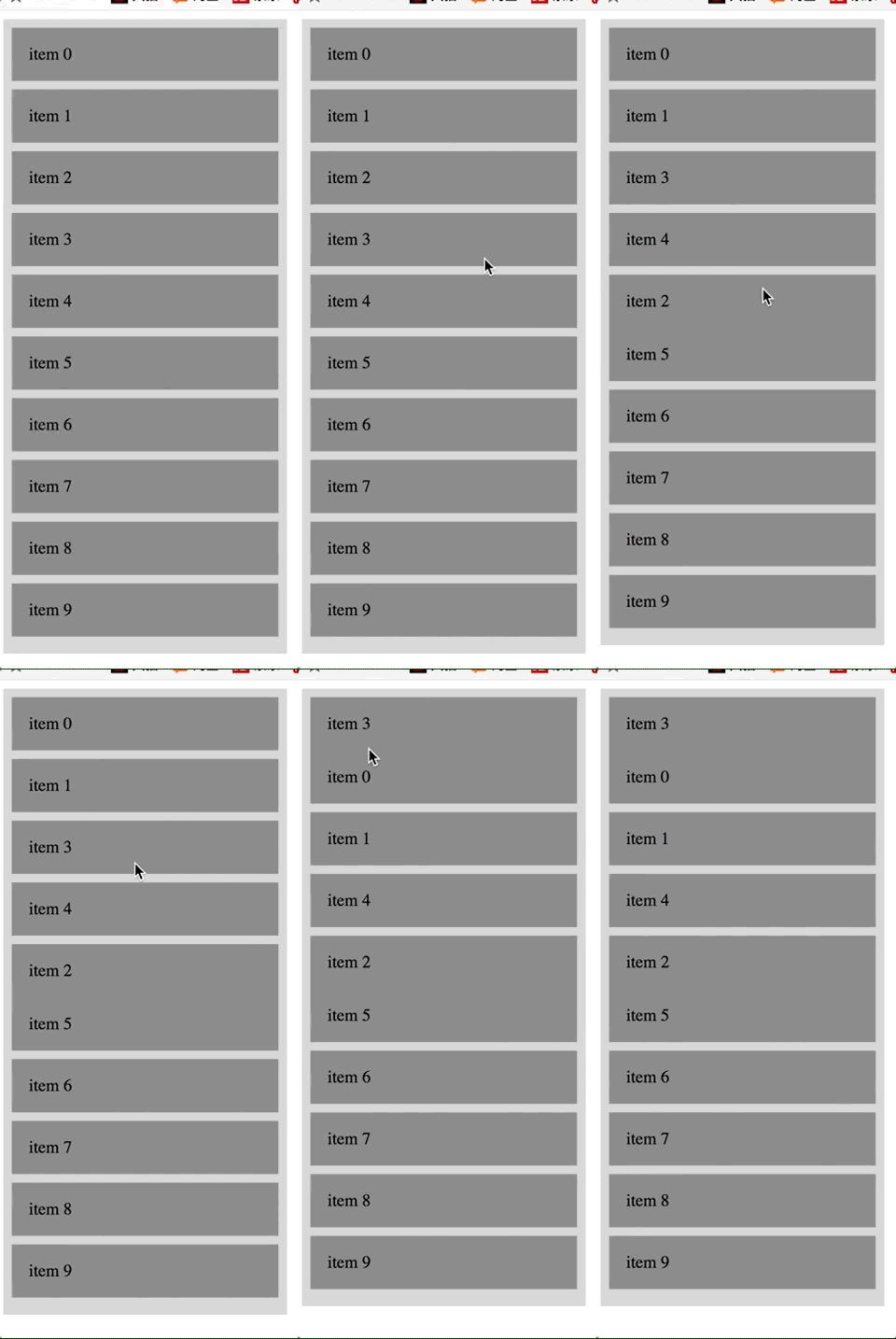
react-beautiful-dnd v2.4.1
and the code is just copy from README
import React, { Component } from 'react';
import ReactDOM from 'react-dom';
import { DragDropContext, Droppable, Draggable } from 'react-beautiful-dnd';

// fake data generator
const getItems = count =>
  Array.from({ length: count }, (v, k) => k).map(k => ({
    id: `item-${k}`,
    content: `item ${k}`,
  }));

// a little function to help us with reordering the result
const reorder = (list, startIndex, endIndex) => {
  const result = Array.from(list);
  const [removed] = result.splice(startIndex, 1);
  result.splice(endIndex, 0, removed);

  return result;
};

// using some little inline style helpers to make the app look okay
const grid = 8;
const getItemStyle = (draggableStyle, isDragging) => ({
  // some basic styles to make the items look a bit nicer
  userSelect: 'none',
  padding: grid * 2,
  marginBottom: grid,

  // change background colour if dragging
  background: isDragging ? 'lightgreen' : 'grey',

  // styles we need to apply on draggables
  ...draggableStyle,
});
const getListStyle = isDraggingOver => ({
  background: isDraggingOver ? 'lightblue' : 'lightgrey',
  padding: grid,
  width: 250,
});

class App extends Component {
  constructor(props) {
    super(props);
    this.state = {
      items: getItems(10),
    };
    this.onDragEnd = this.onDragEnd.bind(this);
  }

  onDragEnd(result) {
    // dropped outside the list
    if (!result.destination) {
      return;
    }

    const items = reorder(
      this.state.items,
      result.source.index,
      result.destination.index
    );

    this.setState({
      items,
    });
  }

  // Normally you would want to split things out into separate components.
  // But in this example everything is just done in one place for simplicity
  render() {
    return (
      <DragDropContext onDragEnd={this.onDragEnd}>
        <Droppable droppableId="droppable">
          {(provided, snapshot) => (
            <div
              ref={provided.innerRef}
              style={getListStyle(snapshot.isDraggingOver)}
            >
              {this.state.items.map(item => (
                <Draggable key={item.id} draggableId={item.id}>
                  {(provided, snapshot) => (
                    <div>
                      <div
                        ref={provided.innerRef}
                        style={getItemStyle(
                          provided.draggableStyle,
                          snapshot.isDragging
                        )}
                        {...provided.dragHandleProps}
                      >
                        {item.content}
                      </div>
                      {provided.placeholder}
                    </div>
                  )}
                </Draggable>
              ))}
              {provided.placeholder}
            </div>
          )}
        </Droppable>
      </DragDropContext>
    );
  }
}

// Put the thing into the DOM!
ReactDOM.render(<App />, document.getElementById('app'));
 crapthings
All 3 comments
Looks like it is related to #147. In the mean time - try setting all the margin properties rather than just the margin bottom (see our base example).
 alexreardon
on 26 Oct 2017
alexreardon
on 26 Oct 2017
Can you please move your example into a webpack bin so we can play with it?
Cheers
alexreardon
on 27 Oct 2017
It is actually an issue with inline styles and how react usages them.
We set the margin on the dragging item to margin: 0 while dragging. After dragging this is removed but it looks like the marginBottom above that is not being applied. If you inspect the element post drag you will see that there is no margin-bottom property on the element.
I have found the work around to be setting a full margin property rather than just a marginBottom.
- marginBottom: grid,
+ margin: `0 0 ${grid}px 0`,
Unfortunately there is not much we can do about this. We could possibly set all the margin properties (margin-right, margin-left, margin-top, margin-bottom) and see what react does, but for now it is clear that it is just an issue with react and inline styles. Ideally you would be using something like styled-components anyway so it should not effect you unless you are using inline-styles.
Thanks for raising this @crapthings
alexreardon
on 27 Oct 2017
Related issues
 h182032
·
3Comments
h182032
·
3Comments
 lukyth
·
3Comments
lukyth
·
3Comments
 WJKwok
·
3Comments
WJKwok
·
3Comments
 shalkam
·
3Comments
shalkam
·
3Comments
 Tsabary
·
3Comments
Tsabary
·
3Comments
Most helpful comment
It is actually an issue with inline styles and how react usages them.
We set the margin on the dragging item to
margin: 0while dragging. After dragging this is removed but it looks like themarginBottomabove that is not being applied. If you inspect the element post drag you will see that there is no margin-bottom property on the element.I have found the work around to be setting a full
marginproperty rather than just amarginBottom.Unfortunately there is not much we can do about this. We could possibly set all the margin properties (margin-right, margin-left, margin-top, margin-bottom) and see what react does, but for now it is clear that it is just an issue with react and inline styles. Ideally you would be using something like styled-components anyway so it should not effect you unless you are using inline-styles.
Thanks for raising this @crapthings