React-admin: Pagination resets to page 1 when stacking page changes with a slow data provider
Probably related to #4655
What you were expecting:
Even if my API is slow, if I stack page changes, I want my last selected page to be the one that is loaded at the end.
What happened instead:
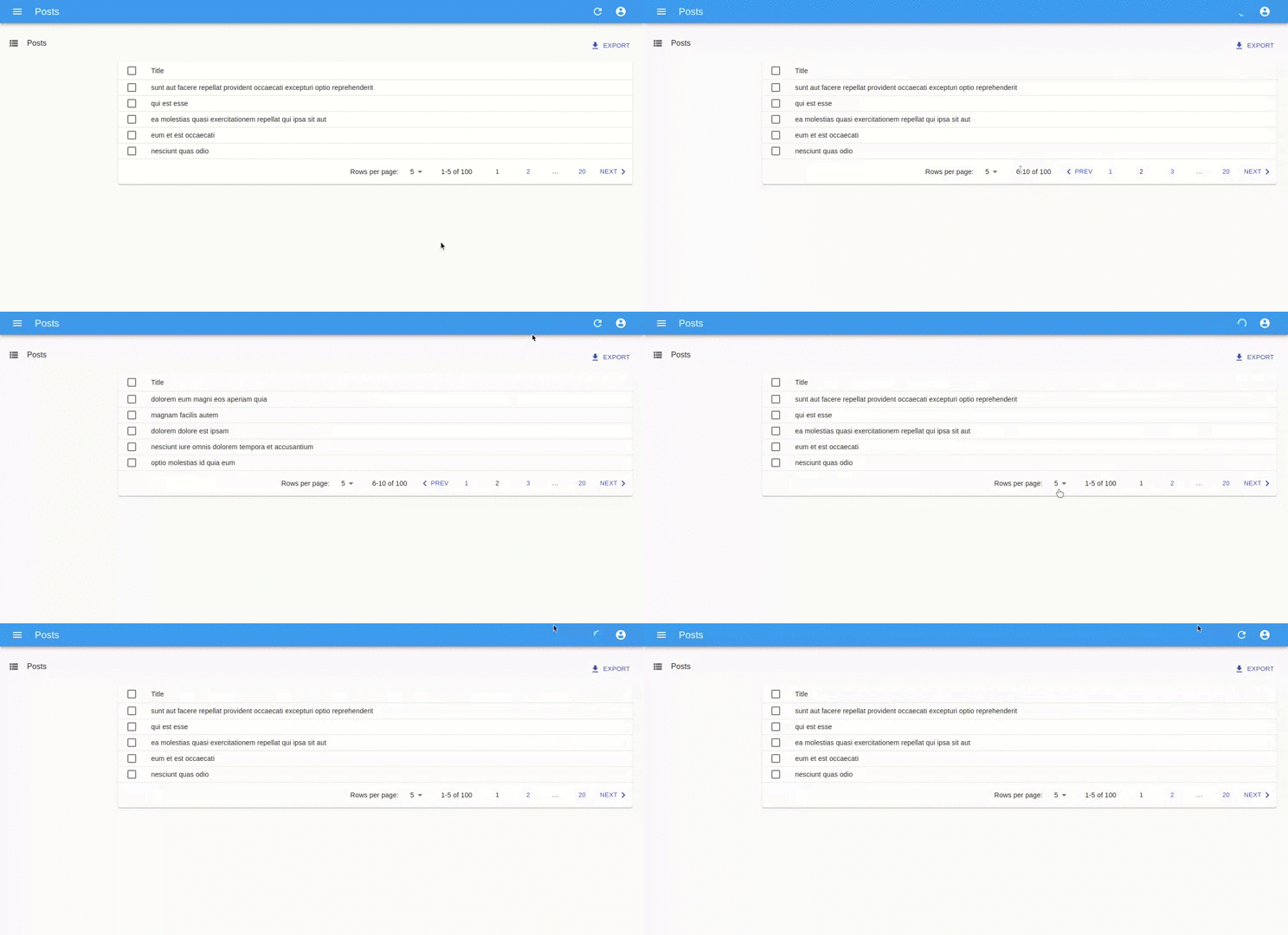
If we stack multiple page changes, while the first page change is still loading, the pagination is reset to the first page.
Steps to reproduce:
On the following sandbox, the getList is very slow (at least 10 seconds, on purpose): https://codesandbox.io/s/nameless-field-hp09u
- Go the Post list, and wait for the first page to load
- Click one time on the "next" button in the pagination
- While the page 2 is loading, click again on the "next" button
- Wait for all the queries to end
The page resetted to the page 1, while I wanted the page 3.
Environment
- React-admin version: 3.x
- Last version that did not exhibit the issue (if applicable): -
- React version: 16.13.1
- Browser: Chrome 80
- Stack trace (in case of a JS error): -
 Kmaschta
All 22 comments
Better use https://codesandbox.io/s/competent-grass-yw2e3, which doesn't use React StrictMode (known to cause pagination bugs)
 fzaninotto
on 7 Apr 2020
fzaninotto
on 7 Apr 2020
@fzaninotto @fzaninotto I got this problem on my project . this problem is :
when goto the page which 'page link' is beside ellipsis, the result page will be 1st page.
ex. there 100 pages,
now at 1st page, "2nd page link" followed by ellipsis, like 1 2 ... 100 , if click 2 , still is 1
then , click 2 again , now 2nd page is shown, and pagination becomes 1 2 3 .... 100 , then click 3 , result is 1
then ,click 3 again , now 3rd page is shown , and pagination becomes: 1 2 3 4 ... 100 , then click 4, result is 1
.... and so on
 ouonet
on 7 Apr 2020
ouonet
on 7 Apr 2020
Really similar problem appeared in my application. I found that it could be connected with fetching data by List component. Next page click works only two times in row, and page buttons works only if clicked two times in row in incremented way (2 then 3, if there would be page 4 it would redirect me to page 1). When the error occurs there are 4 API requests (getList method issued 4 times) first always with page=1, then two API calls with correct page number parameter and last with page=1 parameter so if the last API call is always focused on page=1 it will always redirect user to first page. Can u explain why there are 4 api calls after two correct calls ?
 TomaszBernat96
on 14 Apr 2020
TomaszBernat96
on 14 Apr 2020
@Kmaschta @fzaninotto how about disabling the "next" button until the first loading(fetch) is finished?
 manishsundriyal
on 18 Apr 2020
manishsundriyal
on 18 Apr 2020
@manishsundriyal This is not the case due to the fact that all requests are issued by component and all of them are connected with getAll() (from DataProvider implementation). Context for this API calls is provided by pagination component which lets List component know what page should be called within API call. So when new numbers appeared component know that next API call should be issued with numPage + 1 (stored in local state of component). The problem lies within List component. I am almost 100% sure that if @Kmaschta will check getAll() method form DataProvider (just set there a break point and refresh page) he will find out what I described in my previous message. I will look closer to this issue in next week but I think that it can be fixed only with implementation of watcher based on Redux (I mean without React-Admin team help) :D
TomaszBernat96
on 18 Apr 2020
Hi @Giacomo Graziosi,
Unfortunately, I had to postpone solution finding due to my other tasks
deadlines. I will look closely into this matter in next week so if I will
find out some solution, I will let you know. I'm guessing that there is
problem within shared state in redux (invalid mutation on which relies API
call chain within List component). In case if I'm right there is not much
which we can do because it strictly relies on react admin core
functionalities implementation. I'll try to hack it with my own shared
state which will examine two steps (what have happened on previous call,
what is happening now and what should be the final effect).
sob., 18 kwi 2020 o 14:41 Giacomo Graziosi notifications@github.com
napisał(a):
@TomaszBernat96 https://github.com/TomaszBernat96 I have a similar
problem, did you found some kind of work around?—
You are receiving this because you were mentioned.
Reply to this email directly, view it on GitHub
https://github.com/marmelab/react-admin/issues/4658#issuecomment-615861754,
or unsubscribe
https://github.com/notifications/unsubscribe-auth/AGJSKA775SIWRUJMV6H74WTRNGNVXANCNFSM4MDHWRIA
.
TomaszBernat96
on 18 Apr 2020
@TomaszBernat96 I deleted my comment because removing React StrictMode was enough to fix my problem.
 esistgut
on 19 Apr 2020
esistgut
on 19 Apr 2020
@esistgut please provide us in that case with steps to reproduce to implement your solution or give us more info on that subject within context of your application :D
TomaszBernat96
on 19 Apr 2020
I also have this problem.
And no, removing strict mode doesn't help.
 pgte
on 22 Apr 2020
pgte
on 22 Apr 2020
@pgte Can you provide a codesandbox showing the issue ?
 djhi
on 22 Apr 2020
djhi
on 22 Apr 2020
@djhi You can use the original one:
https://codesandbox.io/s/nameless-field-hp09u
It's very random. Sometimes it goes back. Sometimes it advances. Sometimes it stays on the same page (if we're in the initial state).
pgte
on 22 Apr 2020
Sorry, I did not see we already identified it as a bug.
djhi
on 22 Apr 2020
Just starting with react and react-admin and found what I think is the same bug. Created a stackoverlow at https://stackoverflow.com/questions/61351939/react-admin-pagination-not-working-as-expected. My symptoms are very repeatable: Click next and nothing happens, click again and go to page 2, click again, and go back to page 1. You can see in the gif I created that it always sends an extra getList call with page 1 specified after the last next is pushed. If you then click next it successfully goes to page 2, then 3, then back to 1; if again, goes to 2, then 3, then 4, then back 1, etc. Refresh page and it starts back at the first scenario (click next and stays on 1, then click again, goes to 2, then again back to 1). Hoping someone can fix this soon as it is beyond my experience level to try. Thanks.
 dgarvin57
on 22 Apr 2020
dgarvin57
on 22 Apr 2020
Is this same issues as https://github.com/marmelab/react-admin/issues/4616 (click Next button and nothing happens)??
dgarvin57
on 22 Apr 2020
@dgarvin57 looks like it.
pgte
on 22 Apr 2020
Same issue here. Pagination is very unpredictable. Using graphql.
Disabling strictmode fixed it for me.
 thedumbtechguy
on 25 Apr 2020
thedumbtechguy
on 25 Apr 2020
I've updated to the latest recently-released react-admin (v3.4.3) and I still have the issue.
I've recorded a movie to show what's happening:
https://drive.google.com/file/d/1qVgfhMmClZzL9d3ItHeizfrWBN2jzJKp/view?usp=sharing
The list component is a simple list with a data grid:
import React from 'react'
import {
  List,
  Datagrid,
  TextField,
  DateField,
  SearchInput,
  TextInput,
  Filter,
  EditButton,
} from 'react-admin'
import { makeStyles, Chip } from '@material-ui/core'

const useQuickFilterStyles = makeStyles(theme => ({
  chip: {
    marginBottom: theme.spacing(1),
  },
}))
const QuickFilter = ({ label }) => {
  const classes = useQuickFilterStyles()
  return <Chip className={classes.chip} label={label} />
}

const UserFilter = props => (
  <Filter {...props}>
    <SearchInput source="q" alwaysOn />
    <TextInput label="Email" source="email" defaultValue="" />
    <QuickFilter label="Role Admin" source="roles" defaultValue={'admin'} />
  </Filter>
)

export default props => (
  <List {...props}
    filters={<UserFilter />}
    sort={{ field: 'createdAt', order: 'DESC' }}
    >
    <Datagrid rowClick="show">
      <DateField source="createdAt" showTime />
      <TextField source="email" sortable={false} />
      <TextField source="fullName" sortable={false} />
      <EditButton />
    </Datagrid>
  </List>
)
I can confirm that the issue still exists. I'm using only with sorting.
My app has custom data provided which uses IndexedDB as a backend so query times are significantly lower than HTTP request. The interesting thing is that the issue appears only while sorting by id (the fastest query possible in indexeddb), if I use another index, paging appears to be working.
 srsly4
on 27 Apr 2020
srsly4
on 27 Apr 2020
I can't reproduce the issue on master. Please provide a CodeSandbox demonstrating that the issue is still there is you want us to investigate again.
fzaninotto
on 4 May 2020
This was fixed in 3.4.3, I believe. No longer seeing the issue. Thanks a
bunch.
On Mon, May 4, 2020 at 12:44 PM Francois Zaninotto notifications@github.com
wrote:
I can't reproduce the issue on master. Please provide a CodeSandbox
demonstrating that the issue is still there is you want us to investigate
again.—
You are receiving this because you were mentioned.
Reply to this email directly, view it on GitHub
https://github.com/marmelab/react-admin/issues/4658#issuecomment-623606425,
or unsubscribe
https://github.com/notifications/unsubscribe-auth/AKUXMDLHSB7ZBWFLIDOR7O3RP35HJANCNFSM4MDHWRIA
.
dgarvin57
on 4 May 2020
I'm still having this issue, strict mode disabled
 UltimateForm
on 1 Jun 2020
UltimateForm
on 1 Jun 2020
@UltimateForm Then please open a new issue with your exact react-admin version, and a link to a CodeSandbox reproducing the issue.
fzaninotto
on 2 Jun 2020
Related issues
 kikill95
·
3Comments
kikill95
·
3Comments
 nicgirault
·
3Comments
nicgirault
·
3Comments
 9747749366
·
3Comments
9747749366
·
3Comments
 pixelscripter
·
3Comments
Kmaschta
·
3Comments
pixelscripter
·
3Comments
Kmaschta
·
3Comments
Most helpful comment
I'm still having this issue, strict mode disabled