React-admin: Very strange rendering bug
It's been a week that I work to migrate from admin-on-rest to react-admin.
Except some subtle things (like the delete button in the edit action or the pagination in a list or the material-ui that must use v1), everything goes fine.
I launched the app on our dev servers and ask some users to test it. Some of them start reporting that "after a while, the app looks strange".
I then gathered the screenshots and indeed the UI looks very weird.
I ask them the steps to reproduce but they were not able to get consistent.
Also note that refreshing the page does not solve the situation : the UI still looks weird BUT never renders the same !
I tried very hard to reproduce the problem on localhost but never succeed : it always behave correctly
So, I connected myself on the dev servers and indeed, if I click randomly on the UI, it starts to bug very quickly (I've a 10 seconds video to showcase it : https://ufile.io/aowibd7x).
The same random actions do not cause any trouble on the old admin-on-rest or even on localhost with react-admin.
Note that the real users do not compulsively click randomly : they have the same bug but as they said "after a while".
Also note that using "logout" button clears the situation and you can use the app again.
So, to me, it seems like a "random" bug in react-admin, probably due to the optimized production build.
Or maybe this is a bug in react... (but as I use react in a lot of other apps as well as in my previous app with admin-on-rest, this is unlikely I think)
If anyone is able to help, that would be very cool because, at the moment, my only choice is to keep running on admin-on-rest (and if I can not solve this issue, to use another framework for the next version of my app)
 christopheblin
All 18 comments
This is really weird. We've built many admins using react-admin and I've never seen this. However, especially here, we really need a repository or codesandbox showing this issue. Otherwise, I don't see how we could help
 djhi
on 22 May 2019
djhi
on 22 May 2019
Ok I've reproduced the bug on a very simple repo with a single resource (without tabs nor show nor edit, just a list).
Just try to use something else than my own API and I will upload that during the day
christopheblin
on 22 May 2019
Just try to use something else than my own API
djhi
on 22 May 2019
Yes I am adapting the example with that API
christopheblin
on 22 May 2019
npm install
npm run build
serve -s build
open browser at localhost:5000 -> it works
hit refresh in the browser -> see screenshot
Ctrl+C
npm start
open browser at localhost:3002 -> it works
hit refresh -> still works
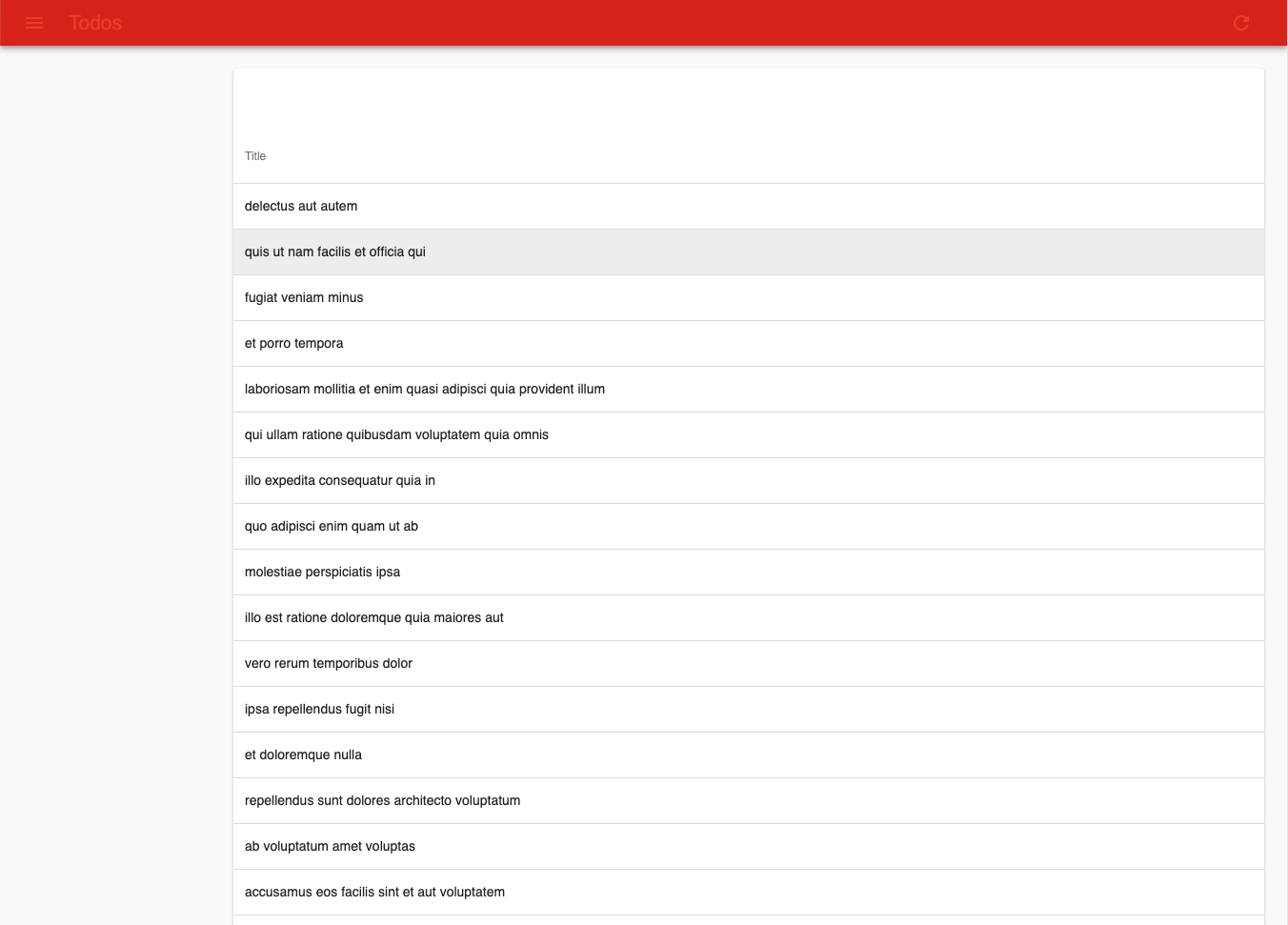
christopheblin
on 22 May 2019
Do you need something else to investigate ?
christopheblin
on 22 May 2019
Yes, time :wink:
djhi
on 22 May 2019
I've downloaded your repo, followed the instructions to build and serv the static content, and I can't reproduce the problem.
Which browser and system are you on? Could it be a browser extension that you and your coworkers use?
 fzaninotto
on 22 May 2019
fzaninotto
on 22 May 2019
I am on Mac OS X 10.14.5 and Chrome Version 74.0.3729.169 (Build officiel) (64 bits)
Note that the users who have the original problem are on Windows Chrome (same version)
Could you upload your build directory zipped so I can see if I have the bug (because if I do not have the bug it could mean that "npm run build" or another npm command does not have the same result on my machine)
christopheblin
on 22 May 2019
Here is my build directory if you prefer to compare yourself : build.zip
I really think this is a problem with npm because I rarely see Chrome with a different behavior on different machines / OS
christopheblin
on 22 May 2019
I use the same version of Chrome on Linux. Here is my build.
fzaninotto
on 22 May 2019
I can reproduce the problem with your build. Note that, for mine, I used yarn and not npm. What's your Node.js version?
fzaninotto
on 22 May 2019
Indeed, I do not have the problem with your build ...
$ npm --version
5.6.0
$ node --version
v8.9.1
christopheblin
on 22 May 2019
can you tell me the exact commands you use to install/build/serve please so that I can test (and if it works, I can use that instead of npm)
christopheblin
on 22 May 2019
$ node --version
v10.15.3
$ npm --version
6.4.1
$ yarn --version
1.16.0
I used the exact command you typed, except I changed yarn for npm:
yarn install
yarn run build
serve -s build
As we can't reproduce the problem, as per our issue policy, I'm going to close this issue. I advise you to use StackOverflow instead for troubleshooting your build.
fzaninotto
on 22 May 2019
Well, I find this a bit harsh to close the issue like that because the bug can surely be reproduced with the same tools versions.
Unless react-admin requires a specific documented toolchain ?
Anyway, I am going to upgrade my tools to latest versions and if it does not work I will simply use another framework
Thanks for your time
christopheblin
on 22 May 2019
If you can provide a way for us to reproduce the bug, I'll gladly reopen the issue. Until then, it's not a bug in react-admin but a problem in your toolchain (as nobody ever reported that bug before). So the right place to discuss it is StackOverflow.
We can't help you find the minimum conditions to reproduce the problem if we can't reproduce it at all. And we can't test react-admin on all configurations either. I know people would love it, but we prefer to spend our (limited) open-source time on adding features and fixing proven bugs, and rely on the community (which you're part of) to troubleshoot rare platform issues.
Sorry if you find it harsh, but the issue template explains this process clearly and you saw it when opening your issue.
fzaninotto
on 22 May 2019
If someone keeps having this problem like me, i found this issue related that has to do the material ui version in production and JSS minification.
 balbuena
on 13 Jan 2021
balbuena
on 13 Jan 2021
Related issues
 samanmohamadi
·
3Comments
samanmohamadi
·
3Comments
 phacks
·
3Comments
phacks
·
3Comments
 Dragomir-Ivanov
·
3Comments
Dragomir-Ivanov
·
3Comments
 9747749366
·
3Comments
9747749366
·
3Comments
 ilaif
·
3Comments
ilaif
·
3Comments