React-admin: Can't clear AutocompleteInput
What you were expecting:
Once I start typing in the text input, I should be able to clear that text using backspace or del keys.
What happened instead:
Once Autocomplete pulls out a suggestion I can no longer clear the text field.
Steps to reproduce:
When I enter A-L Ali correctly gets autosuggested, filling in the text input. I can't remove that text and search for another option in there with none of the backspace, delete or mark the text and starting typing something else.
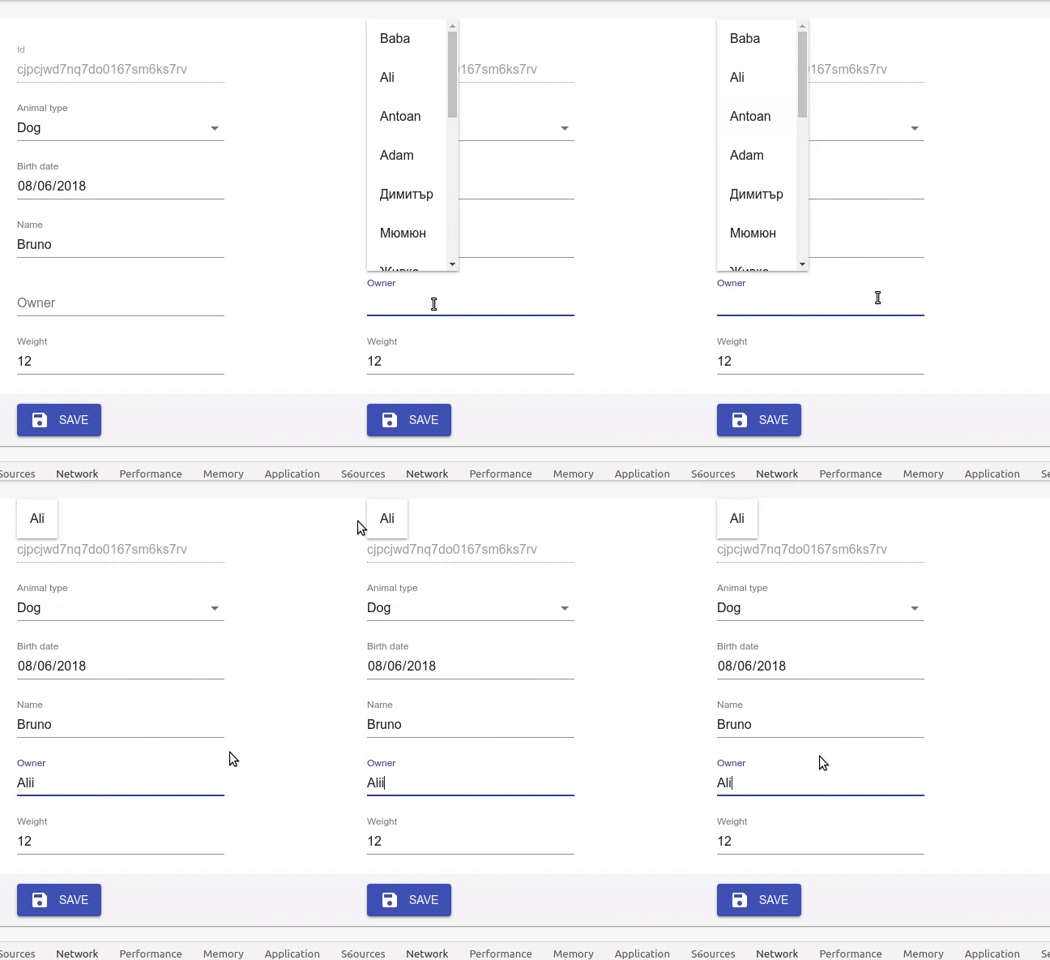
Related code:
<ReferenceInput label="Owner" source="owner.id" reference="Owner">
      <AutocompleteInput optionText="firstName"/>
</ReferenceInput>-->
Other information:
One other thing is that once filtered, the list of suggestions stick to the top of the page (I would expect it to stick to the field I'm working on).
Environment
- React-admin version: 2.5.1
- React version: 16.6.3
- Browser: Google Chrome on Linux Version 68.0.3440.106 (Official Build) (64-bit)
 ivanpetrushev
All 14 comments
Update. Today suddenly clearing AutocompleteInput started to work. Haven't changed anything in code, beyond restarting my dev PC.
But the filtered list is still visually attached to the top of the page, and now I'm getting a JS error with that trace:
uncaught at handleFetch TypeError: Cannot read property 'error' of null
    at push../node_modules/ra-core/esm/reducer/admin/references/possibleValues.js.__webpack_exports__.default (http://localhost:3001/static/js/1.chunk.js:81413:24)
    at combination (http://localhost:3001/static/js/1.chunk.js:185683:29)
    at combination (http://localhost:3001/static/js/1.chunk.js:185683:29)
    at combination (http://localhost:3001/static/js/1.chunk.js:185683:29)
    at resettableAppReducer (http://localhost:3001/static/js/1.chunk.js:78638:12)
    at dispatch (http://localhost:3001/static/js/1.chunk.js:185922:22)
    at http://localhost:3001/static/js/1.chunk.js:167978:18
    at http://localhost:3001/static/js/1.chunk.js:79029:16
    at http://localhost:3001/static/js/1.chunk.js:183652:22
    at dispatch (http://localhost:3001/static/js/1.chunk.js:185462:18)
    at http://localhost:3001/static/js/1.chunk.js:185331:12
    at http://localhost:3001/static/js/1.chunk.js:184248:52
    at exec (http://localhost:3001/static/js/1.chunk.js:184960:5)
    at flush (http://localhost:3001/static/js/1.chunk.js:185003:5)
    at asap (http://localhost:3001/static/js/1.chunk.js:184975:5)
    at runPutEffect (http://localhost:3001/static/js/1.chunk.js:184244:60)
    at runEffect (http://localhost:3001/static/js/1.chunk.js:184187:280)
    at next (http://localhost:3001/static/js/1.chunk.js:184057:9)
    at currCb (http://localhost:3001/static/js/1.chunk.js:184140:7)
    at http://localhost:3001/static/js/1.chunk.js:184207:14
Same issue. The only way I found to delete is to select the entire value and click on the "delete" key on the keyboard.
 nacimgoura
on 11 Dec 2018
nacimgoura
on 11 Dec 2018
Same issue. Also if you remove and don't change the text, and continue with another textfield, the deleted autocompleteinput text reverts it back.
 selenyillar
on 20 Dec 2018
selenyillar
on 20 Dec 2018
Yes, this is a bug. The problem is from the 'handleMatchSuggestionOrFilter' of Autocomplete.js:
   handleMatchSuggestionOrFilter = inputValue => {
        const { choices, inputValueMatcher, input } = this.props;

        const matches =
            inputValue &&
            choices.filter(it =>
                inputValueMatcher(inputValue, it, this.getSuggestionText)
            );

        if (matches.length === 1) {
            const match = matches[0];
            const nextId = this.getSuggestionValue(match);
            const suggestionText = this.getSuggestionText(match);

            if (this.state.inputValue !== nextId) {
                this.setState(
                    {
                        inputValue: nextId,
                        searchText: suggestionText, // The searchText could be whatever the inputvalue matcher likes, so sanitize it
                        selectedItem: match,
                        suggestions: [match],
                    },
                    () => input.onChange(nextId)
                );
            } else {
                this.setState({
                    dirty: false,
                    suggestions: [match],
                    searchText: suggestionText,
                });
            }
        } else {
            this.setState({
                dirty: true,
                searchText: inputValue,
            });
            this.updateFilter(inputValue);
        }
    };
Let's say my resource is ['abc', 'abcd', 'abcde']. If I input 'abcde' in my autocomplete, the 'choices' will be ['abcde'], the 'matches.length' will be 1, then the state will be updated with 'abcde' as the selected value.
Then I type a backspace, the inputValue now is 'abcd'. Since the choices have not updated with a new query now, the choices remains ['abcde'], which also have a single match with 'abcd'. So 'abcde' is chosen again to be the final answer, and your input 'abcd' will be updated with 'abcde'.
So I can't get my 'abcd' by typing backspace if the current value is 'abcde' if it is a single match.
If you use a custom 'inputValueMatcher' more unexpected things may happen.
A simple solution is this:
    handleMatchSuggestionOrFilter = inputValue => {
        this.setState({
            dirty: true,
            searchText: inputValue,
        });
        this.updateFilter(inputValue);
    };
But a single matched suggestion can not be selected automatically then.
If you want a more complecated solution. you have to call the updateFilter first, then try to find out if the updated choices have a single match.
 pfcao
on 27 Dec 2018
pfcao
on 27 Dec 2018
Same situation here
 marquesgabriel
on 7 Jan 2019
marquesgabriel
on 7 Jan 2019
Same issue here.
 kavi
on 9 Jan 2019
kavi
on 9 Jan 2019
Same issue here
 spierr
on 16 Jan 2019
spierr
on 16 Jan 2019
Same issue here
 kuisis
on 18 Jan 2019
kuisis
on 18 Jan 2019
Just noticed that if you change the default inputValueMatcher function to <AutocompleteInput inputValueMatcher={() => null}/> the problem desappears. The only cons is that you loose the single match selection.
spierr
on 21 Jan 2019
@spierr this works better than the current behavior.
 lijoantony
on 24 Jan 2019
lijoantony
on 24 Jan 2019
@spierr , yeah, this is an interesting tip.
I think one of the cons is that the "highlightedSuggestionText" will never work now. That means the matched letters of the item(s) cann't be rendered by a different style.
pfcao
on 25 Jan 2019
Fixed by #2833
 fzaninotto
on 31 Jan 2019
fzaninotto
on 31 Jan 2019
@fzaninotto Thanks! You guys rock!!
 waynebloss
on 1 Feb 2019
waynebloss
on 1 Feb 2019
Note to others and myself next time I look for this issue: You must pass allowEmpty to ReferenceInput if you want to clear the value of your referenced AutocompleteInput:
  <ReferenceInput label="Location" source="location"
    reference="locations" filterToQuery={filterByName} allowEmpty>
    <AutocompleteInput optionText="name" />
  </ReferenceInput>
Related issues
 ericwb
·
3Comments
ericwb
·
3Comments
 rkyrychuk
·
3Comments
rkyrychuk
·
3Comments
 marknelissen
·
3Comments
marknelissen
·
3Comments
 Dragomir-Ivanov
·
3Comments
Dragomir-Ivanov
·
3Comments
 yangjiamu
·
3Comments
yangjiamu
·
3Comments
Most helpful comment
Just noticed that if you change the default inputValueMatcher function to
<AutocompleteInput inputValueMatcher={() => null}/>the problem desappears. The only cons is that you loose the single match selection.