React-admin: Add `resettable` prop in `<AutocompleteInput>`
Is your feature request related to a problem? Please describe.
It would be nice to have the resettable prop for the <AutocompleteInput> component too.
This way the user can clear the existing input fast. Now, we need to focus the input and press delete many times.
 afilp
afilp
All 14 comments
Great idea. The core team won't work on it in the near future, so feel free to open a PR for it.
 fzaninotto
on 25 Nov 2018
fzaninotto
on 25 Nov 2018
Hello. I'm trying to make the AutocompleteInput component resettable. Is there a way to build only the ra-ui-materialui package? I want to make some little modifications and go testing
 marquesgabriel
on 5 Dec 2018
marquesgabriel
on 5 Dec 2018
Hello again. Today i spent the morning trying to implement de resettable feature on the AutocompleteInput but i'm stuck in a problem. Here is what i did:
- Replaced
<TextField/>component for<ResettableTextField/>inAutocompleteInput.js - Added resettable boolean prop
The X icon button appeared! Nice!
but when its clicked triggers an error in Autosuggest.js: event.target is undefined. This happens because ResettableTextField's method handleClickClearButton() passes an empty string as argument and the autosuggest component expects the default event argument for onChange()
What can I do then? Any ideas?
marquesgabriel
on 8 Jan 2019
Hello, I found this issue while trying to implement the same thing and have found a way to fix the error. I would like to open a PR but I'm not 100% sure how to proceed. Thanks.
 EricTousignant
on 30 Oct 2019
EricTousignant
on 30 Oct 2019
Hello, I found this issue while trying to implement the same thing and have found a way to fix the error. I would like to open a PR but I'm not 100% sure how to proceed. Thanks.
First thing is to put your code here so that others (me) might use it immediately and not have to wait, Thanks.
 adibnaya
on 31 Oct 2019
adibnaya
on 31 Oct 2019
Haha @adibnaya, right, that would indeed be helpful!
So here's what I did to make it work for my specific scenario (might not work for all options!)
I started with the original react-admin AutocompleteInput.js file (v2.9.8) and copied it into my project.
Code changes
-
1. Swap out the original Material UI TextField with React-Admin's ResettableTextField
8  - import TextField from '@material-ui/core/TextField';
15 + import { ResettableTextField } from 'react-admin';
272 - <TextField
272 + <ResettableTextField


md5-c31f58a44375a556196d1220128568c3


536 + clearAlwaysVisible: PropTypes.bool,
537 + resettable: PropTypes.bool,


md5-5be7ed42f3cc7a50afc978dee524f7f8


466 + clearAlwaysVisible,
467 + resettable,


md5-5be7ed42f3cc7a50afc978dee524f7f8


506 - options,
506 + options: {
        ...options,
        clearAlwaysVisible,
        resettable,
      },


md5-2ad5715d540794250af8c1f1a7e9d3ce


282 - onChange={onChange}
282 + onChange={event => {
        // Focus seems needed to clear properly...
        this.inputEl && this.inputEl.focus && this.inputEl.focus();
        // AutoSuggest is expecting event.target.value to be defined...
        onChange(event || { target: { value: '' } });
      }}


md5-8b63609d02a0243616f4bf20d20bc89e


<ReferenceInput {...}>
  <AutocompleteInput
    {...}
    resettable={true}
    clearAlwaysVisible={true}
  />
</ReferenceInput>
Known Issues
-
- It seems like the focus event/state is not passed to ResettableTextField properly.
As a workaround in my project I've simply setclearAlwaysVisible={true} - When clicking the clear button, the focus stays on the field with some suggestions.
The reason being that I had to addthis.inputEl && this.inputEl.focus && this.inputEl.focus();
Without this line, the field would blur, but the empty value would not be updated in the redux-store.
One would need to click in the field (focus) and out (blur) again for the value to be properly propagated. (I noticed this since I am using a<FormDataConsumer>and it wasn't properly updated.
I hope this helps you and anyone else, and I would be happy to make it a PR and contribute to this wonderful tool!
EricTousignant
on 31 Oct 2019
I need a similar behaviour on the referenced AutocompleteInput where I clear the field automatically when the user has submitted the form (the form in question is a drawer on top of a custom chat component).
I'm able to clear the value of the field in redux form, but I seem to mess up the referenced resource's possibleValues: If the user reopens the drawer and uses the field, they can see their previous choice in the drop down, but when they submit a new query, the AutocompleteInput is not populated with the resulting data. If the user clears this search, and tries again, the field then behaves as expected.
Is there an action to reset the referenced data? I've taken a peek around the source, but couldn't find anything.
EDIT: I've resorted to re-rendering the field to achieve the reset effect desired. Resetting the form caused the same issue in my original comment (the drop down not populating with the latest fetched records). I'm unclear if this is my own misuse/misunderstanding of the ReferenceInput and AutocompleteInput fields or if this may be a bug in it's own right, rather than feat request. Please advise and I'll raise separately if required :) Thanks!
 atomicacorn
on 7 Nov 2019
atomicacorn
on 7 Nov 2019
For a fast solution, you can use a type="search" on your Autocomplete input to display a native x button.
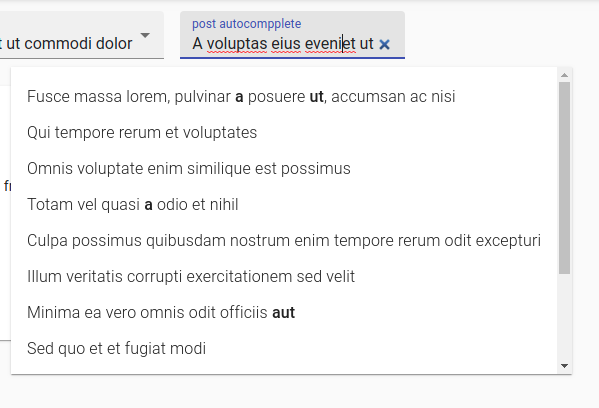
<ReferenceInput
            label="Autocomplete with reset button"
            source="post_id"
            reference="posts"
            alwaysOn
>
            <AutocompleteInput
                optionText="title"
                options={{ type: 'search' }}
            />
</ReferenceInput>
 JulienMattiussi
on 7 Feb 2020
JulienMattiussi
on 7 Feb 2020
@JulienMattiussi , very interesting, will try that! :)
EricTousignant
on 7 Feb 2020
@JulienMattiussi , it's a good middle of the road approach, but if you click the X, then click outside, the previous value would be left behind. It's not exactly "clearing" the input as it should.
EricTousignant
on 27 Feb 2020
There's an Autocomplete component in the @material-ui/lab package that is pretty stable already. It has many options and is overall better than the current Downshift component in RA.
I started integrating it into a custom RA input component and it seems to work quite well. It's pretty easy to integrate with https://marmelab.com/react-admin/Inputs.html#useinput-hook.
 melvynhills
on 28 Feb 2020
melvynhills
on 28 Feb 2020
Hello, is there any interest for developing this? @fzaninotto
 capJavert
on 16 Jun 2020
capJavert
on 16 Jun 2020
Would also like this, bumping issue
 RobertLowe
on 6 Sep 2020
RobertLowe
on 6 Sep 2020
Fixed by #5396
fzaninotto
on 14 Oct 2020
Related issues
 ilaif
·
3Comments
ilaif
·
3Comments
 9747749366
·
3Comments
9747749366
·
3Comments
 aserrallerios
·
3Comments
aserrallerios
·
3Comments
 pixelscripter
·
3Comments
pixelscripter
·
3Comments
 nicgirault
·
3Comments
nicgirault
·
3Comments
Most helpful comment
Hello, is there any interest for developing this? @fzaninotto