React-admin: title property of Edit component does not seem to work
Please do not submit support requests or "How to" questions here. For that, go to StackOverflow.
What you were expecting:
Following the tutorial https://marmelab.com/react-admin/Tutorial.html, when instructing to play with the Edit component, it should display a title.
export const PostEdit = (props) => (
    <Edit title={<PostTitle />} {...props}>
I expect to see the title as in this picture:
Trying a simpler title also does not work:
export const PostEdit = (props) => (
    <Edit title="Post edition" {...props}>
What happened instead:
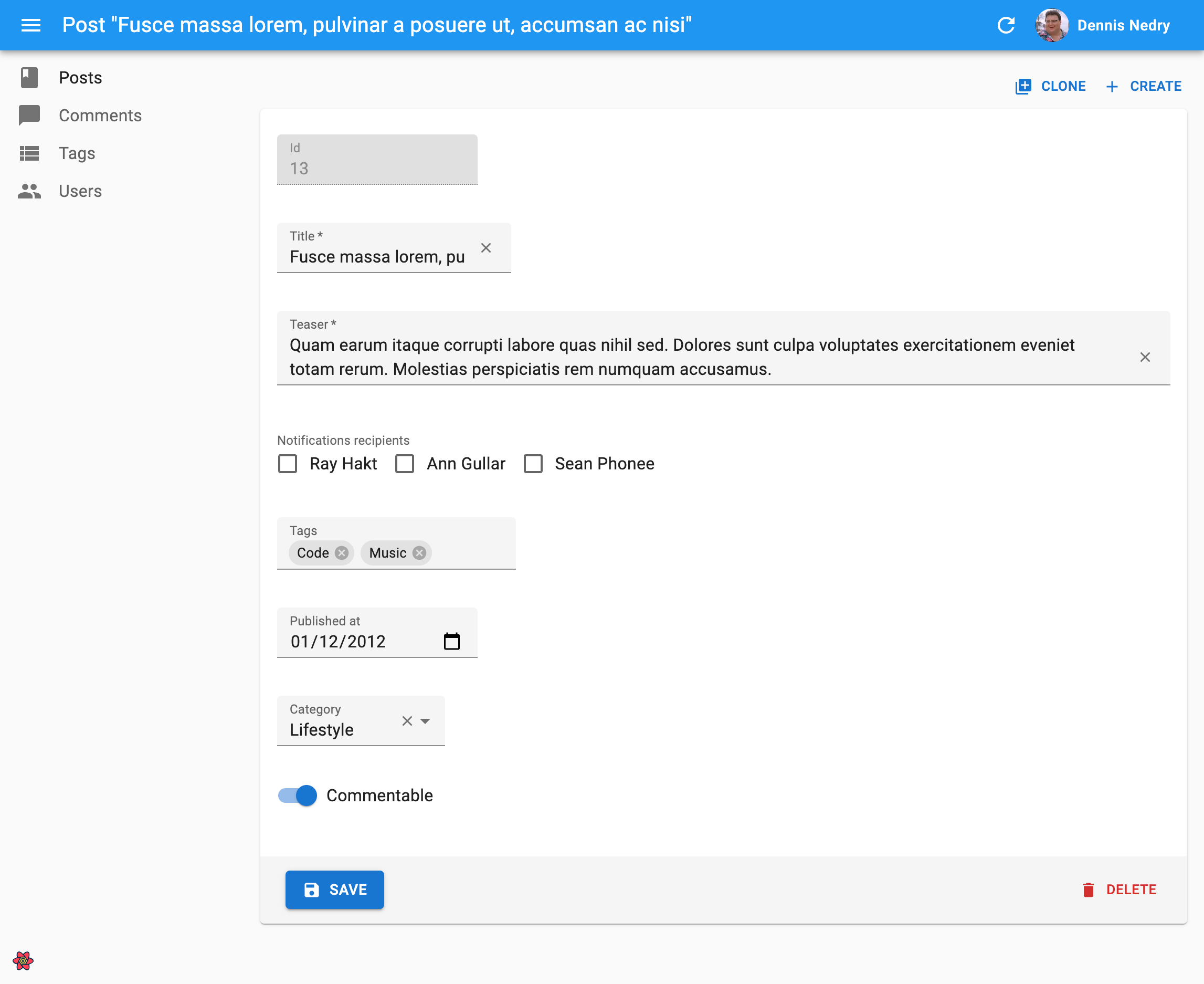
I see no title at all:

Steps to reproduce:
Just follow the tutorial, and copy-paste the examples
Related code:
const PostTitle = ({ record }) => {
    return <span>Post {record ? `"${record.title}"` : ''}</span>;
};

export const PostEdit = (props) => (
    <Edit title={<PostTitle />} {...props}>
        <SimpleForm>
            <DisabledInput source="id" />
            <ReferenceInput label="User" source="userId" reference="users">
                <SelectInput optionText="name" />
            </ReferenceInput>
            <TextInput source="title"/>
            <LongTextInput source="body"/>
        </SimpleForm>
    </Edit>
);
Environment
- React-admin version: 2.3.4
- Last version that did not exhibit the issue (if applicable): -
- React version: 16.5.2
- Browser: Chrome 69.0.3497.100
- Stack trace (in case of a JS error): -
 raulferras
All 8 comments
You can see your custom title in the blue bar on top.
I'm not sure, but I think this feature has been changed and the example in the tutorial is from the old version. I don't know if you can still place the title the way it's displayed in the example picture.
 jheiska
on 17 Oct 2018
jheiska
on 17 Oct 2018
Absolutely. We need to update the screenshot accordingly
 djhi
on 17 Oct 2018
djhi
on 17 Oct 2018
The same goes for the display of the "list" and "refresh" buttons.
 nacimgoura
on 17 Oct 2018
nacimgoura
on 17 Oct 2018
Ok, that explains everything.
Thanks for the answer.
raulferras
on 18 Oct 2018
I think that it's not the right behavior. By the way, I need that App's title remains the same in all pages, and the page have it own subtitle. This behavior worked in old versions. But now, its seem changed.
 leomfelicissimo
on 21 Oct 2018
leomfelicissimo
on 21 Oct 2018
You can override easily the AppBar
On Sun 21 Oct 2018 at 05:45, leomfelicissimo notifications@github.com
wrote:
I think that it's not the right behavior. By the way, I need that App's
title remains the same in all pages, and the page have it own subtitle.
This behavior worked in old versions. But now, its seem changed.—
You are receiving this because you are subscribed to this thread.
Reply to this email directly, view it on GitHub
https://github.com/marmelab/react-admin/issues/2438#issuecomment-431636412,
or mute the thread
https://github.com/notifications/unsubscribe-auth/ARhDrmbvNoJ_KqhSHJVb0UhOModYHKbaks5um-3MgaJpZM4Xercn
.>
Aksels Ledins
Software Engineer @ Fizix.io
Website: aksels.me
Mail : aksels.[email protected]
Tel : +33 7 85 28 14 84
 AkselsLedins
on 21 Oct 2018
AkselsLedins
on 21 Oct 2018
See https://marmelab.com/blog/2018/09/07/react-admin-2-3.html#streamlined-ui for more context about this decision. You can disagree of course but you'll have to override the parts you don't like, or fork the ra-ui-materialui package to suit your needs.
djhi
on 21 Oct 2018
Oups, didn't mean to close it as we still have to update the documentation screenshots
djhi
on 21 Oct 2018
Related issues
 fzaninotto
·
3Comments
fzaninotto
·
3Comments
 samanmohamadi
·
3Comments
samanmohamadi
·
3Comments
 pixelscripter
·
3Comments
pixelscripter
·
3Comments
 kopax
·
3Comments
kopax
·
3Comments
 aserrallerios
·
3Comments
aserrallerios
·
3Comments
Most helpful comment
You can see your custom title in the blue bar on top.
I'm not sure, but I think this feature has been changed and the example in the tutorial is from the old version. I don't know if you can still place the title the way it's displayed in the example picture.