Reach-ui: dialog blocks zoom pinch gestures on iOS devices
🐛 Bug report
Current Behavior
I recorded the video on the xcode iOS simulator, simulating an iPhone 6S running iOS 12.2. The behavior is reproduced on multiple iOS devices, including iOS 13.
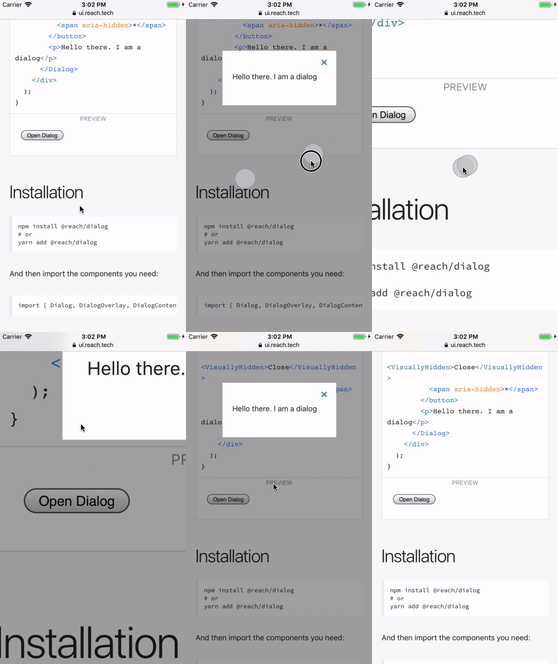
This is important for people that zoom in on web pages to improve legibility. These users are in some cases without an option to get out of the dialog, as they're unable to pan the close button, or equivalent call-to-action, and might be left with needing to reload the entire page.
Expected behavior
It should be possible to pan and zoom using the system standard touch gestures while the dialog is open, so that the dialog don't create obstacles for people that try to interact with the UI.
Reproducible example
It's reproducible on the docs page for the reach dialog: https://ui.reach.tech/dialog/
Suggested solution(s)
By removing the <RemoveScroll> wrapper the system touch gestures are no longer blocked: https://github.com/reach/reach-ui/blob/6e9dbcf716d5c9a3420e062e5bac1ac4671d01cb/packages/dialog/src/index.js#L63
The downside is that an annoying iOS (and soon Android) behaviour resurfaces. However I think it's better to remove this component for now, and live with some minor scrolling annoyance until someone can come up with a way that solves the challenges for both user groups without making the UX far worse for some users 🙂
Additional context
The component got introduced in #111 by @theKashey. The dialog is still on v1 of react-remove-scroll and there's been multiple v2 releases. I didn't test if the zoom blocking is fixed on v2.2.0 but I don't expect it will based on the information in the changelog.
Your environment
| Software | Name/Version(s) |
| ------------------------ | --------------- |
| @reach/dialog | >0.1.2 |
| React | 16.8.6 |
| Browser | iOS Safari 12.2 |
| Assistive tech | N/A |
| Node | N/A |
| npm/yarn | N/A |
| Operating System | iOS 12.2 |
 stipsan
All 7 comments
Actually, it was "fixed" in v2.2.0 commit, however allowPinchZoom is __disabled by default__.
1. How to enable
- upgrade from v1 t v2. There were no breaking changes in API - only hooks.
- Add
allowPinchZoomprop - done
2. Why it's not enabled by default?
- you might scroll with two fingers. Like just do it not with one, but with two. Probably not a big problem, but that would be a breaking behaviour change.
- it's not 100%
position:fixedcompatible. I mean pinch-zoom is working weird with position fixed elements, as you "zoom out" (at least on iPhone) - only you allow any "two fingers" gesture - you allow any. There is no way to prevent any event in the future, so that's breaking isolation, which is required in some cases.
 theKashey
on 23 Oct 2019
theKashey
on 23 Oct 2019
@chancestrickland why was this closed? The dependency is bumped but the allowPinchZoom is missing 🤔
stipsan
on 29 Oct 2019
@theKashey thanks for the feedback. Don't you think the obstacles we create for some users are a bit steep by disabling the two fingers gesture like this? It sucks that the UI can look "broken" on iPhone with position:fixed elements for sure. But for people that rely on the two fingers gesture to access content can be severely impacted by this behaviour, to the point of not having access to the UI at all once the dialog opens.
For our users on https://www.finn.no we used @reach/dialog in our GDPR popup on our frontpage. Because of this behaviour thousands of people, particularly 50+ years of age, were unable to access our site. We have a stellar support team though so we resolved the issue by rolling back @reach/dialog quickly, but other teams using this package today might have users impacted by it.
stipsan
on 29 Oct 2019
Don't you think the obstacles we create for some users are a bit steep by disabling the two fingers gesture like this?
To be honest - we had 3 major incidents last year due to "overlocking", and I know how "dangerous" it could be. Locking a user in a partially disabled environment is not good. However, "underlocking" is not better - you are allowing the user to scroll from the "active zone" somewhere to the dead void.
For now, I am looking towards more "smart way" - on the lock activation a __whole__ target should be in a viewport, and if not, them:
- reset user zoom, literally zoom out
- make own lock div scrollable
- don't activate the lock
- should be tracked here - https://github.com/theKashey/react-remove-scroll/issues/3
What means "looking" - nobody complains until last week.
theKashey
on 29 Oct 2019
For now I think we can just accept have DialogInner accept the same prop and forward it on to the RemoveScroll component. Following the conversation, we may need a better solution in the long run. We can include this addition in our next release but I'll leave this issue open as better solutions may arise.
 chaance
on 29 Oct 2019
chaance
on 29 Oct 2019
As of 0.5.0, DialogInner accepts allowPinchZoom to address this behavior. I haven't added this to the documentation as I suspect we'll reevaluate and change our approach here, but this should at least let you work around the issue as needed for now.
chaance
on 31 Oct 2019
Perfect, thanks @chancestrickland and @theKashey! 🎉
stipsan
on 4 Nov 2019
Related issues
 coreybruyere
·
4Comments
coreybruyere
·
4Comments
 fabien0102
·
3Comments
fabien0102
·
3Comments
 raunofreiberg
·
3Comments
raunofreiberg
·
3Comments
 ryanflorence
·
4Comments
ryanflorence
·
4Comments
 VladSez
·
3Comments
VladSez
·
3Comments
Most helpful comment
To be honest - we had 3 major incidents last year due to "overlocking", and I know how "dangerous" it could be. Locking a user in a partially disabled environment is not good. However, "underlocking" is not better - you are allowing the user to scroll from the "active zone" somewhere to the dead void.
For now, I am looking towards more "smart way" - on the lock activation a __whole__ target should be in a viewport, and if not, them:
What means "looking" - nobody complains until last week.