Reach-ui: ComboboxList does not scroll along when navigating with keyboard
🐛 Bug report
Current Behavior
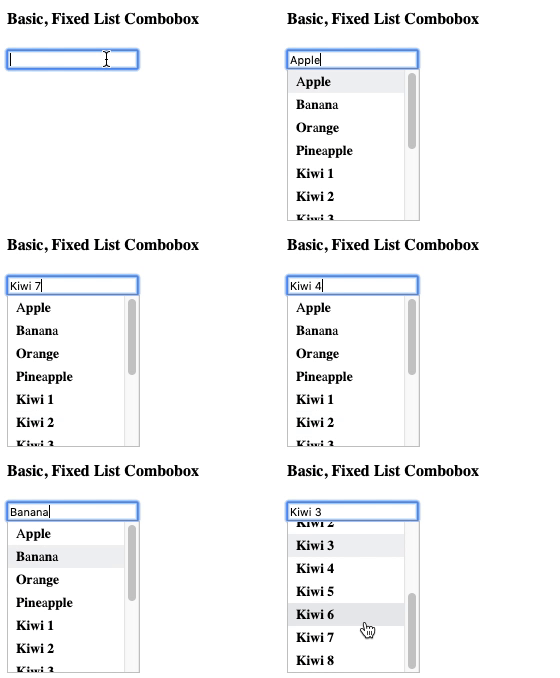
Expected behavior
The Combobox should scroll along with the focused item.
Reproducible example
https://codesandbox.io/s/upbeat-feynman-b4gge
Suggested solution(s)
Additional context
Your environment
| Software | Name/Version(s) |
| ------------------------ | --------------- |
| [REACH_PACKAGE_NAME] |
| React |
| Browser |
| Assistive tech |
| Node |
| npm/yarn |
| Operating System |
 raunofreiberg
All 3 comments
Starting a discussion here, but I think this is probably best left to app code. If you need a fixed height popover, you should also be able to measure DOM nodes and handle scrolling with our API as needed. I'm not sure a fixed popover is a great UI pattern here for a few reasons, and I'd hate for us to bake in an opinionated approach that isn't flexible enough for others to work around or bypass.
Open to suggestions on what an API might look like with this in mind if you disagree.
 chaance
on 19 Dec 2019
chaance
on 19 Dec 2019
If it can help, this is what I've done in the onKeyDown of ComboboxInput :
function onKeyDown(e) {
  if(!e.isDefaultPrevented()) {
    const container = popoverRef.current;
    if (!container) return;

    const element = container.querySelector("[aria-selected=true]");
    if (element) container.scrollTop = element.offsetTop - container.offsetTop;
  }
}
Another option is to use scrollIntoView but it didn't work well for my use case.
 Julienng
on 3 Jan 2020
Julienng
on 3 Jan 2020
If it can help, this is what I've done in the
onKeyDownofComboboxInput:function onKeyDown(e) { if(!e.isDefaultPrevented()) { const container = popoverRef.current; if (!container) return; const element = container.querySelector("[aria-selected=true]"); if (element) container.scrollTop = element.offsetTop - container.offsetTop; } }Another option is to use
scrollIntoViewbut it didn't work well for my use case.
Thanks for this! I updated your code to make sure it:
- Only scrolls when selected element is partially in view.
- Keeps the selected element close to where it was (it doesn't scroll to the top).
- Takes care of the height of the selected element.
- Works when navigating from last item to first item and vice versa (requiring requestAnimationFrame).
const onKeyDown = (event: React.KeyboardEvent<HTMLInputElement>) => {
  if (!event.isDefaultPrevented()) {
    const container = popoverRef.current;
    if (!container) return;

    window.requestAnimationFrame(() => {
      const element = container.querySelector("[aria-selected=true]");
      if (element) {
        const top = element.offsetTop - container.scrollTop;
        const bottom =
          (container.scrollTop + container.clientHeight) -
          (element.offsetTop + element.clientHeight);

        if (bottom < 0) container.scrollTop -= bottom;
        if (top < 0) container.scrollTop += top;
      }
    });
  }
};
Sandbox: https://codesandbox.io/s/eager-carson-158pr
Hope this can be helpful!
 stephan281094
on 18 Jan 2020
stephan281094
on 18 Jan 2020
Related issues
 higimo
·
3Comments
higimo
·
3Comments
 ryanflorence
·
4Comments
ryanflorence
·
4Comments
 coreybruyere
·
4Comments
coreybruyere
·
4Comments
 denkristoffer
·
5Comments
raunofreiberg
·
4Comments
denkristoffer
·
5Comments
raunofreiberg
·
4Comments
Most helpful comment
Thanks for this! I updated your code to make sure it:
Sandbox: https://codesandbox.io/s/eager-carson-158pr
Hope this can be helpful!