 minichate
All 13 comments
allow RDP-File @ Windows-Defender
 naseblau
on 15 Aug 2020
naseblau
on 15 Aug 2020

Any help for this?
 trjwaugh
on 17 Aug 2020
trjwaugh
on 17 Aug 2020
Any help for this?
Same problem here!
 hokhosh
on 17 Aug 2020
hokhosh
on 17 Aug 2020
No, the title is wrong.... you need suport for 10.0.19041.84, which is the termsrv.dll version. This support is available in 3rd party INI, like my own one here Once the INI file has been replaced, do RDPWInst -r to restart RDP, if that fails, perhaps a restart, if that still fails, then it /may/ be that Windows Defender or other AV is interfering. Aside from those things, make sure that the INI file is in normal DOS format.
 affinityv
on 18 Aug 2020
affinityv
on 18 Aug 2020
No, I have your ini file with the support for 10.0.19041.84, it is all green and it still does not work for my windows version 10.0.19041.450.
 maaraplus
on 19 Aug 2020
maaraplus
on 19 Aug 2020
No, I have your ini file with the support for 10.0.19041.84, it is all green and it still does not work for my windows version 10.0.19041.450.
it worked here with -> Version 10.0.19041 compilation 19041
Which is claerly enough I dont need update my windows for a long time I just updated to use wsl2
 samuk190
on 19 Aug 2020
samuk190
on 19 Aug 2020
Well, thank you, but as this was a migration from 1909 to 2004 (and I was checking that there is an INI file for 2004 available), then the only option for me now is to uninstall the whole 2004 update, which I would rather skip. Somewhere between 19041.84 and 19041.450 the binary offsets have changed again...
maaraplus
on 19 Aug 2020
Well, thank you, but as this was a migration from 1909 to 2004 (and I was checking that there is an INI file for 2004 available), then the only option for me now is to uninstall the whole 2004 update, which I would rather skip. Somewhere between 19041.84 and 19041.450 the binary offsets have changed again...
I highly recommend upgrading only when there's something new which is very essential. For me hyper v + wsl2 is the essential as I can run virtualbox with my docker desktop in wsl2 <3
samuk190
on 19 Aug 2020
2004 works, many people are using it. Update as regularly as possible for regular SECURITY updates, delay feature updates (you need pro version to be able to do so).
If the INI file isn't working for you, then it is likely one of a few things, you have it saved without DOS line endings -- what do you see if you "type rdpwrap.ini" in a cmd window? Does notepad open it up and it looks good in notepad?
Is Windows Defender active and if so, have you got exceptions for the "C:\Program Files\RDP Wrapper" directory?
Are any other AV or security software causing issues that need exceptions?
affinityv
on 20 Aug 2020
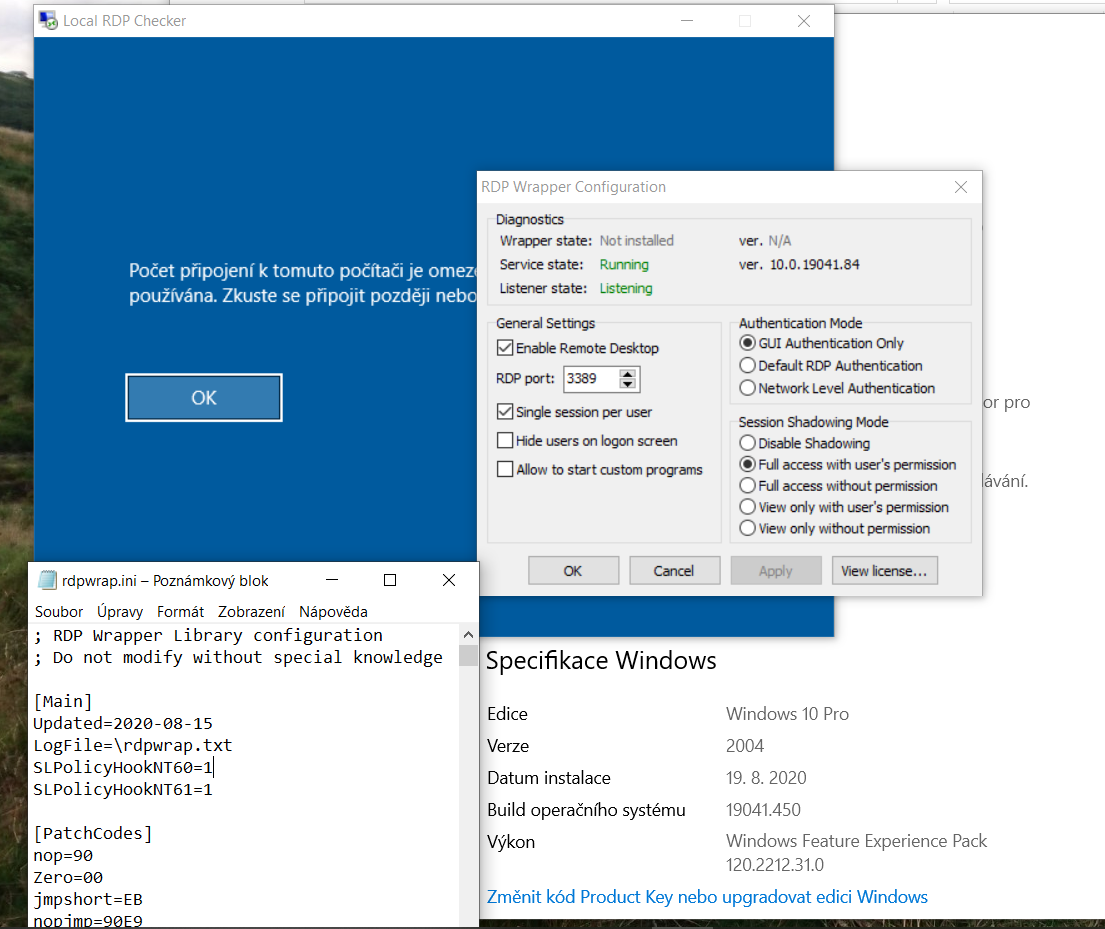
The INI file seems to be fine. I have Avast as the antivirus but I am using RDPwrap with it for seven years, so it would be a real coincidence that it stopped working exactly now. I was going through regular updates of the INI file after major windows updates in the past and it kept working. Do you really think that there is no change between 10.0.19041.84 (which was a preview version of the 2004 update for insiders back in February) and 10.0.19041.450 which is the current iteration of it being dispatched now?
maaraplus
on 20 Aug 2020
My foolish mistake. Only when I posted the screenshot to github, I realized that the wrapper got somehow uninstalled during the windows update. I reinstalled it and voila, it works! Kudos to your great work affinityv.
maaraplus
on 20 Aug 2020
My foolish mistake. Only when I posted the screenshot to github, I realized that the wrapper got somehow uninstalled during the windows update. I reinstalled it and voila, it works! Kudos to your great work affinityv.
Nice! Just a tip...
Avast and Windows defender are the same, with some windows defender features being much better. The big difference here is that windows defender doesnt use much resources while avast use alot..
.< (I'm not using any third party antivirus since I got my pc)
.< (You can disable virus manually removing it's permissions (read,write,execute) and restarting pc.
.<(You can search for viruses (running at memory) by using process manager selecting "VirusTotal Scan")
--> Process explorer 64 manager is from microsoft and you can replace traditional task manager for it.
samuk190
on 22 Aug 2020
This support is available in 3rd party INI, like my own one here Once the INI file has been replaced, do
RDPWInst -rto restart RDP
@affinityv
Many Thanks for this INI file :) Works perfectly now!
 PizzaProgram
on 22 Aug 2020
PizzaProgram
on 22 Aug 2020
Related issues
 nick7inc
·
5Comments
nick7inc
·
5Comments
 eduardolucioac
·
4Comments
eduardolucioac
·
4Comments
 korolartemnexus
·
6Comments
korolartemnexus
·
6Comments
 papoluisjr
·
3Comments
papoluisjr
·
3Comments
 Trooper29
·
4Comments
Trooper29
·
4Comments
Most helpful comment
No, the title is wrong.... you need suport for 10.0.19041.84, which is the termsrv.dll version. This support is available in 3rd party INI, like my own one here Once the INI file has been replaced, do
RDPWInst -rto restart RDP, if that fails, perhaps a restart, if that still fails, then it /may/ be that Windows Defender or other AV is interfering. Aside from those things, make sure that the INI file is in normal DOS format.