Rdpwrap: OS build 18362.959 isn't supported?
Hi,
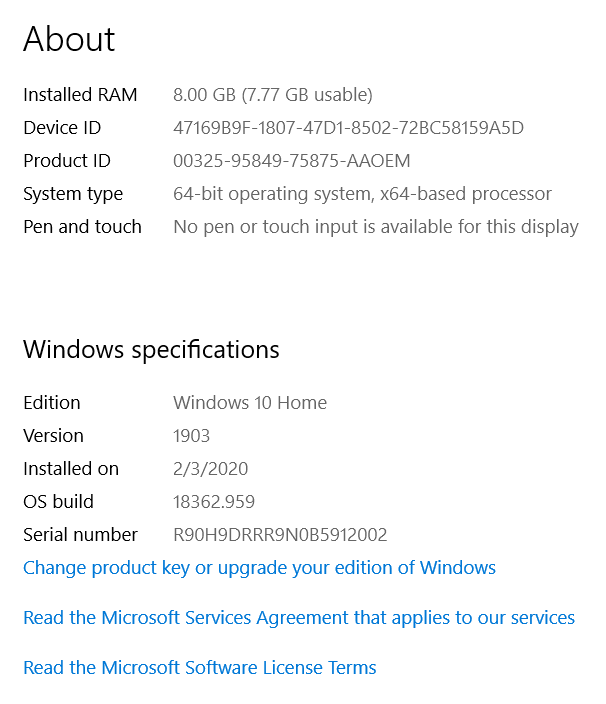
I have struggled with this for the longest time, I have OS build 18362.959, I followed all the instructions carefully including installing the INI file and trying some of the suggestions from the issues reported previously, but no luck.
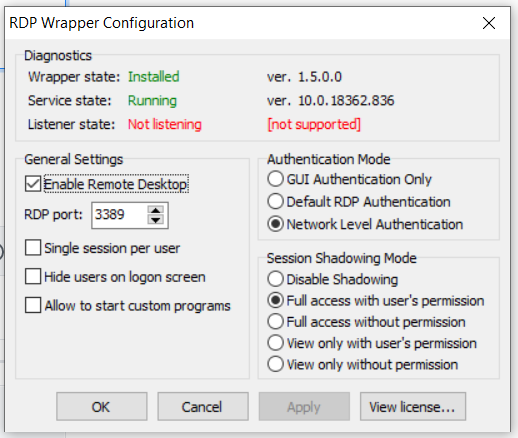
When running the RDPConf.exe I get Listener state: Not listening and [not supported]
Any ideas?
Thanks in advance!
 GWAM
GWAM
All 9 comments
Add this in ini file.
[10.0.18362.959]
LocalOnlyPatch.x64=1
LocalOnlyOffset.x64=82FC5
LocalOnlyCode.x64=jmpshort
SingleUserPatch.x64=1
SingleUserOffset.x64=0DBFC
SingleUserCode.x64=Zero
DefPolicyPatch.x64=1
DefPolicyOffset.x64=1FE15
DefPolicyCode.x64=CDefPolicy_Query_eax_rcx
SLInitHook.x64=1
SLInitOffset.x64=22DDC
SLInitFunc.x64=New_CSLQuery_Initialize
[10.0.18362.959-SLInit]
bInitialized.x64 =F6A8C
bServerSku.x64 =F6A90
lMaxUserSessions.x64 =F6A94
bAppServerAllowed.x64 =F6A9C
bRemoteConnAllowed.x64=F6AA0
bMultimonAllowed.x64 =F6AA4
ulMaxDebugSessions.x64=F6AA8
bFUSEnabled.x64 =F6AAC
 princepsycho
on 22 Jul 2020
princepsycho
on 22 Jul 2020
Updated my INI file, thank you @princepsycho
 affinityv
on 22 Jul 2020
affinityv
on 22 Jul 2020
Hi
Add this in ini file.
[10.0.18362.959]
LocalOnlyPatch.x64=1
LocalOnlyOffset.x64=82FC5
LocalOnlyCode.x64=jmpshort
SingleUserPatch.x64=1
SingleUserOffset.x64=0DBFC
SingleUserCode.x64=Zero
DefPolicyPatch.x64=1
DefPolicyOffset.x64=1FE15
DefPolicyCode.x64=CDefPolicy_Query_eax_rcx
SLInitHook.x64=1
SLInitOffset.x64=22DDC
SLInitFunc.x64=New_CSLQuery_Initialize[10.0.18362.959-SLInit]
bInitialized.x64 =F6A8C
bServerSku.x64 =F6A90
lMaxUserSessions.x64 =F6A94
bAppServerAllowed.x64 =F6A9C
bRemoteConnAllowed.x64=F6AA0
bMultimonAllowed.x64 =F6AA4
ulMaxDebugSessions.x64=F6AA8
bFUSEnabled.x64 =F6AAC
I added into the INI, restarted the termservice but still same issue, RDPConf shows:
Wrapper state: Installed ver. 1.5.0.0
Service state: Running ver. 10.0.18362.836 (strange that Windows actually shows a different build? 959)
Listener state: Not listening [not supported]
Any other ideas? thanks
M
GWAM
on 22 Jul 2020
Hi
Add this in ini file.
[10.0.18362.959]
LocalOnlyPatch.x64=1
LocalOnlyOffset.x64=82FC5
LocalOnlyCode.x64=jmpshort
SingleUserPatch.x64=1
SingleUserOffset.x64=0DBFC
SingleUserCode.x64=Zero
DefPolicyPatch.x64=1
DefPolicyOffset.x64=1FE15
DefPolicyCode.x64=CDefPolicy_Query_eax_rcx
SLInitHook.x64=1
SLInitOffset.x64=22DDC
SLInitFunc.x64=New_CSLQuery_Initialize
[10.0.18362.959-SLInit]
bInitialized.x64 =F6A8C
bServerSku.x64 =F6A90
lMaxUserSessions.x64 =F6A94
bAppServerAllowed.x64 =F6A9C
bRemoteConnAllowed.x64=F6AA0
bMultimonAllowed.x64 =F6AA4
ulMaxDebugSessions.x64=F6AA8
bFUSEnabled.x64 =F6AACI added into the INI, restarted the termservice but still same issue, RDPConf shows:
Wrapper state: Installed ver. 1.5.0.0
Service state: Running ver. 10.0.18362.836 (strange that Windows actually shows a different build? 959)
Listener state: Not listening [not supported]Any other ideas? thanks
M
Hi,
on Which version of windows are you trying to install rdpwrap ? 10.0.18362.836 ? if yes use this ini file :
[10.0.18362.836]
LocalOnlyPatch.x64=1
LocalOnlyOffset.x64=82FC5
LocalOnlyCode.x64=jmpshort
SingleUserPatch.x64=1
SingleUserOffset.x64=0DBFC
SingleUserCode.x64=Zero
DefPolicyPatch.x64=1
DefPolicyOffset.x64=1FE15
DefPolicyCode.x64=CDefPolicy_Query_eax_rcx
SLInitHook.x64=1
SLInitOffset.x64=22DDC
SLInitFunc.x64=New_CSLQuery_Initialize
[10.0.18362.836-SLInit]
bInitialized.x64 =F6A8C
bServerSku.x64 =F6A90
lMaxUserSessions.x64 =F6A94
bAppServerAllowed.x64 =F6A9C
bRemoteConnAllowed.x64=F6AA0
bMultimonAllowed.x64 =F6AA4
ulMaxDebugSessions.x64=F6AA8
bFUSEnabled.x64 =F6AAC
The ini file i posted is for version 959 not for version 836.
princepsycho
on 22 Jul 2020
Hi
Add this in ini file.
[10.0.18362.959]
LocalOnlyPatch.x64=1
LocalOnlyOffset.x64=82FC5
LocalOnlyCode.x64=jmpshort
SingleUserPatch.x64=1
SingleUserOffset.x64=0DBFC
SingleUserCode.x64=Zero
DefPolicyPatch.x64=1
DefPolicyOffset.x64=1FE15
DefPolicyCode.x64=CDefPolicy_Query_eax_rcx
SLInitHook.x64=1
SLInitOffset.x64=22DDC
SLInitFunc.x64=New_CSLQuery_Initialize
[10.0.18362.959-SLInit]
bInitialized.x64 =F6A8C
bServerSku.x64 =F6A90
lMaxUserSessions.x64 =F6A94
bAppServerAllowed.x64 =F6A9C
bRemoteConnAllowed.x64=F6AA0
bMultimonAllowed.x64 =F6AA4
ulMaxDebugSessions.x64=F6AA8
bFUSEnabled.x64 =F6AACI added into the INI, restarted the termservice but still same issue, RDPConf shows:
Wrapper state: Installed ver. 1.5.0.0
Service state: Running ver. 10.0.18362.836 (strange that Windows actually shows a different build? 959)
Listener state: Not listening [not supported]
Any other ideas? thanks
MHi,
on Which version of windows are you trying to install rdpwrap ? 10.0.18362.836 ? if yes use this ini file :
[10.0.18362.836]
LocalOnlyPatch.x64=1
LocalOnlyOffset.x64=82FC5
LocalOnlyCode.x64=jmpshort
SingleUserPatch.x64=1
SingleUserOffset.x64=0DBFC
SingleUserCode.x64=Zero
DefPolicyPatch.x64=1
DefPolicyOffset.x64=1FE15
DefPolicyCode.x64=CDefPolicy_Query_eax_rcx
SLInitHook.x64=1
SLInitOffset.x64=22DDC
SLInitFunc.x64=New_CSLQuery_Initialize[10.0.18362.836-SLInit]
bInitialized.x64 =F6A8C
bServerSku.x64 =F6A90
lMaxUserSessions.x64 =F6A94
bAppServerAllowed.x64 =F6A9C
bRemoteConnAllowed.x64=F6AA0
bMultimonAllowed.x64 =F6AA4
ulMaxDebugSessions.x64=F6AA8
bFUSEnabled.x64 =F6AACThe ini file i posted is for version 959 not for version 836.
Thanks @princepsycho , to clarify, my OS shows 10.0.18362.959, but RDPConf shows 10.0.18362.836
Regardless, I now have both entries in the INI file but RDPConf still shows not supported and not listening
Thoughts?
GWAM
on 22 Jul 2020
Hi
Add this in ini file.
[10.0.18362.959]
LocalOnlyPatch.x64=1
LocalOnlyOffset.x64=82FC5
LocalOnlyCode.x64=jmpshort
SingleUserPatch.x64=1
SingleUserOffset.x64=0DBFC
SingleUserCode.x64=Zero
DefPolicyPatch.x64=1
DefPolicyOffset.x64=1FE15
DefPolicyCode.x64=CDefPolicy_Query_eax_rcx
SLInitHook.x64=1
SLInitOffset.x64=22DDC
SLInitFunc.x64=New_CSLQuery_Initialize
[10.0.18362.959-SLInit]
bInitialized.x64 =F6A8C
bServerSku.x64 =F6A90
lMaxUserSessions.x64 =F6A94
bAppServerAllowed.x64 =F6A9C
bRemoteConnAllowed.x64=F6AA0
bMultimonAllowed.x64 =F6AA4
ulMaxDebugSessions.x64=F6AA8
bFUSEnabled.x64 =F6AACI added into the INI, restarted the termservice but still same issue, RDPConf shows:
Wrapper state: Installed ver. 1.5.0.0
Service state: Running ver. 10.0.18362.836 (strange that Windows actually shows a different build? 959)
Listener state: Not listening [not supported]
Any other ideas? thanks
MHi,
on Which version of windows are you trying to install rdpwrap ? 10.0.18362.836 ? if yes use this ini file :
[10.0.18362.836]
LocalOnlyPatch.x64=1
LocalOnlyOffset.x64=82FC5
LocalOnlyCode.x64=jmpshort
SingleUserPatch.x64=1
SingleUserOffset.x64=0DBFC
SingleUserCode.x64=Zero
DefPolicyPatch.x64=1
DefPolicyOffset.x64=1FE15
DefPolicyCode.x64=CDefPolicy_Query_eax_rcx
SLInitHook.x64=1
SLInitOffset.x64=22DDC
SLInitFunc.x64=New_CSLQuery_Initialize
[10.0.18362.836-SLInit]
bInitialized.x64 =F6A8C
bServerSku.x64 =F6A90
lMaxUserSessions.x64 =F6A94
bAppServerAllowed.x64 =F6A9C
bRemoteConnAllowed.x64=F6AA0
bMultimonAllowed.x64 =F6AA4
ulMaxDebugSessions.x64=F6AA8
bFUSEnabled.x64 =F6AAC
The ini file i posted is for version 959 not for version 836.Thanks @princepsycho , to clarify, my OS shows 10.0.18362.959, but RDPConf shows 10.0.18362.836
Regardless, I now have both entries in the INI file but RDPConf still shows not supported and not listening
Thoughts?
Ignore this, just edit ini file and install rdpwrap by this way,
Go on folder containing file, open cmd, and do "rdpwinst.exe -i"
princepsycho
on 22 Jul 2020
AV can take it out, including ESET, TrendMicro and possibly others; even Windows Defender will take it out if it doesn't have an exception for the C:\program files\RDP Wrapper directory.
affinityv
on 22 Jul 2020
Thanks a lot everyone, running the RDPWinst.exe -i in addition to adding the whole folder as exclude from Defender did the trick, this is now working, thanks!!
GWAM
on 22 Jul 2020
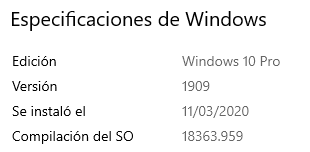
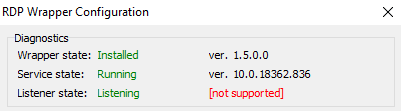
Hello, u have an ini file for Windows 1909 Build 18363.959
RDPWrap show Build 18362.836
Regards
 zolymo
on 28 Jul 2020
zolymo
on 28 Jul 2020
Related issues
 wanglulei
·
4Comments
wanglulei
·
4Comments
 eyeTechSolutions
·
5Comments
eyeTechSolutions
·
5Comments
 cH40z32
·
4Comments
cH40z32
·
4Comments
 korolartemnexus
·
6Comments
korolartemnexus
·
6Comments
 jifernandezc
·
5Comments
jifernandezc
·
5Comments
Most helpful comment
Thanks a lot everyone, running the RDPWinst.exe -i in addition to adding the whole folder as exclude from Defender did the trick, this is now working, thanks!!