Hi guys. I have problem with RDP Wrapper (I think). I can't updated rdpwrap.ini because termservice can't start after updating the file. I think the problem isn't the file rdpwrap.ini, because I tried with different file's versions and updating OS and replacing with rdpwrap.ini for that version. I noted that RDP Wrapper don't have version (look at the picture). I tried download and install repeatdly RDP Wrapper of this github repository, with no results.

I have Windows 10 Enterprise, OS v. 17763.805.
I hope you can help me!
 jifernandezc
All 5 comments
The OS version doesn't count, but the ver in RDP Wrapper config does.... if that section is not in your ini file, then get this one.
Once you have updated that, do the normal RDPIinst -r with eleveated cmd session.
 affinityv
on 6 Mar 2020
affinityv
on 6 Mar 2020
The OS version doesn't count, but the ver in RDP Wrapper config does.... if that section is not in your ini file, then get this one.
Once you have updated that, do the normalRDPIinst -rwith eleveated cmd session.
Thanks @affinityv. I know that the version of termsrv.dll is the necessary for RDP, in fact, my ini file have that section and also I tried with your file and the error is the same:
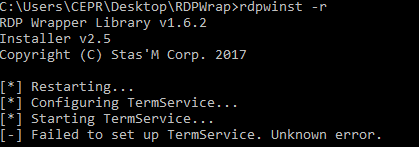
I spent weeks trying to turn on RDP without get any results. I don't know if some file of the Windows System is corrupt ( Also tried with sfc /scannow and nothing happen) or This error have relation with this:
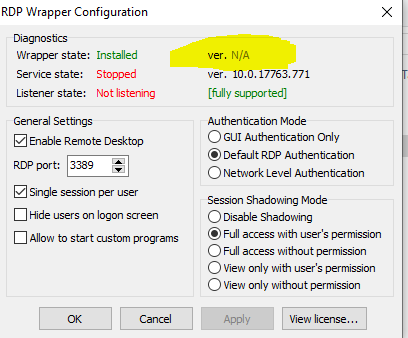
(If you have have any doubt, look the green words "fully support")
Thanks for your time guys.
jifernandezc
on 9 Mar 2020
Okay, which AV are you using? Perhaps it has taken out the Windows registry parts needed for RDP. I know that TrendMicro and ESET have both done that to people. And someone said that Windows Defender might do the same. I have to import the REG tree parts when TM screws with systems that are "protected/hinded" by that product. I may add the RDP hives to my repo.
Edit: added the two reg files for Win7 Pro and Win10 Pro; import with reg import FILE.reg
Edit 2: I have exclusions for TM, but TM often thinks it knows better; exclusions for Windows Defender seem to be good so far though... if you can, I would suggest NOT using TM, ESET or any other 3rd party AV these days as they add more risk and problems than they are worth (this has been true for many other so-called security products in the past from the likes of Nortons, Symantac, MacAfee and probably many others...)
affinityv
on 9 Mar 2020
I love you @affinityv. The problem was Windows defender. I added exclusion to folder where is located rdpwrap.ini and re-installed rdp wrapper and now is working. Thanks so much.
jifernandezc
on 9 Mar 2020
The OS version doesn't count, but the ver in RDP Wrapper config does.... if that section is not in your ini file, then get this one.
Once you have updated that, do the normalRDPIinst -rwith eleveated cmd session.
Thank you so much for your help!
 hepbitkin
on 31 Mar 2020
hepbitkin
on 31 Mar 2020
Related issues
 cH40z32
·
4Comments
cH40z32
·
4Comments
 dagwieers
·
4Comments
dagwieers
·
4Comments
 wanglulei
·
4Comments
wanglulei
·
4Comments
 sihow29
·
4Comments
sihow29
·
4Comments
 mascarasnake66
·
4Comments
mascarasnake66
·
4Comments
Most helpful comment
The OS version doesn't count, but the ver in RDP Wrapper config does.... if that section is not in your ini file, then get this one.
Once you have updated that, do the normal
RDPIinst -rwith eleveated cmd session.