Rdpwrap: Windows 10 Home Ver 1909 (OS) Build 18363.815) Not working
Windows 10 Home Ver 1909 (OS) Build 18363.815) Not working Please help
Thank You
 StarfighterJ
All 17 comments
Same thing here.... but I'm using Win10 Pro
just ran install.bat and with RDPConf.exe with administrative rights and they seem to be ok. But my computer still limited with just one user logged at a time.
 danmaxis
on 23 Apr 2020
danmaxis
on 23 Apr 2020
Please tell us the termsrv.dll version and not the windows version
Right click on termsrv.dll --> properties --> Details --> version
 sk-lau
on 24 Apr 2020
sk-lau
on 24 Apr 2020
My termsrv.dll is 10.0.18362.657
danmaxis
on 24 Apr 2020
My termsrv.dll is 10.0.18362.657
Did RDPConf show the green colour check meaning it's fully supported ?
sk-lau
on 24 Apr 2020
My termsrv.dll is 10.0.18362.657 also and RDPConf does show Green and RDPCheck works. But Microsoft Remote desk top for Android for some strange reason no longer connecting. use to work good. Now getting couldn't connect with error code 0x104.
StarfighterJ
on 24 Apr 2020
Is your Android device local to the RDP machine? If it isn't and you are coming in via another network connection, then you may be getting blocked on the standard port (3389). And if the latter is the case, you really should be accessing the RDP machine via a secure channel (ie ssh tunnel) and not directly. It is very dangerous to allow RDP to be world accessible.
 affinityv
on 24 Apr 2020
affinityv
on 24 Apr 2020
My termsrv.dll is 10.0.18362.657
Did RDPConf show the green colour check meaning it's fully supported ?
Nope, it really displayed as not supported. It was hoping that someone already solved it but it wasnt committed to the official branch.
I have no issues connecting, it's just one active user at a time that i'm trying to solve.
danmaxis
on 24 Apr 2020
Yes my Android Device is Local to my RDP Computer. But Guess what I rememebered year or so back when everything was green and RDcheck worked I messed with changing GUI Authentication Only to Network Level Authentication and Switched it back, and now it is working Problem is Solved This was a strange way to fix it Thank you all
StarfighterJ
on 24 Apr 2020
Hi, Any news?
My termsrv.dll is 10.0.18362.657 and OS Build 18363.815 is not working.
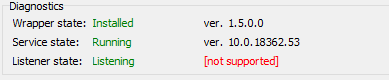
please help
 aroyero
on 26 Apr 2020
aroyero
on 26 Apr 2020
Hi, Any news?
My termsrv.dll is 10.0.18362.657 and OS Build 18363.815 is not working.
please help
I just copy the zip contents to c:program filesrdp wrapper, restarted and all works fine
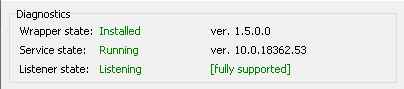
aroyero
on 26 Apr 2020
Hi, Any news?
My termsrv.dll is 10.0.18362.657 and OS Build 18363.815 is not working.
please helpI just copy the zip contents to c:program filesrdp wrapper, restarted and all works fine
Did it runs just fine?
And by zip content you mean these files that come with rdp wrapper setup?
danmaxis
on 27 Apr 2020
Hi, Any news?
My termsrv.dll is 10.0.18362.657 and OS Build 18363.815 is not working.
please helpI just copy the zip contents to c:program filesrdp wrapper, restarted and all works fine
Did it runs just fine?
And by zip content you mean these files that come with rdp wrapper setup?
Hi,
now is working fine, yes, all files that come with the rdp wrapper
aroyero
on 27 Apr 2020
Can you upload your .ini file? I have the same versions as you and it doesn't work for me.
System version: Win 10 Pro 1909 18363.815
Termsrv.dll file version: 10.0.18362.657
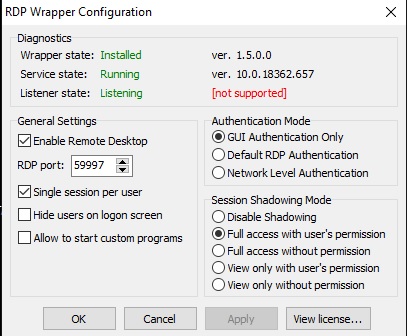
 moreleb
on 28 Apr 2020
moreleb
on 28 Apr 2020
Can you upload your .ini file? I have the same versions as you and it doesn't work for me.
System version: Win 10 Pro 1909 18363.815
Termsrv.dll file version: 10.0.18362.657
Dude, just got a solution at an other issue, it refers to this one.
This one -> #1040
I proceeded as it says and worked for me.
danmaxis
on 28 Apr 2020
Can you upload your .ini file? I have the same versions as you and it doesn't work for me.
System version: Win 10 Pro 1909 18363.815
Termsrv.dll file version: 10.0.18362.657
Dude, just got a solution at an other issue, it refers to this one.
This one -> #1040
I proceeded as it says and worked for me.
Thanks dude. It works
moreleb
on 28 Apr 2020
Hi,
this is the .ini file. hope it helps
aroyero
on 28 Apr 2020
@aroyero your rdwrap.ini file was the only fiy that worked for me. Thanks...
 jnstllng
on 1 May 2020
jnstllng
on 1 May 2020
Related issues
 wanglulei
·
4Comments
wanglulei
·
4Comments
 isidorosss
·
5Comments
isidorosss
·
5Comments
 eduardolucioac
·
4Comments
eduardolucioac
·
4Comments
 cakexxx
·
6Comments
cakexxx
·
6Comments
 korolartemnexus
·
6Comments
korolartemnexus
·
6Comments