Rdpwrap: Listener state: Not listening [not supported]
I've just installed RDP Wrap and I'm running into some issues:
RDF Check states the error "Socket connection failed".
RDF Configuration shows that the listener state is not listening and not supported.
Here are the images: imgur.com/a/eTTPGuY
I have done some research on the "issues" tab and I saw some people suggesting that removing a windows security update can fix this issue, however, I have a fresh install of windows, so I don't think this option is available for me.
I am running Windows 10 Home, version 1909. OS build: 18363.657
 JackE9
All 43 comments
Run cmd.exe as administrator and type:
net stop termservice
Then go to C:\Program Files\RDP Wrapper and open rdpwrap.ini
If you don't have it, download it from rdpwrap.zip
If you have it, just copy the following and append to the end of the file and save:
[10.0.18362.657]
LocalOnlyPatch.x86=1
LocalOnlyOffset.x86=B7D06
LocalOnlyCode.x86=jmpshort
LocalOnlyPatch.x64=1
LocalOnlyOffset.x64=82FB5
LocalOnlyCode.x64=jmpshort
SingleUserPatch.x86=1
SingleUserOffset.x86=50535
SingleUserCode.x86=nop
SingleUserPatch.x64=1
SingleUserOffset.x64=0DBFC
SingleUserCode.x64=Zero
DefPolicyPatch.x86=1
DefPolicyOffset.x86=50269
DefPolicyCode.x86=CDefPolicy_Query_eax_ecx
DefPolicyPatch.x64=1
DefPolicyOffset.x64=1FE15
DefPolicyCode.x64=CDefPolicy_Query_eax_rcx
SLInitHook.x86=1
SLInitOffset.x86=5A77A
SLInitFunc.x86=New_CSLQuery_Initialize
SLInitHook.x64=1
SLInitOffset.x64=22DDC
SLInitFunc.x64=New_CSLQuery_Initialize

[10.0.18362.657-SLInit]
bInitialized.x86      =D577C
bServerSku.x86        =D5780
lMaxUserSessions.x86  =D5784
bAppServerAllowed.x86 =D578C
bRemoteConnAllowed.x86=D5790
bMultimonAllowed.x86  =D5794
ulMaxDebugSessions.x86=D5798
bFUSEnabled.x86       =D579C
bInitialized.x64      =F6A8C
bServerSku.x64        =F6A90
lMaxUserSessions.x64  =F6A94
bAppServerAllowed.x64 =F6A9C
bRemoteConnAllowed.x64=F6AA0
bMultimonAllowed.x64  =F6AA4
ulMaxDebugSessions.x64=F6AA8
bFUSEnabled.x64       =F6AAC
On the last step, do not forge to start the service again with:
net start termservice

Let other know if it works for you.
 sawwd
on 16 Feb 2020
sawwd
on 16 Feb 2020
Working fine ty , just executeRDPWInst.exe -r after editing rdpwrap.ini
 langit7
on 17 Feb 2020
langit7
on 17 Feb 2020
Let other know if it works for you.
sawwd, thanks sooooooo much. You;re a life saver. 10.0.18362.657 x86 works like a champ now.
 VelociRacer
on 18 Feb 2020
VelociRacer
on 18 Feb 2020
sawwd, everything is ok now on Win10.0.18363.657 x86. Thank you very much.
 a-lascu
on 18 Feb 2020
a-lascu
on 18 Feb 2020
Thank you very much.
 ConceitoTecnologia
on 18 Feb 2020
ConceitoTecnologia
on 18 Feb 2020
You are the man Sawwd. Thank you!
 phrayz
on 19 Feb 2020
phrayz
on 19 Feb 2020
great! it really works, thank you very much
 jackymardt
on 2 Mar 2020
jackymardt
on 2 Mar 2020
I did it.and became fully supported,but listening state is still“not listening” ,I don't know where I'm doing the wrong thing. PLZ!
 Cube0829
on 3 Mar 2020
Cube0829
on 3 Mar 2020
Thank you very much, @sawwd !
Works again like a charm!
 Vegz78
on 21 Mar 2020
Vegz78
on 21 Mar 2020
@sawwd I did everything as per the instructions and executed RDPWInst.exe -r after editing rdpwrap.ini, even rebooted Windows but am still getting Not listening - Not supported and RDPCheck reports failure to connect.
Do I need to uninstall some recent Windows security updates first?
 CaspianCanuck
on 22 Mar 2020
CaspianCanuck
on 22 Mar 2020
Never mind, it finally worked! Many thanks to the maintainers of this code for creating this useful utility!
CaspianCanuck
on 23 Mar 2020
Never mind, it finally worked! Many thanks to the maintainers of this code for creating this useful utility!
Hi, how you fix this? I have same problem.
 broliukaz
on 25 Mar 2020
broliukaz
on 25 Mar 2020
Remote Desktop Service only runs for 3 seconds after I've done this.
I've tried to start it in CMD as administrator: net start termservice
I've also tried to start Remote Desktop Services in services.msc
 arnoldvdm
on 27 Mar 2020
arnoldvdm
on 27 Mar 2020
Never mind, it finally worked! Many thanks to the maintainers of this code for creating this useful utility!
Hi, how you fix this? I have same problem.
I finally got it working.
- Run
install.batas administrator - Copy all files to:
Program Files\RDP Wrapper - Turn off all network adapters in:
ncpa.cpl - Run
cmdas administrator - Run
net stop termservice - Run
uninstall.batas administrator - Run
install.batas administrator - Edit
rdpwrap.inias administrator (for example in Notepad++) - Add and save the lines from > sawwd
- Run
RDPWInst.exe -rin cmd as administrator - Turn the network adapters on again in:
ncpa.cpl
arnoldvdm
on 28 Mar 2020
Never mind, it finally worked! Many thanks to the maintainers of this code for creating this useful utility!
Hi, how you fix this? I have same problem.
I finally got it working.
- Run
install.batas administrator- Copy all files to:
Program Files\RDP Wrapper- Turn off all network adapters in:
ncpa.cpl- Run
cmdas administrator- Run
net stop termservice- Run
uninstall.batas administrator- Run
install.batas administrator- Edit
rdpwrap.inias administrator (for example in Notepad++)- Add and save the lines from > sawwd
- Run
RDPWInst.exe -rin cmd as administrator- Turn the network adapters on again in:
ncpa.cpl
I tried your steps but still doesn't work.
 espinosaluis
on 28 Mar 2020
espinosaluis
on 28 Mar 2020
Never mind, it finally worked! Many thanks to the maintainers of this code for creating this useful utility!
Hi, how you fix this? I have same problem.
I finally got it working.
- Run
install.batas administrator- Copy all files to:
Program Files\RDP Wrapper- Turn off all network adapters in:
ncpa.cpl- Run
cmdas administrator- Run
net stop termservice- Run
uninstall.batas administrator- Run
install.batas administrator- Edit
rdpwrap.inias administrator (for example in Notepad++)- Add and save the lines from > sawwd
- Run
RDPWInst.exe -rin cmd as administrator- Turn the network adapters on again in:
ncpa.cplI tried your steps but still doesn't work.
Do you get an error message after you've run net start termservice
Maybe it works after changing Group Policy settings:
You can try to install Group Policy (gpedit.msc)
https://www.itechtics.com/enable-gpedit-windows-10-home/
Try to enable: Set rules for remote control of Terminal Services user sessions
You can find it under: User Configuration -> Administrative Templates -> Windows Components -> Terminal Services
arnoldvdm
on 28 Mar 2020
Never mind, it finally worked! Many thanks to the maintainers of this code for creating this useful utility!
Hi, how you fix this? I have same problem.
I finally got it working.
- Run
install.batas administrator- Copy all files to:
Program Files\RDP Wrapper- Turn off all network adapters in:
ncpa.cpl- Run
cmdas administrator- Run
net stop termservice- Run
uninstall.batas administrator- Run
install.batas administrator- Edit
rdpwrap.inias administrator (for example in Notepad++)- Add and save the lines from > sawwd
- Run
RDPWInst.exe -rin cmd as administrator- Turn the network adapters on again in:
ncpa.cplI tried your steps but still doesn't work.
Do you get an error message after you've run
net start termserviceMaybe it works after changing Group Policy settings:
You can try to install Group Policy (gpedit.msc)
https://www.itechtics.com/enable-gpedit-windows-10-home/Try to enable:
Set rules for remote control of Terminal Services user sessions
You can find it under: User Configuration -> Administrative Templates -> Windows Components -> Terminal Services
Thanks for your reply. I finally got it to work. I did what was mentioned here
https://github.com/stascorp/rdpwrap/issues/1035#issuecomment-604501183
I have the impression I had already did that before but I've tried so many things and times that I'm not totally sure now...
espinosaluis
on 28 Mar 2020
Asmtron has published an archive and a readme to automatically update the ini file in issue #860. It does automatically what you ve done manually. you may prefer to check sources in https://github.com/asmtron/rdpwrap/tree/master/bin
 edgd1er
on 28 Mar 2020
edgd1er
on 28 Mar 2020
It doesn't work on Windows 10 Home 1909 Build 18363.720
It works on Windows 10 Home 1909 Build: 18363.752
On 18363.720 only the Listener stat doesn't work.
arnoldvdm
on 28 Mar 2020
I found the solution.
Make sure the service is logged in as Network Service.

arnoldvdm
on 28 Mar 2020
Are all files located in the same folder?
Does the network service also have full access permissions to the folder?
You can also test it by setting "everyone" with full access permissions.
arnoldvdm
on 8 Apr 2020
Im having the same issue, the RDP package files are installed in \program files\RDPWrapper ini and dlls are in \program files\RDP Wrapper.. Both directories have network services explicitly added. It shows as fully supported 10.10.18362.657, but not listening.
And never mind. I did the autoupdate process (https://github.com/stascorp/rdpwrap/issues/860) and now all is good, obviously something was messed up in the initial install, but I am good now)
 bftaylor
on 8 Apr 2020
bftaylor
on 8 Apr 2020
Run cmd.exe as administrator and type:
net stop termserviceThen go to
C:\Program Files\RDP Wrapperand openrdpwrap.iniIf you don't have it, download it from rdpwrap.zip
If you have it, just copy the following and append to the end of the file and save:
[10.0.18362.657]
LocalOnlyPatch.x86=1
LocalOnlyOffset.x86=B7D06
LocalOnlyCode.x86=jmpshort
LocalOnlyPatch.x64=1
LocalOnlyOffset.x64=82FB5
LocalOnlyCode.x64=jmpshort
SingleUserPatch.x86=1
SingleUserOffset.x86=50535
SingleUserCode.x86=nop
SingleUserPatch.x64=1
SingleUserOffset.x64=0DBFC
SingleUserCode.x64=Zero
DefPolicyPatch.x86=1
DefPolicyOffset.x86=50269
DefPolicyCode.x86=CDefPolicy_Query_eax_ecx
DefPolicyPatch.x64=1
DefPolicyOffset.x64=1FE15
DefPolicyCode.x64=CDefPolicy_Query_eax_rcx
SLInitHook.x86=1
SLInitOffset.x86=5A77A
SLInitFunc.x86=New_CSLQuery_Initialize
SLInitHook.x64=1
SLInitOffset.x64=22DDC
SLInitFunc.x64=New_CSLQuery_Initialize

[10.0.18362.657-SLInit]
bInitialized.x86      =D577C
bServerSku.x86        =D5780
lMaxUserSessions.x86  =D5784
bAppServerAllowed.x86 =D578C
bRemoteConnAllowed.x86=D5790
bMultimonAllowed.x86  =D5794
ulMaxDebugSessions.x86=D5798
bFUSEnabled.x86       =D579C
bInitialized.x64      =F6A8C
bServerSku.x64        =F6A90
lMaxUserSessions.x64  =F6A94
bAppServerAllowed.x64 =F6A9C
bRemoteConnAllowed.x64=F6AA0
bMultimonAllowed.x64  =F6AA4
ulMaxDebugSessions.x64=F6AA8
bFUSEnabled.x64       =F6AAC
On the last step, do not forge to start the service again with:
net start termservice
Let other know if it works for you.
Thanks a lot, It worked.
Guys, just open notepad as an admin and then copy the contents to the file.
 rohit3120
on 24 Apr 2020
rohit3120
on 24 Apr 2020
buenas tardes amigos! Les cuento que en varios equipos funcionando con Windows 10 y las recientes actualizaciones a la fecha, me dejaron de funcionar las conexiones remotas. Tengo 1 caso puntual que no logro resolver en donde me queda todo así:

Tengo conexión por teamviewer también a estos equipos por lo que puedo conectar y controlar pero por remoto, se cayeron y no logro revertir el problema. A alguno le sucedió? En estos momentos es medio crítico tener a varios usuarios sin poder conectar. Apelo a su gran experiencia para ver qué puede ser lo que sucede.
Aguardo sus comentarios y me mantengo online. Desde ya, muchas gracias!
 jhonny003
on 28 Apr 2020
jhonny003
on 28 Apr 2020
Run cmd.exe as administrator and type:
net stop termserviceThen go to
C:\Program Files\RDP Wrapperand openrdpwrap.iniIf you don't have it, download it from rdpwrap.zip
If you have it, just copy the following and append to the end of the file and save:
[10.0.18362.657]
LocalOnlyPatch.x86=1
LocalOnlyOffset.x86=B7D06
LocalOnlyCode.x86=jmpshort
LocalOnlyPatch.x64=1
LocalOnlyOffset.x64=82FB5
LocalOnlyCode.x64=jmpshort
SingleUserPatch.x86=1
SingleUserOffset.x86=50535
SingleUserCode.x86=nop
SingleUserPatch.x64=1
SingleUserOffset.x64=0DBFC
SingleUserCode.x64=Zero
DefPolicyPatch.x86=1
DefPolicyOffset.x86=50269
DefPolicyCode.x86=CDefPolicy_Query_eax_ecx
DefPolicyPatch.x64=1
DefPolicyOffset.x64=1FE15
DefPolicyCode.x64=CDefPolicy_Query_eax_rcx
SLInitHook.x86=1
SLInitOffset.x86=5A77A
SLInitFunc.x86=New_CSLQuery_Initialize
SLInitHook.x64=1
SLInitOffset.x64=22DDC
SLInitFunc.x64=New_CSLQuery_Initialize

[10.0.18362.657-SLInit]
bInitialized.x86      =D577C
bServerSku.x86        =D5780
lMaxUserSessions.x86  =D5784
bAppServerAllowed.x86 =D578C
bRemoteConnAllowed.x86=D5790
bMultimonAllowed.x86  =D5794
ulMaxDebugSessions.x86=D5798
bFUSEnabled.x86       =D579C
bInitialized.x64      =F6A8C
bServerSku.x64        =F6A90
lMaxUserSessions.x64  =F6A94
bAppServerAllowed.x64 =F6A9C
bRemoteConnAllowed.x64=F6AA0
bMultimonAllowed.x64  =F6AA4
ulMaxDebugSessions.x64=F6AA8
bFUSEnabled.x64       =F6AAC
On the last step, do not forge to start the service again with:
net start termservice
Let other know if it works for you.
For those for whom the @sawwd fix doesn't seem to work straight ahead, bear in mind that the provided sawwd's file rdpwrap.zip should be completely overwritten and in my case not like he mentioned in a second option, to append it, since my case it already contained the same rules and sections, so it would have no effect - probably no preference being listed later, and did not work, but replacing the file completely from the provided zip file worked.
Because without this action, there was the message "Fully supported" but without the "Listening" message. Though I had to also restart the pc after I think, previously it did not work even with a restart.
Note: I also had to add my user to the 'remote desktop users' group, as otherwise I got error 'The requested session access is denied' adding rdp rights alone to the user without adding group didn't help. Then for example I initiated the connection to computer itself by IP 172.0.0.2 as 172.0.0.1 is blocked , to test it.
 FantomX1
on 3 May 2020
FantomX1
on 3 May 2020
El problema es que el servicio de termnal service parece inactivo. Al
colocar NET STOP TERMSERVICRE devuelve "servicio inválido"
Lo que resolvió el problema fueron las nuevas actualizaciones de Windows
- Una vez que el servicio estaba activo, ya pude poner en funcnionamiento
el rdpwrapper.
Muchas Gracias!!!
Atte.,
Luján Juan Manuel
Microsoft Certified IT Professional E-mail: sistemas.[email protected]
El dom., 3 may. 2020 a las 8:01, Frantisek Hallo (notifications@github.com)
escribió:
Run cmd.exe as administrator and type:
net stop termservice
Then go to C:Program Files\RDP Wrapper and open rdpwrap.ini
If you don't have it, download it from rdpwrap.zip
https://github.com/stascorp/rdpwrap/files/4210953/rdpwrap.zipIf you have it, just copy the following and append to the end of the file
and save:[10.0.18362.657]
LocalOnlyPatch.x86=1
LocalOnlyOffset.x86=B7D06
LocalOnlyCode.x86=jmpshort
LocalOnlyPatch.x64=1
LocalOnlyOffset.x64=82FB5
LocalOnlyCode.x64=jmpshort
SingleUserPatch.x86=1
SingleUserOffset.x86=50535
SingleUserCode.x86=nop
SingleUserPatch.x64=1
SingleUserOffset.x64=0DBFC
SingleUserCode.x64=Zero
DefPolicyPatch.x86=1
DefPolicyOffset.x86=50269
DefPolicyCode.x86=CDefPolicy_Query_eax_ecx
DefPolicyPatch.x64=1
DefPolicyOffset.x64=1FE15
DefPolicyCode.x64=CDefPolicy_Query_eax_rcx
SLInitHook.x86=1
SLInitOffset.x86=5A77A
SLInitFunc.x86=New_CSLQuery_Initialize
SLInitHook.x64=1
SLInitOffset.x64=22DDC
SLInitFunc.x64=New_CSLQuery_Initialize[10.0.18362.657-SLInit]
bInitialized.x86 =D577C
bServerSku.x86 =D5780
lMaxUserSessions.x86 =D5784
bAppServerAllowed.x86 =D578C
bRemoteConnAllowed.x86=D5790
bMultimonAllowed.x86 =D5794
ulMaxDebugSessions.x86=D5798
bFUSEnabled.x86 =D579C
bInitialized.x64 =F6A8C
bServerSku.x64 =F6A90
lMaxUserSessions.x64 =F6A94
bAppServerAllowed.x64 =F6A9C
bRemoteConnAllowed.x64=F6AA0
bMultimonAllowed.x64 =F6AA4
ulMaxDebugSessions.x64=F6AA8
bFUSEnabled.x64 =F6AACOn the last step, do not forge to start the service again with:
net start termservice
[image: 2020-02-16_2337]
https://user-images.githubusercontent.com/13658340/74613261-63474680-5115-11ea-9123-4a0af3d7635a.pngLet other know if it works for you.
For those for whom the @sawwd https://github.com/sawwd fix doesn't seem
to work straight ahead, bear in mind that the provided sawwd's file
rdpwrap.zip should be completely overwritten and not like he mentioned in a
second option, to append it, since my case it already contained the same
rules and sections, so it would have no effect probably no preference being
listed later, and did not work, but replacing the file completely from the
provided zip file worked.—
You are receiving this because you commented.
Reply to this email directly, view it on GitHub
https://github.com/stascorp/rdpwrap/issues/999#issuecomment-623091914,
or unsubscribe
https://github.com/notifications/unsubscribe-auth/AORHANAVDYSKN2T7VPN2IE3RPVFI5ANCNFSM4KWC2TIA
.
jhonny003
on 3 May 2020
listener state: Not listening [not supported] on Windows 10 home x64 2004 update 10.0.19041.84
 psndna88
on 8 Jun 2020
psndna88
on 8 Jun 2020
Same here but on x86 system.
From: Parvinder Singhnotifications@github.com
Sent: 6/8/2020 6:40 AM
To: stascorp/rdpwraprdpwrap@noreply.github.com
Cc: VelociRacerbjohari007@hotmail.com; Commentcomment@noreply.github.com
Subject: Re: [stascorp/rdpwrap] Listener state: Not listening [not supported] (#999)
listener state: Not listening [not supported] on Windows 10 home x64 2004 update 10.0.19041.84
—
You are receiving this because you commented.
Reply to this email directly, view it on GitHubhttps://github.com/stascorp/rdpwrap/issues/999#issuecomment-640523281, or unsubscribehttps://github.com/notifications/unsubscribe-auth/AORSXNSU5KJY73CAZ4QA4Z3RVS52BANCNFSM4KWC2TIA.
VelociRacer
on 8 Jun 2020
Hi,
I am facing the same issue even i have updated the the file from rdpwrap.zip and replace it.
 PC2289
on 18 Jul 2020
PC2289
on 18 Jul 2020
Which .ini file are you using?
And you do need to be sure that you are replacing the right one -
especially if have been troubleshooting it for a while, you often end
up with multiple copies of rdpwrapper and can be confused as to which
one you are using - best to always copy to 'Program Files/rdpwrapper',
and remove any other copies.
On Sat, 18 Jul 2020 at 12:44, PC2289 notifications@github.com wrote:
>
Hi,
I am facing the same issue even i have updated the the file from rdpwrap.zip and replace it.—
You are receiving this because you are subscribed to this thread.
Reply to this email directly, view it on GitHub, or unsubscribe.
 robbak
on 18 Jul 2020
robbak
on 18 Jul 2020
Hi! getting this error with 1909 - 18363.959 after trying to update the ini as mentioned above.
 ameic
on 25 Jul 2020
ameic
on 25 Jul 2020
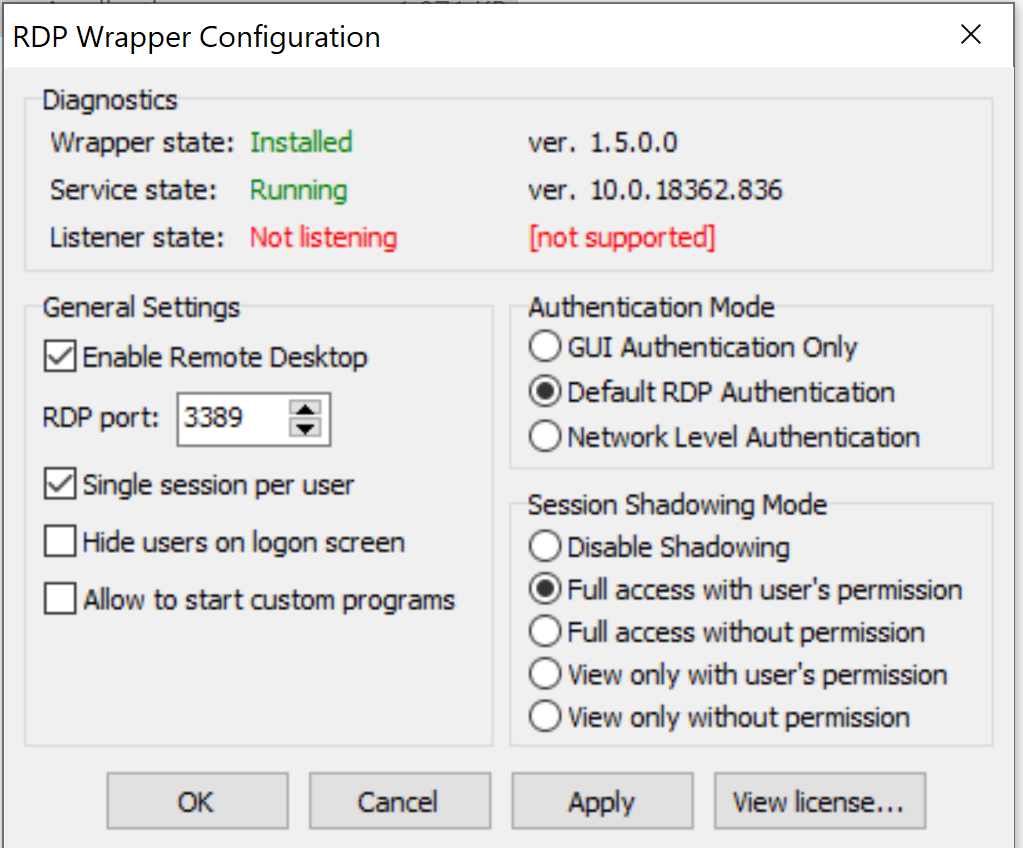
Hi there, thank you for creating this great add-on. could you please help me in getting it to work with ver. 10.0.18362.836.
Thank you
 bdbd192
on 4 Aug 2020
bdbd192
on 4 Aug 2020
This version is working with my INI file and has been for some time.
It is likely that Windows Defender or some other "protections" has taken out the service; you need to use the right INI file that supports this and you need to create an exception for the "C:Program Files\RDP Wrapper" directory.
 affinityv
on 4 Aug 2020
affinityv
on 4 Aug 2020
This version is working with my INI file and has been for some time.
It is likely that Windows Defender or some other "protections" has taken out the service; you need to use the right INI file that supports this and you need to create an exception for the "C:Program Files\RDP Wrapper" directory.
You're awesome! this worked, in the beginning it showed supported but not listening. so i had to restart wrapper service" restarted machine" and so listening started successfully. i have changed the defender settings previously as you have mentioned. next step is to add incremental restriction on my to do list 👍 i have the PC located in the living room and using Samsung 7X series i can remote desktop to it and access through LAN from my bedroom =D
Thank you again and wish you have an awsome day.
bdbd192
on 5 Aug 2020
This version is working with my INI file and has been for some time.
It is likely that Windows Defender or some other "protections" has taken out the service; you need to use the right INI file that supports this and you need to create an exception for the "C:Program Files\RDP Wrapper" directory.
Confirmed working on latest update Win10 Home Version 10.0.18362 Compilation 18362
 Fusseldieb
on 12 Aug 2020
Fusseldieb
on 12 Aug 2020
Hi everyone.
I followed all the instructions but when I run "RDPWInst.exe -r" I get:
RDP Wrapper Library v1.6.2
Installer v2.5
Copyright (C) Stas'M Corp. 2017
[] Restarting...
[+] TermService found (pid 4196).
[] No shared services found.
[] Terminating service...
[] Starting TermService...
[-] StartService error (code 1056).
[+] Done.
Listener state remains not listening.
Some idea?
I have Service state: 10.0.18362.836.
Thanks...
I confirm that it works for me too, but I solved with the .ini file linked here by overwriting my: https://github.com/stascorp/rdpwrap/issues/1022
Thanks all!!! ;) ;) ;)
 undertherainITA
on 21 Aug 2020
undertherainITA
on 21 Aug 2020
Did you try to run just the install.bat file?
From: undertherainITAnotifications@github.com
Sent: 8/21/2020 3:37 AM
To: stascorp/rdpwraprdpwrap@noreply.github.com
Cc: VelociRacerbjohari007@hotmail.com; Commentcomment@noreply.github.com
Subject: Re: [stascorp/rdpwrap] Listener state: Not listening [not supported] (#999)
Hi everyone.
I followed all the instructions but when I run "RDPWInst.exe -r" I get:
RDP Wrapper Library v1.6.2
Installer v2.5
Copyright (C) Stas'M Corp. 2017
[] Restarting...
[+] TermService found (pid 4196).
[] No shared services found.
[] Terminating service...
[] Starting TermService...
[-] StartService error (code 1056).
[+] Done.
Listener state remains not listening.
Some idea?
I have Service state: 10.0.18362.836.
Thanks...
—
You are receiving this because you commented.
Reply to this email directly, view it on GitHubhttps://github.com/stascorp/rdpwrap/issues/999#issuecomment-678093579, or unsubscribehttps://github.com/notifications/unsubscribe-auth/AORSXNQN4P7M7SJNH7NG7CDSBYP3XANCNFSM4KWC2TIA.
VelociRacer
on 21 Aug 2020
Help. Win 10 Pro 1909 build 18353.1082.
Tried INI and rdpinst -r
but still getting "Listener state: Listening " and "[not supported]".
Help please :D
 pc483
on 7 Oct 2020
pc483
on 7 Oct 2020
Got it working by using a ini file suggested here https://github.com/stascorp/rdpwrap/issues/1163
Original issue state:

 1TheMuffinMan
on 21 Oct 2020
1TheMuffinMan
on 21 Oct 2020
So is there a current correct install procedure? I've tried installing, I've tried starting and stopping services and editing the .ini, I tried replacing the .ini, I've tried to reinstall with the -r, I've tried uninstalling and reinstalling, all as administrator, I've tried rebooting a number of times including after all of this and I'm still getting:

 GrolarBear
on 25 Oct 2020
GrolarBear
on 25 Oct 2020
I tried all sorts of things, but this finally fixed it:
https://github.com/stascorp/rdpwrap/issues/860
GrolarBear
on 26 Oct 2020
ya me tiene loco no me permite acceso remoto

 1Hancen
on 17 Jan 2021
1Hancen
on 17 Jan 2021
Thank you!! this worked after lots of failed attempts
 zbusch
on 18 Jan 2021
zbusch
on 18 Jan 2021
Related issues
 philippseith
·
6Comments
philippseith
·
6Comments
 sk-lau
·
4Comments
sk-lau
·
4Comments
 francescofalanga92
·
3Comments
francescofalanga92
·
3Comments
 isidorosss
·
5Comments
isidorosss
·
5Comments
 jifernandezc
·
5Comments
jifernandezc
·
5Comments
Most helpful comment
This version is working with my INI file and has been for some time.
It is likely that Windows Defender or some other "protections" has taken out the service; you need to use the right INI file that supports this and you need to create an exception for the "C:Program Files\RDP Wrapper" directory.