Rdpwrap: Add support for build 6.3.9600.19093
August 30, 2018—KB4343891
Applies to: Windows 8.1, Windows Server 2012 R2
termsrv_6.3.9600.19093.zip
 antonabits
All 39 comments
[6.3.9600.19093]
LocalOnlyPatch.x64=1
LocalOnlyOffset.x64=8AE4E
LocalOnlyCode.x64=nopjmp
SingleUserPatch.x64=1
SingleUserOffset.x64=36BC9
SingleUserCode.x64=Zero
DefPolicyPatch.x64=1
DefPolicyOffset.x64=45305
DefPolicyCode.x64=CDefPolicy_Query_eax_rcx
SLInitHook.x64=1
SLInitOffset.x64=5D660
SLInitFunc.x64=New_CSLQuery_Initialize
[6.3.9600.19093-SLInit]
bFUSEnabled.x64=FA054
lMaxUserSessions.x64=FA058
bAppServerAllowed.x64=FA05C
bInitialized.x64=FA060
bMultimonAllowed.x64=FA064
bServerSku.x64=FA068
ulMaxDebugSessions.x64=FA06C
bRemoteConnAllowed.x64=FA070
 royshum
on 10 Sep 2018
royshum
on 10 Sep 2018
I can confirm it's working! Thanks royshum!
antonabits
on 10 Sep 2018
I confirm it's working on win8.1x64_Pro ! Thanks!
 ivanmara555
on 13 Sep 2018
ivanmara555
on 13 Sep 2018
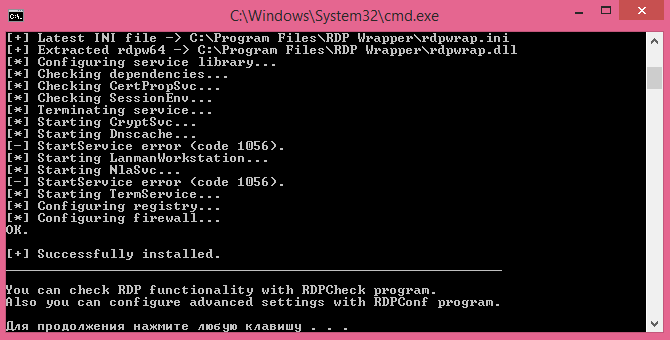
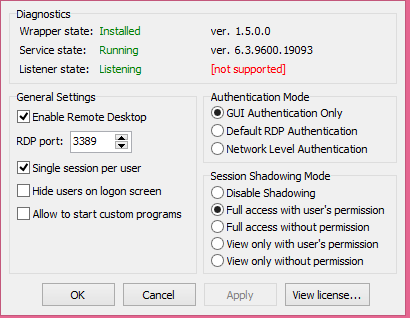
I still do not get it, I replaced termsrv.dll with yours but everything is not exactly supported
 Lemon-kent
on 14 Sep 2018
Lemon-kent
on 14 Sep 2018
DON't replace termsrv.dll just add sections from second post to the end of c:Program FilesRDP Wrapperrdpwrap.ini ... restart or reboot terminal service and start rdpconf.exe again to chek is all correct
ivanmara555
on 14 Sep 2018
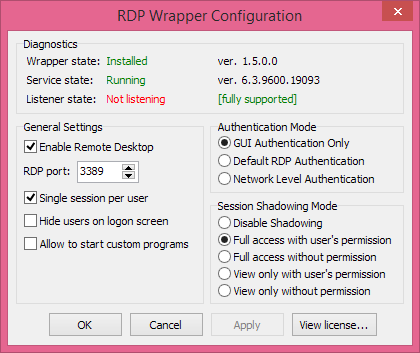
I added a section to the end of the file, but the program still writes to me Not Listen
 flaschenpost87
on 17 Sep 2018
flaschenpost87
on 17 Sep 2018
Windows 2012 R2 with same problem, if update the INI the listener state is Not Listening after reboot the service
 DakotaBcn
on 17 Sep 2018
DakotaBcn
on 17 Sep 2018
x64 and x86 offsets:
[6.3.9600.19093]
LocalOnlyPatch.x86=1
LocalOnlyOffset.x86=B3958
LocalOnlyCode.x86=jmpshort
LocalOnlyPatch.x64=1
LocalOnlyOffset.x64=8AE4E
LocalOnlyCode.x64=nopjmp
SingleUserPatch.x86=1
SingleUserOffset.x86=3F045
SingleUserCode.x86=nop
SingleUserPatch.x64=1
SingleUserOffset.x64=36BC9
SingleUserCode.x64=Zero
DefPolicyPatch.x86=1
DefPolicyOffset.x86=3D899
DefPolicyCode.x86=CDefPolicy_Query_eax_ecx
DefPolicyPatch.x64=1
DefPolicyOffset.x64=45305
DefPolicyCode.x64=CDefPolicy_Query_eax_rcx
SLInitHook.x86=1
SLInitOffset.x86=18288
SLInitFunc.x86=New_CSLQuery_Initialize
SLInitHook.x64=1
SLInitOffset.x64=5D660
SLInitFunc.x64=New_CSLQuery_Initialize
[6.3.9600.19093-SLInit]
bFUSEnabled.x86 =D3068
lMaxUserSessions.x86 =D306C
bAppServerAllowed.x86 =D3070
bInitialized.x86 =D3074
bMultimonAllowed.x86 =D3078
bServerSku.x86 =D307C
ulMaxDebugSessions.x86=D3080
bRemoteConnAllowed.x86=D3084
bFUSEnabled.x64 =FA054
lMaxUserSessions.x64 =FA058
bAppServerAllowed.x64 =FA05C
bInitialized.x64 =FA060
bMultimonAllowed.x64 =FA064
bServerSku.x64 =FA068
ulMaxDebugSessions.x64=FA06C
bRemoteConnAllowed.x64=FA070
 fre4kyC0de
on 18 Sep 2018
fre4kyC0de
on 18 Sep 2018
Thank you DakotaBcn. It's working now!
 rav76
on 19 Sep 2018
rav76
on 19 Sep 2018
Windows 8.1 The program still writes to me "Not Listening". What should I do?
flaschenpost87
on 19 Sep 2018
Hi
You Have to put code from fre4kyC0de (from line [6.3.9600.19093] to end) to "c:program filesRDP Wrapperrdpwrap.ini (at the end of file). Save, and restart termservice
net stop termservice,
net start termservice (with local login), or restart computer.
run RDPConf.exe to check.
rav76
on 19 Sep 2018
Hi
You Have to put code from fre4kyC0de (from line [6.3.9600.19093] to end) to "c:program filesRDP Wrapperrdpwrap.ini (at the end of file). Save, and restart termservice
net stop termservice,
net start termservice (with local login), or restart computer.
run RDPConf.exe to check.
I did it all and still get "Not Listening"
flaschenpost87
on 19 Sep 2018
Hi
You Have to put code from fre4kyC0de (from line [6.3.9600.19093] to end) to "c:program filesRDP Wrapperrdpwrap.ini (at the end of file). Save, and restart termservice
net stop termservice,
net start termservice (with local login), or restart computer.
run RDPConf.exe to check.I did it all and still get "Not Listening"
Try rebooting after modified the rdpwrap.ini? In my case I also need to reboot the computer to get it working, simply restart the termservice did not work for me.
royshum
on 19 Sep 2018
I try with Srv 2012 R2 (all updates) and it works ok.
Maybe You have to reboot...
rav76
on 19 Sep 2018
When I add fre4kyC0de [6.3.9600.19093] to end of INI, then reboot Termsservice stops working, = Not listening. Remote Desktop Service in Services not running.
tried - Uninstall wrapper, re Install, add 19093 line to INI again. Same problem.
Termservice will not run, Trying to Start/restart TS gives error.
 ericernie
on 19 Sep 2018
ericernie
on 19 Sep 2018
try to add fre4kyC0de post to my ini file ... reboot ... and all working on my 8.1x64 pro ... !
ivanmara555
on 19 Sep 2018
Hi, What ver. RDP Wrapper do you use?
I use 1.6.2, maybe you have old ver. 1.6.0?
rav76
on 19 Sep 2018
Hi, What ver. RDP Wrapper do you use?
I use 1.6.2, maybe you have old ver. 1.6.0?
I use 1.6.2, and i try to reboot. Not Listening((((
flaschenpost87
on 19 Sep 2018
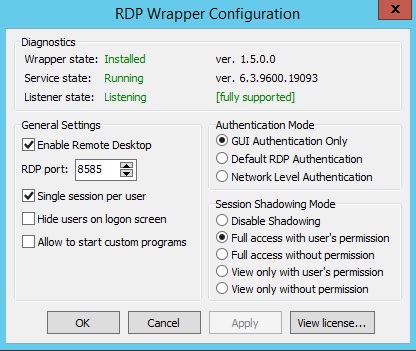
Standard port 3389?
I use 8585, not default.
Do you have win 8 pro?
Without Wrapper one remote connection work?
rav76
on 19 Sep 2018
Port 3389. I have windows 8.1 for one language. I do not have a Remote Desktop function.
flaschenpost87
on 19 Sep 2018
aplied and reboot server 2012 R2
Service terminal server not work
Insert code in INI, save, rdpconf show listening, but open rdpcheck and no work, service stopped
reboot server, no start service
event viewer show this message (sorry for spanish)
Nombre de la aplicación con errores: svchost.exe_TermService, versión: 6.3.9600.17415, marca de tiempo: 0x54504177
Nombre del módulo con errores: rdpwrap.dll, versión: 1.5.0.0, marca de tiempo: 0x5488aa5a
Código de excepción: 0xc0000005
Desplazamiento de errores: 0x0000000000002953
Identificador del proceso con errores: 0x19d0
Hora de inicio de la aplicación con errores: 0x01d4504d42b99629
Ruta de acceso de la aplicación con errores: C:WindowsSystem32svchost.exe
Ruta de acceso del módulo con errores: c:program filesrdp wrapperrdpwrap.dll
DakotaBcn
on 19 Sep 2018
ok, I attach my INI, win 2012 R2 Fundation, ver. 6.3.9600 Compilation 9600.
You can compare with your.
rdpwrap.zip
rav76
on 19 Sep 2018
Could you try this file?
Working fine here (Windows 8.1 Core x64 with all updates)
Please also check, if the file has been saved with
fre4kyC0de
on 20 Sep 2018
@rav76 thanks!!! your ini works with mi Win2012 👍
DakotaBcn
on 20 Sep 2018
Thanks fre4ky/ rav.
Pasting just 19093 section into existing INI just stopped T/Serv listening didnt work,
but
rdpwrap_master_justFinal.txt worked for me, Stop T/Service. Cut and Paste to overwrite INI,
It then needed a Reboot.
ericernie
on 24 Sep 2018
Could you try this file?
Working fine here (Windows 8.1 Core x64 with all updates)Please also check, if the file has been saved with line ending (e.g. using Notepad++; Line ending should be "Windows (CR + LF)"). If not, convert it to Windows format.
Thanks. It's work!
flaschenpost87
on 24 Sep 2018
@flaschenpost87, I tried replacing the contents of the INI file with your file (THANKS!!!) which seems to work:
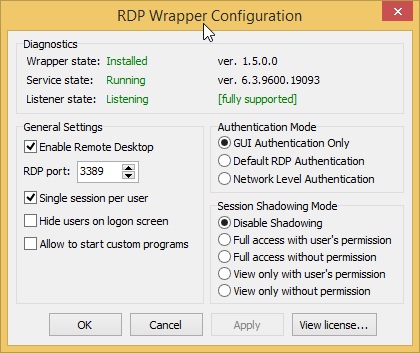
I rebooted but when I run RDPCheck, it still shows access denied. Please advise. Thanks!
 EliezerBee
on 26 Sep 2018
EliezerBee
on 26 Sep 2018
I rebooted but when I run RDPCheck, it still shows access denied. Please advise. Thanks!
Hi
Change:
Authentication Mode: Network Level Autentication
Session Shadowing: Full access with user's permition.
After reboot you have diagnostics green?
rav76
on 26 Sep 2018
@rav76, I tried making those changes but Authentication Mode seems to keep reverting back to GUI Authentication Only. Yes, everything is all green, as shown in my screenshot in my last post (less than an hour ago). When I try RDPCheck, it says my password is wrong (even though it's definitely not) instead of Access Denied like it was saying before...
EliezerBee
on 26 Sep 2018
@rav76, I tried making those changes but Authentication Mode seems to keep reverting back to GUI Authentication Only. Yes, everything is all green, as shown in my screenshot in my last post (less than an hour ago). When I try RDPCheck, it says my password is wrong (even though it's definitely not) instead of Access Denied like it was saying before...
rav76
on 26 Sep 2018
@EliezerBee, Do you have admin rights, when you're changing settings?
rav76
on 26 Sep 2018
My account is an admin and I believe I get the UAC when I open RDPConfig...
EliezerBee
on 26 Sep 2018
What system?
rav76
on 26 Sep 2018
8.1 Pro x64
EliezerBee
on 26 Sep 2018
Did you test without wrapper?
Try uninstall wrapper, check rdp connection.
Rename or delete rdp wrapper folder in program files. Install wrapper 1.62.
After that, update.cmd, after change file rdpwrap.ini from @fre4kyC0de or me.
Restart windows.
It should be work.
rav76
on 26 Sep 2018
When you wrote "check rdp connection" -
- Try uninstall wrapper, _check rdp connection_.
- Rename or delete rdp wrapper folder in program files. Install wrapper 1.62.
- After that, update.cmd, after change file rdpwrap.ini from @fre4kyC0de or me.
- Restart windows.
Do you mean try a regular RDP connection from another computer?
EliezerBee
on 26 Sep 2018
Yes, without rdp wrapper.
rav76
on 26 Sep 2018
Perfect - thank you! Apparently, remote connections were disabled somehow for the PC in Windows' "Remote Settings".
EliezerBee
on 27 Sep 2018
You are welcome :)
Always you have to go back to source :)
With regards
Rav
rav76
on 27 Sep 2018
Related issues
 cakexxx
·
6Comments
cakexxx
·
6Comments
 Trooper29
·
4Comments
Trooper29
·
4Comments
 mahmoodyali
·
4Comments
mahmoodyali
·
4Comments
 eduardolucioac
·
4Comments
eduardolucioac
·
4Comments
 papoluisjr
·
3Comments
papoluisjr
·
3Comments
Most helpful comment
Could you try this file?
Working fine here (Windows 8.1 Core x64 with all updates)
rdpwrap_master_justFinal.txt
Please also check, if the file has been saved with line ending (e.g. using Notepad++; Line ending should be "Windows (CR + LF)"). If not, convert it to Windows format.