Rdpwrap: Please add support for 10.0.14393.2457

Windows 10 1607 LTSB
August 30 cumulative update KB4346783
10.0.14393.2457
Became unsupported
 haba-haba
All 46 comments
Please, update as soon as possible ☹️
 khmelevskiy
on 1 Sep 2018
khmelevskiy
on 1 Sep 2018
@khmelevskiy I had to rollback that update in the meantime, you can do the same.
 xaduha
on 3 Sep 2018
xaduha
on 3 Sep 2018
@xaduha ver 1607 (14393.2457)
After the update was uninstalled, the computer began to reboot cyclically....
khmelevskiy
on 3 Sep 2018
Well, that sucks. Worked fine for me.
xaduha
on 4 Sep 2018
I save that update but restore old termsrv.dll.
It's work.
 alkila
on 5 Sep 2018
alkila
on 5 Sep 2018
I have the same problem. How can i restore the termsrv.dll library?
 Ivanovic000
on 5 Sep 2018
Ivanovic000
on 5 Sep 2018
Uninstall RDPWrap-v1.6.2
restart
rename new termsrv.dll 10.0.14393.2457 to termsrv0.dll or delete in windows/system32
mov old termsrv.dll 10_0_14393_1737 in windows/system32
Install RDPWrap-v1.6.2
restart
alkila
on 5 Sep 2018
Hi,, did anyone know why sharing printer is not working with wrapper or termsrv modified ?
 Bastien59960
on 5 Sep 2018
Bastien59960
on 5 Sep 2018
@alkila thanks for your help, but i can't do that because i've not the permissions. Anyway i fix the problem uninstalling the last windows 10 enterprise update (i don't remember the build).
Ivanovic000
on 6 Sep 2018
While waiting for the complete solution from the developer you may like to add these lines to your rdpwrap.ini (for x64 systems only):
[10.0.14393.2457]
LocalOnlyPatch.x64=1
LocalOnlyOffset.x64=8D781
LocalOnlyCode.x64=jmpshort
SingleUserPatch.x64=1
SingleUserOffset.x64=2A3D4
SingleUserCode.x64=Zero
DefPolicyPatch.x64=1
DefPolicyOffset.x64=1B545
DefPolicyCode.x64=CDefPolicy_Query_eax_rcx
SLInitHook.x64=1
SLInitOffset.x64=C920
SLInitFunc.x64=New_CSLQuery_Initialize


[10.0.14393.2457-SLInit]
bServerSku.x64        =E73D0
lMaxUserSessions.x64  =E73D4
bAppServerAllowed.x64 =E73D8
bInitialized.x64      =E8470
bRemoteConnAllowed.x64=E8474
bMultimonAllowed.x64  =E8478
ulMaxDebugSessions.x64=E847C
bFUSEnabled.x64       =E8480
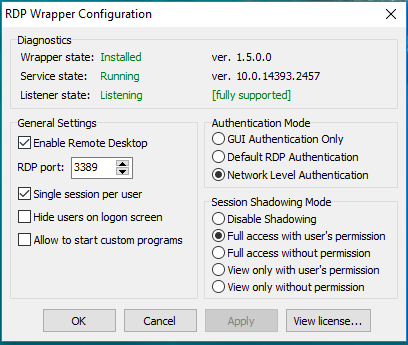
 zzelalex
on 10 Sep 2018
zzelalex
on 10 Sep 2018
While waiting for the complete solution from the developer you may like to add these lines to your rdpwrap.ini (for x64 systems only):
[10.0.14393.2457]
LocalOnlyPatch.x64=1
LocalOnlyOffset.x64=8D781
LocalOnlyCode.x64=jmpshort
SingleUserPatch.x64=1
SingleUserOffset.x64=2A3D4
SingleUserCode.x64=Zero
DefPolicyPatch.x64=1
DefPolicyOffset.x64=1B545
DefPolicyCode.x64=CDefPolicy_Query_eax_rcx
SLInitHook.x64=1
SLInitOffset.x64=C920
SLInitFunc.x64=New_CSLQuery_Initialize


[10.0.14393.2457-SLInit]
bServerSku.x64        =E73D0
lMaxUserSessions.x64  =E73D4
bAppServerAllowed.x64 =E73D8
bInitialized.x64      =E8470
bRemoteConnAllowed.x64=E8474
bMultimonAllowed.x64  =E8478
ulMaxDebugSessions.x64=E847C
bFUSEnabled.x64       =E8480
We try these settings - but RDP service does not start after. Any idea?
 artsonit
on 14 Sep 2018
artsonit
on 14 Sep 2018
We try these settings - but RDP service does not start after. Any idea?
Have no idea, there may be different reasons.
The simplest way is:
- Download RDPWrap-v1.6.2.zip from the "releases" section and unpack it somewhere.
- Download my rdpwrap.ini from the attachment to this post and unpack it to the same folder. RDPWInst.exe and rdpwrap.ini must be in the same folder.
- Run a cmd session with the admin rights and cd to the folder with RDPWrap unpacked.
- Run uninstall.bat.
- Run RDPWInst.exe -i
zzelalex
on 14 Sep 2018
I too got installation message as :
....
[*] Terminal Services version: 10.0.17134.1
[-] This version of Terminal Services is not supported.
....
But actually, above version of TS is indeed supported. I tested and found working for other (non 3389) ports as well. Just wanted to confirm that.
Thanks!
-Gamma
 gamma-577
on 15 Sep 2018
gamma-577
on 15 Sep 2018
I too got installation message as :
....
[*] Terminal Services version: 10.0.17134.1
Don't you see any difference between 17134 and 14393 numbers?
zzelalex
on 15 Sep 2018
I too got installation message as :
....
[*] Terminal Services version: 10.0.17134.1Don't you see any difference between 17134 and 14393 numbers?
I don't know anything about ver 14393.
Thanks!
gamma-577
on 17 Sep 2018
I too got the installation message:
[*] Terminal Services version: 10.0.14393.2457
[-] This version of Terminal Services is not supported.
After replacing the ini-file by the one provided by zzelalex RDPConfig says it is fully supported:
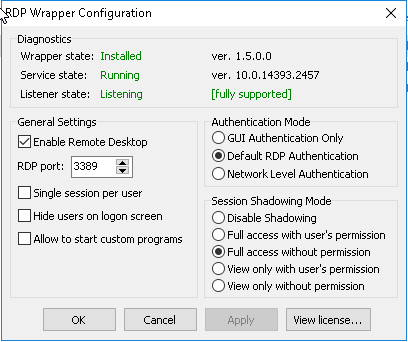
After installing the RDP Wrapper I restarted the system.
Now it is possible to open multiple RDP sessions. But I could not open multiple concurrent sessions. When I do TermService crashes and only the console session stays open.
On another system I can open multiple concurrent sessions, but when I log off from a rdp session TermService crashes. Agian the console session is not affected.
EventViewer tells me not only TermService did crash, but also Cryptographic Services, DNS Client, Workstation, Network Location Awareness and Windows Remote Management terminated unexpectedly.
There is also an Application Error 1000:
_Faulting application name: svchost.exe_TermService, version: 10.0.14393.0, time stamp: 0x57899b1c
Faulting module name: termsrv.dll, version: 10.0.14393.2457, time stamp: 0x5b7e2c17
Exception code: 0xc0000005
Fault offset: 0x000000000002a3af
Faulting process id: 0x3dc
Faulting application start time: 0x01d44fed705ac4f5
Faulting application path: C:\Windows\System32\svchost.exe
Faulting module path: C:\Windows\System32\termsrv.dll
Report Id: e45daa6b-df45-417d-9834-a92c957d32d9
Faulting package full name:
Faulting package-relative application ID:
Am I doing something wrong or is there still an issue whith RDPWrapper 1.6.2 with rdpwrap.ini provided by zzelalex?
 Hubert-Jan
on 19 Sep 2018
Hubert-Jan
on 19 Sep 2018
Any news from developer?
 scerazy
on 19 Sep 2018
scerazy
on 19 Sep 2018
Will create offsets for all 09/2018 patches soon. Work is in progress
 fre4kyC0de
on 20 Sep 2018
fre4kyC0de
on 20 Sep 2018
Good, because at the moment if I do:
stop service remotely/copy ini/start service remotely
it just does not work without reboot (which is less than ideal) - Listener State is RED Not listening
Formatting is wrongly displayed below, it of course is double \ in front of machine name!
psservice \machine_that_was_updated stop UmRdpService
psservice \machine_that_was_updated stop TermService
copy c:\Utilities\wrapper\install\rdpwrap.ini "\machine_that_was_updated\C$\Program Files\RDP Wrapper\rdpwrap.ini"
psservice \machine_that_was_updated start TermService
scerazy
on 20 Sep 2018
Hello,
I'm in version 10.0.14393.2457 and the patch provided by zzlelalex work for me, all the checks by the application are in green.
But from then, termservice service crashes aleatory and I have to wait the service to restart (60000 seconds)
Anyone faced the same problem?
Thanks
 noubit
on 21 Sep 2018
noubit
on 21 Sep 2018
Hi,
I'm having the same behavior as noubit using version 10.0.14393.2457 with the new offsets. The service works fine for some hours, but then it becomes unstable. The RDP service stops without any apparent reason.
Has anyone found a solution to this issue?
Thanks
 miltonreg
on 23 Sep 2018
miltonreg
on 23 Sep 2018
Final offsets for 10.0.14393.2457 (all 2018-09 updates now supported).
For more offsets, take a look at https://github.com/fre4kyC0de/rdpwrap
[10.0.14393.2457]
LocalOnlyPatch.x86=1
LocalOnlyOffset.x86=A6248
LocalOnlyCode.x86=jmpshort
LocalOnlyPatch.x64=1
LocalOnlyOffset.x64=8D781
LocalOnlyCode.x64=jmpshort
SingleUserPatch.x86=1
SingleUserOffset.x86=36CE5
SingleUserCode.x86=nop
SingleUserPatch.x64=1
SingleUserOffset.x64=2A3D4
SingleUserCode.x64=Zero
DefPolicyPatch.x86=1
DefPolicyOffset.x86=31209
DefPolicyCode.x86=CDefPolicy_Query_eax_ecx
DefPolicyPatch.x64=1
DefPolicyOffset.x64=1B545
DefPolicyCode.x64=CDefPolicy_Query_eax_rcx
SLInitHook.x86=1
SLInitOffset.x86=45824
SLInitFunc.x86=New_CSLQuery_Initialize
SLInitHook.x64=1
SLInitOffset.x64=C920
SLInitFunc.x64=New_CSLQuery_Initialize

[10.0.14393.2457-SLInit]
bInitialized.x86      =C1F94
bServerSku.x86        =C1F98
lMaxUserSessions.x86  =C1F9C
bAppServerAllowed.x86 =C1FA0
bRemoteConnAllowed.x86=C1FA4
bMultimonAllowed.x86  =C1FA8
ulMaxDebugSessions.x86=C1FAC
bFUSEnabled.x86       =C1FB0

bServerSku.x64        =E73D0
lMaxUserSessions.x64  =E73D4
bAppServerAllowed.x64 =E73D8
bInitialized.x64      =E8470
bRemoteConnAllowed.x64=E8474
bMultimonAllowed.x64  =E8478
ulMaxDebugSessions.x64=E847C
bFUSEnabled.x64       =E8480
With these offsets I have a little less problems, but still 2 major issues on system running Win10IoT:
- only one sessions per user possible;
- Remote Desktop Services (and other services) crash when trying to logon as a user who is already logged on.
From: NULL notifications@github.com
Sent: maandag 24 september 2018 0:38
To: stascorp/rdpwrap rdpwrap@noreply.github.com
Cc: Huub van Doormaal Huub.vanDoormaal@kse.nl; Comment comment@noreply.github.com
Subject: Re: [stascorp/rdpwrap] Please add support for 10.0.14393.2457 (#542)
Final offsets for 10.0.14393.2457 (all 2018-09 updates now supported).
For more offsets, take a look at https://github.com/fre4kyC0de/rdpwrap
[10.0.14393.2457]
LocalOnlyPatch.x86=1
LocalOnlyOffset.x86=A6248
LocalOnlyCode.x86=jmpshort
LocalOnlyPatch.x64=1
LocalOnlyOffset.x64=8D781
LocalOnlyCode.x64=jmpshort
SingleUserPatch.x86=1
SingleUserOffset.x86=36CE5
SingleUserCode.x86=nop
SingleUserPatch.x64=1
SingleUserOffset.x64=2A3D4
SingleUserCode.x64=Zero
DefPolicyPatch.x86=1
DefPolicyOffset.x86=31209
DefPolicyCode.x86=CDefPolicy_Query_eax_ecx
DefPolicyPatch.x64=1
DefPolicyOffset.x64=1B545
DefPolicyCode.x64=CDefPolicy_Query_eax_rcx
SLInitHook.x86=1
SLInitOffset.x86=45824
SLInitFunc.x86=New_CSLQuery_Initialize
SLInitHook.x64=1
SLInitOffset.x64=C920
SLInitFunc.x64=New_CSLQuery_Initialize
[10.0.14393.2457-SLInit]
bInitialized.x86 =C1F94
bServerSku.x86 =C1F98
lMaxUserSessions.x86 =C1F9C
bAppServerAllowed.x86 =C1FA0
bRemoteConnAllowed.x86=C1FA4
bMultimonAllowed.x86 =C1FA8
ulMaxDebugSessions.x86=C1FAC
bFUSEnabled.x86 =C1FB0
bServerSku.x64 =E73D0
lMaxUserSessions.x64 =E73D4
bAppServerAllowed.x64 =E73D8
bInitialized.x64 =E8470
bRemoteConnAllowed.x64=E8474
bMultimonAllowed.x64 =E8478
ulMaxDebugSessions.x64=E847C
bFUSEnabled.x64 =E8480
—
You are receiving this because you commented.
Reply to this email directly, view it on GitHubhttps://github.com/stascorp/rdpwrap/issues/542#issuecomment-423853292, or mute the threadhttps://github.com/notifications/unsubscribe-auth/ApZGjfPlGS_EjT3NtRnf6qLp8GdeqyVFks5ueA1WgaJpZM4WVAdA.
Hubert-Jan
on 24 Sep 2018
Hi,
I'm using the latest offsets for 10.0.14393.2457 published by fre4kyC0de, but RDP Services are still crashing unexpectedly when a session is disconnected or terminated. Any idea?
Thanks.
miltonreg
on 25 Sep 2018
Same here, Cryptographic Services, DNS Client, Workstation, Network Location Awareness and Windows Remote Management terminated unexpectedly randomly on some machines
Only reboot brings it all back, but hardly a "solution" for remote machine one was just trying to access!
Sadly not a reliable solution!
Had to remove it all together as I was getting too much grief from unhappy users (I would also be unhappy)
scerazy
on 25 Sep 2018
Сделал все как описано. Но безрезультатно. termsrv.dll на старую не менял.
Очень жду решения!
Did everything as described. But to no avail. termsrv.dll on the old did not change.
Very much I wait for the decision!
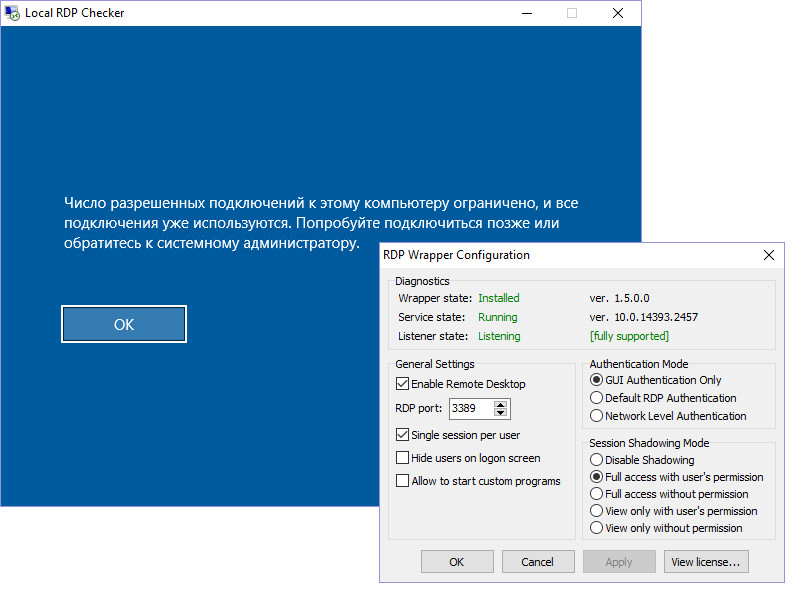
 g0105
on 25 Sep 2018
g0105
on 25 Sep 2018
Anybody having any more ideas?
scerazy
on 27 Sep 2018
I just have a temporary workaround, until find a real solution. I used WSUS to reject this September's update for my TS running on Windows 2016... Otherwise, the server will continue downloading and installing it automatically.
miltonreg
on 28 Sep 2018
I have the same issues.
Replaced the new termsrv.dll with the old one v. 14393_1737.
Everything is fine as for now.
Waiting for RS5....
zzelalex
on 28 Sep 2018
How to replace the old one in the working Windows without rebooting into safe mode?
g0105
on 28 Sep 2018
How to replace the old one in the working Windows without rebooting into safe mode?
- Uninstall rdpwrap (uninstall.bat).
- Stop the service (net stop termservice).
- Take ownership over c:\windows\system32\termsrv.dll (TakeOwnershipEx or manually).
- Renave c:\windows\system32\termsrv.dll to something else, like termsrv_2457.dll
- Copy the old termsrv.dll to the c:\windows\system32\ folder.
- Restore the ownership of c:\windows\system32\termsrv.dll (it is the new file already).
- Start the service (net start termservice).
- Install rdpwrap (install.bat)
Not a complicated task but the physical presence is necessary, you cannot do it via RDP.
zzelalex
on 28 Sep 2018
Not a complicated task but the physical presence is necessary, you cannot do it via RDP.
Thank you! It is possible and not physically. I can do it on TeamViewer or VNC ....
g0105
on 28 Sep 2018
TeamViewer or VNC ....
... or Radmin, etc.
If you know this my advice is not necessary, I assume.
zzelalex
on 28 Sep 2018
Where we can found old versions of termsrv.dll for example this version Windows 7 - 6.1.7601.22104? Thank you
 fixxitarc
on 28 Sep 2018
fixxitarc
on 28 Sep 2018
TeamViewer or VNC ....
... or Radmin, etc.
If you know this my advice is not necessary, I assume.
No, no, I did not mean to offend. Wonderful description, and I have it all happened. I also wrote about this program TakeOvnersnipEx. Thank you!
g0105
on 28 Sep 2018
Well, 1737 was working reliably, reverting back to it, is the only real solution for now
On clients with SCCM client installed easiest is via package/program:
echo off
net stop UmRdpService
net stop termservice
takeown /f c:\windows\sysnative\termsrv.dll
icacls c:\windows\sysnative\termsrv.dll /grant *S-1-5-18:F /t
pushd c:\windows\sysnative
ren termsrv.dll termsrv_2457.dll
popd
copy termsrv_1737.dll c:\windows\sysnative\termsrv.dll
icacls c:\windows\sysnative\termsrv.dll /setowner "NT SERVICE\TrustedInstaller"
copy /y %~dp0rdpwrap.ini "c:\Program Files\RDP Wrapper"
scerazy
on 29 Sep 2018
Can anyone share with termsrv.dll v14393,1737 for 32-bit?
 the0day
on 30 Sep 2018
the0day
on 30 Sep 2018
Download .msu & extract it from there?
scerazy
on 2 Oct 2018
Hi,
I confirm the malfunction.
When I log out these services are stopped: Cryptographic Services, DNS Client, Remote Desktop Services.
It does not happen every time but periodically.
 Zaebumba
on 3 Oct 2018
Zaebumba
on 3 Oct 2018
@fre4kyC0de could you please also provide link to 10.0.14393.2457 x86 build?
 binarymaster
on 4 Oct 2018
binarymaster
on 4 Oct 2018
How can we close something that CLEARLY does NOT work?
scerazy
on 4 Oct 2018
How can we close something that CLEARLY does NOT work?
I know what I'm doing. So you CLEARLY doing something WRONG.
binarymaster
on 4 Oct 2018
Do you mean the RDPWrapper should work correctly with the latest ini file?
I am only one out of several people who did not get RDPWrapper with the latest ini file working correctly on Windows 10.0.14393.2457. (Replacing termsvr.dll by a old one is not a real solution.)
If we all are doing something wrong, I (we) would like to know what.
Hubert-Jan
on 4 Oct 2018
Do you mean the RDPWrapper should work correctly with the latest ini file?
Yes. Update procedure is described in README.
binarymaster
on 4 Oct 2018
I have used the latest INI file you have posted today\yestserday. That is working properly on m Windows 10.0.14393.2457 even with Windows security update KB4457127.
If I am correct you have removed the offsets for x86? Then this INI file would not work for everybody.
But for me it works. Thank you very much!
Hubert-Jan
on 4 Oct 2018
@fre4kyC0de could you please also provide link to 10.0.14393.2457 x86 build?
Nvm, I've got it from Cab_5_for_KB4343884.cab.
binarymaster
on 5 Oct 2018
Related issues
 cH40z32
·
4Comments
cH40z32
·
4Comments
 mascarasnake66
·
4Comments
mascarasnake66
·
4Comments
 papoluisjr
·
3Comments
papoluisjr
·
3Comments
 jifernandezc
·
5Comments
jifernandezc
·
5Comments
 cakexxx
·
6Comments
cakexxx
·
6Comments
Most helpful comment
Uninstall RDPWrap-v1.6.2
restart
rename new termsrv.dll 10.0.14393.2457 to termsrv0.dll or delete in windows/system32
mov old termsrv.dll 10_0_14393_1737 in windows/system32
Install RDPWrap-v1.6.2
restart
termsrv_10_0_14393_1737.zip