Rdpwrap: Add support for 10.0.15063.1155
Hello!
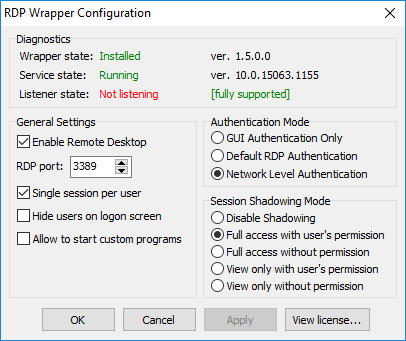
When windows update to 10.0.15063.1155. rdpwrap stopped working.
I found termsrv.dll only in C:\Windows\System32
 Yurii84
All 21 comments
Hi,
I am having the same issue with the new version.
Any news?
 matheuscanela
on 18 Jun 2018
matheuscanela
on 18 Jun 2018
For me, a temporary solution it's delete kb4284874 to downgrade windows 10 pro
 vvburkovsky
on 18 Jun 2018
vvburkovsky
on 18 Jun 2018
Yep, I have done that too
matheuscanela
on 18 Jun 2018
Same issue here. Hoping for a "rdpwrap.ini" update soon.
 zimmerma379
on 25 Jun 2018
zimmerma379
on 25 Jun 2018
Try duplicating an entry in the INI file from 10.0.15063.296 to 10.0.15063.1155 (run RDPWInst -r right after that), and check out whether it works for you.
 binarymaster
on 25 Jun 2018
binarymaster
on 25 Jun 2018
Try duplicating an entry in the INI file from 10.0.15063.296 to 10.0.15063.1155 (run RDPWInst -r right after that), and check out whether it works for you.
zimmerma379
on 25 Jun 2018
Try duplicating an entry in the INI file from 10.0.15063.296 to 10.0.15063.1155 (run RDPWInst -r right after that), and check out whether it works for you.
I try this to, it no working for me
Yurii84
on 26 Jun 2018
Try duplicating an entry in the INI file from 10.0.15063.296 to 10.0.15063.1155 (run RDPWInst -r right after that), and check out whether it works for you.
Same here, no luck.
 Kbotz
on 29 Jun 2018
Kbotz
on 29 Jun 2018
Try duplicating an entry in the INI file from 10.0.15063.296 to 10.0.15063.1155 (run RDPWInst -r right after that), and check out whether it works for you.
Same here. I've duplicated the two sections (with and without -SLInit), the restart is fine, the RDPConf shows only green text, but only one connected user at a time is supported.
 Glandos
on 29 Jun 2018
Glandos
on 29 Jun 2018
I'm not sure, if RDP Wrapper will work with Win10 1803 (64 Bit, Pro).
Could somebody clarify this, please?
Has to be anything changed on a now running RDP Wrapper configuration under 1703 before/after update to 1803?
 guebert
on 11 Jul 2018
guebert
on 11 Jul 2018
It worked smooth(ish) on 1803. Once downloaded, install.bat worked as administrator. Then the next step was RDPCheck which didn't work as expected. Then RDPConf ran and showed installed/running/listening.
It was a fresh install and was tested to confirm concurrent users.
Service ver: 10.0.17134.1
OS Build: 17134.165
Thanks for your work!
 BashedCode
on 17 Jul 2018
BashedCode
on 17 Jul 2018
My way to solve this problem is uninstall the windows update (KB4338826),
after success uninstall KB4338826 the Service ver turn to be like this
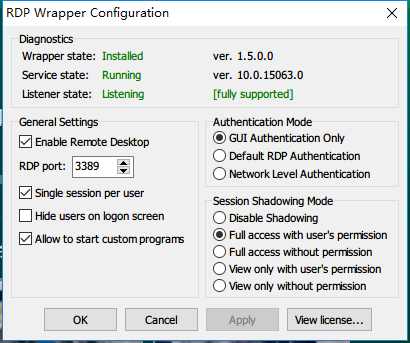
and it successful support and listen ok
 WoolenWang
on 29 Jul 2018
WoolenWang
on 29 Jul 2018
I'm still seeing this issue. Windows 10 1607 and 1709 appear to be fine. 1703 however is still showing as not a supported version of terminal services.
 MrRobot5000
on 14 Aug 2018
MrRobot5000
on 14 Aug 2018
Any news? Seems like plenty of people are affected, and uninstalling updates is a sub-optimal solution.
 CookiePLMonster
on 3 Sep 2018
CookiePLMonster
on 3 Sep 2018
@CookiePLMonster the project is open source and anybody is welcome to contribute. I'm busy with other projects right now.
binarymaster
on 3 Sep 2018
Looking at the INI file, are x64-only submissions even accepted? If not, how one would get into obtaining this specific DLL file in x86 version from that specific build?
CookiePLMonster
on 3 Sep 2018
are x64-only submissions even accepted
Yes, but it would be more preferable to add both.
how one would get into obtaining this specific DLL file in x86 version from that specific build?
Either you have some x86 machines with Windows 10 installed, or search in the Internet (sometimes I use WZor's UUP archives).
binarymaster
on 3 Sep 2018
x64 offsets (no x86 version):
[10.0.15063.1155]
; no x86 version
LocalOnlyPatch.x64=1
LocalOnlyOffset.x64=8CB01
LocalOnlyCode.x64=jmpshort
SingleUserPatch.x64=1
SingleUserOffset.x64=15EA4
SingleUserCode.x64=Zero
DefPolicyPatch.x64=1
DefPolicyOffset.x64=FAE5
DefPolicyCode.x64=CDefPolicy_Query_eax_rcx
SLInitHook.x64=1
SLInitOffset.x64=234DC
SLInitFunc.x64=New_CSLQuery_Initialize
[10.0.15063.1155-SLInit]
; no x86 version
bInitialized.x64 =E9468
bRemoteConnAllowed.x64=E946C
bMultimonAllowed.x64 =E9470
ulMaxDebugSessions.x64=E9474
bFUSEnabled.x64 =E9478
bServerSku.x64 =E9484
lMaxUserSessions.x64 =E9488
bAppServerAllowed.x64 =E948C
 fre4kyC0de
on 18 Sep 2018
fre4kyC0de
on 18 Sep 2018
Thanks! Works like a charm!
 phrsn
on 18 Sep 2018
phrsn
on 18 Sep 2018
Thanks! It appears to be working!
MrRobot5000
on 18 Sep 2018
corrected one typo
fre4kyC0de
on 19 Sep 2018
Related issues
 sk-lau
·
4Comments
sk-lau
·
4Comments
 cakexxx
·
6Comments
cakexxx
·
6Comments
 jifernandezc
·
5Comments
jifernandezc
·
5Comments
 dagwieers
·
4Comments
dagwieers
·
4Comments
 mahmoodyali
·
4Comments
mahmoodyali
·
4Comments
Most helpful comment
x64 offsets (no x86 version):
[10.0.15063.1155]
; no x86 version
LocalOnlyPatch.x64=1
LocalOnlyOffset.x64=8CB01
LocalOnlyCode.x64=jmpshort
SingleUserPatch.x64=1
SingleUserOffset.x64=15EA4
SingleUserCode.x64=Zero
DefPolicyPatch.x64=1
DefPolicyOffset.x64=FAE5
DefPolicyCode.x64=CDefPolicy_Query_eax_rcx
SLInitHook.x64=1
SLInitOffset.x64=234DC
SLInitFunc.x64=New_CSLQuery_Initialize
[10.0.15063.1155-SLInit]
; no x86 version
bInitialized.x64 =E9468
bRemoteConnAllowed.x64=E946C
bMultimonAllowed.x64 =E9470
ulMaxDebugSessions.x64=E9474
bFUSEnabled.x64 =E9478
bServerSku.x64 =E9484
lMaxUserSessions.x64 =E9488
bAppServerAllowed.x64 =E948C