Rdkit: Lines in wedge bonds being drawn too closely together
Configuration:
- RDKit Version: 2020.03.1 vs 2018.09.1
- Operating system: Windows 10
- Python version (if relevant): 3.6.5
- Are you using conda? yes
- If you are using conda, which channel did you install the rdkit from? rdkit
Description:
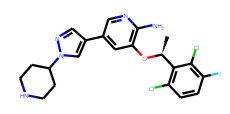
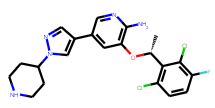
When the drawing code below is executed with the 2020.03.1 version, the down wedged stereobond is rendered as what appears to be a solid "up" wedge. This is much cleaner when rendered in the 2018.09.1 rdkit version.
If you change the image size to 500x500, it renders correctly in 2020.03.1. As a result it appears that the dashes overlap at smaller resolutions to the point where the space between them disappears completely. I recommend reverting the rendering of the wedges to the 2018 style as structures drawn with the current code convey wrong information to the viewer.
import rdkit
from rdkit import Chem
from rdkit.Chem.Draw import rdMolDraw2D
from IPython.display import SVG
print( rdkit.__version__ )
mol = Chem.MolFromSmiles('C[C@H](C1=C(C=CC(=C1Cl)F)Cl)OC2=C(N=CC(=C2)C3=CN(N=C3)C4CCNCC4)N')
mol = rdMolDraw2D.PrepareMolForDrawing(mol, kekulize=True)
drawer = rdMolDraw2D.MolDraw2DSVG(200, 200)
opts = drawer.drawOptions()
drawer.DrawMolecule(mol)
drawer.FinishDrawing()
svg = drawer.GetDrawingText()
display(SVG(svg.replace('svg:','')))
2020.03.1 output:
2018.09.1 output:
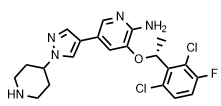
For reference, here is ChemDraw's rendering of that same wedge bond:
 paconius
All 2 comments
@paconius there are two things going on here:
1) the logic to detect whether or not the number of dashes should be reduced in a "small" drawing is using the wrong units.
2) the default number of dashes is too big anyway
It's a simple fix.
With the fix I'm working on, here are renderings of your molecule on a larger canvas:
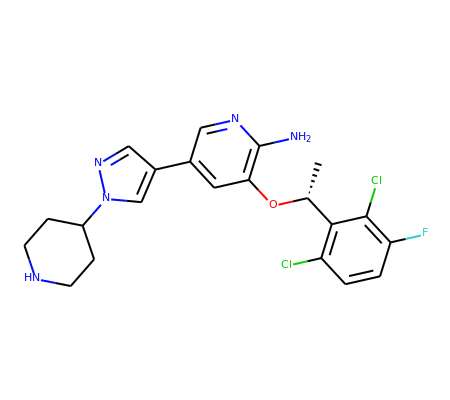
and on a small one:
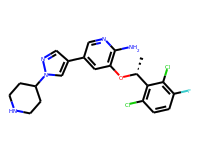
And, yes, the font size is too small in that second one, but that's a different problem
 greglandrum
on 11 Jun 2020
greglandrum
on 11 Jun 2020
Don’t worry about the font size, unless you consider it a bug. It’s all
changed in the new code that is “coming”. I need to put a minimum font size
in that as well, I guess.
Dave
 DavidACosgrove
on 11 Jun 2020
DavidACosgrove
on 11 Jun 2020
Related issues
 lpenguin
·
5Comments
lpenguin
·
5Comments
 ErikCVik
·
5Comments
paconius
·
4Comments
ErikCVik
·
5Comments
paconius
·
4Comments
 asmunder
·
3Comments
asmunder
·
3Comments
 mrcblt
·
5Comments
mrcblt
·
5Comments