Ray: TypeError: can't pickle _thread.lock objects
What is the problem?
Ray version : 1.0.0
OS *: windows 10 (64 bits)
*Python version: 3.7.2
Reproduction (REQUIRED)
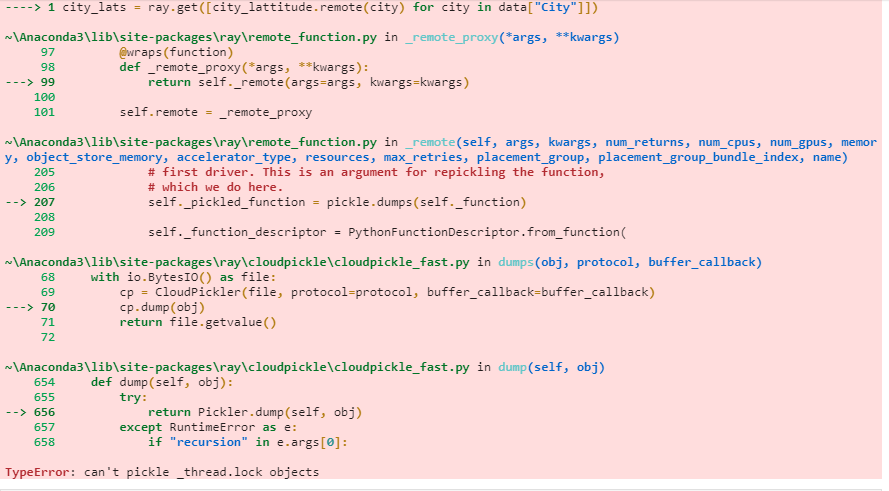
Getting TypeError: can't pickle _thread.lock objects while using the remote functions in data preprocessing steps.
Example:
@ray.remote
def city_lattitude(cityname):
    location = geocode(cityname)
    location_lat = float(location.raw["lat"])
    return location_lat

city_lats = ray.get([city_lattitude.remote(city) for city in data["City"]])
If we cannot run your script, we cannot fix your issue.
- [ yes] I have verified my script runs in a clean environment and reproduces the issue.
- [ yes] I have verified the issue also occurs with the latest wheels.
 amitmeel
All 6 comments
that's a classic error :)
@amitmeel I _believe_ it's because the geocode can't be serialized. Can you send the source code of your geocode function (or the library it's from)?
 sumanthratna
on 2 Oct 2020
sumanthratna
on 2 Oct 2020
Try pickling location = geocode(cityname) using cloudpickle & pickle 5, and see if you can serialize them. You might need to write your own custom serialization logic for the class otherwise. You can achieve it by writing a magic method __reduce__ (https://www.synopsys.com/blogs/software-security/python-pickling/#:~:text=Whenever%20an%20object%20is%20pickled,reconstruct%20this%20object%20when%20unpickling.)
 rkooo567
on 3 Oct 2020
rkooo567
on 3 Oct 2020
that's a classic error :)
@amitmeel I _believe_ it's because the
geocodecan't be serialized. Can you send the source code of yourgeocodefunction (or the library it's from)?
Library name is Geopy.
from geopy.geocoders import Nominatim
from functools import partial

geolocator = Nominatim(user_agent="Geocoder") # create the locator
geocode = partial(geolocator.geocode, language="es")

def city_lattitude(cityname):
    location = geocode(cityname)
    location_lat = float(location.raw["lat"])
    return location_lat
Try pickling
location = geocode(cityname)using cloudpickle & pickle 5, and see if you can serialize them. You might need to write your own custom serialization logic for the class otherwise.
@rkooo567 we can pickle it using the cloudpickle.
amitmeel
on 3 Oct 2020
Can you give me the working reproduction script including what dependencies I should download? Let me try to find workaround for you!
rkooo567
on 6 Oct 2020
Can you give me the working reproduction script including what dependencies I should download? Let me try to find workaround for you!
@rkooo567 you need to download the geopy package to get the longitude and latitude. make a csv with two columns ["City","CityArea"]. in the city put the city names of india and in cityarea put any area name of city.
from geopy.geocoders import Nominatim
from functools import partial

geolocator = Nominatim(user_agent="Geocoder") # create the locator
geocode = partial(geolocator.geocode, language="es")

@ray.remote
def city_lattitude(cityname):
    location = geocode(cityname)
    location_lat = float(location.raw["lat"])
    return location_lat

city_lats = ray.get([city_lattitude.remote(city) for city in data["City"]])
please use the above script to get the same issue. in case of anything else needed, lets connect on Slack (already joined the ray slack channel.)
amitmeel
on 7 Oct 2020
Related issues
 WangYiPengPeter
·
3Comments
WangYiPengPeter
·
3Comments
 robertnishihara
·
3Comments
robertnishihara
·
3Comments
 Khalilsqu
·
3Comments
robertnishihara
·
3Comments
Khalilsqu
·
3Comments
robertnishihara
·
3Comments
 0luhancheng0
·
3Comments
0luhancheng0
·
3Comments