Ray: Local cluster YAML no longer working in 0.9.0.dev0
What is the problem?
With my previous version of Ray (0.7.7), I had a cluster.yaml file that worked well, but it has since stopped working since I upgraded to 0.9.0.dev0 to include a recent tune bug fix for PAUSED trials. When I run a test script after running ray up cluster.yaml, only the head node is visible and I’m getting this warning:
2020-03-16 19:48:44,344 WARNING worker.py:802 -- When connecting to an existing cluster, _internal_config must match the cluster's _internal_config.
I know that there is a firewall between my machines, so I had to open specific ports and force Ray to use them in my cluster YAML file previously, so maybe there were some new port changes that are blocking communication?
Ray version and other system information (Python version, TensorFlow version, OS):
Ray: 0.9.0.dev0
OS: Centos 7
Reproduction (REQUIRED)
Please provide a script that can be run to reproduce the issue. The script should have no external library dependencies (i.e., use fake or mock data / environments):
My cluster.yaml is:
```# An unique identifier for the head node and workers of this cluster.
cluster_name: asedler_nesu
NOTE: Typically for local clusters, min_workers == initial_workers == max_workers.
The minimum number of workers nodes to launch in addition to the head
node. This number should be >= 0.
Typically, min_workers == initial_workers == max_workers.
min_workers: 1
The initial number of worker nodes to launch in addition to the head node.
Typically, min_workers == initial_workers == max_workers.
initial_workers: 1
The maximum number of workers nodes to launch in addition to the head node.
This takes precedence over min_workers.
Typically, min_workers == initial_workers == max_workers.
max_workers: 1
Autoscaling parameters.
Ignore this if min_workers == initial_workers == max_workers.
autoscaling_mode: default
target_utilization_fraction: 0.8
idle_timeout_minutes: 5
This executes all commands on all nodes in the docker container,
and opens all the necessary ports to support the Ray cluster.
Empty string means disabled. Assumes Docker is installed.
docker:
image: "" # e.g., tensorflow/tensorflow:1.5.0-py3
container_name: "" # e.g. ray_docker
# If true, pulls latest version of image. Otherwise, docker run will only pull the image
# if no cached version is present.
pull_before_run: True
run_options: [] # Extra options to pass into "docker run"
Local specific configuration.
provider:
type: local
head_ip: neuron.bme.emory.edu
worker_ips:
- sulcus.bme.emory.edu
How Ray will authenticate with newly launched nodes.
auth:
ssh_user: asedler
ssh_private_key: ~/.ssh/id_rsa
Leave this empty.
head_node: {}
Leave this empty.
worker_nodes: {}
Files or directories to copy to the head and worker nodes. The format is a
dictionary from REMOTE_PATH: LOCAL_PATH, e.g.
file_mounts: {
"/path1/on/remote/machine": "/path1/on/local/machine",
"/path2/on/remote/machine": "/path2/on/local/machine",
}
List of commands that will be run before setup_commands. If docker is
enabled, these commands will run outside the container and before docker
is setup.
initialization_commands: []
List of shell commands to run to set up each nodes.
setup_commands: []
Custom commands that will be run on the head node after common setup.
head_setup_commands: []
Custom commands that will be run on worker nodes after common setup.
worker_setup_commands: []
NOTE: Modified the following commands to use the tf2-gpu environment
and to use specific ports that have been opened for this purpose
by Andrew Sedler ([email protected])
Command to start ray on the head node. You don't need to change this.
head_start_ray_commands:
- conda activate tf2-gpu && ray stop
- conda activate tf2-gpu && ulimit -c unlimited && ray start --head --redis-port=6379 --redis-shard-ports=59519 --node-manager-port=19580 --object-manager-port=39066 --autoscaling-config=~/ray_bootstrap_config.yaml
Command to start ray on worker nodes. You don't need to change this.
worker_start_ray_commands:
- conda activate tf2-gpu && ray stop
- conda activate tf2-gpu && ray start --redis-address=$RAY_HEAD_IP:6379 --node-manager-port=19580 --object-manager-port=39066
The test script is:
```import ray
ray.init(address="localhost:6379")
import time
from pprint import pprint
@ray.remote
def f():
    time.sleep(0.01)
    return ray.services.get_node_ip_address()
# Get a list of the IP addresses of the nodes that have joined the cluster.
pprint(set(ray.get([f.remote() for _ in range(1000)])))
If we cannot run your script, we cannot fix your issue.
- [x] I have verified my script runs in a clean environment and reproduces the issue.
- [x] I have verified the issue also occurs with the latest wheels.
 arsedler9
All 35 comments
Hm, Can you provide a full console log from running the test script?
 richardliaw
on 17 Mar 2020
richardliaw
on 17 Mar 2020
Sure, here's the full console output from starting the cluster to running the test script:
```[asedler@neuron] tune_tf2 $ conda activate tf2-gpu
(tf2-gpu) [asedler@neuron] tune_tf2 $ ray up cluster.yaml
2020-03-17 10:11:14,152 INFO node_provider.py:37 -- ClusterState: Loaded cluster state: ['sulcus.bme.emory.edu', 'neuron.bme.emory.edu']
This will restart cluster services [y/N]: y
2020-03-17 10:11:18,532 INFO commands.py:222 -- get_or_create_head_node: Updating files on head node...
2020-03-17 10:11:18,534 INFO updater.py:348 -- NodeUpdater: neuron.bme.emory.edu: Updating to b5ff49744b62938d891a9c56b9cc0dbb99710d8f
2020-03-17 10:11:18,535 INFO node_provider.py:81 -- ClusterState: Writing cluster state: ['sulcus.bme.emory.edu', 'neuron.bme.emory.edu']
2020-03-17 10:11:18,535 INFO updater.py:390 -- NodeUpdater: neuron.bme.emory.edu: Waiting for remote shell...
2020-03-17 10:11:18,536 INFO updater.py:201 -- NodeUpdater: neuron.bme.emory.edu: Waiting for IP...
2020-03-17 10:11:18,590 INFO log_timer.py:17 -- NodeUpdater: neuron.bme.emory.edu: Got IP [LogTimer=54ms]
2020-03-17 10:11:18,604 INFO updater.py:264 -- NodeUpdater: neuron.bme.emory.edu: Running uptime on
bash: cannot set terminal process group (-1): Inappropriate ioctl for device
bash: no job control in this shell
in .bash_profile
in .profile
Agent pid 28887
Identity added: /snel/home/asedler/.ssh/id_rsa (/snel/home/asedler/.ssh/id_rsa)
10:11:20 up 23 min, 1 user, load average: 0.15, 0.14, 0.27
2020-03-17 10:11:20,167 INFO log_timer.py:17 -- NodeUpdater: neuron.bme.emory.edu: Got remote shell [LogTimer=1631ms]
2020-03-17 10:11:20,168 INFO updater.py:424 -- NodeUpdater: neuron.bme.emory.edu: neuron.bme.emory.edu already up-to-date, skip to ray start
2020-03-17 10:11:20,169 INFO updater.py:264 -- NodeUpdater: neuron.bme.emory.edu: Running conda activate tf2-gpu && ray stop on
bash: cannot set terminal process group (-1): Inappropriate ioctl for device
bash: no job control in this shell
in .bash_profile
in .profile
Agent pid 28926
Identity added: /snel/home/asedler/.ssh/id_rsa (/snel/home/asedler/.ssh/id_rsa)
2020-03-17 10:11:22,722 INFO updater.py:264 -- NodeUpdater: neuron.bme.emory.edu: Running conda activate tf2-gpu && ulimit -c unlimited && ray start --head --redis-port=6379 --redis-shard-ports=59519 --node-manager-port=19580 --object-manager-port=39066 --autoscaling-config=~/ray_bootstrap_config.yaml on
bash: cannot set terminal process group (-1): Inappropriate ioctl for device
bash: no job control in this shell
in .bash_profile
in .profile
Agent pid 29049
Identity added: /snel/home/asedler/.ssh/id_rsa (/snel/home/asedler/.ssh/id_rsa)
2020-03-17 10:11:24,565 INFO scripts.py:357 -- Using IP address
2020-03-17 10:11:24,567 INFO resource_spec.py:212 -- Starting Ray with 346.83 GiB memory available for workers and up to 18.63 GiB for objects. You can adjust these settings with ray.init(memory=
2020-03-17 10:11:26,157 INFO services.py:1122 -- View the Ray dashboard at localhost:8265
2020-03-17 10:11:26,244 INFO scripts.py:387 --
Started Ray on this node. You can add additional nodes to the cluster by calling
ray start --address='<IP-ADDRESS>:6379' --redis-password='<PASSWORD>'
from the node you wish to add. You can connect a driver to the cluster from Python by running
import ray
ray.init(address='auto', redis_password='<PASSWORD>')
If you have trouble connecting from a different machine, check that your firewall is configured properly. If you wish to terminate the processes that have been started, run
ray stop
2020-03-17 10:11:26,358 INFO log_timer.py:17 -- NodeUpdater: neuron.bme.emory.edu: Ray start commands completed [LogTimer=6189ms]
2020-03-17 10:11:26,358 INFO log_timer.py:17 -- NodeUpdater: neuron.bme.emory.edu: Applied config b5ff49744b62938d891a9c56b9cc0dbb99710d8f [LogTimer=7824ms]
2020-03-17 10:11:26,359 INFO node_provider.py:81 -- ClusterState: Writing cluster state: ['sulcus.bme.emory.edu', 'neuron.bme.emory.edu']
2020-03-17 10:11:26,362 INFO commands.py:289 -- get_or_create_head_node: Head node up-to-date, IP address is:
To monitor auto-scaling activity, you can run:
ray exec /snel/home/asedler/core/tune_tf2/cluster.yaml 'tail -n 100 -f /tmp/ray/session_/logs/monitor'
To open a console on the cluster:
ray attach /snel/home/asedler/core/tune_tf2/cluster.yaml
To get a remote shell to the cluster manually, run:
ssh -o IdentitiesOnly=yes -i ~/.ssh/id_rsa asedler@
(tf2-gpu) [asedler@neuron] tune_tf2 $ python ~/ray_test.py
2020-03-17 10:13:42,958 WARNING worker.py:802 -- When connecting to an existing cluster, _internal_config must match the cluster's _internal_config.
{
arsedler9
on 17 Mar 2020
What if you try ray.init(address="auto")?
Also, can you do which ray on the command-line, and also import ray; print(ray.__file__) in python?
richardliaw
on 17 Mar 2020
The next thing to try is ray start --head --redis-port 6379 and then also in python, run ray.init(address="auto").
richardliaw
on 17 Mar 2020
Sure, here's the output corresponding to your first comment. Looks like which ray returns what I'd expect and so does print(ray.__file__) but using address='auto' raises an error.
```
(tf2-gpu) [asedler@neuron] tune_tf2 $ which ray
~/anaconda3/envs/tf2-gpu/bin/ray
(tf2-gpu) [asedler@neuron] tune_tf2 $ ray up cluster.yaml
2020-03-18 09:51:40,683 INFO node_provider.py:37 -- ClusterState: Loaded cluster state: ['sulcus.bme.emory.edu', 'neuron.bme.emory.edu']
This will restart cluster services [y/N]: y
2020-03-18 09:51:41,855 INFO commands.py:222 -- get_or_create_head_node: Updating files on head node...
2020-03-18 09:51:41,856 INFO updater.py:348 -- NodeUpdater: neuron.bme.emory.edu: Updating to b5ff49744b62938d891a9c56b9cc0dbb99710d8f
2020-03-18 09:51:41,857 INFO node_provider.py:81 -- ClusterState: Writing cluster state: ['sulcus.bme.emory.edu', 'neuron.bme.emory.edu']
2020-03-18 09:51:41,858 INFO updater.py:390 -- NodeUpdater: neuron.bme.emory.edu: Waiting for remote shell...
2020-03-18 09:51:41,858 INFO updater.py:201 -- NodeUpdater: neuron.bme.emory.edu: Waiting for IP...
2020-03-18 09:51:41,866 INFO log_timer.py:17 -- NodeUpdater: neuron.bme.emory.edu: Got IP [LogTimer=8ms]
2020-03-18 09:51:41,880 INFO updater.py:264 -- NodeUpdater: neuron.bme.emory.edu: Running uptime on
bash: cannot set terminal process group (-1): Inappropriate ioctl for device
bash: no job control in this shell
in .bash_profile
in .profile
Agent pid 94812
Identity added: /snel/home/asedler/.ssh/id_rsa (/snel/home/asedler/.ssh/id_rsa)
09:51:43 up 1 day, 4 min, 2 users, load average: 0.88, 0.54, 0.30
2020-03-18 09:51:43,433 INFO log_timer.py:17 -- NodeUpdater: neuron.bme.emory.edu: Got remote shell [LogTimer=1575ms]
2020-03-18 09:51:43,435 INFO updater.py:424 -- NodeUpdater: neuron.bme.emory.edu: neuron.bme.emory.edu already up-to-date, skip to ray start
2020-03-18 09:51:43,435 INFO updater.py:264 -- NodeUpdater: neuron.bme.emory.edu: Running conda activate tf2-gpu && ray stop on
bash: cannot set terminal process group (-1): Inappropriate ioctl for device
bash: no job control in this shell
in .bash_profile
in .profile
Agent pid 94869
Identity added: /snel/home/asedler/.ssh/id_rsa (/snel/home/asedler/.ssh/id_rsa)
2020-03-18 09:51:45,988 INFO updater.py:264 -- NodeUpdater: neuron.bme.emory.edu: Running conda activate tf2-gpu && ulimit -c unlimited && ray start --head --redis-port=6379 --redis-shard-ports=59519 --node-manager-port=19580 --object-manager-port=39066 --autoscaling-config=~/ray_bootstrap_config.yaml on
bash: cannot set terminal process group (-1): Inappropriate ioctl for device
bash: no job control in this shell
in .bash_profile
in .profile
Agent pid 95046
Identity added: /snel/home/asedler/.ssh/id_rsa (/snel/home/asedler/.ssh/id_rsa)
2020-03-18 09:51:48,048 INFO scripts.py:357 -- Using IP address
2020-03-18 09:51:48,050 INFO resource_spec.py:212 -- Starting Ray with 343.6 GiB memory available for workers and up to 18.63 GiB for objects. You can adjust these settings with ray.init(memory=
2020-03-18 09:51:48,818 INFO services.py:1122 -- View the Ray dashboard at localhost:8265
2020-03-18 09:51:48,863 INFO scripts.py:387 --
Started Ray on this node. You can add additional nodes to the cluster by calling
ray start --address='<IP-ADDRESS>:6379' --redis-password='<PASSWORD>'
from the node you wish to add. You can connect a driver to the cluster from Python by running
import ray
ray.init(address='auto', redis_password='<PASSWORD>')
If you have trouble connecting from a different machine, check that your firewall is configured properly. If you wish to terminate the processes that have been started, run
ray stop
2020-03-18 09:51:49,016 INFO log_timer.py:17 -- NodeUpdater: neuron.bme.emory.edu: Ray start commands completed [LogTimer=5581ms]
2020-03-18 09:51:49,016 INFO log_timer.py:17 -- NodeUpdater: neuron.bme.emory.edu: Applied config b5ff49744b62938d891a9c56b9cc0dbb99710d8f [LogTimer=7160ms]
2020-03-18 09:51:49,018 INFO node_provider.py:81 -- ClusterState: Writing cluster state: ['sulcus.bme.emory.edu', 'neuron.bme.emory.edu']
2020-03-18 09:51:49,020 INFO commands.py:289 -- get_or_create_head_node: Head node up-to-date, IP address is:
To monitor auto-scaling activity, you can run:
ray exec /snel/home/asedler/core/tune_tf2/cluster.yaml 'tail -n 100 -f /tmp/ray/session_/logs/monitor'
To open a console on the cluster:
ray attach /snel/home/asedler/core/tune_tf2/cluster.yaml
To get a remote shell to the cluster manually, run:
ssh -o IdentitiesOnly=yes -i ~/.ssh/id_rsa asedler@
(tf2-gpu) [asedler@neuron] tune_tf2 $ python ~/ray_test.py
/snel/home/asedler/anaconda3/envs/tf2-gpu/lib/python3.7/site-packages/ray/__init__.py
Traceback (most recent call last):
File "/snel/home/asedler/ray_test.py", line 2, in
ray.init(address="auto")
File "/snel/home/asedler/anaconda3/envs/tf2-gpu/lib/python3.7/site-packages/ray/worker.py", line 674, in init
address, redis_address)
File "/snel/home/asedler/anaconda3/envs/tf2-gpu/lib/python3.7/site-packages/ray/services.py", line 240, in validate_redis_address
address = find_redis_address_or_die()
File "/snel/home/asedler/anaconda3/envs/tf2-gpu/lib/python3.7/site-packages/ray/services.py", line 127, in find_redis_address_or_die
+ "Please specify the one to connect to by setting address.")
ConnectionError: Found multiple active Ray instances: {'$RAY_HEAD_IP:6379', 'address.
arsedler9
on 18 Mar 2020
In response to your second comment, I tried running via the command line through the open ports with the following commands:
Head node:
(tf2-gpu) [asedler@neuron] tune_tf2 $ ray start --head --redis-port=6379 --redis-shard-ports=59519 --node-manager-port=19580 --object-manager-port=39066 --autoscaling-config=~/ray_bootstrap_config.yaml
2020-03-18 10:02:53,333 INFO scripts.py:357 -- Using IP address <IP-ADDRESS> for this node.
2020-03-18 10:02:53,336 INFO resource_spec.py:212 -- Starting Ray with 343.65 GiB memory available for workers and up to 18.63 GiB for objects. You can adjust these settings with ray.init(memory=<bytes>, object_store_memory=<bytes>).
2020-03-18 10:02:53,841 INFO services.py:1122 -- View the Ray dashboard at localhost:8265
2020-03-18 10:02:53,887 INFO scripts.py:387 --
Started Ray on this node. You can add additional nodes to the cluster by calling
ray start --address='<IP-ADDRESS>:6379' --redis-password='<PASSWORD>'
from the node you wish to add. You can connect a driver to the cluster from Python by running
import ray
ray.init(address='auto', redis_password='<PASSWORD>')
If you have trouble connecting from a different machine, check that your firewall is configured properly. If you wish to terminate the processes that have been started, run
ray stop
On the worker node (same command used in cluster.yaml, but had to use --address instead of --redis-address and replaced $RAY_HEAD_IP with the actual IP because that environment variable was unassigned):
(tf2-gpu) [asedler@sulcus] ~ $ ray start --address='<IP-ADDRESS>:6379' --node-manager-port=19580 --object-manager-port=39066
2020-03-18 10:12:09,243 INFO scripts.py:429 -- Using IP address <IP-ADDRESS> for this node.
2020-03-18 10:12:09,251 INFO resource_spec.py:212 -- Starting Ray with 329.49 GiB memory available for workers and up to 18.63 GiB for objects. You can adjust these settings with ray.init(memory=<bytes>, object_store_memory=<bytes>).
2020-03-18 10:12:09,831 INFO scripts.py:438 --
Started Ray on this node. If you wish to terminate the processes that have been started, run
ray stop
And then when I run the script with address="auto", I don't get the same error as before, but I do still get the warning and still only see the head node IP:
(tf2-gpu) [asedler@neuron] ~ $ python ~/ray_test.py
/snel/home/asedler/anaconda3/envs/tf2-gpu/lib/python3.7/site-packages/ray/__init__.py
2020-03-18 10:15:21,727 WARNING worker.py:802 -- When connecting to an existing cluster, _internal_config must match the cluster's _internal_config.
{'<IP-ADDRESS>'}
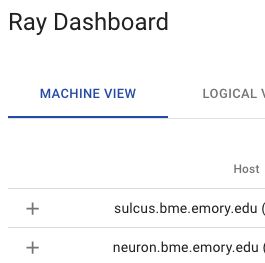
Interestingly though, I now see both machines in the dashboard:
arsedler9
on 18 Mar 2020
The warning is a bug (https://github.com/ray-project/ray/issues/7647). The dashboard looks good; is it possible to print ray.cluster_resources()?
richardliaw
on 18 Mar 2020
Also, in terms of port blocking communication, can you try opening a large range of ports between each machine (or maybe all ports)? We recently enabled direct actor calls, which requires each worker to communicate with all other workers.
richardliaw
on 18 Mar 2020
The ray.cluster_resources() command seems to report the resources from both machines:
{'CPU': 128.0,
'GPU': 18.0,
'memory': 14185.0,
'node:<IP-ADDRESS>': 1.0,
'node:<IP-ADDRESS>': 1.0,
'object_store_memory': 526.0}
Okay, as far as I know, nothing has changed since the last time I tested, other than a lab-mate using these machines to run a separate job, but now when I run the test script, I'm seeing this error message repeated a bunch of times. Will try the port idea next.
```
(tf2-gpu) [asedler@neuron] tune_tf2 $ python ~/ray_test.py
2020-03-18 19:16:54,630 WARNING worker.py:802 -- When connecting to an existing cluster, _internal_config must match the cluster's _internal_config.
E0318 19:16:54.688184 120850 task_manager.cc:166] 3 retries left for task 2f99a4361a07d466ffffffff0700, attempting to resubmit.
E0318 19:16:54.690060 120850 core_worker.cc:205] Will resubmit task after a 5 second delay: Type=NORMAL_TASK, Language=PYTHON, function_descriptor={type=PythonFunctionDescriptor, module_name=__main__, class_name=, function_name=f, function_hash=5f2f3c2b15a480e2ba796895c3ccd8072a42a195}, task_id=2f99a4361a07d466ffffffff0700, job_id=0700, num_args=0, num_returns=1
2020-03-18 19:16:54,695 WARNING worker.py:1081 -- A worker died or was killed while executing task 2f99a4361a07d466ffffffff0700.
E0318 19:16:54.698148 120850 task_manager.cc:166] 3 retries left for task 730451fca0ec05c5ffffffff0700, attempting to resubmit.
E0318 19:16:54.698299 120850 core_worker.cc:205] Will resubmit task after a 5 second delay: Type=NORMAL_TASK, Language=PYTHON, function_descriptor={type=PythonFunctionDescriptor, module_name=__main__, class_name=, function_name=f, function_hash=5f2f3c2b15a480e2ba796895c3ccd8072a42a195}, task_id=730451fca0ec05c5ffffffff0700, job_id=0700, num_args=0, num_returns=1
E0318 19:16:54.705929 120850 task_manager.cc:166] 3 retries left for task 65ed8a70bb493b5effffffff0700, attempting to resubmit.
E0318 19:16:54.706041 120850 core_worker.cc:205] Will resubmit task after a 5 second delay: Type=NORMAL_TASK, Language=PYTHON, function_descriptor={type=PythonFunctionDescriptor, module_name=__main__, class_name=, function_name=f, function_hash=5f2f3c2b15a480e2ba796895c3ccd8072a42a195}, task_id=65ed8a70bb493b5effffffff0700, job_id=0700, num_args=0, num_returns=1
2020-03-18 19:16:54,706 WARNING worker.py:1081 -- A worker died or was killed while executing task 730451fca0ec05c5ffffffff0700.
E0318 19:16:54.713867 120850 task_manager.cc:166] 3 retries left for task 250f665142b29382ffffffff0700, attempting to resubmit.
E0318 19:16:54.714037 120850 core_worker.cc:205] Will resubmit task after a 5 second delay: Type=NORMAL_TASK, Language=PYTHON, function_descriptor={type=PythonFunctionDescriptor, module_name=__main__, class_name=, function_name=f, function_hash=5f2f3c2b15a480e2ba796895c3ccd8072a42a195}, task_id=250f665142b29382ffffffff0700, job_id=0700, num_args=0, num_returns=1
arsedler9
on 19 Mar 2020
With all ports open, I'm seeing both of the machine IP's reported, like I expected! So it must be a port issue. With our current setup, though, we'd prefer not to keep all ports open. How can I tell which ports I should open for the direct actor calls? Is there a way I can specify which ports to use, like I did with the other options: --redis-port=6379 --redis-shard-ports=59519 --node-manager-port=19580 --object-manager-port=39066?
(tf2-gpu) [asedler@neuron] tune_tf2 $ python ~/ray_test.py
2020-03-18 19:23:52,364 WARNING worker.py:802 -- When connecting to an existing cluster, _internal_config must match the cluster's _internal_config.
{'<IP-ADDRESS>', '<IP-ADDRESS>'}
EDIT: But unfortunately, I still only see one IP reported and only one machine in the dashboard when I use my old cluster.yaml, even with all ports open.
arsedler9
on 19 Mar 2020
Is there a way to specify ports with direct actor calls? @ericl @edoakes
RE: old cluster yaml, what's the difference between the "start_ray_commands" on the old cluster yaml and what you ran just now?
richardliaw
on 19 Mar 2020
Ahh, okay I figured it out the issue with my cluster.yaml. I updated --redis-address to --address in the worker command and now I can run ray up cluster.yaml successfully when all ports are open.
Now just need to be able to specify the direct actor ports.
arsedler9
on 19 Mar 2020
@arsedler9 unfortunately there isn't currently an option to specify direct actor ports, but we can prioritize adding that option soon. Would it suffice for you to be able to specify a range of ports, e.g., 8000-9000, that workers/actors will bind on each node?
 edoakes
on 19 Mar 2020
edoakes
on 19 Mar 2020
Thanks @edoakes , I think that being able to specify a range of ports for Ray to use would work well! If we could also have Ray choose redis-port, redis-shard-ports, node-manager-port, and object-manager-port from within that specified range, that would be great. How many direct actor ports will need to be opened?
arsedler9
on 19 Mar 2020
@ericl @edoakes @richardliaw Do you have a rough sense of when this might be available? Just trying to plan my own work accordingly. Thanks!
arsedler9
on 31 Mar 2020
@arsedler9 I would expect this to be in the nightly wheels within a week or so. Unfortunately it's not as trivial as I was hoping, as gRPC doesn't seem to expose a way to provide a range of ports for it to select from.
edoakes
on 31 Mar 2020
The proposed API is adding two flags to ray start: --min-worker-port=<PORT> and --max-worker-port=<PORT>. We could alternatively do something like --worker-port-range=<PORT>-<PORT> but that would require writing our own parsing logic, which I'd prefer to avoid (even if it's very simple).
edoakes
on 31 Mar 2020
Thanks for the quick reply! I think either way would be fine. If would both the min and max flags need to be specified to limit ports? Also, would this range apply to all ports that Ray uses?
arsedler9
on 31 Mar 2020
Other flags will stay the same, this will only apply to workers' gRPC servers. You'll need to specify at least the min port (max will default to 65535).
edoakes
on 1 Apr 2020
@edoakes I think having the two flags is fine.
 robertnishihara
on 3 Apr 2020
robertnishihara
on 3 Apr 2020
@arsedler9 this is now merged into master. You only need to set --min-worker-port and --max-worker-port and then worker and driver ports will be selected from that range. By default the range is 10000-10999.
Sorry for the delay, had some extremely annoying CI issues to deal with...
edoakes
on 16 Apr 2020
Excellent, thank you @edoakes !
arsedler9
on 16 Apr 2020
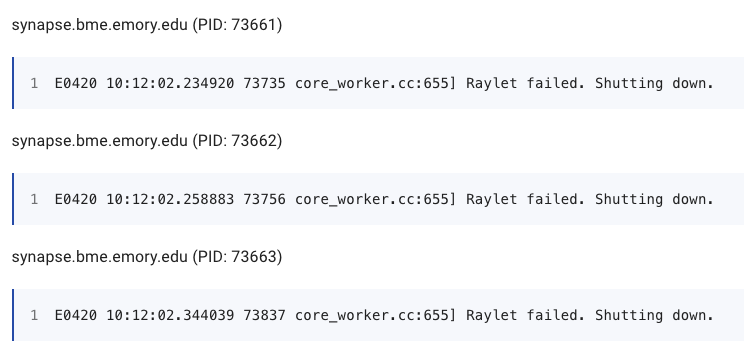
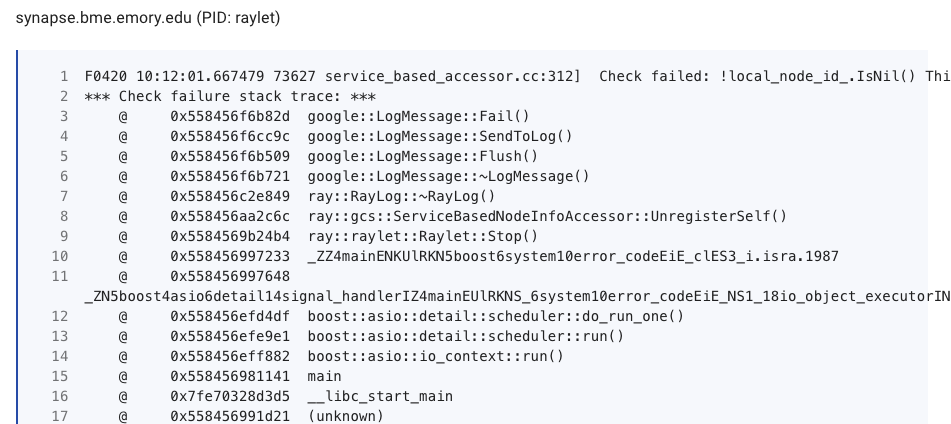
Hey @edoakes, just getting around to testing this on my side. I installed the wheel from the merge commit, opened ports 10000-10099 on all machines, and specified the limits using the flags. I do see all of the machines in the dashboard, but my test script only returns the IP of the head node and the workers are logging the messages below. I noticed you reverted the changes from the PR, so maybe there are still some bugs being worked out, but just wanted to let you know what I'm seeing. Thanks!
Commands to Start the Cluster
ray start --head --redis-port=6379 --redis-shard-ports=59519 --node-manager-port=19580 --object-manager-port=39066 --autoscaling-config=~/ray_bootstrap_config.yaml --min-worker-port=10000 --max-worker-port=10099
ray start --address=$RAY_HEAD_IP:6379 --node-manager-port=19580 --object-manager-port=39066 --min-worker-port=10000 --max-worker-port=10099
md5-a6201e5308ab5c18f5e8786f86b33e7a
import ray; print(ray.__file__)
ray.init(address="auto")
from pprint import pprint
pprint(ray.cluster_resources())
import time
from pprint import pprint
@ray.remote
def f():
time.sleep(0.01)
return ray.services.get_node_ip_address()
# Get a list of the IP addresses of the nodes that have joined the cluster.
pprint(set(ray.get([f.remote() for _ in range(1000)])))
Dashboard

arsedler9
on 20 Apr 2020
Hi @edoakes @richardliaw , I just wanted to post here again because I don't think the issue above has been resolved. I'm still not able to run Ray on multiple machines when the firewall is on. Here are my steps to reproduce (using the latest nightly build of Ray):
On machine neuron, make sure that the ports to use (10000-10099) are open:
(tf2-gpu) [asedler@neuron] ~ $ sudo firewall-cmd --list-ports
5050-5080/udp 5050-5080/tcp 60000-60020/tcp 60000-60020/udp 5900-5950/tcp 10000-10099/udp 10000-10099/tcp
On machine neuron, start the head node:
(tf2-gpu) [asedler@neuron] ~ $ ray start --head --redis-port=10000 --redis-shard-ports=10001 --node-manager-port=10002 --object-manager-port=10003 --min-worker-port=10004 --max-worker-port=10099
2020-06-01 10:22:10,137 WARNING scripts.py:318 -- The --redis-port argument will be deprecated soon. Please use --port instead.
2020-06-01 10:22:10,137 INFO scripts.py:393 -- Using IP address <HEAD-IP> for this node.
2020-06-01 10:22:10,142 INFO resource_spec.py:212 -- Starting Ray with 247.12 GiB memory available for workers and up to 109.92 GiB for objects. You can adjust these settings with ray.init(memory=<bytes>, object_store_memory=<bytes>).
2020-06-01 10:22:10,569 INFO services.py:1165 -- View the Ray dashboard at localhost:8265
2020-06-01 10:22:10,618 INFO scripts.py:423 --
Started Ray on this node. You can add additional nodes to the cluster by calling
ray start --address='<HEAD-IP>:10000' --redis-password='5241590000000000'
from the node you wish to add. You can connect a driver to the cluster from Python by running
import ray
ray.init(address='auto', redis_password='5241590000000000')
If you have trouble connecting from a different machine, check that your firewall is configured properly. If you wish to terminate the processes that have been started, run
ray stop
On machine sulcus, check that the desired ports are open (10000-10099)
(tf2-gpu) [asedler@sulcus] ~ $ sudo firewall-cmd --list-ports
5050-5080/tcp 60000-60020/udp 5900-5950/tcp 10000-10099/udp 10000-10099/tcp
On machine sulcus, start the worker node:
(tf2-gpu) [asedler@sulcus] ~ $ ray start --address='<HEAD-IP>:10000' --node-manager-port=10002 --object-manager-port=10003 --minworker-port=10004 --max-worker-port=10099
2020-06-01 10:22:20,166 INFO scripts.py:466 -- Using IP address <WORKER-IP> for this node.
2020-06-01 10:22:20,173 INFO resource_spec.py:212 -- Starting Ray with 259.96 GiB memory available for workers and up to 111.41 GiB for objects. You can adjust these settings with ray.init(memory=<bytes>, object_store_memory=<bytes>).
2020-06-01 10:22:20,217 INFO scripts.py:475 --
Started Ray on this node. If you wish to terminate the processes that have been started, run
ray stop
Run the testing python script. Note that it only shows the head node.
(tf2-gpu) [asedler@neuron] ~ $ cat ray_test.py
import ray; print(ray.__file__)
ray.init(address="<HEAD-IP>:10000")
from pprint import pprint
pprint(ray.cluster_resources())
import time
from pprint import pprint
@ray.remote
def f():
time.sleep(0.01)
return ray.services.get_node_ip_address()
# Get a list of the IP addresses of the nodes that have joined the cluster.
pprint(set(ray.get([f.remote() for _ in range(1000)])))
(tf2-gpu) [asedler@neuron] ~ $ python ray_test.py
/snel/home/asedler/anaconda3/envs/tf2-gpu/lib/python3.7/site-packages/ray/__init__.py
WARNING: Logging before InitGoogleLogging() is written to STDERR
I0601 10:25:07.813731 174149 174149 global_state_accessor.cc:25] Redis server address = <HEAD-IP>:10000, is test flag = 0
I0601 10:25:07.815820 174149 174149 redis_client.cc:141] RedisClient connected.
I0601 10:25:07.824935 174149 174149 redis_gcs_client.cc:88] RedisGcsClient Connected.
I0601 10:25:07.827821 174149 174149 service_based_gcs_client.cc:75] ServiceBasedGcsClient Connected.
{'CPU': 64.0,
'GPU': 10.0,
'memory': 5061.0,
'node:<HEAD-IP>': 1.0,
'object_store_memory': 1553.0}
{'<HEAD-IP>'}
Stop ray on both machines and deactivate the firewalls:
(tf2-gpu) [asedler@neuron] ~ $ ray stop
(tf2-gpu) [asedler@neuron] ~ $ sudo systemctl stop firewalld
[sudo] password for asedler:
(tf2-gpu) [asedler@sulcus] ~ $ ray stop
(tf2-gpu) [asedler@sulcus] ~ $ sudo systemctl stop firewalld
[sudo] password for asedler:
md5-df046d80fe1d5f3590bd65cba18cfcb9
(tf2-gpu) [asedler@neuron] ~ $ python ray_test.py
/snel/home/asedler/anaconda3/envs/tf2-gpu/lib/python3.7/site-packages/ray/__init__.py
WARNING: Logging before InitGoogleLogging() is written to STDERR
I0601 10:28:48.395171 176630 176630 global_state_accessor.cc:25] Redis server address = <HEAD-IP>:10000, is test flag = 0
I0601 10:28:48.397050 176630 176630 redis_client.cc:141] RedisClient connected.
I0601 10:28:48.406411 176630 176630 redis_gcs_client.cc:88] RedisGcsClient Connected.
I0601 10:28:48.410142 176630 176630 service_based_gcs_client.cc:75] ServiceBasedGcsClient Connected.
{'CPU': 128.0,
'GPU': 20.0,
'memory': 10384.0,
'node:<WORKER-IP>': 1.0,
'node:<HEAD-IP>': 1.0,
'object_store_memory': 3126.0}
{'<HEAD-IP>', '<WORKER-IP>'}
So, I think some ports that Ray requires are still blocked. Can you help me figure this out? Thanks!
arsedler9
on 1 Jun 2020
@arsedler9 do you think you could post the logs in the raylet from the worker nodes? They should be in ~/tmp/ray/session_latest/logs/raylet.{out,err}. That should help us figure out what's going wrong.
edoakes
on 16 Jun 2020
Thanks @edoakes! Here is the output from the raylet logs. Looks like .out has some info, but .err is empty.
(tf2-gpu) [asedler@sulcus] ~ $ cat /tmp/ray/session_latest/logs/raylet.out
I0616 11:42:03.428524 175824 175824 stats.h:62] Succeeded to initialize stats: exporter address is 127.0.0.1:8888
I0616 11:42:03.430092 175824 175824 redis_client.cc:141] RedisClient connected.
I0616 11:42:03.438800 175824 175824 redis_gcs_client.cc:88] RedisGcsClient Connected.
I0616 11:42:03.440999 175824 175824 service_based_gcs_client.cc:75] ServiceBasedGcsClient Connected.
I0616 11:42:03.443001 175824 175824 grpc_server.cc:64] ObjectManager server started, listening on port 10003.
I0616 11:42:03.675700 175824 175824 node_manager.cc:166] Initializing NodeManager with ID 951cd8803aec33a79a5092afb876035fac5054e7
I0616 11:42:03.676267 175824 175824 grpc_server.cc:64] NodeManager server started, listening on port 10002.
(tf2-gpu) [asedler@sulcus] ~ $ cat /tmp/ray/session_latest/logs/raylet.err
(tf2-gpu) [asedler@sulcus] ~ $
@edoakes Is supporting GCS port resolving this issue? If so, I will assign myself to this issue.
 rkooo567
on 24 Jun 2020
rkooo567
on 24 Jun 2020
@rkooo567 yes I believe it should
edoakes
on 25 Jun 2020
This PR is merged, and now you can set --gcs-server-port https://github.com/ray-project/ray/pull/8962. Can you verify if it works? There should be no more ports that should be opened afaik
rkooo567
on 14 Jul 2020
@arsedler9
rkooo567
on 14 Jul 2020
I assume this should be closed by that PR. Please reopen if the issue still occurs.
rkooo567
on 17 Jul 2020
Sorry for the delay @rkooo567, but I just ran my test script from earlier after adding --gcs-server-port and it seems to work! (see below) Thanks so much. One thing I noticed is that my Ray Dashboard seems to be having issues now - when I load localhost:8265 I see it flash on briefly in my browser, but then it disappears. Is that a known issue? Thanks again!
(tf2-test) [asedler@neuron] ~ $ python ~/ray_test.py
/snel/home/asedler/anaconda3/envs/tf2-test/lib/python3.7/site-packages/ray/__init__.py
WARNING: Logging before InitGoogleLogging() is written to STDERR
I0720 11:46:21.957347 69627 69627 global_state_accessor.cc:25] Redis server address = <HEAD-IP>:10000, is test flag = 0
I0720 11:46:21.959774 69627 69627 redis_client.cc:147] RedisClient connected.
I0720 11:46:21.969166 69627 69627 redis_gcs_client.cc:90] RedisGcsClient Connected.
I0720 11:46:21.973222 69627 69627 service_based_gcs_client.cc:193] Reconnected to GCS server: <HEAD-IP>:10004
I0720 11:46:21.973912 69627 69627 service_based_accessor.cc:91] Reestablishing subscription for job info.
I0720 11:46:21.973960 69627 69627 service_based_accessor.cc:401] Reestablishing subscription for actor info.
I0720 11:46:21.973990 69627 69627 service_based_accessor.cc:768] Reestablishing subscription for node info.
I0720 11:46:21.974018 69627 69627 service_based_accessor.cc:1040] Reestablishing subscription for task info.
I0720 11:46:21.974046 69627 69627 service_based_accessor.cc:1212] Reestablishing subscription for object locations.
I0720 11:46:21.974081 69627 69627 service_based_accessor.cc:1323] Reestablishing subscription for worker failures.
I0720 11:46:21.974112 69627 69627 service_based_gcs_client.cc:86] ServiceBasedGcsClient Connected.
{'CPU': 128.0,
 'GPU': 20.0,
 'memory': 10152.0,
 'node:<WORKER-IP>': 1.0,
 'node:<HEAD-IP>': 1.0,
 'object_store_memory': 3058.0}
{'<WORKER-IP>', '<HEAD-IP>'}
It would be really great if someone could lay down ALL the ports that are used by Ray. I'm also facing this issue and I can't just ask IT to open all ports for me. I tried to figure out what services need port and how to specify them. I noticed that reporter.py seems to be using a port, also some metrics port. I found these by inspecting the processess via htop. @arsedler9 maybe this is related to your last issue? Again, would be nice if someone just provided all the ports that need to be opened :+1:
 chanshing
on 26 Aug 2020
chanshing
on 26 Aug 2020
@mfitton for @arsedler9's issue. Sorry again I didn't see this message!
@chanshing It is actually in progress! Here is the PR. Please read it and give me some review :) https://github.com/ray-project/ray/pull/10281
rkooo567
on 26 Aug 2020
@arsedler9 Hi, sorry for not seeing this sooner. The dashboard's nightly release had a glitch with multi-node clusters around the time you posted that could have led to the dashboard appearing blank. Could you let me know if this is still a problem that you're encountering?
 mfitton
on 26 Aug 2020
mfitton
on 26 Aug 2020
Related issues
 timonbimon
·
3Comments
timonbimon
·
3Comments
 dragon28
·
3Comments
dragon28
·
3Comments
 1beb
·
3Comments
1beb
·
3Comments
 monocongo
·
3Comments
monocongo
·
3Comments
 zplizzi
·
3Comments
zplizzi
·
3Comments
Most helpful comment
Sorry for the delay @rkooo567, but I just ran my test script from earlier after adding
--gcs-server-portand it seems to work! (see below) Thanks so much. One thing I noticed is that my Ray Dashboard seems to be having issues now - when I loadlocalhost:8265I see it flash on briefly in my browser, but then it disappears. Is that a known issue? Thanks again!