Ray: Actor not printing when launched in jupyter
System information
- OS Platform and Distribution (e.g., Linux Ubuntu 16.04): Linux Ubuntu 16.04
- Ray installed from (source or binary): pip3 install ray
- Ray version: 0.6.1
- Python version: 3.5.2
- Exact command to reproduce: run following code from inside a Jupyter notebook or from a vanilla python file
Describe the problem
Printing inside actors should show up in the stdout/stdrr or at least in logs when launched from inside a Jupyter notebook. For the moment, nothing is visible.
Source code / logs
import ray
ray.init()

@ray.remote
class Counter(object):
    def __init__(self):
        self.value = 0

    def increment(self):
        self.value += 1
        print(self.value)
        return self.value

c = Counter.remote()
print(ray.get(c.increment.remote()))
Give 1 then 1 when python3 test.py but only 1 inside notebook.
 zifeo
zifeo
All 6 comments
Hm. it might be that the stdout of the jupyter notebook belongs to the main
jupyter kernel/process. The output should show up in the console where you
start the Jupyter notebook.
Following this thread: https://github.com/ipython/ipython/issues/8863,
maybe you can try sys.stdout.flush()?
Let me know if that changes anything.
On Fri, Jan 4, 2019 at 2:38 PM Teo Stocco notifications@github.com wrote:
System information
- OS Platform and Distribution (e.g., Linux Ubuntu 16.04): Linux
Ubuntu 16.04- Ray installed from (source or binary): pip3 install ray
- Ray version: 0.6.1
- Python version: 3.5.2
- Exact command to reproduce: run following code from inside a
Jupyter notebook or from a vanilla python fileDescribe the problem
Printing inside actors should show up in the stdout/stdrr or at least in
logs when launched from inside a Jupyter notebook. For the moment, nothing
is visible.
Source code / logsimport ray
ray.init()
@ray.remoteclass Counter(object):
def __init__(self):
self.value = 0def increment(self): self.value += 1 print(self.value) return self.valuec = Counter.remote()print(ray.get(c.increment.remote()))
Give 1 then 1 when python3 test.py but only 1 inside notebook.
—
You are receiving this because you are subscribed to this thread.
Reply to this email directly, view it on GitHub
https://github.com/ray-project/ray/issues/3692, or mute the thread
https://github.com/notifications/unsubscribe-auth/AEUc5f0b9L5dfdgy2WjpDive0flhIYCNks5u_9fegaJpZM4ZuCeZ
.
 richardliaw
on 5 Jan 2019
richardliaw
on 5 Jan 2019
I've just checked, nothing in the main Jupyter console. sys.stdout.flush() doesn't change anything either.
zifeo
on 5 Jan 2019
Interesting, I can reproduce it. The actor print statements seem to be redirected to my terminal where I ran jupyter-notebook (also it wasn't flushed immediately).
I can reproduce it even more easily in a Jupyter notebook just by running
import subprocess
subprocess.Popen(['ls'])
That will show up in the terminal where you started the jupyter-notebook and not in the notebook itself.
 robertnishihara
on 5 Jan 2019
robertnishihara
on 5 Jan 2019
Hi, I'm a bot from the Ray team :)
To help human contributors to focus on more relevant issues, I will automatically add the stale label to issues that have had no activity for more than 4 months.
If there is no further activity in the 14 days, the issue will be closed!
- If you'd like to keep the issue open, just leave any comment, and the stale label will be removed!
- If you'd like to get more attention to the issue, please tag one of Ray's contributors.
You can always ask for help on our discussion forum or Ray's public slack channel.
![stale[bot] picture](https://avatars3.githubusercontent.com/in/1724?v=4&s=40) stale[bot]
on 15 Nov 2020
stale[bot]
on 15 Nov 2020
Still valid so far.
zifeo
on 15 Nov 2020
@zifeo This is what I see, is that consistent with what you see?
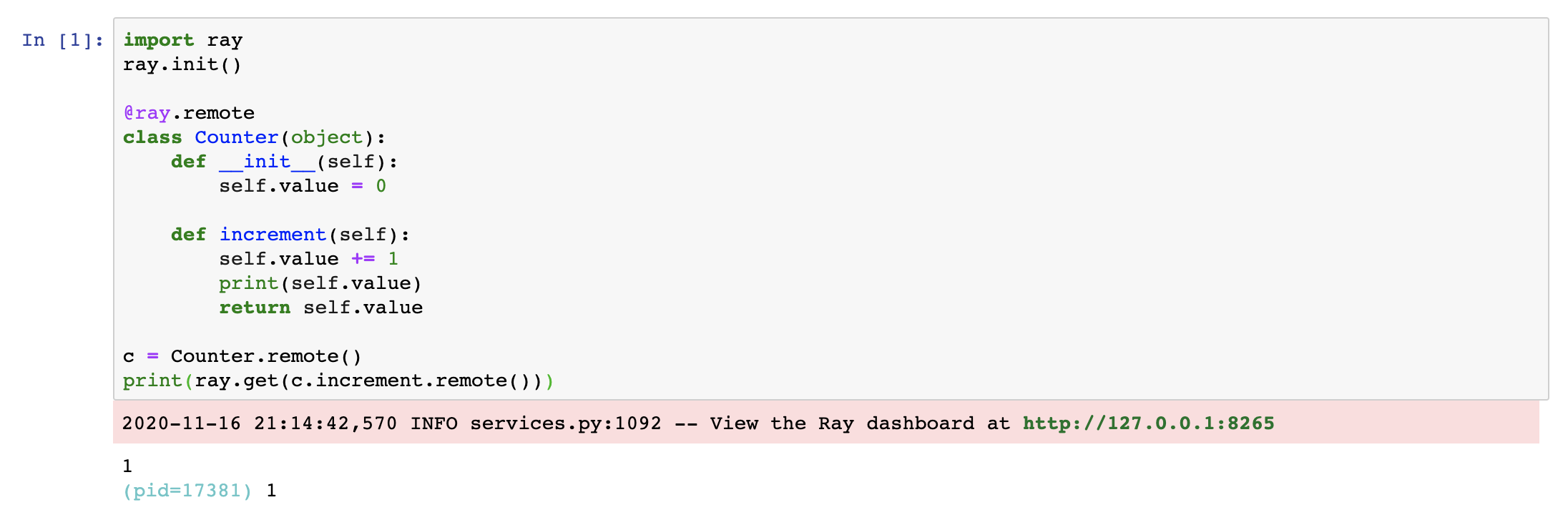
What version of Ray are you using?
robertnishihara
on 17 Nov 2020
Related issues
 AndreCNF
·
3Comments
AndreCNF
·
3Comments
 zplizzi
·
3Comments
robertnishihara
·
3Comments
zplizzi
·
3Comments
robertnishihara
·
3Comments
 Khalilsqu
·
3Comments
Khalilsqu
·
3Comments
 WangYiPengPeter
·
3Comments
WangYiPengPeter
·
3Comments
Most helpful comment
Interesting, I can reproduce it. The actor print statements seem to be redirected to my terminal where I ran
jupyter-notebook(also it wasn't flushed immediately).I can reproduce it even more easily in a Jupyter notebook just by running
That will show up in the terminal where you started the
jupyter-notebookand not in the notebook itself.