With branch capture_sharpening I made a first mockup for RL deconvolution immediately after demosaic. The capture sharpening produces less halos than the RL deconvolution in detail tab. It is still work in progress but can already be used to compare between RL deconvolution in detail tab and the new capture sharpening in raw tab. If you do so, set the contrast threshold adjuster in both tools to 0, because in the new tool it currently does not work as expected.
Example: left old, right new

 heckflosse
All 46 comments
Here's a before/after for an xtrans file
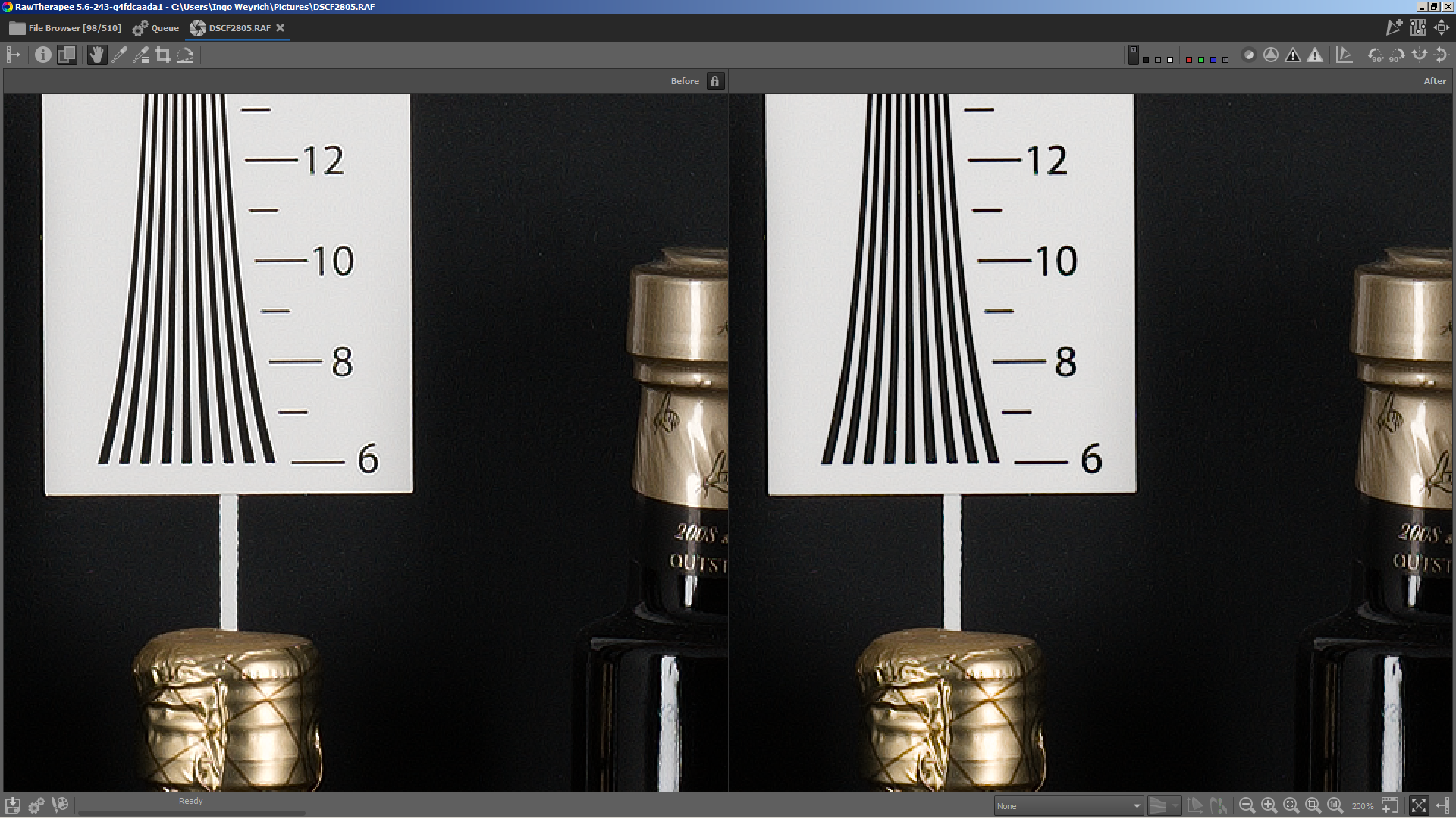
heckflosse
on 14 Aug 2019
Nice work @heckflosse ! :tada:
If you want to see a use case, just get the output files here. Image 1 is with actual RL sharpening, image 2 is with the new one, with gamma=1.40, and image 3 is w/o any sharpening. Gamma 0.7 produced black halos.
 Hombre57
on 15 Aug 2019
Hombre57
on 15 Aug 2019
I just pushed to capture_sharpening. Contrast threshold is functional now.
heckflosse
on 15 Aug 2019
I just pushed a small speedup...
heckflosse
on 15 Aug 2019
I did some testing. Left is unsharpened, middle is using capture sharpening, right is 'old' RL sharpening. All on default settings, with Contrast threshold set to 0.
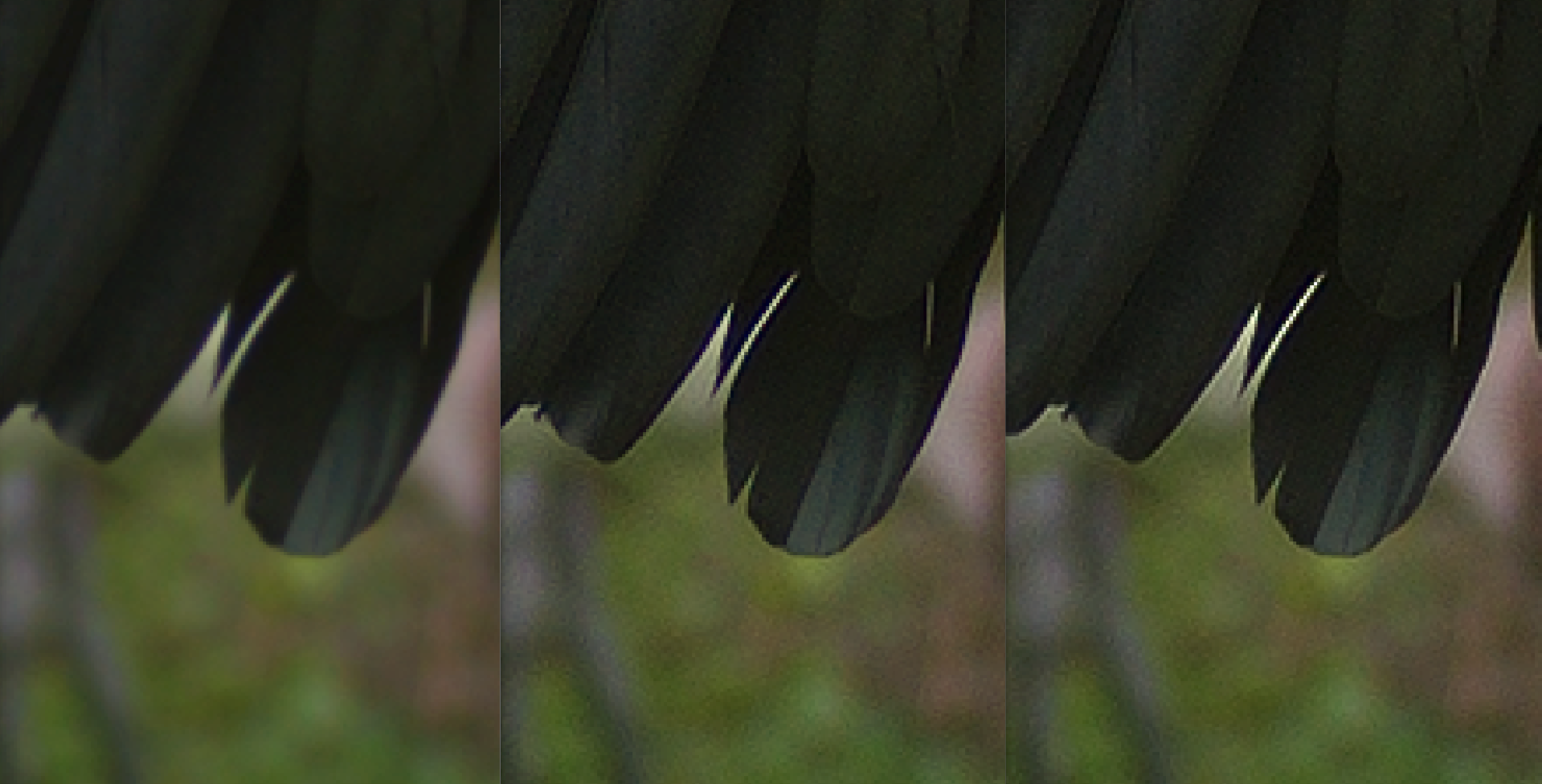
The capture sharpening is definitely better, but also definitely still has dome haloing.
 Thanatomanic
on 18 Aug 2019
Thanatomanic
on 18 Aug 2019
but also definitely still has dome haloing
There's a lot of time to improve it as I set the milestone to 5.8 ;-)
heckflosse
on 18 Aug 2019
I just pushed some changes.
Now demosaic will not be triggered when changing capture sharpening adjusters, only when enabling or disabling the tool.
In preview mode, when capture sharpening is enabled, this will need 12 * width * height byte more than before (where width and height are the values from the raw file).
In full processing there is no increase in memory usage.
I also added Capture Sharpening to the progressbar. It's not very smooth atm though...
heckflosse
on 28 Aug 2019
@heckflosse I'm using you branch for some holiday shots (now that I'm slowly catching up with my backlog), and the results are quite nice. :+1:
I was playing with the gamma slider and experienced a crash when lowering the value below 1.0:
Version: 5.6-298-g673b0d31f
Branch: capture_sharpening
Commit: 673b0d31f
Commit date: 2019-09-01
Compiler: cc 9.2.1
Processor: x86_64
System: Linux
Bit depth: 64 bits
Gtkmm: V3.24.0
Lensfun: V0.3.2.0
Build type: debug
Build flags:  -std=c++11 -march=native -Werror=unused-label -Wall -Wuninitialized -Wcast-qual -Wno-deprecated-declarations -Wno-unused-result -fopenmp -Werror=unknown-pragmas -g -ftree-vectorize
Link flags:  -march=native
OpenMP support: ON
MMAP support: ON
#0 [34m0x0000555555c69fa6[m in [33mLUT<float>::operator[]<float, float, void>(float) const[m (this=0x5555564544a0 <rtengine::Color::gamma2curve>, index=nan(0x400000)) at [32m/home/user/src/rawtherapee/rtengine/LUT.h[m:456
idx = -2147483648
diff = nan(0x400000)
p1 = 0
p2 = 0.99999094
#1 [34m0x0000555555cf2e53[m in [33mrtengine::ImProcFunctions::_ZN8rtengine15ImProcFunctions7rgbProcEPNS_10ImagefloatEPNS_8LabImageEPNS_13PipetteBufferER3LUTIfES9_S9_iS9_S9_S9_ffRKNS_18ColorGradientCurveERKNS_12OpacityCurveEbS9_S9_RKNS_9ToneCurveESI_SI_SI_RdSJ_SJ_RfSK_SK_diiPNS_10DCPProfileERKNSL_10ApplyStateERS7_IjEmb._omp_fn.0(void)[m () at [32m/home/user/src/rawtherapee/rtengine/improcfun.cc[m:2512
r = 0
g = 0
b = 0
y = 29724
j = 366
tj = 30
i = 346
ti = 10
ii = 336
jj = 336
editIFloatBuffer = 0x0
editWhateverTmp = 0x0
clutr = {0.000647317036, 0.000549230375, 0.000409964239, 0.000268055795, 0.000525065348, 0.000547170639, 0.000563207723, 0.000602036191, 0.000679091376, 0.000755972578, 0.000750627252, 0.000583753514, 0.000419174292, 0.000493595668, 0.000591065153, 0.000701234734, 0.000774043496, 0.00083375338, 0.000824404415, 0.000643603678, 0.000305358932, 0.000393918192, 0.000512498664, 0.000628314679, 0.000666608394, 0.000681663922, 0.000653591938, 0.000505667296, 0.000198467751, 0.000269972923, 0.000366622698, 0.000455991918, 0.00047306894, 0.000464723766, 0.000431806722, 0.000330995885, 0.000118676384, 0.000166449157, 0.000232135033, 0.000292798795, 0.000303927489, 0.000292456505, 0.000263369409, 0.000199363218, 7.20901298e-05, 0.0001017252, 0.000142925797, 0.00018292146, 0.000195484492, 0.000189899161, 0.000165988808, 0.000123272766, 4.42979217e-05, 6.22895823e-05, 8.73812969e-05, 0.000112552763, 0.000122618629, 0.000119889279, 0.00010234525, 7.50884064e-05, 3.10379728e-05, 4.08226442e-05, 5.55584775e-05, 7.08557782e-05, 7.72177882e-05, 7.54503926e-05, 6.42190062e-05, 4.86548452e-05, 2.50567828e-05, 2.81673929e-05, 3.53059295e-05, 4.36278278e-05, 4.71487692e-05, 4.6127876e-05, 3.96476316e-05, 3.13948549e-05, 3.00763677e-05, 2.74409249e-05, 2.74508711e-05, 2.94801957e-05, 2.99641069e-05, 2.8673272e-05, 2.50079775e-05, 2.10383114e-05, 3.0407642e-05, 2.56597286e-05, 2.33985375e-05, 2.39459951e-05, 2.48271353e-05, 2.4645844e-05, 2.21765022e-05, 1.9561523e-05, 2.73607548e-05, 2.21684968e-05, 1.96153906e-05, 1.97849058e-05, 2.0986432e-05, 2.16219287e-05, 2.02319588e-05, 1.86838279e-05, 2.23638563e-05, 1.84268138e-05, 1.67610524e-05, 1.69020514e-05, 1.74116431e-05, 1.74681954e-05, 1.62374581e-05, 1.51166014e-05, 1.76703397e-05, 1.54967602e-05, 1.51126333e-05, 1.58149724e-05}
perChannelSizeBytes = 50432
jstart = 336
editIFloatTmpG = 0x0
editIFloatTmpB = 0x0
out_rgbx = {0.00202356256, 0.0024844443, 0.00329510518, 0.00484879781, 0.000699544384, 0.00100581511, 0.00146386249, 0.00191600178, 0.00212675286, 0.00229995535, 0.00266247336, 0.00363167305, 0.000631859992, 0.000934049312, 0.00133188069, 0.00166299404, 0.00175625633, 0.00179198454, 0.00194285018, 0.00254021026, 0.000472695101, 0.000698818651, 0.000971961999, 0.00117479125, 0.00121762883, 0.00123468379, 0.00134328683, 0.00175972132, 0.000306001661, 0.000447907805, 0.000609673443, 0.000724312442, 0.000756150577, 0.000790770864, 0.000897693739, 0.00119638862, 0.000216238477, 0.000336849887, 0.000506575103, 0.000717406976, 0.000967494678, 0.00125471829, 0.00146504084, 0.00149874913, 0.000146729173, 0.000240434907, 0.000389771769, 0.000613153563, 0.000924447551, 0.00129579857, 0.0015768212, 0.00162444508, 9.52158734e-05, 0.000158897004, 0.000267060619, 0.000442265504, 0.000702060643, 0.00102558325, 0.00130115252, 0.00141728122, 6.45004402e-05, 0.000103664701, 0.000174367131, 0.000296862039, 0.00048881158, 0.000742567587, 0.000990580767, 0.00115214975, 6.53106836e-05, 8.55646213e-05, 0.000123472288, 0.00019759385, 0.000323337474, 0.000499494548, 0.000686768442, 0.000828796299, 7.1937422e-05, 8.63898313e-05, 0.000117510092, 0.000180785937, 0.00028259799, 0.00040836056, 0.000517803885, 0.000593509525, 6.63076498e-05, 7.81825147e-05, 0.000107345433, 0.000165714184, 0.000253685314, 0.000348726375, 0.000408902939, 0.000437760726, 5.18122542e-05, 6.07853763e-05, 8.38632113e-05, 0.00012949243, 0.000196373061, 0.000264322822, 0.000299300824, 0.000308406539, 3.69796435e-05, 4.375555e-05, 6.0395334e-05, 9.24421911e-05, 0.000139102893, 0.000186451012, 0.000211312465, 0.000219431822, 2.57574357e-05, 3.01751916e-05, 4.13107336e-05, 6.28945854e-05, 9.55604264e-05, 0.000131933295, 0.000158030307, 0.000174636487, 1.79678264e-05, 2.09641003e-05, 2.81901248e-05, 4.17690717e-05, 6.29771239e-05, 8.85765403e-05, 0.000110771951, 0.000128382831, 1.88284957e-05, 1.99894075e-05, 2.32181683e-05, 3.01729378e-05, 4.19385688e-05, 5.73467332e-05, 7.25331847e-05, 8.68355273e-05, 2.62815447e-05, 2.6585958e-05, 2.67136511e-05, 2.82712244e-05, 3.22704e-05, 3.89657653e-05, 4.68885228e-05, 5.61265915e-05, 0.000313271303, 0.000199744463, 0.000118773249, 7.15909846e-05, 4.72051397e-05, 3.6936508e-05, 3.45635272e-05, 3.71402166e-05, 0.000410897745, 0.000259515597, 0.000150759399, 8.60860018e-05, 5.07951445e-05, 3.34097167e-05, 2.61727928e-05, 2.49342374e-05, 0.000368904992, 0.000244195195, 0.00015646586, 9.84443905e-05, 6.06466565e-05, 3.82392973e-05, 2.63163456e-05, 2.0708072e-05, 0.00026367401, 0.000182634903, 0.000126584724, 8.51373916e-05, 5.44095019e-05, 3.44909095e-05, 2.31285994e-05, 1.70697149e-05, 0.000166023005, 0.000120516321, 8.83864632e-05, 6.17977057e-05, 4.03780396e-05, 2.59287299e-05, 1.75551468e-05, 1.29643904e-05, 0.000106365413, 8.04375013e-05, 6.02221771e-05, 4.23066595e-05, 2.77664258e-05, 1.80908391e-05, 1.26648356e-05, 9.78933258e-06, 9.06269561e-05, 6.90775414e-05, 4.98305089e-05, 3.42238418e-05, 2.34354811e-05, 1.74852339e-05, 1.55178859e-05, 1.57061986e-05, 7.81454437e-05, 5.9857317e-05, 4.30582513e-05, 3.13293931e-05...}
editWhateverBuffer = 0x0
tW = 367
tH = 448
editIFloatTmpR = 0x0
rtemp = 0x7ffb18000fc0
gtemp = 0x7ffb1800d4c0
btemp = 0x7ffb180199c0
histToneCurveThr = {maxs = 254, maxsf = 254, data = 0x7ffb18094be0, clip = 3, size = 256, upperBound = 255, owner = 1, maxsv = {254, 254, 254, 254}, sizev = {255, 255, 255, 255}, sizeiv = {1095216660735, 1095216660735}, dirty = true}
buffer = {real = 0x7ffb18000fc0, alignment = 16 '\020', allocatedSize = 605184, unitSize = 4, data = 0x7ffb18000fc0, inUse = true}
istart = 336
clutg = {1.61466378e-05, 1.55690577e-05, 1.38679497e-05, 1.24570724e-05, 1.56009046e-05, 1.55140551e-05, 1.66680657e-05, 1.8776489e-05, 2.01506919e-05, 1.92846546e-05, 1.65681577e-05, 1.40038637e-05, 1.62120396e-05, 1.64260473e-05, 1.71173906e-05, 1.8979048e-05, 2.07956546e-05, 2.09566788e-05, 1.97567897e-05, 1.83982102e-05, 1.6404616e-05, 1.83848333e-05, 2.09158788e-05, 2.39781057e-05, 2.58553446e-05, 2.64690625e-05, 2.60489323e-05, 2.52183654e-05, 1.36402596e-05, 1.61403714e-05, 1.95116882e-05, 2.34102536e-05, 2.62939811e-05, 2.87433868e-05, 3.07564987e-05, 3.30805451e-05, 1.06886491e-05, 1.28661059e-05, 1.60534892e-05, 1.99755268e-05, 2.3590097e-05, 2.76523624e-05, 3.31304582e-05, 4.24524842e-05, 1.29495775e-05, 1.57171053e-05, 1.94372151e-05, 2.5483474e-05, 3.49746042e-05, 4.99916932e-05, 7.34191854e-05, 0.000113137176, 1.90857718e-05, 2.51916226e-05, 3.36499397e-05, 4.95934801e-05, 7.87033714e-05, 0.000126810482, 0.000201342133, 0.000323500281, 2.44352414e-05, 3.47879395e-05, 4.84766497e-05, 7.06395003e-05, 0.000107321153, 0.000163038203, 0.000244478491, 0.000377418473, 2.21294613e-05, 3.21000589e-05, 4.49508771e-05, 6.42426021e-05, 9.43443883e-05, 0.000138040079, 0.00019996606, 0.000301030843, 1.65593992e-05, 2.36201286e-05, 3.28750102e-05, 4.64854784e-05, 6.74156618e-05, 9.82167985e-05, 0.000143423007, 0.000219002424, 1.27389831e-05, 1.64761605e-05, 2.19104113e-05, 3.06454385e-05, 4.520726e-05, 6.89869339e-05, 0.000107874803, 0.000175102687, 1.52384e-05, 1.49981533e-05, 1.64050616e-05, 2.0886986e-05, 3.03408196e-05, 4.82853429e-05, 8.10511847e-05, 0.000140199045, 1.68297029e-05, 1.56834994e-05, 1.69746545e-05, 2.26244447e-05, 3.51601921e-05, 5.93503137e-05, 0.000103900566, 0.000185626166, 1.65696674e-05, 1.56064252e-05, 1.74867127e-05, 2.35670705e-05}
clutb = {3.54472613e-05, 5.73120706e-05, 9.73610731e-05, 0.000171684645, 1.40987513e-05, 1.43450688e-05, 1.82980548e-05, 2.82256642e-05, 4.74318367e-05, 8.21711219e-05, 0.000140608667, 0.000230032223, 1.0309238e-05, 1.10514065e-05, 1.50006445e-05, 2.44371822e-05, 4.28433123e-05, 7.61416813e-05, 0.000130728862, 0.000208294572, 8.2255101e-06, 9.47692661e-06, 1.28765241e-05, 1.96805631e-05, 3.29727955e-05, 5.72054669e-05, 9.6382355e-05, 0.000149830157, 9.09125902e-06, 1.17421578e-05, 1.54236186e-05, 1.98049038e-05, 2.86761133e-05, 4.71866624e-05, 8.06233584e-05, 0.000131953799, 1.46897264e-05, 1.76000613e-05, 2.03921991e-05, 2.41269354e-05, 3.41254672e-05, 5.71193777e-05, 9.99630356e-05, 0.000165870064, 1.84321489e-05, 2.30466212e-05, 2.88737174e-05, 3.91051362e-05, 6.29481146e-05, 0.000112897455, 0.00020360059, 0.000345112756, 2.03961554e-05, 2.65173676e-05, 3.55537522e-05, 5.11837061e-05, 8.20165296e-05, 0.000139648604, 0.000239159956, 0.000395902462, 3.29699396e-05, 4.12305126e-05, 4.93994012e-05, 6.47233392e-05, 9.80307886e-05, 0.000163014774, 0.000280006439, 0.000475677691, 5.80384731e-05, 7.08829757e-05, 8.42892405e-05, 0.000117508403, 0.000199129281, 0.000375016767, 0.00072421052, 0.00134999212, 0.000105197018, 0.000142543329, 0.000218379413, 0.000409135508, 0.000854350335, 0.00179236149, 0.0035687515, 0.00647355895, 0.000146197199, 0.0002052989, 0.00033024358, 0.000619710714, 0.00124689494, 0.00250770431, 0.00486088824, 0.00863370392, 0.000210687853, 0.000284374022, 0.00046015234, 0.000837838044, 0.00156804849, 0.00288227596, 0.00516509404, 0.00886444841, 0.000351747934, 0.000391330337, 0.000559422479, 0.00092682353, 0.00158137339, 0.00263120304, 0.00428410992, 0.00698450813, 0.000646045955, 0.000862240151, 0.00123477471, 0.00167090946}
working = 0x7ffdd8012bb0
lab = 0x55555d3df180
hltonecurve = @0x55555cf31110: {maxs = 65534, maxsf = 65534, data = 0x55555cf330f0, clip = 1, size = 65536, upperBound = 65535, owner = 1, maxsv = {65534, 65534, 65534, 65534}, sizev = {65535, 65535, 65535, 65535}, sizeiv = {281470681808895, 281470681808895}, dirty = true}
shtonecurve = @0x55555cf31170: {maxs = 65534, maxsf = 65534, data = 0x55555cf73110, clip = 2, size = 65536, upperBound = 65535, owner = 1, maxsv = {65534, 65534, 65534, 65534}, sizev = {65535, 65535, 65535, 65535}, sizeiv = {281470681808895, 281470681808895}, dirty = true}
tonecurve = @0x55555cf311d0: {maxs = 65534, maxsf = 65534, data = 0x55555cfb3130, clip = 0, size = 65536, upperBound = 65535, owner = 1, maxsv = {65534, 65534, 65534, 65534}, sizev = {65535, 65535, 65535, 65535}, sizeiv = {281470681808895, 281470681808895}, dirty = true}
sat = 0
rCurve = @0x55555cf32110: {maxs = 0, maxsf = 0, data = 0x0, clip = 0, size = 0, upperBound = 0, owner = 1, maxsv = {0, 0, 0, 0}, sizev = {0, 0, 0, 0}, sizeiv = {0, 0}, dirty = true}
gCurve = @0x55555cf32170: {maxs = 0, maxsf = 0, data = 0x0, clip = 0, size = 0, upperBound = 0, owner = 1, maxsv = {0, 0, 0, 0}, sizev = {0, 0, 0, 0}, sizeiv = {0, 0}, dirty = true}
bCurve = @0x55555cf321d0: {maxs = 0, maxsf = 0, data = 0x0, clip = 0, size = 0, upperBound = 0, owner = 1, maxsv = {0, 0, 0, 0}, sizev = {0, 0, 0, 0}, sizeiv = {0, 0}, dirty = true}
satLimit = 0.50999999
satLimitOpacity = 0.199999988
ctColorCurve = @0x55555cf32310: {_vptr.ColorGradientCurve = 0x55555636e598 <vtable for rtengine::ColorGradientCurve+16>, lut1 = {maxs = 0, maxsf = 0, data = 0x0, clip = 0, size = 0, upperBound = 0, owner = 1, maxsv = {0, 0, 0, 0}, sizev = {0, 0, 0, 0}, sizeiv = {0, 0}, dirty = true}, lut2 = {maxs = 0, maxsf = 0, data = 0x0, clip = 0, size = 0, upperBound = 0, owner = 1, maxsv = {0, 0, 0, 0}, sizev = {0, 0, 0, 0}, sizeiv = {0, 0}, dirty = true}, lut3 = {maxs = 0, maxsf = 0, data = 0x0, clip = 0, size = 0, upperBound = 0, owner = 1, maxsv = {0, 0, 0, 0}, sizev = {0, 0, 0, 0}, sizeiv = {0, 0}, dirty = true}, low = 0, high = 0}
ctOpacityCurve = @0x55555cf32450: {_vptr.OpacityCurve = 0x55555636e5b8 <vtable for rtengine::OpacityCurve+16>, lutOpacityCurve = {maxs = 0, maxsf = 0, data = 0x0, clip = 0, size = 0, upperBound = 0, owner = 1, maxsv = {0, 0, 0, 0}, sizev = {0, 0, 0, 0}, sizeiv = {0, 0}, dirty = true}}
opautili = false
clToningcurve = @0x55555cf31570: {maxs = 65534, maxsf = 65534, data = 0x55555d193230, clip = 0, size = 65536, upperBound = 65535, owner = 1, maxsv = {65534, 65534, 65534, 65534}, sizev = {65535, 65535, 65535, 65535}, sizeiv = {281470681808895, 281470681808895}, dirty = true}
cl2Toningcurve = @0x55555cf315d0: {maxs = 65534, maxsf = 65534, data = 0x55555d1d3250, clip = 0, size = 65536, upperBound = 65535, owner = 1, maxsv = {65534, 65534, 65534, 65534}, sizev = {65535, 65535, 65535, 65535}, sizeiv = {281470681808895, 281470681808895}, dirty = true}
customToneCurve1 = @0x55555cf32230: {_vptr.ToneCurve = 0x55555636cc80 <vtable for rtengine::ToneCurve+16>, lutToneCurve = {maxs = 0, maxsf = 0, data = 0x0, clip = 0, size = 0, upperBound = 0, owner = 1, maxsv = {0, 0, 0, 0}, sizev = {0, 0, 0, 0}, sizeiv = {0, 0}, dirty = true}}
customToneCurve2 = @0x55555cf322a0: {_vptr.ToneCurve = 0x55555636cc80 <vtable for rtengine::ToneCurve+16>, lutToneCurve = {maxs = 0, maxsf = 0, data = 0x0, clip = 0, size = 0, upperBound = 0, owner = 1, maxsv = {0, 0, 0, 0}, sizev = {0, 0, 0, 0}, sizeiv = {0, 0}, dirty = true}}
customToneCurvebw1 = @0x55555cf32a30: {_vptr.ToneCurve = 0x55555636cc80 <vtable for rtengine::ToneCurve+16>, lutToneCurve = {maxs = 0, maxsf = 0, data = 0x0, clip = 0, size = 0, upperBound = 0, owner = 1, maxsv = {0, 0, 0, 0}, sizev = {0, 0, 0, 0}, sizeiv = {0, 0}, dirty = true}}
dcpProf = 0x7ffd44048500
asIn = @0x7fff14a5d3b8: {data = std::unique_ptr<rtengine::DCPProfile::ApplyState::Data> = {get() = 0x7ffdd8008ca0}}
histToneCurve = @0x55555cf31c30: {maxs = 254, maxsf = 254, data = 0x55555d3d3770, clip = 3, size = 256, upperBound = 255, owner = 1, maxsv = {254, 254, 254, 254}, sizev = {255, 255, 255, 255}, sizeiv = {1095216660735, 1095216660735}, dirty = true}
chunkSize = 1
this = 0x55555cf33020
tmpImage = 0x0
editImgFloat = 0x0
editWhatever = 0x0
editID = EUID_None
wprof = 0x55555612a060 <xyz_prophoto>
wiprof = 0x55555612a0c0 <prophoto_xyz>
toxyz = {{0.827291906, 0.140211254, 0.0325175263}, {0.288040191, 0.711874127, 8.56999977e-05}, {0, 0, 1.00037587}}
equalR = 2.47144032
equalG = 1
equalB = 8306.58301
wip = {{1.3459433000000001, -0.25560749999999999, -0.051111799999999999}, {-0.5445989, 1.5081673, 0.020535100000000001}, {0, 0, 1.2118127999999999}}
wp = {{0.79767489999999996, 0.1351917, 0.031353399999999997}, {0.28804020000000002, 0.71187409999999995, 8.5699999999999996e-05}, {0, 0, 0.82521}}
mixchannels = false
hCurve = 0x0
sCurve = 0x0
vCurve = 0x0
bwlCurve = 0x0
hCurveEnabled = false
sCurveEnabled = false
vCurveEnabled = false
bwlCurveEnabled = false
hald_clut = std::shared_ptr<rtengine::HaldCLUT> (empty) = {get() = 0x0}
clutAndWorkingProfilesAreSame = false
xyz2clut = 0x0
clut2xyz = 0x0
v_work2xyz = {{{8.24244637e-07, 6.15312842e-07, 4.57475295e-07, 3.53617878e-07}, {2.97836948e-07, 2.79420533e-07, 2.81708793e-07, 2.87153028e-07}, {9.3938246e-07, 7.27520444e-07, 5.48101923e-07, 4.15074283e-07}}, {{3.32912037e-07, 2.95896854e-07, 2.88527531e-07, 2.92980758e-07}, {5.82940161e-43, 0, 1.40129846e-45, 0}, {9.80908925e-45, 0, 6.05360937e-43, 0}}, {{3.78350585e-44, 9.13015454e-39, -5.65391105e+14, 4.59135442e-41}, {5.81538863e-43, 0, 6.50202487e-43, 0}, {-nan(0x7ffdc8), -nan(0x7fffff), 8.40779079e-45, 0}}}
v_xyz2clut = {{{3.78350585e-44, 7.56701171e-44, 0, 0}, {0, 0, 1.2751816e-43, 1.54142831e-43}, {1.7376101e-43, 1.66754517e-43, 0, 0}}, {{7.65170284e-07, 7.51649907e-07, -5.62952101e+14, 4.59135442e-41}, {5.82940161e-43, 0, 1.12320686e-38, 0}, {-4.91283313e+32, 4.59163468e-41, -8.09267402e+14, 4.59135442e-41}}, {{-7.67779091e+14, 4.59135442e-41, -4.41341485e+32, 4.59163468e-41}, {-2.86431991e+34, 4.59149455e-41, -1.03210694e+34, 4.59163468e-41}, {-5.67652943e+14, 4.59135442e-41, -4.92778087e+32, 4.59163468e-41}}}
v_clut2xyz = {{{-2.86449818e+34, 4.59149455e-41, -2.86431991e+34, 4.59149455e-41}, {1.67303346e-26, 4.59163468e-41, -2.86431991e+34, 4.59149455e-41}, {1.67303346e-26, 4.59163468e-41, -2.86354348e+34, 4.59149455e-41}}, {{-5.09828274e+32, 4.59163468e-41, -4.93037397e+32, 4.59163468e-41}, {6.96993936e-07, 5.89031742e-07, -2.86449422e+34, 4.59149455e-41}, {0, 4.59163468e-41, 5.77150047e-07, 4.20389539e-45}}, {{-1.43193812e+34, 4.59149455e-41, 1.17606832e-38, 0}, {1.67379521e-26, 4.59163468e-41, -5.05238611e+32, 4.59163468e-41}, {1.67381123e-26, 4.59163468e-41, 2.31435792e-39, 6.58808858e-07}}}
v_xyz2work = {{{8.179274e-07, 1.00680495e-06, 1.15360979e-06, 2.36342326e-38}, {5.68565213e-07, 5.56015664e-07, 5.89891727e-07, 6.83568942e-07}, {8.45032332e-07, 1.04971912e-06, 1.23914981e-06, 1.32147545e-06}}, {{5.61962338e-07, 5.44051375e-07, 5.73061527e-07, 6.4504917e-07}, {7.62653485e-07, 9.18625346e-07, -677.421875, -2.20503339e+15}, {5.63366086e-07, 5.32580486e-07, 6.58610278e-44, 0}}, {{5.26888223e-43, 0, 1.67381246e-26, 4.59163468e-41}, {-7.68525342e+14, 4.59135442e-41, -7.67779091e+14, 4.59135442e-41}, {1.67385684e-26, 4.59163468e-41, -5.05353778e+32, 4.59163468e-41}}}
film_simulation_strength = 1
exp_scale = 16
comp = 0
hlrange = 65535.8984
isProPhoto = true
curveMode = rtengine::procparams::ToneCurveMode::STD
curveMode2 = rtengine::procparams::ToneCurveMode::STD
highlight = false
hasToneCurve1 = false
hasToneCurve2 = false
beforeCurveMode = rtengine::procparams::BlackWhiteParams::TcMode::STD_BW
hasToneCurvebw1 = false
ptc1ApplyState = {Working2Prophoto = {{4.18117651e-07, 3.50366889e-07, 3.04239393e-07}, {2.76324982e-07, 2.62534428e-07, 2.58950365e-07}, {2.60828131e-07, 2.60086836e-07, 4.20263177e-07}}, Prophoto2Working = {{3.3676497e-07, 2.85833039e-07, 2.59292563e-07}, {2.48704623e-07, 2.47711796e-07, 2.50437409e-07}, {2.48488618e-07, 4.66908318e-07, 3.5741175e-07}}, cmul_contrast = 2.90579891e-07, isProphoto = 46}
ptc2ApplyState = {Working2Prophoto = {{2.42766959e-07, 2.41203509e-07, 2.44211606e-07}, {2.42845317e-07, 5.32327761e-07, 3.97344735e-07}, {3.10374645e-07, 2.61969689e-07, 2.40210426e-07}}, Prophoto2Working = {{2.3524909e-07, 2.37787845e-07, 2.37941421e-07}, {6.61822924e-07, 4.90606681e-07, 3.72650902e-07}, {3.01775856e-07, 2.67409206e-07, 2.59119361e-07}}, cmul_contrast = 2.64132467e-07, isProphoto = 36}
hasColorToning = false
hasColorToningLabGrid = false
strProtect = 0.757858276
RedLow = 0
GreenLow = 0
BlueLow = 0
RedMed = 0
GreenMed = 0
BlueMed = 0
RedHigh = 0
GreenHigh = 0
BlueHigh = 0
SatLow = 0.800000012
SatHigh = 0.600000024
Balan = 0
chMixRR = 100
chMixRG = 0
chMixRB = 0
chMixGR = 0
chMixGG = 100
chMixGB = 0
chMixBR = 0
chMixBG = 0
chMixBB = 100
blackwhite = false
algm = 0
gammabwr = 1
gammabwg = 1
gammabwb = 1
hasgammabw = false
toneCurveHistSize = 256
histToneCurveCompression = 8
lumimulf = {0.288040191, 0.711874127, 8.56999977e-05}
film_simulation_strength = 1.81614083e+36
hlrange = 0
ptc1ApplyState = {Working2Prophoto = {{0.000442870019, 0.000222689603, 0.000135401147}, {9.75586445e-05, 7.18184383e-05, 4.94519809e-05}, {3.28351089e-05, 2.22661965e-05, 0.000544020964}}, Prophoto2Working = {{0.000263463735, 0.000142699093, 8.92990938e-05}, {5.9887112e-05, 4.0089184e-05, 2.71876524e-05}, {1.92586958e-05, 0.000869396841, 0.000425090868}}, cmul_contrast = 0.000214650441, isProphoto = 174}
chMixGR = 1.81614083e+36
v_xyz2clut = {{{16, 16, 16, 16}, {16, 16, 16, 16}, {3.22298647e-44, 2.80259693e-44, 2.94272678e-44, 2.66246708e-44}}, {{3.22298647e-44, 2.80259693e-44, 2.94272678e-44, 2.66246708e-44}, {16, 16, 16, 16}, {16, 16, 16, 16}}, {{16, 16, 16, 16}, {16, 16, 16, 16}, {16, 16, 16, 16}}}
GreenHigh = 2.86985925e-42
chMixRB = 3.60534453
mixerYellow = 0
gamvalg = 0
chMixRR = 4.59135442e-41
clut2xyz = 0x1c000000070
v_xyz2work = {{{23.4757214, 20.6799507, 21.3371716, 19.8506985}, {0.475721359, 0.679950714, 0.337171555, 0.850698471}, {16, 16, 16, 16}}, {{16, 16, 16, 16}, {16, 16, 16, 16}, {16, 16, 16, 16}}, {{3.22298647e-44, 2.80259693e-44, 2.94272678e-44, 2.66246708e-44}, {23.4757214, 17.6559715, 5.47337438e+17, 3.0611365e-41}, {0, 16, 0.655971527, 2.38220739e-44}}}
curveMode2 = 2031
BlueMed = -4.91283313e+32
Balan = 4.48415509e-44
bwg = 4.59163468e-41
bwrgam = 4.59163468e-41
gammabwb = 4.59163468e-41
chMixGG = -3.64418364
blackwhite = 29
gammabwr = 3.0611365e-41
GreenLow = 2.84743848e-42
bwbgam = 4.00989199
v_clut2xyz = {{{16, 16, 16, 16}, {16, 16, 16, 16}, {16, 16, 16, 16}}, {{16, 16, 16, 16}, {16, 16, 16, 16}, {0.000758046284, 0.000596531027, 5.47620425e+17, 3.0611365e-41}}, {{16, 16, 16, 16}, {3.22298647e-44, 2.80259693e-44, 2.94272678e-44, 2.66246708e-44}, {0.0142682521, 0.0203199182, 1.9372053e-21, 4.59163468e-41}}}
hasColorToning = false
hasColorToningLabGrid = false
chMixRG = 530.102051
kcorec = 4.59163468e-41
exp_scale = 3.0611365e-41
comp = -3.64418364
isProPhoto = false
strProtect = 0
RedHigh = 0
highlight = false
afterCurveMode = 1072559995
RedLow = 0
mixerOrange = 0
mixerCyan = 1.875
computeMixerAuto = 72
gammabwg = 2.75492561e+13
toneCurveHistSize = 21845
ptc2ApplyState = {Working2Prophoto = {{6.82353711e-05, 4.1624171e-05, 2.69979882e-05}, {1.90153605e-05, 0, 0}, {0, 0, 23.4757214}}, Prophoto2Working = {{20.6799507, 21.3371716, 19.8506985}, {0, 0, 0}, {0, 23.4757214, 20.6799507}}, cmul_contrast = 21.3371716, isProphoto = 59}
BlueHigh = 0
SatLow = 2.84743848e-42
SatHigh = 0
chMixBB = 4.59163468e-41
curveMode = rtengine::procparams::ToneCurveMode::STD
GreenMed = 4.59163468e-41
chMixBR = 5.10072641e-43
bwggam = 1.67392833e-26
complem = 18
gamvalb = 0
lumimulf = {1.67504831e-24, 4.59107416e-41, 1.67442506e-26}
hasToneCurve1 = false
beforeCurveMode = 1342787536
hasToneCurvebw1 = 174
mixerPurple = 0
gamvalr = 1.875
v_work2xyz = {{{23.4757214, 20.6799507, 21.3371716, 19.8506985}, {16, 16, 16, 16}, {16, 16, 16, 16}}, {{0.475721359, 0.679950714, 0.337171555, 0.850698471}, {1.93728608e-21, 4.59163468e-41, 2.85517074e+13, 3.0611365e-41}, {23.4757214, 20.6799507, 21.3371716, 19.8506985}}, {{0.00179826864, 0.0011772603, 5.47337438e+17, 3.0611365e-41}, {16, 16, 16, 16}, {16, 16, 16, 16}}}
shoulder = 3.54809926e-16
hasToneCurve2 = 127
hasToneCurvebw2 = 227
BlueLow = 4.59163468e-41
RedMed = -4.40927936e+32
bwb = 1.93730869e-21
histToneCurveCompression = 0
clutAndWorkingProfilesAreSame = false
xyz2clut = 0x15000000150
chMixGB = 3.54809926e-16
chMixBG = 1.00893489e-43
bwr = 2.76109397e+13
mixerMagenta = 0
algm = 0
hasgammabw = 29
stop = std::unique_ptr<StopWatch> = {get() = 0x7fff1d12622c}
tmpImage = 0xfffffffffffffe18
editImgFloat = 0x0
editWhatever = 0x0
editID = 1559441440
wprof = 0x7ffdd800fbc0
wiprof = 0x0
toxyz = {{1.93737009e-21, 4.59163468e-41, 2.7506361e+13}, {3.0611365e-41, 1.9373612e-21, 4.59163468e-41}, {1.93736605e-21, 4.59163468e-41, 1.6759555e-24}}
maxFactorToxyz = 0
equalR = 0
equalG = 4.59135442e-41
equalB = -5.68098545e+14
wip = {{6.9523147088025738e-310, 6.9531607232807822e-310, 6.9531677060050203e-310}, {4.6355709118069938e-310, 2.9900852886312241e-318, 6.9531607232807822e-310}, {6.9531677060066013e-310, 4.6355709115202381e-310, -nan(0xffffffffffdc8)}}
wp = {{6.9531677060002772e-310, 4.6355709126443856e-310, 1.698998815096735e+20}, {6.9531607232807822e-310, 6.9531677060018583e-310, 4.6355709124440914e-310}, {7.7244334785319002e+17, 6.9531607232807822e-310, 6.9531677060034393e-310}}
mixchannels = false
hCurve = 0x0
sCurve = 0x0
vCurve = 0x0
bwlCurve = 0x0
hCurveType = 1532421040
sCurveType = 80
vCurveType = 128
bwlCurveType = 1080475127
hCurveEnabled = false
sCurveEnabled = false
vCurveEnabled = false
bwlCurveEnabled = false
hald_clut = std::shared_ptr<rtengine::HaldCLUT> (expired, weak count 1077968896) = {get() = 0x448a218044854ba7}
#2 [34m0x00007ffff5c74946[m in () at [32m/usr/lib/x86_64-linux-gnu/libgomp.so.1[m
#3 [34m0x00007ffff5c26fa3[m in [33mstart_thread[m (arg=<optimized out>) at [32mpthread_create.c[m:486
ret = <optimized out>
pd = <optimized out>
now = <optimized out>
unwind_buf = {cancel_jmp_buf = {{jmp_buf = {140733681141504, -5139315818480988301, 140733539790846, 140733539790847, 140733681141504, 140728227389456, 5139523458839154547, 5139329531763953523}, mask_was_saved = 0}}, priv = {pad = {0x0, 0x0, 0x0, 0x0}, data = {prev = 0x0, cleanup = 0x0, canceltype = 0}}}
not_first_call = <optimized out>
#4 [34m0x00007ffff5b554cf[m in [33mclone[m () at [32m../sysdeps/unix/sysv/linux/x86_64/clone.S[m:95
Don't know why GDB didn't demangle the OMP function but I'm sure you can make sense of it. :wink:
The target image was in unclipped mode.
HTH,
Flössie
 Floessie
on 3 Sep 2019
Floessie
on 3 Sep 2019
Just some thoughts about further improving Capture Sharpening:
Currently Capture sharpening leads to dark halos when using gamma = 1.0 (which is the preferred gamma, though the default is still 1.35 for no reason) in areas where there are clipped highlights.
This is at least partly because we have non linear data (clipped data).
The idea is, to exclude areas around those clipped pixels from capture sharpening.
Example: Radius (sigma) is set to 0.75, means a gaussian kernel of this kind is used for the deconvolution:
  k k k
k k k k k
k k k k k
k k k k k
  k k k
Now, if one of the values around the center is clipped, the whole area will be excluded from CS because we do not know how much the value is clipped and thus the deconvolution will be kind of random (well, not random, but also not correct).
Of course that means we need proper white levels in camconst.json. The white levels from dcraw often are for the litter. Without proper white levels my approach will not work.
We should encourage more users to measure proper white levels for their cameras to improve the situation.
heckflosse
on 4 Sep 2019
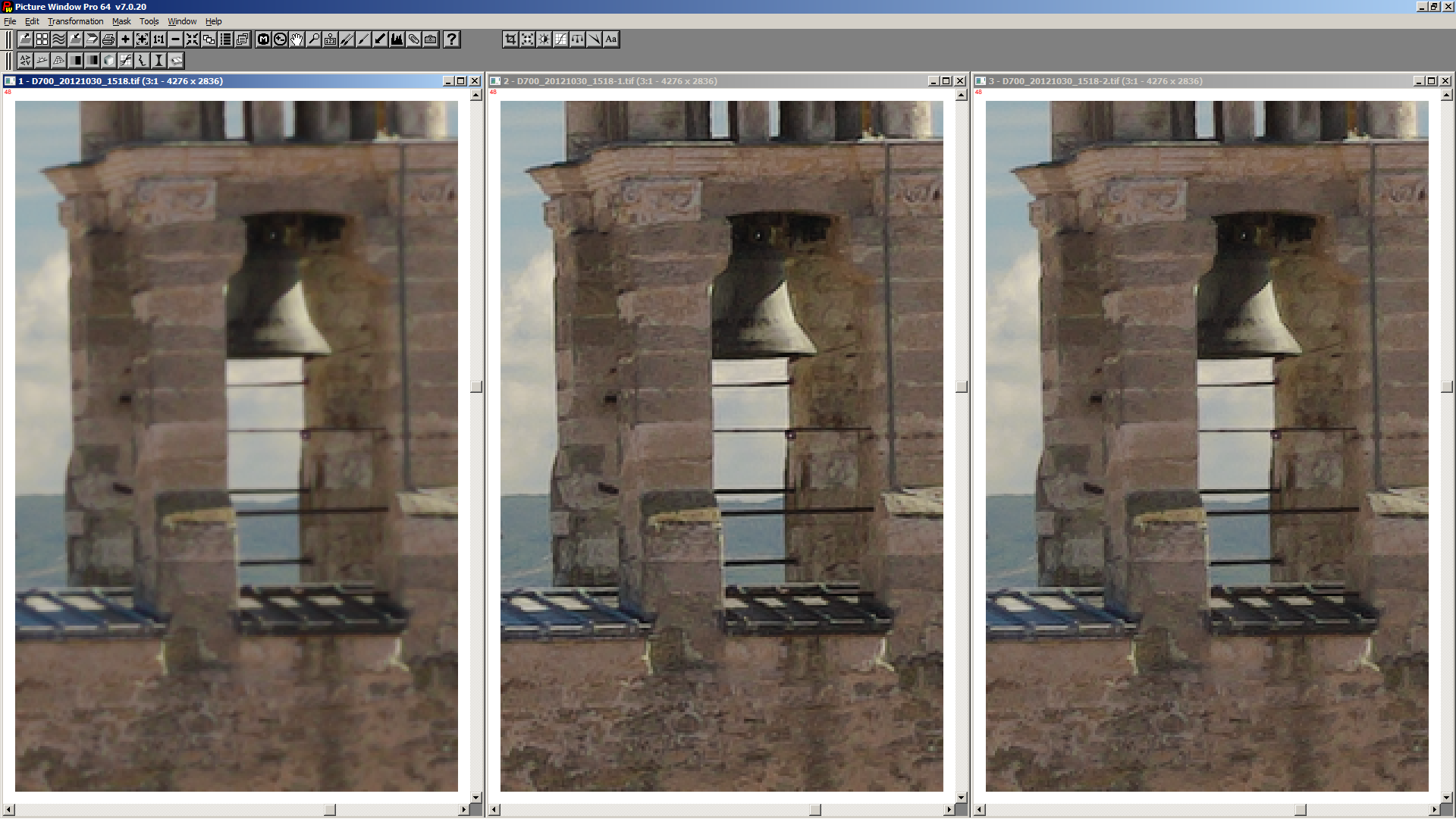
Here's a first screenshot of a new feature for Capture Sharpening, I'm working on. It's automatic calculation of the CS radius.
Left unsharpened, middle with the hardcoded default radius of 0.75, right with the auto calculated radius (0.63 in this example)
heckflosse
on 7 Sep 2019
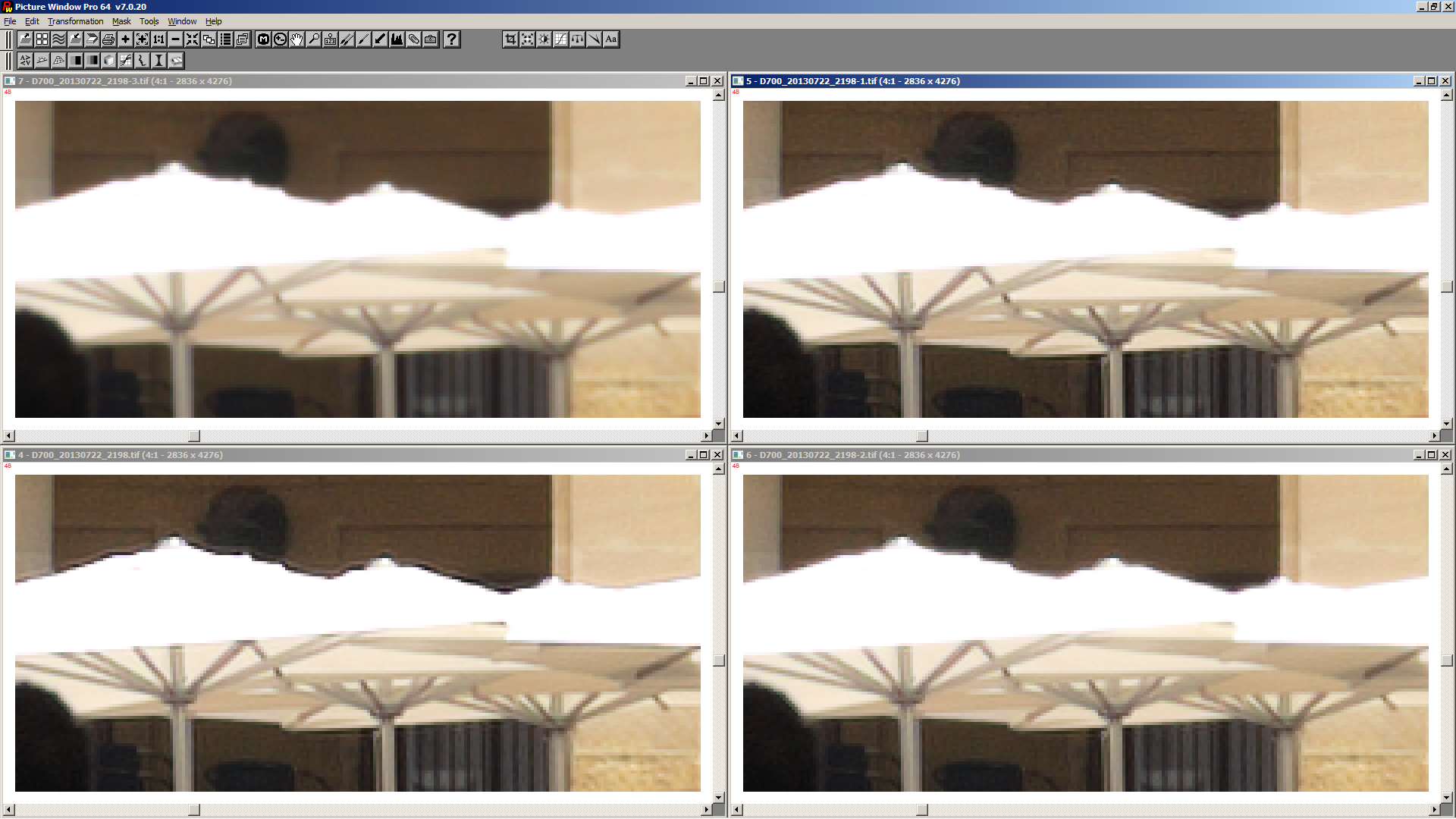
Another one: Top left unsharpened. Bottom left CS with default settings. Top right CS with default settings but with the new feature to eliminate the dark halos near clipped highlights. Bottom right same as top right but with auto calculated radius
heckflosse
on 7 Sep 2019
@heckflosse
I've tested capture sharpening with Auto-Radius and it's works great.
but (there is always a "but" 😁 ) I've a feature request.
Is it possible to add a slider for a "Auto-Radius" correction multiplier?
This would help to create different profiles for different lenses.
 TooWaBoo
on 15 Sep 2019
TooWaBoo
on 15 Sep 2019
@TooWaBoo
Is it possible to add a slider for a "Auto-Radius" correction multiplier?
This would help to create different profiles for different lenses.
Can you provide raw files for which this would make sense?
heckflosse
on 15 Sep 2019
My 55-200mm Nikon is very weak at 200mm.
https://filebin.net/xd2xard3m5kbt122
TooWaBoo
on 15 Sep 2019
@TooWaBoo That doesn't look very soft to me (at least not in the center of the image).
Which radius would you use for that image?
heckflosse
on 15 Sep 2019
Approximately 80
TooWaBoo
on 15 Sep 2019
@TooWaBoo 0.80 ?
heckflosse
on 15 Sep 2019
Sorry, yes I meant 0.80 😂
TooWaBoo
on 15 Sep 2019
@TooWaBoo I will first try this:
https://discuss.pixls.us/t/quick-question-on-rt-richardson-lucy-implementation/13614/128
heckflosse
on 15 Sep 2019
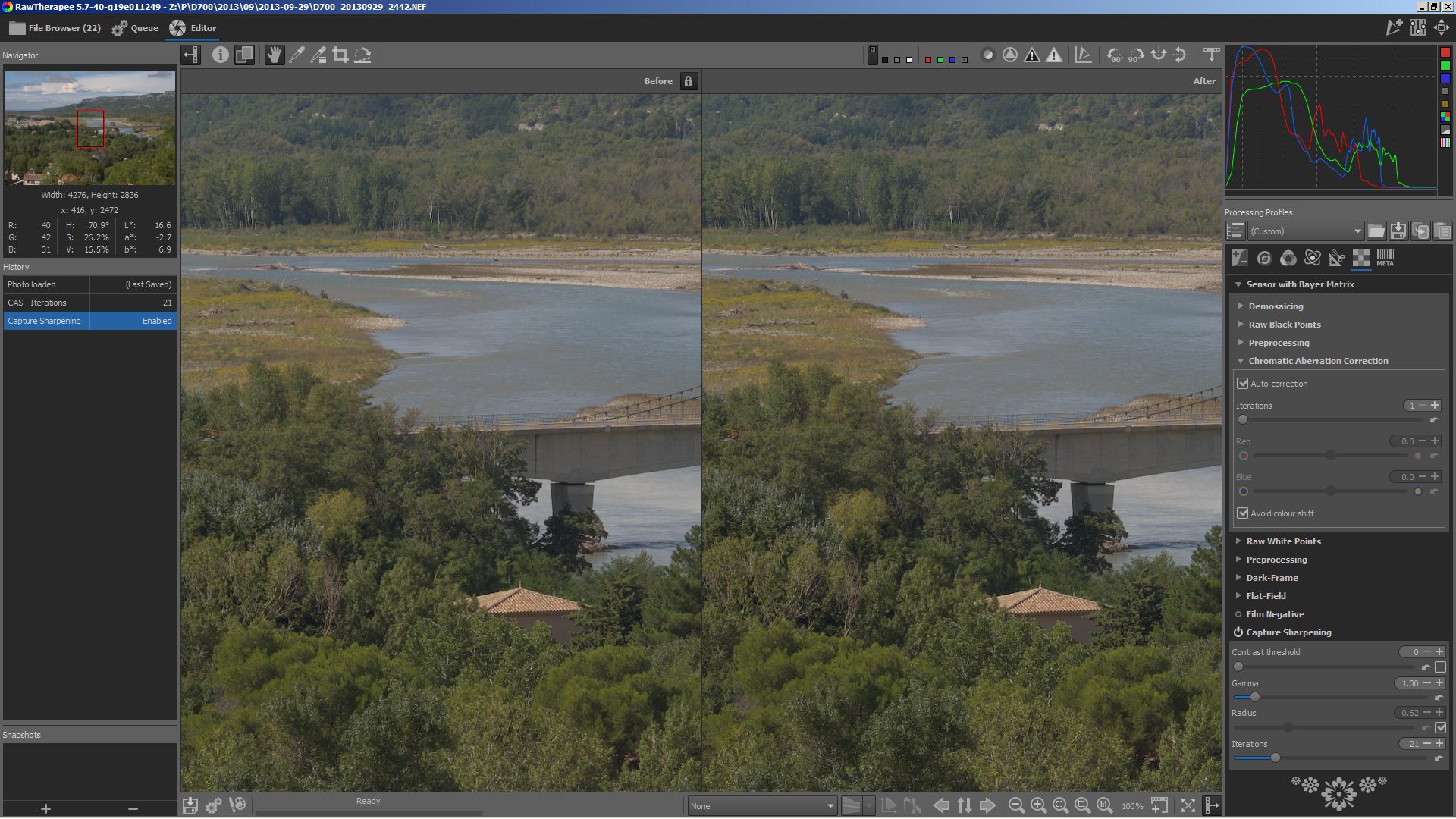
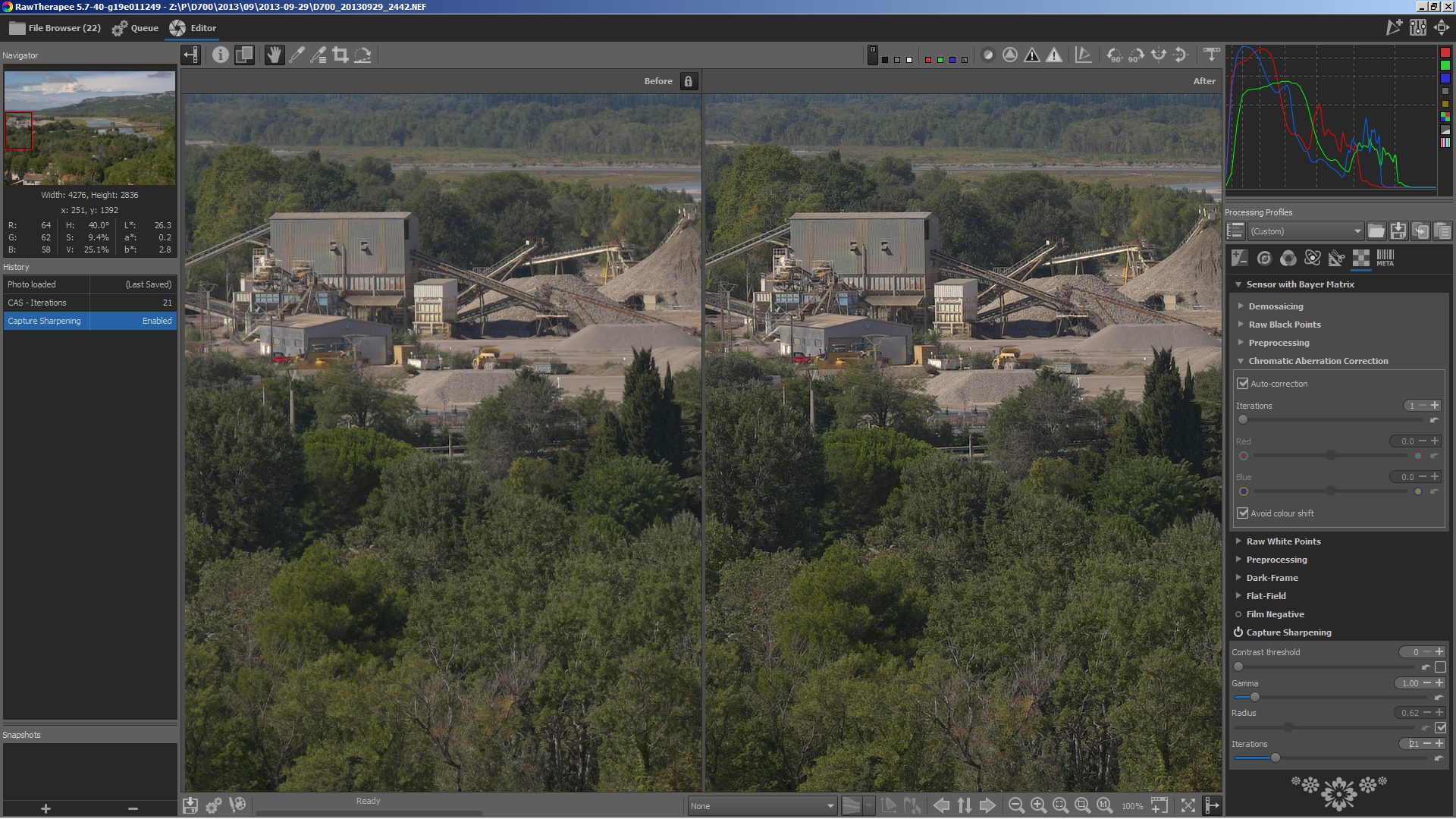
First screenshots of my very first tests with radius automatically increasing with distance to center
Always left fix radius, right automatically increasing radius
Center of the image, as expected no difference:
Left border of the image, small difference, barely visible:
Lower left corner, difference clearly visible:
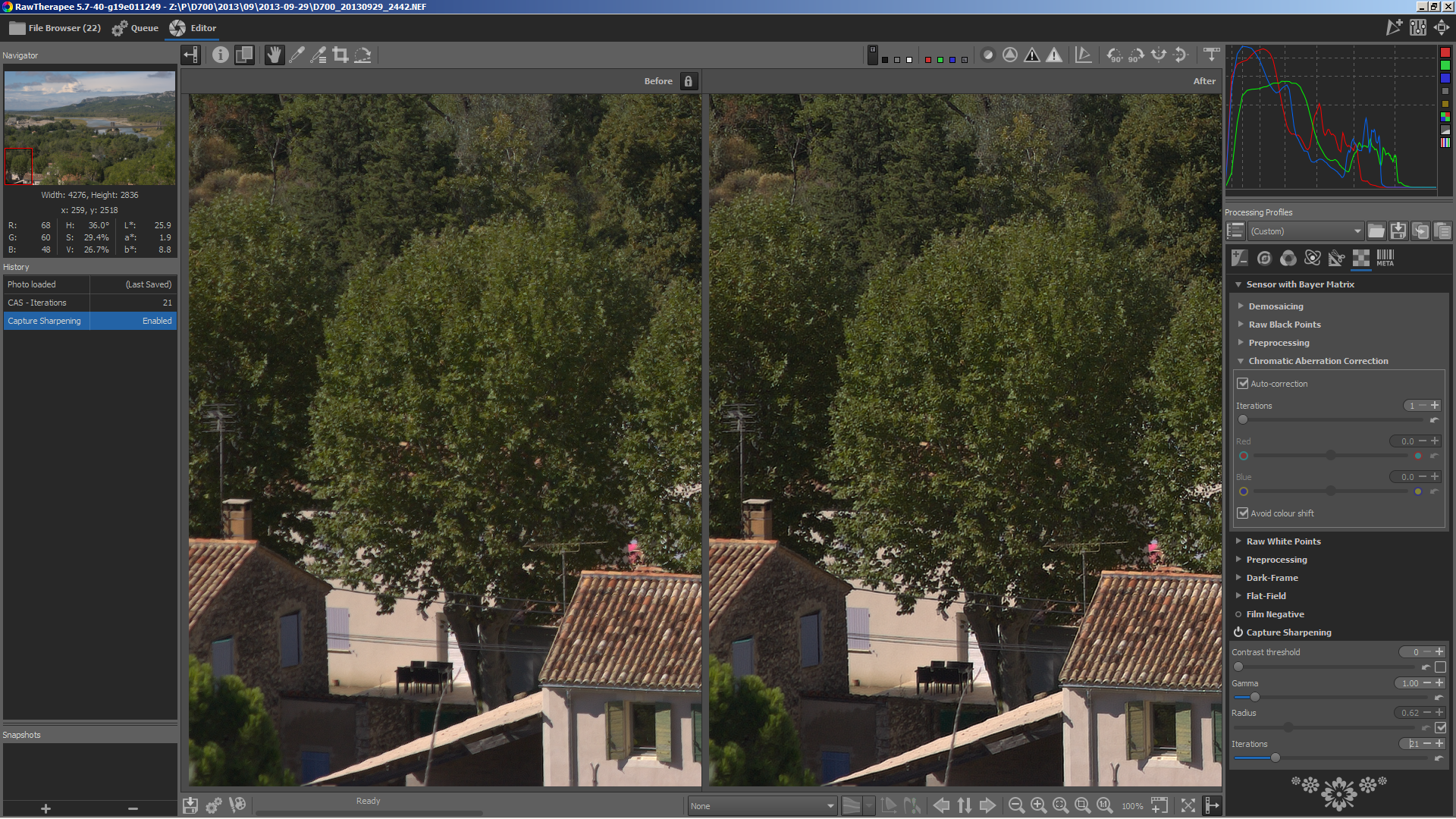
Edit: this image was shot with a 1.4/85mm lens at 5.6. Not the best test case...
heckflosse
on 15 Sep 2019
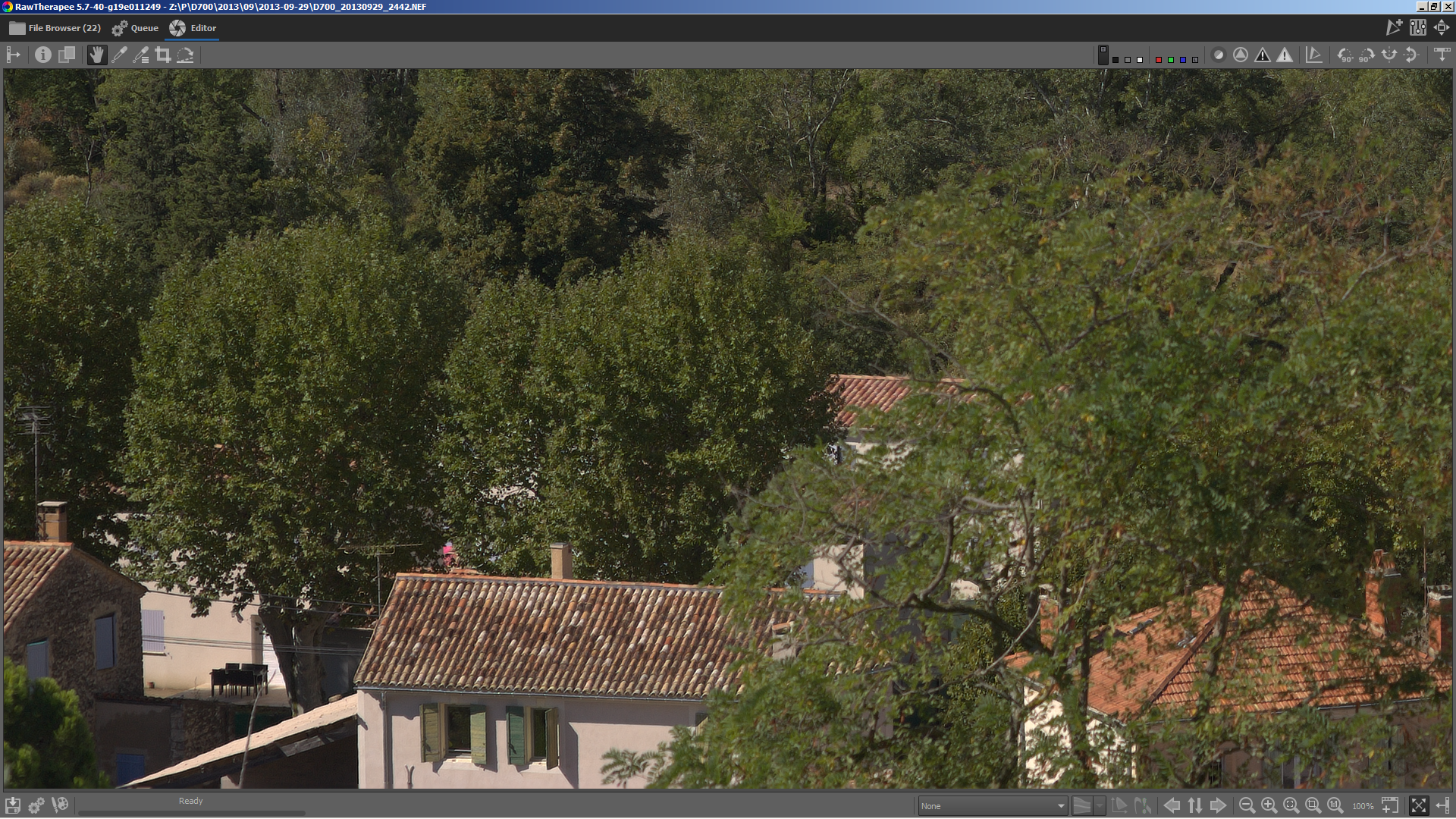
@Beep6581 requested separate images for better comparison:
center with fix radius
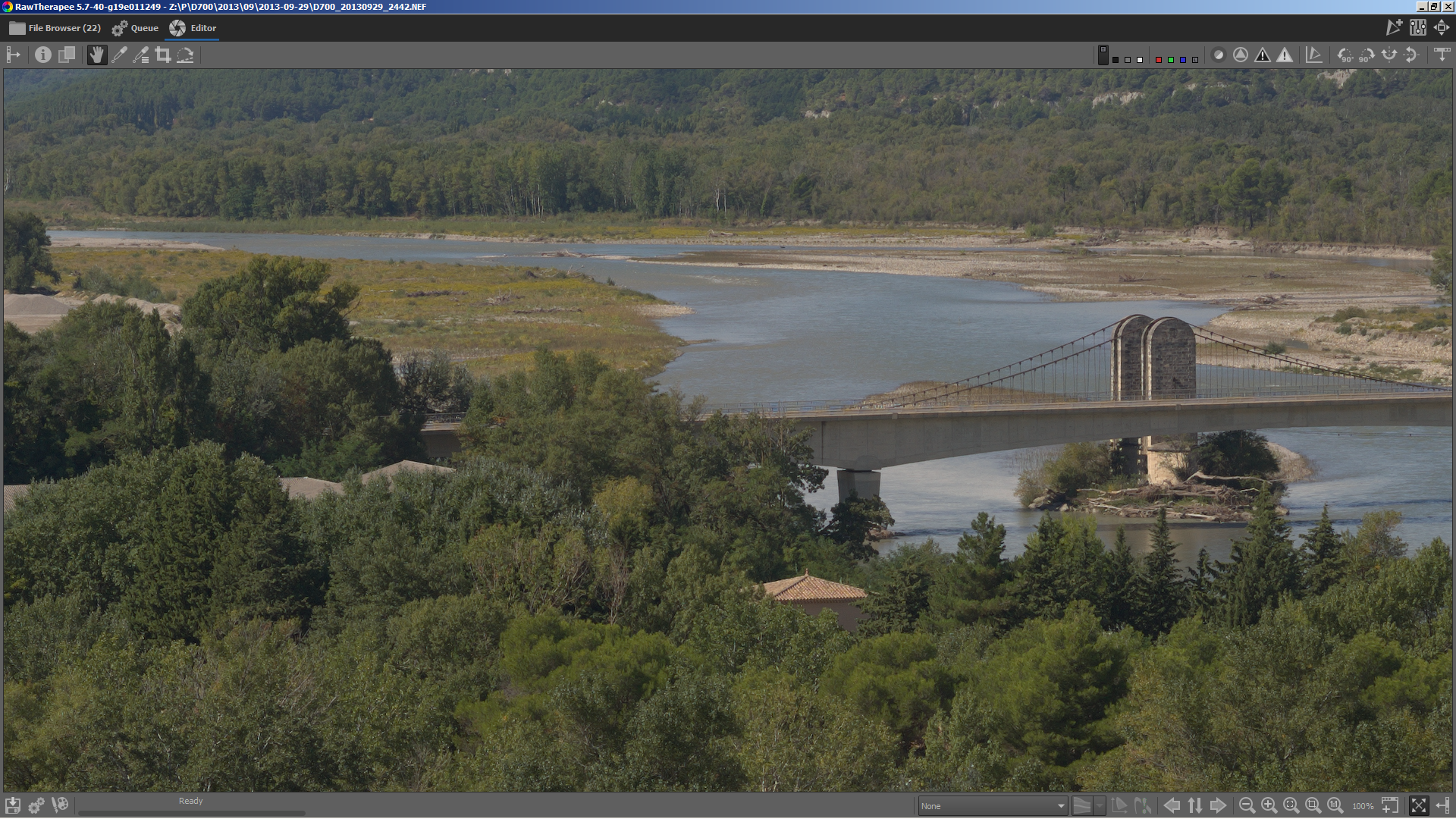
center with variable radius
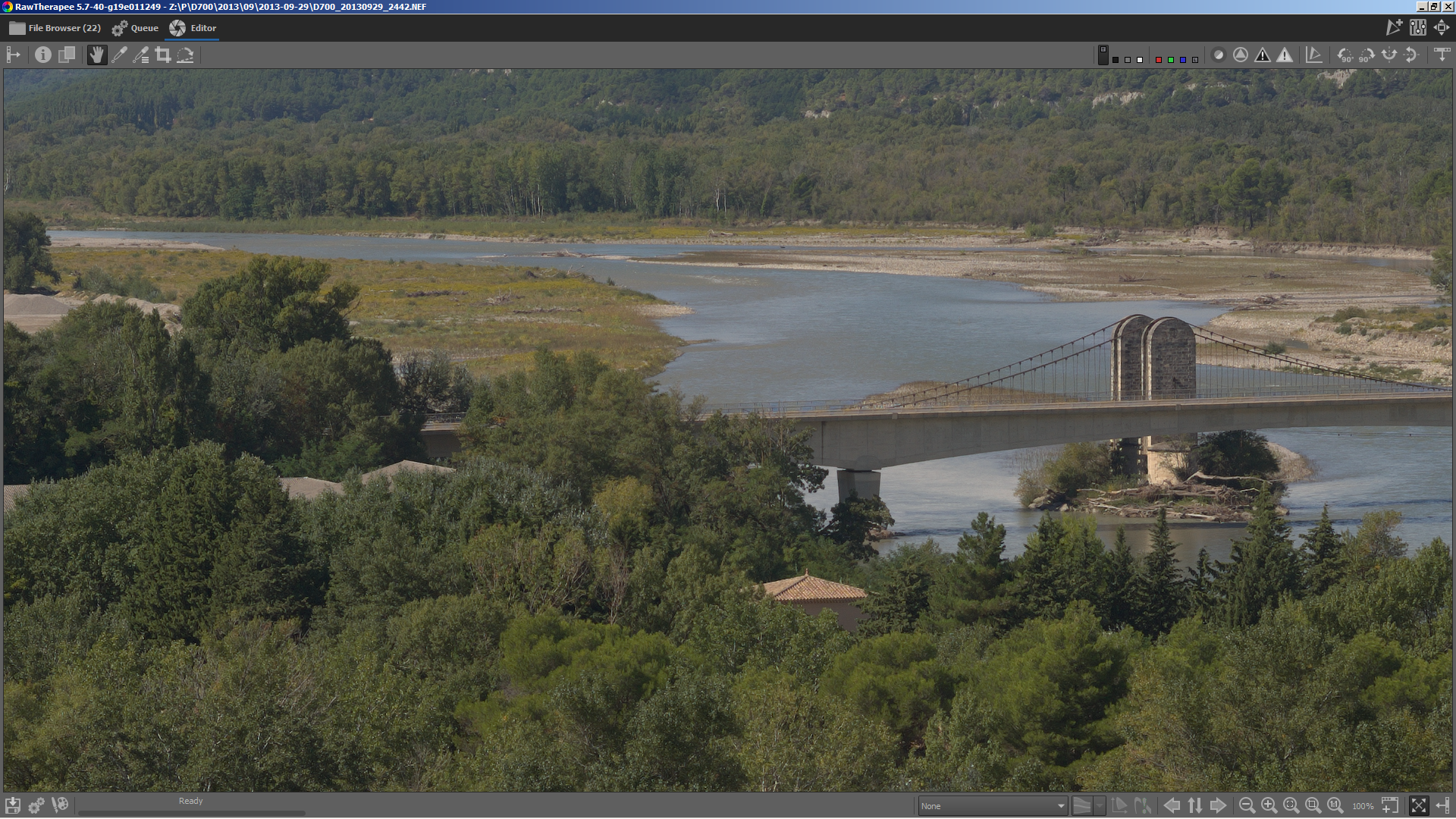
left border with fix radius
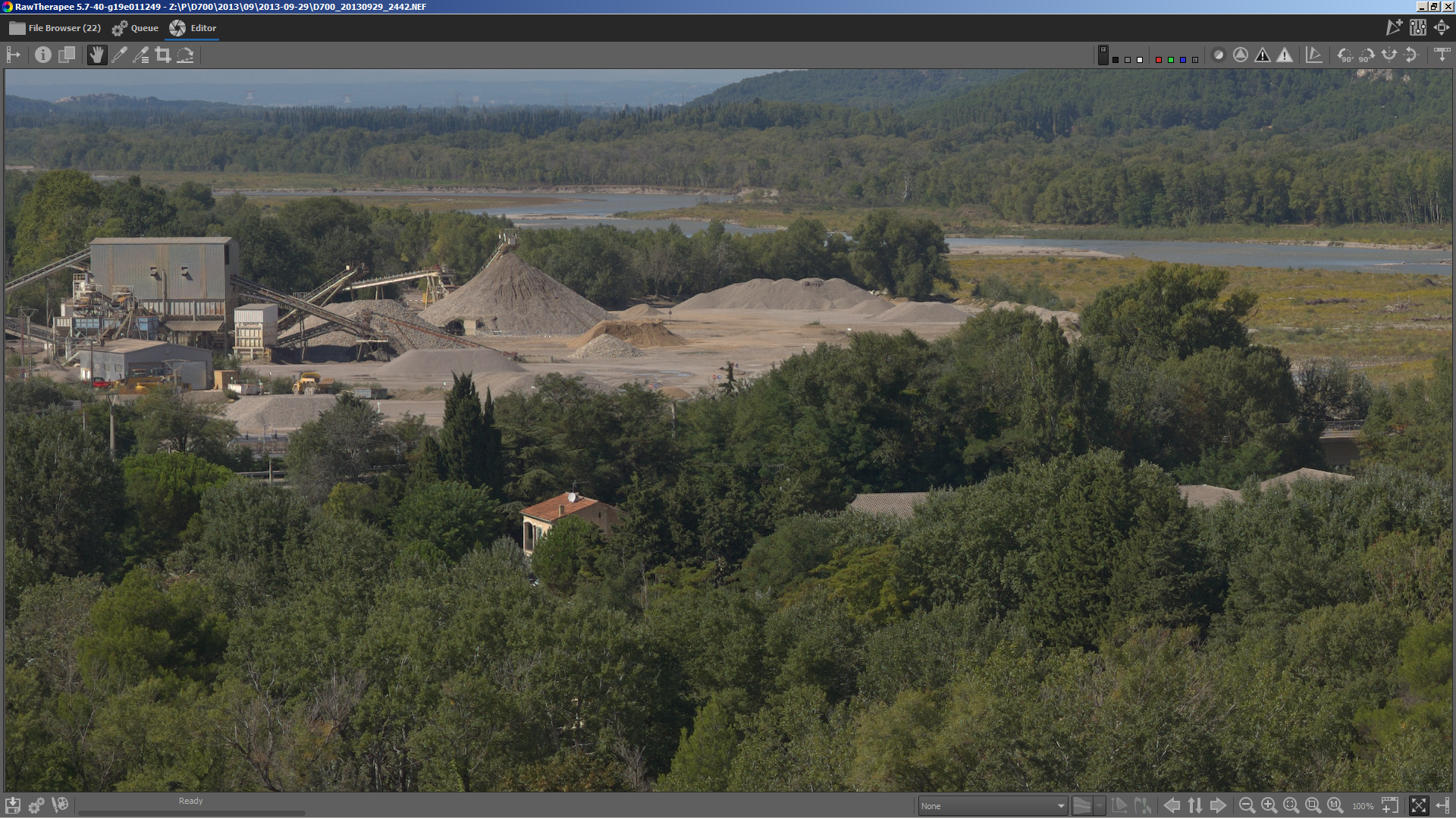
left border with variable radius
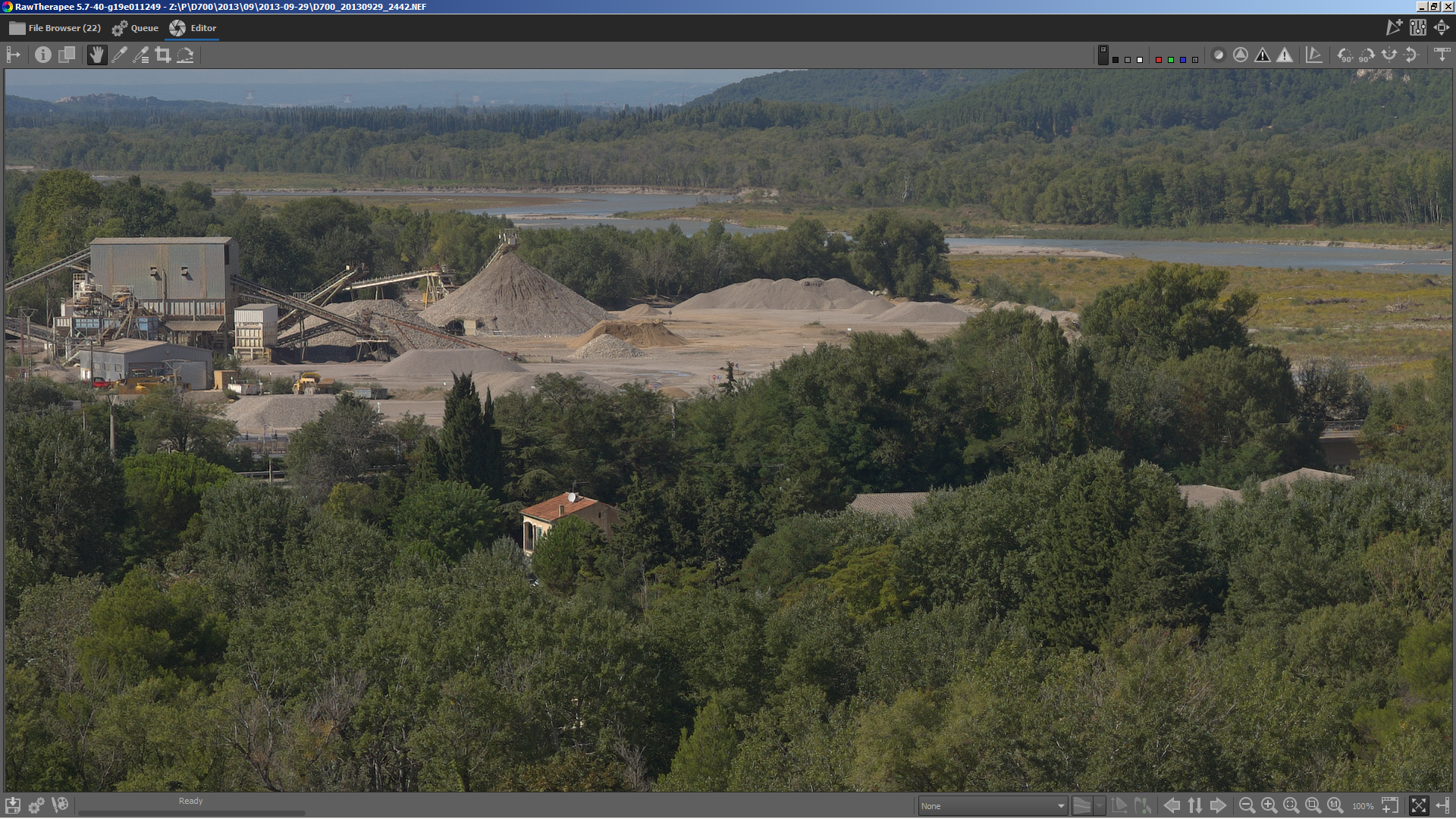
lower left corner with fix radius
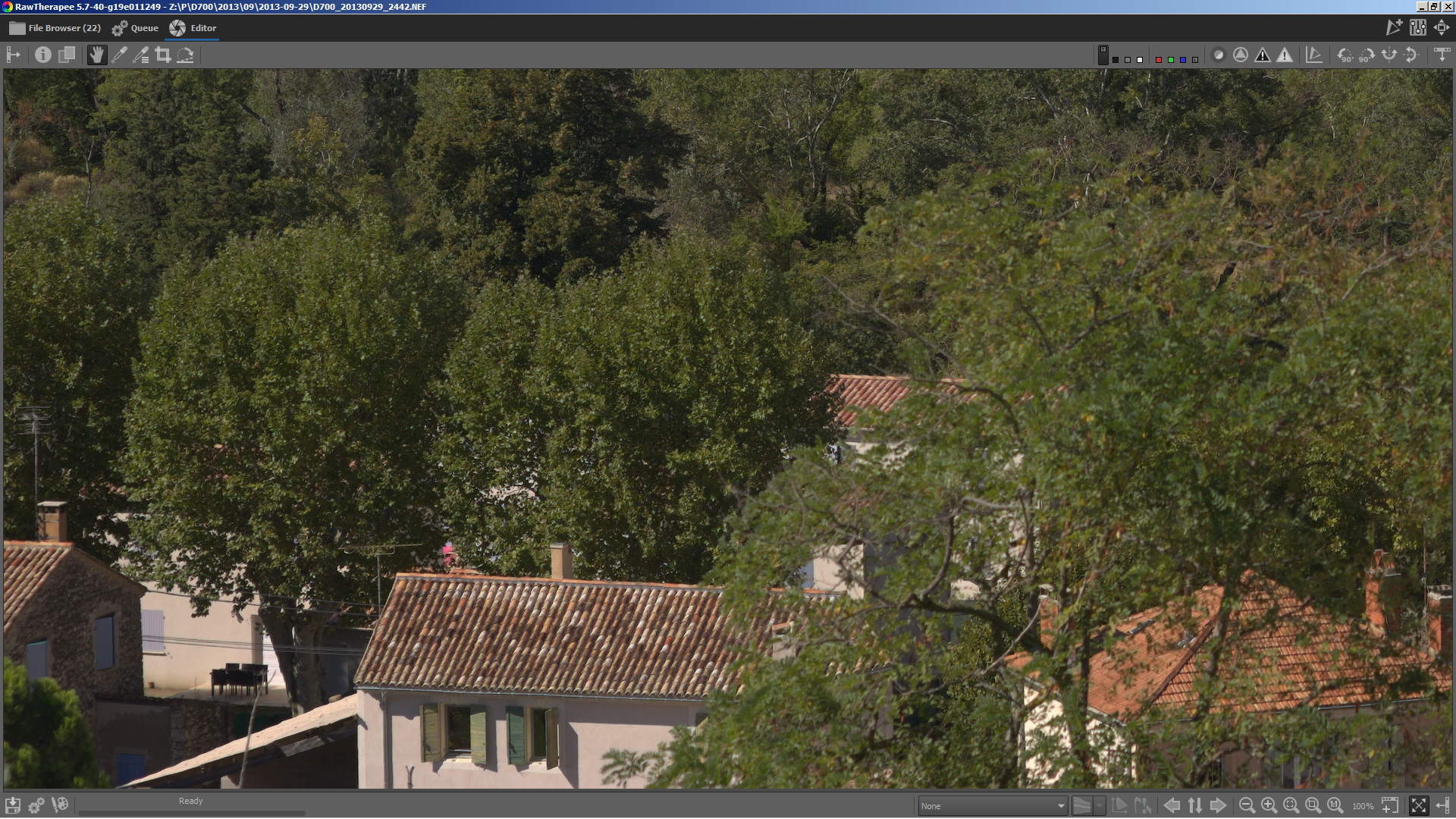
lower left corner with variable radius
heckflosse
on 15 Sep 2019
Fantastic results!
 Beep6581
on 15 Sep 2019
Beep6581
on 15 Sep 2019
Todo list for Capture Sharpening:
1) complete variable radius depending on distance to center
2) improve auto-radius for xtrans
2.1) Implement a hot/dead pixel filter for xtrans. This is needed because especially hot pixels lead to wrong auto-radius. And it's generally missing anyway ;-)
2.2) Review the current xtrans auto-radius calculation
3) avoid the dark halos
heckflosse
on 15 Sep 2019
- Partial paste. Currently, CS always gets saved even when you partial-save with everything unchecked.
- Enable Capture Sharpening in both
* ISO Low.pp3.
Beep6581
on 16 Sep 2019
I pushed 1. to capture_sharpening branch
heckflosse
on 16 Sep 2019
- Add the 1:1 label to Capture Sharpening
TooWaBoo
on 17 Sep 2019
@TooWaBoo
Add the 1:1 label to Capture Sharpening
Why?
heckflosse
on 17 Sep 2019
@heckflosse
To see the effect of the tool. I don't see any difference when the image is not at 100%.
EDIT:
Hmmm, the tool is applied also at <100%. Does this makes sense?
TooWaBoo
on 17 Sep 2019
@TooWaBoo
Sure, CS is always applied to the whole image, same as raw ca-correction for example. It makes panning faster and also you can view the contrast mask for the whole image. I can see the effect also at 50% (less, because of downsized, but still there)
heckflosse
on 17 Sep 2019
The label 1:1 tells me that I have to use the tool at 100% to evaluate the correct setting. That's why I mentioned it.
TooWaBoo
on 17 Sep 2019
@TooWaBoo
The label 1:1 tells me that I have to use the tool at 100% to evaluate the correct setting. That's why I mentioned it.
That's indeed an argument. Opinions?
heckflosse
on 17 Sep 2019
The "1:1" label means the tool has no effect at <100%, i.e. it's "physically" excluded from the pipeline. This is not true for CS, so no 1:1 label.
Beep6581
on 17 Sep 2019
For e.g. Tone Mapping, Dynamic Range Compression, Noise Reduction, Contrast by Detail Levels and maybe more have a 1:1 label but are processed also <100%.
My opinion from user view: The 1:1 indicates if the tool should be setup at >=100%.
TooWaBoo
on 17 Sep 2019
Noise Reduction being the exception.
heckflosse
on 17 Sep 2019
RawPedia:
Note that the effects of some tools are only accurately visible when you are zoomed in to 1:1 (100%) or more. These tools are marked in the interface with a "1:1" icon Zoom 1:1 next to the tool's name.
TooWaBoo
on 17 Sep 2019
That phrasing should perhaps better be "Some tools are only active when viewing at 1:1 zoom or higher, because their effects are computationally too slow otherwise."
Thanatomanic
on 17 Sep 2019
@Thanatomanic
Did you read all posts from here? https://github.com/Beep6581/RawTherapee/issues/5412#issuecomment-532060303
In my opinion the phrase in RawPedia is correct, because the 1:1 label should tell the user how to use the tool in the correct way.
TooWaBoo
on 17 Sep 2019
@toowaboo Yes I did, but "only accurately visible" is something that applies to the CS imo. You don't see the effect when zoomed out (or at least not _accurately_). So while the tool is active at all zoom levels, the current text in RawPedia doesn't describe things accurately.
Thanatomanic
on 17 Sep 2019
@Thanatomanic , This is not the point. The point is: Should CS get the 1:1 label or not.
TooWaBoo
on 17 Sep 2019
Sorry for not being overly clear (long workday, and I'm typing on the way back home). If RawPedia is correct, then CS should get the "1:1" label because its effects are only _accurately_ visible at 100% zoom.
If @Beep6581 is correct, then RawPedia could be rewritten according to my suggestion and CS should not get the "1:1" label because it is active independent of zoom level.
Thanatomanic
on 17 Sep 2019
@Thanatomanic , There is no correct or wrong. 😁 The question is, what makes sense from the view of a user.
TooWaBoo
on 17 Sep 2019
Let me write about the differences to other 1:1 tools from a technical perspective (keep aside the user perspective for the moment):
All other 1:1 tools are either not applied at zoom level < 100% or applied to a downsized image using a scaled parameter, which is not accurate
CS always is applied to the whole image and the result will be downsized afterwards for less than 100% preview, which of course means, the 50% preview can not show an accurate result, but only because it's downsized.
Now, from a users perspective, if we add the 1:1 icon, we also have to add the 1:1 icon to raw-ca-correction, because it's also always applied to the whole image and downsized for preview.......
Thinking more about that, we would even need to add an 1:1 icon to demosaic, because you can not see the exact output at < 100% ;-)
heckflosse
on 17 Sep 2019
Or the other way: There is (for reasons) no tool in raw tab which has the 1:1 icon
heckflosse
on 17 Sep 2019
I prefer the user view because a user does not think about or knows what's under the hood. The 1:1 label instructs the user to configure the tool at >=100%. All tools to which this applies should therefore get the 1: 1 label.
This exactly corresponds to the RawPedia article.
TooWaBoo
on 18 Sep 2019
http://rawpedia.rawtherapee.com/Template:1:1
The effects of this tool are only visible at a preview scale of 1:1 or more. Use a detail window (click on the Window-add.png icon under the main preview panel) to inspect a part of the image, or zoom the main preview to 100% (also called 1:1) Magnifier-1to1.png.
In capture sharpening, the whole image is processed, so the preview is accurate at any zoom level as far as CS is concerned. Whether you can see the effects or not at 50% zoom or 10% zoom is completely irrelevant. The 1:1 label is there to warn you of a technical shortcoming of RawTherapee (due to the nature of the algorithm, too high memory requirements, too slow speed, other) that the <100% zoom's preview is unreliable, not to warn the user when the user is being stupid. If it was otherwise, it would follow that a 1:1 warning should appear when you use a tool with some parameter whose value is too small to have a visible effect at the current zoom level and taking into account the image size and probably even screen size and PPI, but disappear when the parameter is sufficiently high, e.g. at 50% zoom a USM radius of 0.8 might make a visible difference, but at 25% zoom the same radius on the same image might make no difference.
So again, the 1:1 label is there to warn you that the effects of the tool on the preview may be inaccurate at <100% zoom, regardless of image size, screen size, screen PPI or parameters used.
Beep6581
on 18 Sep 2019
What does accurate mean? It means if you apply the tool in RawTherapee and zoom out to some scale, and then you export the full-sized image and zoom out to the same scale in your image viewer, the images should be identical (excluding the effects of the downscaling interpolation algorithms used by RawTherapee and the image viewer).
Beep6581
on 18 Sep 2019
Related issues
 Desmis
·
297Comments
heckflosse
·
110Comments
Hombre57
·
91Comments
heckflosse
·
88Comments
heckflosse
·
77Comments
Desmis
·
297Comments
heckflosse
·
110Comments
Hombre57
·
91Comments
heckflosse
·
88Comments
heckflosse
·
77Comments