Rawtherapee: Locallab: Improvements of GUI
Hello All,
Lately I have started a new session of improvements for Locallab GUI. The main objectives are:
- Rewrite some part of Locallab GUI to make it more generic: this will improve robustness, maintainability and simplify further evolution
- Remove Batch Mode support for Locallab: local treatments cannot really be managed in Batch Mode...
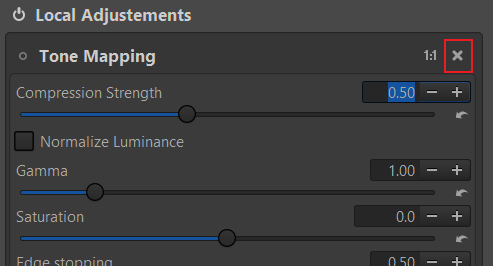
- By default, a spot won't have linked Locallab tool. New GUI will allow to add/remove Locallab tool for each tool (only linked tool parameters will be saved in .pp3 file, will fix #5255). Preview:
- Improve copy/paste mechanism for Locallab spot
- Add more mouse/keyboard controls on spot (to reduce number of widgets to manage), maybe add new spot shapes...
- Bugfixes...
Here a detailed schedule I will edit regularly:
- [x] Locallab tools management
- [x] Creation of generic class to manage Locallab tool individually
- [x] Conversion to all Locallab tool to this new generic class
- [x] Adaptation of actual GUI
- [x] Remove Batch Mode support for Locallab
- [x] Add possibility add/remove Locallab tool
- [x] Fix #5255
- [x] Improve copy/paste of spot
- [ ] Locallab spot management
- [ ] Creation of generic class to manage several type of spot (rectangle, ellipse, others?)
- [ ] Adaptation of actual GUI
- [x] Avoid reprocessing when switching between spots when not necessary (fix #5268)
- [ ] Add more mouse/keyboard controls
- [ ] Add possibility to deactivate a specific spot to see its effects on image
- [x] Fix #5354 (thanks to Hombre57)
For the moment, modifications are managed in my fork (I have started from commit afd5d5d of newlocallab branch):
https://github.com/Pandagrapher/RawTherapee
List to be completed with your suggestions ;)
Pierre
@Desmis
 Pandagrapher
All 16 comments
@Pandagrapher
It's ok for me.
When you say "Creation of generic class to manage several type of spot (rectangle, ellipse, others?)", does this incorporate the drawing of curves, polygons .. ?
jacques
 Desmis
on 13 Aug 2019
Desmis
on 13 Aug 2019
@Desmis
When you say "Creation of generic class to manage several type of spot (rectangle, ellipse, others?)", does this incorporate the drawing of curves, polygons .. ?
For the moment, it doesn't but I think it will simplify further type addition. I just noted the idea of adding full-frame spot. When ready for, we will have to synchronize each other to update code.
I was wondering: when a spot is an excluded one, Locallab tools parameters are ignored? If yes, I will create a dedicated excluded spot type which cannot have linked Locallab tools.
Pierre
Pandagrapher
on 13 Aug 2019
@Pandagrapher
For "excluding spot", they used the same "Locallab tools parameters", but it's "only" the raw datas (in Lab*) which are differents
- Excluding = original datas
- Normal = recursives datas
Am I clear ? For me no differences for GUI part.
For synchronisation no problem at all.
Actually I am not at home, I get internet with a Smartphone....until August 27th I would be little available (holidays with my family)
jacques
Desmis
on 13 Aug 2019
@Pandagrapher
Have you seen this message in Pixls.us
Desmis
on 13 Aug 2019
@Pandagrapher
Have you seen this message in Pixls.us
@Desmis
Yes, this crash is similar to issue #5221 so fixed :)
Pandagrapher
on 13 Aug 2019
For "excluding spot", they used the same "Locallab tools parameters", but it's "only" the raw datas (in L_a_b*) which are differents
- Excluding = original datas
- Normal = recursives datas
Am I clear ? For me no differences for GUI part.
@Desmis
Thanks for the explanation, it's clear now :) (so no specific modification for GUI for excluded spot :p)
Pierre
Pandagrapher
on 13 Aug 2019
@Desmis
does this incorporate the drawing of curves, polygons .. ?
Does your algorithm work with [any shape + origin] ? If not, why ?
 Hombre57
on 17 Aug 2019
Hombre57
on 17 Aug 2019
@Hombre57
I have speak of that
- here in GitHub https://github.com/Beep6581/RawTherapee/issues/5409#issuecomment-520308559
- here in Rawpedia (in french) http://rawpedia.rawtherapee.com/Local_Adjustments/fr#Principes_g.C3.A9n.C3.A9raux
You can also read the code in iplocallab.cc
- static void calcTransition
- static void calcTransitionrect
- float calcLocalFactor
- float calcLocalFactorrect
and for example to take into account deltaE and mask
void ImProcFunctions::transit_shapedetect
*etc
Desmis
on 18 Aug 2019
@Desmis
Hello Jacques,
I have added the possibility to add/remove a Locallab tool to the currently selected spot (refer to my last commit in my fork). What do you think about this improvement ?
Note: For the moment, the Locallab tools state (added/removed) isn't saved in .pp3 file (will be managed in next commit).
Pierre
Pandagrapher
on 9 Sep 2019
@Pandagrapher
Hello Pierre
I just tested your new commit.
Nice improvment :)
With that the interface is much clearer, very good job.
Thank you
Jacques
Desmis
on 10 Sep 2019
Hello All,
Some preview of the improved copy/paste (or save/load) for Locallab spots :
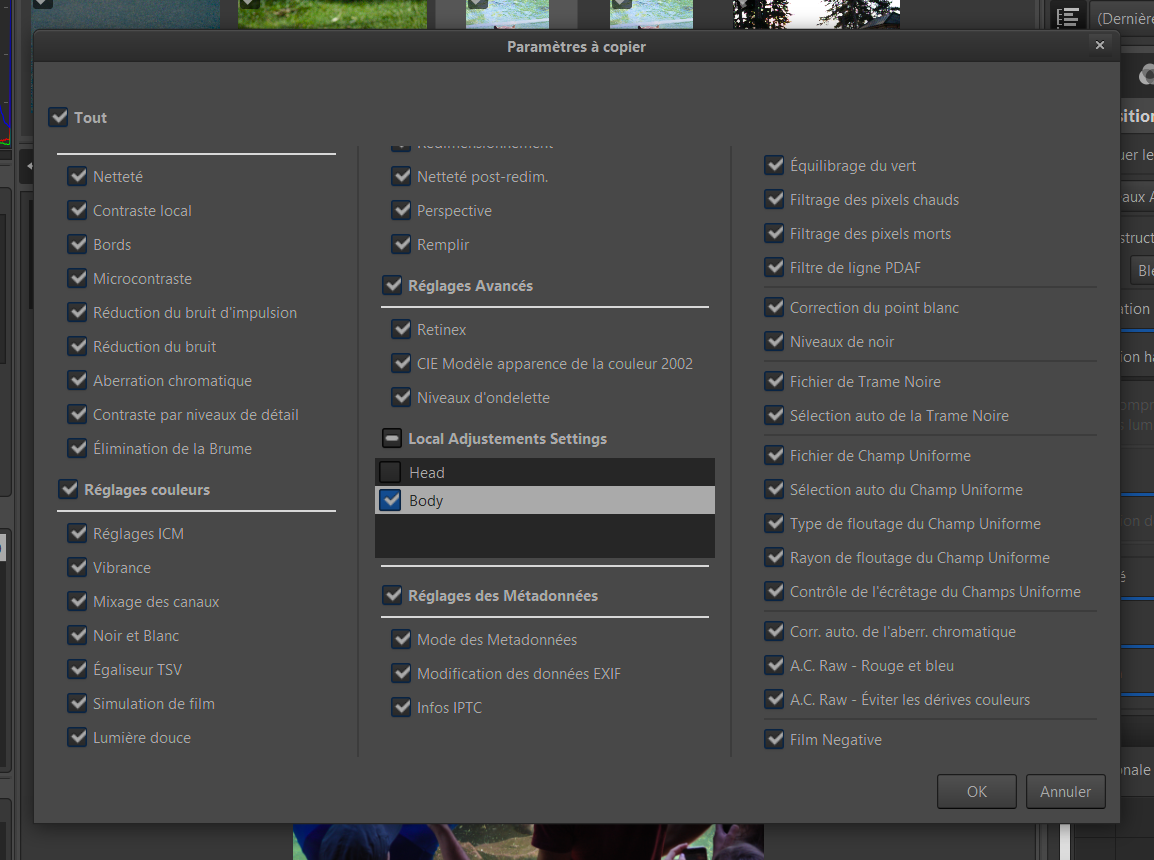
When using partial dialog, spot to be kept can now be chosen in a list!!
@Desmis
I gonna start a (huge) merge. Please do not impact GUI (or noticed me the diff from now).
Pierre
Pandagrapher
on 20 Feb 2020
No problem, i have no computer :)
But thank you for your job.
Jacques
Desmis
on 21 Feb 2020
@Desmis @Thanatomanic @heckflosse @Floessie @Beep6581
Hello All,
I have started working on a TreeView upgrade. My purpose is to make it more intuitive and reduce the number of buttons/sliders in "Settings" panel.
Here a proposal:
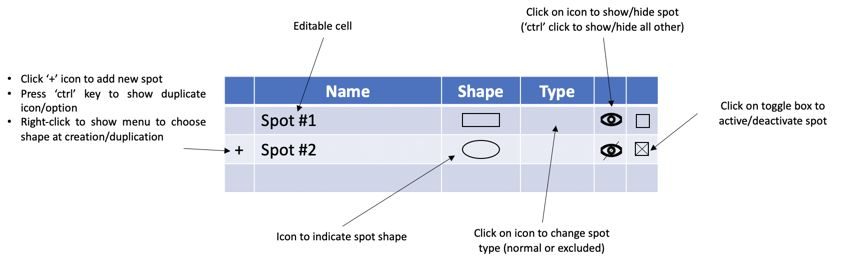
Does this seem to you more intuitive? Do not hesitate if you have any suggestion.
In a second step, I will add more mouse control when manipulating spot.
Pierre
Pandagrapher
on 16 Jun 2020
Sounds good. I can help with the icons if you like.
 Beep6581
on 18 Jun 2020
Beep6581
on 18 Jun 2020
@Beep6581
I can help with the icons if you like.
Sure :) I am not really skilled with Inkscape
The list of icons for the TreeView:
- 1st column:
- "Add" -> I used the "add-small" one
- "Duplicate" -> I have created a "copy-small" from "copy" icon
- 3rd column (shape):
- "Rectangle"
- "Ellipse"
- 4th column (type): This column is definitely not the easy one to be intuitive with such a small icon. I was thinking like maybe a filled rectangle with a circle part across it. For the excluded version, the rectangle part inside circle is less visible. If you have a better idea, do not hesitate.
- "Normal spot"
- "Excluded spot"
- 5th column:
- "Visible" -> Eye icon ?
- "Not visible" -> Barred eye icon ?
From my tests, the small icon size (16x16px without hidpi) seems to be a good one for TreeView icons.
Thanks a lot :)
Pierre
Pandagrapher
on 18 Jun 2020
@Pandagrapher
After thinking about it, I think that when you are going to simplify the GUI of "settings" in a few days (expanders to decrease the size of settings), you should remove the checkbox "Mask laplacian solve PDE".
Indeed in 99% of cases, the use is "enabled"
You should not make this variable disappear, but make it inaccessible to the user, by ensuring through the GUI that it is "enabled"
Thank you
Jacques
Desmis
on 19 Jun 2020
Related issues
 Floessie
·
5Comments
Hombre57
·
3Comments
Floessie
·
5Comments
Hombre57
·
3Comments
 heckflosse
·
4Comments
heckflosse
·
4Comments
 Lawrence37
·
3Comments
Lawrence37
·
3Comments
 JIPG2
·
3Comments
JIPG2
·
3Comments
Most helpful comment
@Desmis @Thanatomanic @heckflosse @Floessie @Beep6581
Hello All,
I have started working on a TreeView upgrade. My purpose is to make it more intuitive and reduce the number of buttons/sliders in "Settings" panel.
Here a proposal:

Does this seem to you more intuitive? Do not hesitate if you have any suggestion.
In a second step, I will add more mouse control when manipulating spot.
Pierre