Rawtherapee: CR3 decoding support (metadata support needed)
There is an increasing number of cameras using the Canon Raw v3 (CR3) format. This issue is about adding support for decoding CR3 in RawTherapee, regardless of specific camera model.
CR3 specification:
https://github.com/lclevy/canon_cr3
 Beep6581
All 23 comments
Hi, how is the progress of this feature? Desperately needing it... ;-)
BTW, congrats on this great piece of software!
 miguel-porto
on 25 Sep 2019
miguel-porto
on 25 Sep 2019
@miguel-porto There has been more discussion on the subject recently. See here: https://discuss.pixls.us/t/not-yet-canon-raw-files-cr3-recognised-by-rawtherapee/14042
If you desperately need it, you may opt to contact Canon yourself: https://discuss.pixls.us/t/canon-cr3-raw-support-your-move/14192
 Thanatomanic
on 26 Sep 2019
Thanatomanic
on 26 Sep 2019
Oh, didn't know the problem was still at that level, sorry. Just came across this issue first. Thanks for the clarification.
miguel-porto
on 26 Sep 2019
Hello, it looks like the new snapshot of LibRaw supports CR3!
https://www.libraw.org/news/libraw-snapshot-201910
Code should be available in their Github repo :)
 albfe
on 4 Nov 2019
albfe
on 4 Nov 2019
Commit 0cf3f16df adds basic CR3 decoding support. Metadata is not supported yet.
Beep6581
on 19 Nov 2019
Thanks a lot for the effort: it works!
Of course it is not yet usable, without metadata support, but I guess it will be coming with time :)
Thanks again!
albfe
on 19 Nov 2019
@albfe We started work on it today. Porting the code to decode the files was easy. Give us some time for the remaining parts (Metadata...)
 heckflosse
on 19 Nov 2019
heckflosse
on 19 Nov 2019
@heckflosse , I completely understand and my intention was not to criticize, but rather to thank you for having started working on this. Sorry if we misunderstood. My note about metadata was for other possible users that are waiting for cr3 support, so that they don't expect it is fully usable right now, just that.
BTW, even EOS R crop seems to be working well.
albfe
on 19 Nov 2019
Should I expect to see CR3 files already? I built the code for Mac OS (including the latest cr3 related commit from dev) and am not seeing the CR3 files in the File Browser.
 Krijger
on 11 Dec 2019
Krijger
on 11 Dec 2019
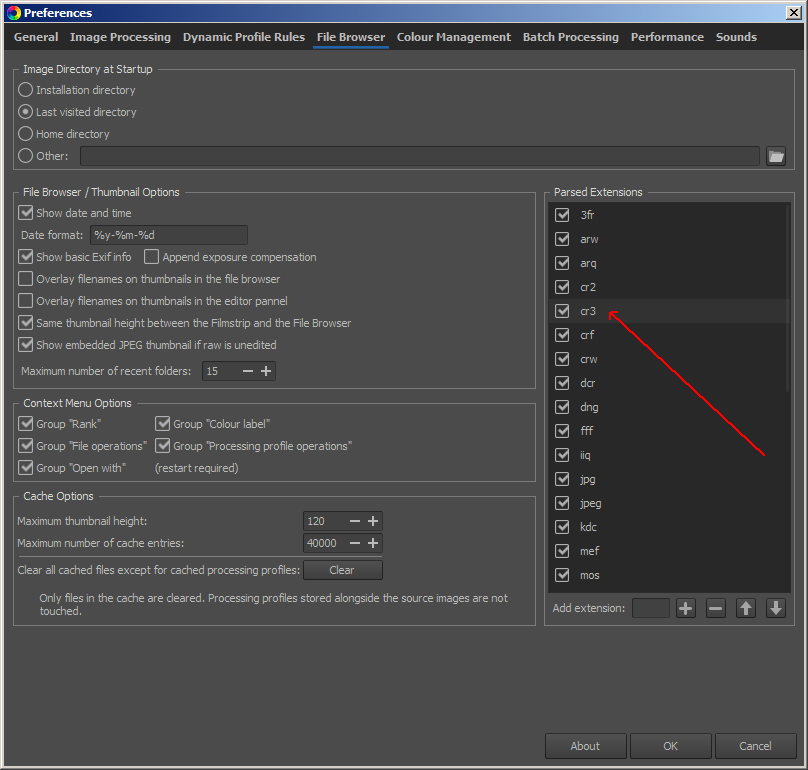
@Krijger Is CR3 enabled in preferences?
heckflosse
on 11 Dec 2019
@heckflosse hmm, it's not even in the list
Krijger
on 11 Dec 2019
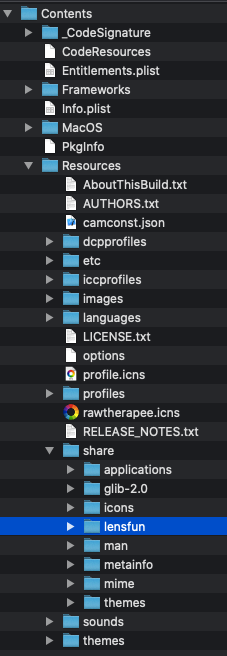
I checked my app contents for files in it that might explain this, it may have to do with the following file tree.
└── Contents
    │   ├── share
    │   │   ├── mime
    │   │   │   ├── image
    │   │   │   │   ├── bmp.xml
    │   │   │   │   ├── x-bzeps.xml
    │   │   │   │   ├── x-canon-cr2.xml
    │   │   │   │   ├── x-canon-crw.xml
I got the mime from shared-mime-info (installed with homebrew), (EDIT) which apparently does not yet know about CR3 https://gitlab.freedesktop.org/xdg/shared-mime-info/blob/master/freedesktop.org.xml.in#L4753, so I wonder where your installation gets the option from. What package installs the correct mimes ?
Krijger
on 11 Dec 2019
@Krijger Just add cr3 to the list

heckflosse
on 11 Dec 2019
Thanks! I actually looked for an option like that, but completely missed the preference pane not completely being shown (I scrolled the extension list, and missed the scrollbar on the outer panel). This may be a Mac OS GUI issue, because I think it should be displayed completely by default?
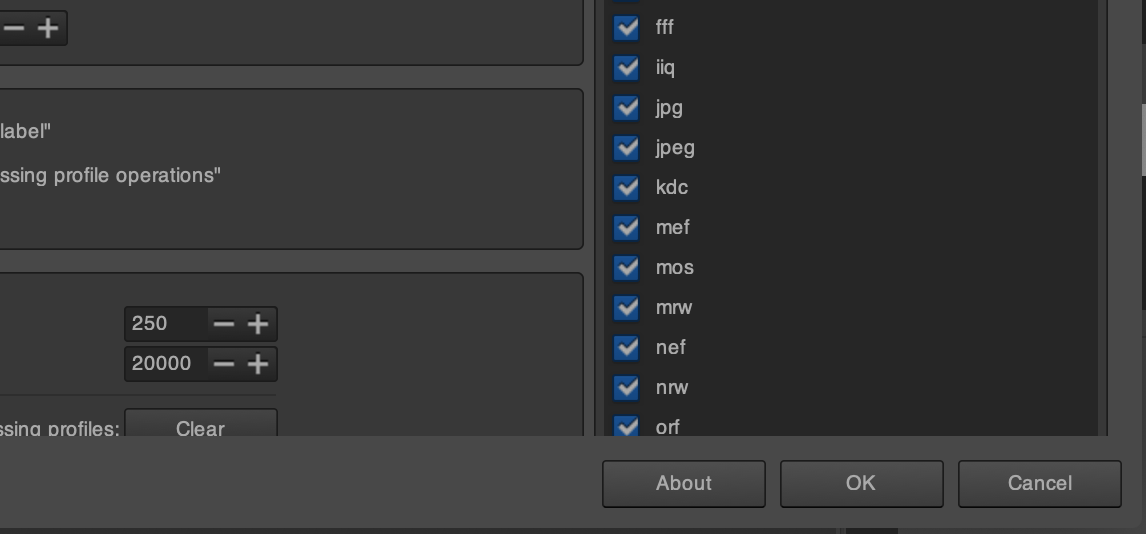
I can confirm that this works.
Krijger
on 12 Dec 2019
Full CR3 support will not be possible for 5.8 => change milestone to 5.9
heckflosse
on 15 Dec 2019
Clarification: metadata support is missing.
Beep6581
on 16 Dec 2019
I checked my app contents for files in it that might explain this, it may have to do with the following file tree.
└── Contents
    │   ├── share
    │   │   ├── mime
    │   │   │   ├── image
    │   │   │   │   ├── bmp.xml
    │   │   │   │   ├── x-bzeps.xml
    │   │   │   │   ├── x-canon-cr2.xml
    │   │   │   │   ├── x-canon-crw.xml
share/ should be in a folder called Resources/ under Contents/
 Benitoite
on 5 Feb 2020
Benitoite
on 5 Feb 2020
I just realised that exiftool supports reading and writing metadata to and from CR3 files. Is this something that could be utilised for RawTherapee, as well?
 mart-w
on 24 Mar 2020
mart-w
on 24 Mar 2020
I am getting started on photography with my new EOS RP. Is there anything I can do to help to get the metadata support in RawTherapee? I looked at the list of pictures which are required and I didn't find my camera so I suspect that all files needed are already provided? I would love to help as I really would prefer using an open-source-tool against the propitiatory tool from Canon... (Also this runs under Linux in contrast to the Canon Tool.)
 SchoolGuy
on 11 May 2020
SchoolGuy
on 11 May 2020
Hi
I am trying to upload a bunch of white frame files for a 1DX Mark III (which I have access to for a while), however uploading the zipped file to filebin (about 460MB) continually fails. There was a note about uploading the file to another site, but the name of that site currently escapes me. If someone can let me know of that site, please let me know.
 noirsabb
on 20 Jul 2020
noirsabb
on 20 Jul 2020
@noirsabb would it help to divide the files in a couple of separate zip files and upload those to filebin?
Also, if you're looking for specific support for your camera in terms of white levels, please open a new issue.
Thanatomanic
on 20 Jul 2020
@Thanatomanic unfortunately upload fails after a few seconds.
As to support for CR3 files, unfortunately as yet RT (dev, version: 5.8-2375-g6b749bcbf) displays CR3 files produced by the camera as white or washed out, although the thumbnails look OK. I can work with the raw white points to get some detail, but the results cannot be used. I followed a hack in another thread setting bpp (?) in dcraw.cpp (?) to 14, and was able to get something to work with, although I am aware CR3 support is in progress. Issue #5319 no longer encompasses (general) CR3 decoding? I will create a new one if you like.
noirsabb
on 20 Jul 2020
CR3 decoding is working in general. I think it is better to open separate threads for specific camera's to make sure the camconst.json values are populated so that the colours become correct.
Thanatomanic
on 20 Jul 2020
Related issues
Thanatomanic
·
3Comments
 Hombre57
·
3Comments
heckflosse
·
3Comments
Hombre57
·
3Comments
heckflosse
·
3Comments
 agriggio
·
4Comments
agriggio
·
4Comments
 JIPG2
·
3Comments
JIPG2
·
3Comments
Most helpful comment
@heckflosse , I completely understand and my intention was not to criticize, but rather to thank you for having started working on this. Sorry if we misunderstood. My note about metadata was for other possible users that are waiting for cr3 support, so that they don't expect it is fully usable right now, just that.
BTW, even EOS R crop seems to be working well.