This is a list of issues with GTK+3.24.1 and RT
W = Windows, M = MacOS, L = Linux
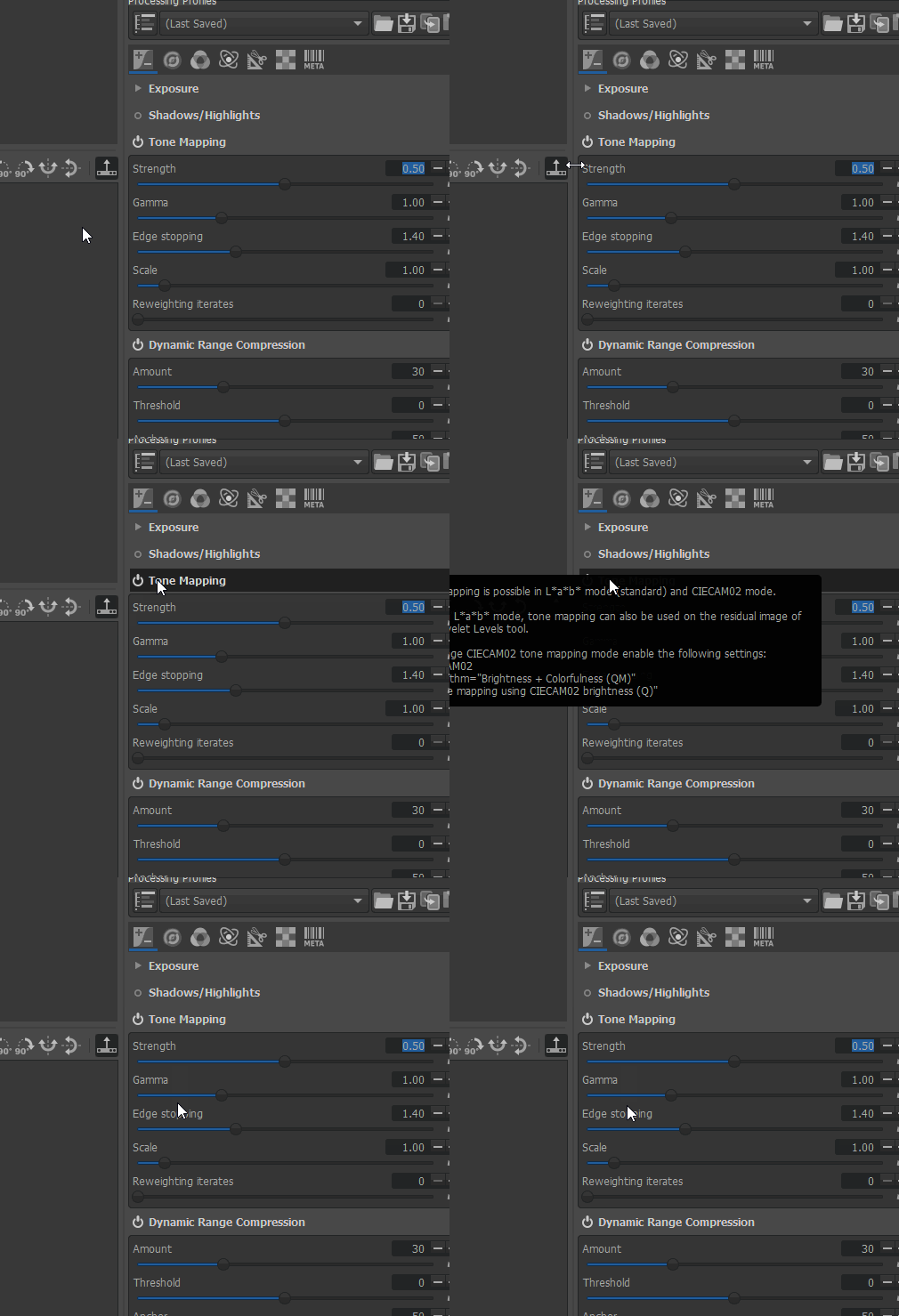
Filename tooltip on thumbnails and History tooltip are flickering. (W/M)Scrolling with the mouse wheel in the file browser, queue and filmstrip doesn't work anymore. (W)Scrolling with the mouse wheel when hovering a combobox (e.g. Toolpanel) doesn't work anymore. (W)Zooming with the mouse wheel in the preview doesn't work anymore. (W)Rounding of "em" values in themes has changed. (this affects only the TWB theme) (W)Scrolling with the mouse wheel only possible by page. (W)
EDIT: All bugs are fixed in GTK+3.24-2
 TooWaBoo
All 30 comments
There is a Mac-only issue involving the quartz backend in 3.24.0, RT occasionally crashes when dragging the window around, etc. The gtk dev who wrote the backend code there has reported it to gitlab.gnome.org: https://gitlab.gnome.org/GNOME/gtk/issues/1312
 Benitoite
on 10 Sep 2018
Benitoite
on 10 Sep 2018
@Benitoite
Thanks, what about the other issues?
TooWaBoo
on 10 Sep 2018
2, 3, and 4 don’t seem to be any problem on Mac.
Benitoite
on 10 Sep 2018
I've opened an issue in Gtk project for n°3 : https://gitlab.gnome.org/GNOME/gtk/issues/1330.
N°2, 4 and 6 are solved here : the scroll event is a GTK_SMOOTH_SCROLL which wasn't handled (and it may be a Gtk bug IMHO : it shouldn't emulate a smooth scroll when using a mouse). I'll post a patch soon.
@Benitoite What's your pointing device ? Standard mouse ?
 Hombre57
on 11 Sep 2018
Hombre57
on 11 Sep 2018
@hombre standard Logitech wired usb mouse with scroll wheel.
Benitoite
on 12 Sep 2018
@TooWaBoo (ping @Beep6581) You've added W/M/L tag to each entry, Does it mean that OS not listed are not affected, or that we don't know ? I have to answer in GNOME's issue about n°3 in Linux.
Hombre57
on 12 Sep 2018
About n°2, 4 and 6 : this may evolve soon with a change in Gtk, hopefully in a good way (but that's not sure).
Hombre57
on 12 Sep 2018
@Hombre57 GTK+ 3.24 will not be available in my distro any time soon, so I cannot help.
 Beep6581
on 12 Sep 2018
Beep6581
on 12 Sep 2018
Does it mean that OS not listed are not affected, or that we don't know
That means "we don't know."
TooWaBoo
on 12 Sep 2018
Testing under Gtk+ 3.18, GTK+ 3.22.30 (Sabayon) and 3.24.0 (Fedora), branch scrolled-toolbar-fix commit 0d61f14ba, whether using the mouse scrollwheel causes scrolling when hovering over:
Description | 3.18 | 3.22.30 | 3.24.0
------------|------|---------|-------
The monitor profile combo, top half | ? | yes | yes
The monitor profile combo, bottom 1/3rd | ? | no | no
The zoom icons, top half | ? | yes | yes
The zoom icons, bottom 1/3rd | ? | no | no
A curve in the toolbox with "hide vertical scrollbar" off | ? | yes | yes
A combobox in the toolbox with "hide vertical scrollbar" off | ? | yes | yes
A slider in the toolbox "hide vertical scrollbar" off | ? | yes | yes
A curve in the toolbox with "hide vertical scrollbar" on | ? | yes | yes
A combobox in the toolbox with "hide vertical scrollbar" on | ? | yes | yes
A slider in the toolbox with "hide vertical scrollbar" on | ? | yes | yes
Notes:
- With "hide vertical scrollbar" on and GTK+ 3.22.30, scrolling in the toolbox does not work when hovering over the "-" button to the right of a slider:

The exact buggy behavior is that when I first hover the mouse over the "-" button, the:hoveranimation lights it up and if I scroll then it will scroll one step down. Once it does that, nothing happens if I keep scrolling. Since it scrolled one step, the cursor is no longer hovering over the "-". If I move it back over the "-", it does not light up, and scrolling does not work at all, not even 1 step. To get it to light up again, I have to just hover over the "+", then hovering over the "-" again lights it up and again I can scroll 1 step.
Scrolling while hovering over the "-" works fine using GTK+ 3.24.0.
Beep6581
on 15 Sep 2018
@Beep6581
Remember that in Linux, the Preferences option "Hide vertical scrollbar" is hardcoded to be on, else scrolling with the mouse wheel didn't work.
With last commit, it's not the case anymore.
Hombre57
on 15 Sep 2018
@Hombre57
Scrolling over thumbnails and zooming with the mousewheel works fine in GTK+3.24.0 with the fix from branch scrolled-toobar-fix
TooWaBoo
on 19 Sep 2018
Noticed the flickering after updating to https://keybase.pub/gaaned92/RTW64NightlyBuilds/RawTherapee_dev_5.4-795-g6f6cdd113_WinVista_64.zip.
Here's a GIF since no one posted an example:
 afr-e
on 1 Oct 2018
afr-e
on 1 Oct 2018
re GTK_SMOOTH_SCROLL:
I often get a delta of 0.0 which results (in thumbbrowserbase) in the view scrolling up instead of down.
I am on Linux (Gentoo) with gtk+-3.24.1.
 ff2000
on 21 Oct 2018
ff2000
on 21 Oct 2018
What will be the resolution for this in view of a 5.5 RC?
 Thanatomanic
on 5 Nov 2018
Thanatomanic
on 5 Nov 2018
Using gtk+ 3.24.1 on Windows I can not reproduce the flickering reported above
 heckflosse
on 8 Nov 2018
heckflosse
on 8 Nov 2018
Update: The flickering is gone but the filename tooltips in browser now don't allow me to open images...
heckflosse
on 8 Nov 2018
@heckflosse
Update: The flickering is gone but the filename tooltips in browser now don't allow me to open images...
What do you mean ?
Hombre57
on 8 Nov 2018
@Hombre57 The tooltips appear under the mouse cursor and doubleclicking a thumb then does nothing
heckflosse
on 8 Nov 2018
Ping @TooWaBoo
Maybe increasing marging-top could solve the problem ?
Hombre57
on 8 Nov 2018
@heckflosse
On Win10 it's still flickering.
@Hombre57
No that wouldn't help. The tooltip position can not be controlled by the theme. The behavior also depends on the font size and/or dpi. Test with font size 18, then it's flickering on the toolbars too. There is something wrong with the calculation of the tooltip or mouse position in GTK+3.24.
TooWaBoo
on 8 Nov 2018
Same on macOS 10.12: flickering filenames still but tools are not flickering in gtk+3.24.1
Benitoite
on 12 Nov 2018
No flickering with latest branch gtk-3-24 @ gnome/gtk@91129be95c05726ea1bee23b9425f63d390905dd build on macOS. It looks like other quartz issues were fixed since 3.24.1.
Benitoite
on 21 Nov 2018
Is the first comment up to date?
Beep6581
on 3 Dec 2018
Updated the first comment. Point 3. works now.
TooWaBoo
on 4 Dec 2018
And this affects only 3.24.0, not 3.24.1?
Beep6581
on 4 Dec 2018
Sorry, my fault. Tested with 3.24.1. Changed title.
TooWaBoo
on 4 Dec 2018
GTK+3.24-2 is out and it looks like all bugs are fixed now.
TooWaBoo
on 14 Dec 2018
Indeed, I don't see any of the issues anymore! Hurray?
However, one thing I notice is that when you hover and produce a tooltip, and then quickly move to another image (either in browser or filmstrip), the tooltip info updates but the location stays the same.
Or was this already like this pre-3.24.1?
Thanatomanic
on 15 Dec 2018
This happens in the past too.
TooWaBoo
on 15 Dec 2018
Related issues
Beep6581
·
89Comments
 Desmis
·
133Comments
Desmis
·
133Comments
 daicehawk
·
76Comments
heckflosse
·
77Comments
Desmis
·
167Comments
daicehawk
·
76Comments
heckflosse
·
77Comments
Desmis
·
167Comments
Most helpful comment
This happens in the past too.