Rawtherapee: Default profile for raw photos could not be found when MultiUser=false
From RawPedia http://rawpedia.rawtherapee.com/Making_a_Portable_Installation
Let's assume that you've unzipped your archive into E:\RawTherapee, where E:\ is the drive letter of your USB flash drive. Now open the E:\RawTherapee\options file, and set the MultiUser option to false. That way, the cache directory will be located in a subdirectory of the installation path.
When I set MultiUser=false and run RT in ./programs/rawtherapee/rawtherapee I get
The default profile for raw could not be found or is not set. Please check your profiles' directory, it may be missing or damaged. "${G}/Auto-Matched Curve - ISO Low" will be used instead.
It appears every time I run RT, not just the first time.
$ grep RawDefault -n ~/.config/RawTherapee5-dev/options
107:RawDefault=${G}/Auto-Matched Curve - ISO Low
$ grep RawDefault -n ~/programs/rawtherapee/options
107:RawDefault=${G}/Auto-Matched Curve - ISO Low
First reported here:
https://discuss.pixls.us/t/the-default-profile-for-raw-photos-could-not-be-found/6870
 Beep6581
All 10 comments
Furthermore, for a portable installation, the entire config directory should be located in the installation directory, such as to let no garbage when leaving the host PC.(especially batch dir and user profile dir).
 gaaned92
on 4 Mar 2018
gaaned92
on 4 Mar 2018
@Hombre57 any chance this could be included in 5.4?
Beep6581
on 7 Mar 2018
@Beep6581 Yes, I'll look at this tonight or tomorrow.
@gaaned92 That makes sens, but I'll see the actual logic.
 Hombre57
on 7 Mar 2018
Hombre57
on 7 Mar 2018
@Beep6581 @gaaned92 See commit d862621 in branch single-user.
The new behavior is now : if RT_SETTINGS is not set and MultiUser=false, a mysettings folder will be created in the application's install directory. Also, the cache folder is now named mycache when in the same conditions. That will make updating easier for users, since they'll only have to move the mycache and mysettings folder to the new install dir + edit the options file from the install dir to set MultiUser=false again. I recall that this options file is read first, whatever MultiUser is set to.
Things to check : if it works fine on Linux, and if it works fine on Windows when installed in Program files (i.e. permissions).
Hombre57
on 9 Mar 2018
@Hombre57
When installed in an unprotected dir it's ok now. setting MultiUser=true in the installdir/options file restore the initial behaviour.
When in Program files, it seems not possible to have a prtable installation, but I think it iis not a use case as the object of a portable install is being able to process on any PC without letting garbage behind.
I have to make further tests but now I have no time.
Conclusion: for me it is ok
RawTherapee_single-user_5.3-670-gd86262162_WinVista_64.zip
uploaded at
https://keybase.pub/gaaned92/RTW64NightlyBuilds/
gaaned92
on 9 Mar 2018
@Hombre57 tested, no issues found in Sabayon.
Beep6581
on 9 Mar 2018
Portable installations are usually run from USB sticks and such. I don't think we should invest time in caring for portable installations in protected places such as Program Files. If either RT fails to start when folder creation fails, or if the user is informed that their settings will be lost, I think that is an acceptable compromise.
Beep6581
on 9 Mar 2018
Opening an alert window on event throw seems to work, though it won't be themed.
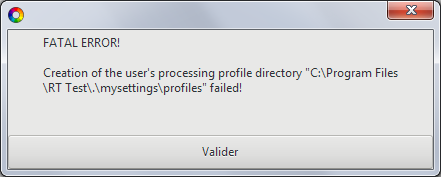
See commit 01f8f41.
Hombre57
on 9 Mar 2018
Merged to dev, closing.
Hombre57
on 9 Mar 2018
@Beep6581 I forgot to update rt-cli with the new error message handling. Done in commit 191a139 into dev.
Hombre57
on 10 Mar 2018
Related issues
 heckflosse
·
3Comments
heckflosse
·
3Comments
 JIPG2
·
3Comments
JIPG2
·
3Comments
 jade-nl
·
4Comments
jade-nl
·
4Comments
 agriggio
·
4Comments
Beep6581
·
5Comments
agriggio
·
4Comments
Beep6581
·
5Comments