Rawtherapee: 5.4-RC1 stuck on release notes panel
I'm testing Fedora 27 RPMs of Rawtherapee 5.4-RC1, I've successfully built it in a testing repo under Copr (https://copr.fedorainfracloud.org/coprs/mattia/Rawtherapee-test/).
When Rawtherapee starts it shows the Release notes window, but I'm unable to scroll or closing it. If I give focus to another program window, the release notes are always on top.
Running from console, it only shows a single warning:
Gtk-Message: GtkDialog mapped without a transient parent. This is discouraged.
Rawtherapee process doesn't seem to be stuck on something (top shows 0% CPU).
Fedora 27 uses gtk 3.22.26
 mattiaverga
All 27 comments
Cannot reproduce with GTK 3.22.26 on Debian testing and latest dev.
 Floessie
on 14 Feb 2018
Floessie
on 14 Feb 2018
@mattiaverga move the windows out of the way - there could be another window underneath waiting for your input (alt+tab may or may not show it, so better to move them out of the way instead). Also, check whether you have a second screen plugged in.
If there is a window, it means your options file is old and has issues. Best to delete your ~/.config/RawTherapee* folder(s).
 Beep6581
on 14 Feb 2018
Beep6581
on 14 Feb 2018
@Beep6581 deleting the options file and let RT recreate with its defaults solved the problem.
After that I managed to track down the problem to a line in the profiles section: I had set RawDefault=${G}/Default, but the Default profile does not exist anymore.
It seems that if RT shows the release notes window, it fails to show the warning window about that profile is missing (I looked behind the release notes window, but there was nothing). If the release notes window has already been dismissed, RT displays the warning window and after clicking OK I can use RT normally.
So this bug only happens when running RT for the first time after upgrading and with a options file with a missing profile name set.
mattiaverga
on 14 Feb 2018
@mattiaverga the z-order probably was: warning window, main RT window, release notes window. That is why you didn't see it.
Thanks for reporting, will investigate tomorrow.
Beep6581
on 14 Feb 2018
You're right about the z-order, the main RT window was totally unresponsive, but minimizing the release notes window also minimize the main window and behind that I saw the warning... :-(
mattiaverga
on 15 Feb 2018
I reproduced the problem. Simply edit options and set
Version=5.2
RawDefault=${G}/foo
Maybe we should use this on the "missing profile" window:
https://developer.gnome.org/gtk3/stable/GtkWindow.html#gtk-window-present
or maybe this MessageDialog should be modal and RT should stop running other code until the user confirms:
https://github.com/Beep6581/RawTherapee/blob/dev/rtgui/main.cc#L357
or maybe RT should first show the About window, and then check for invalid defaults.
@Hombre57 what do you think?
Beep6581
on 17 Feb 2018
All people upgrading will experience this, so it really is quite high priority.
Beep6581
on 17 Feb 2018
@Beep6581 I'd wait for an acknowledgment of the alert window before pursuing the application loading. However I'm not at home until Monday, so someone else will have to do the patch.
 Hombre57
on 17 Feb 2018
Hombre57
on 17 Feb 2018
From a user point of view, I would expect RT firstly to show the About window and then, after dismissing it, to warn me of the missing profile.
I would expect: show the about window -> update Version in the options file, so that the about window is permanently dismissed -> show warning(s) and correct it in options file.
mattiaverga
on 17 Feb 2018
@mattiaverga Sounds good too, but I can't start anything before Monday.
Hombre57
on 17 Feb 2018
@mattiaverga @Beep6581 I finally found the time to create a fix in branch alert-after-splash.
Hombre57
on 18 Feb 2018
Tested, I can confirm that the issue is fixed. Thanks.
mattiaverga
on 18 Feb 2018
@Hombre57 fix confirmed.
There is one more thing. The new default processing profile for raw photos is
RawDefault=${G}/Auto-Matched Curve - ISO Low
Users upgrading from any previous version will see the warnings correctly, but they will still end up with "neutral" as their default raw profile because DEFPROFILE_INTERNAL is used. It would be good if RT would first try using DEFPROFILE_RAW if it exists, and only fall back to DEFPROFILE_INTERNAL if it does not exist (which should never be the case, but good to handle it).
Beep6581
on 18 Feb 2018
@Beep6581 Will do that tonight.
Hombre57
on 19 Feb 2018
@Beep6581 See commit ff02182.
Hombre57
on 19 Feb 2018
@Hombre57 it's good, but there is still one problem.
- Delete
profiles/Auto-Matched Curve - ISO Low.pp3 - Edit your options file and set:
RawDefault=foo - Run RT. You get this:
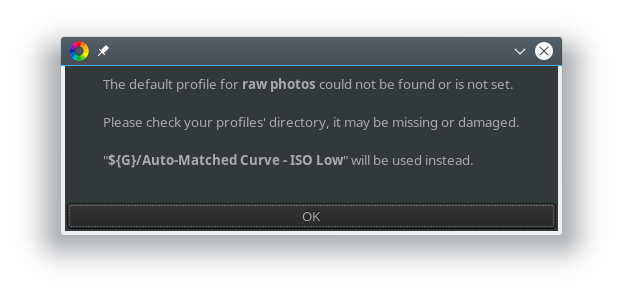
RT cannot findfooso it falls back toDEFPROFILE_RAW(${G}/Auto-Matched Curve - ISO Low.pp3), but that file is also missing and RT doesn't check for that and the user is not notified. RT silently falls back to Neutral if you try to open a raw file without informing the user.
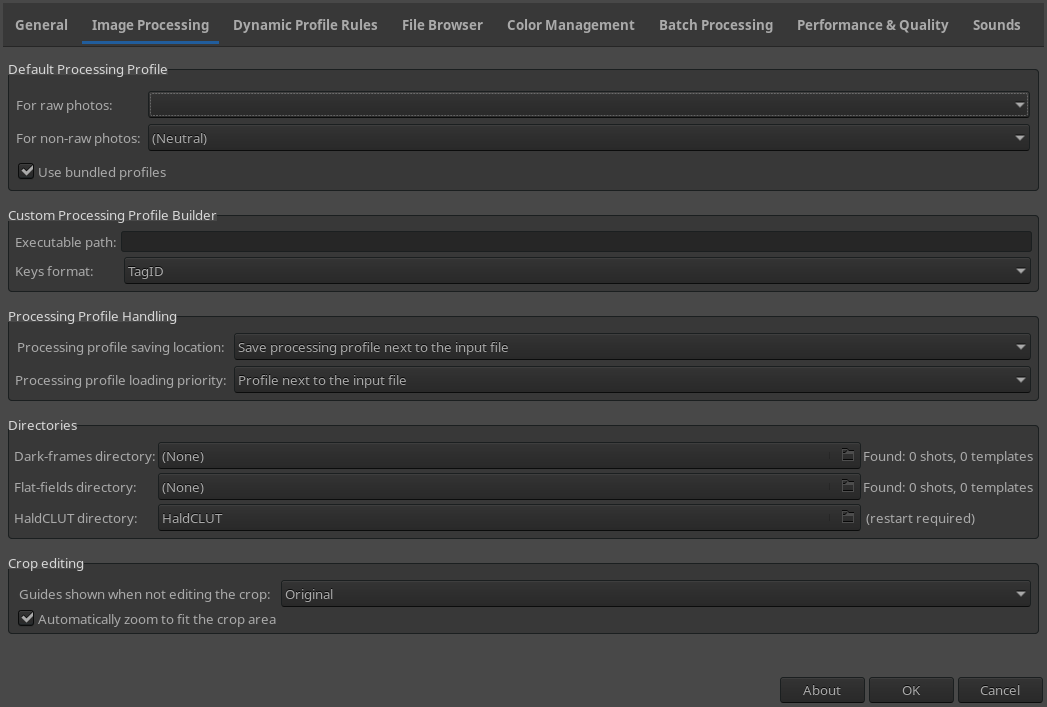
Preferences shows an empty combobox:
- If you run RT again, now RT checks for
RawDefault=${G}/Auto-Matched Curve - ISO Low, doesn't find it, and verbosely falls back to Neutral. Good, but the user was mislead in step 3 and this was only solved when running RT again.
It would be better if steps 3 and 4 above were merged, without needing to re-run RT, so:
- Run RT, it checks for the
RawDefaultprofile, - If
RawDefaultis not found it should warn
The default profile for non-raw photos could not be found or is not set.\n\nPlease check your profiles' directory, it may be missing or damaged.\n\n"%1" will be used instead.
Then it should check for and use `DEFPROFILE_RAW`.
- If
DEFPROFILE_RAWis not found, it should warn
The bundled profile
could not be found!\nYour installation could be damaged.\n\nDefault internal values will be used instead.
And use `DEFPROFILE_INTERNAL`.
@Beep6581 I spent 3 DAYS trying to find out why the updated Eclipse IDE refused to index files :rage: . It works now, but I'm not sure to solve this issue today (other things to do), sorry.
Hombre57
on 21 Feb 2018
@Hombre57 no problem, we're not on a $$$ deadline, take your time.
Beep6581
on 21 Feb 2018
@Hombre57 never change a running system...
 heckflosse
on 21 Feb 2018
heckflosse
on 21 Feb 2018
Or as my coworker uses to say: Never run a changing system.
Floessie
on 21 Feb 2018
@heckflosse
never change a running system...
I updated Eclipse because it kept throwing stack overflow 10 times per minutes for an unknown reason, which, I can assure you, is a bite annoying. I think I'll have to switch to another cmake generator when I'll have more time, at least the indexer is running fine now and can build with a custom builder.
Hombre57
on 21 Feb 2018
@Hombre57
It works now, but I'm not sure to solve this issue today (other things to do), sorry.
I'm using Eclipse, too, and might update sooner or later. Could you give me a hint as to what fixed your problem?
Floessie
on 22 Feb 2018
@Floessie I knew that the build system has to be out of the source tree, but didn't knew that the source tree had to be out of the Eclipse workspace. It never was a problem until this Oxygen version, at least moving the source tree out of the workspace made the indexer work again. However, the target (all, install, etc...) generated by the Eclipse generator doesn't work with this Oxygen version. I had to create an External Tools Configurations... to be able to build from Eclipse, with those parameters :
- Location:
D:\Toolchain\msys64\mingw64\bin\mingw32-make.exe - Working Directory :
D:\Projects\builds\RawTherapee\Debug(location of the makefile) - Arguments:
-j6 install
I learned to use Eclipse by myself, without... erm... RTFM, so if you have another way of handling cmake projects like RT inside Eclipse, I'd be very interested to know.
Sorry for the off-topic.
Hombre57
on 22 Feb 2018
@Hombre57
I knew that the build system has to be out of the source tree, but didn't knew that the source tree had to be out of the Eclipse workspace.
Hm, my workspace is /home/user/src and RT resides under /home/user/src/rawtherapee. So that could be a problem when updating...
I had to create an External Tools Configurations... to be able to build from Eclipse.
I learned to use Eclipse by myself, without... erm... RTFM, so if you have another way of handling cmake projects like RT inside Eclipse, I'd be very interested to know.
I configure the projects manually, like I'm used to when cross-compiling. And yes, I never read the manual, too, so I'm the least to give advice. :flushed: But it kind of works.
Sorry for the off-topic.
Thanks for sharing, so I know what to expect when upgrading. :+1:
Floessie
on 23 Feb 2018
@Floessie
Hm, my workspace is /home/user/src and RT resides under /home/user/src/rawtherapee. So that could be a problem when updating...
That's not sure, I'm using the Eclipse generator from cmake, which generate a .project and .cproject file, that I used to copy to the project in the workspace. Doing that seem to disable the creation of the virtual source tree (I get an error message, even before the update, but now it's worse). You have a totally different way of handling the projects, so it might work fine.
Anyway, this issue will be solved today or tomorrow, the patch is ready (quite simple), I still have to test it.
Hombre57
on 23 Feb 2018
@Hombre57 tested and fix confirmed, :+1: for merge.
Beep6581
on 26 Feb 2018
@Beep6581 Branch merged to dev.
Hombre57
on 26 Feb 2018
Related issues
heckflosse
·
110Comments
Beep6581
·
123Comments
Beep6581
·
77Comments
Floessie
·
94Comments
 Desmis
·
167Comments
Desmis
·
167Comments
Most helpful comment
@Floessie
That's not sure, I'm using the Eclipse generator from cmake, which generate a
.projectand.cprojectfile, that I used to copy to the project in the workspace. Doing that seem to disable the creation of the virtual source tree (I get an error message, even before the update, but now it's worse). You have a totally different way of handling the projects, so it might work fine.Anyway, this issue will be solved today or tomorrow, the patch is ready (quite simple), I still have to test it.