Rawtherapee: Optimize minimal required window size to 1024x768
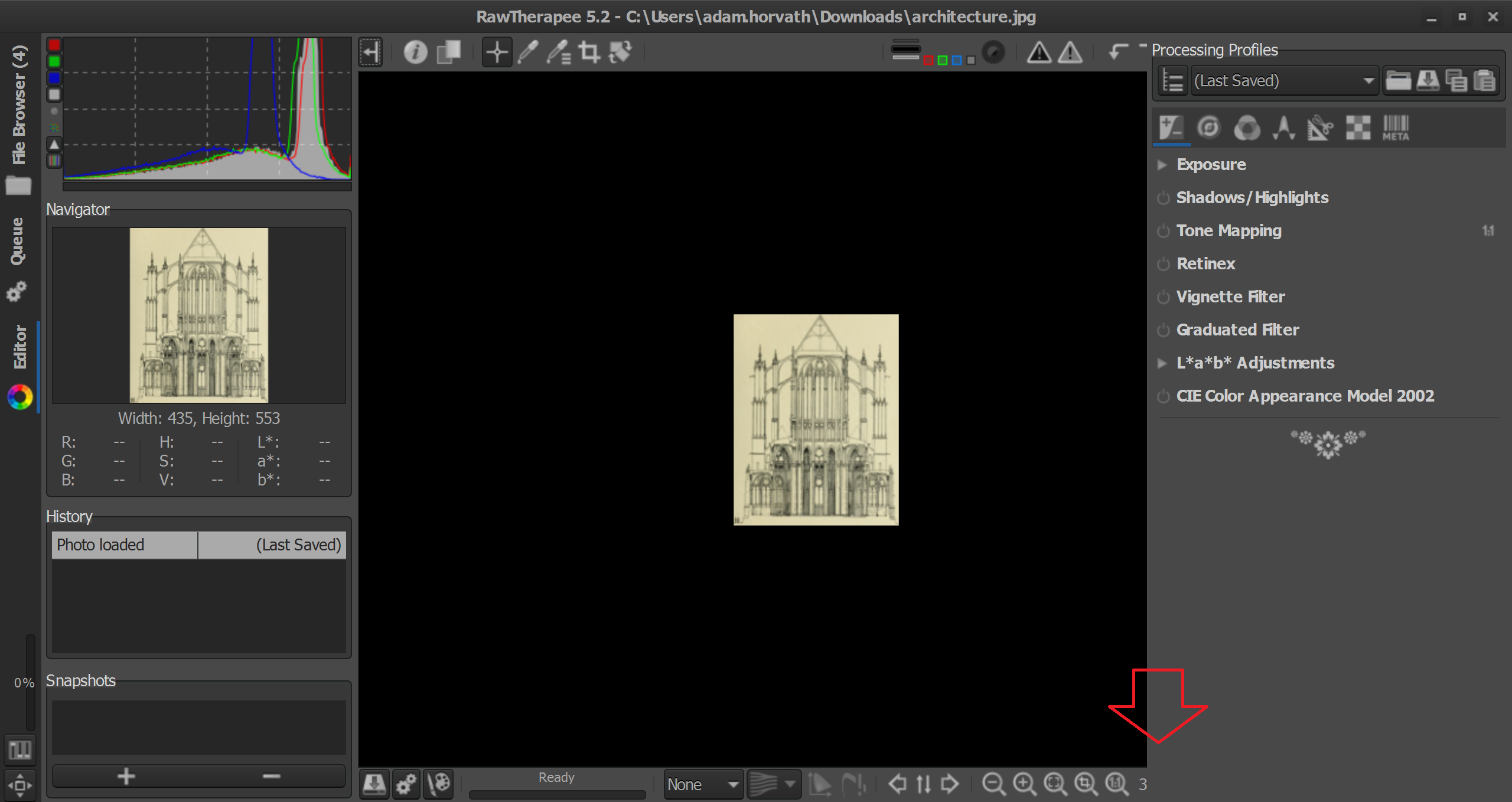
It doesn't matter which order I open left and right panel, when opening right panel it will overlap the icons up to zoom level. The only way to get out of it is to use the shortcut (ALT+L / L), as the buttons are not visible any more.
Version: 5.2
Branch: release-5.2
Commit: 78e921cb
Commit date: 2017-07-23
(Windows 10, System Zoom 200%, 2560x1440)
 adam-ah
All 61 comments
I have this problem too when i use my projector (a 1024x768 capable), since i upgraded to gtk 3 version.
It would be nice to reduce the number of buttons in the lower side panel, to make the ready progress bar resizeable or littler, or to add 2 rows instead of one (maybe a hideable one with less used functions), with horizontal images won't cause problems.
Or to have a selectable 2nd set of smaller icons.
 falket
on 22 Aug 2017
falket
on 22 Aug 2017
Did you try a smaller font size setting in preferences already? That should reduce the width for right and left panels and give you more space for the icons and the preview area.
 heckflosse
on 23 Aug 2017
heckflosse
on 23 Aug 2017
@heckflosse I'm not looking for a workaround, I'm reporting an actual bug.
adam-ah
on 23 Aug 2017
It's not actually a bug. We decided on a minimum resolution for RT a long time ago and stuck with it. When one employs desktop or DPI scaling there is always the risk of running out of screen space even on a 4k monitor. GTK3 had no native support for wrapping of toolbar contents last I checked. #3054 would free up some space under the main preview. Though then if you were to set desktop scaling to 300% you could again run out of space, chasing one's own tail.
As #3054 would free up space I'll close this as a sort-of duplicate unless any dev objects.
 Beep6581
on 23 Aug 2017
Beep6581
on 23 Aug 2017
Replacing the progessbar with a spinner or a simple idle/working indicator would save a lot of space.
 TooWaBoo
on 23 Aug 2017
TooWaBoo
on 23 Aug 2017
@Beep6581 I don't see how it's not a bug if on a totally default, stock notebook with default Windows 10 settings I can click a button to open the right panel but that very button disappears making it _impossible_ to close the panel?
@TooWaBoo I totally agree, there are heaps of options.
- Reduce the size of the obnoxious "Ready" panel which takes up 5 buttons' space
- Move some buttons to the top where there is plenty of space
adam-ah
on 23 Aug 2017
Replacing the progress bar with a spinner, or even removing it entirely, would not help you. I edited the source code to remove the progress bar and resized the RT window to exactly match yours. This is exactly what you would see if it was removed: https://i.imgur.com/vfMiBIF.png Panels still overlap.
Changing the interface language (e.g. to Italian), using a different theme, changing desktop scaling, changing font scaling, etc. all of these things affect the minimum required width.
Beep6581
on 25 Aug 2017
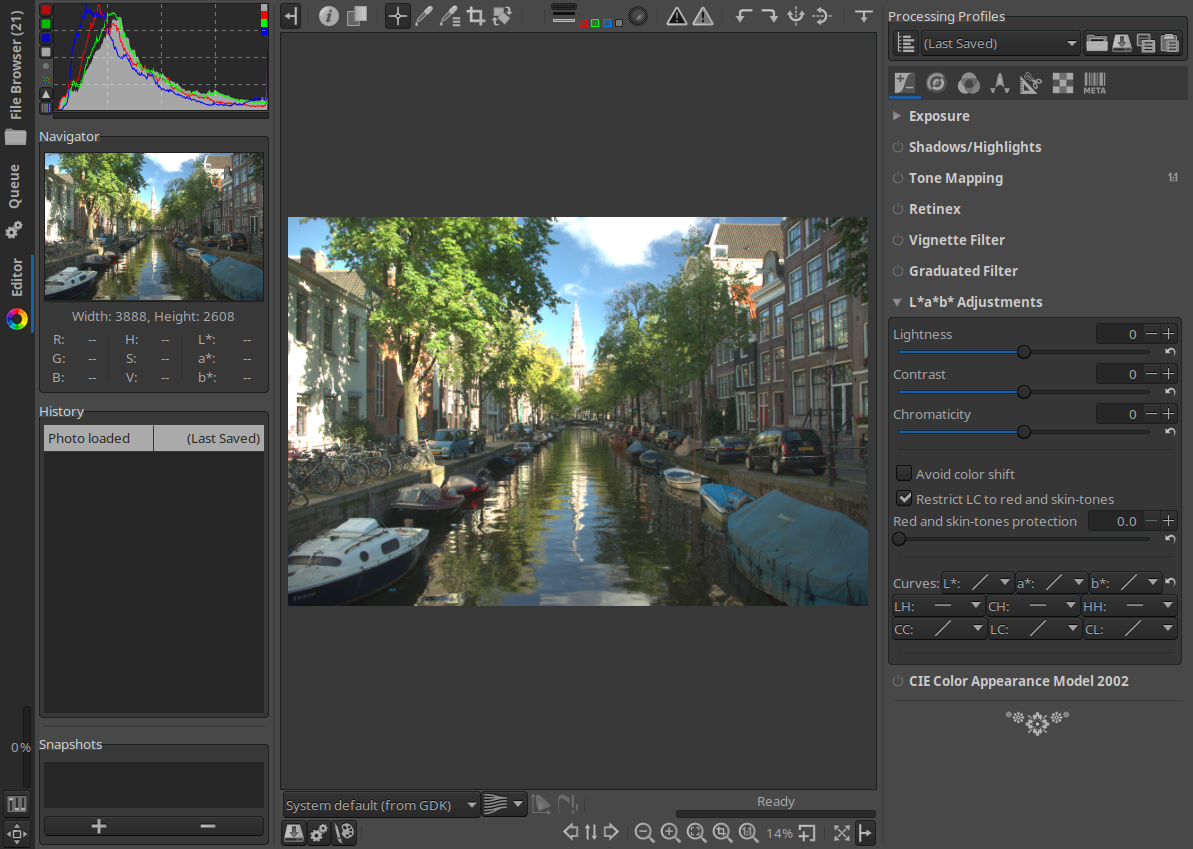
Branch iops lets you split the bottom toolbar in the Editor tab via Preferences.
Now in standard more, the progress bar fills up the empty space:
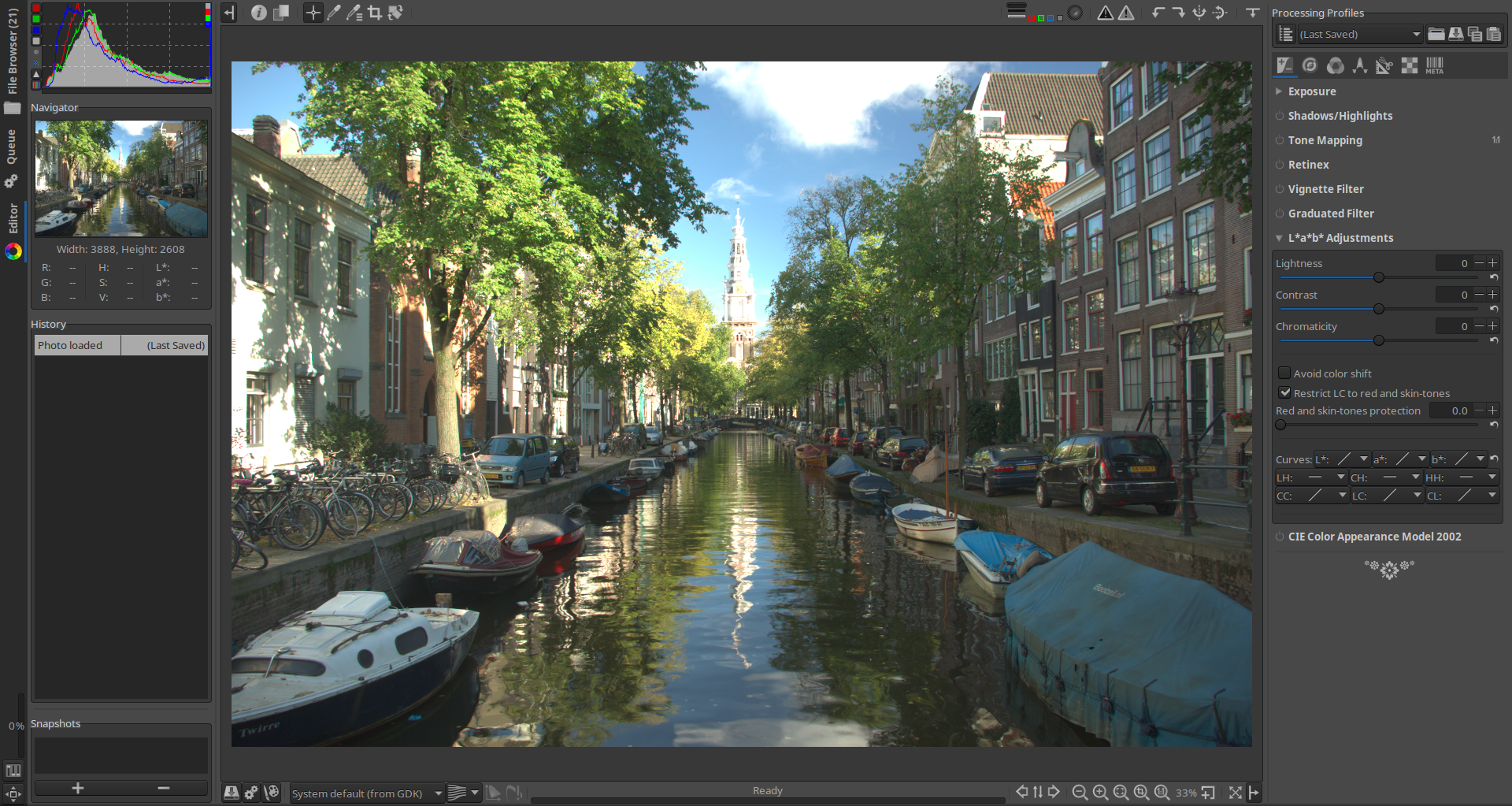
In low-res mode, the color management and progress bar are on their own row, the progress bar is aligned to the right:
Beep6581
on 25 Aug 2017
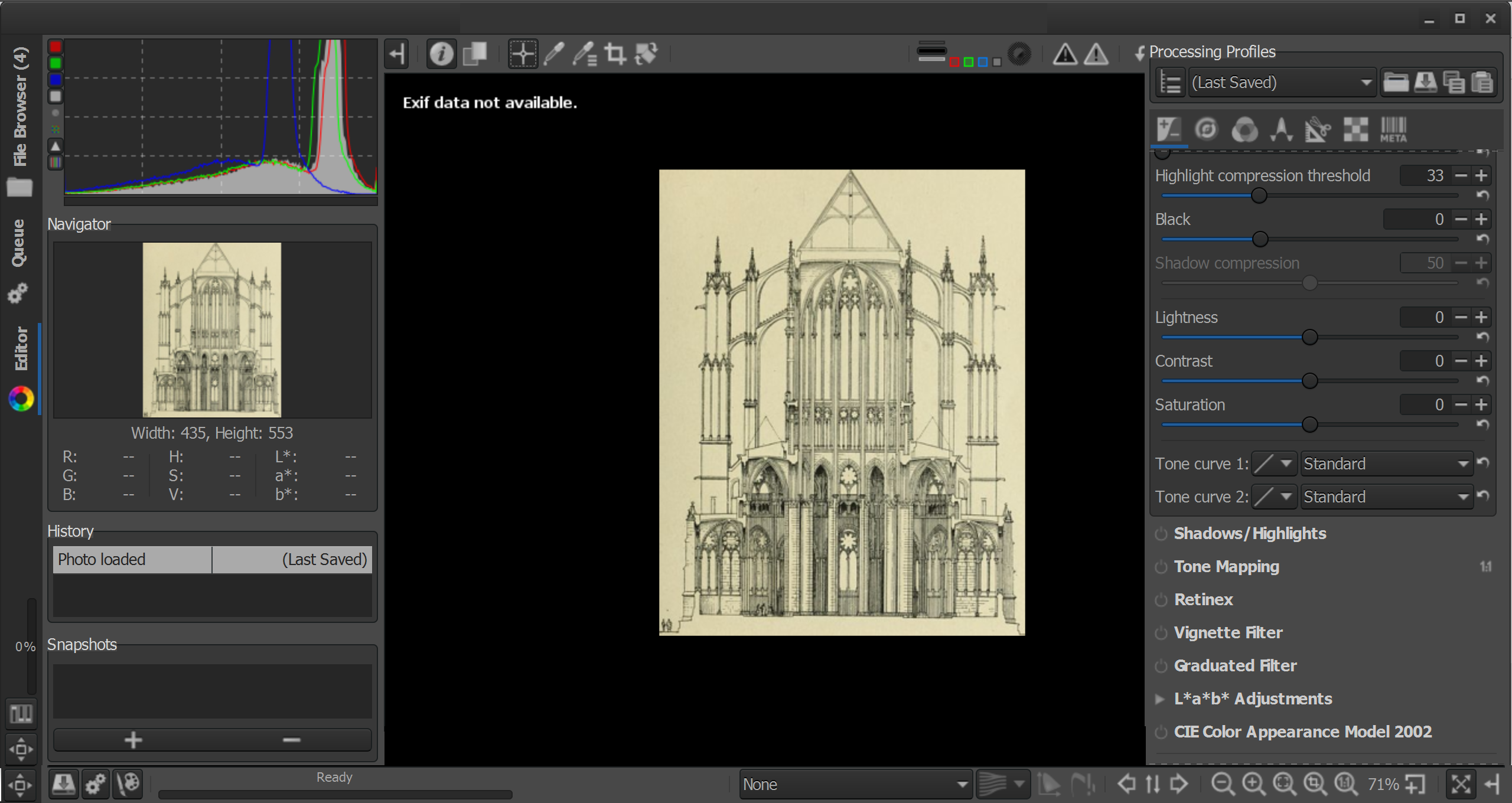
I think the best solution would be if the bottom panel would be on top of the left and right panel all the time. Something like this?
adam-ah
on 25 Aug 2017
The limiting factor in both the iops branch and in your mockup is the top toolbar.
Beep6581
on 25 Aug 2017
I'm considering splitting the top toolbar the same way the bottom one is split. The optimal solution would be for that to be dynamic (widget size request matched against available space) but that's not something I could do yet. Any objections?
Beep6581
on 13 Sep 2017
Sorry for asking but i'm using 5.3 on Linux and i don't understand... is the 2 rows bottom toolbar already available? Thank you.
falket
on 11 Oct 2017
@falket No, it was still a proposal as of now.
@Beep6581 Looking on the automatic toolbar wrapping now.
Here's my suggestion for the bottom toolbar : since we rarely use the color management widgets and the browsing icons, could we add a [+] icon (or [...] ) that would show a second tool bar where you'll find those widgets. That would free up quite some space.
 Hombre57
on 11 Oct 2017
Hombre57
on 11 Oct 2017
@Hombre57 let's try to get the minimum usable window width to 1024px when the left panel is hidden.
I use the CM widgets often, but I wouldn't mind if the CM widgets would pop-out when pressing a CM button (not "+" or "..." but a button which is clearly related to CM).
I don't personally use the browsing buttons (previous image, sync, next image) at all because I use the keyboard shortcuts, but new users definitely will use them until they learn of the keyboard shortcuts, and having to click some button only to show these three buttons so that you can then click "open next image" would IMHO be a regression in usability.
Here's a mockup, I replaced the CM widgets with one CM button and now we're good at 1024x768:
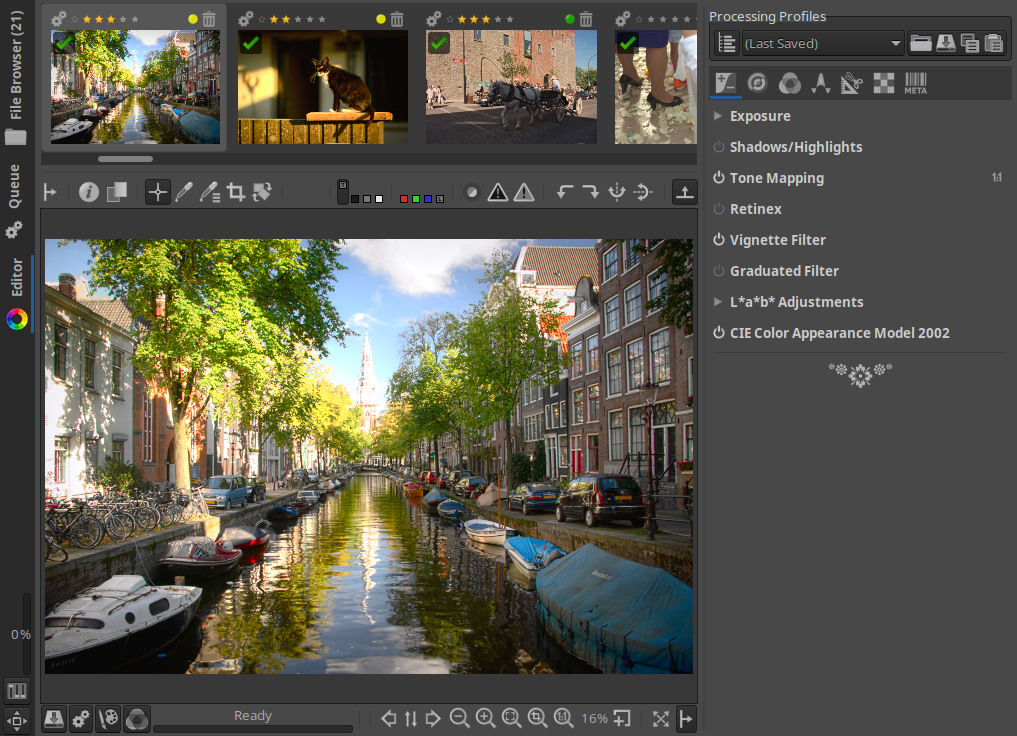
diff --git a/rtgui/editorpanel.cc b/rtgui/editorpanel.cc
index f5c6aa67..3fbc7d18 100644
--- a/rtgui/editorpanel.cc
+++ b/rtgui/editorpanel.cc
@@ -732,7 +732,12 @@ EditorPanel::EditorPanel (FilePanel* filePanel)

     // Color management toolbar
     colorMgmtToolBar.reset (new ColorManagementToolbar (ipc));
-    colorMgmtToolBar->pack_right_in (iops);
+    //colorMgmtToolBar->pack_right_in (iops);
+
+    Gtk::ToggleButton* x = Gtk::manage (new Gtk::ToggleButton ());
+    Gtk::Image* ximg = Gtk::manage (new RTImage ("colour.png"));
+    x->add (*ximg);
+    iops->attach_next_to (*x, *progressLabel, Gtk::POS_LEFT, 1, 1);

     if (!simpleEditor && !options.tabbedUI) {
         Gtk::VSeparator* vsep3 = Gtk::manage (new Gtk::VSeparator ());
Here is a draft of my patch. There's no Gtk container that will make icons flow correctly, I'll have to create one myself (already copied the code from the Gtk code) but it's not guaranteed.
This patch make the top and bottom toolbar of the editor panel flow. Nothing done in FileBrowser yet.
Hombre57
on 16 Oct 2017
It works! Though it needs some tuning ;]
1024x768, gtk+-3.22.16, gtkmm-3.22.1

Beep6581
on 16 Oct 2017
@Hombre57 how is this progressing, any changes to be tested?
Beep6581
on 28 Oct 2017
@Beep6581 This issue is second on my TODO list. I'm actually trying to finish the save-strategy2 branch.
For this UI enhancement, I have to code a container which is a first time for me, but I've copy/pasted the code from the Gtk source and hope to come with something functional for this precise use case.
Hombre57
on 28 Oct 2017
Re https://github.com/Beep6581/RawTherapee/issues/4066#issuecomment-345406005
I'm afraid that my try of creating a Gtk::Container to handle this flowing toolbar will remain unfruitful. Feel free to resume your work and commit if it's working fine.
@Hombre57 what was the problem? The patch worked, it was just an issue with grouping the elements in a way which results in a good-looking interface. Is there some other problem with it?
Beep6581
on 18 Nov 2017
@Beep6581 The problem is that I don't know how to create a Gtk::Container ! The Gtk::FlowBox assume that we want to flow Gtk::Buttonobjects, and then align them vertically to have nice columns, but that's not what we want here. And there's no option to tell the container to respect the child object's expand/shink property, so we have to create our own container. If you have some sample code (preferably C++), it would help a lot.
Hombre57
on 3 Dec 2017
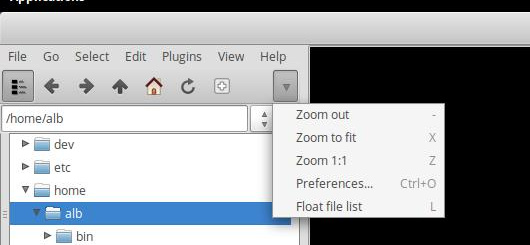
@Hombre57 I think we can "borrow" from geeqie for this. Their toolbar behaves nicely if the left panel is too narrow: buttons that would not fit get replaced by a popup menu. Example:
 agriggio
on 4 Jan 2018
agriggio
on 4 Jan 2018
Sometimes the icons overlap.

I can think of two enhancements that might deal with this problem. Not a programmer, so they may or may not work with what you have.
- Add a scroll bar.
- Add a menu icon that expands to reveal the icons that don't fit, like the one with the upside down triangle you see in @agriggio's post.
 afr-e
on 1 Aug 2018
afr-e
on 1 Aug 2018
@agriggio @Beep6581 @heckflosse @afr-e The scrollbar would waste space, however displaying the toolbar in a GtkScrollWindow might be a clever solution, if you accept :
- that it's automatically scrolled while moving the cursor over it
- scroll the bar while pressing a modifier key
Which solution do you prefer ? I can investigate one of these solution if you want.
About the popup menu for hidden icons, this a special Gtk object that handle that for us IIRC, but only accept icons, no Combobox or whatever.
Hombre57
on 31 Aug 2018
I will test on my old laptop tomorrow and report my findings
heckflosse
on 31 Aug 2018
I would actually be more in preference of the second option @afr-e describes: a dropdown would provide less clutter imo. The GTK docs don't mention a limitation on what you can put in GtkExpander (if that is the right object).
 Thanatomanic
on 31 Aug 2018
Thanatomanic
on 31 Aug 2018
@Thanatomanic No, that's not the right object, it's a Toolbar which can only accept ToolItem, i.e. some basic widget type, By chance RT only have Buttons, and the Combobox could probably be converted to a standard button with a Menu attached. I'll be busy tomorrow but will see on Sunday or next week if I can do something like that.
Hombre57
on 31 Aug 2018
@Thanatomanic hmm... I still do think that an automatic scrolled window would be more user friendly. I'll try that solution first.
Hombre57
on 1 Sep 2018
Based on the description without having seen your solution, it seems like an automatically-scrolling toolbar has some drawbacks:
- it's not intuitive, I haven't seen what has been described in any other software, so users would't expect it.
- you can't just jump to the item of interest like you could in the Geeqie solution, you have to scroll through until you get there, and I presume the scrolling happens at a fixed speed.
- the more items, the more scrolling needed, while the Geeqie solution does not suffer from that.
Beep6581
on 1 Sep 2018
@Beep6581 The Geeqie solution has a drawback, and a serious one for me : you'll have to click twice for each button you'll want to click for the hidden ones. Plus it require waaaay more coding because you'll have to convert all the Button to ToolbarButton.
My solution can have several implementation (eventually selected in Preferences) :
- the toolbar will scroll while you're hovering it, can't be more intuitive, but might be annoying and difficult to click on a button if you don't keep the mouse motionless
- the toolbar will scroll through the scroll wheel, like for the Editor panel. The scrolling increment will let you go to the beginning or end of the toolbar with one or two scroll only. The benefit of that is that once scrolled, the buttons will be directly accessible and won't be transformed to text.
I'll push my patch in a branch so you can evaluate the ease of use.
Hombre57
on 1 Sep 2018
Please test the scrolled-toolbar branch, the toolbar can now be scrolled with the mouse wheel. I find this an elegant solution, and easy to implement. I've set a scrolling mulitiplicator of 2 vs the system scrolling step, I think it's enough but it can be changed in code before merging, or added in Preferences if necessary.
Hombre57
on 2 Sep 2018
@Hombre57 using x11-libs/gtk+-3.22.30 scrolling only works when I hover over the monitor profile combobox. It does not work when I hover over anywhere else.
Maybe this is related to #3413
Beep6581
on 2 Sep 2018
@Beep6581 Could you test this patch :
diff --git a/rtgui/guiutils.cc b/rtgui/guiutils.cc
index f957a90..87debb2 100644
--- a/rtgui/guiutils.cc
+++ b/rtgui/guiutils.cc
@@ -992,6 +992,7 @@
 {
     set_policy (Gtk::POLICY_EXTERNAL, Gtk::POLICY_NEVER);
     set_propagate_natural_height(true);
+    set_kinetic_scrolling(false);
 }

 bool MyScrolledToolbar::on_scroll_event (GdkEventScroll* event)
It made no noticeable difference, but setting GDK_CORE_DEVICE_EVENTS=1 made it work.
Beep6581
on 2 Sep 2018
@Beep6581 Maybe this patch works better ?
diff --git a/rtgui/guiutils.cc b/rtgui/guiutils.cc
index f957a90..fd2626b 100644
--- a/rtgui/guiutils.cc
+++ b/rtgui/guiutils.cc
@@ -1006,7 +1006,11 @@
         double step  = adjust->get_step_increment() * 2;
         double value2 = 0.;

-        if (event->direction == GDK_SCROLL_DOWN) {
+        if (event->direction == GDK_SCROLL_SMOOTH) {
+            step = 5;
+        }
+
+        if (event->direction == GDK_SCROLL_DOWN || (event->direction == GDK_SCROLL_SMOOTH && event->delta_y < 0)) {
             value2 = value + step;

             if (value2 > upper) {
@@ -1016,7 +1020,7 @@
             if (value2 != value) {
                 scroll->set_value(value2);
             }
-        } else if (event->direction == GDK_SCROLL_UP) {
+        } else if (event->direction == GDK_SCROLL_UP || (event->direction == GDK_SCROLL_SMOOTH && event->delta_y > 0)) {
             value2 = value - step;

             if (value2 < lower) {
Yes it does, and step = 30 makes the movement fast and smooth. There might be some interference from the tooltips though.
Beep6581
on 2 Sep 2018
The last commit to scrolled-toolbar now support GDK_SCROLL_SMOOTH sent by some devices. Maybe that XInput2 only uses this kind of scroll event, even for standard mouse wheel. This could be tested with touchpad too, that provide horizontal scrolling.
There's a place to add a multiplicator, if it doesn't scroll fast enough (but it should be compared to other software first, the scroll speed is an system setting).
Hombre57
on 3 Sep 2018
@Hombre57
I need an ID for the Scrolled Toolbar, please.
    MyScrolledToolbar *stb1 = Gtk::manage(new MyScrolledToolbar());
    stb1->add(*toolBarPanel);
--> stb1->set_name ("ScrolledEditorTopPanel");
It would be better to set a name for the toolbars (EditorToolbarTop, EditorToolbarBottom) and add a class scrollable to each.
Beep6581
on 3 Sep 2018
@Beep6581
To complete the definition we also need names for the file brower toolbar and the path & search fields. They are scrollable too.
TooWaBoo
on 3 Sep 2018
@Beep6581 @TooWaBoo Done in commit b226c12.
Hombre57
on 3 Sep 2018
Btw, no complain so far, does it mean that you're okay with this solution ?
Hombre57
on 3 Sep 2018
@Hombre57 the skip = 30 code is missing, so currently scrolling is unusably slow in Linux/X11.
Beep6581
on 4 Sep 2018
@Beep6581 Ok, I'll be on IRC tonight, I'll appreciate if you or a linux user could "live test" my code.
Hombre57
on 4 Sep 2018
@Hombre57
I've tested the scrolled toolbars and found some weird behaviour. When you scroll back and forth sometimes the scrolling stucks and some buttons can't be clicked. You have to move out of the toolbar to make it work. Tested with RT and TooWaBlue theme.
I also suggest to remove the hard coded 2px space from the filebrowser in filecatalog.cc.
    inTabMode = false;

    set_name ("FileBrowser");
--> set_spacing (2);

    //  construct and initialize thumbnail browsers
    fileBrowser = Gtk::manage( new FileBrowser() );
Because of these 2px the vertical scrollbar appears in the filmstrip of the RT theme. It's better to add the 2px space in the css to the filter toolbar.
TooWaBoo
on 4 Sep 2018
@TooWaBoo Is it better now for the scrolling ? Do you use a mouse, a pen, or... ?
Hombre57
on 4 Sep 2018
Tested 98fc85b, scrolling still works here in Sabayon/KDE, though I still experience the occasional freezing as reported in IRC and as reported above by @TooWaBoo
Beep6581
on 5 Sep 2018
@Hombre57
Tested and it's still freezing sometimes. I think this has todo with the tooltips. Sometimes it takes a couple of seconds to show the tooltips and then the scrolling works. I guess the toolbar is sometimes loosing focus when a tooltip tries to popup.
TooWaBoo
on 5 Sep 2018
@TooWaBoo @Beep6581 Still shooting in the dark then, since there's no freeze or focus problem here. Can we still commit ?
Hombre57
on 5 Sep 2018
@Hombre57 I think so, as it improves the situation.
Beep6581
on 5 Sep 2018
@Beep6581 Thanks, branch merged into dev and suppressed. Please close if ok for you.
Hombre57
on 5 Sep 2018
Sure. The freezing problem can be handled in a new clean bug-issue. I'll get you a video recording so you can see what we mean.
Beep6581
on 5 Sep 2018
@Hombre57 is this GTK function set_propagate_natural_height new?
I get a compiler error when I compile the current version from dev branch:
rawtherapee-git/rtgui/guiutils.cc:994:38: error: ‘set_propagate_natural_height’ was not declared in this scope
     set_propagate_natural_height(true);
                                      ^
here is my lib version output from cmake
-- Checking for module 'gtk+-3.0>=3.16'
--   Found gtk+-3.0, version 3.18.9
-- Checking for module 'gtkmm-3.0>=3.16'
--   Found gtkmm-3.0, version 3.18.0
-- Checking for module 'glib-2.0>=2.44'
--   Found glib-2.0, version 2.48.2
-- Checking for module 'glibmm-2.4>=2.44'
--   Found glibmm-2.4, version 2.46.3
-- Checking for module 'cairomm-1.0'
--   Found cairomm-1.0, version 1.12.0
-- Checking for module 'gio-2.0>=2.44'
--   Found gio-2.0, version 2.48.2
-- Checking for module 'giomm-2.4>=2.44'
--   Found giomm-2.4, version 2.46.3
-- Checking for module 'gthread-2.0>=2.44'
--   Found gthread-2.0, version 2.48.2
-- Checking for module 'gobject-2.0>=2.44'
--   Found gobject-2.0, version 2.48.2
-- Checking for module 'sigc++-2.0>=2.3.1'
--   Found sigc++-2.0, version 2.6.2
-- Checking for module 'lensfun>=0.2'
--   Found lensfun, version 0.3.2.0
-- Checking for module 'lcms2>=2.6'
--   Found lcms2, version 2.6
-- Checking for module 'expat>=2.1'
--   Found expat, version 2.1.0
-- Checking for module 'fftw3f'
--   Found fftw3f, version 3.3.4
-- Checking for module 'libiptcdata'
--   Found libiptcdata, version 1.0.4
-- Checking for module 'libtiff-4>=4.0.4'
--   Found libtiff-4, version 4.0.6
-- Found JPEG: /usr/lib/x86_64-linux-gnu/libjpeg.so
-- Found ZLIB: /usr/lib/x86_64-linux-gnu/libz.so (found version "1.2.8")
-- Found PNG: /usr/lib/x86_64-linux-gnu/libpng.so (found version "1.2.54")
-- Checking for module 'libcanberra-gtk3'
--   Found libcanberra-gtk3, version 0.30
-- Try OpenMP C flag = [-fopenmp]
-- Performing Test OpenMP_FLAG_DETECTED
-- Performing Test OpenMP_FLAG_DETECTED - Success
-- Try OpenMP CXX flag = [-fopenmp]
-- Performing Test OpenMP_FLAG_DETECTED
-- Performing Test OpenMP_FLAG_DETECTED - Success
-- Found OpenMP: -fopenmp
-- Performing Test _fftw3f_multithread
-- Performing Test _fftw3f_multithread - Failed
-- Performing Test LENSFUN_HAS_LOAD_DIRECTORY
-- Performing Test LENSFUN_HAS_LOAD_DIRECTORY - Success
 da-phil
on 6 Sep 2018
da-phil
on 6 Sep 2018
@da-phil @TooWaBoo It has been introduced in Gtk 3.22. I commented out this function to test if it's working fine, and ended up with the scrolling freeze (see also #4781).
I'm trying to replace this function by a custom made one...
Hombre57
on 6 Sep 2018
@da-phil Could you test the scrolled-toolbar-fix branch ? If you hover the lower part of the tool bar, does it still scroll with the mouse wheel ?
Hombre57
on 7 Sep 2018
@Hombre57
Tested but it's still freezing.
Just a thought. Could it be that there is a hidden scrollbar overlaying the buttons? This would explain while freeze only happens at the bottom part of the buttons.
TooWaBoo
on 7 Sep 2018
@Hombre57 I can't reproduce the freeze, I hovered over all icons in the toolbar at the bottom (save image to show/hide all panels) and also tried to scroll with the mouse wheel.
build version:
Version: nightly-609-gcaffc3a
Branch: scrolled-toolbar-fix
Commit: caffc3a
Commit date: 2018-09-06
Compiler: cc 5.4.0
Processor: x86_64
System: Linux
Bit depth: 64 bits
Gtkmm: V3.18.0
Lensfun: V0.3.2.0
Build type: Debug
Build flags:  -std=c++11  -Werror=unused-label -fopenmp -Werror=unknown-pragmas -Wall -Wno-unused-result -Wno-deprecated-declarations -g -ftree-vectorize
Link flags:
OpenMP support: ON
MMAP support: ON
lib versions:
-- The C compiler identification is GNU 5.4.0
-- The CXX compiler identification is GNU 5.4.0
-- Check for working C compiler: /usr/bin/cc
-- Check for working C compiler: /usr/bin/cc -- works
-- Detecting C compiler ABI info
-- Detecting C compiler ABI info - done
-- Detecting C compile features
-- Detecting C compile features - done
-- Check for working CXX compiler: /usr/bin/c++
-- Check for working CXX compiler: /usr/bin/c++ -- works
-- Detecting CXX compiler ABI info
-- Detecting CXX compiler ABI info - done
-- Detecting CXX compile features
-- Detecting CXX compile features - done
-- CMAKE_BUILD_TYPE: Debug
-- Found PkgConfig: /usr/bin/pkg-config (found version "0.29.1")
-- Checking for module 'gtk+-3.0>=3.16'
--   Found gtk+-3.0, version 3.18.9
-- Checking for module 'gtkmm-3.0>=3.16'
--   Found gtkmm-3.0, version 3.18.0
-- Checking for module 'glib-2.0>=2.44'
--   Found glib-2.0, version 2.48.2
-- Checking for module 'glibmm-2.4>=2.44'
--   Found glibmm-2.4, version 2.46.3
-- Checking for module 'cairomm-1.0'
--   Found cairomm-1.0, version 1.12.0
-- Checking for module 'gio-2.0>=2.44'
--   Found gio-2.0, version 2.48.2
-- Checking for module 'giomm-2.4>=2.44'
--   Found giomm-2.4, version 2.46.3
-- Checking for module 'gthread-2.0>=2.44'
--   Found gthread-2.0, version 2.48.2
-- Checking for module 'gobject-2.0>=2.44'
--   Found gobject-2.0, version 2.48.2
-- Checking for module 'sigc++-2.0>=2.3.1'
--   Found sigc++-2.0, version 2.6.2
-- Checking for module 'lensfun>=0.2'
--   Found lensfun, version 0.3.2.0
-- Checking for module 'lcms2>=2.6'
--   Found lcms2, version 2.6
-- Checking for module 'expat>=2.1'
--   Found expat, version 2.1.0
-- Checking for module 'fftw3f'
--   Found fftw3f, version 3.3.4
-- Checking for module 'libiptcdata'
--   Found libiptcdata, version 1.0.4
-- Checking for module 'libtiff-4>=4.0.4'
--   Found libtiff-4, version 4.0.6
-- Found JPEG: /usr/lib/x86_64-linux-gnu/libjpeg.so
-- Found ZLIB: /usr/lib/x86_64-linux-gnu/libz.so (found version "1.2.8")
-- Found PNG: /usr/lib/x86_64-linux-gnu/libpng.so (found version "1.2.54")
-- Checking for module 'libcanberra-gtk3'
--   Found libcanberra-gtk3, version 0.30
-- Try OpenMP C flag = [-fopenmp]
-- Performing Test OpenMP_FLAG_DETECTED
-- Performing Test OpenMP_FLAG_DETECTED - Success
-- Try OpenMP CXX flag = [-fopenmp]
-- Performing Test OpenMP_FLAG_DETECTED
-- Performing Test OpenMP_FLAG_DETECTED - Success
-- Found OpenMP: -fopenmp
-- Performing Test _fftw3f_multithread
-- Performing Test _fftw3f_multithread - Failed
-- Performing Test LENSFUN_HAS_LOAD_DIRECTORY
-- Performing Test LENSFUN_HAS_LOAD_DIRECTORY - Success
-- Configuring done
-- Generating done
@da-phil Thanks, at least it works fine for Gtk3.18 now. I've updated my toolchain yesterday and will try to fix the bug today's for Gtk3.24.
Hombre57
on 9 Sep 2018
@Hombre57 I get a new GTK warning:
(rawtherapee:2763): Gtk-WARNING **: Allocating size to gtkmm__GtkPaned 0x55ff61cbef80 without calling gtk_widget_get_preferred_width/height(). How does the code know the size to allocate?
Best,
Flössie
 Floessie
on 10 Sep 2018
Floessie
on 10 Sep 2018
@Floessie Please provide your AboutThisBuild and if possible tell me when this appears : initial start or RT and/or when opening a new editor ? I don't have this issue.
Hombre57
on 10 Sep 2018
@Hombre57 It appears whenever I open a new editor. Here's my AboutThisBuild.txt:
Version: 5.4-814-ge881552b7
Branch: dev
Commit: e881552b7
Commit date: 2018-09-11
Compiler: cc 6.3.0
Processor: x86_64
System: Linux
Bit depth: 64 bits
Gtkmm: V3.22.0
Lensfun: V0.3.2.0
Build type: release
Build flags:  -std=c++11 -march=native -Werror=unused-label -fopenmp -Werror=unknown-pragmas -Wall -Wno-unused-result -Wno-deprecated-declarations -O3 -DNDEBUG -ftree-vectorize
Link flags:  -march=native
OpenMP support: ON
MMAP support: ON
HTH,
Flössie
Floessie
on 11 Sep 2018
Toolbars have been made scrollable for RawTherapee 5.5.
If anyone has further requests, e.g. allowing splitting of the toolbar as shown here https://github.com/Beep6581/RawTherapee/issues/4035#issuecomment-324809917 then please open a new issue.
Beep6581
on 2 Dec 2018
Related issues
Beep6581
·
5Comments
Floessie
·
5Comments
 Lawrence37
·
3Comments
heckflosse
·
3Comments
agriggio
·
4Comments
Lawrence37
·
3Comments
heckflosse
·
3Comments
agriggio
·
4Comments
Most helpful comment
@Hombre57 I think we can "borrow" from geeqie for this. Their toolbar behaves nicely if the left panel is too narrow: buttons that would not fit get replaced by a popup menu. Example: