Rawtherapee: mRaw files from Canon EOS 80D not supported - pending on dcraw update
HI, Im using windows 10. I have installed 4.2.1 stable version. but whenever opening any RAW file its showing distorted image only. please check the screenshot attached. how can I resolve it?

 itzsom
All 28 comments
@itzsomnath update to the latest "fast" build.
http://rawtherapee.com/downloads
 Beep6581
on 13 Dec 2016
Beep6581
on 13 Dec 2016
I installed the latest update "RawTherapee_WinVista_64_Gtk3_Release_4.2.1375". It is even more pathetic. Every time I try to open a RAW file it just crashes and closes the application.
itzsom
on 14 Dec 2016
Please read this and upload a raw file (preferably to filebin.net) and post the link here.
 heckflosse
on 14 Dec 2016
heckflosse
on 14 Dec 2016
HI, My system configuration is as follow.
Windows 10 Pro 64 bit.
Intel Core i7- 6650 U CPU @2.20 GHz, 16GB RAM, Intel Iris graphics 540
I tried with following fast versions.
- RawTherapee_WinVista_64_4.2.1
Issue: RAW file opening as completed distorted formal. please check attached screenshot raw_issue.PNG
- RawTherapee_WinVista_64_Gtk3_Release_4.2.1375
Issue: when ever tried to open a RAW file it crashed and closed the application. Tried several time. crashed every time.
My system is restricting filebin.net "This domain is blocked due to a security threat."
Please check the RAW file uploaded in below links.
https://drive.google.com/open?id=0B3oKYtuzoNVWeFQ1eEpTcXRNaEk
https://drive.google.com/open?id=0B3oKYtuzoNVWMHRwSmpxLWZYQVE
Below is the distorted image in version 4.2.1

itzsom
on 14 Dec 2016
I confirm the crash with the file from https://drive.google.com/open?id=0B3oKYtuzoNVWeFQ1eEpTcXRNaEk
Thanks for reporting the bug!!!
heckflosse
on 14 Dec 2016
Seems to be an issue with Canon EOS 80D raw images. I'll investigate...
heckflosse
on 14 Dec 2016
Appreciate your response. I'll wait for your further update on this.
itzsom
on 14 Dec 2016
@heckflosse While you're at it, could you have a look at this, as it is very misleading. Thanks. :slightly_smiling_face:
 Floessie
on 14 Dec 2016
Floessie
on 14 Dec 2016
Okay, RawImage::image is allocated with a size of 3402 * 4032 * 8 + 0 == 109734912 here. It is accessed at ((3401 + 34) * 4032 + 4031 + 264) * 8 + 2 * 2 == 110833724 here.
How is that supposed to work at all? :confused:
Floessie
on 14 Dec 2016
@itzsomnath
The raw file is an m-raw file.
That means
- the m-raw from EOS 80D currently is not supported
- it is already demosaiced and you can not use the
Preprocessingtools even if it would be supported - it also conflicts with the settings in camconst.json for EOS 80D
Solution: Don't use m-raw format, use raw
@Floessie
The crash occurs because of the conflict between camconst.json settings and m-raw.
I'll have a look at that now.
heckflosse
on 14 Dec 2016
@heckflosse Didn't even know, something like m-raw existed. Fix confirmed. :+1:
Floessie
on 14 Dec 2016
@Floessie Thanks for testing.
I guess we have to wait for a dcraw update to solve the issue that the m-raw files are 'distorted'.
It seems to be a special case with m-raw files from EOS 80D
heckflosse
on 14 Dec 2016
Info on sRaw and mRaw:
Beep6581
on 13 Mar 2018
I take this. First result:
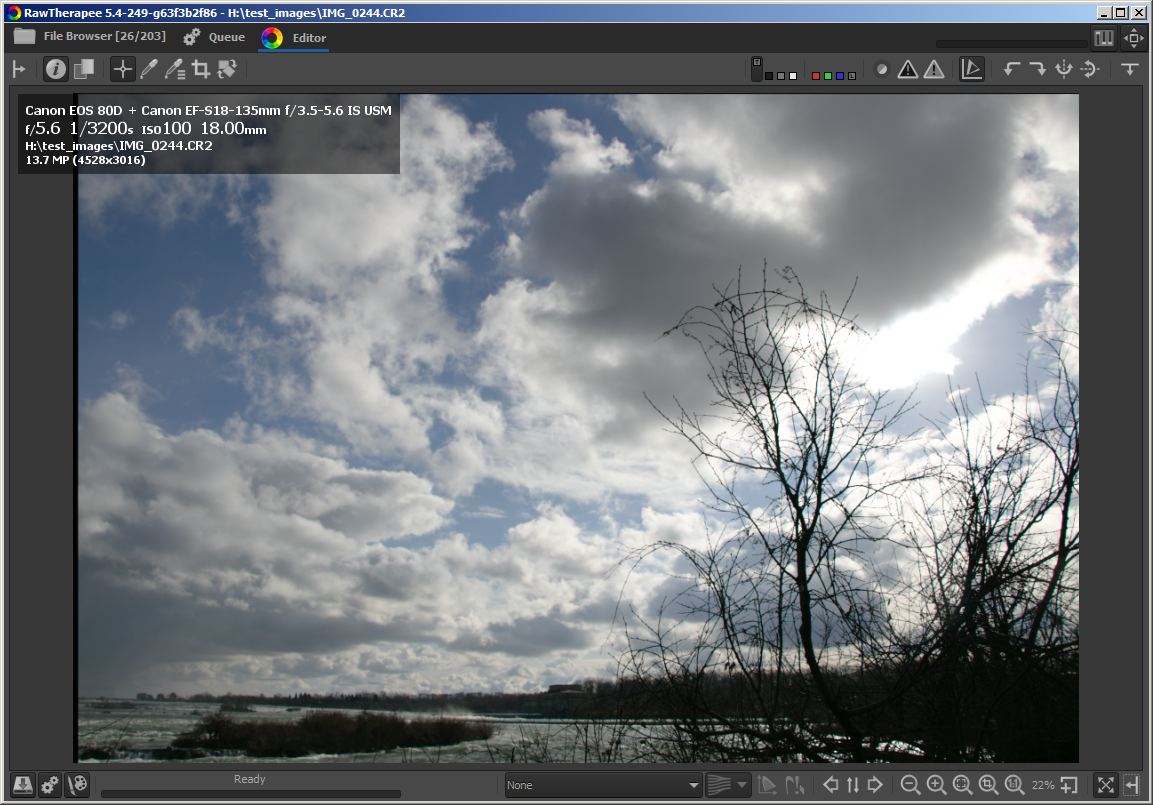
Now trying to fix the upper and left border...
heckflosse
on 26 Apr 2018
I just detected that mRaw files from Canon EOS 6D Mark II also don't work.
Tested using https://raw.pixls.us/getfile.php/1624/nice/Canon%20-%20EOS%206D%20Mark%20II%20-%20sRAW1%20(mRAW)%20(3:2).CR2
I will try to find a generic solution for the mraw stuff.
heckflosse
on 26 Apr 2018
Here's a first experimental patch which already works for all the mRaw files I found on raw.pixls.us
I didn't try to solve the border issues for EOS 80D mRaw files. My intention was to provide a generic solution to avoid hardcoding of image dimensions for mRaw files in future.
I will post a better patch (less code) soon.
diff --git a/rtengine/dcraw.cc b/rtengine/dcraw.cc
index afe54200a..b09c41a03 100644
--- a/rtengine/dcraw.cc
+++ b/rtengine/dcraw.cc
@@ -9104,9 +9104,63 @@ void CLASS identify()
       SWAP(height,width);
       SWAP(raw_height,raw_width);
     }
-    if (width == 7200 && height == 3888) {
-      raw_width  = width  = 6480;
-      raw_height = height = 4320;
+
+    if(std::fabs((float)width / height - 1.5f) > 0.02f) {
+        float ratio[20] = {1.f};
+        int dimension[20];
+        if((float)width / height > 1.5f) {
+            // decrease width
+            int size = width * height;
+            int newWidth = width;
+            int index = -1;
+            while (--newWidth && index < 19) {
+                if(size % newWidth == 0 && std::fabs((float)newWidth / (size / newWidth) - 1.5f) <= 0.02f) {
+                    ++index;
+                    ratio[index] = std::fabs((float)newWidth / (size / newWidth) - 1.5f);
+                    dimension[index] = newWidth;
+                }
+            }
+            // find ratio closest to 1.5
+            float val = 1.f;
+            int found = index;
+            while(index >= 0) {
+                if (ratio[index] < val) {
+                    val = ratio[index];
+                    found = index;
+                }
+                index--;
+            }
+            if(found >= 0) {
+                raw_width = width = dimension[found];
+                raw_height = height = size / raw_width;
+            }
+        } else {
+            // decrease height
+            int size = width * height;
+            int newHeight = height;
+            int index = -1;
+            while (--newHeight && index < 19) {
+                if(size % newHeight == 0 && std::fabs((float)(size / newHeight) / newHeight - 1.5f) <= 0.02f) {
+                    ++index;
+                    ratio[index] = std::fabs((float)(size / newHeight) / newHeight - 1.5f);
+                    dimension[index] = newHeight;
+                }
+            }
+            // find ratio closest to 1.5
+            float val = 1.f;
+            int found = index;
+            while(index >= 0) {
+                if (ratio[index] < val) {
+                    val = ratio[index];
+                    found = index;
+                }
+                index--;
+            }
+            if(found >= 0) {
+                raw_height = height = dimension[found];
+                raw_width = width = size / raw_height;
+            }
+        }
     }
     filters = 0;
     tiff_samples = colors = 3;
Here's a simpler patch:
diff --git a/rtengine/dcraw.cc b/rtengine/dcraw.cc
index afe54200a..b7cc78b00 100644
--- a/rtengine/dcraw.cc
+++ b/rtengine/dcraw.cc
@@ -9104,9 +9104,34 @@ void CLASS identify()
       SWAP(height,width);
       SWAP(raw_height,raw_width);
     }
-    if (width == 7200 && height == 3888) {
-      raw_width  = width  = 6480;
-      raw_height = height = 4320;
+
+    if(std::fabs((float)width / height - 1.5f) > 0.02f) {
+        float ratio[20];
+        int dimension[20];
+        int size = width * height;
+        int newHeight = sqrt(size / 1.48f);
+        int index = -1;
+        while (--newHeight && index < 19 && std::fabs((float)(size / newHeight) / newHeight - 1.5f) <= 0.02f) {
+            if(size % newHeight == 0) {
+                ++index;
+                ratio[index] = std::fabs((float)(size / newHeight) / newHeight - 1.5f);
+                dimension[index] = newHeight;
+            }
+        }
+        // find ratio closest to 1.5
+        float val = 1.f;
+        int found = index;
+        while(index >= 0) {
+            if (ratio[index] < val) {
+                val = ratio[index];
+                found = index;
+            }
+            index--;
+        }
+        if(found >= 0) {
+            raw_height = height = dimension[found];
+            raw_width = width = size / raw_height;
+        }
     }
     filters = 0;
     tiff_samples = colors = 3;
@heckflosse I don't really understand, why you initialize the first element of ratio: Isn't it only set in the first while when index is 0? So the access in the second while can only happen if it is definitely set. I must be missing something...
Floessie
on 27 Apr 2018
@Floessie Your're right. Thanks for the hint :+1:
Fixed
heckflosse
on 27 Apr 2018
@Floessie The fix for the wrong borders of the 80D mRaw files is a bit more complicated.
Currently I got crashes here, if I set top_margin/left_margin.
Imho we should review this code in a new issue, because it's also for foveon and demosaiced DNG files, not only for mRaw.
Objections to push the patch from above?
heckflosse
on 27 Apr 2018
@heckflosse
Objections to push the patch from above?
No, but I was thinking about the 20. I guess it's arbitrarily chosen but index depends on it the first while. Wouldn't it be more concise to use a flexible std::vector<> here, perhaps with a struct containing both ratio and dimension? Then you wouldn't need index anymore but emplace_back() and empty(). Anyway, the code is fine as is.
Currently I got crashes here, if I set top_margin/left_margin.
Imho we should review this code in a new issue, because it's also for foveon and demosaiced DNG files, not only for mRaw.
Why not, though I need some enlightenment on what you are doing there... :smile:
Floessie
on 27 Apr 2018
@heckflosse compiled and tested on all mRaw files from RPU (hint: you can search RPU for "mraw", you don't have to search by model).
Tested:
No black borders.
RT: 3858x2566
Canon - EOS 5D Mark II - sRAW1 (mRAW) (3_2).cr2
-TIFF-IFD0-ExifIFD-MakerNotes-SensorInfo:SensorWidth=3872
-TIFF-IFD0-ExifIFD-MakerNotes-SensorInfo:SensorHeight=2574
-TIFF-IFD0-ExifIFD-MakerNotes-SensorInfo:SensorLeftBorder=0
-TIFF-IFD0-ExifIFD-MakerNotes-SensorInfo:SensorTopBorder=0
-TIFF-IFD0-ExifIFD-MakerNotes-SensorInfo:SensorRightBorder=3860
-TIFF-IFD0-ExifIFD-MakerNotes-SensorInfo:SensorBottomBorder=2573
No black borders.
RT: 4096x2728
Canon - EOS 7D Mark II - sRAW1 (mRAW) (3_2).cr2
-TIFF-IFD0-ExifIFD-MakerNotes-SensorInfo:SensorWidth=4104
-TIFF-IFD0-ExifIFD-MakerNotes-SensorInfo:SensorHeight=2736
-TIFF-IFD0-ExifIFD-MakerNotes-SensorInfo:SensorLeftBorder=0
-TIFF-IFD0-ExifIFD-MakerNotes-SensorInfo:SensorTopBorder=0
-TIFF-IFD0-ExifIFD-MakerNotes-SensorInfo:SensorRightBorder=4103
-TIFF-IFD0-ExifIFD-MakerNotes-SensorInfo:SensorBottomBorder=2735


md5-2501fdb044128f9d51e7455e32d542a1


```text
No black borders.
RT: 3952x2632
Canon - EOS 5D Mark III - sRAW1 (mRAW).CR2
-TIFF-IFD0-ExifIFD-MakerNotes-SensorInfo:SensorWidth=3960
-TIFF-IFD0-ExifIFD-MakerNotes-SensorInfo:SensorHeight=2640
-TIFF-IFD0-ExifIFD-MakerNotes-SensorInfo:SensorLeftBorder=0
-TIFF-IFD0-ExifIFD-MakerNotes-SensorInfo:SensorTopBorder=0
-TIFF-IFD0-ExifIFD-MakerNotes-SensorInfo:SensorRightBorder=3959
-TIFF-IFD0-ExifIFD-MakerNotes-SensorInfo:SensorBottomBorder=2639


md5-9ac332e54adfc47836606ec682734477


```text
No black borders.
RT: 3880x2584
Canon - EOS 60D - sRAW1 (mRAW) (3_2).CR2
-TIFF-IFD0-ExifIFD-MakerNotes-SensorInfo:SensorWidth=3888
-TIFF-IFD0-ExifIFD-MakerNotes-SensorInfo:SensorHeight=2592
-TIFF-IFD0-ExifIFD-MakerNotes-SensorInfo:SensorLeftBorder=0
-TIFF-IFD0-ExifIFD-MakerNotes-SensorInfo:SensorTopBorder=0
-TIFF-IFD0-ExifIFD-MakerNotes-SensorInfo:SensorRightBorder=3887
-TIFF-IFD0-ExifIFD-MakerNotes-SensorInfo:SensorBottomBorder=2591


md5-2ad114199a790a7600a84366999587d2


```text
No black borders.
RT: 4096x2728
Canon - EOS 70D - sRAW1 (mRAW).CR2
-TIFF-IFD0-ExifIFD-MakerNotes-SensorInfo:SensorWidth=4104
-TIFF-IFD0-ExifIFD-MakerNotes-SensorInfo:SensorHeight=2736
-TIFF-IFD0-ExifIFD-MakerNotes-SensorInfo:SensorLeftBorder=0
-TIFF-IFD0-ExifIFD-MakerNotes-SensorInfo:SensorTopBorder=0
-TIFF-IFD0-ExifIFD-MakerNotes-SensorInfo:SensorRightBorder=4103
-TIFF-IFD0-ExifIFD-MakerNotes-SensorInfo:SensorBottomBorder=2735


md5-2ec1af3d7409dc6b9381cad8f6457d38


```text
No black borders.
RT: 2992x1992
Canon - EOS 80D - sRAW2 (sRAW) (3_2).CR2
-TIFF-IFD0-ExifIFD-MakerNotes-SensorInfo:SensorWidth=3000
-TIFF-IFD0-ExifIFD-MakerNotes-SensorInfo:SensorHeight=2000
-TIFF-IFD0-ExifIFD-MakerNotes-SensorInfo:SensorLeftBorder=0
-TIFF-IFD0-ExifIFD-MakerNotes-SensorInfo:SensorTopBorder=0
-TIFF-IFD0-ExifIFD-MakerNotes-SensorInfo:SensorRightBorder=2999
-TIFF-IFD0-ExifIFD-MakerNotes-SensorInfo:SensorBottomBorder=1999
@Beep6581 With the files from RPU the black borders are only for
EOS 80D - sRAW1 (mRAW) (3_2). CR2
heckflosse
on 27 Apr 2018
@Floessie
though I need some enlightenment on what you are doing there...
That's old code from the time before I started contributing. It never has been tested on 3-channel files with top_margin or left_margin > 0 because usually these files don't have borders.
Unfortunately there are exceptions...
heckflosse
on 27 Apr 2018
@Floessie Here's a patch using std::vector
diff --git a/rtengine/dcraw.cc b/rtengine/dcraw.cc
index afe54200a..7d340b8fb 100644
--- a/rtengine/dcraw.cc
+++ b/rtengine/dcraw.cc
@@ -24,6 +24,8 @@
 /*RT*/#define DJGPP
 /*RT*/#include "jpeg.h"

+#include <utility>
+#include <vector>
 #include "opthelper.h"

 /*
@@ -9095,7 +9097,7 @@ void CLASS identify()
     filters = 0;
     simple_coeff(0);
        adobe_coeff (make, model);
-  } else if (!strcmp(make,"Canon") && tiff_bps == 15) {
+  } else if (!strcmp(make,"Canon") && tiff_bps == 15) { // Canon mRaw/sRaw
     switch (width) {
       case 3344: width -= 66;
       case 3872: width -= 6;
@@ -9104,9 +9106,27 @@ void CLASS identify()
       SWAP(height,width);
       SWAP(raw_height,raw_width);
     }
-    if (width == 7200 && height == 3888) {
-      raw_width  = width  = 6480;
-      raw_height = height = 4320;
+
+    if(std::fabs((float)width / height - 1.5f) > 0.02f) {
+        // wrong image dimensions. Calculate correct dimensions. width / height should be close to 1.5
+        std::vector<std::pair<float, int>> dimensions;
+
+        int size = width * height;
+        int newHeight = sqrt(size / 1.48f);
+        while (--newHeight && std::fabs((float)(size / newHeight) / newHeight - 1.5f) <= 0.02f) {
+            if(size % newHeight == 0) {
+                dimensions.emplace_back(std::pair<float, int>(std::fabs((float)(size / newHeight) / newHeight - 1.5f), newHeight));
+            }
+        }
+        // find ratio closest to 1.5
+        float val = 1.f;
+        while(!dimensions.empty()) {
+            if(dimensions.back().first < val) {
+                raw_height = height = dimensions.back().second;
+                raw_width = width = size / raw_height;
+            }
+            dimensions.pop_back();
+        }
     }
     filters = 0;
     tiff_samples = colors = 3;
@heckflosse What a pleasure. :+1:
Only a nitpicking: emplace() is meant to be fed with the parameters to T's constructor, otherwise it decays to an insert()/push_back(). So, if I'm not mistaken, the line should read:
dimensions.emplace_back(std::fabs(static_cast<float>(size / newHeight) / newHeight - 1.5f), newHeight);
Best,
Flössie
Floessie
on 27 Apr 2018
@Floessie How about this one?
dimensions.emplace_back(std::fabs(size / (newHeight * newHeight) - 1.5f), newHeight);
Because there is the 1.5f constant in the calculation I see ne need for a cast at all, or do I miss something?
heckflosse
on 27 Apr 2018
@heckflosse Phew, I don't know by heart. Just give it a try...
Floessie
on 27 Apr 2018
Related issues
heckflosse
·
3Comments
heckflosse
·
4Comments
 LordPhoenixfr
·
4Comments
heckflosse
·
4Comments
LordPhoenixfr
·
4Comments
heckflosse
·
4Comments
 Thanatomanic
·
4Comments
Thanatomanic
·
4Comments
Most helpful comment
I take this. First result:

Now trying to fix the upper and left border...