Raspiblitz: Stuck on Lightning Filtering Blockchain Screen
The title pretty much says it all. I'm stuck on the screen where it says: lightning filtering blockchain, and then it shows the number out of the total blocks. I have rebooted many times and it will update the total number of blocks on the right side but the left side is always a question mark. In other words, it currently looks like: Progress: ?/567902.
I left it up over night (so it was probably on this screen for close to 10 hours straight) and it didn't go through to the next screen where you can open channels and what not. I had reached that screen and done a fair bit previously but for whatever reason the device dropped connection and I had to go through the whole process again...now we're stuck on this screen and can't get back to the full menu.
Any ideas on how to fix or what might be going on? I'm trying to get all of my BTC off as it's been more than a shaky process to say the least. That's entirely my fault so no big deal. Like a true idiot I didn't write down the seed so getting the coins back that way is not an option. I tried the /home/admin/config.scripts/lnd.rescue.sh backup command as well and it gave an error and said that file wasn't found. If the coins truly are gone for good it's not enough to be a big problem. Just obviously would not be the preferred outcome.
Tried to go into the terminal and force close all open channels but no dice there either. Probably will post that issue on the lnd page itself. In any case, thanks for your help.
 funk256
All 69 comments
I have the same problem, although I haven't funded or opened any channel, yet. I just set it up and after the going to change the name of my node, it crashed and the Lightning Filtering Blockchain
Progress: ?/567971 ever since. Even restarting my pi didn't help. I hope we will find an answer, soon.
 th4fl4sh4
on 20 Mar 2019
th4fl4sh4
on 20 Mar 2019
login via SSH, ctrl-c to get to command prompt, then run these and post the resulting URLs:
/home/admin/XXdebugLogs.sh | nc termbin.com 9999
sudo tail -n 500 /mnt/hdd/lnd/logs/bitcoin/mainnet/lnd.log | nc termbin.com 9999
 fluidvoice
on 20 Mar 2019
fluidvoice
on 20 Mar 2019
login via SSH, ctrl-c to get to command prompt, then run these and post the resulting URLs:
/home/admin/XXdebugLogs.sh | nc termbin.com 9999
sudo tail -n 500 /mnt/hdd/lnd/logs/bitcoin/mainnet/lnd.log | nc termbin.com 9999
Hey, thanks for your help. Hopefully all you need are the links as they are quite a lot of text. If not I can go back and paste the contents here.
For the first command: https://termbin.com/kqzl
For the second: https://termbin.com/yvqx
Thanks again.
funk256
on 20 Mar 2019
The links are fine. Better than pasting all that. looking at them.
fluidvoice
on 20 Mar 2019
need to look further. run...
sudo grep -A100 "LTND: Version:" /mnt/hdd/lnd/logs/bitcoin/mainnet/lnd.log && sudo grep ERR /mnt/hdd/lnd/logs/bitcoin/mainnet/lnd.log | nc termbin.com 9999
fluidvoice
on 20 Mar 2019
All as one command? It looks like separating at the && may have produced the same results anyway.
When I hit enter it first gives:
Binary file /mnt/hdd/lnd/logs/bitcoin/mainnet/lnd.log matches
Then it gives the link: https://termbin.com/zrcn
Will keep checking in if I need to do anything else. I was probably going to burn the new image to my SD card over the weekend when I have the chance. I take it that doesn't mess with your existing wallets so long as you have the correct passwords. Thanks again.
funk256
on 21 Mar 2019
Yes, all as one. Try it again with putting -a after both grep so like this:
sudo grep -a -A100 "LTND: Version:" /mnt/hdd/lnd/logs/bitcoin/mainnet/lnd.log && sudo grep -a ERR /mnt/hdd/lnd/logs/bitcoin/mainnet/lnd.log | nc termbin.com 9999
or do it as two different ones:
sudo grep -a -A100 "LTND: Version:" /mnt/hdd/lnd/logs/bitcoin/mainnet/lnd.log
sudo grep -a ERR /mnt/hdd/lnd/logs/bitcoin/mainnet/lnd.log | nc termbin.com 9999
fluidvoice
on 21 Mar 2019
Okay, good deal. That definitely gave me different results. It didn't put the first bit into a link, unfortunately:
2019-03-18 18:39:43.143 [INF] LTND: Version: 0.5.2-beta commit=v0.5.2-beta, build=production, logging=default
2019-03-18 18:39:43.144 [INF] LTND: Active chain: Bitcoin (network=mainnet)
2019-03-18 18:39:43.254 [INF] CHDB: Checking for schema update: latest_version=7, db_version=7
2019-03-18 18:39:43.282 [INF] RPCS: password RPC server listening on [::]:10009
2019-03-18 18:39:43.289 [INF] RPCS: password gRPC proxy started at [::]:8080
2019-03-18 18:39:43.290 [INF] LTND: Waiting for wallet encryption password. Use lncli create to create a wallet, lncli unlock to unlock an existing wallet, or lncli changepassword to change the password of an existing wallet and unlock it.
2019-03-18 22:42:01.698 [INF] LNWL: Opened wallet
2019-03-18 22:42:02.679 [INF] LTND: Primary chain is set to: bitcoin
2019-03-18 22:46:08.598 [INF] LTND: Initializing bitcoind backed fee estimator
2019-03-18 22:46:08.593 [INF] LNWL: Started listening for bitcoind block notifications via ZMQ on tcp://:28332
2019-03-18 22:46:08.593 [INF] LNWL: Started listening for bitcoind transaction notifications via ZMQ on tcp://:28333
2019-03-18 22:46:35.581 [DBG] LNWL: Using minimum fee rate of 253 sat/kw
2019-03-18 22:46:42.567 [INF] LNWL: The wallet has been unlocked without a time limit
2019-03-18 22:50:06.635 [INF] LTND: LightningWallet opened
2019-03-18 22:50:06.712 [DBG] LNWL: Birthday block has already been verified: height=566506, hash=00000000000000000011ae2968a9b02d2c5dcc1e9390dbd00b272eff31833428
2019-03-18 22:50:30.177 [WRN] LNWL: Unable to synchronize wallet to chain: -8: Block height out of range
2019-03-18 22:50:52.253 [INF] HSWC: Restoring in-memory circuit state from disk
2019-03-18 22:50:52.275 [INF] HSWC: Payment circuits loaded: num_pending=0, num_open=0
2019-03-18 22:50:52.987 [INF] HSWC: Trimming open circuits for chan_id=567389:1508:0, start_htlc_id=0
2019-03-18 22:50:52.988 [INF] HSWC: Trimming open circuits for chan_id=567348:2237:1, start_htlc_id=5
2019-03-18 22:50:52.988 [INF] HSWC: Trimming open circuits for chan_id=567429:1586:0, start_htlc_id=0
2019-03-18 22:50:52.988 [INF] HSWC: Trimming open circuits for chan_id=567521:1247:0, start_htlc_id=0
2019-03-18 22:50:52.988 [INF] HSWC: Trimming open circuits for chan_id=567348:2239:0, start_htlc_id=0
2019-03-18 22:50:52.988 [INF] HSWC: Trimming open circuits for chan_id=567354:1673:1, start_htlc_id=0
2019-03-18 22:50:53.456 [INF] RPCS: RPC server listening on [::]:10009
2019-03-18 22:50:53.484 [INF] RPCS: gRPC proxy started at [::]:8080
2019-03-18 22:51:24.635 [INF] LTND: Waiting for chain backend to finish sync, start_height=567663
2019-03-18 22:59:04.243 [DBG] LNWL: Possible reorg at block 000000000000000000153742341851b3c42ede6bd108598ef0c15414b9102c4f
2019-03-18 23:09:21.324 [DBG] LNWL: Disconnecting block 567648 (000000000000000000085f169de4edd6efb92adc732458ee6062f88780269b89)
2019-03-19 11:00:57.172 [INF] LTND: Version: 0.5.2-beta commit=v0.5.2-beta, build=production, logging=default
2019-03-19 11:00:57.172 [INF] LTND: Active chain: Bitcoin (network=mainnet)
2019-03-19 11:00:57.347 [INF] CHDB: Checking for schema update: latest_version=7, db_version=7
2019-03-19 11:00:57.407 [INF] RPCS: password RPC server listening on [::]:10009
2019-03-19 11:00:57.408 [INF] RPCS: password gRPC proxy started at [::]:8080
2019-03-19 11:00:57.409 [INF] LTND: Waiting for wallet encryption password. Use lncli create to create a wallet, lncli unlock to unlock an existing wallet, or lncli changepassword to change the password of an existing wallet and unlock it.
2019-03-19 22:04:39.971 [INF] LNWL: Opened wallet
2019-03-19 22:04:40.601 [INF] LTND: Primary chain is set to: bitcoin
2019-03-19 22:06:06.689 [INF] LTND: Initializing bitcoind backed fee estimator
2019-03-19 22:06:06.689 [INF] LNWL: Started listening for bitcoind transaction notifications via ZMQ on tcp://:28333
2019-03-19 22:06:06.689 [INF] LNWL: Started listening for bitcoind block notifications via ZMQ on tcp://:28332
2019-03-19 22:11:21.989 [DBG] LNWL: Using minimum fee rate of 253 sat/kw
2019-03-19 22:11:27.792 [INF] LNWL: The wallet has been unlocked without a time limit
2019-03-19 22:13:32.917 [INF] LTND: LightningWallet opened
2019-03-19 22:13:32.925 [DBG] LNWL: Birthday block has already been verified: height=566506, hash=00000000000000000011ae2968a9b02d2c5dcc1e9390dbd00b272eff31833428
2019-03-19 22:14:05.451 [WRN] LNWL: Unable to synchronize wallet to chain: -8: Block height out of range
2019-03-19 22:14:08.723 [INF] HSWC: Restoring in-memory circuit state from disk
2019-03-19 22:14:08.768 [INF] HSWC: Payment circuits loaded: num_pending=0, num_open=0
2019-03-19 22:14:09.345 [INF] HSWC: Trimming open circuits for chan_id=567389:1508:0, start_htlc_id=0
2019-03-19 22:14:09.345 [INF] HSWC: Trimming open circuits for chan_id=567348:2237:1, start_htlc_id=5
2019-03-19 22:14:09.345 [INF] HSWC: Trimming open circuits for chan_id=567429:1586:0, start_htlc_id=0
2019-03-19 22:14:09.345 [INF] HSWC: Trimming open circuits for chan_id=567521:1247:0, start_htlc_id=0
2019-03-19 22:14:09.345 [INF] HSWC: Trimming open circuits for chan_id=567348:2239:0, start_htlc_id=0
2019-03-19 22:14:09.345 [INF] HSWC: Trimming open circuits for chan_id=567354:1673:1, start_htlc_id=0
2019-03-19 22:14:09.882 [INF] RPCS: RPC server listening on [::]:10009
2019-03-19 22:14:09.884 [INF] RPCS: gRPC proxy started at [::]:8080
2019-03-19 22:15:35.479 [INF] LTND: Waiting for chain backend to finish sync, start_height=567688
2019-03-19 22:49:06.989 [DBG] LNWL: Possible reorg at block 00000000000000000015b3bb044c856de72191f4f915a7b55df42b709522be4d
2019-03-19 23:21:36.538 [DBG] LNWL: Disconnecting block 567675 (0000000000000000002d88cedb27473b128f57227d914b53f853af2f4c1335bb)
2019-03-19 23:58:59.450 [DBG] RPCS: [listpeers] yielded [] peers
2019-03-19 23:59:17.017 [INF] RPCS: [listchannels] fetched 6 channels from DB
2019-03-20 00:01:44.650 [DBG] RPCS: [listpeers] yielded [] peers
2019-03-20 00:01:50.547 [INF] RPCS: [listchannels] fetched 6 channels from DB
2019-03-20 00:03:26.693 [DBG] RPCS: [walletbalance] Total balance=0.00321268 BTC
2019-03-20 00:23:17.602 [INF] RPCS: [listchannels] fetched 6 channels from DB
2019-03-20 00:23:30.968 [DBG] LNWL: ChannelPoint(d5bfe562fb6f8a84cd6319d2484923d710595a0c1a99cffb7d2430ebb555e17a:0), starting local commitment: (lnwallet.commitment)(0x208c360)({
height: (uint64) 11,
isOurs: (bool) true,
ourMessageIndex: (uint64) 0,
theirMessageIndex: (uint64) 11,
ourHtlcIndex: (uint64) 0,
theirHtlcIndex: (uint64) 0,
txn: (wire.MsgTx)(0x309c060)({
Version: (int32) 2,
TxIn: ([]wire.TxIn) (len=1 cap=1) {
(wire.TxIn)(0xfe02140)({
PreviousOutPoint: (wire.OutPoint) d5bfe562fb6f8a84cd6319d2484923d710595a0c1a99cffb7d2430ebb555e17a:0,
SignatureScript: ([]uint8) {
},
Witness: (wire.TxWitness)
Sequence: (uint32) 2160987734
})
},
TxOut: ([]wire.TxOut) (len=1 cap=1) {
(wire.TxOut)(0x309c080)({
Value: (int64) 98863,
PkScript: ([]uint8) (len=22 cap=22) {
00000000 00 14 34 1f 02 4b 93 29 e3 d0 d4 5c be b7 33 90 |..4..K.).....3.|
00000010 0d 97 f9 51 39 fd |...Q9.|
}
})
},
LockTime: (uint32) 546598157
}),
sig: ([]uint8) (len=70 cap=70) {
00000000 30 44 02 20 03 fe 04 90 48 01 c9 3e 7f f9 4a f9 |0D. ....H..>..J.|
00000010 95 bf 9d 2b 77 97 b7 17 d4 2c 2f bd 2d a6 d8 5f |...+w....,/.-.._|
00000020 11 d0 51 e0 02 20 61 c4 4a 41 ce c6 9b e1 5a 80 |..Q.. a.JA....Z.|
00000030 d3 b2 ac 43 9a d1 e9 8a 1b 90 94 3b 9e c3 6d ce |...C.......;..m.|
00000040 95 74 ed ef a6 6f |.t...o|
},
ourBalance: (lnwire.MilliSatoshi) 0 mSAT,
theirBalance: (lnwire.MilliSatoshi) 98863000 mSAT,
fee: (btcutil.Amount) 0.00001137 BTC,
feePerKw: (lnwallet.SatPerKWeight) 1571,
dustLimit: (btcutil.Amount) 0.00000573 BTC,
outgoingHTLCs: ([]lnwallet.PaymentDescriptor)
incomingHTLCs: ([]lnwallet.PaymentDescriptor)
outgoingHTLCIndex: (map[int32]lnwallet.PaymentDescriptor) {
},
incomingHTLCIndex: (map[int32]lnwallet.PaymentDescriptor) {
}
})
2019-03-20 00:23:30.969 [DBG] LNWL: ChannelPoint(735f7782fdb9b7efbe1e44c44bb362d22e3be7cd4ab93b28a3ebe4b78fdb7646:0), starting local commitment: (lnwallet.commitment)(0x5474000)({
height: (uint64) 10,
isOurs: (bool) true,
ourMessageIndex: (uint64) 0,
theirMessageIndex: (uint64) 10,
ourHtlcIndex: (uint64) 0,
theirHtlcIndex: (uint64) 0,
txn: (wire.MsgTx)(0x76a6720)({
Version: (int32) 2,
TxIn: ([]wire.TxIn) (len=1 cap=1) {
(wire.TxIn)(0x40f0bc0)({
PreviousOutPoint: (wire.OutPoint) 735f7782fdb9b7efbe1e44c44bb362d22e3be7cd4ab93b28a3ebe4b78fdb7646:0,
SignatureScript: ([]uint8) {
},
Witness: (wire.TxWitness)
Sequence: (uint32) 2147820587
})
For the second part: https://termbin.com/2qpg
On boot with the Pi itself I get this line: 34.350573] EXT4-fs error (device mmcblk0p2): ext4_mb_generate_buddy:757: group 7, block bitmap and bg descriptor inconsistent : 28104 vs 28108 free clusters
Then on the next two lines it's:
Give root password for maintenance
(or press Control-D to continue):
I basically plugged in a keyboard to the Pi and spammed Control-D until it finally got through and I could log in. Now we're at the point with the screen stuck on filtering blockchain. Not sure if that might add another piece to the puzzle. Thanks again so much.
funk256
on 21 Mar 2019
Your SD card seems to be having a problem and is perhaps corrupted or full. Please update to Raspiblitz v1.1 (re-write the SD card with the new image) as per the directions: https://github.com/rootzoll/raspiblitz/blob/master/FAQ.md#how-to-update-my-raspiblitz-after-version-098
Also, it might help to upgrade the quality of your SD card if it's not already a good one:
https://www.amazon.com/Samsung-Endurance-32GB-Micro-Adapter/dp/B07B98GXQT
fluidvoice
on 21 Mar 2019
Okay, that would certainly make sense with some of the booting issues I've had. I'll definitely give it a try and report back here. May end up getting another SD card. I wouldn't argue with that suggestion either. So long as the wallet details and all that are on the HDD and not the card that doesn't seem like it would cause me too many issues when all is said and done.
I do appreciate all of your time and help on this.
funk256
on 22 Mar 2019
My Raspiblitz also keeps showing Lightning Filtering Blockchain Screen ?/568319. It has been like that for hours already after flashing V1.1 again. SD Card is brand new from Sandisk.
Thanks for the help
 ElSpiestolero
on 22 Mar 2019
ElSpiestolero
on 22 Mar 2019
I downgraded to Raspiblitz V1.0 and having the same problem. Stuck on Lightning Filtering Blockchain Screen ?/568502. @funk256 did you try a new SD Card?
ElSpiestolero
on 24 Mar 2019
logs?
fluidvoice
on 24 Mar 2019
@fluidvoice I'm having the same issue. I'm stuck on 'Lightning Filtering Blockchain' Progress ?/568532 .. It's been on this screen for a long time.
Here's my logs. Is my SD card corrupt as well?
^Cadmin@RaspiBlitz:~ $ sudo grep -a -A100 "LTND: Version:" /mnt/hdd/lnd/logs/bitin/mainnet/lnd.log && sudo grep -a ERR /mnt/hdd/lnd/logs/bitcoin/mainnet/lnd.log | nc termbin.com 9999
2019-03-21 05:22:53.127 [INF] LTND: Version: 0.5.2-beta commit=v0.5.2-beta, build=production, logging=default
2019-03-21 05:22:53.129 [INF] LTND: Active chain: Bitcoin (network=mainnet)
2019-03-21 05:22:53.398 [INF] CHDB: Checking for schema update: latest_version=7, db_version=7
2019-03-21 05:22:53.398 [INF] RPCS: Generating TLS certificates...
2019-03-21 05:22:53.406 [INF] RPCS: Done generating TLS certificates
2019-03-21 05:22:53.412 [INF] RPCS: password RPC server listening on [::]:10009
2019-03-21 05:22:53.419 [INF] RPCS: password gRPC proxy started at [::]:8080
2019-03-21 05:22:53.419 [INF] LTND: Waiting for wallet encryption password. Use lncli create to create a wallet, lncli unlock to unlock an existing wallet, or lncli changepassword to change the password of an existing wallet and unlock it.
2019-03-21 23:49:49.688 [INF] LTND: Version: 0.5.2-beta commit=v0.5.2-beta, build=production, logging=default
2019-03-21 23:49:49.689 [INF] LTND: Active chain: Bitcoin (network=mainnet)
2019-03-21 23:49:49.704 [INF] CHDB: Checking for schema update: latest_version=7, db_version=7
2019-03-21 23:49:49.712 [INF] RPCS: password RPC server listening on [::]:10009
2019-03-21 23:49:49.718 [INF] RPCS: password gRPC proxy started at [::]:8080
2019-03-21 23:49:49.719 [INF] LTND: Waiting for wallet encryption password. Use lncli create to create a wallet, lncli unlock to unlock an existing wallet, or lncli changepassword to change the password of an existing wallet and unlock it.
2019-03-22 13:27:06.006 [INF] LTND: Version: 0.5.2-beta commit=v0.5.2-beta, build=production, logging=default
2019-03-22 13:27:06.007 [INF] LTND: Active chain: Bitcoin (network=mainnet)
2019-03-22 13:27:06.100 [INF] CHDB: Checking for schema update: latest_version=7, db_version=7
2019-03-22 13:27:06.113 [INF] RPCS: password RPC server listening on [::]:10009
2019-03-22 13:27:06.120 [INF] RPCS: password gRPC proxy started at [::]:8080
2019-03-22 13:27:06.122 [INF] LTND: Waiting for wallet encryption password. Use lncli create to create a wallet, lncli unlock to unlock an existing wallet, or lncli changepassword to change the password of an existing wallet and unlock it.
2019-03-23 14:46:18.019 [INF] LTND: Version: 0.5.2-beta commit=v0.5.2-beta, build=production, logging=default
2019-03-23 14:46:18.020 [INF] LTND: Active chain: Bitcoin (network=mainnet)
2019-03-23 14:46:18.100 [INF] CHDB: Checking for schema update: latest_version=7, db_version=7
2019-03-23 14:46:18.115 [INF] RPCS: password RPC server listening on [::]:10009
2019-03-23 14:46:18.121 [INF] RPCS: password gRPC proxy started at [::]:8080
2019-03-23 14:46:18.122 [INF] LTND: Waiting for wallet encryption password. Use lncli create to create a wallet, lncli unlock to unlock an existing wallet, or lncli changepassword to change the password of an existing wallet and unlock it
 justinsane
on 24 Mar 2019
justinsane
on 24 Mar 2019
^Cadmin@raspies:~ $ sudo grep -a -A100 "LTND: Version:" /mnt/hdd/lnd/logs/bitcoimainnet/lnd.log && sudo grep -a ERR /mnt/hdd/lnd/logs/bitcoin/mainnet/lnd.log | nc termbin.com 9999
2019-03-20 21:58:34.214 [INF] LTND: Version: 0.5.2-beta commit=v0.5.2-beta, build=production, logging=default
2019-03-20 21:58:34.214 [INF] LTND: Active chain: Bitcoin (network=mainnet)
2019-03-20 21:58:34.216 [INF] CHDB: Checking for schema update: latest_version=7, db_version=7
2019-03-20 21:58:34.216 [INF] RPCS: Generating TLS certificates...
2019-03-20 21:58:34.227 [INF] RPCS: Done generating TLS certificates
2019-03-20 21:58:34.232 [INF] RPCS: password RPC server listening on [::]:10009
2019-03-20 21:58:34.233 [INF] RPCS: password gRPC proxy started at [::]:8080
2019-03-20 21:58:34.233 [INF] LTND: Waiting for wallet encryption password. Use lncli create to create a wallet, lncli unlock to unlock an existing wallet, or lncli changepassword to change the password of an existing wallet and unlock it.
2019-03-20 21:58:38.130 [INF] LTND: Version: 0.5.2-beta commit=v0.5.2-beta, build=production, logging=default
2019-03-20 21:58:38.130 [INF] LTND: Active chain: Bitcoin (network=mainnet)
2019-03-20 21:58:38.131 [INF] CHDB: Checking for schema update: latest_version=7, db_version=7
2019-03-20 21:58:38.135 [INF] RPCS: password RPC server listening on [::]:10009
2019-03-20 21:58:38.135 [INF] RPCS: password gRPC proxy started at [::]:8080
2019-03-20 21:58:38.136 [INF] LTND: Waiting for wallet encryption password. Use lncli create to create a wallet, lncli unlock to unlock an existing wallet, or lncli changepassword to change the password of an existing wallet and unlock it.
2019-03-21 22:18:33.031 [INF] LTND: Version: 0.5.2-beta commit=v0.5.2-beta, build=production, logging=default
2019-03-21 22:18:33.032 [INF] LTND: Active chain: Bitcoin (network=mainnet)
2019-03-21 22:18:33.179 [INF] CHDB: Checking for schema update: latest_version=7, db_version=7
2019-03-21 22:18:33.203 [INF] RPCS: password RPC server listening on [::]:10009
2019-03-21 22:18:33.204 [INF] RPCS: password gRPC proxy started at [::]:8080
2019-03-21 22:18:33.204 [INF] LTND: Waiting for wallet encryption password. Use lncli create to create a wallet, lncli unlock to unlock an existing wallet, or lncli changepassword to change the password of an existing wallet and unlock it.
2019-03-21 22:25:35.305 [INF] LTND: Version: 0.5.2-beta commit=v0.5.2-beta, build=production, logging=default
2019-03-21 22:25:35.306 [INF] LTND: Active chain: Bitcoin (network=mainnet)
2019-03-21 22:25:35.491 [INF] CHDB: Checking for schema update: latest_version=7, db_version=7
2019-03-21 22:25:35.541 [INF] RPCS: password RPC server listening on [::]:10009
2019-03-21 22:25:35.542 [INF] RPCS: password gRPC proxy started at [::]:8080
2019-03-21 22:25:35.542 [INF] LTND: Waiting for wallet encryption password. Use lncli create to create a wallet, lncli unlock to unlock an existing wallet, or lncli changepassword to change the password of an existing wallet and unlock it.
2019-03-21 22:33:10.387 [INF] LTND: Version: 0.5.2-beta commit=v0.5.2-beta, build=production, logging=default
2019-03-21 22:33:10.388 [INF] LTND: Active chain: Bitcoin (network=mainnet)
2019-03-21 22:33:10.563 [INF] CHDB: Checking for schema update: latest_version=7, db_version=7
2019-03-21 22:33:10.605 [INF] RPCS: password RPC server listening on [::]:10009
2019-03-21 22:33:10.612 [INF] RPCS: password gRPC proxy started at [::]:8080
2019-03-21 22:33:10.612 [INF] LTND: Waiting for wallet encryption password. Use lncli create to create a wallet, lncli unlock to unlock an existing wallet, or lncli changepassword to change the password of an existing wallet and unlock it.
2019-03-21 22:32:52.835 [INF] LTND: Version: 0.5.2-beta commit=v0.5.2-beta, build=production, logging=default
2019-03-21 22:32:52.835 [INF] LTND: Active chain: Bitcoin (network=mainnet)
2019-03-21 22:32:52.924 [INF] CHDB: Checking for schema update: latest_version=7, db_version=7
2019-03-21 22:32:52.975 [INF] RPCS: password RPC server listening on [::]:10009
2019-03-21 22:32:53.004 [INF] RPCS: password gRPC proxy started at [::]:8080
2019-03-21 22:32:53.004 [INF] LTND: Waiting for wallet encryption password. Use lncli create to create a wallet, lncli unlock to unlock an existing wallet, or lncli changepassword to change the password of an existing wallet and unlock it.
2019-03-21 22:32:30.527 [INF] LTND: Version: 0.5.2-beta commit=v0.5.2-beta, build=production, logging=default
2019-03-21 22:32:30.528 [INF] LTND: Active chain: Bitcoin (network=mainnet)
2019-03-21 22:32:30.674 [INF] CHDB: Checking for schema update: latest_version=7, db_version=7
2019-03-21 22:32:30.717 [INF] RPCS: password RPC server listening on [::]:10009
2019-03-21 22:32:30.727 [INF] RPCS: password gRPC proxy started at [::]:8080
2019-03-21 22:32:30.727 [INF] LTND: Waiting for wallet encryption password. Use lncli create to create a wallet, lncli unlock to unlock an existing wallet, or lncli changepassword to change the password of an existing wallet and unlock it.
2019-03-22 12:48:03.428 [INF] LTND: Version: 0.5.2-beta commit=v0.5.2-beta, build=production, logging=default
2019-03-22 12:48:03.428 [INF] LTND: Active chain: Bitcoin (network=mainnet)
2019-03-22 12:48:03.537 [INF] CHDB: Checking for schema update: latest_version=7, db_version=7
2019-03-22 12:48:03.601 [INF] RPCS: password RPC server listening on [::]:10009
2019-03-22 12:48:03.601 [INF] RPCS: password gRPC proxy started at [::]:8080
2019-03-22 12:48:03.601 [INF] LTND: Waiting for wallet encryption password. Use lncli create to create a wallet, lncli unlock to unlock an existing wallet, or lncli changepassword to change the password of an existing wallet and unlock it.
2019-03-22 15:24:49.797 [INF] LTND: Version: 0.5.2-beta commit=v0.5.2-beta, build=production, logging=default
2019-03-22 15:24:49.797 [INF] LTND: Active chain: Bitcoin (network=mainnet)
2019-03-22 15:24:49.972 [INF] CHDB: Checking for schema update: latest_version=7, db_version=7
2019-03-22 15:24:50.018 [INF] RPCS: password RPC server listening on [::]:10009
2019-03-22 15:24:50.024 [INF] RPCS: password gRPC proxy started at [::]:8080
2019-03-22 15:24:50.024 [INF] LTND: Waiting for wallet encryption password. Use lncli create to create a wallet, lncli unlock to unlock an existing wallet, or lncli changepassword to change the password of an existing wallet and unlock it.
2019-03-22 15:25:00.338 [INF] LNWL: Opened wallet
2019-03-22 15:25:01.208 [INF] LTND: Version: 0.5.2-beta commit=v0.5.2-beta, build=production, logging=default
2019-03-22 15:25:01.209 [INF] LTND: Active chain: Bitcoin (network=mainnet)
2019-03-22 15:25:01.210 [INF] CHDB: Checking for schema update: latest_version=7, db_version=7
2019-03-22 15:25:01.211 [INF] RPCS: Generating TLS certificates...
2019-03-22 15:25:01.223 [INF] RPCS: Done generating TLS certificates
2019-03-22 15:25:01.230 [INF] RPCS: password RPC server listening on [::]:10009
2019-03-22 15:25:01.232 [INF] RPCS: password gRPC proxy started at [::]:8080
2019-03-22 15:25:01.235 [INF] LTND: Waiting for wallet encryption password. Use lncli create to create a wallet, lncli unlock to unlock an existing wallet, or lncli changepassword to change the password of an existing wallet and unlock it.
2019-03-22 15:27:23.667 [INF] LTND: Version: 0.5.2-beta commit=v0.5.2-beta, build=production, logging=default
2019-03-22 15:27:23.667 [INF] LTND: Active chain: Bitcoin (network=mainnet)
2019-03-22 15:27:23.843 [INF] CHDB: Checking for schema update: latest_version=7, db_version=7
2019-03-22 15:27:23.887 [INF] RPCS: password RPC server listening on [::]:10009
2019-03-22 15:27:23.887 [INF] RPCS: password gRPC proxy started at [::]:8080
2019-03-22 15:27:23.887 [INF] LTND: Waiting for wallet encryption password. Use lncli create to create a wallet, lncli unlock to unlock an existing wallet, or lncli changepassword to change the password of an existing wallet and unlock it.
2019-03-23 16:30:07.516 [INF] LTND: Version: 0.5.2-beta commit=v0.5.2-beta, build=production, logging=default
2019-03-23 16:30:07.517 [INF] LTND: Active chain: Bitcoin (network=mainnet)
2019-03-23 16:30:07.707 [INF] CHDB: Checking for schema update: latest_version=7, db_version=7
2019-03-23 16:30:07.724 [INF] RPCS: password RPC server listening on [::]:10009
2019-03-23 16:30:07.724 [INF] RPCS: password gRPC proxy started at [::]:8080
2019-03-23 16:30:07.724 [INF] LTND: Waiting for wallet encryption password. Use lncli create to create a wallet, lncli unlock to unlock an existing wallet, or lncli changepassword to change the password of an existing wallet and unlock it.
2019-03-23 23:06:13.355 [INF] LTND: Version: 0.5.2-beta commit=v0.5.2-beta, build=production, logging=default
2019-03-23 23:06:13.356 [INF] LTND: Active chain: Bitcoin (network=mainnet)
2019-03-23 23:06:13.584 [INF] CHDB: Checking for schema update: latest_version=7, db_version=7
2019-03-23 23:06:13.632 [INF] RPCS: password RPC server listening on [::]:10009
2019-03-23 23:06:13.639 [INF] RPCS: password gRPC proxy started at [::]:8080
2019-03-23 23:06:13.640 [INF] LTND: Waiting for wallet encryption password. Use lncli create to create a wallet, lncli unlock to unlock an existing wallet, or lncli changepassword to change the password of an existing wallet and unlock it.
2019-03-23 23:06:24.400 [INF] LNWL: Opened wallet
2019-03-23 23:06:25.283 [INF] LTND: Version: 0.5.2-beta commit=v0.5.2-beta, build=production, logging=default
2019-03-23 23:06:25.283 [INF] LTND: Active chain: Bitcoin (network=mainnet)
2019-03-23 23:06:25.284 [INF] CHDB: Checking for schema update: latest_version=7, db_version=7
2019-03-23 23:06:25.284 [INF] RPCS: Generating TLS certificates...
2019-03-23 23:06:25.291 [INF] RPCS: Done generating TLS certificates
2019-03-23 23:06:25.296 [INF] RPCS: password RPC server listening on [::]:10009
2019-03-23 23:06:25.296 [INF] RPCS: password gRPC proxy started at [::]:8080
2019-03-23 23:06:25.296 [INF] LTND: Waiting for wallet encryption password. Use lncli create to create a wallet, lncli unlock to unlock an existing wallet, or lncli changepassword to change the password of an existing wallet and unlock it.
2019-03-23 23:08:05.074 [INF] LTND: Version: 0.5.2-beta commit=v0.5.2-beta, build=production, logging=default
2019-03-23 23:08:05.076 [INF] LTND: Active chain: Bitcoin (network=mainnet)
2019-03-23 23:08:05.257 [INF] CHDB: Checking for schema update: latest_version=7, db_version=7
2019-03-23 23:08:05.327 [INF] RPCS: password RPC server listening on [::]:10009
2019-03-23 23:08:05.327 [INF] RPCS: password gRPC proxy started at [::]:8080
2019-03-23 23:08:05.331 [INF] LTND: Waiting for wallet encryption password. Use lncli create to create a wallet, lncli unlock to unlock an existing wallet, or lncli changepassword to change the password of an existing wallet and unlock it.
ElSpiestolero
on 24 Mar 2019
@ElSpiestolero @justinsane
Those are not so helpful. Let me see:
sudo tail -n 500 /mnt/hdd/lnd/logs/bitcoin/mainnet/lnd.log | nc termbin.com 9999
fluidvoice
on 24 Mar 2019
Here you go. Thanks for the help.
ElSpiestolero
on 24 Mar 2019
@fluidvoice thank you in advance for the help..
justinsane
on 24 Mar 2019
@fluidvoice thank you in advance for the help..
@justinsane looks strange. Please reboot then do it...
sudo tail -n 500 /mnt/hdd/lnd/logs/bitcoin/mainnet/lnd.log | nc termbin.com 9999
fluidvoice
on 24 Mar 2019
I just realized that the default logging level was turned down in v1.1 so that may be why the logs don't show much.
change debuglevel=info to debuglevel=debug in the /mnt/hdd/lnd/lnd.conf file then reboot and send the logs as before:
fluidvoice
on 25 Mar 2019
@fluidvoice https://termbin.com/j1s1q <-- is this better? I rebooted...
justinsane
on 25 Mar 2019
@fluidvoice https://termbin.com/j1s1q <-- is this better? I rebooted...
No. Did you change the debuglevel in lnd.conf as I said above?
fluidvoice
on 25 Mar 2019
I am running v1. 0. Are these ok? https://termbin.com/nwo6
ElSpiestolero
on 25 Mar 2019
@fluidvoice maybe starting lnd by terminal (not systemd service) and piping std/error console to a termbin can give more info why its termnating. But I dont have a command handy for that.
 rootzoll
on 25 Mar 2019
rootzoll
on 25 Mar 2019
Sorry for the slow reply on my end. I'm just now getting everything set back up at my main location. I really only have good news: I flashed version 1.1 and that appeared to fix everything. I was able to force close my open channels and get everything back to a different wallet. I do have a few questions that may go outside of the scope of why this thread was originally opened...
When force closing a channel like I did, do you have to wait a much longer time for those funds to get back in your wallet or how does that work exactly? I was expecting it to confirm after six blocks like the usual txn but instead it maybe only transferred after hitting its maturity date? Whatever exactly the lncli pendingchannels command listed with a block number that was counting down.
Second thing, I obviously made quite a big mistake by not writing down the seed to the lnd wallet during setup. Is there any way to reclaim that seed or to make another wallet where you can get a new seed? That would be quite a relief to have in case there was some issue that couldn't be resolved like HDD dying or something else. I realize that may be unrealistic, though.
Thanks again for everything.
funk256
on 25 Mar 2019
@funk256 good to hear that v1.1 worked for you.
When force closing a channel like I did, do you have to wait a much longer time for those funds to get back in your wallet or how does that work exactly?
There is consent close and force close. Force close can be initiated without further contact to the other party - you simply submit the last signed closing transaction to the blockchain - but it has a TimeLock (usual around 100 blocks) so that the other party could monitor the blockchain and in the case you try to cheat and post a closing transaction with a old channel state it can counter that and can get justice. If a closing of a channel is done in consent by both parties - its faster and those 100 blocks are not needed.
Is there any way to reclaim that seed or to make another wallet where you can get a new seed?
I am not aware of a way to get that seed phrase again. Before getting a new seed (during a fresh setup) you would need to close all your channels and transfere your funds outside the RaspiBlitz. But the seed does not backup all your channel data. See FAQ: https://github.com/rootzoll/raspiblitz/blob/master/FAQ.md#how-to-backup-my-lightning-node
rootzoll
on 26 Mar 2019
@fluidvoice https://termbin.com/j1s1q <-- is this better? I rebooted...
No. Did you change the debuglevel in lnd.conf as I said above?
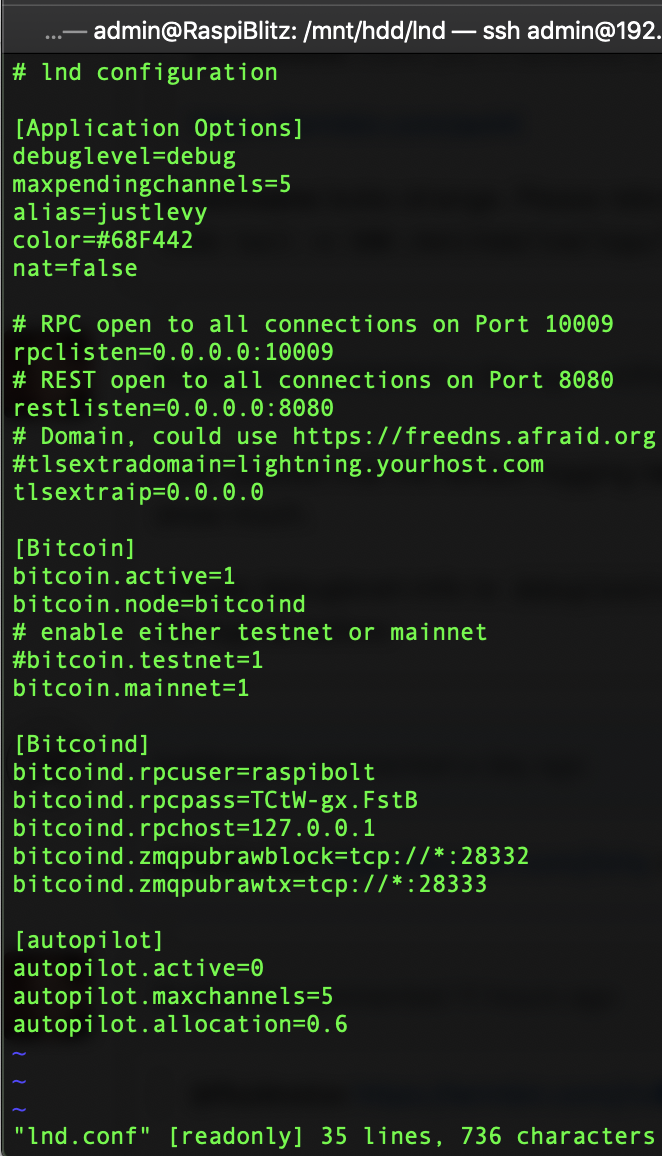
Looks like it's already set to debuglevel... I didn't change anything...
justinsane
on 26 Mar 2019
Same here on v1.1
[Application Options]
debuglevel=debug
maxpendingchannels=5
alias=raspies
color=#68F442
nat=false
ElSpiestolero
on 27 Mar 2019
https://github.com/rootzoll/raspiblitz/issues/407 Fixed the problem for me. Used the command: ./70initLND.sh
ElSpiestolero
on 27 Mar 2019
407 Fixed the problem for me. Used the command: ./70initLND.sh
@justinsane try this.
fluidvoice
on 28 Mar 2019
Thank you for your help @fluidvoice
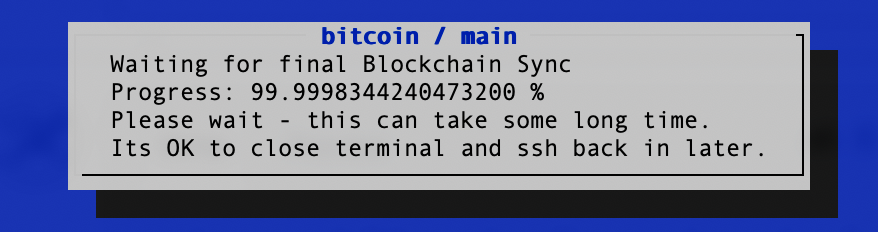
Update: I ran ./70initLND.sh and it seemed to work so far. I was prompted to create a LND wallet which I successfully did, rebooted, now I'm on this screen so I believe it's waiting time...
justinsane
on 28 Mar 2019
I have the same Problem.
login via SSH, ctrl-c to get to command prompt, then run these and post the resulting URLs:
/home/admin/XXdebugLogs.sh | nc termbin.com 9999
sudo tail -n 500 /mnt/hdd/lnd/logs/bitcoin/mainnet/lnd.log | nc termbin.com 9999
Was running the two commands, results:
Thanks for help
 Lace79
on 1 Apr 2019
Lace79
on 1 Apr 2019
Another similar report - just for the record to later fix that better:
https://github.com/rootzoll/raspiblitz/issues/492
rootzoll
on 6 Apr 2019
I have the same Problem.
login via SSH, ctrl-c to get to command prompt, then run these and post the resulting URLs:
/home/admin/XXdebugLogs.sh | nc termbin.com 9999
sudo tail -n 500 /mnt/hdd/lnd/logs/bitcoin/mainnet/lnd.log | nc termbin.com 9999Was running the two commands, results:
Thanks for help
did you try running ./70initLND.sh as mentioned above?
fluidvoice
on 9 Apr 2019
Same problem here.
- Running ./70initLND.sh didn't solve the issue
- After reboot, I have sucesssfully unlocked the wallet. Screen shows -> Progress: ?/572378
- After approx 60 seconds, terminal asks for "Input wallet password:" again....
debuglevel of lnd.cont is set to debug.
Here my files:
https://termbin.com/wq1x
https://termbin.com/1mj9
Any help much appreciated! Thx.
 gate40
on 19 Apr 2019
gate40
on 19 Apr 2019
Same problem here.
- Running ./70initLND.sh didn't solve the issue
- After reboot, I have sucesssfully unlocked the wallet. Screen shows -> Progress: ?/572378
- After approx 60 seconds, terminal asks for "Input wallet password:" again....
debuglevel of lnd.cont is set to
debug.Here my files:
https://termbin.com/wq1x
https://termbin.com/1mj9Any help much appreciated! Thx.
The debug level does not appear to be set to debug because only "[INF]" shows up in the logs and not also [DBG] and [ERR] such as here (https://termbin.com/yvqx):
2019-03-20 01:00:43.506 [INF] HSWC: Removing channel link with ChannelID(4676db8fb7e4eba3283bb94acde73b2ed262b34bc4441ebeefb7b9fd82775f73)
2019-03-20 01:00:43.506 [ERR] RPCS: unable to force close transaction: unable to find arbitrator
2019-03-20 01:00:43.507 [DBG] LNWL: ChannelPoint(cdfab81fda987060c0dc4ef909a50db68260db8016c8bf30a9407bc4e4aeadea:1), starting local commitment: (*lnwallet.commitment)(0x2132630)({
Please run this and post the output:
sudo cat /mnt/hdd/lnd/lnd.conf
That aside, repeats of the line below in your log show that LND is repeatedly shutting down and restarting. We need more detailed logs to see why.
[INF] LTND: Shutdown complete
fluidvoice
on 20 Apr 2019
Please run this and post the output:
sudo cat /mnt/hdd/lnd/lnd.conf
# lnd configuration

[Application Options]
debuglevel=debug
maxpendingchannels=5
alias=OzoneLGN
color=#68F442
nat=false

# RPC open to all connections on Port 10009
rpclisten=0.0.0.0:10009
# REST open to all connections on Port 8080
restlisten=0.0.0.0:8080
# Domain, could use https://freedns.afraid.org
#tlsextradomain=lightning.yourhost.com
tlsextraip=0.0.0.0

[Bitcoin]
bitcoin.active=1
bitcoin.node=bitcoind
# enable either testnet or mainnet
#bitcoin.testnet=1
bitcoin.mainnet=1

[Bitcoind]
bitcoind.rpcuser=raspibolt
bitcoind.rpcpass=passwordB
bitcoind.rpchost=127.0.0.1
bitcoind.zmqpubrawblock=tcp://*:28332
bitcoind.zmqpubrawtx=tcp://*:28333

[autopilot]
autopilot.active=0
autopilot.maxchannels=5
autopilot.allocation=0.6
Content of /mnt/hdd/lnd
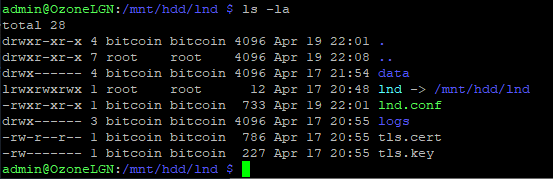
Restarted, CTRL+c and sudo tail -n 500 /mnt/hdd/lnd/logs/bitcoin/mainnet/lnd.log -> still [INF] messages only.... -> https://termbin.com/zdv8
Searched for lnd.conf and found another one in /home/admin/.lnd with debuglevel=info and a different alias.
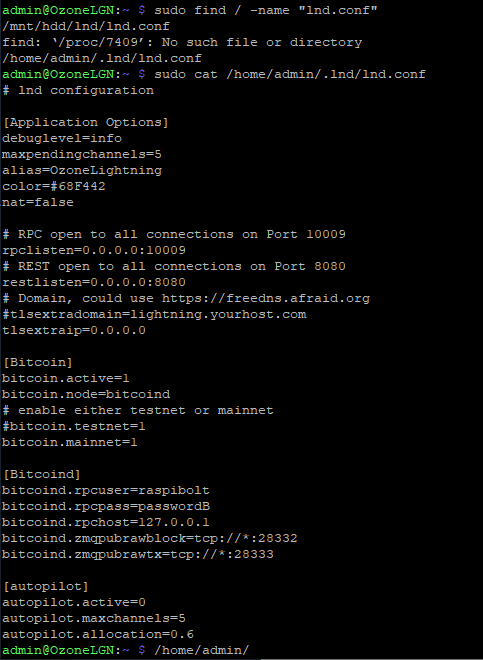
Changed debuglevel of /home/admin/.lnd/lnd.conf to debug, restarted, CTRL+c and sudo tail -n 500 /mnt/hdd/lnd/logs/bitcoin/mainnet/lnd.log -> still [INF] messages only....
gate40
on 20 Apr 2019
hum.
sudo cat /etc/systemd/system/lnd.service
sudo cat /mnt/hdd/raspiblitz.conf
maybe you can try changing the following line in lnd.service and restart (though I don't think this should be required. I'd expect this to be in another config file, not the sevice file):
ExecStart=/usr/local/bin/lnd --externalip=${publicIP} --debuglevel=debug
instead of rebooting you can:
sudo systemctl stop lnd.service
edit the lnd.service file, then
sudo systemctl start lnd.service
fluidvoice
on 21 Apr 2019
Set debuglevelin lnd.service and restarted -> still [INF] only in logs.
sudo cat /etc/systemd/system/lnd.service
# RaspiBlitz: systemd unit for lnd

[Unit]
Description=LND Lightning Daemon
Wants=bitcoind.service
After=bitcoind.service

# for use with sendmail alert
#OnFailure=systemd-sendmail@%n

[Service]
EnvironmentFile=/mnt/hdd/raspiblitz.conf
ExecStart=/usr/local/bin/lnd --externalip=${publicIP} --debuglevel=debug
PIDFile=/home/bitcoin/.lnd/lnd.pid
User=bitcoin
Group=bitcoin
LimitNOFILE=128000
Type=simple
KillMode=process
TimeoutSec=180
Restart=always
RestartSec=60
StandardOutput=null
StandardError=journal

[Install]
WantedBy=multi-user.target
sudo cat /mnt/hdd/raspiblitz.conf
# RASPIBLITZ CONFIG FILE
raspiBlitzVersion='1.1'
network=bitcoin
chain=main
hostname=OzoneLGN
publicIP=212.51.136.116
autoPilot=off
autoNatDiscovery=off
runBehindTor=off
rtlWebinterface=off
Any further ideas? Shall I repeat the whole LND config and wallet creation process? Thx for your support.
gate40
on 21 Apr 2019
Still stuck here. Unable to get the debug information written to the logs. Any ideas? Thx!
gate40
on 23 Apr 2019
lets see if your syslog shows anything:
sudo cat /var/log/syslog | nc termbin.com 9999
fluidvoice
on 25 Apr 2019
sudo cat /var/log/syslog | nc termbin.com 9999
https://termbin.com/j0u0
gate40
on 25 Apr 2019
If you look through that syslog you will find hundreds of entries of the following two lines. This indicates a power supply problem which can cause various problem and my guess is the source of your problems. I suggest you upgrade your PS. Even if you continue to have problems at least you will have removed one source of problems. Be aware that under-voltage errors can also cause data/file corruption so if you still have problems after upgrading your PS, try a fresh/complete re-install.
rpi_firmware_get_throttled
Under-voltage detected!
fluidvoice
on 25 Apr 2019
Also @gate40 please reply if upgrading your PS fixes the problem where LND continually prompts to unlock the wallet, because lots of people are seeing this symptom. I'm wondering if the low-voltage issue was causing LND to continually restart itself - even though that was not obviously pointed out in a log file (since we could not get LND logs).
fluidvoice
on 25 Apr 2019
Thanks @fluidvoice! I already ordered power supply (3A) two week ago, still waiting for delivery...
At the moment, I power the Raspi using a travel adapter with USB ports. According to specs, the adaptor should deliver 2.4A USB port output.
Meanwhile, I will unplug the LCD and try powering the Raspi from the PC's USB port. Don't know if the PC's USB port will deliver enough amps - I check the syslog...
gate40
on 25 Apr 2019
I already ordered power supply (3A) two week ago
which one? I hope one of the ones from the Amazon shopping lists.
try powering the Raspi from the PC's USB port
This won't work. PC USB ports do not deliver enough current.
Most travel adapters probably do not as well. Unfortunately, printed/claimed spec's don't mean very much. They are often wrong.
fluidvoice
on 25 Apr 2019
which one? I hope one of the ones from the Amazon shopping lists.
...not exactly - ordered this one:
https://www.aliexpress.com/item/Raspberry-Pi-3-Power-Supply-5V-3A-Switch-Button-Micro-USB-Interface-Power-Charger-Adapter-EU/32805797998.html
gate40
on 25 Apr 2019
which one? I hope one of the ones from the Amazon shopping lists.
...not exactly - ordered this one:
https://www.aliexpress.com/item/Raspberry-Pi-3-Power-Supply-5V-3A-Switch-Button-Micro-USB-Interface-Power-Charger-Adapter-EU/32805797998.html
That may or may not work. Some comments in the review claim it does not hold 5V at 3 Amps (always read the reviews)...
"I do not recommend using this unit if you have connected usb devices that need a lot of energy."
fluidvoice
on 25 Apr 2019
With unplugged LCD, changed micro usb cable and travel adapter there are no more undervoltage messages in syslog...
To get more infos about the restart of LND service i found this github issue https://github.com/Stadicus/RaspiBolt/issues/276#issuecomment-439678798
So, tried to start LND manually.
Output of session 2 (unlocking the wallet):
bitcoin@OzoneLGT:~ $ lncli unlock
Input wallet password:

lnd successfully unlocked!
Output of session 1 (lnd):
bitcoin@OzoneLGT:~ $ lnd
2019-04-26 10:24:10.591 [INF] LTND: Version: 0.5.2-beta commit=v0.5.2-beta, build=production, logging=default
2019-04-26 10:24:10.592 [INF] LTND: Active chain: Bitcoin (network=mainnet)
2019-04-26 10:24:10.699 [INF] CHDB: Checking for schema update: latest_version=7, db_version=7
2019-04-26 10:24:10.765 [INF] RPCS: password RPC server listening on [::]:10009
2019-04-26 10:24:10.766 [INF] RPCS: password gRPC proxy started at [::]:8080
2019-04-26 10:24:10.767 [INF] LTND: Waiting for wallet encryption password. Use `lncli create` to create a wallet, `lncli unlock` to unlock an existing wallet, or `lncli changepassword` to change the password of an existing wallet and unlock it.
2019-04-26 10:24:45.247 [INF] LNWL: Opened wallet
2019-04-26 10:24:46.245 [ERR] SRVR: invalid password
2019-04-26 10:24:46.247 [INF] LTND: Shutdown complete
invalid password
Hmmmm....seems that there is a problem with the wallet, even session 1 says "lnd successfully unlocked!"
Any further advice? Will flashing the microsd and starting over overwrite all existing config files (and wallet)?
gate40
on 26 Apr 2019
bitcoin@OzoneLGT:~ $ lnd
You can't start LND like that and I would not recommend you try to do things manually. You should start it up as normal and if you are not using the LCD then perhaps you can do things through the main menu by running the script: /home/admin/00mainMenu.sh
Other than that, I would recommend to use a power supply sufficient to run everything including LCD.
fluidvoice
on 26 Apr 2019
Other than that, I would recommend to use a power supply sufficient to run everything including LCD.
You're right, will do so.
Think I will redo setup process from scratch. Do I have to format the HD (and so copy the whole blockchain data again) or will flashing the microsd and restat the setup overwrite all ev. corrupted config files?
gate40
on 26 Apr 2019
Having the "?/#" LND Stuck progress as well. Is this issue going to be resolved with version 1.2?
 bitofdon
on 26 Apr 2019
bitofdon
on 26 Apr 2019
Having the "?/#" LND Stuck progress as well. Is this issue going to be resolved with version 1.2?
Probably not, because most of these are being caused by poor power supplies.
fluidvoice
on 27 Apr 2019
Probably not, because most of these are being caused by poor power supplies.
Which power supply should i be using? I was just using the one that came with the Raspberry Pi 3
bitofdon
on 27 Apr 2019
Probably not, because most of these are being caused by poor power supplies.
Which power supply should i be using? I was just using the one that came with the Raspberry Pi 3
So you bought a kit. Which power supply did it come with? The safest bet is to stick with what is listed in the shopping lists and those get updated as we learn which ones are better, insufficient, etc. At this point I'm recommending that everyone run the PowerTest with all your normal peripherals plugged in (LCD, HDD, etc.)
PowerTest script (all in one line):
wget https://raw.githubusercontent.com/openoms/raspiblitz/powertest/home.admin/XXpowertest.sh && sudo chmod +x XXpowertest.sh && ./XXpowertest.sh
fluidvoice
on 27 Apr 2019
At this point I'm recommending that everyone run the PowerTest with all your normal peripherals plugged in (LCD, HDD, etc.)
Thanks for this one. Ran the test but not shure how to read/interpretet the results. Are they good or bad?
***
RaspiBlitz powertest v0.1
Starting sysbench to run for 60 seconds (--max-time=60 --cpu-max-prime=10000)
***

sysbench 0.4.12:  multi-threaded system evaluation benchmark

Running the test with following options:
Number of threads: 4

Doing CPU performance benchmark

Threads started!
44.5'C  600/1200 MHz 1.2V
48.3'C  600/1200 MHz 1.2V
49.9'C  600/1200 MHz 1.2V
51.0'C  600/1200 MHz 1.2V
51.5'C  600/1200 MHz 1.2V
52.1'C  600/1200 MHz 1.2V
53.2'C  600/1200 MHz 1.2V
53.2'C  600/1200 MHz 1.2V
53.2'C  600/1200 MHz 1.2V
53.2'C  600/1200 MHz 1.2V
53.7'C  600/1200 MHz 1.2V
Time limit exceeded, exiting...
(last message repeated 3 times)
Done.

Maximum prime number checked in CPU test: 10000


Test execution summary:
    total time:                          60.0314s
    total number of events:              6376
    total time taken by event execution: 240.0375
    per-request statistics:
         min:                                 27.79ms
         avg:                                 37.65ms
         max:                                162.01ms
         approx.  95 percentile:              69.93ms

Threads fairness:
    events (avg/stddev):           1594.0000/45.37
    execution time (avg/stddev):   60.0094/0.01

52.6'C  600/1200 MHz 1.2V
50.5'C  600/1200 MHz 1.2V
49.4'C  600/1200 MHz 1.2V
49.4'C  600/1200 MHz 1.2V
Are they good or bad?
wow.... really bad. That PS is garbage.
What is the URL/link to where you bought that?
Are you using a Raspberry Pi 3B+ or just 3B (not plus)?
fluidvoice
on 27 Apr 2019
PowerTest Output comes from travel adapter - still waiting for delivery of 3A PS. I‘m using a Pi 3B.
I‘ll suspend further testing until the new PS arrives. Will report if issues are gone with new PS.
gate40
on 28 Apr 2019
PowerTest Output comes from travel adapter - still waiting for delivery of 3A PS. I‘m using a Pi 3B.
I‘ll suspend further testing until the new PS arrives. Will report if issues are gone with new PS.
I doubt it. That PS doesn't look very good quality either - but maybe you'll get lucky.
This one looks excellent. Note how it is over-volted at 5.25V that way when the voltage drops when amps/current is high it's still within spec: https://www.amazon.com/dp/B07MC7B9X3
fluidvoice
on 28 Apr 2019
New Power Supply arrived. Running Raspiblitz since two days, no more "Under-voltage" Messages in syslog. New PS does not solve the main issue, still stuck on filtering screen resp. repetitive asking for lnd unlock.
Here the output of ./XXpowertest.sh:
***
RaspiBlitz powertest v0.1
Starting sysbench to run for 60 seconds (--max-time=60 --cpu-max-prime=10000)
***

sysbench 0.4.12:  multi-threaded system evaluation benchmark

Running the test with following options:
Number of threads: 4

Doing CPU performance benchmark

Threads started!
47.8'C 1200 MHz  1.2688V
58.0'C 1200 MHz  1.2688V
62.8'C 1200 MHz  1.2688V
65.0'C 1200 MHz  1.2688V
67.1'C 1200 MHz  1.2688V
68.8'C 1200 MHz  1.2688V
69.8'C 1200 MHz  1.2688V
Done.

Maximum prime number checked in CPU test: 10000


Test execution summary:
    total time:                          36.6412s
    total number of events:              10000
    total time taken by event execution: 146.5010
    per-request statistics:
         min:                                 13.89ms
         avg:                                 14.65ms
         max:                                 69.95ms
         approx.  95 percentile:              17.31ms

Threads fairness:
    events (avg/stddev):           2500.0000/44.82
    execution time (avg/stddev):   36.6253/0.01

62.8'C  600/1200 MHz 1.2688V
58.0'C  600/1200 MHz 1.2688V
55.8'C  600/1200 MHz 1.2688V
54.8'C  600/1200 MHz 1.2688V
53.7'C  600/1200 MHz 1.2688V
53.2'C  600/ 600 MHz 1.2688V
52.1'C  600/ 600 MHz 1.2V
51.5'C 1200 MHz  1.2688V
@gate40 /home/admin/XXdebugLogs.sh ?
fluidvoice
on 8 May 2019
Probably not, because most of these are being caused by poor power supplies.
Which power supply should i be using? I was just using the one that came with the Raspberry Pi 3
So you bought a kit. Which power supply did it come with? The safest bet is to stick with what is listed in the shopping lists and those get updated as we learn which ones are better, insufficient, etc. At this point I'm recommending that everyone run the PowerTest with all your normal peripherals plugged in (LCD, HDD, etc.)
PowerTest script (all in one line):
wget https://raw.githubusercontent.com/openoms/raspiblitz/powertest/home.admin/XXpowertest.sh && sudo chmod +x XXpowertest.sh && ./XXpowertest.sh
Hey so the Power Supply i have is the 2.5A that comes with the CanaKit Raspberry Pi 3 on Amazon
bitofdon
on 8 May 2019
Hey all you guys need to open your own issues. It's too hard to keep track of what's going on with who.
fluidvoice
on 8 May 2019
Hey so the Power Supply i have is the 2.5A that comes with the CanaKit Raspberry Pi 3 on Amazon
Do you have a question? Did you run the PowerTest script? Open your own issue supplying details of your problem and debug logs (/home/admin/XXdebuglogs.sh)
fluidvoice
on 8 May 2019
@fluidvoice /home/admin/XXdebugLogs.sh -> https://termbin.com/s1pu
Bitcoin Node Status: https://bitnodes.earn.com/nodes/212.51.136.116-8333/
gate40
on 8 May 2019
@fluidvoice
/home/admin/XXdebugLogs.sh-> https://termbin.com/s1puBitcoin Node Status: https://bitnodes.earn.com/nodes/212.51.136.116-8333/
I would upgrade to v1.2 as it provides more debug information. It looks like you might have network errors but it's hard to tell. If v1.2 still is failing, open a new issue and post the output of the XXdebugLogs.sh script.
fluidvoice
on 8 May 2019
I would upgrade to v1.2
Will do so - thx!
gate40
on 8 May 2019
@fluidvoice Update to v1.2 did not solve the issue.
Meanwhile, I did a complete new install. Prepared the HD running XXcleanHDD.sh to preserve all Blockchain Data, flashed SD card and setup again. Everything is working fine now.
gate40
on 12 May 2019
@fluidvoice Update to v1.2 did not solve the issue.
Meanwhile, I did a complete new install. Prepared the HD running XXcleanHDD.sh to preserve all Blockchain Data, flashed SD card and setup again. Everything is working fine now.
SSH into your node, unlock your wallet, and create a SCB (static channel backup) like this:
lncli unlock
lncli exportchanbackup --all --output_file channel.backup
then copy this channel.backup file somewhere safe
fluidvoice
on 12 May 2019
Related issues
rootzoll
·
36Comments
 unic0der
·
54Comments
unic0der
·
54Comments
 marssystems
·
37Comments
marssystems
·
37Comments
 Aki113s
·
40Comments
rootzoll
·
79Comments
Aki113s
·
40Comments
rootzoll
·
79Comments
Most helpful comment
@fluidvoice Update to v1.2 did not solve the issue.
Meanwhile, I did a complete new install. Prepared the HD running XXcleanHDD.sh to preserve all Blockchain Data, flashed SD card and setup again. Everything is working fine now.