Raspiblitz: Add BTCPayServer as service option
See this great base work from @normandmickey
https://gist.github.com/normandmickey/6d6e74ebb6b3ddbd317bc1450f48f08e
Test and convert into a 'config.script' for RaspiBlitz.
 rootzoll
All 79 comments
Nice, will try it next week
 chacham18
on 8 Feb 2019
chacham18
on 8 Feb 2019
I followed the instructions and got it working. But for some reason can't integrate joule with it, don't see the LND services listed in crypto services in BTCPay / server settings / services so can't get the QR details to link it to joule. Be interested if you get the same issue @gabrieldov
 rektlesspinko
on 15 Feb 2019
rektlesspinko
on 15 Feb 2019
Is this still a thing? A install script with in the "services" menu whould be awesome!
 DaReaLDeviL
on 25 Feb 2019
DaReaLDeviL
on 25 Feb 2019
Yes, I haven't had any time to try to script it. But if you can follow the
instructions they should work.
On Mon, Feb 25, 2019, 3:24 AM DaReaLDeviL notifications@github.com wrote:
Is this still a thing? A install script with in the "services" menu whould
be awesome!—
You are receiving this because you were mentioned.
Reply to this email directly, view it on GitHub
https://github.com/rootzoll/raspiblitz/issues/214#issuecomment-466914634,
or mute the thread
https://github.com/notifications/unsubscribe-auth/ACV4DuEmJpjoBl1NuQON_NRyatTj6YM5ks5vQ53SgaJpZM4ZguUT
.
 normandmickey
on 25 Feb 2019
normandmickey
on 25 Feb 2019
@normandmickey let me know if you have a basic script ready .. I can then integrate it into the rest of RaspiBlitz.
rootzoll
on 26 Feb 2019
Updated Gist to install BTCPayServer on Raspiblitz V1.3 for RPI4B
https://gist.github.com/normandmickey/3f10fc077d15345fb469034e3697d0d0
Appears to work but would consider it a WIP. Would still like to "scriptify" so it could be added as a menu option. RPI4B improved performance over RPI3 makes this a viable option now.
normandmickey
on 9 Jul 2019
Made the script, but be aware that it is experimental, recommended only for test nodes first. Got it working once already, but SSL certificate asks are limited (5 in an hour - https://letsencrypt.org/docs/rate-limits/) so need to give it a break.
Nginx is very fussy, the setup tends to break previous Nginx configs (Like Electrs SSL), so added a warning if previous nginx.conf is found.
Script: https://raw.githubusercontent.com/openoms/bitcoin-tutorials/master/BTCPayServer/btcpay_to_blitz.sh
to download and run:
wget https://raw.githubusercontent.com/openoms/bitcoin-tutorials/master/BTCPayServer/btcpay_to_blitz.sh && bash btcpay_to_blitz.sh
There is a readme too for the manual process based on @normandmickey`s gist:
https://github.com/openoms/bitcoin-tutorials/blob/master/BTCPayServer/BTCPayServer_on_the_RaspiBlitz.md
By the way for debugging Nginx found:
sudo nginx -t
very useful. Runs a test and gets detailed info on which line is problematic.
 openoms
on 10 Sep 2019
openoms
on 10 Sep 2019
With the help of the script above now I am running BTCPayServer with my longstanding LN-node.
The same RPi4 runs Electrs with Nginx serving both.
Minimal manual debugging needed in nginx.conf only.
openoms
on 11 Sep 2019
That's awesome! Can't wait to try your script out. I started to write one
a while ago but gave up. Glad you picked up the ball and ran with it!
On Wed, Sep 11, 2019, 2:09 PM bluecell296 notifications@github.com wrote:
With the help of the script above now I am running BTCPayServer with my
longstanding LN-node.
The same RPi4 runs Electrs with Nginx serving both.
Minimal manual debugging needed in nginx.conf only.See BTCpay run on check.DIYnodes.com.
—
You are receiving this because you were mentioned.
Reply to this email directly, view it on GitHub
https://github.com/rootzoll/raspiblitz/issues/214?email_source=notifications&email_token=AASXQDWAZGDC7VSA7DQYGZDQJEX35A5CNFSM4GMC4UJ2YY3PNVWWK3TUL52HS4DFVREXG43VMVBW63LNMVXHJKTDN5WW2ZLOORPWSZGOD6PMKDY#issuecomment-530498831,
or mute the thread
https://github.com/notifications/unsubscribe-auth/AASXQDT3ISGZUXG2S5UQE4TQJEX35ANCNFSM4GMC4UJQ
.
normandmickey
on 11 Sep 2019
@openoms I ran your script and opened a browser to BTCPay and it had the pop up that has sync information and it said something about not being connected or offline or something (sorry I don't remember exactly!). So I decided to run your script again, but got same result.
I then manually checked /home/admin/.nbxplorer/Main/settings.config and noticed that the rpc user and password weren't set, so I set it and now it works.
It looks like your script is supposed to set that though right?
Also is it bad that I re-ran your script a second time on top of the first time?
 grnqrtr
on 12 Sep 2019
grnqrtr
on 12 Sep 2019
@grnqrtr Rerunning is ok.
It should get the RPCuser and password from the bitcoin.conf (worked well for me).
Do these commands show you the credentials?
sudo cat /mnt/hdd/bitcoin/bitcoin.conf | grep rpcuser | cut -c 9-
sudo cat /mnt/hdd/bitcoin/bitcoin.conf | grep rpcpassword | cut -c 13-
openoms
on 12 Sep 2019
Yeah, I just tested and both of those commands give me the expected user & pass. I don't understand why /home/admin/.nbxplorer/Main/settings.config didn't get set correctly. I'll have to test again with a fresh 1.3 SD card.
grnqrtr
on 12 Sep 2019
I tried again with fresh 1.3 SD card, but still didn't work. Here is a pastbin of most of my session. I see that there is a "Build FAILED" in there.
After running script once, I checked /home/admin/.nbxplorer/Main/settings.config and noticed that the rpc user and password weren't set again. I also realized that /home/admin/.btcpayserver/Main/settings.config didn't even exist so I re ran script, then still set some things manually in the file.
grnqrtr
on 13 Sep 2019
@grnqrtr thanks for testing and giving log (and good job hiding your RPC password - will modify the script to hide that in the output)
You seem to get errors while building the BTCPay component. Strange that it was running well on mine with a fresh 1.3 image. Are you running as the user admin from /home/admin/ ?
Could use the commands one-by-one manually or normandmickey-s original instructions to catch the fault.
Also it says
tee: /home/admin/.nbxplorer/Main/settings.config: No such file or directory
despite the nbxplorer build succeeded. That file should exist at that point with the default settings. Is your SDcard ok? Can you try with a different one?
openoms
on 13 Sep 2019
Yes, I'm running as admin from /home/admin . I think my SD cards are okay. I've been going back and forth between two different ones, but was having problems on both.
I ended up getting it running fine by using your manually instructions here: https://github.com/openoms/bitcoin-tutorials/blob/master/BTCPayServer/BTCPayServer_on_the_RaspiBlitz.md
Up and running now.
I'd be curious to hear if anyone else is having problems with the script or just me.
grnqrtr
on 14 Sep 2019
@grnqrtr
I'd be curious to hear if anyone else is having problems with the script or just me.
Caught the problem. NBXplorer needs some time to start and create the /home/admin/.nbxplorer/Main/settings.config . Added a check and sleep 10 while the file is not there, so should be sorted now.
Also tested running on top of previous installation. Worked so far.
openoms
on 18 Sep 2019
I ran on top of previous installation and seemed to work fine!
One small thing I noticed was at the beginning if there is an existing Nginx configuration it warns and says "Press CRTL+C to abort or any key to continue" but I have to hit ENTER to continue, any key doesn't progress the script.
Thanks for putting this script together @openoms!
grnqrtr
on 19 Sep 2019
Just one remark. The Lets Encrypt certificate will expire after 90 days. So a renew (cronjob) will be needed.
It's also possible to use webroot instead of standalone for the renewal. Then nginx only needs to be reloaded instead of stopped and started https://dipeshwagle.com.np/posts/add-https-using-nginx/
 frennkie
on 19 Sep 2019
frennkie
on 19 Sep 2019
Thanks for the feedback @frennkie and @grnqrtr , will modify and test again.
Do you guys think we should run BTTPayServer as it's own user (just like it has been setup for Electrs too)? .NET is hog of dependecies, might be good to just keep it in it`s own enclave without sudo access and password disabled.
openoms
on 19 Sep 2019
@frennkie the webroot method failed when using a ddns and standalone worked so sticked to it. The time difference is couple seconds between nginx start-stop and reload in every 2 months.
Used a systemd service and timer to renew with certbot because it is logged better and has been already tested well for other services.
Made the certificate generation less interactive with the help of the link provided.
The script is running quite reliably on the Rpi4 now. The .NET build of NBXplorer fails on the Odroid (same 32bit armv7las the RPi) for some reason.
openoms
on 21 Sep 2019
might be good to just keep it in it`s own enclave without sudo access and password disabled.
I honestly don't know, but it sounds cleaner and more secure to have it's own user.
grnqrtr
on 21 Sep 2019
Update: https://github.com/openoms/bitcoin-tutorials/blob/master/BTCPayServer/btcpay_to_blitz.sh
- BTCpayServer, NBXplorer and the .NET Core is now confined to the user
btcpay. - The BTCPay data and store settings are stored on the HDD
/mnt/hdd/.btcpayserverand recoverable on a reinstall / SDcard update. - Sets up the Tor Hidden Service too if Tor is active
openoms
on 22 Sep 2019
@openoms I haven't tested your script on my rpi3 yet (still trying to recover funds), but as far as i understand from reading this thread, you are basically deploying the BTCPay docker image. So, now the question is how is this different from the Hack0? Or rather what advantages does the Hack0 have over Raspiblitz now?
 jodobear
on 23 Sep 2019
jodobear
on 23 Sep 2019
The script doesn't use Docker, it manually installs BTCPayServer and its dependencies (Dot Net and Nbxplorer) and uses the existing Bitcoin and LND Nodes of the Blitz. A lot of Raspiblitz users have expressed a desire to add BTCPayServer instead of running a second node. This is one way to do that.
normandmickey
on 23 Sep 2019
So, then i'd argue that this is a better way to deploy BTCPay than the docker since the docker is used primarily to make VPS hosting simpler. Am i right? Also, is it also good to have docker since it encapsulates BTCPay in it's own container?
jodobear
on 23 Sep 2019
I am not qualified to say whether Docker is good or bad. There's a lot of moving parts to Lightning Nodes and Docker definitely
makes installing and updating BTCPayServer very simple.
The scripts to install Raspiblitz are a bit more transparent and run the same software without the Docker overhead. I would say that the Raspiblitz has been more techie (maker/hacker) focused and BTCPayServer has been more merchant focused. However here is a lot of overlap.
On Mon, Sep 23, 2019, 11:22 AM jodobear notifications@github.com wrote:
So, then i'd argue that this is a better way to deploy BTCPay than the
docker since the docker is used primarily to make VPS hosting simpler. Am i
right? Also, is it also good to have docker since it encapsulates BTCPay in
it's own container?—
You are receiving this because you were mentioned.
Reply to this email directly, view it on GitHub
https://github.com/rootzoll/raspiblitz/issues/214?email_source=notifications&email_token=AASXQDSGJPUYLIRPLP65AGDQLDNM3A5CNFSM4GMC4UJ2YY3PNVWWK3TUL52HS4DFVREXG43VMVBW63LNMVXHJKTDN5WW2ZLOORPWSZGOD7LHPPA#issuecomment-534149052,
or mute the thread
https://github.com/notifications/unsubscribe-auth/AASXQDTWZEBZJXO2DP3NTA3QLDNM3ANCNFSM4GMC4UJQ
.
normandmickey
on 23 Sep 2019
Positives of using this script with the RaspiBlitz:
- avoiding Docker altogether
- NBXplorer and BTCPayServer are built from source - a middleman is out
- connects to the existing bitcoind and lnd - no more synching/funding/no need for new channels
- the user has the seed and the backup of the LND node unlike in the BTCPay docker setup
- overall flexibilty - you can still use RaspiBlitz to anything else
- should be able to keep all the store data during an update
Negative:
- Server settings: Maintenance doesn`t work
- updates will require to run the script again (build from source)
- less (more complicated) support from the BTCPay team
- The script can break when updating either RaspiBlitz or BTCPayServer - will need continuous testing
openoms
on 23 Sep 2019
The hack0 is great to physically deploy BTCPayServer and decentralize further. As you correctly said @jodobear it uses the same dockerised process as the deployment to a VPS like LunaNode, but running on your own hardware.
I bought it myself for two reasons:
- wanted a RockPro64 anyway - the hardware is the same as what the BitBoxBase uses and it costed what I would pay anywhere
- It has the signature of Nicolas Dorier (priceless)
For the reasons detailed above I will probably run the RaspiBlitz on it see: https://github.com/rootzoll/raspiblitz/tree/master/alternative.platforms#armbian-buster. Can even make an SDcard/ eMMC image for that hardware if it works well. Will also test the BitBoxBase. As discussing the RockPro64/hack0 is off-topic here I opened a separate issue: https://github.com/openoms/raspiblitz/issues/58
openoms
on 23 Sep 2019
It has the signature of Nicolas Dorier (priceless)
I bought it for the exact same reason and want to start learning about this stuff better.
I like the flexibility i get when working with linux, i am free to build it as i want and not dependent on docker images as you precisely point out, though it makes sense from a plug n play pov.
I'm going to build BTCPay on my blitz and compare.
Apologies for hijacking the thread.
jodobear
on 24 Sep 2019
@openoms I assume you have seen and read this message
---------
The .NET Core tools collect usage data in order to help us improve your experience. The data
is anonymous and doesn't include command-line arguments. The data is collected by Microsoft
and shared with the community. You can opt-out of telemetry by setting the
DOTNET_CLI_TELEMETRY_OPTOUT environment variable to '1' or 'true' using your favorite shell.

Read more about .NET Core CLI Tools telemetry: https://aka.ms/dotnet-cli-telemetry
My strong strong recommendation would be to turn this into "opt-in" by adding this step in the script:
echo "DOTNET_CLI_TELEMETRY_OPTOUT=1" | sudo tee -a /etc/environment
Anybody wanting to send this data to Microsoft can remove it.
frennkie
on 26 Sep 2019
@frennkie thanks for pointing this out. Added the opt out line to the script.
openoms
on 27 Sep 2019
@openoms Maybe it makes sense to pin the script to specific - known to work - releases. E.g after https://github.com/openoms/bitcoin-tutorials/blob/master/BTCPayServer/btcpay_to_blitz.sh#L88 this sudo -u btcpay git checkout v2.0.0.58 could be done so that the result of running the script is somewhat deterministic (same versions).
I just now ran into this (with the implicit master)
$ sudo -u btcpay ./build.sh
Microsoft (R) Build Engine version 15.9.20+g88f5fadfbe for .NET Core
Copyright (C) Microsoft Corporation. All rights reserved.

/home/btcpay/dotnet/sdk/2.2.102/Sdks/Microsoft.NET.Sdk/targets/Microsoft.NET.TargetFrameworkInference.targets(137,5): error NETSDK1045: The current .NET SDK does not support targeting .NET Core 3.0.  Either target .NET Core 2.2 or lower, or use a version of the .NET SDK that supports .NET Core 3.0. [/home/btcpay/NBXplorer/NBXplorer/NBXplorer.csproj]

Build FAILED.

/home/btcpay/dotnet/sdk/2.2.102/Sdks/Microsoft.NET.Sdk/targets/Microsoft.NET.TargetFrameworkInference.targets(137,5): error NETSDK1045: The current .NET SDK does not support targeting .NET Core 3.0.  Either target .NET Core 2.2 or lower, or use a version of the .NET SDK that supports .NET Core 3.0. [/home/btcpay/NBXplorer/NBXplorer/NBXplorer.csproj]
    0 Warning(s)
    1 Error(s)
@frennkie Good point will do this for btcpayserver and NBxplorer too. Also. NET needs to be kept at the tested version. The BTCpay team is just starting to test building on .NET 3.0.
openoms
on 3 Oct 2019
Updated the script to checkout both NBxplorer and BTCpayserver to the last commit which was tested successfully. Will only update after testing so there should be no surprise errors again. https://github.com/openoms/bitcoin-tutorials/commit/ed0833f2735defb9176c8dadcb48054128402303
openoms
on 4 Oct 2019
My BTCPayServer was not responding just now. 502 Bad Gateway from nginx. I checked and the dotnet process was running on IPv4 127.0.0.1:23000.
Nginx ist configured to connect to localhost. But that could mean either 127.0.0.1 or ::1. And that was my issue... In the nginx logs I saw that it was trying to connect to [::1]:23000.
I think Btcpay should also listen to the IPv6 socket... But that might require some code changes... Therefore I have changed the nginx reverse proxy from. localhost to 127.0.0.1.
frennkie
on 6 Oct 2019
I just finally had the chance to run this updated script again after re-syncing up a fresh node. Everything seemed to install fine, though I seem to only be able to access BTCPay from the Tor hidden service address but not from the node's local IP and not from the DDNS address I setup.
Is that the way it should be? I have TOR service enabled on RaspiBlitz and also set up a TOR relay before using your script, could that be why? Previously I had TOR enabled on RaspiBlitz, but was able to access BTCPay from the local IP and DDNS. Though I don't remember what order I did things previously. Maybe I had installed BTCPay with your script and then enabled TOR on RaspiBlitz?
grnqrtr
on 11 Oct 2019
@grnqrtr it should work on LAN for sure and on the domain/dyndns too if you have the ports 80 and 443 forwarded.
Check if nginx is serving ok with:
sudo nginx -t
openoms
on 11 Oct 2019
It seems okay, sudo nginx -t returns:
nginx: the configuration file /etc/nginx/nginx.conf syntax is ok
nginx: configuration file /etc/nginx/nginx.conf test is successful
EDIT: Maybe it isn't serving ok after all. sudo systemctl status nginx shows that it failed.
● nginx.service - A high performance web server and a reverse proxy server
   Loaded: loaded (/lib/systemd/system/nginx.service; enabled; vendor preset: enabled)
   Active: failed (Result: exit-code) since Fri 2019-10-11 14:00:18 BST; 2h 32min ago
     Docs: man:nginx(8)
  Process: 638 ExecStartPre=/usr/sbin/nginx -t -q -g daemon on; master_process on; (code=exited, status=0/SUCCESS)
  Process: 682 ExecStart=/usr/sbin/nginx -g daemon on; master_process on; (code=exited, status=1/FAILURE)

Oct 11 14:00:14 GRNQRTR systemd[1]: Starting A high performance web server and a reverse proxy server...
Oct 11 14:00:15 GRNQRTR nginx[682]: nginx: [emerg] bind() to 0.0.0.0:443 failed (98: Address already in use)
Oct 11 14:00:16 GRNQRTR nginx[682]: nginx: [emerg] bind() to 0.0.0.0:443 failed (98: Address already in use)
Oct 11 14:00:16 GRNQRTR nginx[682]: nginx: [emerg] bind() to 0.0.0.0:443 failed (98: Address already in use)
Oct 11 14:00:17 GRNQRTR nginx[682]: nginx: [emerg] bind() to 0.0.0.0:443 failed (98: Address already in use)
Oct 11 14:00:17 GRNQRTR nginx[682]: nginx: [emerg] bind() to 0.0.0.0:443 failed (98: Address already in use)
Oct 11 14:00:18 GRNQRTR nginx[682]: nginx: [emerg] still could not bind()
Oct 11 14:00:18 GRNQRTR systemd[1]: nginx.service: Control process exited, code=exited, status=1/FAILURE
Oct 11 14:00:18 GRNQRTR systemd[1]: nginx.service: Failed with result 'exit-code'.
Oct 11 14:00:18 GRNQRTR systemd[1]: Failed to start A high performance web server and a reverse proxy server.
bind() to 0.0.0.0:443 failed (98: Address already in use) This makes me think it must be because of the TOR relay I setup using port 443. Sorry to bother you with something unrelated to your script!
EDIT: I made some edits to /etc/tor/torrc and everything is working fine now. No problems with your script!
grnqrtr
on 11 Oct 2019
FYI BTCPay Server with the current install script does make many regular outside calls which might not be a good fit with a privacy focused node.
Nicolas Dorier wrote that they are likely the price queries made often to avoid delays with invoice creation.
It is slightly different at every restart (reinstalled too). Took out the localhost connections and in the rest of the list there are connections to:
- Microsoft
- Digital Ocean
- Cloudflare
- amazonaws.com
- cloudfront.net
This is without connecting to a domain, only a self-signed self-signed certificate and Tor.
admin@RaspiBlitz:~ $ sudo -u btcpay lsof -i
COMMAND   PID   USER   FD   TYPE  DEVICE SIZE/OFF NODE NAME
dotnet  24686 btcpay  113u  IPv4 6793639      0t0  TCP 192.168.1.236:43617->52.169.64.244:https (ESTABLISHED)
dotnet  24686 btcpay  122u  IPv4 6794477      0t0  TCP 192.168.1.236:42627->52.169.64.244:https (ESTABLISHED)
dotnet  24718 btcpay  406u  IPv4 6797664      0t0  TCP 192.168.1.236:38121->159.203.144.149:https (ESTABLISHED)
dotnet  24718 btcpay  417u  IPv4 6797708      0t0  TCP 192.168.1.236:45663->104.16.214.191:https (ESTABLISHED)
dotnet  24718 btcpay  418u  IPv4 6797706      0t0  TCP 192.168.1.236:38735->159.203.144.149:https (ESTABLISHED)
dotnet  24718 btcpay  429u  IPv4 6797710      0t0  TCP 192.168.1.236:45559->ec2-99-79-108-36.ca-central-1.compute.amazonaws.com:https (ESTABLISHED)
dotnet  24718 btcpay  431u  IPv4 6797712      0t0  TCP 192.168.1.236:43719->server-13-224-77-74.man50.r.cloudfront.net:https (ESTABLISHED)
dotnet  24718 btcpay  433u  IPv4 6797714      0t0  TCP 192.168.1.236:40157->104.18.91.37:https (ESTABLISHED)
Just saw this on install test:
[Install]
WantedBy=multi-user.target

Created symlink /etc/systemd/system/multi-user.target.wants/btcpayserver.service → /etc/systemd/system/btcpayserver.service.
tee: /home/btcpay/.btcpayserver/Main/settings.config: No such file or directory
After test install - calling https://192.168.178.99 brings up no page (I choosed run behind TOR during install). @openoms whats the best debug path from here?
rootzoll
on 20 Dec 2019
@rootzoll It seems that BTCPayserver sis not install if you did not have the directory for the settings file created.
Is the /mnt/hdd/.btcpayserver dir there?
sudo systemctl status nbxplorer
sudo systemctl status btcpayserver

sudo nginx -t
show any errors?
A reinstall might also help.
openoms
on 20 Dec 2019
Also the self signed certificate leads to errors in all the browsers, not easily dealt with in some.
Try the Hidden Service address in Tor browser too that bypasses Nginx.
openoms
on 20 Dec 2019
@rootzoll managed to reproduce this:
$ sudo nginx -t
nginx: [emerg] open() "/etc/nginx/sites-enabled/btcpayserver" failed (2: No such file or directory) in /etc/nginx/nginx.conf:62
nginx: configuration file /etc/nginx/nginx.conf test failed
the problem is that the bonus.btcpayserver.sh cleanes out /etc/nginx/sites-enabled/btcpayserver after it has been created.
Will test the solution and make a PR soon.
openoms
on 23 Dec 2019
Added lines to store the btcpay data in the app-data dir on the disk to be able to preserve setings and acccounts: https://github.com/rootzoll/raspiblitz/pull/927/commits/ad150eee2eeb2489a8ff03122e754aafb5c6dd60
openoms
on 24 Dec 2019
I get the following error:
sudo journalctl -u btcpayserver.service
...
dotnet[22799]: The application to execute does not exist: '/home/btcpay/btcpayserver/BTCPayServer/bin/Release/netcoreapp2.1/BTCPayServer.dll
...
That is true, the folder "/home/btcpay/btcpayserver/BTCPayServer/bin" doesn't exist.
What can I do?`
 bjadel
on 1 Jan 2020
bjadel
on 1 Jan 2020
@bjadel best is to use the 1.4 RC1 image and install/reinstall from menu.
How did you install so far?
openoms
on 1 Jan 2020
@bjadel best is to use the 1.4 RC1 image and install/reinstall from menu.
How did you install so far?
I use the version 1.4 RC1 and install the server from service menu.
Here is the folder with missing 'bin' folder:
/home/btcpay/btcpayserver/BTCPayServer $ ls -lha
total 272K
drwxr-xr-x 26 btcpay btcpay 4.0K Jan 1 17:40 .
drwxr-xr-x 11 btcpay btcpay 4.0K Jan 1 17:40 ..
-rw-r--r-- 1 btcpay btcpay 359 Jan 1 17:40 BitpayHttpException.cs
-rw-r--r-- 1 btcpay btcpay 12K Jan 1 17:40 BTCPayServer.csproj
-rw-r--r-- 1 btcpay btcpay 3.5K Jan 1 17:40 BTCPayServer.ruleset
-rw-r--r-- 1 btcpay btcpay 6.6K Jan 1 17:40 bundleconfig.json
drwxr-xr-x 2 btcpay btcpay 4.0K Jan 1 17:40 Configuration
drwxr-xr-x 2 btcpay btcpay 4.0K Jan 1 17:40 Contracts
drwxr-xr-x 3 btcpay btcpay 4.0K Jan 1 17:40 Controllers
-rw-r--r-- 1 btcpay btcpay 225 Jan 1 17:40 CorsPolicies.cs
-rw-r--r-- 1 btcpay btcpay 5.3K Jan 1 17:40 Currencies.txt
-rw-r--r-- 1 btcpay btcpay 1.4K Jan 1 17:40 CurrencyValue.cs
drwxr-xr-x 2 btcpay btcpay 4.0K Jan 1 17:40 Data
-rw-r--r-- 1 btcpay btcpay 8.6K Jan 1 17:40 DerivationSchemeParser.cs
-rw-r--r-- 1 btcpay btcpay 9.7K Jan 1 17:40 DerivationSchemeSettings.cs
-rw-r--r-- 1 btcpay btcpay 5.2K Jan 1 17:40 EventAggregator.cs
drwxr-xr-x 2 btcpay btcpay 4.0K Jan 1 17:40 Events
-rw-r--r-- 1 btcpay btcpay 4.1K Jan 1 17:40 ExplorerClientProvider.cs
drwxr-xr-x 2 btcpay btcpay 4.0K Jan 1 17:40 Extensions
-rw-r--r-- 1 btcpay btcpay 17K Jan 1 17:40 Extensions.cs
drwxr-xr-x 2 btcpay btcpay 4.0K Jan 1 17:40 Filters
drwxr-xr-x 2 btcpay btcpay 4.0K Jan 1 17:40 HostedServices
drwxr-xr-x 2 btcpay btcpay 4.0K Jan 1 17:40 Hosting
-rw-r--r-- 1 btcpay btcpay 841 Jan 1 17:40 HwiWebSocketTransport.cs
-rw-r--r-- 1 btcpay btcpay 719 Jan 1 17:40 IDelay.cs
-rw-r--r-- 1 btcpay btcpay 272 Jan 1 17:40 IStartupTask.cs
drwxr-xr-x 2 btcpay btcpay 4.0K Jan 1 17:40 JsonConverters
drwxr-xr-x 2 btcpay btcpay 4.0K Jan 1 17:40 Logging
-rw-r--r-- 1 btcpay btcpay 9.5K Jan 1 17:40 MigrationStartupTask.cs
drwxr-xr-x 2 btcpay btcpay 4.0K Jan 1 17:40 ModelBinders
drwxr-xr-x 11 btcpay btcpay 4.0K Jan 1 17:40 Models
drwxr-xr-x 2 btcpay btcpay 4.0K Jan 1 17:40 PaymentRequest
drwxr-xr-x 6 btcpay btcpay 4.0K Jan 1 17:40 Payments
-rw-r--r-- 1 btcpay btcpay 3.3K Jan 1 17:40 Program.cs
drwxr-xr-x 2 btcpay btcpay 4.0K Jan 1 17:40 Properties
-rw-r--r-- 1 btcpay btcpay 220 Jan 1 17:40 Roles.cs
-rw-r--r-- 1 btcpay btcpay 2.3K Jan 1 17:40 SearchString.cs
drwxr-xr-x 4 btcpay btcpay 4.0K Jan 1 17:40 Security
drwxr-xr-x 11 btcpay btcpay 4.0K Jan 1 17:40 Services
drwxr-xr-x 2 btcpay btcpay 4.0K Jan 1 17:40 SSH
drwxr-xr-x 5 btcpay btcpay 4.0K Jan 1 17:40 Storage
-rw-r--r-- 1 btcpay btcpay 445 Jan 1 17:40 StorePolicies.cs
-rw-r--r-- 1 btcpay btcpay 699 Jan 1 17:40 TransactionComparer.cs
drwxr-xr-x 3 btcpay btcpay 4.0K Jan 1 17:40 U2F
drwxr-xr-x 2 btcpay btcpay 4.0K Jan 1 17:40 Validation
drwxr-xr-x 18 btcpay btcpay 4.0K Jan 1 17:40 Views
-rw-r--r-- 1 btcpay btcpay 2.3K Jan 1 17:40 WalletId.cs
-rw-r--r-- 1 btcpay btcpay 4.5K Jan 1 17:40 WebSocketHelper.cs
-rw-r--r-- 1 btcpay btcpay 309 Jan 1 17:40 WellKnownTempData.cs
drwxr-xr-x 20 btcpay btcpay 4.0K Jan 1 17:40 wwwroot
-rw-r--r-- 1 btcpay btcpay 219 Jan 1 17:40 ZoneLimits.cs
bjadel
on 1 Jan 2020
I have solved the problem. In my case the service menu script has not build the BTCPayServer.
bjadel
on 1 Jan 2020
I have solved the problem. In my case the service menu script has not build the BTCPayServer.
Did you just reinstall or used some other method?
openoms
on 2 Jan 2020
I have solved the problem. In my case the service menu script has not build the BTCPayServer.
Did you just reinstall or used some other method?
No, the reinstall didn't solved the problem. I switch to user btcpay and enter the folder '/home/btcpay/btcpayserver/'. In this folder I run the build script. After that the folder 'bin' was available.
bjadel
on 2 Jan 2020
No, the reinstall didn't solved the problem. I switch to user btcpay and enter the folder '/home/btcpay/btcpayserver/'. In this folder I run the build script. After that the folder 'bin' was available.
What you describe is the same what is happening in the script: https://github.com/rootzoll/raspiblitz/blob/v1.4/home.admin/config.scripts/bonus.btcpayserver.sh#L172
Not sure what caused your error.
Did you delete directories or did other things manually?
openoms
on 3 Jan 2020
I had the problem that I started the build script first as admin user. This caused errors. Then I wanted to start the script with the user btcpay. There was an error message that a lock is set. So I did the following:
sudo rm /tmp/NuGetScratch/lock/83712a22a258d25bd50ce3d8d718d0b49a03a0f9
Afterwards the build command could be executed successfully.
bjadel
on 3 Jan 2020
@bjadel ok, so as you can see in the script all installation is done with the btcpay user so runinng manually in admin should cause errors
Could your initial error have been because a download error? In that case the uninstall and reinstall should have helped since you have done the same manually.
Maybe when the install errorred out early the SERVICE menu did not show BTCpay as on so the ./config.scripts/bonus.btcpayserver.sh off was not run to clean.
Will try to reproduce this.
openoms
on 4 Jan 2020
@bjadel ok, so as you can see in the script all installation is done with the btcpay user so runinng manually in admin should cause errors
Could your initial error have been because a download error? In that case the uninstall and reinstall should have helped since you have done the same manually.
Now, it is not easy to reproduce that. I believe it was not a download error.
Maybe when the install errorred out early the SERVICE menu did not show BTCpay as on so the
./config.scripts/bonus.btcpayserver.sh offwas not run to clean.
Will try to reproduce this.
That would be possible.
Would it still be a good idea to clean the /tmp/NuGetScratch folder during the clean process? Maybe with the command:
dotnet nuget locals all --clear
or
dotnet nuget locals temp --clear
bjadel
on 5 Jan 2020
@openoms this is your call - let me know if there is anything to add to the BTCPayServer script before final v1.4 release
rootzoll
on 6 Jan 2020
Included dotnet nuget locals all --clear and made some other improvements in:
https://github.com/rootzoll/raspiblitz/pull/974/commits/6ce189b3f8ff4b8f0e75370ca8779d23789a2d76
BTCPay is now at the latest: v1.0.3.146
openoms
on 13 Jan 2020
@openoms I tested the BTCPayServer install on a fresh install again and it seems not to work yet. I ran behind TOR and in the end it told me to go to a onion.address - but there was nothing reachable.
Also there is no file called: ´/home/btcpay/.btcpayserver/Main/settings.config´ there is just a link /home/btcpay/.btcpayserver pointing to /mnt/hdd/app-data/.btcpayserver that is empty.
/etc/systemd/system/btcpayserver.service seems to restarting all of the time
Where should I start to debug? Maybe we should push this feature to 1.5 until its better tested?
rootzoll
on 20 Jan 2020
The problem must be with the links. Are you testing on a BTRFS disk?
For me it gave no errors on RC1 and RC2 on the EXT4 disks.
Will build again and find out.
openoms
on 20 Jan 2020
BTCPay is of course not essential, it should not hold back the 1.4 release.
It can always be offered as a manual setup later and I do prefer running it as a separate node.
openoms
on 20 Jan 2020
Made a large overhaul and a good couple of rounds of testing. Give BTCPay another chance to get in 1.4!
openoms
on 21 Jan 2020
I am testing on EXT4 hdd/ssd ... thx for the fix - will test again.
For the v1.4 we can keep the bonus-BTC script as experimental in there - but if we cannot fix install issues within this week I would like to uncomment BTC-PayServer from the service menu for that release and push it to v1.5.
rootzoll
on 21 Jan 2020
The BTCPay install script asks me to run behind TOR without having me TOR installed before, I choosed it anyway ... and after the script was finished there was no TOR running. I will add a "Please install TOR first" notice if that Option gets choosen.
rootzoll
on 21 Jan 2020
@rootzoll that is right the bonus.btcpaysetdomain.sh is not checking for Tor for the dialog. The Self-signed certificate should still work on clearnet, but it is pointless without Tor or domain/dyndns.
I think adding a "Please install Tor first" notice is better than to not offer the option at all in case Tor is not installed.
Would prefer to avoid triggering the Tor install from the btcpay setup script, it is huge already.
openoms
on 21 Jan 2020
OK the "Please install TOR first" notice is in.
@openoms with your latest PR its now working on my machine running behind TOR :D
rootzoll
on 21 Jan 2020
For v1.4 BTCPay will just be avaible when running behind TOR. We will see for the next release how we offer to run it more openly.
rootzoll
on 28 Jan 2020
Tested to recover BTCPay/TOR on update - but the process seems to need other parts of the system already running. So for now BTCPay as to be re-installed manually after a update/recovery. That is Ok for the v1.4 release. Tests worked fine. Closing issue.
rootzoll
on 28 Jan 2020
I tried activating BTCPayServer on 1.6rc2 and when it gets to Checking for nbxplorer config this just repeats over and over:
Waiting for nbxplorer to start - CTRL+C to abort
seems like starting nbxplorer service has failed - see: systemctl status nbxplorer
maybe report here: https://github.com/rootzoll/raspiblitz/issues/214
systemctl status nbxplorer returns:
● nbxplorer.service - NBXplorer daemon
   Loaded: loaded (/etc/systemd/system/nbxplorer.service; enabled; vendor preset: enabled)
   Active: failed (Result: exit-code) since Sun 2020-07-12 14:13:59 BST; 39s ago
  Process: 20406 ExecStart=/home/btcpay/dotnet/dotnet /home/btcpay/NBXplorer/NBXplorer/bin/Release/netcoreapp3.1/NBXplorer.dll -c /home/btcpay/.nbxplorer/Main/settings.config (code=exited, status=203/EXEC)
 Main PID: 20406 (code=exited, status=203/EXEC)
I tried rebooting and trying again, but same thing.
grnqrtr
on 12 Jul 2020
Looking further up I see these .NET downloads failing:
***
Installing .NET
***

Reading package lists... Done
Building dependency tree
Reading state information... Done
Note, selecting 'libssl1.0-dev' for regex 'libssl1.0'
Note, selecting 'libssl1.0.0' for regex 'libssl1.0'
Note, selecting 'libssl1.0.2' for regex 'libssl1.0'
gettext is already the newest version (0.19.8.1-9).
libssl1.0-dev is already the newest version (1.0.2q-2).
libssl1.0.2 is already the newest version (1.0.2q-2).
libunwind8 is already the newest version (1.2.1-9).
0 upgraded, 0 newly installed, 0 to remove and 0 not upgraded.
http://: Invalid host name.
sha512sum: /home/btcpay/dotnet-sdk-3.1.300-linux-.tar.gz: No such file or directory
http://: Invalid host name.
sha512sum: /home/btcpay/aspnetcore-runtime-3.1.4-linux-.tar.gz: No such file or directory
mkdir: cannot create directory ‘/home/btcpay/dotnet’: File exists
tar: dotnet-sdk-3.1.300-linux-.tar.gz: Cannot open: No such file or directory
tar: Error is not recoverable: exiting now
tar: aspnetcore-runtime-3.1.4-linux-.tar.gz: Cannot open: No such file or directory
tar: Error is not recoverable: exiting now
DOTNET_CLI_TELEMETRY_OPTOUT=1
ln: failed to create symbolic link '/usr/share/dotnet': File exists
sudo: /home/btcpay/dotnet/dotnet: command not found
Seems like the ${binaryVersion} string isn't being pulled into the links?
grnqrtr
on 12 Jul 2020
@grnqrtr it is fixed here:https://github.com/rootzoll/raspiblitz/pull/1331
edit _bootstrap.sh and restart
openoms
on 12 Jul 2020
clean install of 1.6.1. while adding BTCpay i get this:
_seems like starting nbxplorer service has failed - see: systemctl status nbxplorer
maybe report here: https://github.com/rootzoll/raspiblitz/issues/214
Waiting for nbxplorer to start - CTRL+C to abort_
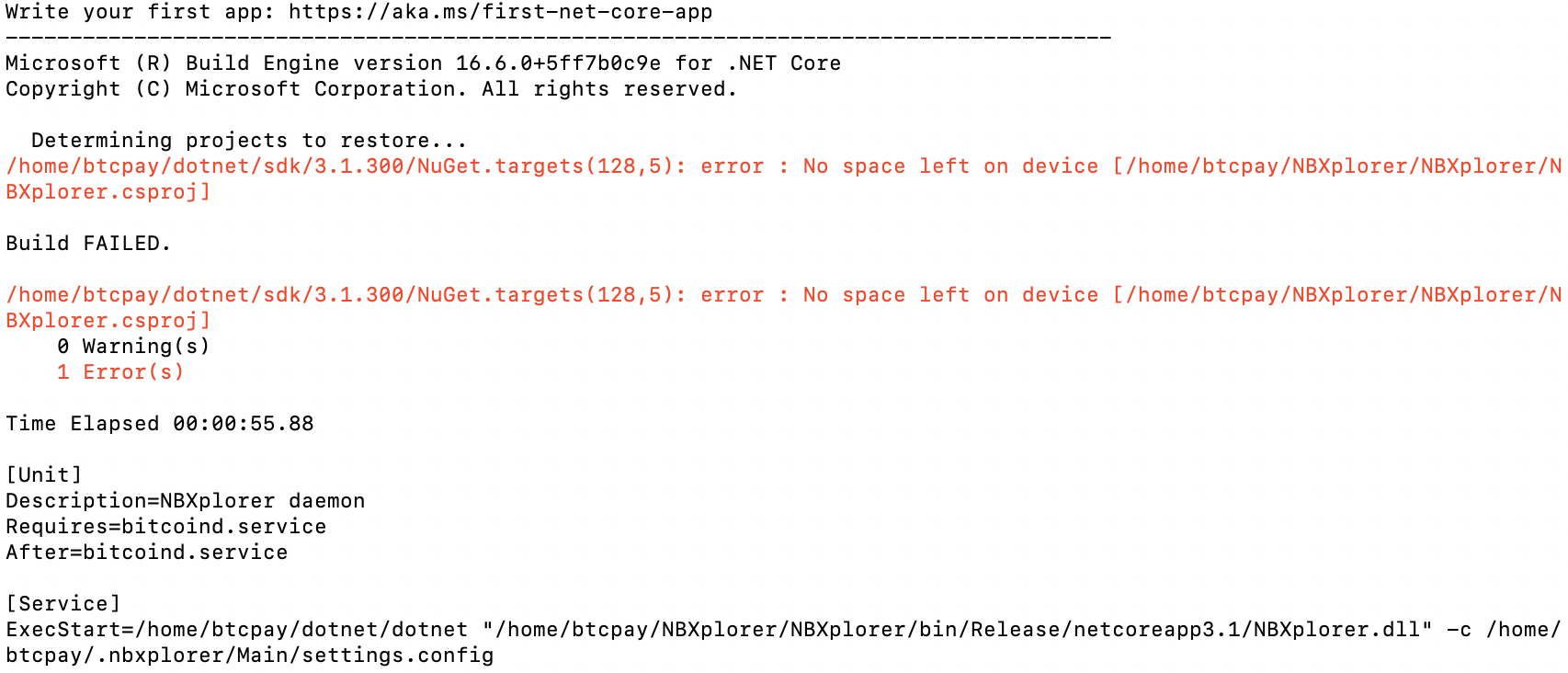
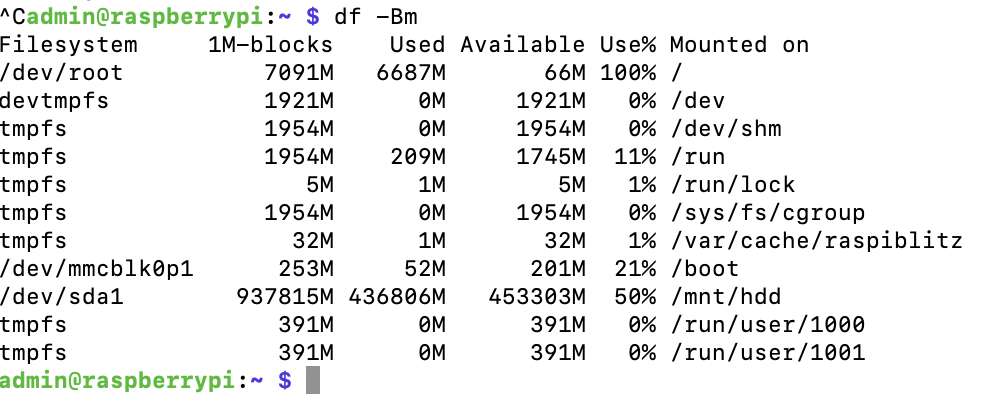
i have a 32GB SD card, but it show this:
 fellowworldcitizen
on 8 Nov 2020
fellowworldcitizen
on 8 Nov 2020
clearly this is beacuse your SDcard filesystem failed to expand on the first start.
This should have been fixed, not sure why it happens to you. Might be a dodgy SDcard.
you can try expanding the partition with:
sudo raspi-config --expand-rootfs
then reinstall BTCPay.
openoms
on 8 Nov 2020
That worked! SDcard is expanded now. I don't think it is dodgy, it is a high quality one. maybe worth checking the first start script once more. Thanks!
fellowworldcitizen
on 8 Nov 2020
@fellowworldcitizen can you check your cat /home/admin/raspiblitz.recover.log file if it contains CHECK IF SD CARD NEEDS EXPANSION and what is mentioned after that?
rootzoll
on 11 Nov 2020
@fellowworldcitizen what is the result of this command: cat raspiblitz.recover.log | grep "CHECK IF SD CARD NEEDS EXPANSION" -A 10?
rootzoll
on 11 Nov 2020
@rootzoll, that file does not exist in /home/admin/. I get "cat: raspiblitz.recover.log: No such file or directory".
there is however a raspiblitz.log but it returns nothing on that.
fellowworldcitizen
on 11 Nov 2020
Ah sorry you did a fresh install not a recovery, correct?
rootzoll
on 12 Nov 2020
@rootzoll, i did indeed a fresh install, then a lnd channelbackup + seed restore, but that is probably irrelevant.
fellowworldcitizen
on 12 Nov 2020
@fellowworldcitizen Yeah found a bug in v1.6.1 so that a fresh install was not expanding the sd card (an update did). I got it fixed ow for upcoming v1.6.2 - thx for the report.
rootzoll
on 18 Nov 2020
Related issues
openoms
·
4Comments
 cedricwalter
·
5Comments
cedricwalter
·
5Comments
 syracusebitcoin
·
3Comments
syracusebitcoin
·
3Comments
 tiero
·
4Comments
tiero
·
4Comments
 Kixunil
·
3Comments
Kixunil
·
3Comments
Most helpful comment
Updated Gist to install BTCPayServer on Raspiblitz V1.3 for RPI4B
https://gist.github.com/normandmickey/3f10fc077d15345fb469034e3697d0d0
Appears to work but would consider it a WIP. Would still like to "scriptify" so it could be added as a menu option. RPI4B improved performance over RPI3 makes this a viable option now.