Raspiblitz: Raspiblitz randomly hangs on boot
I am having issues getting the latest Raspiblitz image to boot completely.
It most often hangs at "started update UTMP about system boot/shutdown" but sometimes hangs before or after this.
I am running a 3.5A power supply to the Pi and a 2A power supply to the screen and have tried the other way around as well.
I have re-downloaded the image several times, tried burning it via Windows and OSX, tried 3 different SD cards that are confirmed working with other Linux images on the same Pi/screen setup. No lightning bolts and nothing funny going on.
The HDD is the same as the one from the guide and I have it and networking connected while booting, but have tried booting without them as well... Tried just about everything short of a manual build.
Can't for the life of me figure out what is preventing a boot at this point...

 becausetheypayme
All 58 comments
Maybe ist something with the last sd card image - I think I heard a similar report, but was not able to get a clue why this is happening. Hopefully very soon I will be able to release a new SD card build - I would recommend trying that one and see if it works better for you.
 rootzoll
on 11 Dec 2018
rootzoll
on 11 Dec 2018
Maybe ist something with the last sd card image - I think I heard a similar report, but was not able to get a clue why this is happening. Hopefully very soon I will be able to release a new SD card build - I would recommend trying that one and see if it works better for you.
Thanks, Christian, will do and report back on success/fail.
becausetheypayme
on 11 Dec 2018
Maybe ist something with the last sd card image - I think I heard a similar report, but was not able to get a clue why this is happening. Hopefully very soon I will be able to release a new SD card build - I would recommend trying that one and see if it works better for you.
Christian, just as a small update, I just tried the "Build your own image" process. I built the raspbian stretch desktop and then ran the raspbianStretchDesktop.sh without issue. On the first reboot, it began to hang just like on the pre-built raspiblitz-2018-10-20.img
I am not sure if that is helpful but there it is. :-)
becausetheypayme
on 20 Dec 2018
yes, I have exactly the same problem. Tried on three different Raspberries, with different cards and PS. Nothing solves the issue I'm clueless...
 kastmada
on 23 Dec 2018
kastmada
on 23 Dec 2018
yes, I have exactly the same problem. Tried on three different Raspberries, with different cards and PS. Nothing solves the issue I'm clueless...
Have a look at the question and answers here: https://raspberrypi.stackexchange.com/questions/45746/raspbian-fails-to-boot-after-fresh-install
 fluidvoice
on 23 Dec 2018
fluidvoice
on 23 Dec 2018
Also try a different power adapter and a different monitor via HDMI to see if it gets further along in the boot sequence. You might need to learn how to boot up in "safe" mode to get a look at what was happening in the journalctl when it failed. https://raspberrypi.stackexchange.com/questions/61638/how-do-i-start-up-in-safemode
fluidvoice
on 23 Dec 2018
Here's what my journalctl output ends with which includes your last two UTMP lines. Given the next line is Started Raise network interfaces I would investigate that. ie, swap whatever you are using (wifi or ethernet) or disable it completely, temporarily in the SD card config files. Unplug all network cables and USB devices if any.
Dec 21 13:17:01 thundahub systemd[1]: Configuration file /etc/systemd/system/lnd.service is marked execu
Dec 21 13:17:01 thundahub systemd[1]: Configuration file /etc/systemd/system/bitcoind.service is marked
Dec 21 13:17:01 thundahub systemd[1]: Listening on /dev/initctl Compatibility Named Pipe.
Dec 21 13:17:01 thundahub systemd[1]: Listening on udev Kernel Socket.
Dec 21 13:17:01 thundahub systemd[1]: Started Forward Password Requests to Wall Directory Watch.
Dec 21 13:17:01 thundahub kernel: usb 1-1.1.1: new high-speed USB device number 5 using dwc_otg
Dec 21 13:17:01 thundahub systemd[1]: Listening on fsck to fsckd communication Socket.
Dec 21 13:17:01 thundahub systemd[1]: Listening on Journal Socket.
Dec 21 13:17:01 thundahub kernel: usb 1-1.1.1: New USB device found, idVendor=0424, idProduct=7800
Dec 21 13:17:01 thundahub kernel: usb 1-1.1.1: New USB device strings: Mfr=0, Product=0, SerialNumber=0
Dec 21 13:17:01 thundahub kernel: libphy: lan78xx-mdiobus: probed
Dec 21 13:17:01 thundahub kernel: i2c /dev entries driver
Dec 21 13:17:01 thundahub kernel: scsi 0:0:0:0: Direct-Access JMicron Generic 0204 PQ: 0 A
Dec 21 13:17:01 thundahub systemd-journald[121]: Journal started
Dec 21 13:17:01 thundahub systemd-journald[121]: Runtime journal (/run/log/journal/64b3620cd2d943e3840bf
...skipping...
Dec 21 13:17:09 thundahub systemd[1]: Starting Update UTMP about System Boot/Shutdown...
Dec 21 13:17:09 thundahub systemd[1]: Starting Network Time Synchronization...
Dec 21 13:17:09 thundahub systemd[1]: Started Update UTMP about System Boot/Shutdown.
Dec 21 13:17:09 thundahub systemd[1]: Started Raise network interfaces.
Dec 21 13:17:10 thundahub systemd-timesyncd[344]: System clock time unset or jumped backwards, restoring
Dec 21 13:45:03 thundahub systemd[1]: Time has been changed
Dec 21 13:45:03 thundahub systemd[1]: Started Network Time Synchronization.
Dec 21 13:45:03 thundahub systemd[1]: Reached target System Initialization.
Dec 21 13:45:03 thundahub systemd[1]: Listening on triggerhappy.socket.
Dec 21 13:45:03 thundahub systemd[1]: Listening on Avahi mDNS/DNS-SD Stack Activation Socket.
Dec 21 13:45:03 thundahub systemd[1]: Listening on D-Bus System Message Bus Socket.
Dec 21 13:45:03 thundahub systemd[1]: Reached target Sockets.
Dec 21 13:45:03 thundahub systemd[1]: Reached target Basic System.
Dec 21 13:45:03 thundahub systemd[1]: Starting Configure Bluetooth Modems connected by UART...
Dec 21 13:45:03 thundahub systemd[1]: Starting Save/Restore Sound Card State...
Dec 21 13:45:03 thundahub systemd[1]: Starting Avahi mDNS/DNS-SD Stack...
Dec 21 13:45:03 thundahub systemd[1]: Started Regular background program processing daemon.
Dec 21 13:45:03 thundahub systemd[1]: Starting Check for v3d driver...
Dec 21 13:45:03 thundahub systemd[1]: Starting LSB: Autogenerate and use a swap file...
Dec 21 13:45:03 thundahub systemd[1]: Started Daily Cleanup of Temporary Directories.
Dec 21 13:45:03 thundahub cron[387]: (CRON) INFO (pidfile fd = 3)
Dec 21 13:45:03 thundahub systemd[1]: Starting Login Service...
Dec 21 13:45:03 thundahub systemd[1]: Started D-Bus System Message Bus.
Dec 21 13:45:03 thundahub cron[387]: (CRON) INFO (Running @reboot jobs)
Dec 21 13:45:03 thundahub kernel: uart-pl011 3f201000.serial: no DMA platform data
Dec 21 13:45:03 thundahub avahi-daemon[386]: Found user 'avahi' (UID 108) and group 'avahi' (GID 112).
Dec 21 13:45:03 thundahub avahi-daemon[386]: Successfully dropped root privileges.
Dec 21 13:45:03 thundahub avahi-daemon[386]: avahi-daemon 0.6.32 starting up.
Dec 21 13:45:03 thundahub avahi-daemon[386]: Successfully called chroot().
fluidvoice
on 23 Dec 2018
Yah tried all of that with the same result, unfortunately.
Tried 3.5amp power on a y cable as well as 3.5A to the pi and a 2.5A to the 7”lcd.
Bit of a mystery.
From: Brad notifications@github.com
Sent: Sunday, December 23, 2018 11:34 AM
To: rootzoll/raspiblitz
Cc: Toby Horton; Author
Subject: Re: [rootzoll/raspiblitz] Raspiblitz randomly hangs on boot (#195)
Also try a different power adapter and a different monitor via HDMI to see if it gets further along in the boot sequence.
—
You are receiving this because you authored the thread.
Reply to this email directly, view it on GitHubhttps://github.com/rootzoll/raspiblitz/issues/195#issuecomment-449655632, or mute the threadhttps://github.com/notifications/unsubscribe-auth/AMUT70Q4HXWLhr8CsmZX9DLxP-7L_o7tks5u78y-gaJpZM4ZNlRr.
becausetheypayme
on 24 Dec 2018
I'm still guessing this could be a network related problem since that is the next thing that loads in the boot sequence. You need to get at your journalctl output.
fluidvoice
on 24 Dec 2018
I am having this same problem commenting for update
 slavefootjesus
on 2 Jan 2019
slavefootjesus
on 2 Jan 2019
I am having this same problem commenting for update
you have no prayer in anyone being able to help you if you don't provide any logs of any kind or error messages you are seeing.
fluidvoice
on 3 Jan 2019
I'm still guessing this could be a network related problem since that is the next thing that loads in the boot sequence. You need to get at your journalctl output.
How would you do this with no availability to boot?
Also, considering it hangs at various points, some past the network, I don’t think it is network related.
becausetheypayme
on 3 Jan 2019
What do you mean by "commenting for update"? Also, you have no prayer in anyone being able to help you if you don't provide any logs of any kind or error messages you are seeing.
If his problem was same as mine, there are no errors to share. At least none that don’t involve mounting the SDcard somewhere else and extracting that way, assuming there are any errors logged.
becausetheypayme
on 3 Jan 2019
As I said before "You need to get at your journalctl output." to see what is going wrong.
There are ways to do it, but I don't know all the steps. You'll have to research it.
from above...
You might need to learn how to boot up in "safe" mode to get a look at what was happening in the journalctl when it failed. https://raspberrypi.stackexchange.com/questions/61638/how-do-i-start-up-in-safemode
fluidvoice
on 3 Jan 2019
As I said before "You need to get at your journalctl output." to see what is going wrong.
There are ways to do it, but I don't know all the steps. You'll have to research it.
Meh... ended up going with RaspiBolt and had 0 issues on same hardware. Really only submitted to try and help this project.
becausetheypayme
on 3 Jan 2019
went with raspibolt 0 issues. prior had 0 errors to report just hung randomly when booting
slavefootjesus
on 3 Jan 2019
Odd. That implies the problem is in the difference between how Dietpi (in Raspibolt) and Raspbian (in Raspiblitz) is booting up. What's odd is the problem doesn't happen with most people but so far 3 of you guys and one guy tried with various different Pi boards.
fluidvoice
on 3 Jan 2019
Odd. That implies the problem is in the difference between how Dietpi (in Raspibolt) and Raspbian (in Raspiblitz) is booting up. What's odd is the problem doesn't happen with most people but so far 3 of you guys and one guy tried with various different Pi boards.
Yah... Very odd. I tried with two different 3b+ boards from different production runs, 3 different SD cards of various speed/size specs, tried booting with and without the HDD/NIC connected, mad no difference. And I have 6a of total power connected with 2.5a to the 7" screen, 3.5a to the Pi, and the screen and Pi cross connected via the jumper bridge.
The base Raspbian image booted up fine consistently. It wasn't until the first boot after running the .sh to setup Raspiblitz that the hangs started. I tried both the Raspiblitz image and the base Raspbian image and then running the .sh. Hung the same on both counts. I was able to get pretty far in the boot process at times. There were a couple of places it tended to hang consistently but randomly hung at a ~dozen other steps over the course of testing.
I am not enough of a linux SA to theorize on what was causing the hang. I do know that it was connecting to my router and pulling an IP even when it would hang. So I really don't think that network was the issue but I also don't have a better answer, unfortunately.
becausetheypayme
on 3 Jan 2019
Well kernel booting is one of the hardest things to debug when things go wrong. It's a problem best investigated on the Raspbian or Dietpi forums where guys are very knowledgeable about this subject.
I've done similar with notebooks and Linux distro's like LinuxMint, Ubuntu, and Manjaro.
fluidvoice
on 4 Jan 2019
RaspiBolt is using also Raspian - the Lite version - RaspiBlitz uses the full Desktop version. That could be one difference to look into.
Another difference is that the RaspiBlitz has the LCD and there are getting some driver installed for it ... those drivers maybe the source of error on booting up. But its all running fine on my test machines, so I cannot test this.
@becausetheypayme if you want to give it one more try and test if its LCD related I can prepare a new RaspiBlitz build script that would keep LCD turned off by parameter - let me know.
rootzoll
on 9 Jan 2019
@rootzoll Unfortunately I already have my node live. I would have to tear it down and start over. If I go to build another, I will hit you up and we can try it.
Thanks!
becausetheypayme
on 9 Jan 2019
So I will close this issue for now - but if someone has the same problem and wants to try an install without LCD to see if thats the problem, please let me know and I will open up issue again.
rootzoll
on 9 Jan 2019
Just downloaded the latest RaspiBlitz 1.0 for my Pi 3 B+ with Pi 7" touchscreen and face exactly the same problems. Tried different SD cards, disconnected all peripherals, except the screen, and rebooted device many times. The boot process always hangs, mostly at "started update UTMP about system boot/shutdown" but sometimes hangs before or after this.
Using the same Pi and SD cards for different Rasbian version and I experience zero problems ...
 felivix
on 22 Feb 2019
felivix
on 22 Feb 2019
Just downloaded the latest RaspiBlitz 1.0 for my Pi 3 B+ with Pi 7" touchscreen and face exactly the same problems. Tried different SD cards, disconnected all peripherals, except the screen, and rebooted device many times. The boot process always hangs, mostly at "started update UTMP about system boot/shutdown" but sometimes hangs before or after this.
Using the same Pi and SD cards for different Rasbian version and I experience zero problems ...
Just want to say I have gone through the exact same thing as felivix with the same setup and description of what they did. For me it seems to hang at always a similar point in the code ~12 seconds after powering up.
Examples of places it gets hung on:
"Started D-Bus System Message Bus."
"Starting Login Services..."
"Started Disable WiFi if country not set"
 DariusParvin
on 24 Feb 2019
DariusParvin
on 24 Feb 2019
This seems like a common problem with debian ... this post is mentioning some solutions:
https://unix.stackexchange.com/questions/252603/debian-jessie-boot-hangs-at-started-update-utmp-about-system-runlevel-changes
Please report if you think you got it fixed on your machines ... would love to add some precautions for this to the next release.
rootzoll
on 26 Feb 2019
Hi rootzoll
I'm trying to follow the tips from the link you posted.
Opening a second terminal window I'm asked to login into RaspiBlitz. What are the login name and password?
felivix
on 26 Feb 2019
username: admin
password: [The PasswordA you set on RaspiBlitz Setup]
rootzoll
on 27 Feb 2019
After putting raspiblitz-v1.0-2019-02-18.img.gz on the SD card and inserting it into the Pi there was never a RaspiBlitz setup that required me to set a password ....
felivix
on 27 Feb 2019
@felivix how do you ssh into your RaspiBlitz then and control it?
rootzoll
on 27 Feb 2019
I'm not ssh into RaspiBlitz,, I have a keyboard connected to the Pi and use Alt-F2 to open a second console.
felivix
on 27 Feb 2019
@felivix ahhh ok now I can see ... but to be honest I never used it that way. So I can just guess. If you never set a password try: admin/raspiblitz
rootzoll
on 27 Feb 2019
@rootzoll admin/raspiblitz is not working ....
felivix
on 27 Feb 2019
Last guess would be: pi/raspiblitz
rootzoll
on 27 Feb 2019
It worked!
And without doing anything else I'm now in this console on the blue screen with the information: Login to your RaspiBlitz with: ssh admin@192..... Use password: raspiblitz
I will now continue with the instructions given on GitHub ....
felivix
on 27 Feb 2019
It worked for me too! I plugged in a USB keyboard, hit Alt F2, entered pi/raspiblitz for the username/password, then ssh into the Pi and now i'm on the blue screen ready to follow the next steps. Thanks a lot rootzoll and felivix
DariusParvin
on 28 Feb 2019
@DariusParvin , great to hear that it worked for you.
My node is now up and running. All went well and was rather easy. RTL is a great user interface (use password B to log in).
@rootzoll , I think the main issue is that RaspiBlitz stops writing to the screen (rather randomly at different places) during installation and also later while restarting the node. Although the process continues, i.e. it's not hung, but the screen stops displaying the further progress. Using Alt-F2 on the Pi or ssh-ing into the Pi and one sees that all works well.
felivix
on 28 Feb 2019
@felivix interesting find .. not sure how to mittigate that in future releases, yet. Maybe adding some graphic switching like @raumi75 is doing (for QR codes) can kick the screen back to work .. maybe adding a short boot logo can do the trick - maybe worth a shot. Open for other ideas.
rootzoll
on 6 Mar 2019
@becausetheypayme v1.1 (to be released end of week) will try to address this problem, but I would need feedback from you if this changed anything - because I was not able to reproduce the LCD hanging on my test machines.
So once v1.1 image is out, please make a new fresh sd card from that. The first thing now RaspiBlit zis doing on the boostrap (once it gets started from linux systemd) is to display the raspiBlitz logo for 5 seconds. That is switching the LCD into graphics/framebuffer mode and back and if we are lucky this makes the LCD unfreeze again. Its a lucky shot, but worse testing.
rootzoll
on 14 Mar 2019
@becausetheypayme @felivix so my solution/shot at this problem for v1.1 above. I will close this issue as part of the v1.1 release - but feels free to ask to open it up again to report if this is not fixing this.
rootzoll
on 17 Mar 2019
@becausetheypayme @kastmada @DariusParvin @slavefootjesus
The release 1.1 is out: https://twitter.com/rootzoll/status/1107825248249004034
I would be interested if the switch on boot to graphics mode might restart the hung display driver. Let me know. Thx.
rootzoll
on 19 Mar 2019
Awesome. I'm ordering a new micro SD card to test it out on. I should be able to test it on the weekend. I don't want to risk re-doing everything now that I got it all working :)
DariusParvin
on 19 Mar 2019
Awesome. I'm ordering a new micro SD card to test it out on. I should be able to test it on the weekend. I don't want to risk re-doing everything now that I got it all working :)
If it's happening, it might help if we can look at your /var/log/syslog file.
fluidvoice
on 19 Mar 2019
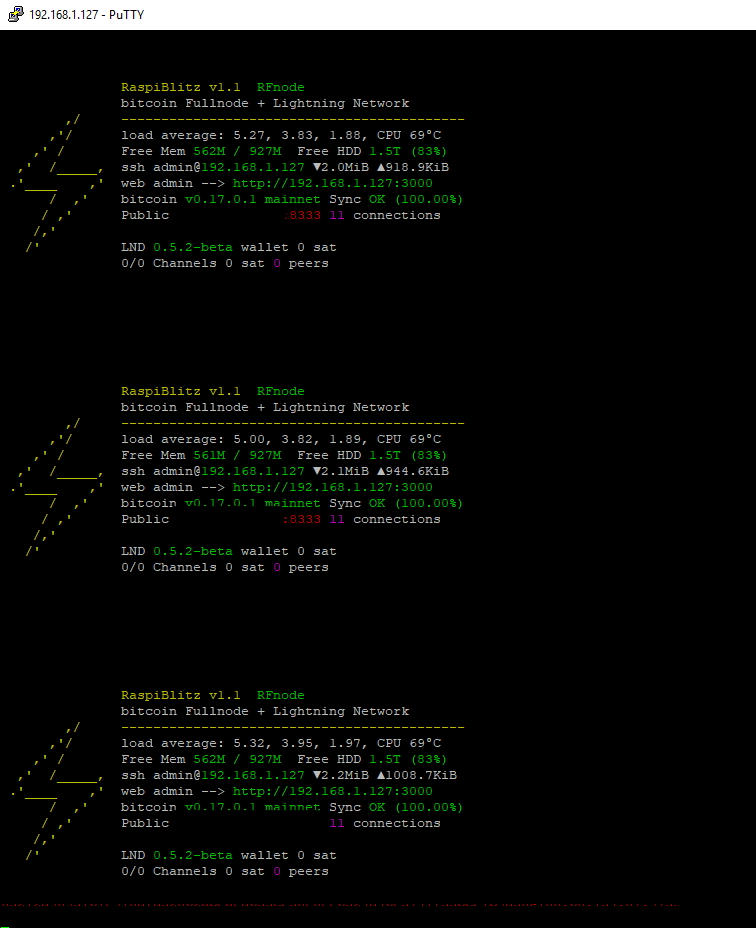
Just installed release 1.1. All went well but LCD problem persists. For some reason Raspiblitz stops writing to the screen during boot up, although it continues with the boot process and runs well. Just the terminal display freezes. Opening an additional terminal with Alt-F2 and logging in with admin and passwordA, the Raspiblitz Status Screen is displayed, and continues to come up again and again and again .... also when I SSH into it from my notebook.
felivix
on 19 Mar 2019
run this and then post the URL that it creates (which shows the output):
sudo tail -n 1000 /var/log/syslog | nc termbin.com 9999
fluidvoice
on 19 Mar 2019
felivix
on 19 Mar 2019
Crap... Accidentally closed the issue.
Meant to comment that I am rebuilding my test node with the new image. Will report back. LOL
becausetheypayme
on 19 Mar 2019
run this and then post the URL that it creates (which shows the output):
sudo tail -n 1000 /var/log/syslog | nc termbin.com 9999
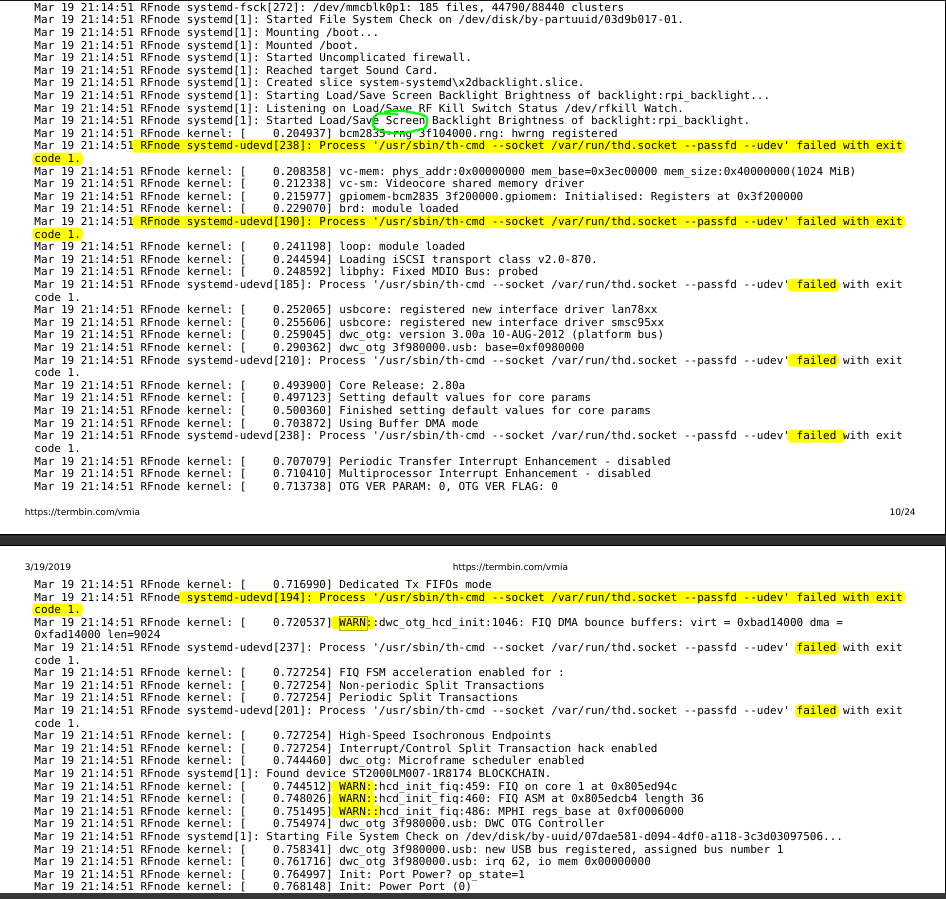
only error looking things I see... Will be hard to debug this. I don't know what much of the cryptic logging means...
fluidvoice
on 19 Mar 2019
I have the exactly same problem as becausetheypayme. Tried yesterday to set up Raspiblitz on 2 different Pis and also with different power plugs. Everytime the Pis are booting and hang at position "Started Update UTMP about System Boot/Shutdown ." I tried to boot several times but the error occurs everytime. I used the latest Raspiblitz-version. Any ideas how to solve that issue?
 StyriaTrading
on 8 Apr 2019
StyriaTrading
on 8 Apr 2019
@StyriaTrading , RaspiBlitz is not hanging ..... it just stops writing to the screen. When it happens wait a couple of minutes and then open a new console with Alt-F2 or SSH into the Pi and you will see that the boot and set-up process continues!
felivix
on 8 Apr 2019
Same problem here... HDMI video is just useless and sticks around the same place in the boot sequence forever, both when I SSH in and when my LCD screen is either working or not.
I've tried it under the v1.2 and v1.3 RC1 builds, no change. Is this even being addressed anymore?
 LukeParker
on 24 Jul 2019
LukeParker
on 24 Jul 2019
As mentioned above by @StyriaTrading:
Wait till screen stops - Press Alt and F2 to make a new window - Enter User:Pi and Password: Raspiblitz. DONE
I was using HDMI so presume it must be that. You can then sign via putty or terminal as normal. Thanks guys!
 giantboyworld
on 26 Jul 2019
giantboyworld
on 26 Jul 2019
I had similar issues with HDMI. Not sure if the solution below would work for you but worth giving it a try.
My solution was to SSH into the pi, go to the terminal and then run:
cd /home/admin/LCD-show
sudo ./LCD-hdmi
After rebooting the HDMI started working.
 pxsocs
on 26 Jul 2019
pxsocs
on 26 Jul 2019
Sweet ill try that for sure , would be great resolve it as I still have to Alt F2 it every time I boot. Thanks @pxsocs
giantboyworld
on 26 Jul 2019
@giantboyworld did the steps above work?
pxsocs
on 28 Jul 2019
Hey there @pxsocs
I tried it once but it didn't work when I restarted, I still had to make a new window and enter username and password. Im just waiting for my Raspiblitz to sync the blockchain and lightning to sync and its taking an ice age to complete hehhe. As soon as it done Ill have another go. Thanks loads for your help. Speak soon.
giantboyworld
on 30 Jul 2019
So I was having the EXACT same issue. Fresh first time install. Raspberry Pi 4...4GB, Everything synced. In SSH terminal I ran what @pxsocs said.
cd /home/admin/LCD-show
sudo ./LCD-hdmi
System rebooted, saw the entire boot run. Then it went to the loading screen, it stayed on Lightning Preparing Sync and rapidly finished. Then the Display worked, unsure if it will happen again, but will see.
My display is VERY small though, the status screen in 25% of what it should be. Small steps yes?
 Aki113s
on 18 Sep 2019
Aki113s
on 18 Sep 2019
First off, hope everyone is well and staying optimistic in these turbulent times. Second! Thank you so much for this project and everyone that has contributed. Best "how to" for me!
ok! Having a similar issue. Right now, I re-flashed the micro SD(.img file). Started set up again and hoping to kind of restore everything I may have messed up. Stuck with the choice of transferring the SSD stored "Bitcoin" folder (6 hrs in and not copying yet) rabbit hole. Or I can re format and start from scratch hoping it was a set up mistake.
With that being said, I will explain my initial issue (which led me here) so far what and I have done to fix it, the equipment I am using and connection methods used.
Equipment:
*1TB (recommended) san disk SSD ( added Sata Connector)
*32GB thumb stick for BTRFS
*5V fan (using 5V pin)
*aluminum case
*5.1V, 3A charger
*Raspberry pi 4
Connection Methods:
*Ethernet to local router
*SSH from separate linux terminal (my linux mint PC)
Issue:
-reboot sequence appeared to be either not working or hung up
Action took:
-google search led me here, but so many more topics outside the tutorial
-read and followed the threads recommendations
From my understanding this appeared to be a networking issue as @fluidvoice said. I brushed it off and got even further down the thread's attempts to the suggestions. I also attempted them. Soon discovering like Edison, all the ways that do not work as issues persisted or were added. I ruled them out so to speak. Most of my debugging has been halted due to not being able to debug unless I am SSHed in. I can edit the files of the the micro sd though.
When I was able to get in I configured RTL, TOR, and JoinMarket. I activated these through the SSH terminal. This is when I noticed the issue of not rebooting more so. I had to shut(open) the power circuit. Now my worry became the hard drives health.
So its definitely not restarting for some reason or it appears that way at this point. I finally see it on my network and begin to SSH the raspiblitz. No LND information. Oh! I installed RTL. Ok. cool! Log in on the web app. It works! Well, sorta. [ECONNREFUSED] as soon as I enter in all credentials. (maybe fund it first?) Deactivate RTL and attempted to reset the pi myself through the raspiblitz SSH menu. Have no SSH issues(normal restart). Bitcoin syncs fine and now its the LND that is having trouble connecting. Even after the RTL is disabled.
I type the LND wallet password (C) four times. Never connects and I get greeted with an error that leads me here https://github.com/rootzoll/raspiblitz/issues/774. After a few too many of manual shut downs, reading, solution attempts; I am finally able SSH in, double check my settings and un-check settings like "LCD rotate" (just to clear out that) and BTC-RPC-Explorer. Shut down and shut off until I could see the pi on the network. SSH in and now LND is working. Everything is good. Why mess with it?
Well, I could not help but notice that while the raspblitz was installing files it needed to be restarted properly. This was not happening. So now my mission is to make sure my gear is good. From starters my Sata connector is from an old hard drive. (ordering a new one)
Hard drive test:
-I notice a light on my hard drive connector.
-->this light is only on, when the device is not connected.
--->It turns off sometimes when I connect the SSD.
--->This is consistent with my PC (through visual inspection using light on connector) and not seeing it show up in my "devices".
Action:
-New Sata Connector
Results:
-WILL UPDATE
*Conclusion*TL;DR
What would appear as a reboot issue or SSD connector issue. I tend to still be leaning at what @fluidvoice said earlier. Possible networking issue. Turns out thus far, that my 1TB SSD connector is causing reboot issues at least. I will be buying a new Sata connector. Still I wonder, why I cant SSH in. The Ethernet light(s) is solid yellow no green flashing. Indicating nothing is being output for SSH.
Therefore my question(s) are :
Why is the pi not allowing me to SSH in regardless if the hard drive is not being recognized? Shouldn't I be able to ssh in still?
Any thoughts, tips, or direction. Thanks in advance.
die
 dienasty13
on 7 Jun 2020
dienasty13
on 7 Jun 2020
For such errors (hangs on boot and SSH login not possible) we identified two sources of errors:
1) SSD Connector - we recommend strongly the one in the RaspiBlitz shopping list
2) The ShimFan (5V active Fan) - with v1.5 we changed shopping list back to passive cooling
If the SSH certificate is broken (that can lead to not being able to login), there is a way to reset it since v1.5 - see: https://github.com/rootzoll/raspiblitz/blob/master/FAQ.md#how-can-i-repair-my-ssh-login
rootzoll
on 7 Jun 2020
Related issues
 Kixunil
·
3Comments
Kixunil
·
3Comments
 openoms
·
4Comments
rootzoll
·
3Comments
openoms
·
4Comments
rootzoll
·
3Comments
 Himbeergeld
·
3Comments
Himbeergeld
·
3Comments
 shawnyeager
·
3Comments
shawnyeager
·
3Comments