Rasa NLU version:
"version": "0.13.2"
Operating system (windows, osx, ...):
docker
Content of model configuration file:
language: "en"

pipeline: "spacy_sklearn"

# data contains the same json, as described in the training data section
data: {
  "rasa_nlu_data": {
    "common_examples": [
      {
        "text": "hey",
        "intent": "greet",
        "entities": []
      }
    ]
  }
}
Issue:
I tried to train my data using the command from document
$ curl -XPOST -H "Content-Type: application/x-yml" localhost:5000/train?project=my_project \
    -d @mydata.yml
I got an error below.
{
    "error": "while parsing a block mapping\n  in \"<unicode string>\", line 1, column 1:\n    language: \"en\"pipeline: \"spacy_s ... \n    ^\nexpected <block end>, but found '<scalar>'\n  in \"<unicode string>\", line 1, column 15:\n    language: \"en\"pipeline: \"spacy_sklearn\"# data  ... \n                  ^"
}
How to fix this?
 andy51002000
All 12 comments
Please post the error in a legible format, with ```
 akelad
on 4 Sep 2018
akelad
on 4 Sep 2018
@akelad Thanks for your mention. I've updated my post. May I know, is there something I misunderstood so that I couldn't train the mix data.
andy51002000
on 5 Sep 2018
Is this the exact error in the log you got? It looks very strange.
Is that file the exact one you used as well? Having one intent example isn't going to do much. I guess there's probably some sort of formatting error
akelad
on 5 Sep 2018
Yes. It is the exact error I got. The model I used is from the rasa nlu repository /sample_configs/config_train_server_json.yml. Please check the attachment below
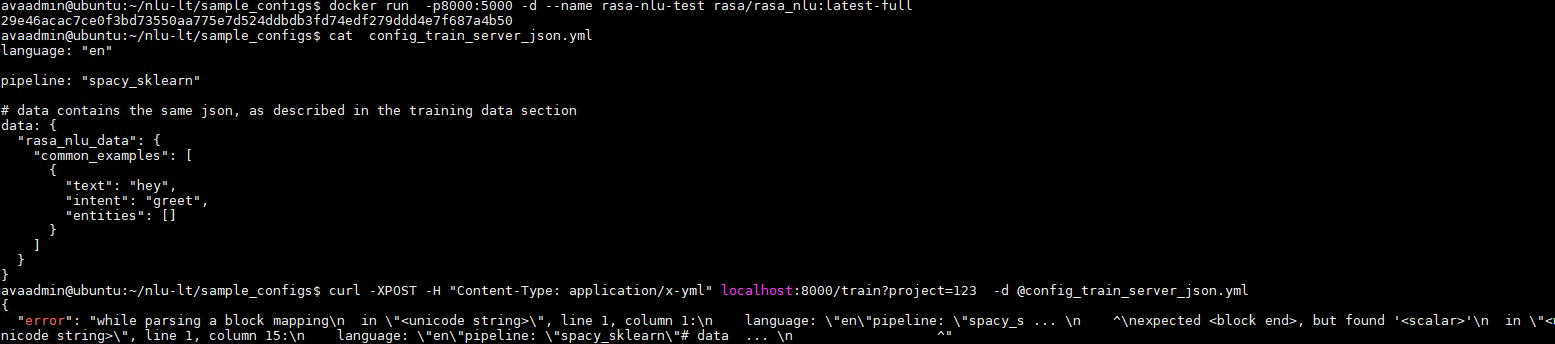
I've also tested other model. I still got the same error message.
language: "en"

pipeline: "spacy_sklearn"

# data contains the same json, as described in the training data section
data: {
  "rasa_nlu_data": {
    "common_examples": [
      {
        "text": "hey",
        "intent": "greet",
        "entities": []
      },
      {
        "text": "hello",
        "intent": "greet",
        "entities": []
      },
      {
        "text": "hey man",
        "intent": "greet",
        "entities": []
      },
      {
        "text": "hi",
        "intent": "greet",
        "entities": []
      },
      {
        "text": "give me coffee",
        "intent": "order",
        "entities": []
      },
      {
        "text": "give me tea",
        "intent": "order",
        "entities": []
      },
      {
        "text": "give me water",
        "intent": "order",
        "entities": []
      },
      {
        "text": "see you",
        "intent": "goodby",
        "entities": []
      },
      {
        "text": "see you next time",
        "intent": "goodby",
        "entities": []
      },
      {
        "text": "goodbye",
        "intent": "goodby",
        "entities": []
      }
    ]
  }
}
Got the same problem after updating rasa from 0.11.x to 0.12.3 .. my docker image is "rasa/rasa_nlu:0.13.2-full" ... my trainingsfiles are the same as in your documentation... the curl request is also the same ;)
{
  "error": "while parsing a block mapping\n  in \"<unicode string>\", line 1, column 1:\n    language: \"en\"pipeline: \"spacy_s ... \n    ^\nexpected <block end>, but found '<scalar>'\n  in \"<unicode string>\", line 1, column 15:\n    language: \"en\"pipeline: \"spacy_sklearn\"# data  ... \n                  ^"
 alexxk82
on 13 Sep 2018
alexxk82
on 13 Sep 2018
Ok... i found a solution
instead of
curl --request POST --header 'content-type: application/x-yml' @config_train_server_json.yml --url 'localhost:5000/train?project=test_model'
use this (--data-binary added to curl request)
curl --request POST --header 'content-type: application/x-yml' --data-binary @config_train_server_json.yml --url 'localhost:5000/train?project=test_model'
alexxk82
on 13 Sep 2018
@andy51002000 does that work for you too?
akelad
on 13 Sep 2018
It works for me. Thanks @alexxk82 . Suggest update the request example on the document.
$ curl -XPOST -H "Content-Type: application/x-yml" localhost:5000/train?project=my_project \
    -d @sample_configs/config_train_server_md.yml
I believe that I'm not the only one experienced with this problem.
andy51002000
on 20 Sep 2018
We'd be happy to accept a PR to fix the docs :)
akelad
on 20 Sep 2018
This issue has been automatically marked as stale because it has not had recent activity. It will be closed if no further activity occurs. Thank you for your contributions.
![stale[bot] picture](https://avatars3.githubusercontent.com/in/1724?v=4&s=40) stale[bot]
on 19 Dec 2018
stale[bot]
on 19 Dec 2018
This issue has been automatically closed due to inactivity. Please create a new issue if you need more help.
stale[bot]
on 26 Dec 2018
Unable to Train NLU 0.15.1 with end point POST/Train
I am created config file config/config_spacy.json
```
{
"language":"en_core_web_md",
"pipeline":"pretrained_embeddings_spacy",
"path":"projects/1234",
"data":"training_data/rasa_data.json"
}
```
Command used to Run
curl -XPOST -H "Content-Type: application/x-yml" localhost:5000/train?project=1234 -d @config/config_spacy.json
Error I am Receiving as follows
{
"error": "while scanning for the next token\nfound character that cannot start any token\n in \"
}
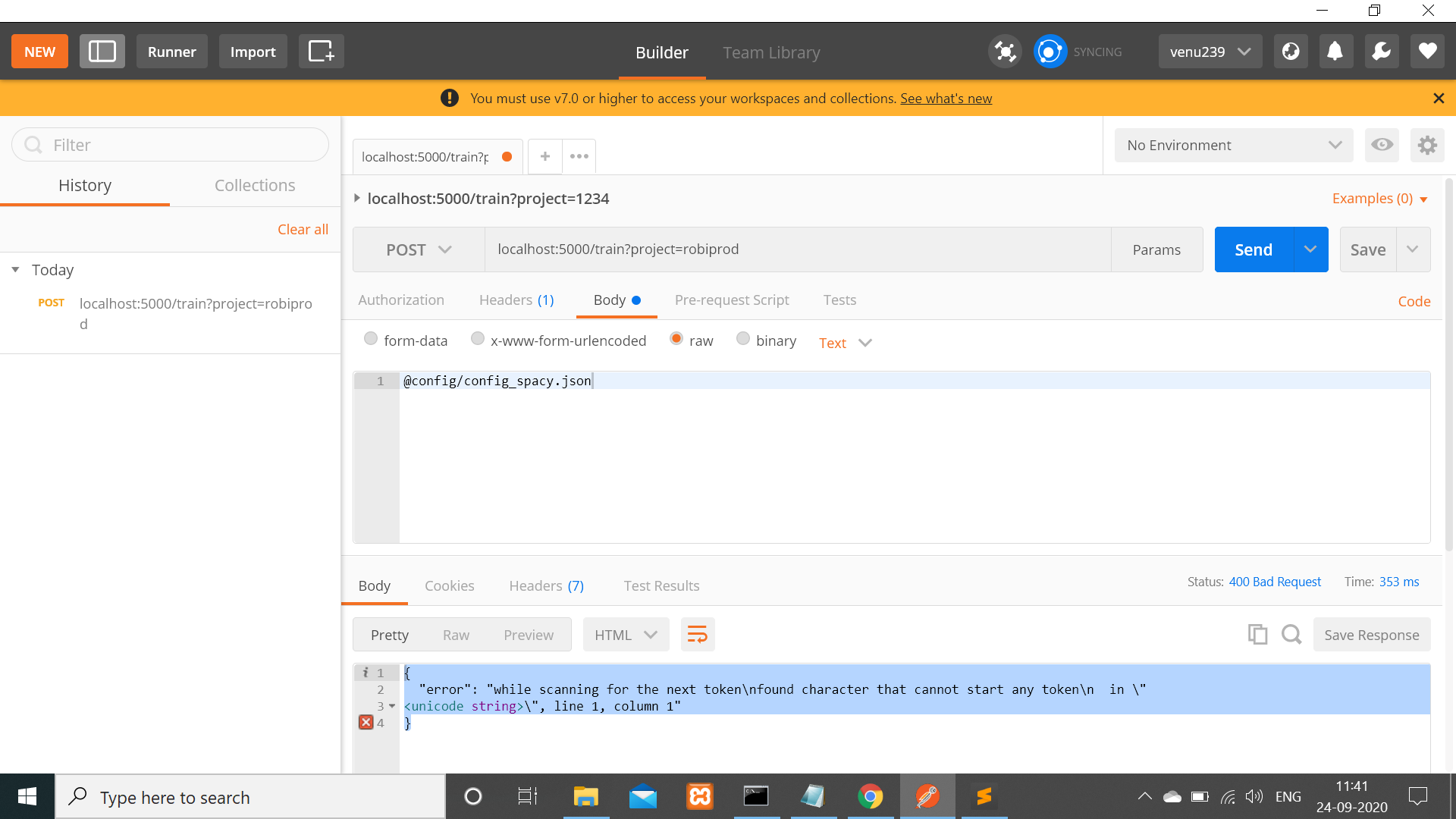
kindly help , Thanks in advance
 venu239
on 24 Sep 2020
venu239
on 24 Sep 2020
Related issues
 connorbrinton
·
3Comments
connorbrinton
·
3Comments
 mit4dev
·
4Comments
mit4dev
·
4Comments
 nikhilcss97
·
3Comments
nikhilcss97
·
3Comments
 edouardlp
·
3Comments
edouardlp
·
3Comments
 johnson7788
·
3Comments
johnson7788
·
3Comments
Most helpful comment
Ok... i found a solution
instead of
curl --request POST --header 'content-type: application/x-yml' @config_train_server_json.yml --url 'localhost:5000/train?project=test_model'use this (--data-binary added to curl request)
curl --request POST --header 'content-type: application/x-yml' --data-binary @config_train_server_json.yml --url 'localhost:5000/train?project=test_model'