Rancher: [2.4.3] Frequent backed up reader errors when using Imported cluster (EKS)
What kind of request is this : bug
Steps to reproduce:
- Import an EKS cluster
- Keep using it for sometime (view logs, execute shell, switch projects etc)
Result:
- Results in the page getting stuck and error notification coming up
Get https://10.100.0.1:443/api/v1/namespaces?timeout=30s: backed up reader
Environment information
- Rancher version:
v2.4.2andv2.4.3 - UI version:
v2.4.14andv2.4.22 - Installation option: single install
Cluster information
- Cluster type: Imported
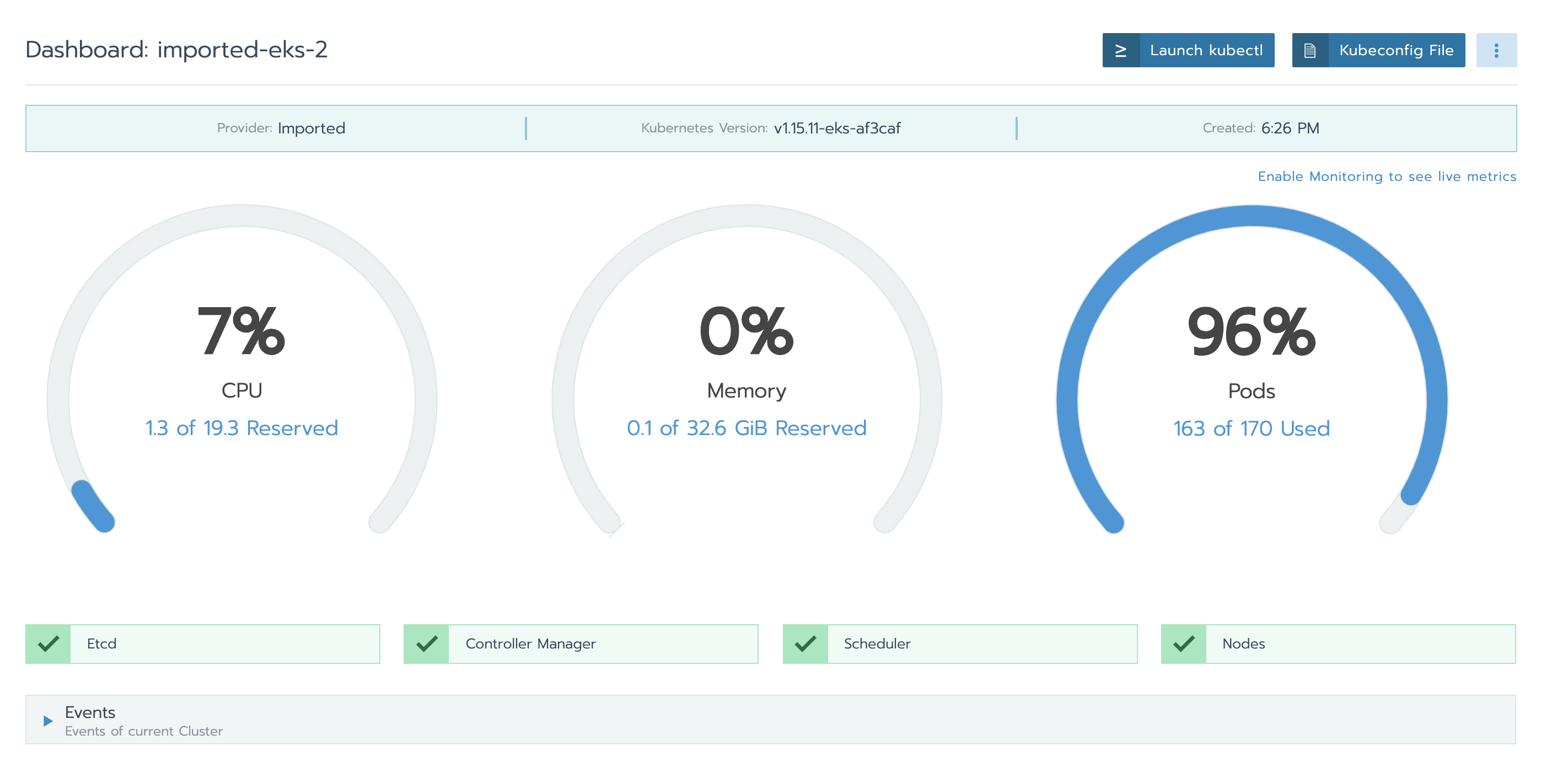
- Machine type: AWS EKS + 3 Linux Nodes + 2 Windows Nodes
- Kubernetes version:
Server Version: version.Info{Major:"1", Minor:"15+", GitVersion:"v1.15.11-eks-af3caf", GitCommit:"af3caf6136cd355f467083651cc1010a499f59b1", GitTreeState:"clean", BuildDate:"2020-03-27T21:51:36Z", GoVersion:"go1.12.17", Compiler:"gc", Platform:"linux/amd64"}
gzrancher/rancher#10302
gzrancher/rancher#10607
 niranjan94
All 53 comments
We are seeing lots of UI timeout errors after upgrading to 2.4.2. Same situation as above, imported EKS clusters running on 1.15.
 joberdick
on 17 Apr 2020
joberdick
on 17 Apr 2020
i have the same problem, my inported k8s cluster version is 1.14.9
 wuzhihui1123
on 24 Apr 2020
wuzhihui1123
on 24 Apr 2020
Hi .. Any possible workaround for this ? Makes managing larger EKS clusters almost impossible as the backed up reader errors keep coming up and require multiple page reloads.
niranjan94
on 6 May 2020
I met the similar backed up reader errors.
Rancher version: v2.4.2
`Unknown error: Get https://10.43.0.1:443/api/v1/namespaces/cattle-system/pods?timeout=30s: backed up reader
...
failed on subscribe alertmanager: Get https://10.43.0.1:443/apis/monitoring.coreos.com/v1/alertmanagers?resourceVersion=0&timeout=30m0s&timeoutSeconds=1800&watch=true: backed up reader `
 simonhou
on 11 May 2020
simonhou
on 11 May 2020
Not sure if this is also related, but after upgrading to v2.4.2 we're also seeing TLS timeout errors along with the backed up reader errors.
E0512 15:05:56.136690 8 reflector.go:153] github.com/rancher/norman/controller/generic_controller.go:229: Failed to list *v1.Namespace: Get https://172.20.0.1:443/api/v1/namespaces?limit=500&resourceVersion=0&timeout=30s: net/http: TLS handshake timeout
Rancher: v2.4.2
K8s: v1.15.11-eks-af3caf
 kevinfrommelt
on 12 May 2020
kevinfrommelt
on 12 May 2020
We've also experienced this issue on both 2.4.2 and 2.4.3 on an imported Kops/AWS cluster (updated rancher from 2.3.2 at the same time as we updated K8s from 1.5 to 1.16).
For us, Rancher would sometimes also go into a state where there would be no communication with the cluster at all, only ever giving EOF errors. Only a Rancher restart would help:
Cluster health check failed: Failed to communicate with API server: Get https://100.64.0.1:443/api/v1/namespaces/kube-system?timeout=30s: EOF
We were, however, able to mitigate the problem by disabling Rancher's Monitoring feature we had previously enabled. That reduced the "backed up reader" issue while using the web UI to less than a handful of times a day, making Rancher usable again. I still see it regularly in the logs though, a couple times an hour:
rancher_1 | W0512 18:20:36.499816 6 reflector.go:326] github.com/rancher/norman/controller/generic_controller.go:229: watch of *v1.<something> ended with: an error on the server ("unable to decode an event from the watch stream: backed up reader") has prevented the request from succeeding
... where something is a K8s resource type (Node, Job, ResourceQuota, LimitRange, APIService, Endpoints, RoleBinding, etc.). Haven't seen the EOF error once since then either.
My theory is that some component in the communication between Rancher and the cluster is overloaded. Having monitoring enabled seemed to increase that communication dramatically (relative to the other communication). But we only have a single small-ish cluster (3-5 nodes, ~50-100 namespaces, 100-150 pods), nothing compared to what I imagine some people are managing with Rancher, so YMMV. Disabling Rancher-internal monitoring is also an option for us since we have additional monitoring set up in AWS and having it in Rancher has always been more of a convenience feature.
Hope this helps someone else mitigating / diagnosing the issue.
 Tobi042
on 12 May 2020
Tobi042
on 12 May 2020
Even with cluster monitoring disabled, we are still getting this issue quite frequently. Restarting the Rancher container is the only way to fix this issue for us.
 khanhibus
on 16 May 2020
khanhibus
on 16 May 2020
Agree with @khanhibus. Disabling Cluster monitoring seems to have no effect on this issue.
niranjan94
on 18 May 2020
Alright, new findings:
The library responsible for giving out the "Backed up reader" errors is https://github.com/rancher/remotedialer . The way I understand it is that it's responsible for tunnelling the calls to the kube-apiserver (like kubectl proxy; correct me if I'm wrong). Its default timeout is 15 seconds (connection.go), but can be manipulated by setting the REMOTEDIALER_BACKUP_TIMEOUT_SECONDS environment variable on the Rancher docker container.
Having done that, it seems like this masking the actual issue. I'm now getting errors like these:
rancher_1 | 2020/05/22 08:49:12 [INFO] Failed to watch system component, error: Get https://100.64.0.1:443/api/v1/componentstatuses?timeout=30s: context deadline exceeded (Client.Timeout exceeded while awaiting headers)
Also getting these when using the Web UI. The EOF errors I've had previously, also persist (In that case, the only fix was still to restart Rancher).
Anyway, these timeouts look to me like kube-apiserver is reacting either slowly or not returning anything because something crashes. Looking at the kube-apiserver logs, it seems like it might be the latter:
I0522 08:43:01.501391       1 log.go:172] http2: panic serving 172.20.40.252:41952: runtime error: invalid memory address or nil pointer dereference
goroutine 254935293 [running]:
k8s.io/kubernetes/vendor/k8s.io/apiserver/pkg/server/filters.(*timeoutHandler).ServeHTTP.func1.1(0xc023d96660)
        /workspace/anago-v1.16.9-beta.0.49+25599b5adea930/src/k8s.io/kubernetes/_output/dockerized/go/src/k8s.io/kubernetes/vendor/k8s.io/apiserver/pkg/server/filters/timeout.go:108 +0x107
panic(0x3bed560, 0x73b5700)
        /usr/local/go/src/runtime/panic.go:679 +0x1b2
This stack trace goes on for some time.
While this is not optimal, a google search seems to suggest that that's merely a symptom as well.
Specifically a symptom of the HTTP handler timing out. Someone had it with etcd tcp socket exhaustion on their machine, but that doesn't seem to be case for me.
Still, I will look into possible etcd performance issues. Will keep this issue updated.
Tobi042
on 22 May 2020
I'm going back on my previous assumption. Looks like etcd performance was (in my case) a red herring.
Running netstat -t on the cattle-cluster-agent pod and rancher reveals this picture when the commands hang:
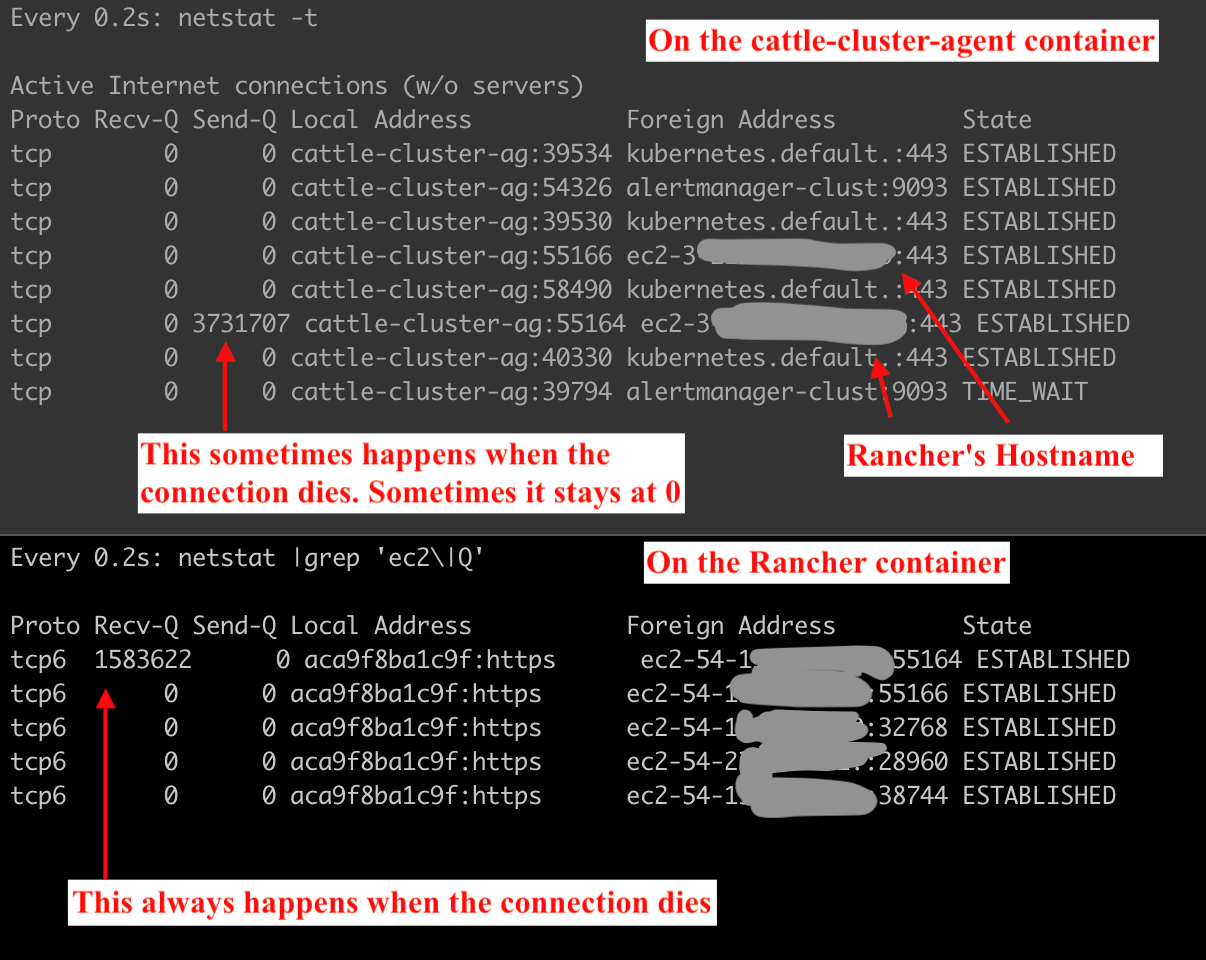
So Rancher's receive queue (or rather that of the connection with the remote agent) is filling up and not being emptied. Which would explain the original error message of "backed up reader", I guess. Eventually, the tunnel gets killed and the cattle-cluster-agent logs give this error:
level=error msg="Remotedialer proxy error" error="read tcp 100.112.0.30:49252->3.<redacted rancher ip>:443: i/o timeout"
I have also received reports from my team about Rancher CLI commands hanging or failing in the middle of execution, which fits with the tunnel being backed up / dead.
I am a bit at a loss about what to try next. It looks like a bug in the Rancher software to me right now.
Tobi042
on 25 May 2020
Same issue than you @Tobi042 since 1 week
 jgourmelen
on 25 May 2020
jgourmelen
on 25 May 2020
Same problem here since upgrade, cluster almost unusable through Rancher. Any fix in sight?
 hameno
on 25 May 2020
hameno
on 25 May 2020
Same issue with Backed up reader errors after upgrading.
This happens on 2.4.2 and 2.4.3. Hope this can be fixed soon. Didn't have this in 2.3 before.
 rjbaat
on 25 May 2020
rjbaat
on 25 May 2020
We have the same problem after upgrading an on premise instance from 2.3.3 to 2.4.3.
Had to rollback to 2.3.3 as the product is unusable. Keen for a resolution asap.
 njpeterson
on 25 May 2020
njpeterson
on 25 May 2020
We also had to rollback. We can't use 2.4 until this is resolved.
joberdick
on 25 May 2020
Have the same problem with rancher 2.4.3 (Backed up reader errors)
 smollsmit
on 28 May 2020
smollsmit
on 28 May 2020
I am also experiencing this issue. Rancher 2.4.3
 drpebcak
on 28 May 2020
drpebcak
on 28 May 2020
Also experiencing this issue. Rancher 2.4.3
 process0
on 28 May 2020
process0
on 28 May 2020
@Tobi042 can you post logs from the cluster agent pod?
 rmweir
on 30 May 2020
rmweir
on 30 May 2020
I also see this issue in 2.4.3. Although, I've noticed in just about every case, a simple page refresh did the trick. At one point, an imported cluster lost connection. We've been using Rancher for three EKS clusters.
 miltoncs
on 1 Jun 2020
miltoncs
on 1 Jun 2020
Could someone who is experiencing this post a screenshot of their networking tab? Ideally when encountering this error or while the page load times are long.
rmweir
on 1 Jun 2020
What do you mean by "screenshot of networking" ?
 shubb30
on 1 Jun 2020
shubb30
on 1 Jun 2020
@shubb30 A screen shot of their networking tab in dev tools. In chrome: right click -> Inspect -> select network tab, navigate to page that experiences backed up reader errors or at least has a long load time.
rmweir
on 1 Jun 2020

shubb30
on 1 Jun 2020
@rmweir created ~10 screenshots of first the page call erroring out and then the page call taking ~1 minute to succeed, but eventually succeeding. They're pretty large and it would be a lot to censor, so could I send it to you via mail or the Rancher Users Slack or something?
Tobi042
on 1 Jun 2020
@Tobi042 that'll work, I'm @ Ricky with the rancher logo on status.
rmweir
on 1 Jun 2020
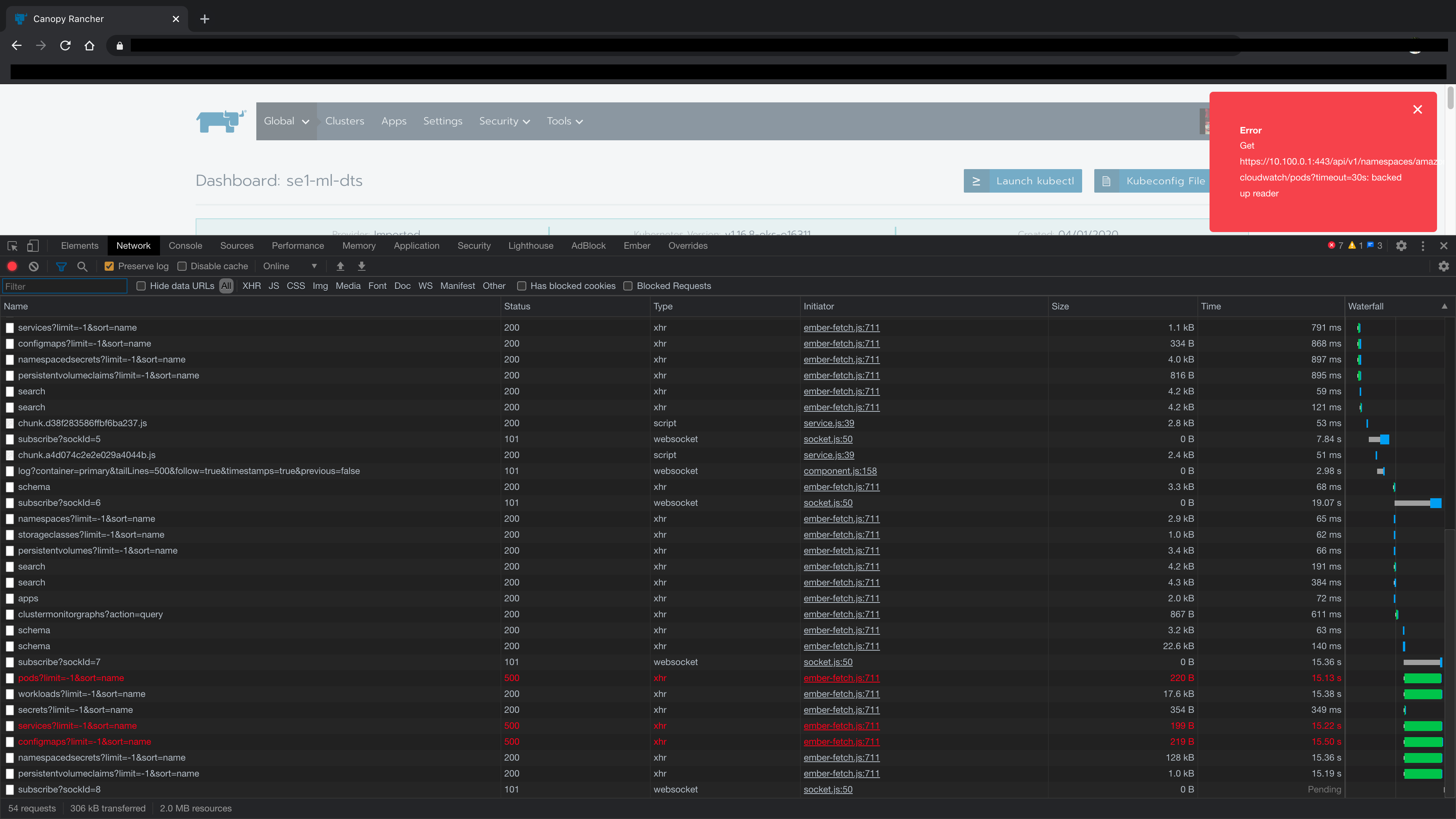 niranjan94
on 2 Jun 2020
niranjan94
on 2 Jun 2020
@niranjan94 ty! If you select one starting with services, and then select "response" what does it show?
rmweir
on 2 Jun 2020
@rmweir
Request
Path
https://rancher.example.com/v3/project/c-ngnjw:p-9f79s/services?limit=-1&sort=name
Headers
accept: application/json
accept-encoding: gzip, deflate, br
accept-language: en-IN,en-GB;q=0.9,en-US;q=0.8,en;q=0.7
content-type: application/json
cookie: R_LOCALE=en-us; CSRF=35172c51d3; R_SESS=token-abcdefghijklmn
dnt: 1
referer: https://rancher.example.com/c/c-ngnjw/monitoring
sec-ch-ua: "\\Not\"A;Brand";v="99", "Chromium";v="84", "Google Chrome";v="84"
sec-ch-ua-mobile: ?0
sec-fetch-dest: empty
sec-fetch-mode: cors
sec-fetch-site: same-origin
user-agent: Mozilla/5.0 (Macintosh; Intel Mac OS X 10_15_5) AppleWebKit/537.36 (KHTML, like Gecko) Chrome/84.0.4147.30 Safari/537.36
x-api-action-links: actionLinks
x-api-csrf: 35172c51d3
x-api-no-challenge: true
Response
Headers
content-encoding: gzip
content-length: 170
content-type: application/json
date: Tue, 02 Jun 2020 06:22:45 GMT
expires: Wed 24 Feb 1982 18:42:00 GMT
status: 500
x-api-schemas: https://rancher.example.com/v3/project/c-ngnjw:p-9f79s/schemas
x-content-type-options: nosniff
Body
{
  "baseType": "error",
  "code": "ServerError",
  "message": "Get https://10.100.0.1:443/api/v1/namespaces/cattle-prometheus/services?timeout=30s: backed up reader",
  "status": 500,
  "type": "error"
}
same issue, if any additional network or any related info is still helpful - i'd be glad to provide anything that might shed some light on the issue. thank you for trying to figure this out
 virtuman
on 2 Jun 2020
virtuman
on 2 Jun 2020
@niranjan94 or anyone else, can you send me a screenshot showing the size of the services/configmaps response on a successful call?
rmweir
on 2 Jun 2020
over 35MB in my case, until the network got reset and page started to reload. Most of the secrets, are HELM releases that are stored in secrets in helm3, secret type:
helm.sh/release.v1 if you could skip these from lading - it would automatically fix majority of the issues. or at least load secrets without body. and retrieve body only when necessary.
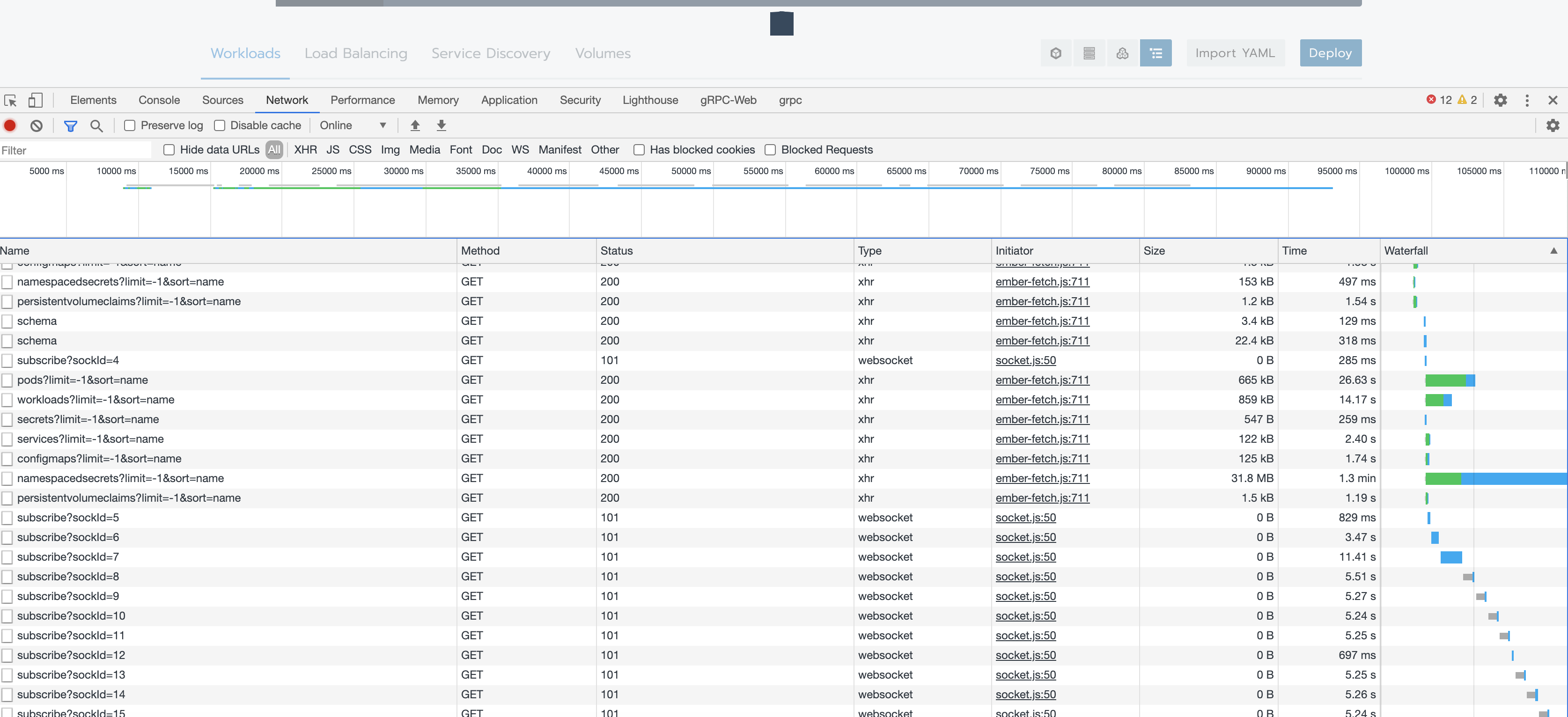
it actually kep on downloading after i took a screenshot. page refreshed for some reason once it got to 35mb+
virtuman
on 3 Jun 2020
For us, it is totally random. To reproduce it, I click thorough the projects in a cluster until I see it happen. Sometimes, it will just happen while looking at a page.
This example, I clicked on a project and saw the timeout. Then I clicked on the same project, and it loaded fast.
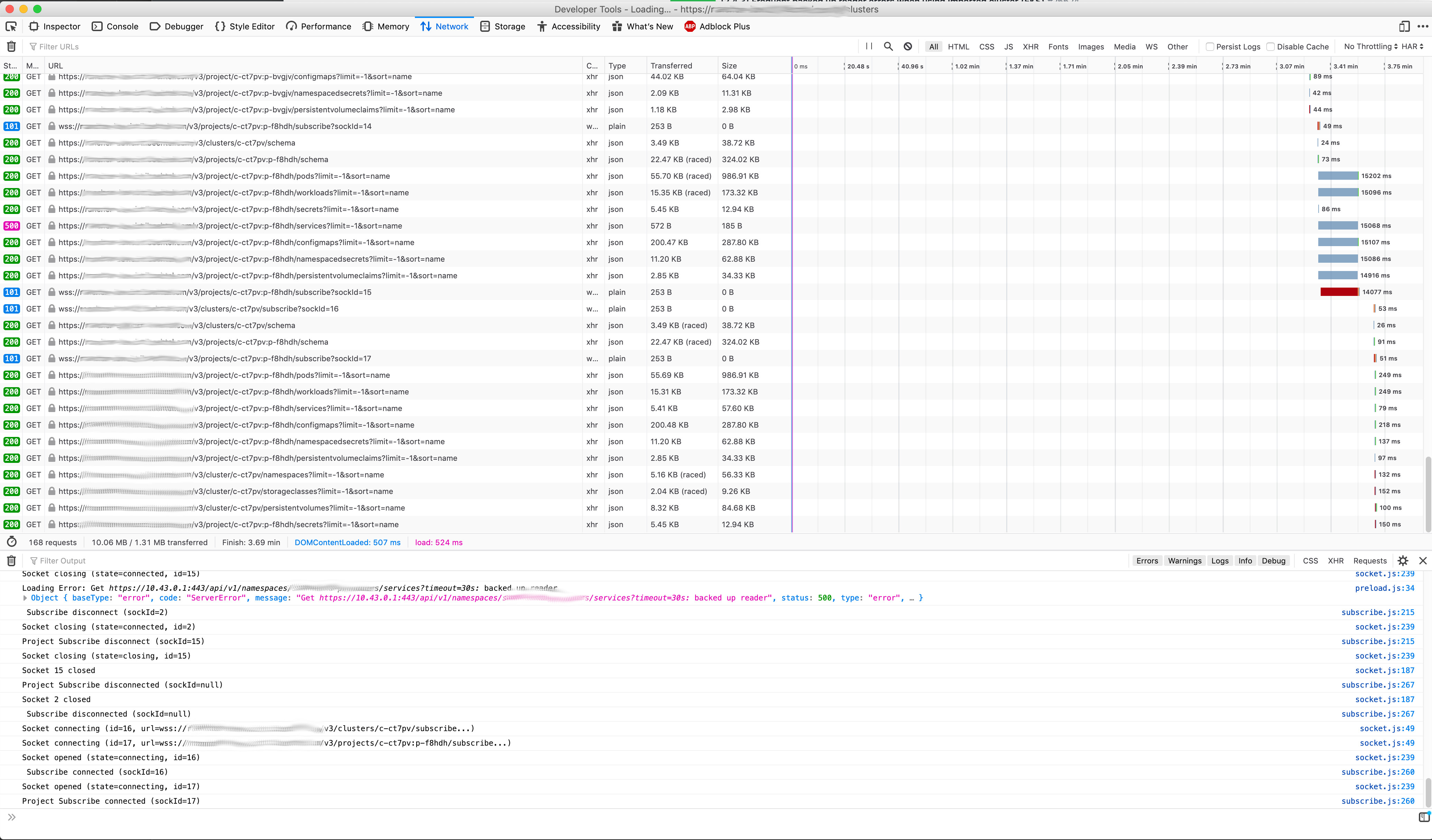
shubb30
on 3 Jun 2020
was able to reproduce:
- import eks cluster add a few node groups (want pod capacity of ~120)
- fill a project with pods, each in a diff namespace until pods are full. I used a script to create X namespaces and launch X redis apps with 0 followers (results in 1 pod per app)
- switch between projects until error is encountered
rmweir
on 3 Jun 2020
over 35MB in my case, until the network got reset and page started to reload. Most of the secrets, are HELM releases that are stored in secrets in helm3, secret type:
helm.sh/release.v1 if you could skip these from lading - it would automatically fix majority of the issues. or at least load secrets without body. and retrieve body only when necessary.
It is of a similar size or above in my case too. And we also use helm for everything and have a lot of helm release secrets. Perhaps that's what is causing this.
niranjan94
on 3 Jun 2020
We are also seeing this in imported GKE clusters. On rancher v2.4.4
 jonatan-b-kr
on 4 Jun 2020
jonatan-b-kr
on 4 Jun 2020
the bug is reproduced in v2.4.4
Steps:
- run
v2.4.4single install - import an EKS cluster, k8s 1.15, 10 workers, pod capacity 170
- deploy the app
Redistemplate version10.6.4from the built-in catalog library into a project 130 times, set the follower to be 0, so there is 1 pod each app each namespace - keeping switch between projects, or refreshing on the project page, and track the network at the same time
Results:


- it does not happen every time, and it also does NOT stop me from using the cluster
 jiaqiluo
on 6 Jun 2020
jiaqiluo
on 6 Jun 2020
Hit the issue on an upgrade from 2.3.8 to 2.4.4 and 2.4.5-rc2
Steps:
- Have an imported EKS cluster in rancher:v2.3.8 (k8s 1.16, 8 worker nodes)
- Deploy redis apps - filled up 123/136 pods
- Upgrade to 2.4.4/2.4.5-rc2
- Cluster goes into
Unavailablestate with error -Cluster health check failed: Failed to communicate with API server: Get https://10.100.0.1:443/api/v1/namespaces/kube-system?timeout=30s: EOF
 sowmyav27
on 6 Jun 2020
sowmyav27
on 6 Jun 2020
@sowmyav27 I’ve had this happen as well. When the cluster gets into this state, it seems like the only temporary fix is to kill all of the rancher server pods. When rancher comes back up the cluster is accessible, but it will start throwing the backed up reader errors quickly, and then eventually it will be unavailable again.
drpebcak
on 7 Jun 2020
After speaking to @ibuildthecloud it turns out that that the issue is related to our transition to http2, will put in a revert. A quickfix could be to restarted rancher with the environment variable DISABLE_HTTP2=true.
rmweir
on 9 Jun 2020
@rmweir Can confirm that disabling HTTP/2 seems to fix the issue for now. Thanks for your efforts on this! Just out of curiosity, is it related to Golang blocking new connections if the max number of streams is reached?
Tobi042
on 9 Jun 2020
@Tobi042 current theory is that it's less anything Golang specific, and more a case of back pressure caused by the way http2 multiplexes streams
rmweir
on 9 Jun 2020
The bug fix is validated in v2.4-3165-head in both fresh installing and upgrade path
Fresh installing path:
- run
v2.4-3165-headsingle install - import an EKS cluster, k8s
v1.15.11-eks-af3caf, 12 workers, pod capacity 204 - deploy the app
Redistemplate version10.6.4from the built-in catalog library into a project 160 times, set the follower to be 0, so there is 1 pod each app each namespace - keeping switch between projects, or refreshing on the project page, and track the network at the same time
- Result: not see the
backed up readerissue anymore
Upgrade path:
- run
v2.3.8single install - import an EKS cluster, k8s
v1.16.8-eks-e16311, 10 workers, pod capacity 170 - deploy the app
Redistemplate version10.6.4from the built-in catalog library into a project 125 times, set the follower to be 0, so there is 1 pod each app each namespace - not see the bug occurring
- upgrade to
v2.4.4 - see the bug occurring when switching between projects
- upgrade to
v2.4-3165-head - Result: not see the
backed up readerissue anymore
jiaqiluo
on 9 Jun 2020
Wait for validating the fix in master-head
jiaqiluo
on 9 Jun 2020
Thanks for all your help is diagnosing this issue. I can also confirm that adding the environment variable DISABLE_HTTP2=true fixes the issue. Not sure if anyone is experiencing this, but now I am seeing new errors in the rancher logs after using that aforementioned environmental variable. Just to test, I restarted Rancher without disabling HTTP/2 and did not get the following logs:
Jun 9 13:47:42 rancher journal: 2020-06-09 20:47:42.917250 I | http: TLS handshake error from 127.0.0.1:46446: EOF
Jun 9 13:47:42 rancher journal: 2020-06-09 20:47:42.920193 I | http: TLS handshake error from 127.0.0.1:46450: EOF
Jun 9 13:47:42 rancher journal: 2020-06-09 20:47:42.928191 I | http: TLS handshake error from 127.0.0.1:46500: EOF
Jun 9 13:47:42 rancher journal: 2020-06-09 20:47:42.928227 I | http: TLS handshake error from 127.0.0.1:46496: EOF
Jun 9 13:47:42 rancher journal: 2020-06-09 20:47:42.929887 I | http: TLS handshake error from 127.0.0.1:46486: EOF
Jun 9 13:47:42 rancher journal: 2020-06-09 20:47:42.929935 I | http: TLS handshake error from 127.0.0.1:46488: EOF
Jun 9 13:47:42 rancher journal: 2020-06-09 20:47:42.932751 I | http: TLS handshake error from 127.0.0.1:46576: EOF
Jun 9 13:47:42 rancher journal: 2020-06-09 20:47:42.932976 I | http: TLS handshake error from 127.0.0.1:46578: EOF
Jun 9 13:47:42 rancher journal: 2020-06-09 20:47:42.933019 I | http: TLS handshake error from 127.0.0.1:46580: EOF
Jun 9 13:47:42 rancher journal: 2020-06-09 20:47:42.933045 I | http: TLS handshake error from 127.0.0.1:46582: EOF
Jun 9 13:47:42 rancher journal: 2020-06-09 20:47:42.933069 I | http: TLS handshake error from 127.0.0.1:46584: EOF
Jun 9 13:47:42 rancher journal: 2020-06-09 20:47:42.933093 I | http: TLS handshake error from 127.0.0.1:46586: EOF
Jun 9 13:47:42 rancher journal: 2020-06-09 20:47:42.933116 I | http: TLS handshake error from 127.0.0.1:46588: EOF
Jun 9 13:47:42 rancher journal: 2020-06-09 20:47:42.933151 I | http: TLS handshake error from 127.0.0.1:46592: EOF
Jun 9 13:47:42 rancher journal: 2020-06-09 20:47:42.933293 I | http: TLS handshake error from 127.0.0.1:46594: EOF
Otherwise, Rancher is working as expected.
khanhibus
on 9 Jun 2020
the bug fix is validated on rancher:master-3174-head
the EKS cluster runs k8s v1.16.8-eks-e16311
The tests are the same as my previous comment for v2.4-3165-head https://github.com/rancher/rancher/issues/26624#issuecomment-641492865
During the upgrade path after upgrading to v2.4.4, the cluster goes into Unavailable state with error - Cluster health check failed: Failed to communicate with API server: Get https://10.100.0.1:443/api/v1/namespaces/kube-system?timeout=30s: EOF
and it comes back to normal after upgrading to master-3174-head
jiaqiluo
on 10 Jun 2020
In gz#10724 we saw the same behavior in a non EKS cluster and running helm upgrade of rancher with the addition of the following options fixed:
--set 'extraEnv[0].name=DISABLE_HTTP2' \
--set 'extraEnv[0].value="true"'
 Tejeev
on 17 Jun 2020
Tejeev
on 17 Jun 2020
Same here with an imported rke created cluster.
The Workararound disabling the HTTP2 works for this scenario as well.
 ChrisHaPunkt
on 18 Jun 2020
ChrisHaPunkt
on 18 Jun 2020
Just upgraded to v2.4.5. The issue is fixed 🎉
Thank you rancher team 😄
niranjan94
on 21 Jun 2020
Hi there.
Yes, in the version 2.4.5 the bug was fixed... in fact, if you look in the logs, the HTTP2 was disabled explicitly:
I0630 18:22:22.863662 25 http.go:116] HTTP2 has been explicitly disabled
Thanks @Tobi042 for you work in this bug. Thanks @rmweir for your suggestion to fix it. Thanks Rancher to released a quick fix.
 thyarles
on 30 Jun 2020
thyarles
on 30 Jun 2020
I thought it was a problem with DigitalOcean's clusters until someone from their team pointed me to this thread. I disabled HTT2, let's see. When is 2.4.5 estimated to be in the stable branch?
 vitobotta
on 20 Jul 2020
vitobotta
on 20 Jul 2020
@vitobotta https://github.com/rancher/rancher#latest-release
hameno
on 20 Jul 2020
@hameno I thought it would be delayed for the stable branch, thanks!
vitobotta
on 20 Jul 2020
Related issues
 deniseschannon
·
54Comments
deniseschannon
·
54Comments
 deadbeef84
·
55Comments
deadbeef84
·
55Comments
 bscott
·
67Comments
jiaqiluo
·
53Comments
bscott
·
67Comments
jiaqiluo
·
53Comments
 tfiduccia
·
49Comments
tfiduccia
·
49Comments
Most helpful comment
We are seeing lots of UI timeout errors after upgrading to 2.4.2. Same situation as above, imported EKS clusters running on 1.15.