Rancher: Rancher server breaks when ran behind ALB (get forbidden: User \"system:anonymous\" cannot get path \"/login\")
Rancher versions:
rancher/server or rancher/rancher: 2.06
Every now and again Rancher will now allow me into the interface, its getting more and more frequent and it isnt just me but everyone that uses Rancher. I get the following error message:
{
"kind": "Status",
"apiVersion": "v1",
"metadata": {
},
"status": "Failure",
"message": "forbidden: User \"system:anonymous\" cannot get path \"/login\"",
"reason": "Forbidden",
"details": {
},
"code": 403
}
It worked for 15 minutes in incognito mode but then also stops! Same on Chrome, IE, or any other browser. Hosted in AWS behind an ALB
 martcastaldo
All 54 comments
There is more info needed to investigate this:
- What kind of install is this (single/HA, how many instances, how many pods with
rancher/rancherare running)? - What is in front of the
rancher/rancherpods/containers and how is it configured? - What does the
rancher/ranchercontainer log at the moment it happens?
 superseb
on 3 Aug 2018
superseb
on 3 Aug 2018
What kind of install is this (single/HA, how many instances, how many pods with rancher/rancher are running)?
Single node. When you say pods are you on about K8s pods? it is running 1 K8s master, and 2 K8s minions
What is in front of the rancher/rancher pods/containers and how is it configured?
K8s is running a few workloads for Rancher about 7/8 pods. In front of Rancher is an AWS ALB
What does the rancher/rancher container log at the moment it happens?
Need to check and get back on this one
martcastaldo
on 3 Aug 2018
This is what I'm seeing in the logs:
E0806 07:06:43.489996 1 streamwatcher.go:109] Unable to decode an event from the watch stream: json: cannot unmarshal string into Go struct field dynamicEvent.Object of type v3.NodeStatus
martcastaldo
on 6 Aug 2018
its becoming more and more frequent now... Rancher for my organisation is becoming unusable.
martcastaldo
on 6 Aug 2018
Also getting this:
forbidden: User "system:anonymous" cannot get path "/v3-public/authProviders"
Also this sometimes:
Nothing handled the action '
martcastaldo
on 6 Aug 2018
Similar issue is reported here https://github.com/rancher/rancher/issues/13369, but that's in combination with either Cloudflare DNS or Azure App Proxy. If there is only an ALB in front, can you share the exact config used so we can use it to reproduce. Also, what authentication is configured?
superseb
on 6 Aug 2018
simple setup...
The ALB is configured to forward all traffic on port 80 or 443 to a target group that only has the Rancher server in using a rule which looks for the host being the URL for our rancher server and also the ALB is handling SSL termination.
Is there anything else you need to know?
martcastaldo
on 6 Aug 2018
Think I may have sorted this...
So enabled session affinity on the load balancer (ALB) and it seems to have resolved this issue. I cant see anything in any documentation saying that Session Affinity needs to be abled to allow Rancher to work without any issues behind a loadbalancer?
In AWS it is called Sticky Session... just for clarification
martcastaldo
on 6 Aug 2018
Hi @martcastaldo I'm facing the same problem even with single node install. I've added session affinity let's see if works for me.
 andrleite
on 6 Aug 2018
andrleite
on 6 Aug 2018
@andrleite I think it will... It must keep some kind of session open for web sockets with session affinity... I dont see why you should need this if you just get web sockets to re-establish the connection, I wonder if its being implemented correctly by Rancher.
Since this change though all my users have confirmed over the last 7 hours they have not had one single issue... there are about 5 of us using this Rancher test bed :)
martcastaldo
on 6 Aug 2018
@superseb unfortunately this issue is back... anything I can do to assist with this issue? :)
martcastaldo
on 7 Aug 2018
Okay,
The session expired, I only set it for a day on the ALB but looks now that it has expired I'm getting the same issue behind the ALB.
Can anyone from Rancher help?
Thanks :)
martcastaldo
on 8 Aug 2018
It is reporting:
HTTP403: FORBIDDEN - The server understood the request, but is refusing to fulfill it.
GET - https://
martcastaldo
on 8 Aug 2018
Also getting things like this when it works for the odd minute:
*%growl.webSocket.connecting.title%*
*%growl.webSocket.connecting.warning%*
@martcastaldo same issue here. It happens both directly through ALB and through Azure App Proxy (as mentioned in the other ticket). We have not found any solution yet.
 jannylund
on 8 Aug 2018
jannylund
on 8 Aug 2018
I tested the sticky session on ALB but no difference. I can currently reproduce it even with curl. The Rancher logs are not saying anything at all during this time, but I do see the same error on cannot unmarshal. I'm not able to trigger the error to re-appear by refreshing the page though. (nor by requesting it with curl).
E0808 17:01:37.272875       1 streamwatcher.go:109] Unable to decode an event from the watch stream: json: cannot unmarshal string into Go struct field dynamicEvent.Object of type v3.NodeStatus
E0808 17:03:19.938117       1 streamwatcher.go:109] Unable to decode an event from the watch stream: json: cannot unmarshal string into Go struct field dynamicEvent.Object of type v3.NodeStatus
2018-08-08 17:05:54.927214 I | mvcc: store.index: compact 13161342
2018-08-08 17:05:55.214892 I | mvcc: finished scheduled compaction at 13161342 (took 278.945178ms)
E0808 17:07:30.275403       1 streamwatcher.go:109] Unable to decode an event from the watch stream: json: cannot unmarshal string into Go struct field dynamicEvent.Object of type v3.NodeStatus
E0808 17:10:47.943876       1 streamwatcher.go:109] Unable to decode an event from the watch stream: json: cannot unmarshal string into Go struct field dynamicEvent.Object of type v3.NodeStatus
2018-08-08 17:10:54.939380 I | mvcc: store.index: compact 13162128
2018-08-08 17:10:55.168683 I | mvcc: finished scheduled compaction at 13162128 (took 220.241105ms)
E0808 17:14:34.277942       1 streamwatcher.go:109] Unable to decode an event from the watch stream: json: cannot unmarshal string into Go struct field dynamicEvent.Object of type v3.NodeStatus
2018-08-08 17:15:54.957227 I | mvcc: store.index: compact 13162898
2018-08-08 17:15:55.176270 I | mvcc: finished scheduled compaction at 13162898 (took 210.082837ms)
E0808 17:20:42.950387       1 streamwatcher.go:109] Unable to decode an event from the watch stream: json: cannot unmarshal string into Go struct field dynamicEvent.Object of type v3.NodeStatus
2018-08-08 17:20:54.969769 I | mvcc: store.index: compact 13163673
2018-08-08 17:20:55.188981 I | mvcc: finished scheduled compaction at 13163673 (took 210.332921ms)
E0808 17:21:49.280522       1 streamwatcher.go:109] Unable to decode an event from the watch stream: json: cannot unmarshal string into Go struct field dynamicEvent.Object of type v3.NodeStatus
c2018-08-08 17:25:54.981898 I | mvcc: store.index: compact 13164449
2018-08-08 17:25:55.201233 I | mvcc: finished scheduled compaction at 13164449 (took 210.31138ms)
E0808 17:26:21.956762       1 streamwatcher.go:109] Unable to decode an event from the watch stream: json: cannot unmarshal string into Go struct field dynamicEvent.Object of type v3.NodeStatus
EDIT: I just got things working again by disabling HTTP2 on the ALB level. Let's see if it's stable?!
jannylund
on 8 Aug 2018
@martcastaldo @andrleite I've been running 3 days without a single issue now since disabling HTTP2. Can you please test if this solves your issues as well, or if it's just a random thing.
jannylund
on 11 Aug 2018
@jannylund @andrleite Same here... looking good, did it the same time as you and looks like it has sorted that issue...
martcastaldo
on 11 Aug 2018
Requesting info to reproduce and have it tested:
- What version are you running
- What authentication is configured
- How many concurrent connections to Rancher
- After what time does it start showing the error(s)
superseb
on 11 Aug 2018
Version: Rancher v2.0.4 standalone on Ubuntu 16.04 LTS. ( https://github.com/jannylund/rancher-single-host )
Authentication: Standard rancher only.
Connections: Unclear, but we got 11 users created for now.
Errors: They are random and I haven't managed to force them to appear. Once they start to appear, they are happening to everyone. They also seem to go away after being idle for a night or so.
Note that:
- Direct access bypassing the AWS ALB means that this error never happens.
- Everyone is accessing Rancher over the same ALB in our case.
- No reports of errors after disabling HTTP2 in ALB 3 days ago.
jannylund
on 11 Aug 2018
@superseb
Requesting info to reproduce and have it tested:
What version are you running
rancher:v2.0.6 single host install on CoreOS stable
What authentication is configured
Local auth
How many concurrent connections to Rancher
About 7
After what time does it start showing the error(s)
I don't know for sure
@martcastaldo @jannylund I've been running 2 days with ALB idle timeout=900s ( based on nginx example configuration: https://rancher.com/docs/rancher/v2.x/en/installation/ha-server-install-external-lb/nginx/)
proxy_read_timeout 900s;
and HTTP2 enabled without a single issue. I was running with ALB idle timeout=4000s.
andrleite
on 11 Aug 2018
So, suddenly all the problems are back. HTTP2 is off, nothing changed but now Rancher is throwing the same issues again. The search continues.
EDIT: Temporarily enabling then disabling HTTP2 again made things works. So now I'm thinking about some reset happening on the ALB side when changing attributes.
jannylund
on 14 Aug 2018
Maybe raise an issue with AWS?
Mine is still working okay, but I have also enabled session affinity for 7 days, so I wont know yet.
martcastaldo
on 14 Aug 2018
@martcastaldo session affinity works for you?
andrleite
on 24 Aug 2018
@andrleite I have a case open with AWS but there seems to be no easy way on solving this. We've identified that using "edit attributes" on the ALB will remove the issue once it's happening, but there's really nothing in the logs on AWS side either to solve this.
jannylund
on 25 Aug 2018
@andrleite I turned off http 2.0 and put session affinity to 7 days and it works no problem... well... this issue seems to be working :)
martcastaldo
on 31 Aug 2018
Actually spoke too soon! :(
{
"kind": "Status",
"apiVersion": "v1",
"metadata": {
},
"status": "Failure",
"message": "forbidden: User \"system:anonymous\" cannot get path \"/login\"",
"reason": "Forbidden",
"details": {
},
"code": 403
}
martcastaldo
on 31 Aug 2018
@martcastaldo swapping http2 on/off likely fixes it. Annoying though.
jannylund
on 31 Aug 2018
Having the same issue using Rancher 2.0.8 Single installation, AWS ALB in front using ACM wildcard certs, and I can temporarily fix by following instructions from @jannylund . Although we use RKE HA for our STAGING env, we find it easier to run the single installation for test environments and this error its getting quite annoying , generating quite some friction internally while trying to get the team to use Rancher to instantiate their test env, consequently increasing our adoption timeframe.
 crsantini
on 1 Sep 2018
crsantini
on 1 Sep 2018
Having the same issue. Toggling HTTP 2.0 on/off did the trick for me but obviously isn't a sustainable solution.
 maxtuzz
on 25 Sep 2018
maxtuzz
on 25 Sep 2018
This is a neverending issue. We ramped up rancher users and now we are back to issues multiple times per hour.
@superseb where you able to reproduce this?
jannylund
on 3 Oct 2018
Thanks all for the report.
We will look at it soon.
 loganhz
on 21 Oct 2018
loganhz
on 21 Oct 2018
To add to this, I can confirm it doesn't change with auth type. I also tested a separate ALB for only my own traffic, and it happens there as well (just not as often). The main ALB we use suffers every day since Rancher users are up.
The case with having two ALB's show that the problem is related to the ALB, since Rancher may work nicely throguh one ALB and fail through the other.
Otherwise I would purely blame ALB for this, but we have never seen issues related to anything else behind these or other ALBs, so something in combination with Rancher and AWS ALB.
jannylund
on 21 Oct 2018
Its not just an ALB issue... its just a combination of Rancher and ALB. I'm still getting it all the time now and its reproducible.
I have to just switch on and off http 2 access, this must reset the ALB or something
martcastaldo
on 29 Oct 2018
@martcastaldo I did not reproduce this issue in v2.0.6, not sure if I missed any key information:
Platform: AWS EC2 & ALB
Rancher: 2.0.6
Cluster: Custom
Kubernetes: v1.10.5-rancher1-1
Network Plugin: Canal
Docker: v17.03.2
This is my steps:
- Launch the instance on aws and run rancher:v2.0.6
# docker run -itd --restart=unless-stopped -p 80:80 -p 443:443 rancher/rancher:v2.0.6 --no-cacerts
- Configure ALB with reference Amazon ALB Configuration
> NOTE:Certificate typeselects 'Choose a certificate from ACM (recommended)`
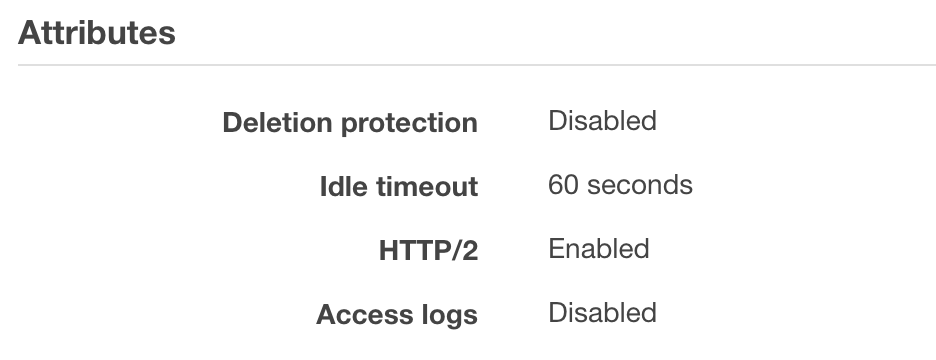
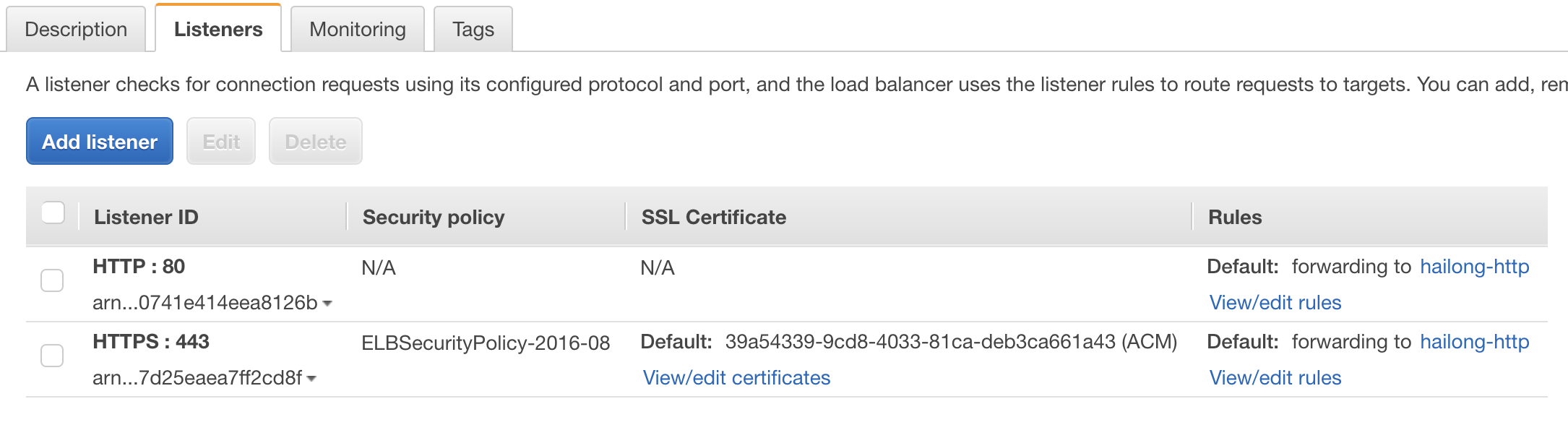
- Then I add a CNAME record on my domain name server and point to the A record of the ALB.
- Finally, I use the domain name to access the Rancher. Every half hour I will log in and log out, or randomly operate the buttons on the UI. It works well in my environment.
 kingsd041
on 30 Oct 2018
kingsd041
on 30 Oct 2018
@kingsd041 hi, we are also continuously having this issue for months (using 2.0.8) and switching on/off http2 it backs to normal. We seen the issue happening more frequent at a point it just stresses everyone out in the team when more than 1 session has been opened with Rancher, either with the same user in different browsers, or different users in different computers. After a few minutes, we frequently have the anonymous issue until we reset http2 again. Hope it helps to debug further.
crsantini
on 30 Oct 2018
@kingsd041 I'm running 2 ALB's now (and still on Rancher 2.0.4). One ALB where only my traffic to Rancher goes. This one has had the issue one time in 2 weeks.
Our primary ALB for Rancher has around 20-40 daily users. Some days go by with only one issue. Sometimes it happens 10 times per hour. We have not found a reason for it, but I believe that sometimes you start seeing that websockets for logs or shells can not open just before the failure.
jannylund
on 30 Oct 2018
I am having the same problem. Shortly before getting kicked out from the UI, i also get these errors:

Hopefully this will help in finding the issue.
 Jonathan1
on 30 Oct 2018
Jonathan1
on 30 Oct 2018
@Jonathan1 @digitalassembly Which authentication type are you using?
I use local authentication, multiple accounts are logged in at the same time, and the issue is not reproduced.
kingsd041
on 31 Oct 2018
Hi Hailong, I'm using local authentication as well, just had the issue 15
min ago when another work mate logged with a different account, the issue
dropped us both after 15 min he was in.
On Wed, Oct 31, 2018 at 12:45 PM hailong notifications@github.com wrote:
@Jonathan1 https://github.com/Jonathan1 @digitalassembly
https://github.com/digitalassembly Which authentication type are you
using?
I use local authentication, multiple accounts are logged in at the same
time, and the issue is not reproduced.—
You are receiving this because you were mentioned.
Reply to this email directly, view it on GitHub
https://github.com/rancher/rancher/issues/14931#issuecomment-434541786,
or mute the thread
https://github.com/notifications/unsubscribe-auth/AKkFEHC6jwxkgRJhljN7nKKzIrP3g6rlks5uqQ7cgaJpZM4Vtvqm
.
crsantini
on 31 Oct 2018
Hi @digitalassembly , Can you find me in wechat by searching howl6616
loganhz
on 31 Oct 2018
@kingsd041 Let me detail my setup
- Single node Rancher 2.0.8 (Rancher OS) using external EBS storage for data with option no certificate, setup as per rancher docs.
- Using Route 53 A records Alias to point to my Application Load Balance
- Application load balance having port 443 open using a custom certificate created by AWS certificate manager covering *.mydomain.com
- Using ELBSecurityPolicy-2016-08
- 443 routes to port 80 on Rancher container
- Idle timeout set to 4000 seconds
- HTTP/2 currently disabled (but thats what does the trick to restore connection, enable/disable )
@loganhz I will add you in a few hours
crsantini
on 31 Oct 2018
@kingsd041 Both me and @Jonathan1 are using Azure AD, but the same happened with local auth. So no difference in auth.
@digitalassembly it's actually enough to change idle timeout, so we typically just add a second now and get some tracking on amount of troubles. :trollface:
jannylund
on 31 Oct 2018
This is an extremely tricky issue, and we've seen specific issues related to using Rancher 1.x + ALB. To the point that we don't support ALB w/ Rancher 1.x because we could never explain the issues. Looking at this issue again, the only way I can even guess how this could happen is that ALB reuses TCP connection in a manner that is essentially incorrect or very different from how a web browser behaves.
My best guess is that a websocket connection is opened. At some point the ALB decides the client connection (from browser to ALB) is disconnected or timed out or completed. It then adds that TCP connection back to a free pool. Now a new HTTP request comes in and uses that existing TCP connection from the pool. I have to dig into how the guts of http websockets are supposed to work because the expected behavior is that once a websocket connection is upgraded, that TCP connection can not be reused for a subsequent HTTP request. It must be closed by the client. It is quite possible that Rancher is doing something wrong here. I will investigate further, but at this point I'm quite confident it is due to TCP reuse so I should be able to find a solution (hacky or proper).
 ibuildthecloud
on 1 Nov 2018
ibuildthecloud
on 1 Nov 2018
@ibuildthecloud Please keep in mind that there seem to be no reports of this happening when Rancher is run in HA mode, only for the standalone installations. Is there anything that's working differently that could relate to this? (Or am I just missing reports on this happening with HA setups)
jannylund
on 1 Nov 2018
@jannylund yes, one more proxy. An HA installation has nginx ingress controller in front of Rancher. So it goes ALB->nginx->rancher.
ibuildthecloud
on 2 Nov 2018
I have a curl command to reproduce this issue. So much closer to a fix. It's actually an upstream kubernetes issue.
ibuildthecloud
on 2 Nov 2018
The easiest way to reproduce this issue is to go to the UI, open the dev tools, and then go to any pod and open a shell. Then, from dev tools, copy the "exec" API request as a curl command and run from the console. Change the URL part that has the pod name in it to be something invalid. When you run the curl command you should now get a 404. Run that a bunch of times. Your ALB should be broken....
ibuildthecloud
on 3 Nov 2018
Updates on steps to repro based on the conversation with @ibuildthecloud: the issue only happens with docker standalone container behind ALB.
 alena1108
on 3 Nov 2018
alena1108
on 3 Nov 2018
Thanks all!
It will be fixed and released in v2.1.2
loganhz
on 5 Nov 2018
rancher/rancher:master
Reproduced in v2.0.8
- Create ALB (ensure HTTP/2 is disabled in ALB attributes)
- Deploy Rancher as a single container
- Followed steps to reproduce
- Deployed workload
- Get curl command to execute shell - replacing pod name w/ invalid name
- After running curl command a few times, saw the offending error:
{
  "kind": "Status",
  "apiVersion": "v1",
  "metadata": {

  },
  "status": "Failure",
  "message": "forbidden: User \"system:anonymous\" cannot get path \"/k8s/clusters/c-z7j9j/api/v1/namespaces/default/pods/inval-7x9xd/exec\"",
  "reason": "Forbidden",
  "details": {

  },
  "code": 403
}
- Deployed fresh install of rancher/rancher:master
- Followed steps to reproduce
Did not see the offending error -- all commands returned 404 correctly.
 bmdepesa
on 8 Nov 2018
bmdepesa
on 8 Nov 2018
@loganhz @bmdepesa is there any scheduled release date for 2.1.2 or 2.2? This is a huge pain for us and it's growing worse every day.
jannylund
on 21 Nov 2018
@jannylund 2.1.2 will be released soon (after Thanksgiving )
loganhz
on 21 Nov 2018
I guess Darren found and reported the vulnerability CVE-2018-1002105 to Kubernetes when he was fixing this issue. :)
loganhz
on 5 Dec 2018
Related issues
 oomathias
·
50Comments
oomathias
·
50Comments
 ghost
·
93Comments
ghost
·
93Comments
 ciokan
·
102Comments
ciokan
·
102Comments
 johnrengelman
·
50Comments
johnrengelman
·
50Comments
 bscott
·
67Comments
bscott
·
67Comments
Most helpful comment
I have a curl command to reproduce this issue. So much closer to a fix. It's actually an upstream kubernetes issue.