I have my library on a network drive, I've even splitted the library in there into A-C, D-F subfolders, but towards end of my import every folder just loads forever while browser console spams sync received, re-fetching collection on short intervals (seems to me the listing times out and Radarr can't recover).
Would be nice if there was a configuration option to increase the timeout for users who have large libraries in slower speed drives.
Radarr Version: 0.2.0.870
 redfellow
All 10 comments
How long have you waited? Also did you try turning the pagesize down?
 galli-leo
on 20 Nov 2017
galli-leo
on 20 Nov 2017
At one time I left it open for 30min, it keeps looping that sync-received line. I imported the library in 100 movie chunks, until I couldn't get anything to show up unless I reduced sice to 50, then to 30 and finally to 15 and then finally even 15 wouldn't cut it.
I believed it either times out or some file locks the scan up so that it doesn't continue.
So finally I splitted library into EVEN smaller chunks and managed to get the remaining files to import -- so basicly large folder over a network share times out while trying to read, and the timeout should be configurable/increased (no such issue with Sonarr interestingly, with an even larger Series library).
redfellow
on 21 Nov 2017
Bulk import is broken for anything more than 100 movies. Apparently its "not a bug" (#743).
 stalks
on 27 Jan 2018
stalks
on 27 Jan 2018
Yeah I figured, but as this is free software, I don't feel so entitled that I'd expect anything I report or suggest as feature to be fixed or implemented.
If info I gave is useful at some point to someone else or the devs, great!
FYI I got around this problem by downloading everything over network share on my PC, imported them, then just modified the movie path to point to the network share.
redfellow
on 27 Jan 2018
@rnyberg The problem is probably that your movies are on a networked share. Radarr scans the files in those folders to give somewhat useful info while bulk importing, so it probably takes a while to do that over the network. I have some plans for speeding up bulk import, but that's gonna take a long while to really implement.
galli-leo
on 30 Jan 2018
@galli-leo While I do not expect this to be fixed any time soon, I can't see why an existing reproductible issue is closed before the problem itself is rectified?
At the very least, the infinite loop (sync received, re-fetching collection that never stops, while UI shows a loading indicator) that makes an average user think Radarr is doing actual work could be triaged if no actual fix to the underlying problem is on the radar.
redfellow
on 7 Feb 2018
@rnyberg That's not an infinite loop, that's just signalr working and logging.
I closed this, since we are tracking bulk import improvements at #733 (Should have been more explicit)
galli-leo
on 8 Feb 2018
Hi guys - @redfellow @stalks,
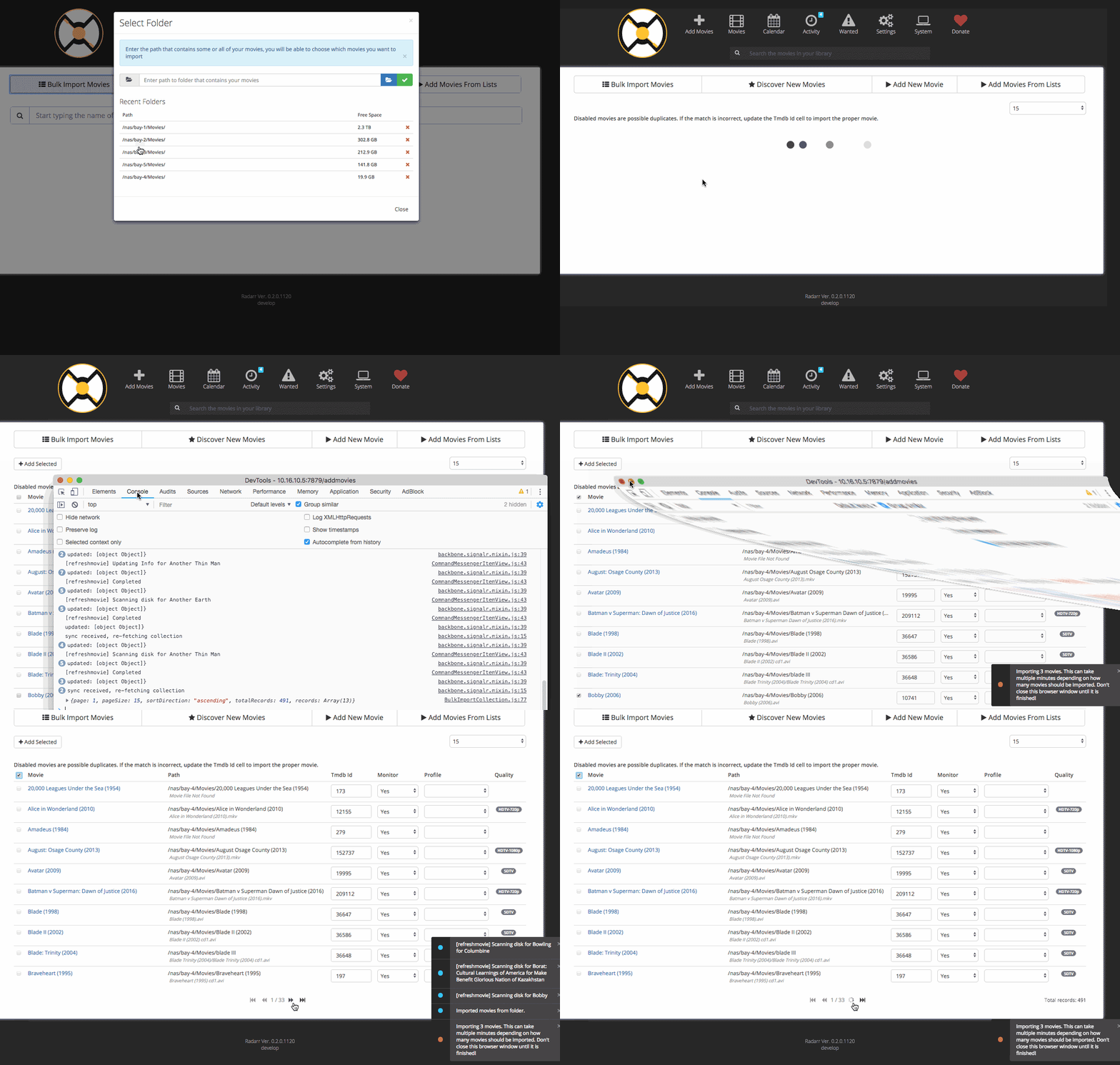
If you're like me and trying to import thousands of movies (around 4,000+ movies) just run the following javascript in your browser's developer tools (Chrome DevTools Console):
Be sure to leave the default "list size" to 15 (the smallest) -- The script will just select all the select boxes, click add selected, wait a few moments, and repeat until you're done...
function addMovies() {
    var rowCount = $('#x-movies-bulk >table >tbody >tr').length;
    if(rowCount => 10) {
        $('#x-movies-bulk > table > thead > tr > th.select-all-header-cell.renderable > input[type="checkbox"]').trigger('click');
        $('#x-toolbar > div > div.page-toolbar.pull-left.pull-none-xs.x-toolbar-left > div > div > div').trigger('click');

        setTimeout(function(){
            // Go to the next page...
            $('#x-movies-bulk-pager > div > ul > li:nth-child(4) > i').trigger('click');
        }, 1000 * 15);

    }
}

addMovies();
setInterval(addMovies, 1000 * 30)
 ned-kelly
on 20 Jul 2018
ned-kelly
on 20 Jul 2018
If your naming is less than ideal, you can modify the code ned-kelly has in his example to use these:
Check off all movies that aren't "no movie found" or "cd 1/2..."
var listOfPaths = ""; var movieYear = "";
$("#x-movies-bulk tr").each(function(idx, a){

    var cells = $(a).find("td.select-row-cell input");
    if(cells.length > 0) {
        $(a).find(".movie-title-cell").last().each(function(idx2,c){
            var moviePathContents = $(c).find("span").text();
            var notFound = moviePathContents.indexOf("Movie File Not Found");
            var haveCD = moviePathContents.indexOf(" cd");

            if( moviePathContents.indexOf("Movie File Not Found") === -1 && moviePathContents.indexOf(" cd") === -1  ) {
                console.log(moviePathContents);
                console.log(cells);
                cells.first().prop("checked", true);
                cells.first().change();
            }
        });
    }
});
console.log(listOfPaths);
after they're ticked, review the ticks to ensure the match looks good then add.
Echo a list of rm commands you can use to wipe out folders that contain duplicates of movies
var listOfPaths = ""; var movieYear = "";
$("#x-movies-bulk tr").each(function(idx, a){

    var cells = $(a).find("td.select-row-cell input");
    if(cells.length > 0) {
        var isThisDisabled = $(a).find("td.select-row-cell input").first().prop("disabled");

        $(a).find(".movie-title-cell").each(function(idx2,c){ $(c).find("span").remove();
            var thisText = c.innerText; thisText = thisText.replace("\r\n",""); thisText = thisText.replace("\n","");

            if(isThisDisabled && thisText.substring(0,1) == "/") {
                listOfPaths += "rm -rf \"" + thisText + "\"\n";
            }
        });
    }
});
console.log(listOfPaths);
echo a list of mv commands you can copy paste into a terminal to add the movie year to the path name
var listOfPaths = ""; var movieYear = "";
$("#x-movies-bulk tr").each(function(idx, a){ $(a).find(".movie-title-cell").each(function(idx2,c){ $(c).find("span").remove();
    var thisText = c.innerText; thisText = thisText.replace("\r\n",""); thisText = thisText.replace("\n","");
//console.log(thisText.substring(thisText.length - 6));
    if(thisText.substring(thisText.length - 6, thisText.length - 5) == "(") { movieYear = thisText.substring(thisText.length - 6);  } else { listOfPaths += "mv \"" + thisText + "\" \"" + thisText + " " + movieYear + "\"\n"; } });  });

console.log(listOfPaths);
 aaronkuchma
on 17 Aug 2019
aaronkuchma
on 17 Aug 2019
This saved my ass thanks guys
 timellemeet
on 8 Dec 2019
timellemeet
on 8 Dec 2019
Related issues
 chrisallen
·
3Comments
chrisallen
·
3Comments
 danielb2
·
3Comments
danielb2
·
3Comments
 onedr0p
·
3Comments
onedr0p
·
3Comments
 HitsvilleUK
·
3Comments
HitsvilleUK
·
3Comments
 alpinewinter
·
3Comments
alpinewinter
·
3Comments
Most helpful comment
Hi guys - @redfellow @stalks,
If you're like me and trying to import thousands of movies (around 4,000+ movies) just run the following javascript in your browser's developer tools (Chrome DevTools Console):
Be sure to leave the default "list size" to 15 (the smallest) -- The script will just select all the select boxes, click add selected, wait a few moments, and repeat until you're done...