Radarr: Allow selecting Alternate Name when adding movies
Description:
When adding a movie to Radarr, allow the user to select an alternative title instead of using the main US title. Also, allow the user to edit an already added movie to select an alternative title.
Radarr Version:
0.2.0.654
 schmittyd
All 23 comments
What exactly would you like this feature to accomplish? We already store the alternative titles and use them when checking whether a found movie matches the one you want. The only thing where we could improve, is also searching with the alternative title if your indexer does not support searching by imdbid. For that we already have a feature request open.
 galli-leo
on 27 Apr 2017
galli-leo
on 27 Apr 2017
Sorry if I wasn't clear. I meant, instead of using the original title when adding to Radarr, give the option of using the original title or using an alternative, and using that to name the title in the file system. I am from Australia, and find it annoying that it uses the main/US title, both in Radarr and the file system.
schmittyd
on 27 Apr 2017
Gotcha.
galli-leo
on 27 Apr 2017
I would like to second this request, but I don't even think it's about a regional difference, just a user preference. For example; If I'm trying to find Star Wars: Episode IV - A New Hope I will only find it under the title Star Wars, and similarly The Empire Strikes Back and Return of the Jedi are not found by searching Star Wars. The end result is these files, when downloaded through Radarr, find their way to my media folder and into Plex, where I then have to setup the alternate names in Plex as well because it's much easier to find a Star Wars movie in plex by going to the S section and finding all Star Wars: Episode # - [rest of title] names than it is to look for The Empire Strikes Back which is nowhere near the majority of the other episodes. Also Star Wars: The Force Awakens with it's default title gives no indication as to it's chronology in the series. Star Wars is just one example, surely more can be discussed if needed, but hopefully this makes the point that many of us would just prefer to organize things (on the file system and elsewhere) using the alternate names for certain movies.
 nemchik
on 27 Apr 2017
nemchik
on 27 Apr 2017
@nemchik I think you should update the titles on TMDB for such series. Maybe also hit up Travis Bell (the creator of TMDB) about keeping titles consistent. That makes way more sense, since then the titles are also consistent for users of TMDB services other than Radarr.
galli-leo
on 27 Apr 2017
Fair point. I'll look into that, thanks! (Didn't know I could!)
nemchik
on 27 Apr 2017
@nemchik That's the beauty of TMDB :)
galli-leo
on 27 Apr 2017
Would it be possible to re-open this issue? It seems as though the moderators at TMDB have decided to keep the short names for many movies and expect people to search alternatives via "alternative titles".
See:
https://www.themoviedb.org/talk/568eac2b9251416b4000328a
Edit: I've asked TMDB to re-evaluate this as well, since they include the "Star Trek" prefix in the Star Trek TOS movies.
 ngeraedts
on 18 Feb 2018
ngeraedts
on 18 Feb 2018
@ngeraedts This issue is already open. Also probably not gonna happen anytime soon, since we only get the alternative titles after we already added the movie. I also wrote a comment on the linked thread.
galli-leo
on 18 Feb 2018
I don't normally like to point to other software and say "but X can do it!" Because the usual response is "then go use X" but I'm going to say it: couch potato.
I use Radarr because I find it much more pleasant than couch potato in every respect except this one. Radarr does an amazing job at everything it does, but it doesn't do this. We're relying on an outside source and it's making this one small part of the overall experience just a little bit worse.
nemchik
on 18 Feb 2018
@nemchik Unfortunately, we can do nothing about this, since we only get the alternative titles after we add the movie to the sql database. And as far as I can see, the issue is only with the first three Star Wars movies? So you can probably rename the folders manually for the time being.
galli-leo
on 18 Feb 2018
Sorry for incorrectly asking of the reopen - I saw the referenced issue and my tired brain misinterpreted.
I guess manual intervention with "Static Path: Yes" will do for the time being.
ngeraedts
on 18 Feb 2018
AVP: Alien vs. Predator (2004)
Aliens vs Predator: Requiem (2007)
These are pretty inconsistent in their formatting.
The Captain America movies lack chronology (their titles don't indicate what order they should be in).
The dark knight trilogy starts with Batman begins and again none of the 3 indicate chronology in their titles.
The divergent series.
The fast and the furious series.
Harry Potter.
Hellraiser.
The Hobbit.
The second Jurassic Park moved is called "The Lost World", and again the whole series has no chronology in the names.
Kingsman.
The Lord of the rings
The matrix
Pirates of the Caribbean
The new JJ Abrams Start Trek movies
Thor
Underworld
X-Men
And I'm sure there's more.
Some of these are the fault of the creators giving their movies shitty names and making a series with names that don't match. But pretty much every example above can be solved by alternate titles.
nemchik
on 18 Feb 2018
I would also like to request this feature. I understand you only grab the alternate titles after the movie is added. It would seem simple (to me) to add a column of radio buttons on the "Titles" tab of the movie where you could select the title that Radarr uses to display, sort, and rename.

 burgerga123
on 2 Mar 2018
burgerga123
on 2 Mar 2018
This feature would be great for the James Bond movies as well. Right now they're just sitting all over the place. However being able to rename them "James Bond I: Dr. No", "James Bond II: From Russia With Love" etc would make it so much cleaner looking, IMHO.
 LandMineHare
on 17 Apr 2018
LandMineHare
on 17 Apr 2018
I have nothing else to add other than this feature would be nice.
 djmixman
on 27 May 2018
djmixman
on 27 May 2018
Please i need that too...otherwise it is not/never matching some titles and the whole cut off also not works...just manual by hand...is it still not possible to pick up an alternat ename? Because of that it would already be solved. ;)
 MoeJoe87
on 6 May 2019
MoeJoe87
on 6 May 2019
From a subtitle perspective look up bazarr. It integrates with radarr and should handle subtitles for you.
nemchik
on 6 May 2019
Yes please, possible to store as alternative title would be great!
 tronder88
on 15 Nov 2019
tronder88
on 15 Nov 2019
+1 I've seen some movies get selected with wrong title names which I would like to edit myself
 nipuna-perera
on 17 Dec 2019
nipuna-perera
on 17 Dec 2019
I wonder if this really is that hard to sort out? I've added movies with full Swedish titles (both via "add movie" and "Bulk import") and it still finds the movies on tMDB and matches them. So it must search alternative/original titles already before a movie is added. Problem is it still names it after the English title and I can't change it after the movies been added either.
So in short: it seems like it's doing half of what we want it to do but just not allowing us to display the alternative/original title.


 superdonpan
on 14 Jun 2020
superdonpan
on 14 Jun 2020
I wonder if this really is that hard to sort out? I've added movies with full Swedish titles (both via "add movie" and "Bulk import") and it still finds the movies on tMDB and matches them. So it must search alternative/original titles already before a movie is added. Problem is it still names it after the English title and I can't change it after the movies been added either.
So in short: it seems like it's doing half of what we want it to do but just not allowing us to display the alternative/original title.
Same example here :
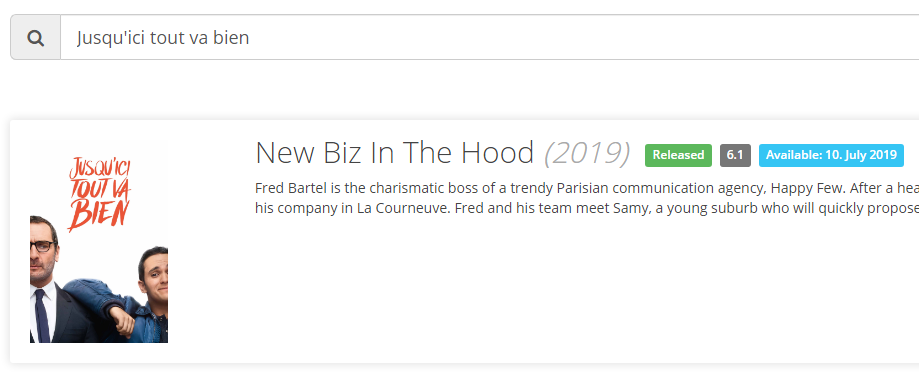
I'm looking for the french movie "Jusqu'ici tout va bien". This is the original name.
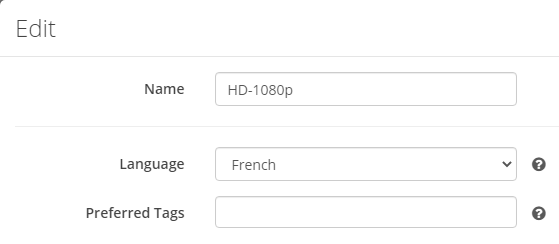
My language profile when adding is "French" :
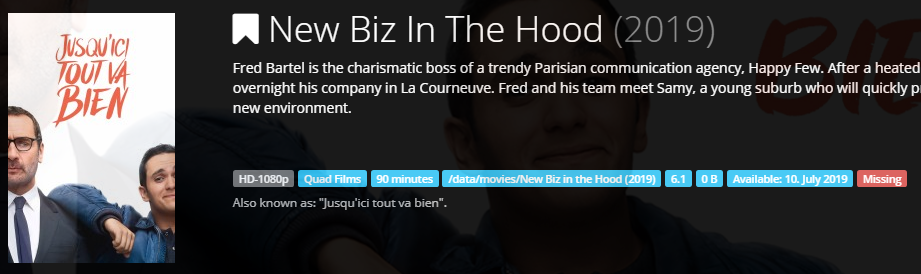
But the Radarr title of the movie is US :
 LeoShivas
on 26 Nov 2020
LeoShivas
on 26 Nov 2020
Same as right above, when adding a non English movie, it often renames it to the English title even if that's not the one I gave and tmdb has the other one. It'd be good to be able to manually change that, and better to be able to auto pick the title from Language L, as part of the bulk rename or refresh.
 John-Gee
on 9 Dec 2020
John-Gee
on 9 Dec 2020
Related issues
 DaveidWeba
·
3Comments
DaveidWeba
·
3Comments
 codaamok
·
3Comments
codaamok
·
3Comments
 feerlessleadr
·
3Comments
feerlessleadr
·
3Comments
 onedr0p
·
3Comments
onedr0p
·
3Comments
 jurpeedurp
·
3Comments
jurpeedurp
·
3Comments
Most helpful comment
I would also like to request this feature. I understand you only grab the alternate titles after the movie is added. It would seem simple (to me) to add a column of radio buttons on the "Titles" tab of the movie where you could select the title that Radarr uses to display, sort, and rename.