Radarr: Bulk import not supported nested subfolders
Due to the size of having 2000+ folders on NAS and slow load over SMB, I have these separated into subfolders 0-9, A, B, C, . . . . X, Y, Z. The issue is when I bulk import, Radarr scans the Sub folder and searches TMDB for it as the title... for instance...
m:moviesLLadder 49 (2004)Ladder 49.mkv
comes up as La La Land (2016)...

 dethknite
All 20 comments
I had a similar experience. I've been adding the subfolder for each letter individually on my bulk imports.
 proxenus
on 14 Mar 2017
proxenus
on 14 Mar 2017
You're going to need a flat folder structure, all your movies in one dir. If you do it like you've got now, every time you add a movie you're going to have to pick the right letter base folder for it.
https://github.com/Radarr/Radarr/wiki/Common-Problems#movie-folders-named-incorrectly
I'd suggest you go to http://feathub.com/Radarr/Radarr where there are already requests for both {Genre} and {MPAA Rating} tags to be usable in file/folder names, you should make one for {TitleFirstLetter}.
 fryfrog
on 16 Mar 2017
fryfrog
on 16 Mar 2017
It's not feasible to put all the movies in one folder - the load times in Kodi and other tools is way too long.
A thought just occurred to me though - Because of paranoia I haven't linked radarr or CP directly to my movie files. I made a local "cache" replicating the entire structure but replacing movie files with a small text file. That way if something is overwritten or deleted by mistake I don't really lose anything.
The way I handle new stuff is I have one designated folder for Radarr to store new movies. Once something is there and the desired quality I manually put it into my real structure.
In my case because I'm not looking for Radarr to update/manage existing movies, I can put all my cache files in one folder to simplify the process for Radarr but keep the real ones broken down by letter.
You can borrow the script I use to build the cache here:
http://pastebin.com/qvrreEnE
proxenus
on 16 Mar 2017
Hi,
I have my movies organized in the same way in folders 0-9, A ... Z and sometimes even with nested subfolders under there, e.g. on Synology NAS /volume6/Movies/A/Aliens/Alien (1979), /volume6/Movies/A/Aliens/Alien 3 (1992), etc. For 3D movies I have created a separate folder /volume6/Movies/_3D with the same folder structure 0-9, A ... Z.
This way the folder structure for my movies keeps organised and if I were to put them all in a single folder, many applications can't handle them and even browsing over a network will become very slow.
When adding /volume6/Movies in bulk update I don't get anything, when I add /volume6/Movies/_3D. ot does find some movies, but incorrectly as dethknite described.
By the first looks of it, Radarr seems pretty cool, but why can't it add movies with multiple nested movie folders correctly, like CouchPotato does? This will be a showstopper from using Radarr if I would have to reorganize ALL my movies.
 Manfred73
on 3 Sep 2017
Manfred73
on 3 Sep 2017
Easiest workaround I've found is to use symlinks to make a flat appearing
directory for radarr. It works for importing. New downloads I put in a
separate location and manually move them to the right folder.
On Sun, Sep 3, 2017 at 8:19 AM Manfred Schürhoff notifications@github.com
wrote:
Hi,
I have my movies organized in the same way in folders 0-9, A ... Z and
sometimes even with nested subfolders under there, e.g. on Synology NAS
/volume6/Movies/A/Aliens/Alien (1979), /volume6/Movies/A/Aliens/Alien 3
(1992), etc. For 3D movies I have created a separate folder
/volume6/Movies/_3D with the same folder structure 0-9, A ... Z.This way the folder structure for my movies keeps organised and if I were
to put them all in a single folder, many applications can't handle them and
even browsing over a network will become very slow.When adding /volume6/Movies in bulk update I don't get anything, when I
add /volume6/Movies/_3D. ot does find some movies, but incorrectly as
dethknite described.By the first looks of it, Radarr seems pretty cool, but why can't it add
movies with multiple nested movie folders correctly, like CouchPotato does?
This will be a showstopper from using Radarr if I would have to reorganize
ALL my movies.—
You are receiving this because you commented.
Reply to this email directly, view it on GitHub
https://github.com/Radarr/Radarr/issues/1170#issuecomment-326807761, or mute
the thread
https://github.com/notifications/unsubscribe-auth/ABi0bbcvAshlj4AJPqnSWNtc5KGMHK31ks5serVkgaJpZM4McnV7
.
proxenus
on 3 Sep 2017
Hi,
I also download new movies to a _New_ folder and move them manually to the correct folder.
I have now added all separate folders manually, about 60 of them. Wouldn't that work? Or does that require a lot of manual work after you move to movie to the correct folder?
Manfred73
on 3 Sep 2017
I use directories on the NAS under /movies by genre that match the Plex Libraries Name like "action" & "Drama", "Comedy" etc...I have some movies in sub folders of the main movie. One such movie under "acton" as a parent folder is Death Race with Death Race (2008) Death Race 2 (2010) Death Race 3: Inferno (2012) Death Race: Beyond Anarchy (2017) as sub folders. Radarr sees only Death Race (2008) & Death Race 3: Inferno... Others it finds several but not all as well. Almost 1500 movies & 50 tv shows all get indexed as expected just not the movie sub folders.
I set the main search path for each movie to the genre folder when adding the movies to be downloaded and Radarr will download the movie into place fine. NZBget and Deluge just drop the finished downloads into a common Finished folder both Radarr & Sonarr pickup and deliver shows as expected.
 Mr-Quinn
on 3 Feb 2018
Mr-Quinn
on 3 Feb 2018
Point import at each genre, you'll need them as root folders anyway.
On Sat, Feb 3, 2018, 2:10 PM Michael notifications@github.com wrote:
I use directories on the NAS under /movies by genre that match the Plex
Libraries Name like "action" & "Drama", "Comedy" etc...I have some movies
in sub folders of the main movie. One such movie under "acton" as a parent
folder is Death Race with Death Race (2008) Death Race 2 (2010) Death Race
3: Inferno (2012) Death Race: Beyond Anarchy (2017) as sub folders. Radarr
sees only Death Race (2008) & Death Race 3: Inferno... Others it finds
several but not all as well.—
You are receiving this because you commented.
Reply to this email directly, view it on GitHub
https://github.com/Radarr/Radarr/issues/1170#issuecomment-362858591, or mute
the thread
https://github.com/notifications/unsubscribe-auth/AAFWxMahzHhb-sN9-3agkN0DPWitDZf6ks5tRNlKgaJpZM4McnV7
.
fryfrog
on 3 Feb 2018
@fryfrog
Point import at each genre, you'll need them as root folders anyway.
I do that already but import doesn't get all the sub folders on Synology NAS...
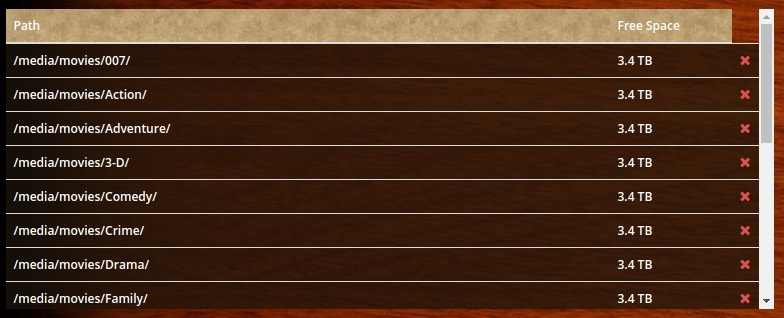
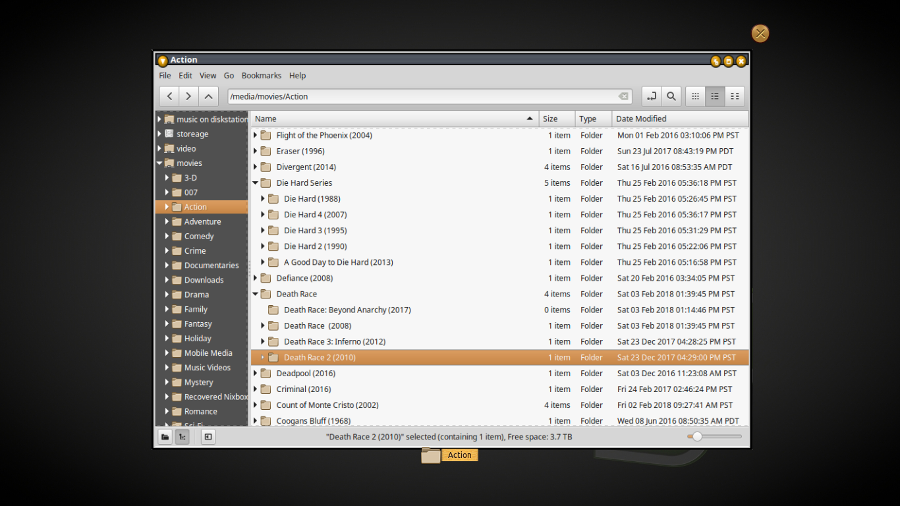
Mr-Quinn
on 4 Feb 2018
But you have ./action/Death Race/Death Race (2008) and ./action/Death Race/Death Race 2 (2010) while you're pointing Radarr's import at ./action/. You either need to move your movies out of ./action/Death Race/ or point that import at ./action/Death Race/ and gain another root folder.
To work, it needs to be pointed at a folder full of folders and files like ./Movie Title (Year)/Movie Title (Year) Edition [Quality-Resolution].ext. The stuff starting w/ Edition is optional, but Radarr will do a terrible job at figuring things out on its own if you don't. It won't get Resolution right and literally can't know Edition or Quality. It'll base Resolution and Quality on the file extension. :/
fryfrog
on 4 Feb 2018
So the name template is applied but - setting the file name / quality is not going to change existing files. RADARR has no way other than the extension to determine what the quality - resolution is....
But going forward it will be applied to new files. Thanks.
Mr-Quinn
on 4 Feb 2018
This issue has been automatically marked as stale because it has not had recent activity. Please verify that this is still an issue with the latest version of Radarr and report back. Otherwise this issue will be closed.
![stale[bot] picture](https://avatars3.githubusercontent.com/in/1724?v=4&s=40) stale[bot]
on 5 Apr 2018
stale[bot]
on 5 Apr 2018
This issue has been automatically marked as stale because it has not had recent activity. Please verify that this is still an issue with the latest version of Radarr and report back. Otherwise this issue will be closed.
stale[bot]
on 5 Jun 2018
This is still an issue, and the only thing stopping me migrating to Radarr.
 Wob76
on 5 Jun 2018
Wob76
on 5 Jun 2018
I tried using symlinks to make the hierarchy appear to be flat but radarr wouldn't follow them. I ended up creating a fake library using only the nfo files in the movie folders to import, it mostly worked but obviously radarr complains the movie file is missing or has a length of 0.
I've lost my radarr database a couple times now and I just stopped importing my library because it's too time consuming to correct all the mismatches on the titles over and over. It would be nice if it could just get the ID from the nfo files.
proxenus
on 6 Jun 2018
This issue has been automatically marked as stale because it has not had recent activity. Please verify that this is still an issue with the latest version of Radarr and report back. Otherwise this issue will be closed.
stale[bot]
on 5 Aug 2018
This is still an issue. To work with Radarr I have to add every subfolder containing movie-folders, f.e. collections or genres.
 hashworks
on 5 Aug 2018
hashworks
on 5 Aug 2018
Yes I have a whole bunch of root directories I have to add because of this and it never gets any better. I wish they'd fix it
Mr-Quinn
on 5 Aug 2018
Now that subfolders are supported in downloads (#4199), is this in the pipeline as well?
 jumoel
on 11 Jun 2020
jumoel
on 11 Jun 2020
Likely not for V3. Or at least not in v3.0. we need to work towards a beta release.
 Qstick
on 11 Jun 2020
Qstick
on 11 Jun 2020
Related issues
 aptalca
·
40Comments
aptalca
·
40Comments
 galli-leo
·
49Comments
galli-leo
·
49Comments
 joelstitch
·
98Comments
joelstitch
·
98Comments
 chrisallen
·
35Comments
chrisallen
·
35Comments
 dawtmaytrikx
·
47Comments
dawtmaytrikx
·
47Comments
Most helpful comment
This is still an issue, and the only thing stopping me migrating to Radarr.