Rabbitmq-server: Erlang detection on Windows

As you can see from the screenshot, Erlang is installed and running, yet the RabbitMQ server installer says it is not there.
 oznetmaster
All 21 comments
Please post questions to rabbitmq-users or Stack Overflow. RabbitMQ uses GitHub issues for specific actionable items engineers can work on, not questions. Thank you.
 michaelklishin
on 1 Nov 2016
michaelklishin
on 1 Nov 2016
It needs to be not just installed but detected by RabbitMQ. See Set ERLANG_HOME in the docs.
michaelklishin
on 1 Nov 2016
There appears to be multiple contradictory pages about installing the server. https://www.rabbitmq.com/install-windows.html says that a normal installation involves only two steps, the two that I tried and which failed.
"Firstly, download and run the Erlang Windows Binary File. It takes around 5 minutes.
Then just run the installer, rabbitmq-server-3.6.5.exe. It takes around 2 minutes, and will set RabbitMQ up and running as a service, with a default configuration."
oznetmaster
on 1 Nov 2016
Also, even if the environment variable is defined as in the alternative installation page, it still does not work:
C:\WINDOWS\system32>if exist "%ERLANG_HOME%\bin\erl.exe" (echo "yes")
"yes"

C:\WINDOWS\system32>if exist "!ERLANG_HOME!\bin\erl.exe" (echo "yes again")

C:\WINDOWS\system32>
The rabbitmq-server.bat file fails with the error:
INFO: Could not find files for the given pattern(s).
The system cannot find the path specified.
ERLANG_HOME not set correctly.
Please either set ERLANG_HOME to point to your Erlang installation or place the
RabbitMQ server distribution in the Erlang lib folder.
because of the above bug.
oznetmaster
on 1 Nov 2016
This is not something that's commonly reported, so there is something system-specific going on. Please start a thread on rabbitmq-users, that's what we use for discussions. If something comes out of it, we will file a specific issue about that, just like I did with #1018.
michaelklishin
on 1 Nov 2016
So if it is not commonly reported, even though it is repeatable and demonstrable with a very simple example, it is not a bug to be fixed?
I am not a google member, and do not have a google account, so I cannot post on google groups.
oznetmaster
on 1 Nov 2016
In case anyone is wondering, my simple demo of the problem should work, even though it is not in a .bat file, because:
[HKEY_CURRENT_USER\SOFTWARE\Microsoft\Command Processor]
"CompletionChar"=dword:00000009
"DefaultColor"=dword:00000000
"EnableExtensions"=dword:00000001
"PathCompletionChar"=dword:00000009
"DelayedExpansion"=dword:00000001
You don't need a Google account. IIRC you need to send an email to [email protected] to subscribe. I'm not sure how to unsubscribe after that but I'm guessing using +unsubscribe instead would work. Email title and content don't matter.
 essen
on 1 Nov 2016
essen
on 1 Nov 2016
I found the bug. The problem is that delayed expansion (!) only works on environment variables that are defined as system variables. It does not work for environment variables defined as user variables.
Our users are normally restricted from modifying system environment variables on their computers.
This needs to be documented at least, if not fixed. Applications should not require changes to system environment variables to work.
oznetmaster
on 1 Nov 2016
Furthermore, system environment variables apparently can only be accessed from an administrative command prompt.
oznetmaster
on 1 Nov 2016
@oznetmaster if we don't have any specifics then it's not at all obvious if something is a bug or not. We do not use GitHub issues for discussions or investigation of environment-specific issues.
michaelklishin
on 1 Nov 2016
I'm getting the same error trying to install 3.6.9 build 920 with Erlang R19B3
 ghost
on 26 Apr 2017
ghost
on 26 Apr 2017
uninstall , restart windows, Disable antivirus And kick other windows users if exist then re-install it will work.
 vbrocket
on 30 Apr 2017
vbrocket
on 30 Apr 2017
up to date we still don't have a solution for this
 j0nimost
on 23 Aug 2017
j0nimost
on 23 Aug 2017
@j0nimost see https://github.com/rabbitmq/rabbitmq-server/issues/1017#issuecomment-257708662. When system variables are used, detection works as expected.
michaelklishin
on 23 Aug 2017
I'm unable to get the installer to work on a new VM (https://developer.microsoft.com/en-us/windows/downloads/virtual-machines)
System variables:
ERLANG_HOME is set to C:\Program Fileserl9.1
Path is set to include %ERLANG_HOME%
Below is a screenshot of everything configured
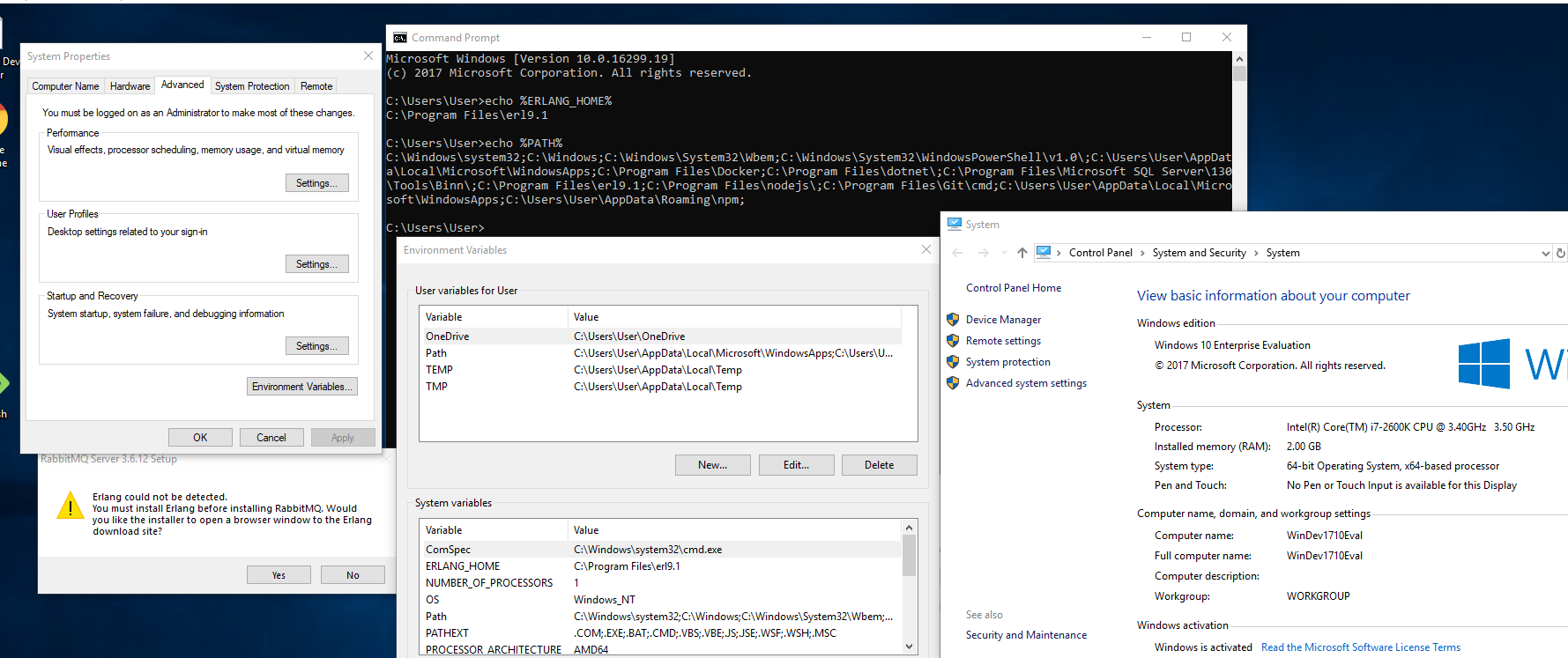
Sorry if this is necro'ing, but I'm a new user to this and can't get it to install.
 cbjjensen
on 5 Nov 2017
cbjjensen
on 5 Nov 2017
@cbjjensen - you can see here that the installer queries the registry to find Erlang.
At this point, can you check the HKLM\Software\Ericsson\Erlang registry key to see what the value is? That would be valuable information.
After doing that, I recommend that you fully uninstall Erlang and RabbitMQ, remove the ERLANG_HOME environment variable and reboot your VM.
Then, log in and start an administrative command prompt, and run the Erlang installer from there. Once Erlang is installed, check to see if the HKLM\Software\Ericsson\Erlang registry key is present and valid. If so, install RabbitMQ from the administrative command prompt.
I've done quite a few "from scratch" installations of RMQ in Windows VMs and haven't run into this issue 🤷♂️
 lukebakken
on 5 Nov 2017
lukebakken
on 5 Nov 2017
I did a RUN, instead of a save when downloading it from the erlang page (not as admin). Here is the result... There isn't an entry there!

I'm going to try a few more things and report back here with the results.
cbjjensen
on 5 Nov 2017
Thanks for the info. If you're not using an administrative account while installing Erlang, it won't have permission to write to HKLM. Apparently that installer doesn't warn about that, either. Let me know how the rest of your testing goes, and thanks again for the report.
lukebakken
on 5 Nov 2017
Running the erlang (otp_win64) installer as administrator has resolved the issue.
cbjjensen
on 5 Nov 2017
@cbjjensen I will make sure the docs are very clear about that. Thanks!
lukebakken
on 5 Nov 2017
Related issues
 gerhard
·
8Comments
gerhard
·
8Comments
 firewave
·
8Comments
firewave
·
8Comments
 gmr
·
4Comments
gmr
·
4Comments
 carlhoerberg
·
7Comments
carlhoerberg
·
7Comments
 ppyoosuf
·
5Comments
ppyoosuf
·
5Comments
Most helpful comment
Running the erlang (otp_win64) installer as administrator has resolved the issue.