- [x] 我确定我已经尝试多次触发此次问题,并且将会提供涉及此问题的系统环境,每个软件及其版本。
简单描述这个 Bug:
- 在MacOS平台Qv2ray无法在开机时自动隐藏界面
即使我开机已经选择了自动连接(固定链接模式)

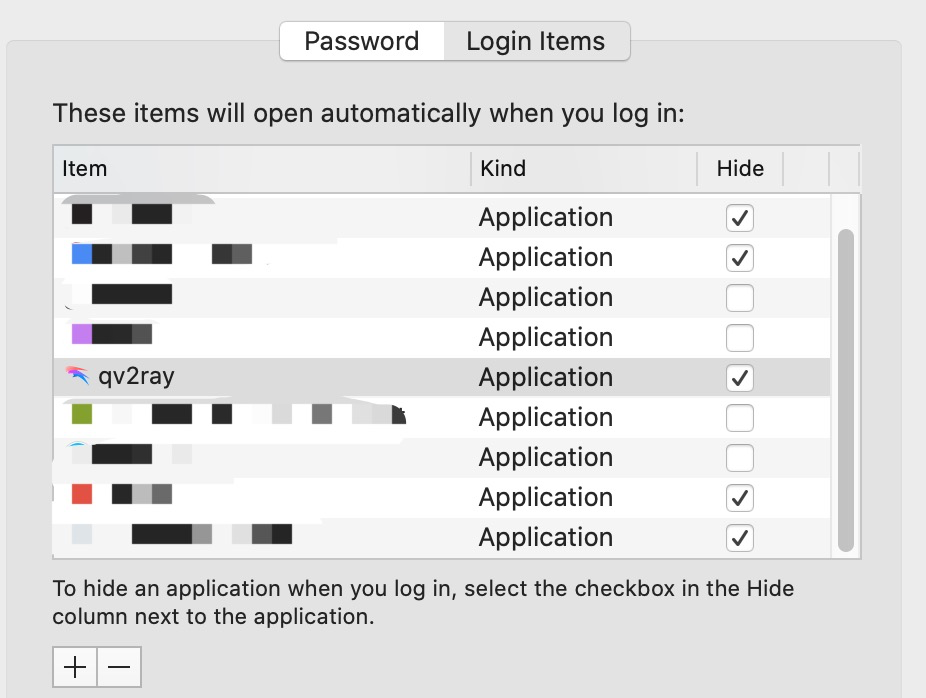
在系统设置中设置了
hide也无法成果
如何触发这个 Bug:
- 安装Qv2ray
- 设置开机自启动
- 重启电脑(在重启前无论是否隐藏qv2ray界面均可)
- 登陆账户,发现qv2ray界面仍然弹出,无法直接待在后台
如果是连接问题,在其他 V2Ray 客户端里出现过吗?
非连接问题,请忽略
相关截图或日志
请从此行下面的行开始粘贴 Qv2ray 日志:

[LICENCE]:
This program comes with ABSOLUTELY NO WARRANTY.
This is free software, and you are welcome to redistribute it
under certain conditions.

Copyright (c) 2019-2020 Qv2ray Development Group.
Third-party libraries that have been used in Qv2ray can be found in the About page.

[INIT]: Qv2ray PreInitialization: OK
[COMMON-NETWORK]: Current OpenSSL version: Secure Transport, macOS 10.15
[INIT]: Qv2ray 2.7.0-alpha1 on macOS 10.15 x86_64
[CORE-UI]: Successfully installed a translator for en_US
[INIT]: Application exec path: /Applications/qv2ray.app/Contents/MacOS
[INIT]: Path: /Applications/qv2ray.app/Contents/MacOS/config/ does not contain a valid config file.
[CORE-SETTINGS]: Found a config file, v= path=/Users/xxxxx/Library/Preferences/qv2ray/
[INIT]: Using /Users/xxxxxx/Library/Preferences/qv2ray/ as the config path.
[CORE-UI]: Removed translations
[CORE-UI]: Successfully installed a translator for zh_CN
[COMPONENT-PLUGINHOST]: Reloading plugin list
[COMPONENT-PLUGINHOST]: Loaded plugin: "Builtin Protocol Support" made by: "Qv2ray Core Workgroup"
[CORE-UI]: Found factory style: macintosh
[CORE-UI]: Found factory style: Windows
[CORE-UI]: Found factory style: Fusion
[CORE-UI]: Found QSS style at: ":/uistyles/flatwhite.css"
[CORE-UI]: Found QSS style at: ":/uistyles/psblack.css"
[CORE-UI]: Applying built-in darkmode theme.
[CORE-UI]: Loading data...
[CORE-CONNECTION]: Processing a simple connection config
[CORE-CONNECTION]: Added global DNS config
[QV2RAY-CORE]: Cannot disconnect when there's nothing connected.
[CORE-CONNECTION]: Outbound protocol vless is not a registered plugin outbound.
[CORE-CONNECTION]: Outbound protocol freedom is not a registered plugin outbound.
[CORE-CONNECTION]: Outbound protocol blackhole is not a registered plugin outbound.
[CORE-CONNECTION]: Applying new outbound settings.
[CORE-VCORE]: Starting kernels with V2RayIntegration.
[CORE-VCORE]: Core ABI: macOS Mach-O executable
[CORE-VCORE]: Host ABI: macOS Mach-O executable
[CORE-VCORE]: Host is compatible with core
[CORE-VCORE]: V2Ray output: V2Ray 4.29.0 (V2Fly, a community-driven edition of V2Ray.) Custom (go1.15.2 darwin/amd64);A unified platform for anti-censorship.
[CORE-UI]: ProxyAddress: 127.0.0.1
[COMPONENT-PROXY]: Setting up System Proxy
[COMPONENT-PROXY]: Qv2ray will set system proxy to use HTTP
[COMPONENT-PROXY]: Qv2ray will set system proxy to use SOCKS
[COMPONENT-PROXY]: Unknown error
[COMPONENT-PROXY]: Found 5 network services: USB Controls;USB Controls 2;Wi-Fi;Bluetooth PAN;Thunderbolt Bridge
[COMPONENT-PROXY]: Setting proxy for interface: USB Controls
[COMPONENT-PROXY]: Setting proxy for interface: USB Controls 2
[CORE-VCORE]: gRPC Version: 1.32.0
[CORE-VCORE]: API call returns: 14 (failed to connect to all addresses)
[CORE-VCORE]: API call returns: 14 (failed to connect to all addresses)
[CORE-VCORE]: API call returns: 14 (failed to connect to all addresses)
[CORE-VCORE]: API call returns: 14 (failed to connect to all addresses)
[COMPONENT-PROXY]: Setting proxy for interface: Wi-Fi
[COMPONENT-PROXY]: Setting proxy for interface: Bluetooth PAN
[COMPONENT-PROXY]: Setting proxy for interface: Thunderbolt Bridge
[CORE-UI]: Setting current item.
[COMMON-NETWORK]: Start checking update for channel ID: 0

[COMPONENT-UPDATE]: Received update info:
 --> Latest: 2.6.3
 --> Current: 2.7.0-alpha1
 --> Ignored: 0.0.0
[COMPONENT-UPDATE]: No suitable updates found on channel 0

[COMMON-FILEIO]: Reading geosites from: /usr/local/Cellar/v2ray-core/4.29.0/bin/geosite.dat
[COMMON-FILEIO]: Loaded 1004 geosite entries from data file.
[COMMON-FILEIO]: Reading geosites from: /usr/local/Cellar/v2ray-core/4.29.0/bin/geoip.dat
[COMMON-FILEIO]: Loaded 251 geosite entries from data file.

[BASE-MESSAGING]: Emitting signal: UPDATE_COLORSCHEME

[CORE-CONNECTION]: Processing a simple connection config
[CORE-CONNECTION]: Added global DNS config
[COMPONENT-PROXY]: Clearing System Proxy
[COMPONENT-PROXY]: Unknown error
[COMPONENT-PROXY]: Found 5 network services: USB Controls;USB Controls 2;Wi-Fi;Bluetooth PAN;Thunderbolt Bridge
[COMPONENT-PROXY]: Clearing proxy for interface: USB Controls
[COMPONENT-PROXY]: Clearing proxy for interface: USB Controls 2
[COMPONENT-PROXY]: Clearing proxy for interface: Wi-Fi
[COMPONENT-PROXY]: Clearing proxy for interface: Bluetooth PAN
[COMPONENT-PROXY]: Clearing proxy for interface: Thunderbolt Bridge
[CORE-CONNECTION]: Outbound protocol vless is not a registered plugin outbound.
[CORE-CONNECTION]: Outbound protocol freedom is not a registered plugin outbound.
[CORE-CONNECTION]: Outbound protocol blackhole is not a registered plugin outbound.
[CORE-CONNECTION]: Applying new outbound settings.
[CORE-VCORE]: Starting kernels with V2RayIntegration.
[CORE-VCORE]: Core ABI: macOS Mach-O executable
[CORE-VCORE]: Host ABI: macOS Mach-O executable
[CORE-VCORE]: Host is compatible with core
[CORE-VCORE]: V2Ray output: V2Ray 4.29.0 (V2Fly, a community-driven edition of V2Ray.) Custom (go1.15.2 darwin/amd64);A unified platform for anti-censorship.
[CORE-UI]: ProxyAddress: 127.0.0.1
[COMPONENT-PROXY]: Setting up System Proxy
[COMPONENT-PROXY]: Qv2ray will set system proxy to use HTTP
[COMPONENT-PROXY]: Qv2ray will set system proxy to use SOCKS
[COMPONENT-PROXY]: Unknown error
[COMPONENT-PROXY]: Found 5 network services: USB Controls;USB Controls 2;Wi-Fi;Bluetooth PAN;Thunderbolt Bridge
[COMPONENT-PROXY]: Setting proxy for interface: USB Controls
[CORE-VCORE]: gRPC Version: 1.32.0
[CORE-VCORE]: API call returns: 14 (failed to connect to all addresses)
[CORE-VCORE]: API call returns: 14 (failed to connect to all addresses)
[CORE-VCORE]: API call returns: 14 (failed to connect to all addresses)
[CORE-VCORE]: API call returns: 14 (failed to connect to all addresses)
[COMPONENT-PROXY]: Setting proxy for interface: USB Controls 2
[COMPONENT-PROXY]: Setting proxy for interface: Wi-Fi
[COMPONENT-PROXY]: Setting proxy for interface: Bluetooth PAN
[CORE-VCORE]: API call returns: 14 (failed to connect to all addresses)
[CORE-VCORE]: API call returns: 14 (failed to connect to all addresses)
[COMPONENT-PROXY]: Setting proxy for interface: Thunderbolt Bridge
[CORE-UI]: Setting current item.

[CORE-UI]: INFO: Opening single connection edit window.

[COMPONENT-PROXY]: Clearing System Proxy
[COMPONENT-PROXY]: Unknown error
[COMPONENT-PROXY]: Found 5 network services: USB Controls;USB Controls 2;Wi-Fi;Bluetooth PAN;Thunderbolt Bridge
[COMPONENT-PROXY]: Clearing proxy for interface: USB Controls
[COMPONENT-PROXY]: Clearing proxy for interface: USB Controls 2
[COMPONENT-PROXY]: Clearing proxy for interface: Wi-Fi
[COMPONENT-PROXY]: Clearing proxy for interface: Bluetooth PAN
[COMPONENT-PROXY]: Clearing proxy for interface: Thunderbolt Bridge
[CORE-CONNECTION]: Processing a simple connection config
[CORE-CONNECTION]: Added global DNS config
[QV2RAY-CORE]: Cannot disconnect when there's nothing connected.
[CORE-CONNECTION]: Outbound protocol vless is not a registered plugin outbound.
[CORE-CONNECTION]: Outbound protocol freedom is not a registered plugin outbound.
[CORE-CONNECTION]: Outbound protocol blackhole is not a registered plugin outbound.
[CORE-CONNECTION]: Applying new outbound settings.
[CORE-VCORE]: Starting kernels with V2RayIntegration.
[CORE-VCORE]: Core ABI: macOS Mach-O executable
[CORE-VCORE]: Host ABI: macOS Mach-O executable
[CORE-VCORE]: Host is compatible with core
[CORE-VCORE]: V2Ray output: V2Ray 4.29.0 (V2Fly, a community-driven edition of V2Ray.) Custom (go1.15.2 darwin/amd64);A unified platform for anti-censorship.
[CORE-UI]: ProxyAddress: 127.0.0.1
[COMPONENT-PROXY]: Setting up System Proxy
[COMPONENT-PROXY]: Qv2ray will set system proxy to use HTTP
[COMPONENT-PROXY]: Qv2ray will set system proxy to use SOCKS
[COMPONENT-PROXY]: Unknown error
[COMPONENT-PROXY]: Found 5 network services: USB Controls;USB Controls 2;Wi-Fi;Bluetooth PAN;Thunderbolt Bridge
[COMPONENT-PROXY]: Setting proxy for interface: USB Controls
[CORE-VCORE]: gRPC Version: 1.32.0
[CORE-VCORE]: API call returns: 14 (failed to connect to all addresses)
[CORE-VCORE]: API call returns: 14 (failed to connect to all addresses)
[CORE-VCORE]: API call returns: 14 (failed to connect to all addresses)
[CORE-VCORE]: API call returns: 14 (failed to connect to all addresses)
[COMPONENT-PROXY]: Setting proxy for interface: USB Controls 2
[COMPONENT-PROXY]: Setting proxy for interface: Wi-Fi
[COMPONENT-PROXY]: Setting proxy for interface: Bluetooth PAN
[COMPONENT-PROXY]: Setting proxy for interface: Thunderbolt Bridge
[CORE-UI]: Setting current item.

[CORE-UI]: INFO: Opening single connection edit window.
系统信息
打开首选项 -> 关于,填写以下信息
版本: 2.7.0-alpha1:5931
编译信息:Qv2ray built from Github Action
额外编译信息:qt5.15.0-661fa725506e358a920699f524b21b5f8bd252fb-ci.macos-latest
操作系统
- macOS
安装来源
- Github Release
已安装的插件、版本及安装来源
默认buit-in插件,无其他插件
附加信息
PS:
- 我以前是通过homebrew安装的。这个版本是为了能够用上vless + tcp + xtls才从github中下载安装。安装时未删除旧的qv2ray.app。而且直接覆盖安装
- 在旧版本2.6.x中都要这样的问题。确信不是2.7.0-alpha1才有这样的问题
 Gabirel
All 21 comments
请确认设置了自动连接后,启动时直接弹出界面还是只在 Dock 有图标?
 U-v-U
on 27 Sep 2020
U-v-U
on 27 Sep 2020
@U-v-U 两者均有,100%肯定
Gabirel
on 27 Sep 2020
OT: 不给个 Star 吗老铁
 DuckSoft
on 27 Sep 2020
DuckSoft
on 27 Sep 2020
@DuckSoft off-topic 🤨但是已给
Gabirel
on 27 Sep 2020
更新到 macOS 10.15.7 之后复现了。Debug In Progress。
DuckSoft
on 29 Sep 2020
Seems to have been fixed in https://github.com/Qv2ray/Qv2ray/actions/runs/279598613.
Anyone interested can have a test.
DuckSoft
on 30 Sep 2020
Seems to have been fixed in https://github.com/Qv2ray/Qv2ray/actions/runs/279598613.
Anyone interested can have a test.
稍后测试
Gabirel
on 30 Sep 2020
请确认设置了自动连接后,启动时直接弹出界面还是只在 Dock 有图标?
复议
 michael-kj
on 30 Sep 2020
michael-kj
on 30 Sep 2020
Seems to have been fixed in https://github.com/Qv2ray/Qv2ray/actions/runs/279598613.
Anyone interested can have a test.
很遗憾,我仍然会出现这样的问题。
Gabirel
on 30 Sep 2020
Oh. That's pretty sad. @U-v-U
We need some more investigation.
DuckSoft
on 30 Sep 2020
We do have solution: Use it on Ubuntu! (pass this message pls.
 MXR612
on 30 Sep 2020
MXR612
on 30 Sep 2020
@Gabirel Try this: https://github.com/Qv2ray/Qv2ray/actions/runs/279987641
U-v-U
on 30 Sep 2020
@Gabirel Try this: https://github.com/Qv2ray/Qv2ray/actions/runs/279987641
总结:很遗憾仍然会弹出界面。但在docker栏里无qv2ray的图标了。
发生的经过描述:
- 重启登录后无qv2ray的界面(还未轮到qv2ray启动)
- 此后qv2ray的图标在docker栏里嘣(qv2ray启动中)
- qv2ray启动完成后在docker栏里消失
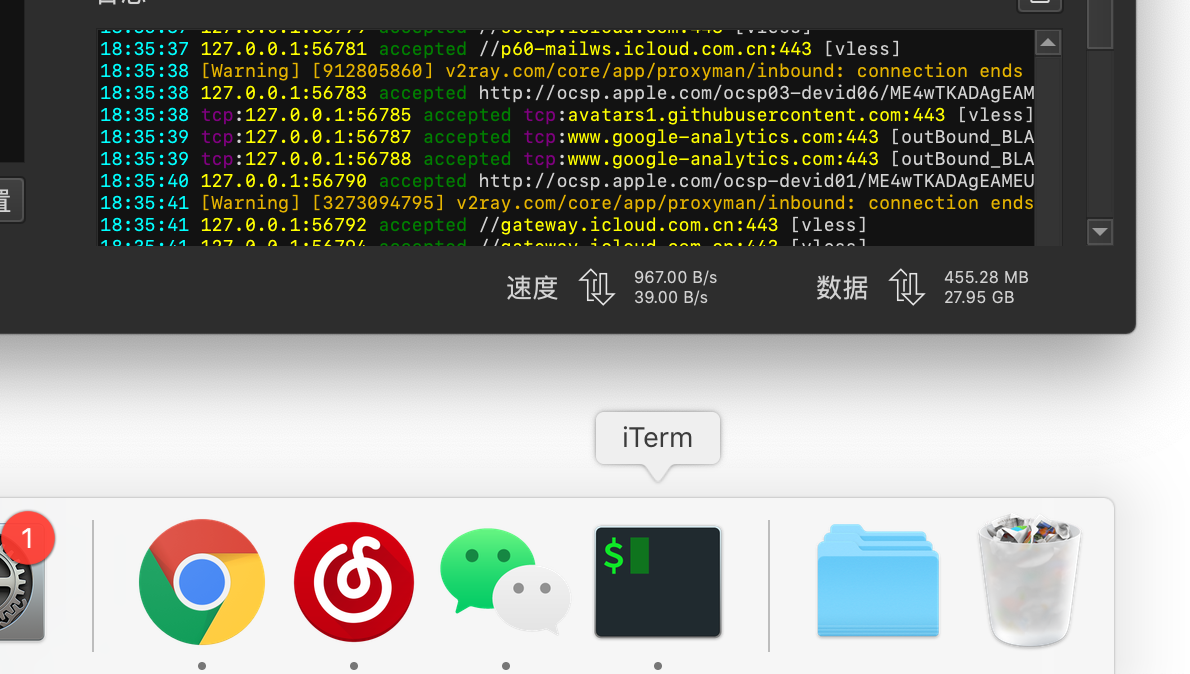
PS: 需要注意的是:消失后,在menu bar里,qv2ray的「隐藏/显示」这一栏的显示为「显示」(但是此时仍有界面窗口。如果此时有窗口,应该显示为「隐藏」) - 此时查看当前desktop可以发现qv2ray的界面
如图所示:(有界面,但是无docker栏)
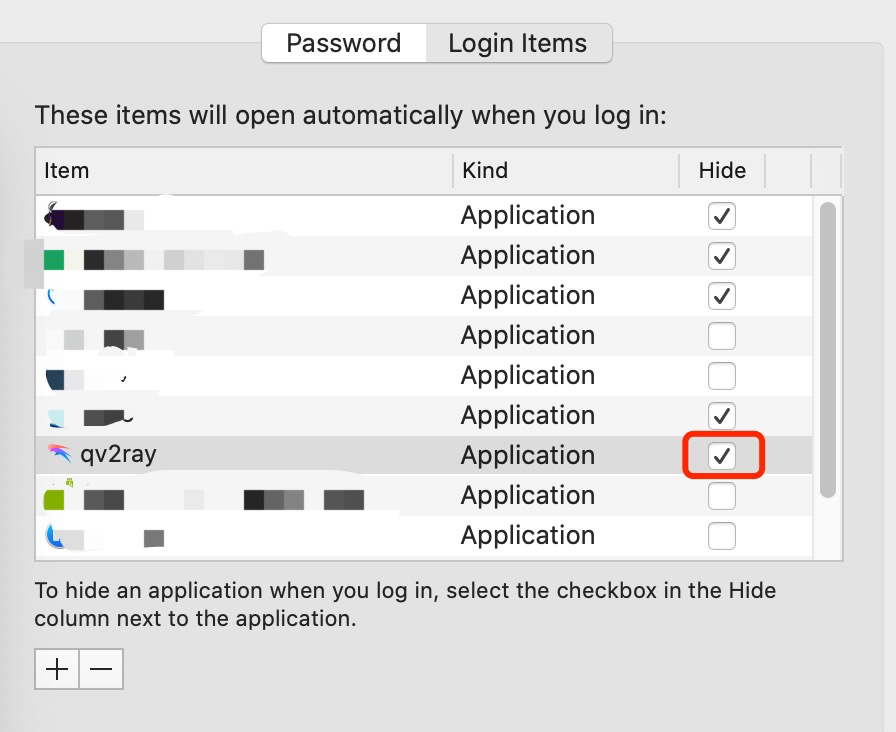
PS: 在下图中,无论是否标注「hide」,界面都无法hide。
Gabirel
on 30 Sep 2020
这个问题有什么进展吗各位
 BleuRain
on 7 Nov 2020
BleuRain
on 7 Nov 2020
这个问题有什么进展吗各位
尚未解决
Gabirel
on 7 Nov 2020
发现问题已解决,可能是什么东西的版本更新导致了这样的不同。故关闭此issue。
版本信息罗列:
- OS:
macOS 10.15.7 - Qv2Ray:
2.7.0-alpha1:5946
Gabirel
on 16 Nov 2020
偶然的一次重启机会,发现他这个问题仍然存在。
如下图所示:在docker栏目中没有qv2ray的图标,但是依然会有界面显示。
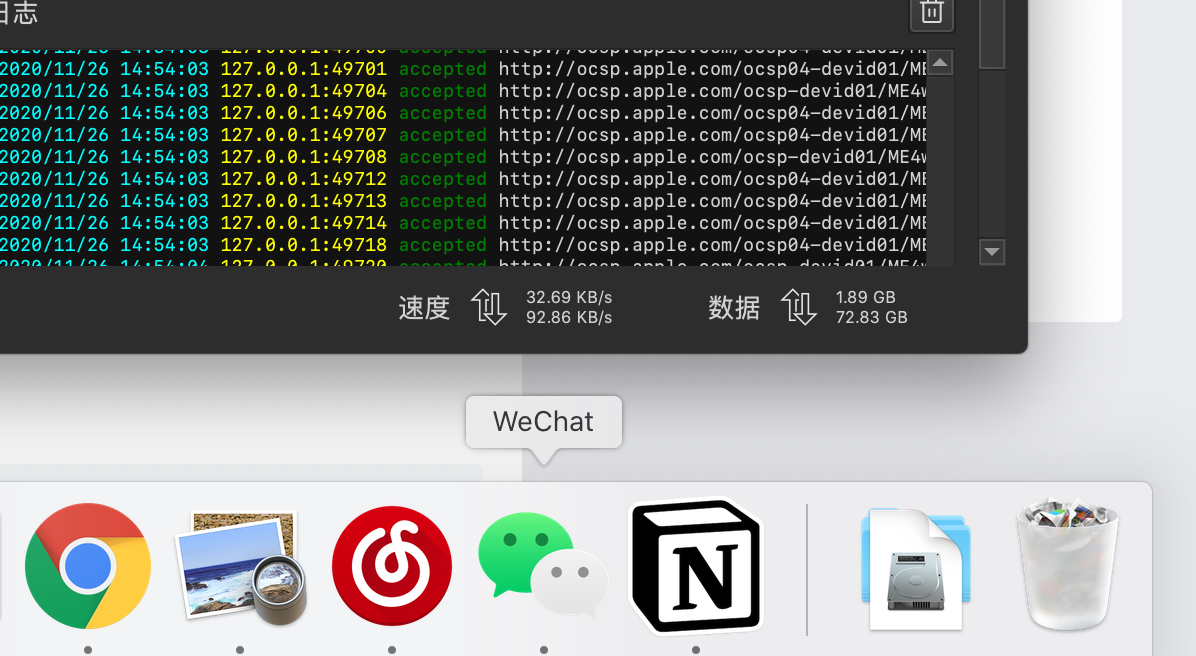
如下图所示:在1的前提之上,发现menu bar的图标控件显示依然异常。即,当前为「隐藏状态」,docker栏目也没有。但是界面确实处于「显示状态」。此时如果点击下图的「显示」,则没有事件发生,menu bar的则会变成「隐藏」,同时界面会被放置到顶端。
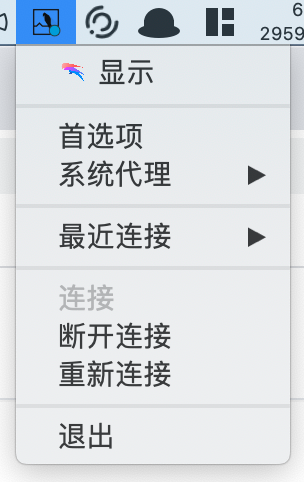
PS:该描述与https://github.com/Qv2ray/Qv2ray/issues/993#issuecomment-701312889相同。
所以,该问题并未解决。因此重开此issue。
Gabirel
on 26 Nov 2020
I encountered the same problem
OS: Linux Manjaro (KDE edition)
 ysl2
on 11 Jan 2021
ysl2
on 11 Jan 2021
@ysl2 Please make sure you have set up automatic connection.
 2014CAIS01
on 11 Jan 2021
2014CAIS01
on 11 Jan 2021
@ysl2 Please make sure you have set up automatic connection.
@2014CAIS01 I just realized that I didn't turn this on, thanks for reminding :-)
ysl2
on 11 Jan 2021
有用ASC优化电脑的么,会不会影响QV2ray使用
 dawei5
on 28 Jan 2021
dawei5
on 28 Jan 2021
Related issues
 probonopd
·
5Comments
probonopd
·
5Comments
 sixg0000d
·
4Comments
sixg0000d
·
4Comments
 178me
·
3Comments
178me
·
3Comments
 lookforkivi
·
6Comments
lookforkivi
·
6Comments
 Passwww
·
5Comments
Passwww
·
5Comments
Most helpful comment
@U-v-U 两者均有,100%肯定