Qv2ray: v2ray core file not found in the AppImage
Briefly describe this bug:
Dear developer, please put v2ray core file into the AppImage and make it work, e.g., by constructing a relative path using QCoreApplication::applicationDirPath().
How can I trigger this bug:
- Download AppImage
- Make Executable
- Run
What is expected to happen
Works
Screenshots
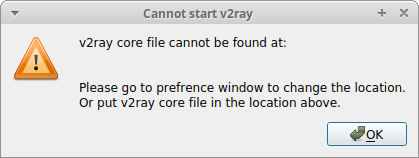
v2ray core file cannot be found at:
Please go to prefrence window to change the location.
Or put v2ray core file in the location above.
System Information
- OS Type: Linux
- Built from the source or download from the release? Downloaded
- Version string in the Preferences Window: 1.99.2.918 Nov 27 2019 04:02:27
Other Info
You may want to write anything if you think it helps us to fix the bug.
Reference:
https://github.com/AppImage/appimage.github.io/pull/1764
 probonopd
All 5 comments
Well, Qv2ray is a separated app compared with v2ray, and, unfortunately, we currently have no plan to bundle it inside the AppImage, even Qv2ray relies on it.
 ghost
on 8 Dec 2019
ghost
on 8 Dec 2019
Why not bundle it inside the AppImage? The idea of AppImage is that you don't need anything else but one file.
probonopd
on 8 Dec 2019
We let the user download themself to prevent abuse of Qv2ray by letting them download and extract the core file, instead of making it a ready-to-use single AppImage.
It's only a GUI instead of a toolset to bypass the firewall, which may against the local law.
ghost
on 9 Dec 2019
We tried not to include these files in order to keep our asses.
Closing now.
 DuckSoft
on 9 Dec 2019
DuckSoft
on 9 Dec 2019
Thanks, I understand.
probonopd
on 9 Dec 2019
Related issues
DuckSoft
·
3Comments
 LuXts
·
5Comments
LuXts
·
5Comments
 BA-NANA
·
7Comments
BA-NANA
·
7Comments
 178me
·
3Comments
178me
·
3Comments
 danuonuo
·
5Comments
danuonuo
·
5Comments