Version 2.0
v1.3.8.* 大概会是最后一个 v1 版本了
由于学业等原因,v2可能会2020年再与大家相见
Version 2.0 将会包含以下功能更新
核心交互
- [x] 支持自选的 v2ray 路径
- [x] (希望在主机列表按下 Enter 键可以连接当前选中的代理)纯键盘操作
连接编辑
- [x] 路由添加
- [x] 路由编辑
- [x] 支持负载均衡
- [x] 入站编辑
- [x] 自动启动对应编辑器(简单出站编辑 / 复杂路由编辑)
- [x] JSON 编辑器
- [x] PAC 模块 (Simple HTTP Server)
v2ray API
- [x] 流量统计
分享和导入功能
- [x] 订阅功能
- [x] 一键生成 vmess://
- [x] 在 Vmess 链接导入页面支持同时导入多行
- [x] (多行导入时)若导入时某个链接 parse 出错,希望可以在日志中报警告并跳过该链接
- [x] 二维码 QR-Code-generator
- [x] 通过二维码导入配置
- [x] 分享二维码
连接配置
- [x] 本地 socks5 UDP支持
- [x] IPv6 支持
可选项
- [ ] Windows 网速插件
- [ ] Linux KDE 网速插件
不包含的功能
- MTProto 出站
- 自动生成 tProxy 的 iptables 命令(应该挺难的)
- 自动下载 v2ray core
- 自动下载更新
- macOS 网速插件
有没有别的建议可以提出来的,都可以再下面写呀~
 ghost
ghost
All 125 comments
希望能够加入本地socks5 UDP支持和通过二维码导入配置功能,感谢大佬开发Qv2ray。
 TheWanderingCoel
on 24 Sep 2019
TheWanderingCoel
on 24 Sep 2019
开发分支包含最新的(但是不稳定的)(也不定时的)功能更新,但是不提供release下载😢。
有兴趣的朋友们可以 git checkout dev 切换到开发分支进行测试
ghost
on 24 Sep 2019
在此期间,针对 v1 版本提出的 bug 类 issue 依然会被修复,功能添加请求将会移动到此 issue 下
ghost
on 24 Sep 2019
From #72:
- 希望可以在 Vmess 链接导入页面支持同时导入多行
- (多行导入时)若导入时某个链接 parse 出错,希望可以在日志中报警告并跳过该链接
 DuckSoft
on 25 Sep 2019
DuckSoft
on 25 Sep 2019
From #75:
希望在主机列表按下 Enter 键可以连接当前选中的代理
DuckSoft
on 25 Sep 2019
【Announcement】Qv2ray v2.0 将不再支持 32 位 Windows 版本
ghost
on 29 Sep 2019
[Help] Can someone @axionl help designing icons for these buttons:
- Ping Server (Maybe a small gauge)
- Share QR Code (A QR logo may help)
- share as
vmess:// - Json (Maybe a logo with "JSON" text)
It'll be very helpful! :heart:
ghost
on 2 Oct 2019
能支持二维码就更好了,顺便问一下VMESS连接在哪导入?
 leoxxx
on 3 Oct 2019
leoxxx
on 3 Oct 2019
主界面第二个按钮,点击即可打开导入窗口,下拉菜单里面可以选择 vmess://

ghost
on 3 Oct 2019
主界面第二个按钮,点击即可打开导入窗口,下拉菜单里面可以选择
vmess://
谢谢啊。我刚试了一下,导入报错。提示是这个。
VMess String Check
Some internal error occured
OK

下面是我的连接,我导入到安卓端完全没问题。
VMESS STRING HIDDEN BY THE OWNER
leoxxx
on 3 Oct 2019
@lhy0403
首次运行会提示你放入核心,并生在用户名的文件下生成一个.qv2ray文件夹。但我偿试修改了Qv2ray.conf中的路么,并转移.qv2ray文件夹到Qv2ray.exe的要目录,然而并不起作用。我觉得生成的配置文件放在软件根目录下可以方便转移。
leoxxx
on 3 Oct 2019
你好,目前不支持自定义 .qv2ray 路径
ghost
on 3 Oct 2019
能不能添加均衡负载?
leoxxx
on 3 Oct 2019
能不能添加均衡负载?
可以……
会包含在路由编辑里面
不过这个功能真的有人用我表示很惊讶😂
ghost
on 3 Oct 2019
https://github.com/lhy0403/Qv2ray/commit/5da7d907654e004c14b7ffba7f17c3d30f98f4cd 和 #91 添加了连接统计功能
这个东西还会进行完善,目前只是傻傻的统计所有流量
ghost
on 5 Oct 2019
@lhy0403
首次运行会提示你放入核心,并生在用户名的文件下生成一个.qv2ray文件夹。但我偿试修改了Qv2ray.conf中的路么,并转移.qv2ray文件夹到Qv2ray.exe的要目录,然而并不起作用。我觉得生成的配置文件放在软件根目录下可以方便转移。
I temporarily create a patch for Arch Linux users. The major changes that relate to Linux are as follows.
- For the
QV2RAY_V2RAY_CORE_PATHandqv2ray.desktop, use/usr/bin/v2rayas the default path to the binary executable. - Modify the
configPathto$HOME/.config/qv2ray
Unfortunately, these parts are still set in the source code in a hard-code way. I hope to get more supporters later for Linux users.
 axionl
on 7 Oct 2019
axionl
on 7 Oct 2019
Well I’m not sure if that will break the functionality of tproxy, because what we are doing currently is to set the capabilities to the binary file And I’m not sure if it is appropriate to tarts the file permission in /bin
However The path for configuration will be changed in the version two, as suggested
ghost
on 7 Oct 2019
[Help] Can someone @axionl help designing icons for these buttons:
* Ping Server (Maybe a small gauge)

* Share QR Code (A QR logo may help)

* share as `vmess://`

* Json (Maybe a logo with "JSON" text)
It'll be very helpful! heart
Sorry, I have no idea about the design of those icons and sometimes the use of ICONS may lead to confusion.
For the following ICON, which is the official logo for the json.org. But before that very few people knew that it could represent JSON and also myself.

As with the others, it is difficult to use the form of ICONS to express some specific computer network technical terms. If you don't mind, consider using text or the font ICONS in SVG format directly.
axionl
on 7 Oct 2019
有关 v2.0 的 linux 版本默认安装位置,欢迎前往 #103 讨论
ghost
on 9 Oct 2019
希望加入ipv6支持
 sonyxu
on 13 Oct 2019
sonyxu
on 13 Oct 2019
希望加入ipv6支持
这个怎么弄?好像v2ray的配置文件里没有包含这一项的,不知道您说的是不是入站设置的监听地址?
ghost
on 13 Oct 2019
希望加入ipv6支持
这个怎么弄?好像v2ray的配置文件里没有包含这一项的,不知道您说的是不是入站设置的监听地址?
默认v2ray应该是全局监听的吧,应该只要加上对ipv6的地址解析就可以了,现在服务器IP为ipv6的时候不能保存,应该是作为域名处理了
sonyxu
on 13 Oct 2019
好的!我会研究一下 IPv6 的支持!
ghost
on 13 Oct 2019
好的!我会研究一下 IPv6 的支持!
感谢开发者的投入(´▽`ʃ♡ƪ)
sonyxu
on 13 Oct 2019
希望能够加入
本地socks5 UDP支持和通过二维码导入配置功能,感谢大佬开发Qv2ray。
@TheWanderingCoel SOCKS 5 UDP See: https://github.com/lhy0403/Qv2ray/commit/bfd5b5f042e1462b03e95c44045f577403849246 目前 dev 版本不是很稳定,日常使用(不知道会不会)有影响,请谨慎尝试😂
ghost
on 13 Oct 2019
希望能够加入
本地socks5 UDP支持和通过二维码导入配置功能,感谢大佬开发Qv2ray。@TheWanderingCoel SOCKS 5 UDP See: bfd5b5f 目前 dev 版本不是很稳定,日常使用(不知道会不会)有影响,请谨慎尝试😂
好的,辛苦了!
TheWanderingCoel
on 13 Oct 2019
有需要全局快捷键的小伙伴吗?
有多少人在用 Wayland?
https://github.com/Skycoder42/QHotkey
See: https://github.com/Skycoder42/QHotkey/issues/14
https://wiki.qt.io/Including_.pro_Files
ghost
on 13 Oct 2019
桌面托盘图标显示网速这个能不能实现,比较好奇,也正想做这个事情。就像Mac端的ClashX一样。

TheWanderingCoel
on 13 Oct 2019
桌面托盘图标显示网速这个能不能实现,比较好奇,也正想做这个事情。就像Mac端的
ClashX一样。
@TheWanderingCoel 看起来确实是个有用的功能,MacOS 提供了 api 但是 Windows 跟 Linux 确实有些困难
不知道直接硬核改图标能不能实现这个功能😂
ghost
on 13 Oct 2019
桌面托盘图标显示网速这个能不能实现,比较好奇,也正想做这个事情。就像Mac端的
ClashX一样。
@TheWanderingCoel 看起来确实是个有用的功能,MacOS 提供了 api 但是 Windows 跟 Linux 确实有些困难
不知道直接硬核改图标能不能实现这个功能😂
我正在用Qt5重写Clash,一点办法都没有😂。我看ClashX用的是xib,qt目前没有好想法
TheWanderingCoel
on 13 Oct 2019
目前 Qv2ray 只能做到这样 (即鼠标 Hover 时显示的气泡)
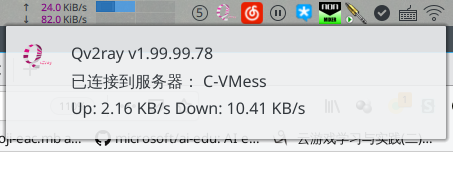
@TheWanderingCoel 似乎 Windows 和 Linux 的 Tray 根本没有这个功能
https://stackoverflow.com/a/25078611/8364323 说 Tray icon is not designed to show text, just small image
ghost
on 13 Oct 2019
目前 Qv2ray 只能做到这样 (即鼠标 Hover 时显示的气泡)
@TheWanderingCoel 似乎 Windows 和 Linux 的 Tray 根本没有这个功能
https://stackoverflow.com/a/25078611/8364323 说Tray icon is not designed to show text, just small image
好吧,有点尴尬。做成Hover气泡或者悬浮穿我觉得都可以hhh
TheWanderingCoel
on 13 Oct 2019
刚刚看了一下,KDE Plasma 环境可以自己实现插件(见上图左上角),windows 下有 ToolBox (在Tray左边任务栏窗口列表右边有一个工具栏,可以实现)
(但是我真的不会……😂)
ghost
on 13 Oct 2019
刚刚看了一下,KDE Plasma 环境可以自己实现插件(见上图左上角),windows 下有 ToolBox (在Tray左边任务栏窗口列表右边有一个工具栏,可以实现)
(但是我真的不会……😂)
hhh我也不会,到时候我去学学,会了提交pr吧(咕咕咕)。
TheWanderingCoel
on 13 Oct 2019

ghost
on 13 Oct 2019
v2.0 不知道会不会有的功能 - 网速显示插件 @TheWanderingCoel :
KDE Plasma 参考: https://github.com/dfaust/plasma-applet-netspeed-widget
GNOME 参考: WIP
Windows 参考: https://github.com/XhmikosR/perfmonbar
macOS 参考: WIP(?)
ghost
on 13 Oct 2019
v2.0 不知道会不会有的功能 - 网速显示插件 @TheWanderingCoel :
KDE Plasma 参考: https://github.com/dfaust/plasma-applet-netspeed-widget
GNOME 参考: WIP
Windows 参考: https://github.com/XhmikosR/perfmonbar
macOS 参考: WIP(?)
谢谢!我有时间看一下~
TheWanderingCoel
on 13 Oct 2019
不应该是随便你怎么叫都不会到吗?
不做一个到100%ERROR的GIF?
 leoxxx
on 14 Oct 2019
leoxxx
on 14 Oct 2019
Anyone who has ANY knowledge about Windows COM+ c++ and NamedPipe may help us in this windows plugin repo.
https://github.com/lhy0403/Qv2ray-Plugin-WinToolbar
ghost
on 14 Oct 2019
希望能够像v2rayN一样自动生成局域网pac地址就好了,完美解决家里其它设备的问题,不代理非必要流量
 zgl018
on 15 Oct 2019
zgl018
on 15 Oct 2019
希望支持PCA模式呀!!很关键
 PistonY
on 15 Oct 2019
PistonY
on 15 Oct 2019
希望支持PCA模式呀!!很关键
希望能够像v2rayN一样自动生成局域网pac地址就好了,完美解决家里其它设备的问题,不代理非必要流量
@zgl018 @PistonY PAC 相关实现参考 (我就是稍微存一下省的到时候忘了😂)
https://github.com/vinipsmaker/tufao
https://www.qt.io/blog/2019/01/25/introducing-qt-http-server
ghost
on 15 Oct 2019
108 【建议】v2ray内核的路径给出选择 #108
ghost
on 15 Oct 2019
路径我不是在这贴子里就说过了?
leoxxx
on 15 Oct 2019
路径我不是在这贴子里就说过了?
@leoxxx
这个说的是自定义内核路径,这个功能仍需讨论(帖子太长刚刚没有看到)
https://github.com/lhy0403/Qv2ray/issues/69#issuecomment-539072886
但是你那个自定义配置文件路径确实做不到
ghost
on 15 Oct 2019
2.0 版本是否要实现 #110 的 FOV001?
希望大家可以积极在 #110 中参与讨论~
ghost
on 15 Oct 2019
[Help] Can someone @axionl help designing icons for these buttons:
* Ping Server (Maybe a small gauge)

* Share QR Code (A QR logo may help)

* share as `vmess://`

* Json (Maybe a logo with "JSON" text)
It'll be very helpful! heart
Sorry, I have no idea about the design of those icons and sometimes the use of ICONS may lead to confusion.
For the following ICON, which is the official logo for the json.org. But before that very few people knew that it could represent
JSONand also myself.
As with the others, it is difficult to use the form of ICONS to express some specific computer network technical terms. If you don't mind, consider using text or the font ICONS in SVG format directly.
For me, keep all icons on the same theme is good enough.
We can use tooltip to elaborate what an icon do.
There is a problem in ver 1.x though.
All icons in ver 1.x is grey, usually grey means disabled.
It is a little bit confusing.
ghost
on 15 Oct 2019
[Help] Can someone @axionl help designing icons for these buttons:
* Ping Server (Maybe a small gauge)

* Share QR Code (A QR logo may help)

* share as `vmess://`

* Json (Maybe a logo with "JSON" text)
It'll be very helpful! heart
Sorry, I have no idea about the design of those icons and sometimes the use of ICONS may lead to confusion.
For the following ICON, which is the official logo for the json.org. But before that very few people knew that it could representJSONand also myself.
As with the others, it is difficult to use the form of ICONS to express some specific computer network technical terms. If you don't mind, consider using text or the font ICONS in SVG format directly.For me, keep all icons on the same theme is good enough.
We can use tooltip to elaborate what an icon do.There is a problem in ver 1.x though.
All icons in ver 1.x is grey, usually grey means disabled.
It is a little bit confusing.
Thanks for your consideration, the darker color will be used to distinguish whether it is available.
axionl
on 15 Oct 2019
路径我不是在这贴子里就说过了?
@leoxxx
这个说的是自定义内核路径,这个功能仍需讨论(帖子太长刚刚没有看到)
#69 (comment)但是你那个自定义配置文件路径确实做不到
那能不能做到配置文件生成在程序的根目录,软件便携化。
leoxxx
on 16 Oct 2019
你是指 Windows 还是 Linux?
目前不考虑 Unix 系改变配置文件路径,Windows 可以
ghost
on 16 Oct 2019
你是指 Windows 还是 Linux?
目前不考虑 Unix 系改变配置文件路径,Windows 可以
WIN
leoxxx
on 16 Oct 2019
这样的话还不如直接发一个带core版,感觉这东西用不着这么纠结
Sent from my iPhone
On Oct 16, 2019, at 6:34 PM, leoxxx notifications@github.com wrote:
你是指 Windows 还是 Linux?
目前不考虑 Unix 系改变配置文件路径,Windows 可以WIN
—
You are receiving this because you were mentioned.
Reply to this email directly, view it on GitHub, or unsubscribe.
PistonY
on 16 Oct 2019
我有一个想法:
Qv2ray 将尝试从多个位置寻找 .qv2ray 文件夹进行读取
按优先级排序,如果加载出错,将从下一位置尝试加载
- 当前文件夹下
config子文件夹 ~/.config/qv2ray/文件夹~/.qv2ray/文件夹
如果在以上位置均未找到合法 Qv2ray.conf 配置文件,将进行以下操作:
- Windows/Linux AppImage 将在当前目录创建
config文件夹 - Linux 将在
~/.config/创建qv2ray文件夹 - macOS 将在
~/创建qv2ray文件夹
朋友们有什么建议或者意见吗?
ghost
on 17 Oct 2019
我有一个想法:
Qv2ray 将尝试从多个位置寻找.qv2ray文件夹进行读取
按优先级排序,如果加载出错,将从下一位置尝试加载* 当前文件夹下 `config` 子文件夹 * `~/.config/qv2ray/` 文件夹 * `~/.qv2ray/` 文件夹如果在以上位置均未找到合法 Qv2ray.conf 配置文件,将进行以下操作:
* Windows/Linux AppImage 将在当前目录创建 `config` 文件夹

* Linux 将在 `~/.config/` 创建 `qv2ray` 文件夹

* macOS 将在  `~/` 创建 `qv2ray` 文件夹
朋友们有什么建议或者意见吗?
Adding a config path setting for the user on the Preferences Menu and providing a default value may be a good way to consider this feature.
axionl
on 17 Oct 2019
but where to store the ‘config path’ settings? @axionl
ghost
on 17 Oct 2019
but where to store the ‘config path’ settings? @axionl
I mean to provide a default path and this can be set by the user also include the proxy config and the software config.
axionl
on 17 Oct 2019
Yeah I know, but where we can store that path to the software config then?
ghost
on 17 Oct 2019
Yeah I know, but where we can store that path to the software config then?
Sorry for my poor consideration, I make an agreement for your scheme for the Linux partition.
axionl
on 17 Oct 2019
@lhy0403 Good idea I think.
PistonY
on 17 Oct 2019
我有一个想法:
Qv2ray 将尝试从多个位置寻找.qv2ray文件夹进行读取
按优先级排序,如果加载出错,将从下一位置尝试加载
- 当前文件夹下
config子文件夹~/.config/qv2ray/文件夹~/.qv2ray/文件夹如果在以上位置均未找到合法 Qv2ray.conf 配置文件,将进行以下操作:
- Windows/Linux AppImage 将在当前目录创建
config文件夹- Linux 将在
~/.config/创建qv2ray文件夹- macOS 将在
~/创建qv2ray文件夹朋友们有什么建议或者意见吗?
对其他系统不熟悉,只说下windows吧。
这个想法很好,v2ray-core也可以设置搜索顺序,这样喜欢把core放当前目录的用户就省掉设置资源文件位置的麻烦。
创建默认配置文件的时候要注意检查目录是否可写,c:\windows,c:\program files等很多文件夹是没有写入权限的,所以如果写入失败要准备好备用位置。windows系统有些特殊目录比如%appdata%是所有软件都有写入权限的。
写入权限问题还有一种比较特殊的情况。假设qv2ray在当前目录保存配置,突然有一天用户把整个qv2ray文件夹移到一个只读目录,当qv2ray想保存新配置时试了下当前目录不可写,于是到备用目录去保存新配置。下次启动时又发现当前目录有个旧配置可用,于是新配置就不起作用。不过这个问题很好解决,发现不可写时提示下用户就行。只是比较隐蔽所以在这里说一下。
最后就是要提防数据损坏,不过这个问题发生概率不高所以不用着急。突然断电这种不可抗力就不说了。windows在关机时也有极低概率出现配置文件写到一半就停止写入的情况。所以在设计配置文件的时候要考虑:读取时怎么知道当前配置文件是否损坏?要是发生损坏要怎么处理?怎么预防这种情况?(小概率事件,不处理其实也没什么关系)
ghost
on 17 Oct 2019
我有一个想法:
Qv2ray 将尝试从多个位置寻找.qv2ray文件夹进行读取
按优先级排序,如果加载出错,将从下一位置尝试加载* 当前文件夹下 `config` 子文件夹 * `~/.config/qv2ray/` 文件夹 * `~/.qv2ray/` 文件夹如果在以上位置均未找到合法 Qv2ray.conf 配置文件,将进行以下操作:
* Windows/Linux AppImage 将在当前目录创建 `config` 文件夹

* Linux 将在 `~/.config/` 创建 `qv2ray` 文件夹

* macOS 将在  `~/` 创建 `qv2ray` 文件夹
朋友们有什么建议或者意见吗?
~这个符号指的是什么路径?
程序根目录?
leoxxx
on 17 Oct 2019
用户 home 路径
ghost
on 17 Oct 2019
哦,对LINUX还不是很了解,只是初步的用用。
觉得这样蛮好的。
leoxxx
on 17 Oct 2019
那 v2 的配置文件路径策略就这么定了?
我有一个想法:
Qv2ray 将尝试从多个位置寻找.qv2ray文件夹进行读取
按优先级排序,如果加载出错,将从下一位置尝试加载* 当前文件夹下 `config` 子文件夹 * `~/.config/qv2ray/` 文件夹 * `~/.qv2ray/` 文件夹如果在以上位置均未找到合法 Qv2ray.conf 配置文件,将进行以下操作:
* Windows/Linux AppImage 将在当前目录创建 `config` 文件夹

* Linux 将在 `~/.config/` 创建 `qv2ray` 文件夹

* macOS 将在  `~/` 创建 `qv2ray` 文件夹
@ZLplLQc 的点子很好,列举出了一些虽然极端,但是也应该考虑到的特殊情况
创建默认配置文件的时候要注意检查目录是否可写,c:\windows,c:\program files等很多文件夹是没有写入权限的,所以如果写入失败要准备好备用位置。windows系统有些特殊目录比如%appdata%是所有软件都有写入权限的。
- 如果所有目录都不可写, Qv2ray 将会报错提醒,并退出
写入权限问题还有一种比较特殊的情况。假设qv2ray在当前目录保存配置,突然有一天用户把整个qv2ray文件夹移到一个只读目录,当qv2ray想保存新配置时试了下当前目录不可写,于是到备用目录去保存新配置。下次启动时又发现当前目录有个旧配置可用,于是新配置就不起作用。不过这个问题很好解决,发现不可写时提示下用户就行。只是比较隐蔽所以在这里说一下。
- 这种情况说实话确实很极端😂,向上一条一样,如果在目录里检测到配置(不管是否合法)但是只读,Qv2ray 将会提醒用户并退出
最后就是要提防数据损坏,不过这个问题发生概率不高所以不用着急。突然断电这种不可抗力就不说了。windows在关机时也有极低概率出现配置文件写到一半就停止写入的情况。所以在设计配置文件的时候要考虑:读取时怎么知道当前配置文件是否损坏?要是发生损坏要怎么处理?怎么预防这种情况?(小概率事件,不处理其实也没什么关系)
- 检测损坏靠的是 Json 解析库报错,然后发生损坏时,会备份一份损坏配置并新建新配置文件
如果大家认为这样的处理方式还算 ok,我就把上面的回复都折叠掉(太长了),用这一条做最终决定
ghost
on 17 Oct 2019
Please checkout from dev branch to see a new feature for Windows
https://static.lhy0403.top/Videos/qv2ray-2.0-win32-toolbar.mp4
Documents will come next week!
ghost
on 19 Oct 2019
Another KDE Plasma's plugin using QML, c++ (for plasma 5)
https://github.com/lhy0403/Qv2ray-Plugin-PlasmaToolbar
Support the same feature as Windows except START STOP and RECONNET
ghost
on 23 Oct 2019
@sonyxu 是哪里需要 ipv6 呢?
我的意思是 Qv2ray 目前好像没有妨碍 ipv6 设置的功能,域名和路由都可以直接支持的
ghost
on 23 Oct 2019
稍后如果有最新客户端我会再测试反馈,目前我有的版本是
[cid:[email protected]]
问题一,如果使用ipv6的话右侧不能正确解析选择服务器的信息。
问题二,这里假设使用百度ipv6地址演示
[cid:[email protected]]
[cid:[email protected]]
点击修改后依然没有解析到正确信息
问题三 使用其他图形客户端能正确连接到ipv6的服务器
使用QV2Ray不能正确连接
[cid:[email protected]]
部分报错信息
如果在新版本中不存在问题会再次发邮件。
发件人: Leroy.H.Ynotifications@github.com
发送时间: 2019年10月23日 18:11
收件人: lhy0403/Qv2rayQv2ray@noreply.github.com
抄送: sonyxusongrunxu@live.com; Mentionmention@noreply.github.com
主题: Re: [lhy0403/Qv2ray] !!Version 2.0!! (#69)
ipv6
@sonyxuhttps://github.com/sonyxu 是哪里需要 ipv6 呢?
我的意思是 Qv2ray 目前好像没有妨碍 ipv6 设置的功能,域名和路由都可以直接支持的
―
You are receiving this because you were mentioned.
Reply to this email directly, view it on GitHubhttps://github.com/lhy0403/Qv2ray/issues/69?email_source=notifications&email_token=AGDQJXP4HFAEXB7NWIJZDSTQQAPMXA5CNFSM4IZ6ACX2YY3PNVWWK3TUL52HS4DFVREXG43VMVBW63LNMVXHJKTDN5WW2ZLOORPWSZGOECA3OAQ#issuecomment-545371906, or unsubscribehttps://github.com/notifications/unsubscribe-auth/AGDQJXNUVIN4LLQUSPB6UFTQQAPMXANCNFSM4IZ6ACXQ.
sonyxu
on 24 Oct 2019
@sonyxu 是哪里需要 ipv6 呢?
我的意思是 Qv2ray 目前好像没有妨碍 ipv6 设置的功能,域名和路由都可以直接支持的
不是很了解邮件回复时的图片问题,有需要可以单独转发给你,我使用的版本1.3.8.0
sonyxu
on 24 Oct 2019
@sonyxu 是哪里需要 ipv6 呢?
我的意思是 Qv2ray 目前好像没有妨碍 ipv6 设置的功能,域名和路由都可以直接支持的不是很了解邮件回复时的图片问题,有需要可以单独转发给你,我使用的版本1.3.8.0
@sonyxu 你可以把图片单发给我的邮箱 [email protected]
ghost
on 24 Oct 2019
@sonyxu 已经收到您的邮件,,我想起来了,是 Windows 平台存储带有冒号 : 的文件时的问题
感谢反馈
ghost
on 24 Oct 2019
恩 说起来想起另外一个bug,同一个IP和端口,不同ID会相互覆盖。应该也和配置文件存储方式的命名有关。
sonyxu
on 24 Oct 2019
@sonyxu 👌
ghost
on 24 Oct 2019
Another KDE Plasma's plugin using QML, c++ (for plasma 5)
https://github.com/lhy0403/Qv2ray-Plugin-PlasmaToolbar
Support the same feature as Windows except START STOP and RECONNET
This is an exciting feature, but there are some problems for the dev branch as follows:
- The qv2ray will be crashed when you modify the
NetSpeed Bar Settingsbecause of theAddress boundary error. This may be a preemption problem. The old VCore is not closed yet, but the one with a new configuration is already in use. - The
Qv2ray-Plugin-PlasmaToolbarhas been shown asDisconnectedwhich may be related to the above issue has not been solved. - The config path has a redundant character:
/usr/bin/v2ray -config /home/axionl/.config/qv2ray//generated/config.gen.json.
Output from terminal execution:
[LICENCE]:
This program comes with ABSOLUTELY NO WARRANTY.
This is free software, and you are welcome to redistribute it
under certain conditions.

Qv2ray Current Developer Copyright (C) 2019 Leroy.H.Y (@lhy0403)
Hv2ray Initial Designs & gRPC implementation Copyright (C) 2019 Hork (@aliyuchang33)
Hv2ray/Qv2ray HTTP Request Helper (partial) Copyright 2019 (C) SOneWinstone (@SoneWinstone)
Qv2ray ArtWork Done By ArielAxionL (@axionl)
Qv2ray Russian Translations By TheBadGateway (@thebadgateway)
Qv2ray patch 8a8c1a By Riko (@rikakomoe)

Qv2ray v1.99.1.1 running on Arch Linux x86_64

[UI]: Found Translator: en-US.qm
[UI]: Found Translator: ru-RU.qm
[UI]: Found Translator: zh-CN.qm
[CONFIG]: Path: /home/axionl/.config/qv2ray/ contains a config file version: 8
[INIT]: Set /home/axionl/.config/qv2ray/ as the config path.
[UI]: Current Window Style: kvantum
[UI]: Breeze;kvantum-dark;kvantum;Windows;Fusion
[UI]: Loaded Translator zh-CN
[NETWORK]: Current OpenSSL version: OpenSSL 1.1.1d  10 Sep 2019
[UI]: SHARE OPTION TODO...
[VCORE]: Connecting to: vultr jpn cloudflare
[CONNECTION]: Skip adding 'freedom' entry.
[CONNECTION]: allocation is not used here.
[NETWORK]: Network request errcode: 0
[UPDATE]: Received update info, Latest: 1.3.8.0 Current: 1.99.1.1 Ignored:
fish: “qv2ray” terminated by signal SIGSEGV (Address boundary error)
Yeah, thanks a lot @axionl 💗
One existing issue is that when Qv2ray was closed improperly, the socket file located somewhere in /tmp/ will not be deleted, which leads to an Address Already in Use when Qv2ray starts next time.
- ----> That's the cause of your second problem.
- A temporary workaround of this problem above, you may want to delete
/tmp/Qv2ray-****manually.
For the first problem, when it crashes, are you trying to click the "Apply Network Speed Bar UI Settings"?
If that's not the case, can you provide the steps before it crashes (in detail?)
ghost
on 25 Oct 2019
The third issue will be fixed in the next commit.
ghost
on 25 Oct 2019
路由编辑
支持负载均衡
仔细看了一下这条。我感觉是不是我说的那个和你的这个不是一个意思?
我的意思是多个V2RAY的服务器节点之间负载均衡。
leoxxx
on 25 Oct 2019
Yeah, thanks a lot @axionl heartpulse
One existing issue is that when Qv2ray was closed improperly, the socket file located somewhere in/tmp/will not be deleted, which leads to anAddress Already in Usewhen Qv2ray starts next time.* ----> That's the cause of your second problem. * A temporary workaround of this problem above, you may want to delete `/tmp/Qv2ray-****` manually.For the first problem, when it crashes, are you trying to click the "Apply Network Speed Bar UI Settings"?
If that's not the case, can you provide the steps before it crashes (in detail?)
I am trying to select the Content Type or other checkboxes without applying the Network Speed Bar UI Settings.
axionl
on 25 Oct 2019
路由编辑
支持负载均衡仔细看了一下这条。我感觉是不是我说的那个和你的这个不是一个意思?
我的意思是多个V2RAY的服务器节点之间负载均衡。
@leoxxx 你是说自动切换连接配置吗? (就是主界面列表里的那些项)
ghost
on 25 Oct 2019
Yeah, thanks a lot @axionl heartpulse
One existing issue is that when Qv2ray was closed improperly, the socket file located somewhere in/tmp/will not be deleted, which leads to anAddress Already in Usewhen Qv2ray starts next time.* ----> That's the cause of your second problem. * A temporary workaround of this problem above, you may want to delete `/tmp/Qv2ray-****` manually.For the first problem, when it crashes, are you trying to click the "Apply Network Speed Bar UI Settings"?
If that's not the case, can you provide the steps before it crashes (in detail?)I am trying to select the
Content Typeor other checkboxes without applying theNetwork Speed Bar UI Settings.
@axionl That becomes strange, as we are now using an integer as the key and the text in UI as a value, when selecting an item in the UI, Qv2ray replace the Content-Type with the Key (which) corresponds to the UI text.
Because the texts in the Combobox (that drop down box) are for each-ed from the key value pair, it shouldn't have trouble looking for the key to the given value.....
ghost
on 25 Oct 2019
Yeah, thanks a lot @axionl heartpulse
One existing issue is that when Qv2ray was closed improperly, the socket file located somewhere in/tmp/will not be deleted, which leads to anAddress Already in Usewhen Qv2ray starts next time.* ----> That's the cause of your second problem. * A temporary workaround of this problem above, you may want to delete `/tmp/Qv2ray-****` manually.For the first problem, when it crashes, are you trying to click the "Apply Network Speed Bar UI Settings"?
If that's not the case, can you provide the steps before it crashes (in detail?)I am trying to select the
Content Typeor other checkboxes without applying theNetwork Speed Bar UI Settings.@axionl That becomes strange, as we are now using an integer as the key and the text in UI as a value, when selecting an item in the UI, Qv2ray replace the Content-Type with the Key (which) corresponds to the UI text.
Because the texts in the Combobox (that drop down box) arefor each-ed from the key value pair, it shouldn't have trouble looking for the key to the given value.....
https://send.firefox.com/download/6a5cece6d10bce56/#Qh7-RMUKDyxvmxLoraJ8Sg
I paste a screen record here.
axionl
on 25 Oct 2019
OK Alright, That's a UI bug..., Thanks @axionl
I shouldn't enable the widgets on the RHS unless at least one page/line is added.....
Added: Sometimes a screenshot is REALLY helpful 😂
ghost
on 25 Oct 2019
路由编辑
支持负载均衡仔细看了一下这条。我感觉是不是我说的那个和你的这个不是一个意思?
我的意思是多个V2RAY的服务器节点之间负载均衡。@leoxxx 你是说自动切换连接配置吗? (就是主界面列表里的那些项)
呃,应该是,自动切换主机列表中的主机。
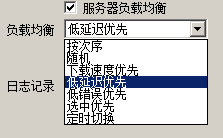
这是其它软件的图,以不同策略负载。
leoxxx
on 26 Oct 2019
@leoxxx 目前还没有这方面的打算,因为在切换连接的时候会出现断开连接的现象,影响使用
ghost
on 26 Oct 2019
@axionl Sir this patch is not necessary anymore as I changed the .desktop file content.
Here: https://github.com/lhy0403/Qv2ray/commit/2fcd32e31e1a4865bb3eea940cd20fc0df2c18e1#diff-cf880ee4d522eb5eac0a02799e6335df.
Thanks for your hard work!
ghost
on 26 Oct 2019
@axionl And it's recommanded to speed up the build process using make -j$(nproc)
ghost
on 26 Oct 2019
@rikakomoe I'll add you to the contributors list soon.
ghost
on 26 Oct 2019
@axionl And it's recommanded to speed up the build process using
make -j$(nproc)
For the Arch Linux user, we generally prefer users to modify MAKEFLAGS variable on /etc/makepkg.conf or $HOME/.config/pacman/makepkg.conf by themselves.
https://wiki.archlinux.org/index.php/Makepkg#Parallel_compilation
axionl
on 26 Oct 2019
For the Arch Linux user, we generally prefer users to modify
MAKEFLAGSvariable on/etc/makepkg.confor$HOME/.config/pacman/makepkg.confby themselves.https://wiki.archlinux.org/index.php/Makepkg#Parallel_compilation
@axionl OK Sorry my bad.
ghost
on 27 Oct 2019
@axionl You may consider adding a macro QV2RAY_DEFAULT_VCORE_PATH when builing qv2ray on ArchLinux See: https://github.com/lhy0403/Qv2ray/blob/dev/src/Qv2rayBase.h#L26
ghost
on 30 Oct 2019
希望可以克隆配置
 yswtrue
on 1 Nov 2019
yswtrue
on 1 Nov 2019
希望可以克隆配置
@yswtrue 那是什么?
ghost
on 1 Nov 2019
希望可以克隆配置
@yswtrue 那是什么?
就是我有多个服务器,配置都是一样的,就地址不一样,所以希望可以有一个克隆功能,可以直接复用
yswtrue
on 1 Nov 2019
@yswtrue 好👌
ghost
on 1 Nov 2019
@yswtrue dev 分支的 commit 已经添加了克隆配置 (duplicate config) 选项,非常感谢你的建议
ghost
on 8 Nov 2019
for @TheWanderingCoel @DuckSoft @leoxxx #72
QRCode 分享和导入即将ready,
导入图片文件扫描的同时,也将支持扫描屏幕二维码
多行vmess也会支持
ghost
on 10 Nov 2019
for @TheWanderingCoel @DuckSoft @leoxxx #72
QRCode 分享和导入即将ready,
导入图片文件扫描的同时,也将支持扫描屏幕二维码
多行vmess也会支持
感谢
TheWanderingCoel
on 10 Nov 2019
@yswtrue dev 分支的 commit 已经添加了克隆配置 (duplicate config) 选项,非常感谢你的建议
万分感谢
yswtrue
on 10 Nov 2019
for @TheWanderingCoel @DuckSoft @leoxxx #72
QRCode 分享和导入即将ready,
导入图片文件扫描的同时,也将支持扫描屏幕二维码
多行vmess也会支持
我就等你编译好来测试一下。
leoxxx
on 11 Nov 2019
好😂,到时候可以直接从 Github Action 下载 https://github.com/lhy0403/Qv2ray/actions
现在正在写 vmess 生成
,,,
Bug 一堆还请大家多多包涵(
ghost
on 11 Nov 2019
Try this!
@leoxxx https://github.com/lhy0403/Qv2ray/commit/4e72ecfe02c8bebc9938544cb11599580c207dc2/checks?check_suite_id=305348813
ghost
on 11 Nov 2019
for @TheWanderingCoel @DuckSoft @leoxxx #72
QRCode 分享和导入即将ready,
导入图片文件扫描的同时,也将支持扫描屏幕二维码
多行vmess也会支持
多行vmess导入有个bug,就是导入下一行的vmess时连接名称没有清空,导致比如本来分别导入三个连接,它们的名称应分别为 连接a/连接b/连接c,现在一次性多行导入之后,名称变成了 连接a/连接a连接b/连接a连接b连接c。
 huyz-git
on 12 Nov 2019
huyz-git
on 12 Nov 2019
@huyizheng 收到
ghost
on 12 Nov 2019
Try this!
@leoxxx https://github.com/lhy0403/Qv2ray/commit/4e72ecfe02c8bebc9938544cb11599580c207dc2/checks?check_suite_id=305348813
QR码只能本地图吗?不能直接识别网页的中图?
还有核心配置啥的还在用户文件下?不是说WIN的改到当前目录?
leoxxx
on 12 Nov 2019
@leoxxx 可以进行屏幕截图,(准确率有待提升
ghost
on 12 Nov 2019
@leoxxx 可以进行屏幕截图,(准确率有待提升
截图不就是本地图?我的意思点一击后直接对网页上的二维识别。
leoxxx
on 13 Nov 2019
@leoxxx Capture from the screen, we currently not support screenshot in particular region.
ghost
on 13 Nov 2019
Should we use a WTFPL licenced project: https://github.com/LBYPatrick/convert-china-list ?
ghost
on 18 Nov 2019
Ping @zgl018 @PistonY PAC 功能正在开发,
PAC和前置代理 仅支持简单配置文件格式(即不使用路由编辑器的配置类型)
https://github.com/nikhilm/qhttpserver
ghost
on 18 Nov 2019
在实现 PAC 功能之后,将会进行 v2.0 Alpha 1 的测试,还是希望能得到大家的支持!
订阅功能和前置代理将在 Alpha 1 之后进行
ghost
on 18 Nov 2019
pic
"Cancel" button does not work
Also, the language does not change on en-US
 thebadgateway
on 19 Nov 2019
thebadgateway
on 19 Nov 2019
pic
"Cancel" button does not work
Also, the language does not change on en-US
@thebadgateway My build does not have the issue.
Can you try using the AppImage from the Github Action? (the dev branch)
ghost
on 19 Nov 2019
@thebadgateway Sorry I misunderstood your words, I thought you were taking about the Prefrences Window.
The CANCEL button on Import Window will be fixed soon!
ghost
on 19 Nov 2019
PAC is on the way, and now it's half-completed (just some UI need to be implemented.)
@thebadgateway That cancel button can finally work!
ghost
on 25 Nov 2019
Alpha 1 next week!
ghost
on 25 Nov 2019
PAC is on the way, and now it's half-completed (just some UI need to be implemented.)
@thebadgateway That cancel button can finally work!
最新的这个committ,一断开连接就吐核
[1] 56629 segmentation fault (core dumped) qv2ray
没有其他的日志输出
huyz-git
on 26 Nov 2019
Rcvd
ghost
on 26 Nov 2019
@huyizheng 你可以确认一下首选项中的版本号吗? 最后一位
ghost
on 26 Nov 2019
一个新的 commit 好像修复了这个问题,,,但是我不知道是什么原因,,,,, https://github.com/lhy0403/Qv2ray/commit/e475b40a02308b25e1f77f5b4c00ff29c398122a 您可以试一下 @huyizheng
ghost
on 26 Nov 2019
一个新的 commit 好像修复了这个问题,,,但是我不知道是什么原因,,,,, e475b40 您可以试一下 @huyizheng
的确修好了
huyz-git
on 26 Nov 2019

It looks like there is a blank option here, and I checked the configuration file to be fine.
axionl
on 26 Nov 2019
@axionl Yes that's the expected result, to let user NOT set an auto start option.
ghost
on 26 Nov 2019
因为 alpha 1 版本已经发布,所有相关问题还请大家去 #121 讨论😊
ghost
on 27 Nov 2019
【Announcement】Qv2ray v2.0 将不再支持 32 位 Windows 版本
FLAG
DuckSoft
on 8 Feb 2020
There's really no support of Qv2ray v2.0
(but it's back on 2.1)
 U-v-U
on 8 Feb 2020
U-v-U
on 8 Feb 2020
Related issues
 alluLinger
·
4Comments
alluLinger
·
4Comments
 probonopd
·
5Comments
DuckSoft
·
3Comments
probonopd
·
5Comments
DuckSoft
·
3Comments
 Logic530
·
3Comments
Logic530
·
3Comments
 178me
·
3Comments
178me
·
3Comments
Most helpful comment
希望能够加入
本地socks5 UDP支持和通过二维码导入配置功能,感谢大佬开发Qv2ray。