Quickstart-android: onMessageRecieved not working when app is killed.
onMessageRecieved not working when app is killed. It works perfect in foreground and in background and I can receive Extras in MainActivity. But when app is killed I receive notification and after click on it- Extras == null.
I send only DATA (to, data) notification. What I do wrong?
`
@override
public void onMessageReceived(RemoteMessage remoteMessage) {
    Map<String, String> map = remoteMessage.getData();
    String message="";
    for (Map.Entry<String, String> entry : map.entrySet()) {
        message= entry.getValue();
    }
    sendNotification(message);
}
private void sendNotification(String messageBody) {
 Intent intent = new Intent(this, MainActivity.class);
intent.putExtra("notification",messageBody);
intent.addFlags(Intent.FLAG_ACTIVITY_SINGLE_TOP);
PendingIntent pendingIntent = PendingIntent.getActivity(this, 0 /* Request code */, intent,
        PendingIntent.FLAG_ONE_SHOT);

String channelId = getString(R.string.default_notification_channel_name);
Uri defaultSoundUri= RingtoneManager.getDefaultUri(RingtoneManager.TYPE_NOTIFICATION);
NotificationCompat.Builder notificationBuilder =
        new NotificationCompat.Builder(this)
                .setSmallIcon(R.drawable.ic_notifications_active_black_24dp)
                .setContentTitle("MyTitle")
                .setContentText(messageBody)
                .setAutoCancel(true)
                .setSound(defaultSoundUri)
                .setContentIntent(pendingIntent);

NotificationManager notificationManager =
        (NotificationManager) getSystemService(Context.NOTIFICATION_SERVICE);

notificationManager.notify(0 /* ID of notification */, notificationBuilder.build());
}
`
and I've tried to use different flags in intent and pending intent and it not works... (I can't catch intent.putExtra("notification",messageBody); in MainActivity when app is closed.)
 DanikKamilov
All 133 comments
Now (for APP IS CLOSED case) I write Notification text to file and read this text if extras == null and notificationText.txt is exists... its stupid solution but it works. How can I catch this extras when app is closed in other way?((
DanikKamilov
on 5 Nov 2017
Hello guys
I solved this inserting this lines in Manifest.xml
<uses-permission android:name="com.google.android.c2dm.permission.RECEIVE" />
 <uses-permission android:name="android.permission.WAKE_LOCK" />
My app received notifications when is foregorund, background and is closed.
 carlosalexandresmo
on 7 Nov 2017
carlosalexandresmo
on 7 Nov 2017
Hi @DanikKamilov and @carlosalexandresmo FCM does not process messages if an app is "killed" or force stopped. When a user kills an app it is an indication that the user does not want the app running so that app should not run till the user explicitly starts it again.
Note that swiping an app from recents list should NOT "kill" or force stop it. If messages are not being received after swiping from recents list then please identify these devices and we will work with the manufactures to correct this behaviour.
Only being able to handle messages when the app is in the foreground or background is working as intended.
 kroikie
on 10 Nov 2017
kroikie
on 10 Nov 2017
@kroikie Are you guys keeping a running list of devices with this problem, and if so can you make it public?
 opus1269
on 11 Nov 2017
opus1269
on 11 Nov 2017
Hi @kroikie on messageReceived is not getting called for the below FCM when the app has been removed from recents by swiping on devices manufactured by VIVO, ONE PLUS.
{
"to":"erWZDlJg9Fo:APA91bFUe_fc6X1kzg7bmZTool7dpBp41AcSPPBEpQVPUihzYR9Q1uBVlUcCkmqj5bs4ObgcgfPjuGCDIiU22DMUxVSArj0aD91WBFMs591To9ge0oIKbCvSuii9WoPFCk2fhC8KeGSD","priority":"high","data":{"message":"Some Message"}
}
Any help is appreciated. Thanks in advance.
PLease
 Adityavns
on 5 Dec 2017
Adityavns
on 5 Dec 2017
@Adityavns try adding these two permissions also in manifest
"uses-permission android:name="com.google.android.c2dm.permission.RECEIVE"
"uses-permission android:name="android.permission.WAKE_LOCK"
I also have oneplus 3 mobile and i was having same issues ,but after adding the permissions my issue got resolved.
 rajeshjakhar1092
on 6 Dec 2017
rajeshjakhar1092
on 6 Dec 2017
Hi Raj,
Thanks for the reply! It is still not working in Vivo and one plus 5 phones
that i have tested.
Regards,
Aditya Vns
On Wed, Dec 6, 2017 at 5:06 PM, rajeshjakhar1092 notifications@github.com
wrote:
@Adityavns https://github.com/adityavns try adding these two
permissions also in manifest"uses-permission android:name="com.google.android.c2dm.permission.RECEIVE"
"uses-permission android:name="android.permission.WAKE_LOCK"I also have oneplus 3 mobile and i was having same issues ,but after
adding the permissions my issue got resolved.—
You are receiving this because you were mentioned.
Reply to this email directly, view it on GitHub
https://github.com/firebase/quickstart-android/issues/368#issuecomment-349613753,
or mute the thread
https://github.com/notifications/unsubscribe-auth/AGEyDnSee13lT7lsO7A_fZJi429_m6a0ks5s9nxTgaJpZM4QSHEZ
.
--
aditya369
Adityavns
on 6 Dec 2017
@Adityavns yeah you are right ,actually i am now again facing the same issue, I still not able to figure out what is the main issue, actually I have a app in which i have implemented the same code and there I am getting notifications all the time even app is killed... but in another app it is not working.. I will let you know if I get a solution :)
Regards
Rajesh Jakhar
rajeshjakhar1092
on 7 Dec 2017
@Adityavns please let me know also if you find any solution.
Regards,
Rajesh Jakhar
rajeshjakhar1092
on 7 Dec 2017
@Adityavns try this one, go to settings in battery>> battery optimization>>select your app>>you will see that your app is optimised>>> click on dont optimise>> then try pushing notificaiton.... hope this helps.
PS:- I then cliked on optimise app.. now I am getting notifications
Please let me know if this works...
Regards
Rajesh Jakhar
rajeshjakhar1092
on 7 Dec 2017
@Adityavns It is because of DOZE mode and battery optimisation,you just have to turn off battery optimisation for all apps or particular app.
Enjoy :) :)
Regards
Rajesh Jakhar
rajeshjakhar1092
on 7 Dec 2017
As @kroikie said this is intended behavior, although we are still interested to know when developers run into it. If you find devices that you think behave strangely please continue to tell us.
I am going to close this issue as there's nothing we can do to "fix" it besides continuing to discuss new places you find it,
 samtstern
on 7 Feb 2018
samtstern
on 7 Feb 2018
List of devices: OnePlus, Oppo, Lenovo
 skfaisal93
on 12 Feb 2018
skfaisal93
on 12 Feb 2018
Same issues with asus a007 zenphone!!
 kimnamcham
on 20 Mar 2018
kimnamcham
on 20 Mar 2018
@kimnamcham It is because of DOZE mode and battery optimization,you just have to turn off battery optimization for all apps or particular app. Go to Settings>> apps >> select your app>> battery>>
battery optimization> select your app>> select don't optimise.
Problem solved.
I have OnePlus 3 and I had the same issue . I did this and my problem was solved. battery optimization blocks incoming notifications from apps so that the wont kill battery.
Thanks Regards
rajeshjakhar1092
on 23 Mar 2018
@rajeshjakhar1092 We all know this. You should read the whole thread.
skfaisal93
on 23 Mar 2018
@kimnamcham This is not solution. There are apps like Whatsapp, iMobile, Facebook,etc which is set to "optimise" in Battery Optimisation Setting but still it gets notification without missing any.
@samtstern @kroikie It can't be intended behaviour if other apps in background still gets notifications. Something bug with firebase push notification sdk.
I tested with firebase 4.5 package using unity. Not working on Oneplus 5.
 aldo-abvr
on 28 Mar 2018
aldo-abvr
on 28 Mar 2018
how to handle notification when app in kill in firebase android
 saprahits
on 7 Apr 2018
saprahits
on 7 Apr 2018
is this issue resolved?
 manishbutola
on 23 Apr 2018
manishbutola
on 23 Apr 2018
No. Google developers closing issue without solution on there own OS.
aldo-abvr
on 23 Apr 2018
i am getting this issue on staging app on live it is working fine. might be my app is white listed when it goes live.
manishbutola
on 23 Apr 2018
even though opmization is enabled apps like whatsapp recieve message when in background and after being swiped out. Any solution for an app targeting oreo ?
 kchandawat
on 12 Jul 2018
kchandawat
on 12 Jul 2018
Solution plz sir?.....
kchandawat
on 9 Sep 2018
Hi @DanikKamilov and @carlosalexandresmo FCM does not process messages if an app is "killed" or force stopped. When a user kills an app it is an indication that the user does not want the app running so that app should not run till the user explicitly starts it again.
Note that swiping an app from recents list should NOT "kill" or force stop it. If messages are not being received after swiping from recents list then please identify these devices and we will work with the manufactures to correct this behaviour.
Only being able to handle messages when the app is in the foreground or background is working as intended.
@kroikie
if not then Why is it used for push notification? because push notification we need to notify user something,even if they are inside or outside app.How can we make onplus and other custom rom device to show the notification,its a major issue guys
 rameshvoltella
on 25 Sep 2018
rameshvoltella
on 25 Sep 2018
@rameshvoltella outside has 2 meanings.
- The user leaves the app but it is still running in the background.
- The user explicitly stops the app via
Managed Applicationsin settings. Or on some devices swiping the app from the recents menu.
In 1. case we deliver the notification.
In 2. case we don't (should not).
From Android docs:
Note that the system adds FLAG_EXCLUDE_STOPPED_PACKAGES to all broadcast intents. It does this to prevent broadcasts from background services from inadvertently or unnecessarily launching components of stoppped applications. A background service or application can override this behavior by adding the FLAG_INCLUDE_STOPPED_PACKAGES flag to broadcast intents that should be allowed to activate stopped applications.
Applications are in a stopped state when they are first installed but are not yet launched and when they are manually stopped by the user (in Manage Applications).
We do not add the FLAG_INCLUDE_STOPPED_PACKAGES flag since we are not sure why the app has been stopped. Thus we don't deliver messages to stopped applications.
kroikie
on 25 Sep 2018
I getting notification in background , open, resume mode in all devices very well.
In Lolipop :- also getting in after killed (swipe) mode but greater than lolipop i am not getting any notification after swipe.
Please suggest and coordinate me ,
Thaks in advance for your great knowledge.
 iwwBittu
on 12 Oct 2018
iwwBittu
on 12 Oct 2018
@iwwBittu there was no change after lollipop on how messages are handled after swiping away an app from the recents menu. Same code should work.
Could you file a ticket with our support team since this may be a device specific issue.
kroikie
on 12 Oct 2018
As programmer, i 'fell asleep' on issue. ' Lost' Difficult to recover. IAM
Administrator
On Fri, Oct 12, 2018, 9:49 AM Arthur Thompson notifications@github.com
wrote:
@iwwBittu https://github.com/iwwBittu there was no change after
lollipop on how messages are handled after swiping away an app from the
recents menu. Same code should work.Could you file a ticket with our support team
https://firebase.google.com/support/ since this may be a device
specific issue.—
You are receiving this because you are subscribed to this thread.
Reply to this email directly, view it on GitHub
https://github.com/firebase/quickstart-android/issues/368#issuecomment-429389729,
or mute the thread
https://github.com/notifications/unsubscribe-auth/Alj2rMAByl_fygHsD6Ozbee_4aknglHGks5ukMgWgaJpZM4QSHEZ
.
 peterpeterpeter10101
on 12 Oct 2018
peterpeterpeter10101
on 12 Oct 2018
Ok, I did some test on Facebook app. I force stopped Facebook messenger app and sent a message to the messenger app from other device (using different FB account) and the messenger did display notification even though it was force stopped. However I noticed Facebook app was still running in the background, so I force stopped both apps (Facebook and Facebook messenger). I sent message again from the other device, but this time no notification was displayed. I believe this is a intentional behaviour. Force stop should completely stop apps and their services and no updates about the apps should be notified to user. I see one possibility though, if we can some how schedule a service to start automatically after some time to start receiving notifications again. Refer this link
Please do similar tests on your devices and share results. Cheers!
 vijayendra-tripathi
on 16 Oct 2018
vijayendra-tripathi
on 16 Oct 2018
@DanikKamilov If this is the case then how can anyone use it in real-time apps. Please suggest us a solution. Thanks in advance.
 excitepv
on 23 Oct 2018
excitepv
on 23 Oct 2018
Everywhere its mentioned that the Vendors like VIVO, ONE PLUS etc. had wrongly implemented Swipe feature to force close the app. This is preventing the apps from receiving any further notifications. Is there any deterministic solution for this issue ? App developers cannot ask each and every app user to disable optimization on battery or enable Autostart. This is a nightmare for people migrating from GCM to Firebase. @Firebase Team, what do you suggest ? When do you think you can correct all Vendors with their wrong implementation ? or provide an alternative solution ?
 kvenkatasudhakar
on 28 Oct 2018
kvenkatasudhakar
on 28 Oct 2018
@FCM guys:
There's a major architectural issue with the way push notifications work on android.
I just do not understand why some part of the app is required to be running in background to receive and display the message. Can't the FCM service itself do that when the app isn't alive.
APNs on iOS does exactly that and it works great. It doesn't matter if the device was rebooted / app swiped / crashed / terminated. It works flawlessly if the user has permitted app to show notifications.
AFAIK FCM service is always alive on every phone that has google play services installed. Why can't it do the same thing.
In my country these days around 80% users own phones manufactured by Chinese vendors and it is impossible to use push notifications with acceptable performance of message delivery, FCM / anything is just not an option here. Plain old SMS are very handy here but expensive.
FCM guys blame it on vendors and these vendors don't care about small app / developers.
I wonder how on earth did this happen to world's most popular os.
It is really very sad :(
 amitv87
on 28 Oct 2018
amitv87
on 28 Oct 2018
@twitter has same problem. needs real-time 'date' analysis. Although not
avalible. twitter seems to 'hold' data or 'stores' data so therfore not
'accuate' data will ever be produced. say if 1M impressed then it gets
'released' by 'increments'. ANYONE CAN ELABORATE? AND ALSO= Data Studio
info can possibly get 'misinterpreted' by some of 'users' thinking that the
'display' or '{sample} templates are their 'OWN'
experiencing these problems across web.
TOO MANY LOG IN REQUIREMENT & CREDENTIAL ISSUES. ''VERIFY' SECURITY ISSUES
ECT...
On Tue, Oct 23, 2018 at 5:00 AM excitepv notifications@github.com wrote:
@DanikKamilov https://github.com/DanikKamilov If this is the case then
how can anyone use it in real-time apps. Please suggest us a solution.
Thanks in advance.—
You are receiving this because you commented.
Reply to this email directly, view it on GitHub
https://github.com/firebase/quickstart-android/issues/368#issuecomment-432217550,
or mute the thread
https://github.com/notifications/unsubscribe-auth/Alj2rFqJxXyEGvTFAOJVSmhN1cmkEodFks5unwThgaJpZM4QSHEZ
.
peterpeterpeter10101
on 28 Oct 2018
@Firebase Team:
I completely agree with the above comment from amitv87 (https://github.com/firebase/quickstart-android/issues/368#issuecomment-433693068)
This makes the service completely unreliable, on phones for these Chinese manufacturers ( or any manufacturer that implemented Swipe feature to force close the app...
The user can always stop receiving notifications from the app via Notification settings. The explanation provide on why is implemented this way, does not resist the test when comparing to APN, which works fine: I do not have iOS users where we use APN complaining of too many on undesirable Notifications, but I have a lot of Android users, where we use FCM, with some of the phones mentioned above, complaining of not receiving Notifications...
Any chance this decision can be reviewed? This really make FCM ( and Android) to look bad...
 RDLemos
on 1 Nov 2018
RDLemos
on 1 Nov 2018
@All, this issue has been raised here and in many other places. The FCM team is aware of the issue and is working on it. Thanks for the feedback.
kroikie
on 8 Nov 2018
Is there any news with this issue, or a link to track progress?
We are still facing these issues. iOS works perfectly fine
 Ehofas
on 3 Dec 2018
Ehofas
on 3 Dec 2018
@Ehofas no news yet on this. I will be sure to update here and in other places once we have a resolution.
kroikie
on 3 Dec 2018
VIVO, ONE PLUS, NOKIA, LENOVO are the device in which notification delivery is very poor. when the app in use then it delivers the notification but when the app in swiped from recent app lists. Notification stops delivering. Please resolve this asap. Thank You
 Prateek218
on 4 Dec 2018
Prateek218
on 4 Dec 2018
@Adityavns try adding these two permissions also in manifest
"uses-permission android:name="com.google.android.c2dm.permission.RECEIVE"
"uses-permission android:name="android.permission.WAKE_LOCK"I also have oneplus 3 mobile and i was having same issues ,but after adding the permissions my issue got resolved.
I am Tring on one Plus 3. I tried with adding the permission. buts the issue is still there.
 NidhinVasudev
on 13 Dec 2018
NidhinVasudev
on 13 Dec 2018
VIVO, ONE PLUS, NOKIA, LENOVO are the device in which notification delivery is very poor. when the app in use then it delivers the notification but when the app in swiped from recent app lists. Notification stops delivering. Please resolve this asap. Thank You
Having the same issue. Find any solution?
NidhinVasudev
on 13 Dec 2018
Hi @NidhinVasudev no update on this issue yet, but we are working on a solution. Thanks for providing these device OEMs.
kroikie
on 13 Dec 2018
@kroikie
When a user kills an app it is an indication that the user does not want the app running so that app should not run till the user explicitly starts it again
When user don't want notification from particular app, (s)he is smart enough to go on Settings > Notifications > Disable notification for specific app. Or Uninstall the app.
Many custom ROM/Vendor swipe out = kill the app/Force stop app.
Many times user force stop app cause of cpu usage, battery or slow performance of device
When the app is not running or killed, it is FCM duty to either
A) show user this push notification. (If notification is not explicitly disabled by user) & let user decide to ignore notification or tap on it to launch the app. Or
B) App handle it
we are not sure why the app has been stopped. Thus we don't deliver messages to stopped applications.
Instead of assuming things, Android has explicit control, Settings > Notification > App > Enable/disable/customize as user is in control, FCM should honor the same. If user has not disable notification explicitly, fcm should do something similar to what apple is doing (Apple ecosystem is more strict on this unlike android...still).
Idea is At the end, user is in control to turn on/off app specific notification, or even uninstall the app.
 m4mum
on 16 Dec 2018
m4mum
on 16 Dec 2018
 Abhishekgarg727
on 26 Dec 2018
Abhishekgarg727
on 26 Dec 2018
Same issues with asus a007 zenphone!!
Does it got fixed
 mvanan88
on 27 Dec 2018
mvanan88
on 27 Dec 2018
no solution yet? I think it's a bug.
Because if the app is not running, the service fcm it should still work.
it is not clear for the user, enabled app in the whitelist
 a92c
on 3 Jan 2019
a92c
on 3 Jan 2019
We're facing issue with Oppo & Vivo Phones. Our application is a VoIP Application and push delivery is critical for us to show the incoming call screen on the receiver end. On the Oppo and Vivo phone just removing the app from recent application kills the app completely and render our app useless. The caller gets frustrated. It's created a lot of problems for our users.
It's been a year since this thread was opened. The affected devices share about 40% of our customer base. It's hurting our business. I hope you guys find a solution fast ( 1 year is a very long time for solving a critical issue like this ). Looking forward to the update.
 RishishPandey
on 4 Jan 2019
RishishPandey
on 4 Jan 2019
I don't think @fcm guys will ever fix this issue. I am complaining about this from the beginning, but instead of fixing it, they only blame it on vendors. The whole FCM team should be sacked for their pathetic development and ignoring developer issues.
Maybe my words are too harsh but I could not control myself anymore.
skfaisal93
on 4 Jan 2019
I Agree as well, this is an issue and must be fixed by @fcm guys...
 srikiz
on 25 Jan 2019
srikiz
on 25 Jan 2019
I keep reading the thread hoping it was already resolve but it's already 2019. I don't know if the FCM folks really care about this issue.
 MJsaycon
on 29 Jan 2019
MJsaycon
on 29 Jan 2019
Everyday i am watching this page any solution provided by FCM. Totally disappointed move to other solutions. any one help me?
 karthick4in
on 2 Feb 2019
karthick4in
on 2 Feb 2019
I have also faced the same issue for the VIVO device. Is there any update form FCM side or OS side?
 mdaslamHossin
on 10 Feb 2019
mdaslamHossin
on 10 Feb 2019
@kroikie @samtstern Hi,
just to reconfirm, if the app is killed and I receive bundled notifications and clicking it opens the app(foreground) and when I tap on the notification shouldn't do anything. Is this the right understanding?
Two behaviors:
- In-app (foreground), tap bundle, navigate to home screen, tap bundle again, navigate to Notifications screen.
- In-app, Home screen, log out, kill the app, tap bundle, navigate to the login screen, tap bundle again, no redirection to Notifications screen.
Any help is appreciated.
 nasreekar
on 11 Feb 2019
nasreekar
on 11 Feb 2019
I have this problem!
In Meizu M1 Note data-only push comes if app is foreground/background? but if app is killed onMessageRecieved is not call.
But in many tetsted phone it works fine
 KORuL
on 2 Mar 2019
KORuL
on 2 Mar 2019
error W/GCM: broadcast intent callback: result=CANCELLED forIntent { act=com.google.android.c2dm.intent.RECEIVE pkg=net.korul.hbbft (has extras) }
KORuL
on 2 Mar 2019
VIVO, OPPO,REDMI are the device in which notification delivery is very poor. when the app in use then it delivers the notification but when the app in swiped from recent app lists. Notification stops delivering.
Any solution for this issue ???
 dinak1989
on 12 Mar 2019
dinak1989
on 12 Mar 2019
@fcm Any solutions?
 swasti29
on 24 Apr 2019
swasti29
on 24 Apr 2019
Any solutions?
 Andronymous
on 4 May 2019
Andronymous
on 4 May 2019
@fcm Any solutions?
 m16u31D
on 6 May 2019
m16u31D
on 6 May 2019
Yes fuck fcm & spending few hours on matt give better results & matrix
On Mon, 6 May 2019 at 5:10 AM, elsuper-migueld notifications@github.com
wrote:
@fcm https://github.com/fcm Any solutions?
—
You are receiving this because you commented.
Reply to this email directly, view it on GitHub
https://github.com/firebase/quickstart-android/issues/368#issuecomment-489473583,
or mute the thread
https://github.com/notifications/unsubscribe-auth/AAHEYOBCGCJDHJK762BIFPLPT5V67ANCNFSM4ECIOEMQ
.
m4mum
on 6 May 2019
guys i guess fcm wont give any fix, best solution will be identify manufactures and navigate to enable background service for apps
rameshvoltella
on 8 May 2019
or write your own mqtt code and stay away from fcm
On Wed, 8 May 2019 at 6:46 PM, Ramesh M Nair notifications@github.com
wrote:
guys i guess fcm wont give any fix, best solution will be identify
manufactures and navigate to enable background service for apps—
You are receiving this because you commented.
Reply to this email directly, view it on GitHub
https://github.com/firebase/quickstart-android/issues/368#issuecomment-490481057,
or mute the thread
https://github.com/notifications/unsubscribe-auth/AAHEYOGHHVSBBSRZHVDPFR3PULHA7ANCNFSM4ECIOEMQ
.
m4mum
on 9 May 2019
Any solutions?
 Nickelback91
on 17 May 2019
Nickelback91
on 17 May 2019
Any body have solution for this???
 gopipeddisetti
on 22 May 2019
gopipeddisetti
on 22 May 2019
The thread is still super active and there is no proper solution/workaround given by the contributors? This is sad. I am also facing this same issue. Any help other than adding the wake-lock permissions?
 rahulrvp
on 24 May 2019
rahulrvp
on 24 May 2019
Same issue : ((
 linhtc
on 28 May 2019
linhtc
on 28 May 2019
Nobody can solve this issue right now. maybe need to fix packages
 nessaji
on 10 Jun 2019
nessaji
on 10 Jun 2019
is there any alternative solution to fire base???,in iOS there is voip notification(push-kit) like we have any solution???
gopipeddisetti
on 13 Jun 2019
I have problem with the OPPO device. When clear the app from the recent apps, The device is not getting notifications, When I open the app, I got all the notifications, how to fix?
 ThirupathiMukkera
on 14 Jun 2019
ThirupathiMukkera
on 14 Jun 2019
So, how is WhatsApp so good at waking up and starting? Which mechanism are they using?
 michaelr524
on 19 Jun 2019
michaelr524
on 19 Jun 2019
@michaelr524 likely they have partnership with the manufacturers so that their app gets priority and isn't killed by the system.
Even WhatsApp can't receive messages if it has been killed by the user.
 sudhirkhanger
on 24 Jun 2019
sudhirkhanger
on 24 Jun 2019
So, how is WhatsApp so good at waking up and starting? Which mechanism are they using?
white list
 337240552
on 14 Jul 2019
337240552
on 14 Jul 2019
I heard that some enter their application in autostart and then this problem is solved.
How to do it programmatically? Or how to programmatically add the application to the white sheet?
Banking applications work!
KORuL
on 14 Jul 2019
Even WhatsApp can't receive messages if it is killed by the user or system via Force Close. You can try it on your device.
sudhirkhanger
on 14 Jul 2019
I am getting "FirebaseInstanceId: Error while delivering the message: ServiceIntent not found" when app is killed.
Its working fine on Foreground and Background.
facing this issue from last few days. Same code working fine before.
Anyone solved this issue?
 MaheshGawhane11
on 16 Jul 2019
MaheshGawhane11
on 16 Jul 2019
If a user force closes an app the next open should only be done explicitly by the user, FCM messages will not be received in that case.
For apps that are Force Closed by the system (this should not happen) please file a support ticket to Firebase identifying the Make and Model of the device. We will work with the manufacture to correct this behavior.
kroikie
on 17 Jul 2019
@kroikie I have try shell pm dump com.kliklabs.chat | grep stopped, on VIVO and OPPO manufacturer, I got response stopped=true although I only swipe up the recent apps list. Thanks
 mu-hasan
on 19 Jul 2019
mu-hasan
on 19 Jul 2019
@kroikie, did you mean: "If a user force closes an app the next open should only be done explicitly by the user, _otherwise_ FCM messages will not be received".
 pembeci
on 31 Jul 2019
pembeci
on 31 Jul 2019
When we clear the app from memory)(clear from Recent apps), the app is not getting notification. I tried alarm manager to wake the device, but it couldn't. Even Work manager also didn't work to wake the device. This happen in only Chinese ROMs(OPPO, Xiomi, etc.,). If any alternative for the push notifications do let me know.
ThirupathiMukkera
on 6 Aug 2019
@pembeci correct
kroikie
on 6 Aug 2019
When we clear the app from memory)(clear from Recent apps), the app is not getting notification. I tried alarm manager to wake the device, but it couldn't. Even Work manager also didn't work to wake the device. This happen in only Chinese ROMs(OPPO, Xiomi, etc.,). If any alternative for the push notifications do let me know.
@kroikie Do you have solution for it?
ThirupathiMukkera
on 6 Aug 2019
@Tharunreddych unfortunately no, we are working with manufactures to implement the correct functionality, so apps are not "killed" so aggressively
kroikie
on 6 Aug 2019
@kroikie why this restrictions implemented first place. If user allowing push notifications settings than blocking notifications by FCM is stupid decision. I am very frustrated to see no solution from past 2 years. APNs notifications works flawlessly and my users just complain about not seeing notifications at critical time. Can we please get at least ETA on the fix?
 hetang
on 16 Aug 2019
hetang
on 16 Aug 2019
Anyone fixed it?
 rajlee5129
on 29 Aug 2019
rajlee5129
on 29 Aug 2019
Been 2 years, any update?
Please fix this, my year end bonus depends on this :)
 professorbk
on 12 Sep 2019
professorbk
on 12 Sep 2019
Try this solution:
When app is killed, you won't get data from "notification" object means (remoteMessage.getNofication()== null).
Try to send a custom notification which means do not send "nofication" object in notification and you will get a Push notification when an app is killed.
Example:
{
"to": "token",
"collapse_key": "type_a",
"data": {
"custom_key": "value",
"body": "Body of Your Notification",
"title": "Title of Your Notification"
}
}
 codal-rkatta
on 13 Sep 2019
codal-rkatta
on 13 Sep 2019
Issue with this is when user manually turned off notification, it may lead
to spammy behaviour & users are not in control
idle solution is google/fcm need to force device brand to stick to one
desired implementation across os
else put upfront disclosure & direct to Non fcm solution to achieve
seamless experience for users & developers
correct me if I am missing any point?
Raxit
On Fri, 13 Sep 2019 at 6:07 PM, codal-rkatta notifications@github.com
wrote:
Try this solution:
When app is killed, you won't get data from "notification" object means
(remoteMessage.getNofication()== null).Try to send a custom notification which means do not send "nofication"
object in notification and you will get a Push notification when an app is
killed.Example:
{
"to": "token",
"collapse_key": "type_a",
"data": {
"custom_key": "value",
"body": "Body of Your Notification",
"title": "Title of Your Notification"
}
}—
You are receiving this because you commented.
Reply to this email directly, view it on GitHub
https://github.com/firebase/quickstart-android/issues/368?email_source=notifications&email_token=AAHEYOCPCBG6MEOI2D54U2DQJOCSLA5CNFSM4ECIOEM2YY3PNVWWK3TUL52HS4DFVREXG43VMVBW63LNMVXHJKTDN5WW2ZLOORPWSZGOD6U4POI#issuecomment-531220409,
or mute the thread
https://github.com/notifications/unsubscribe-auth/AAHEYOA3QSFP2PKQQ3SJICLQJOCSLANCNFSM4ECIOEMQ
.
m4mum
on 13 Sep 2019
Issue with this is when user manually turned off notification, it may lead to spammy behaviour & users are not in control idle solution is google/fcm need to force device brand to stick to one desired implementation across os else put upfront disclosure & direct to Non fcm solution to achieve seamless experience for users & developers correct me if I am missing any point? Raxit
…
On Fri, 13 Sep 2019 at 6:07 PM, codal-rkatta @.*> wrote: Try this solution: When app is killed, you won't get data from "notification" object means (remoteMessage.getNofication()== null). Try to send a custom notification which means do not send "nofication" object in notification and you will get a Push notification when an app is killed. Example: { "to": "token", "collapse_key": "type_a", "data": { "custom_key": "value", "body": "Body of Your Notification", "title": "Title of Your Notification" } } — You are receiving this because you commented. Reply to this email directly, view it on GitHub <#368?email_source=notifications&email_token=AAHEYOCPCBG6MEOI2D54U2DQJOCSLA5CNFSM4ECIOEM2YY3PNVWWK3TUL52HS4DFVREXG43VMVBW63LNMVXHJKTDN5WW2ZLOORPWSZGOD6U4POI#issuecomment-531220409>, or mute the thread https://github.com/notifications/unsubscribe-auth/AAHEYOA3QSFP2PKQQ3SJICLQJOCSLANCNFSM4ECIOEMQ .
Turning notification off is another case. You will not get "data" object if you are sending "notification"
in your push notification:
Check below link for reference:
(https://medium.com/@cdmunoz/working-easily-with-fcm-push-notifications-in-android-e1804c80f74)
However, if you want both the objects in a push notification, you have to manage it through intent-filter and your launcher activity.
codal-rkatta
on 16 Sep 2019
I heard that some enter their application in autostart and then this problem is solved.
How to do it programmatically? Or how to programmatically add the application to the white sheet?
My device is Asus Zenphone Max X00PD. After I enable autostart for my app, notifications will come when the app is closed.
Apparently, we cant enable it programmatically for now.
professorbk
on 17 Sep 2019
:when the app is not in background/killed/not open, then on tapping push notification takes the user to Homescreen, need to change deeplinking logic and take the user to chatScreen
 Srinidhi1561997
on 17 Sep 2019
Srinidhi1561997
on 17 Sep 2019
Push is not receiving when app is force closed on Motorolla One but receiving in Samsung devices.
 NadeemIqbal
on 27 Sep 2019
NadeemIqbal
on 27 Sep 2019
@fcm Guys
Are you really going to provide solution?
Its been around 2 years and you have not fixed this in a single Device
there are too many manufacturers(Oppo, VIVO, One Plus, Samsung, Honor, Huawei, NOKIA, LENOVO, REDMI) doing it, they dont think about small developers and kill apps whenever they go in the background(Even not swiping app from recent app list)
It is so critical issue for every android app developer
 Pinjari
on 30 Sep 2019
Pinjari
on 30 Sep 2019
https://github.com/firebase/quickstart-android/issues/368#issuecomment-539272893
This is about work services in background, not about FCM
KORuL
on 8 Oct 2019
@Tharunreddych unfortunately no, we are working with manufactures to implement the correct functionality, so apps are not "killed" so aggressively
Any update......... :(
gopipeddisetti
on 15 Oct 2019
I tried Message App in my HUAWEI Phone, it can receive message when it killed, do it use FCM?
 mingxin-yang
on 30 Oct 2019
mingxin-yang
on 30 Oct 2019
you should give developers some solution around this, no one to blame but google. You decide wrong behaviors and your documentation is a mess, I've been reading a lot to understand why it works only on some devices and get only this ugly response.
 jorgeperalta
on 30 Oct 2019
jorgeperalta
on 30 Oct 2019
I am not receiving notification in Huawei honor device when application is in killed state or in background state
 sujeetT9L
on 27 Nov 2019
sujeetT9L
on 27 Nov 2019
I am using Samsung J5 with this push notification problem when app is swaped from recent apps list.
I have seen other models and brands with the same problem, so I think it is not a cellphone problem, but a FCM one.
My problem has occurred when I upgraded my apps from a 32 bits version to a 64 bits version.
I have 37 apps which I am maintaining, and some of them are old, and are in 32 bits version ... those apps, works fine in foregroud, background and closed state.
But some of my apps, are in 64 bits version, and those apps, the push notification do not work in closed state.
So, I think it could be something associated with this specific situation... Anyway, we need this feature working well, cause our apps uses it as a main feature.
 olivertech
on 27 Nov 2019
olivertech
on 27 Nov 2019
so I think it is not a cellphone problem, but a FCM one.
then why FCM is not resolving this issue.
sujeetT9L
on 28 Nov 2019
We are facing two issues mainly with firebase push notification :-
- Users don't receive it
- Only 1% of the user opens it (from analytical panel)
Maybe this could happen considering devices are killing the background services and users are actually not receiving it.
Isn't there any solution for this yet?
 Isratmity01
on 2 Dec 2019
Isratmity01
on 2 Dec 2019
We are facing very similar issue: after app is swiped out, if we send notification (we send ONLY data notifications, because we need some custom behaviour) - we receive it and display it via NotificationCompat.Builder workflow.
BUT!!! First received notification is shown and after like 3-5 seconds is automatically dismissed. If we send another notification after that - it works for some time as expected - notification stays in the tray, but, after some time, Android (I suppose) stops service again.
We cannot provide list of ALL devices, that face this issue since we cannot track that stuff - from every perspective but user's - everything works just fine - push came, it was shown successfully.
We could write some workarounds to re-awake service whenever it is stopped (there are examples for that in Google, using BroadcastReceivers), but that should not be our repsonsibility.
As far as I can tell - main problem comes from @firebase decision to not allow us to start service as START_STICKY.
@kroikie - any new insight in the issue?
 Ein6tein
on 3 Dec 2019
Ein6tein
on 3 Dec 2019
SOLVED!
the reason behind this scenario "unable to receive notification when app is killed" is battery optimization AutoStart! by default OPPO,VIVO,RealMe and other chiness companies have restriction on battery usage so they don't let your FCM or any service run when app is killed so you need to add
android.permission.RECEIVE_BOOT_COMPLETED permission
and receiver to restart your FCM or a job schedular .
It works in VIVO api level 29.
 akjaanalam
on 7 Dec 2019
akjaanalam
on 7 Dec 2019
SOLVED!
the reason behind this scenario "unable to receive notification when app is killed" is battery optimization AutoStart! by default OPPO,VIVO,RealMe and other chiness companies have restriction on battery usage so they don't let your FCM or any service run when app is killed so you need to add
android.permission.RECEIVE_BOOT_COMPLETED permission
and receiver to restart your FCM or a job schedular .
It works in VIVO api level 29.
https://dontkillmyapp.com/
it says what needs to be done to make the pushies work. only there is one but !! the user must do it! this cannot be done programmatically!
KORuL
on 7 Dec 2019
I'm really not sure guys, but try to update version of libraries:
// firebase
implementation 'com.google.firebase:firebase-core:11.2.0'
implementation 'com.google.firebase:firebase-messaging:11.2.0'
implementation 'com.google.firebase:firebase-config:11.2.0'
It is the mimimum worked version for me. Good luck :)
 goodFancier
on 15 Jan 2020
goodFancier
on 15 Jan 2020
i have seen some apps using cleaver tap there no issue on receiving push notification?any one know how cleavertap,webengage etc doing this?
rameshvoltella
on 11 Feb 2020
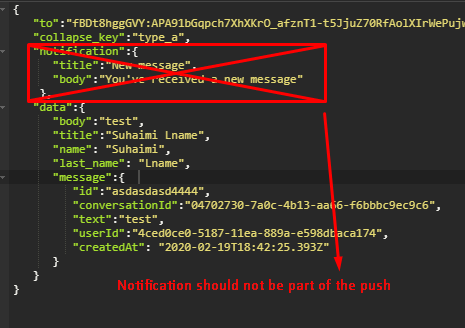
Have you tried to send an FCM push of only "data message" type without the notification field? It works well to me.
 AndresGarciaSobrado91
on 19 Feb 2020
AndresGarciaSobrado91
on 19 Feb 2020
Have you tried to send an FCM push of only "data message" type without the notification field? It works well to me.
Of course, we tried
KORuL
on 20 Feb 2020
Does anyone find any solution?
 jawad12345A
on 19 Mar 2020
jawad12345A
on 19 Mar 2020
The issue is not resolved 2020
 mtali
on 29 Mar 2020
mtali
on 29 Mar 2020
This is an that's been there since the beginning of Android. Different
manufacturers have different flavours of Android. Some of them aggressively
kill the background processes to optimize the battery. The only solution I
found working is to have a custom background thread or a way to detect if
the message has been delivered. You can retry sending the messages if
undelivered. But the key takeaway is that your can never rely on FCM for
communication.
Thanks & regards
Aditya VNS
On Sun, 29 Mar, 2020, 5:09 AM Emmanuel Mtali, notifications@github.com
wrote:
The issue is not resolved 2020
—
You are receiving this because you were mentioned.
Reply to this email directly, view it on GitHub
https://github.com/firebase/quickstart-android/issues/368#issuecomment-605534063,
or unsubscribe
https://github.com/notifications/unsubscribe-auth/ABQTEDRWKQFC6BD7AVU3U7LRJ2DCBANCNFSM4ECIOEMQ
.
Adityavns
on 29 Mar 2020
This is an that's been there since the beginning of Android. Different manufacturers have different flavours of Android. Some of them aggressively kill the background processes to optimize the battery. The only solution I found working is to have a custom background thread or a way to detect if the message has been delivered. You can retry sending the messages if undelivered. But the key takeaway is that your can never rely on FCM for communication. Thanks & regards Aditya VNS
…
On Sun, 29 Mar, 2020, 5:09 AM Emmanuel Mtali, @.*> wrote: The issue is not resolved 2020 — You are receiving this because you were mentioned. Reply to this email directly, view it on GitHub <#368 (comment)>, or unsubscribe https://github.com/notifications/unsubscribe-auth/ABQTEDRWKQFC6BD7AVU3U7LRJ2DCBANCNFSM4ECIOEMQ .
Which work around you use ? Can you share your code?
jawad12345A
on 29 Mar 2020
I'm sorry, that's not possible.
Thanks & regards
Aditya VNS
On Sun, 29 Mar, 2020, 12:53 PM Jawad Ahmed, notifications@github.com
wrote:
This is an that's been there since the beginning of Android. Different
manufacturers have different flavours of Android. Some of them aggressively
kill the background processes to optimize the battery. The only solution I
found working is to have a custom background thread or a way to detect if
the message has been delivered. You can retry sending the messages if
undelivered. But the key takeaway is that your can never rely on FCM for
communication. Thanks & regards Aditya VNS
… <#m_7814733463428319193_>
On Sun, 29 Mar, 2020, 5:09 AM Emmanuel Mtali, @.*> wrote: The issue
is not resolved 2020 — You are receiving this because you were mentioned.
Reply to this email directly, view it on GitHub <#368 (comment)
https://github.com/firebase/quickstart-android/issues/368#issuecomment-605534063>,
or unsubscribe
https://github.com/notifications/unsubscribe-auth/ABQTEDRWKQFC6BD7AVU3U7LRJ2DCBANCNFSM4ECIOEMQ
.Which work around you use ? Can you share your code?
—
You are receiving this because you were mentioned.
Reply to this email directly, view it on GitHub
https://github.com/firebase/quickstart-android/issues/368#issuecomment-605597210,
or unsubscribe
https://github.com/notifications/unsubscribe-auth/ABQTEDTRXFCNH3MAYAEA5G3RJ3ZQVANCNFSM4ECIOEMQ
.
Adityavns
on 5 Apr 2020
 weicheng-87
on 28 May 2020
weicheng-87
on 28 May 2020
Any solutions for infinix or different chinese devices?
 mrazam110
on 2 Jun 2020
mrazam110
on 2 Jun 2020
I have the same problem, and in 2020 there is still no solution for that ?? a shame for google.
 develbass
on 27 Jun 2020
develbass
on 27 Jun 2020
as mentioned by @kroikie many times here, vendors have not implemented swipe-up from recents correctly. I have seen this issue in Lenovo Vibe K5 Plus, few apps are whitelisted by vendor. There is restrict-to-launch checkbox in app management. for well-known apps it is unticked. If I download whatsapp, it is unticked by default. for our app it is ticked, so FCM is not getting delivered after swipe-up. If I untick it, FCM works, but who will educate this to users :)
 sandeep5193
on 14 Jul 2020
sandeep5193
on 14 Jul 2020
Hi, when I call ##426## on my phone, I see the screen with logs of notifications. In this screen shown that firebase delivered notifications, but android can't broadcast stopped app. So I think this is not a problem of firebase. Maybe it is helps someone to understand how to solve this issue.
 bukovskiy7777
on 19 Jul 2020
bukovskiy7777
on 19 Jul 2020
Can confirm that this issue is reproducing for me on Google Pixel3 running Android 10 for even Data only Max Priority FCM messages. App does not receive/show notification when killed from recent panel. However, when app is resumed again all pending notifications are delivered.
This happens even when phone is awake and not sleeping. This is not ideal for me as I am trying to develop a calling app.
Update
Its working as expected in release build.. weird stuff!!
 abhishekBansal
on 13 Aug 2020
abhishekBansal
on 13 Aug 2020
Has this issue been fixed after 3 years? Or any work around?
 austyking
on 13 Aug 2020
austyking
on 13 Aug 2020
Not fixed
KORuL
on 13 Aug 2020
Tested on a production app, over 100+ devices. Just don't Pass the "Notification" object .
Issue arises when Passed the "Notification" object.
( I know this is strange 😷)
What I am doing?
Sending notification to devices group/id , on new document (creation) trigger of Firestore.
check this cloud function
https://github.com/satyajiit/PWA_TO_NATIVE_ANDROID_APP/blob/master/Cloud_Functions_For_FCM/functions/index.js
FirebaseService
in manifest
<service
            android:name=".FirebaseService"
            android:exported="false">
            <intent-filter>
                <action android:name="com.google.firebase.MESSAGING_EVENT" />
            </intent-filter>
        </service>
Don't forget to subscribe topic "all" , for the above code snip.
This is what working for me.
I was having the same issue earlier.
 satyajiit
on 13 Aug 2020
satyajiit
on 13 Aug 2020
@satyajiit my message is data only already. Strangely! It works in release builds on Pixel 3
abhishekBansal
on 13 Aug 2020
same issue, any solution for infinix?
 Waleedasim
on 28 Aug 2020
Waleedasim
on 28 Aug 2020
Any solutions for infinix or different chinese devices?
same issue did you find any solution?
Waleedasim
on 28 Aug 2020
finally issue resolved just follow below code it is working fine on oneplus huawei and infinix
 ComponentName componentName = new ComponentName(this, FCMService.class);
getPackageManager().setComponentEnabledSetting(componentName, PackageManager.COMPONENT_ENABLED_STATE_ENABLED,
                PackageManager.DONT_KILL_APP);
finally issue resolved just follow below code it is working fine on oneplus huawei and infinix
 ComponentName componentName = new ComponentName(this, FCMService.class);
getPackageManager().setComponentEnabledSetting(componentName, PackageManager.COMPONENT_ENABLED_STATE_ENABLED,
                PackageManager.DONT_KILL_APP);
Kotlin version with broadcast would be:
val receiver = ComponentName(applicationContext, BootCompleteReceiver::class.java)

        applicationContext.packageManager?.setComponentEnabledSetting(
            receiver,
            PackageManager.COMPONENT_ENABLED_STATE_ENABLED,
            PackageManager.DONT_KILL_APP
        )
Sometimes onMessage not working when the app in background( removed app from the recent apps)
Android 9 Lenovo PB-6505M
while the app is in the foreground, OnMessage is triggering when I send another notification, and also the pending notifications are coming.
 AllwinJohnson
on 17 Oct 2020
AllwinJohnson
on 17 Oct 2020
finally issue resolved just follow below code it is working fine on oneplus huawei and infinix
 ComponentName componentName = new ComponentName(this, FCMService.class);
getPackageManager().setComponentEnabledSetting(componentName, PackageManager.COMPONENT_ENABLED_STATE_ENABLED,
                PackageManager.DONT_KILL_APP);
Kotlin version with broadcast would be:
val receiver = ComponentName(applicationContext, BootCompleteReceiver::class.java)

        applicationContext.packageManager?.setComponentEnabledSetting(
            receiver,
            PackageManager.COMPONENT_ENABLED_STATE_ENABLED,
            PackageManager.DONT_KILL_APP
        )
I tried adapting this code for Xamarin, but was unable to get it to work, still not receiving the push notification when app is closed on Infinix. @Waleedasim if you don't mind, can you give any other pointers that might be helpful. Thanks
 Cyhermes
on 6 Nov 2020
Cyhermes
on 6 Nov 2020
If someone is looking for a detailed explanation please visit: https://github.com/shahzadafridi/FCM-Notification-Test-Cases I am sure this will helps you.
 shahzadafridi
on 9 Nov 2020
shahzadafridi
on 9 Nov 2020
Anyone with any working solution
 viveksomaiya1103
on 23 Nov 2020
viveksomaiya1103
on 23 Nov 2020
@Google decided to do nothing, it left us with this problem alone
KORuL
on 23 Nov 2020
Lets get one thing cleared!
What ever the documentation says, what I have experienced is that one doesn't need the "onMessageReceived" to simply open app via notification or a specific part of it, such things can be handled by TAGS in notification's payload and and Intent receiver/reader in the startup activity.
If you have noticed, Push notifications do not pop up when app is in foreground (while user is using the app)
and "onMessageReceived" works exactly at that time.
 anurag-176
on 29 Nov 2020
anurag-176
on 29 Nov 2020
Also, did you guys check this out? https://firebase.google.com/docs/cloud-messaging/android/receive
Check this topic there "Background Restricted Apps (Android P or newer)"
anurag-176
on 29 Nov 2020
App state | Notification | Data | Both
Foreground | onMessageReceived | onMessageReceived | onMessageReceived
Background | System tray | onMessageReceived | Notification: system trayData: in extras of the intent.
When app is in background onMessageReceived() is not called. This is how the behavior is.
When app is in background,notification will be handled by system tray and data will be handled by extras in intent in main launcher.
Hope this helps.
 ManjKS
on 30 Dec 2020
ManjKS
on 30 Dec 2020
Related issues
 aselims
·
6Comments
aselims
·
6Comments
 wellbranding
·
3Comments
wellbranding
·
3Comments
 hungud
·
6Comments
hungud
·
6Comments
 charlizesmith
·
5Comments
charlizesmith
·
5Comments
 naveenkumarn27
·
4Comments
naveenkumarn27
·
4Comments
Most helpful comment
Hello guys
I solved this inserting this lines in Manifest.xml
My app received notifications when is foregorund, background and is closed.