As we all know, today more than ever before, it is crucial to be able to trust our computing environments. One of the main difficulties that package maintainers of Linux distributions face, is the difficulty to verify the authenticity and the integrity of the source code.
The Arch Linux team would appreciate it if you would provide us GPG signatures in order to verify easily and quickly of your source code releases.
Overview of the required tasks:
- [x] Please create and/or use a 4096-bit RSA keypair for the file signing
- The key may be used for email encryption too
- Keep your key secret, use a strong unique passphrase for the key
- [ ] Upload the public key to a key server
- [x] [Sign every new commit by default](https://help.github.com/articles/signing-commits-using-gpg/)
- [x] [Sign new tags](https://help.github.com/articles/signing-tags-using-gpg/)
- Verify the Github Release tarball download against your local source
- [ ] [Sign Github Release tarballs](https://wiki.debian.org/Creating%20signed%20GitHub%20releases)
*Additional Information: *
- https://help.github.com/categories/gpg/
- https://git-scm.com/book/en/v2/Git-Tools-Signing-Your-Work
- https://www.qubes-os.org/doc/verifying-signatures/
- https://developers.google.com/web/fundamentals/security/encrypt-in-transit/why-https
Thanks.
 NicoHood
All 25 comments
keys should be on the server..?
As for release tarballs, they're made automatically by gh when git tag is pushed.
Go back to your "Releases" section and download the tarball mysoftware-0.4.tar.gz automatically generated by GitHub. Verify that the tarball contains exactly the same data as the git repository.
Feel free to provide a script/tool for that.
Preferably automate the whole thing. (download, verification, signing & uploading the signature)
 zetok
on 22 Nov 2016
zetok
on 22 Nov 2016
$ gpg --recv-keys 78B8BDF87E9EF0AF
gpg: no valid OpenPGP data found.
gpg: Total number processed: 0
You've possibly uploaded it to the "wrong" keyserver. You may want to try other keyservers.
As stated in the link you only need to run
gpg --armor --detach-sign mysoftware-0.4.tar.gz
And upload the signature. If you do this for a release it will not take longer than writing the changelog ;)
NicoHood
on 22 Nov 2016
You've possibly uploaded it to the "wrong" keyserver. You may want to try other keyservers.
cc @initramfs
If you do this for a release it will not take longer than writing the changelog ;)
Well, good thing that I'm not writing the changelog since its generation is ~automated :D
So no, doing stuff manually would take a lot longer than generating changelog (last time generating took like 15ms?).
Script it, the command listed isn't even close to what the automated script should do. Certainly it should not blindly sign stuff without verifying it.
zetok
on 22 Nov 2016
TBH: You only need to sign the tarball and publish it. As an alternative you can also create your own tarball if you dont like to verify the github download against that.
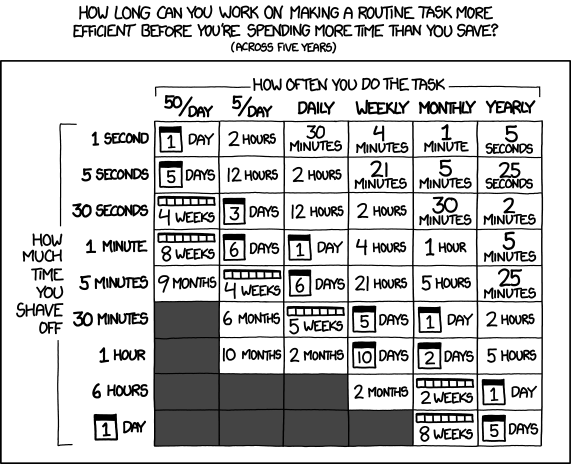
Scripting this is mostly impossible (as you need params such as download source, release number etc and you cannot upload it to github that simple if i am not wrong. Please, this takes no time if you tag a release every few month, but increases everyone's security. And tox is all about security.
NicoHood
on 22 Nov 2016
Scripting this is mostly impossible (as you need params such as download source, release number etc and you cannot upload it to github that simple if i am not wrong.
You are. The only required parameter is tag name that needs to be supplied to script. I mean, even that could be removed, but then script wouldn't be able to always reliably do its job.
(…) you need params such as download source, release number (…)
They're constant, the only differing this is tag name. Which you supply.
(…) you cannot upload it to github (…)
You can, gh has an API for it. There was even a script in qTox's sauce to upload to releases: https://github.com/qTox/qTox/blob/db8bee381e741253d28e97ec186f2c01643a8a79/tools/publish.py
Please, this takes no time if you tag a release every few month, but increases everyone's security.
What takes no time is not doing it. Security is already provided via GPG-signed tags.
As for the XKCD comic – e.g. Gitlab has a nice saying, that goes something like "if you need to do something more than twice, script it".
zetok
on 22 Nov 2016
I support the usage of a script, because people with knowledge can vanish, scripts stay.
 sudden6
on 24 Nov 2016
sudden6
on 24 Nov 2016
Maybe something more generic, not qtox specific would make sense. If it could parse the "origin" of the git, select the correct project etc to upload the data too would be nice. So yeah you might be right that a script makes sense. However this should not keep you from doing it manual for now.
NicoHood
on 24 Nov 2016
I am currently developing a script to tag a release, push it and then compare the github download against the local files. It will then create a hash of the files along with a gpg signature.
The only part that is left is the uploading of the signature and the hash. Since my script is just some bash, I also want to stick to bash for now. Do you have any ideas or wishes how to upload the release? I can do some curl magic (which i have not tried) or simply use another script to do so.
NicoHood
on 10 Dec 2016
depending on where it should run it could be hard to obtain a go environment, so I'd favor curl magic.
sudden6
on 10 Dec 2016
I am currently developing a script to tag a release, push it and then compare the github download against the local files. It will then create a hash of the files along with a gpg signature.
Tagging a release shouldn't be a part of the script that downloads, compares and signs release tarballs.
It's better to split separate stuff into separate scripts.
zetok
on 10 Dec 2016
My first version is available here (link might change in the future, look at nicohood.de to find it somewhere if its offline later on).
https://github.com/NicoHood/NicoHood.github.io/wiki/Github-GPG-signed-release-script
You can modify it to your needs, it should be easy enough for most people.
NicoHood
on 11 Dec 2016
@NicoHood there's no license info?
zetok
on 11 Dec 2016
Good point. Just use it. Is it public domain then or what? I might some day collect those somewhere else, but that should not matter now.
NicoHood
on 11 Dec 2016
Is it public domain then or what?
Nope. If no license is specified, code is proprietary. Also, explicitly stating that code is public domain isn't valid, given that some jurisdictions don't allow placing stuff in public domain by the author. For that you would want to use CC0.
zetok
on 11 Dec 2016
I've written that its simple MIT. Modify as you wish. Would you mind to add a pgp signature of the github release?
NicoHood
on 13 Dec 2016
@NicoHood the script in its current form won't work. Btw, it would be easier to make a repo for it.
#!/bin/bash -ex
There should be no args passed on the hashbang line – set stuff below it with set -ex.
Consider also using -u -o pipefail.
# Settings
OUT_PATH=archive/
PROJECT_NAME=${PWD##*/}
USER_NAME=$(git config user.name)
BRANCH=$(git rev-parse --abbrev-ref HEAD)
TAG=$1
Why would you even need BRANCH? TAG is supposed to be all that is needed to verify whether given tarball matches.
# Check input param number
if [[ $# -ne 1 ]]; then
    echo "Usage: $0 tag"
    exit 1
fi

# Check if commit signing is enabled for this repo and ask for a switch if not
if [[ $(git config commit.gpgsign) != "true" ]]; then
    read -rp 'Warning: Commit signing is disabled. Enable with: "git config --global commit.gpgsign true" Press enter to continue.'
fi
The check for repo being configured for gpg-signing commits doesn't seem to be very useful, since gpg-signing tarballs would work (or wouldn't) regardless of repo config.
# Check if this is a github project
if ! git config --get remote.origin.url | grep github -i; then
    echo "Error: This is (possibly) not a github project. Please fix your origin URL."
    exit 1
fi
This check would fail for me, I have no github in my remotes.
# Check if every added file has been commited
if ! git diff --cached --exit-code; then
    read -rp "Warning: You have added new changes but did not commit them yet. Press enter to continue."
fi
Why is it needed? Also, why are only files that are added checked? What about changes to files that git tracks, but haven't been added?
# Tag new signed release and upload
git tag -s "${TAG}" -m "Release ${TAG}"
git push --tags
Yeah, no. If you want a script for signing tarballs, this is to be removed.
# Create archive of the tag
mkdir -p "${OUT_PATH}"
git archive --format=tar.gz -o "${OUT_PATH}${PROJECT_NAME}-${TAG}.tar.gz" --prefix "${PROJECT_NAME}-${TAG}/" "${TAG}"

# Download github created archive and compare against local file
curl -L "https://github.com/${USER_NAME}/${PROJECT_NAME}/archive/${TAG}.tar.gz" | cmp "${OUT_PATH}${PROJECT_NAME}-${TAG}.tar.gz"
Tarball would fail to download for qTox.
zetok
on 13 Dec 2016
@NicoHood the script in its current form won't work. Btw, it would be easier to make a repo for it.
https://github.com/NicoHood/gpgithub/blob/master/gpgtag.sh
There should be no args passed on the hashbang line – set stuff below it with set -ex.
Consider also using -u -o pipefail.
Added. Thanks
Why would you even need BRANCH? TAG is supposed to be all that is needed to verify whether given tarball matches.
The github release requires the branch as an option.
The check for repo being configured for gpg-signing commits doesn't seem to be very useful, since gpg-signing tarballs would work (or wouldn't) regardless of repo config.
You are right, it is a general notice to please enable the commit signing in general.
This check would fail for me, I have no github in my remotes.
Removed the exit code.
Why is it needed? Also, why are only files that are added checked? What about changes to files that git tracks, but haven't been added?
It is just to avoid that if people used git add but forget to commit those changes. Unstaged changes are quite likely for developing, so I will not check for those. Its just an extra to avoid wrong tags, but i could also completely remove it.
Yeah, no. If you want a script for signing tarballs, this is to be removed.
You always need a tag anyways. Otherwise you cannot compare the data against the download. I've added an if to check if the tag already exists.
Tarball would fail to download for qTox.
Why? because of the username? However you can still manually upload the data if it fails. I think there is no simple way to get the github data, which differs from the git settings.
-> please comment on the commit in the future (as you suggested) https://github.com/NicoHood/gpgithub/blob/master/gpgtag.sh
NicoHood
on 16 Dec 2016
@NicoHood
$ gpg --recv-keys 78B8BDF87E9EF0AF
gpg: no valid OpenPGP data found.
gpg: Total number processed: 0
You've possibly uploaded it to the "wrong" keyserver. You may want to try other keyservers.
The key in question there is mine, and as seen here can indeed be found by a public keyserver. As far as I know, there is no default keyserver that is recommended by GnuPG, the closest thing to a recommendation is probably from this FAQ entry on GnuPG's site, which talks about the SKS pool (and the primary keyserver(s) I use).
Regardless, I have uploaded my key to hkp://keys.gnupg.net (which I suspect you would be using) just now so that you should be able to receive the key without hassle, please wait a few hours for the keyserver to process and host the key. Incidentally I also use the Tor hidden service keyserver at hkp://jirk5u4osbsr34t5.onion if you prefer that.
 initramfs
on 16 Dec 2016
initramfs
on 16 Dec 2016
@initramfs
(…) please wait a few hours for the keyserver to process and host the key.
How many is "a few hours" ? It's been almost 12h since your post, and I for one still can't get it:
$ gpg --recv-keys 78B8BDF87E9EF0AF
gpg: using character set 'utf-8'
gpg: no running Dirmngr - starting '/usr/bin/dirmngr'
gpg: waiting for the dirmngr to come up ... (5s)
gpg: connection to the dirmngr established
gpg: data source: http://keyserver.kjsl.org:11371
gpg: no valid OpenPGP data found.
gpg: Total number processed: 0
update:
[09:30:41] <sudden6> zetok: I can find it if I explicitely select sks-keyservers.net
[09:30:57] <sudden6> but not on the default keys.gnupg.net
[09:31:15] <zetok> that worked, thanks
This should now be done, see https://github.com/qTox/qTox/releases/tag/v1.7.0
sudden6
on 26 Dec 2016
@zetok Release 1.9.0 is not GPG signed, please do so.
@farseerfc Please do not simply disabled the signature if its not available and give upstream a hint. This is a security issue, especially because "Why should upstream drop gpg signatures if it was not by mistake?"
NicoHood
on 24 Apr 2017
@NicoHood uploaded signed release for both 1.9 and 1.10.
zetok
on 7 May 2017
Thanks
NicoHood
on 7 May 2017
@NicoHood You are right, I will not disable signature again.
 farseerfc
on 8 May 2017
farseerfc
on 8 May 2017
Related issues
 ghost
·
6Comments
ghost
·
6Comments
 tox-user
·
4Comments
tox-user
·
4Comments
 Tcll
·
3Comments
Tcll
·
3Comments
 akhilman
·
7Comments
akhilman
·
7Comments
 HuuThanhHung
·
3Comments
HuuThanhHung
·
3Comments
Most helpful comment
This should now be done, see https://github.com/qTox/qTox/releases/tag/v1.7.0