Brief Description
OS: OS X (El Capitan)
qTox version: v1.4.1.1
Commit hash: 06d78dcdee7bfe9a320fe91662f34227d74c3916
toxcore: 0.0.0
Qt: 5.6.0
Hardware: MacBook Air, Early 2014
Reproducible: Always
Steps to reproduce
- log in
- start video call with someone
Observed Behavior
Can't see other person when in a video call, only get the icon of the gray person. Settings have video device set to FaceTime HD Camera. Other user is on Arch Linux, I can see him just fine and audio works both ways.
Expected Behavior
Seeing other person
 redbearsw
All 21 comments
The same happened between two qTox communications installed in OSX (Mac Book Air and Mac Book Pro). The Air was recording the video and was displaying it on Pro, but the Pro could only record grey square.
 hyiltiz
on 17 Jul 2016
hyiltiz
on 17 Jul 2016
I have same issue with OSX 10.11.6 (15G31) and same 1.4.1.1 qTox. And it's not a regression -- I had no video on qTox 1.3-something as well.
Also:
- To reproduce, there is no need to make a call. Going to audio/video settings I can observe that no preview starts for Facetime HD Camera device.
- If I select screen capture as a video device, it works and works in calls.
1 and 2 may mean that it's not call issue itself.
 ddanila
on 27 Jul 2016
ddanila
on 27 Jul 2016
I have same issue 10.11.6 (15G31). qTox version v1.4.1.1. Qt version: 5.6.0
Model ID: Apple Camera VendorID_0x106B ProductID_0x1570
Unique ID: DJH4182F117F6VTDR
Console info: (log)
[20:28:46.289] ../src/video/camerasource.cpp:209 : Debug: Opening device "DJH4182F117F6VTDR"
[AVFoundation input device @ 0x7f9bc8b4f0a0] Video device not found
[20:28:46.289] ../src/video/camerasource.cpp:225 : Warning: Failed to open device!
 VladislavSu
on 10 Sep 2016
VladislavSu
on 10 Sep 2016
Well, apparently problem is that it tries to open video device "DJH4182F117F6VTDR" which does not exist.
Hardcoding deviceName to "FaceTime HD Camera" in camerasource.cpp solves video preview issue, I can see myself in preferences and during the call.
But other party does not see or even hear me + once client crashed for me.
Need to be investigated further...
ddanila
on 4 Jan 2017
Is this still reproducible on newest qTox 1.8.1 ?
 zetok
on 12 Feb 2017
zetok
on 12 Feb 2017
Yes, it's still reproducible:
[17:16:35.954 UTC] video/camerasource.cpp:355 : Debug: Closing device  "none"
[17:16:35.954 UTC] video/camerasource.cpp:269 : Debug: Opening device  "CC25065HCQCF6VVD1"
[AVFoundation input device @ 0x7fdf600befa0] Video device not found
[17:16:35.954 UTC] video/camerasource.cpp:283 : Warning: Failed to open device!
You are using qTox version v1.8.1.
Commit hash: bdbf2b461bd2fde5c2cc00fca364f76e5b448356
toxcore version: 0.1.0
MacOS Sierra 10.12.3 (16D32)
ddanila
on 12 Feb 2017
This still happens on OS X High Sierra (MBP 2015) and Tox 1.13... Please fix
 gvansanden
on 3 Mar 2018
gvansanden
on 3 Mar 2018
Any update on this? uTox crashes on macOS when doing video, so there's currently no Tox client for macOS that can do video.
 frh
on 12 Mar 2018
frh
on 12 Mar 2018
It appears that this is still a problem in qTox 1.16.3. I tried talking to someone the other day. We could hear each other. She could see me. I couldn't see her. I was using Debian Buster. She was using a Macbook.
 tmakarios
on 24 Jul 2019
tmakarios
on 24 Jul 2019
@tmakarios can you try the latest nightly build and see if that fixes the problem?
 sudden6
on 26 Jul 2019
sudden6
on 26 Jul 2019
@sudden6, sorry, I'm not on the same continent as the Macbook, and its owner is (thanks in part to a Linphone nightmare) very unwilling to even _try_ unfamiliar software (i.e., anything other than Skype, Facetime, or WhatsApp). Her willingness to help _debug_ unfamiliar software is almost certainly zero.
I wonder if any of @frh, @gvansanden, @ddanila, @VladislavSu, @hyiltiz, or @redbearsw still have the hardware on which qTox video didn't work for them, and can test it?
P.S. Just to add a little more information: the woman I was talking to reported that no options for video resolution were available when the Facetime HD camera was selected, and she saw no preview image of herself.
tmakarios
on 26 Jul 2019
No problem, I had someone try the latest nightly and they confirmed that at least the video selection, resolution selection and preview work on their Macbook. I have no information if video calls actually work though.
sudden6
on 26 Jul 2019
@sudden6, thanks for your work on this. If we haven't found a different solution before then, I might try asking her to upgrade next time there's a stable release of qTox, and see if that fixes it for her.
tmakarios
on 27 Jul 2019
i have the same problem tox isn't asking for camera permission this should be the problem :(
 mariushartig
on 6 Sep 2019
mariushartig
on 6 Sep 2019
@Vostro162 did you check with a nightly build mentioned above?
sudden6
on 6 Sep 2019
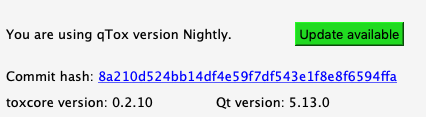
i using this version
tox asking me for microphone permission but not for camera :(
if you need additional informations let me know
mariushartig
on 7 Sep 2019
Ok, this is the most recent one.
TBH I have no idea how this permission thing works with OSX, so far it wasn't needed and we also don't do anything special for audio permissions.
sudden6
on 7 Sep 2019
i will try to fix this bug for you. i made a quick test application in qt and this was working :)
mariushartig
on 7 Sep 2019
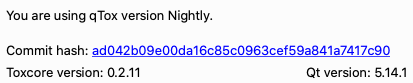
Is there any update on this?
I've tried both stable and nightly versions...
It never asks for camera permission :(
 ElectroQuanta
on 2 Apr 2020
ElectroQuanta
on 2 Apr 2020
@ElectroQuanta here someone having a fix for some it seems: https://github.com/qTox/qTox/issues/6056
sudden6
on 2 Apr 2020
@sudden6 thks ;) I will take a look into it :D
ElectroQuanta
on 3 Apr 2020
Related issues
 tox-user
·
4Comments
tox-user
·
4Comments
 dubslow
·
6Comments
dubslow
·
6Comments
 ghost
·
4Comments
ghost
·
4Comments
 anthonybilinski
·
6Comments
anthonybilinski
·
6Comments
 ovalseven8
·
6Comments
ovalseven8
·
6Comments
Most helpful comment
Yes, it's still reproducible:
[17:16:35.954 UTC] video/camerasource.cpp:355 : Debug: Closing device  "none"
[17:16:35.954 UTC] video/camerasource.cpp:269 : Debug: Opening device  "CC25065HCQCF6VVD1"
[AVFoundation input device @ 0x7fdf600befa0] Video device not found
[17:16:35.954 UTC] video/camerasource.cpp:283 : Warning: Failed to open device!
You are using qTox version v1.8.1.
Commit hash: bdbf2b461bd2fde5c2cc00fca364f76e5b448356
toxcore version: 0.1.0
MacOS Sierra 10.12.3 (16D32)