Qownnotes: Right click menu items (context menu) on Note list items are not evenly spaced.
Expected behaviour
Right click menu items (context menu) on Note list items are evenly spaced.
Actual behaviour
They are not.
Steps to reproduce
Use qownnotes 20.9.3 on openSUSE 15.1, set display language to Chinese, simplified or traditional is okay. Then you will find that right click menu items (context menu) on Note list items are not evenly spaced.
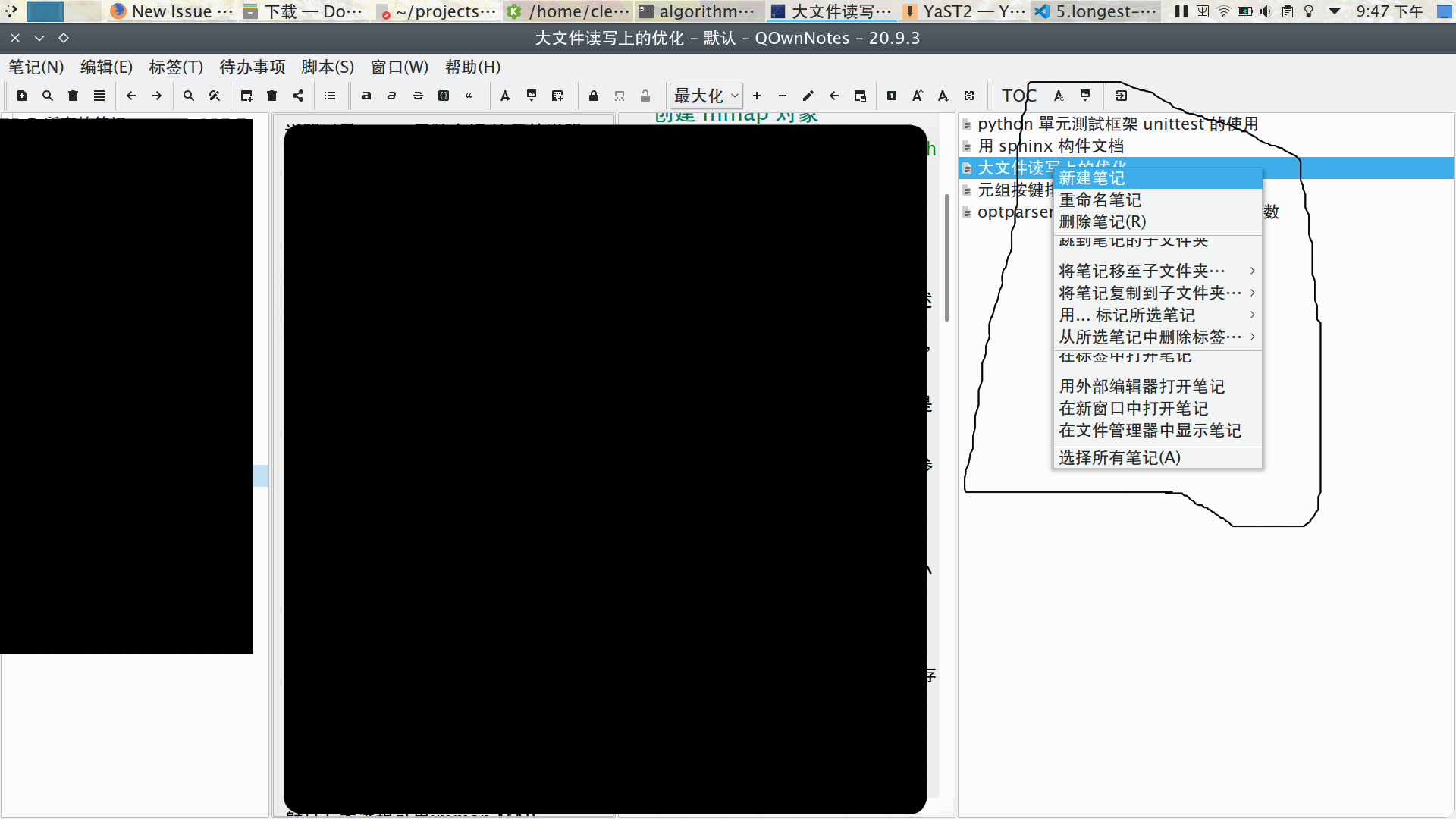
I am not sure when this problem starts to occur. But it does not show up when the display language is English.
Output from the debug section in the settings dialog
Expand
Relevant log output in the Log panel
Expand
 iclementine
All 29 comments
I cannot reproduce that under KDE Neon. Looking good for me.
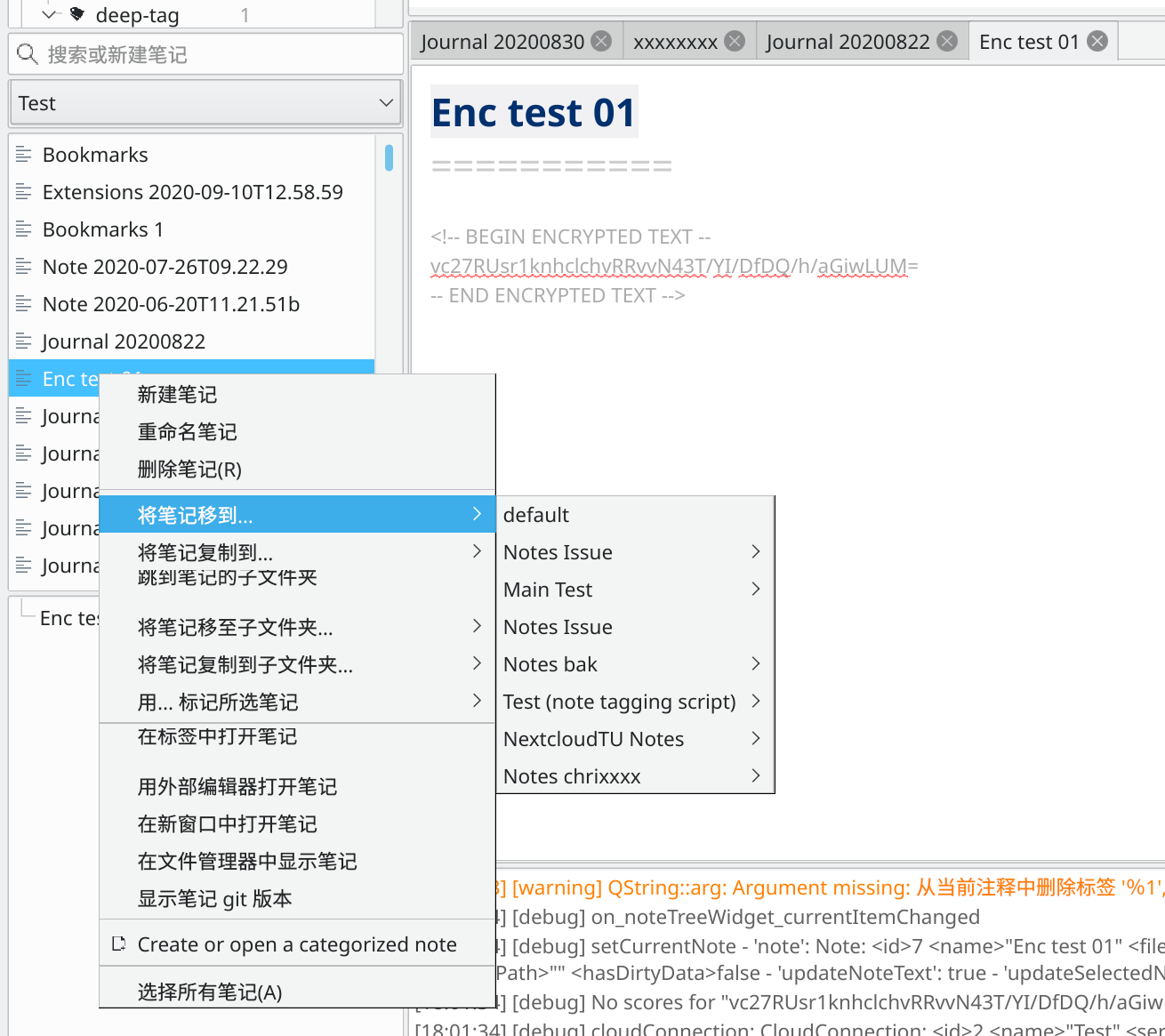
Might be a openSUSE thing... How're the flatpak, snap and app image version of QOwnNotes looking?
 pbek
on 10 Sep 2020
pbek
on 10 Sep 2020
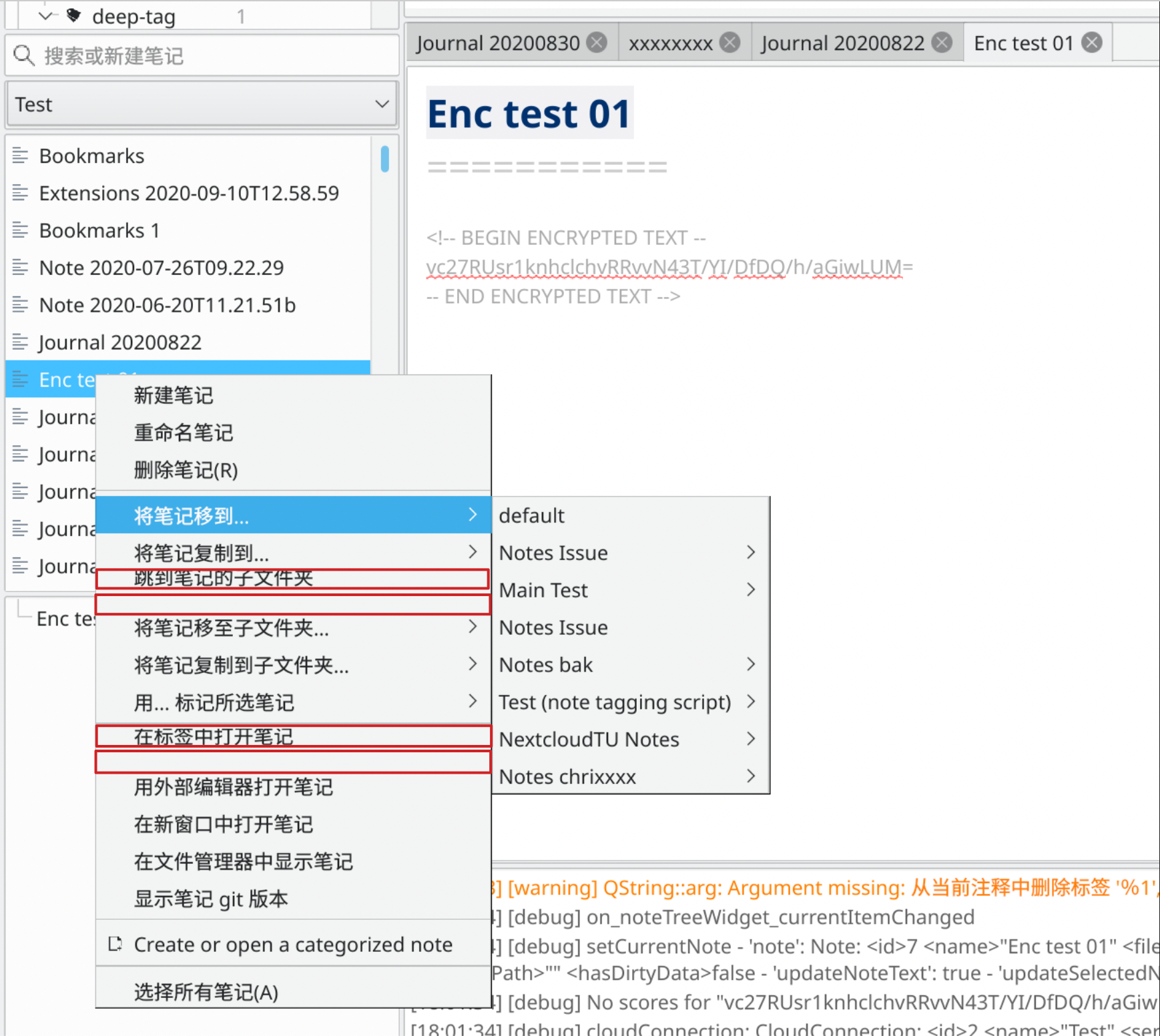
Thank you for you replay. Sorry for not making a good annotation of the screenshot. By ""not being evenly spaced", I mean some menu items' position has a small offset upwards, thus, clipping the text a littel and leave larger margin at the bottom.
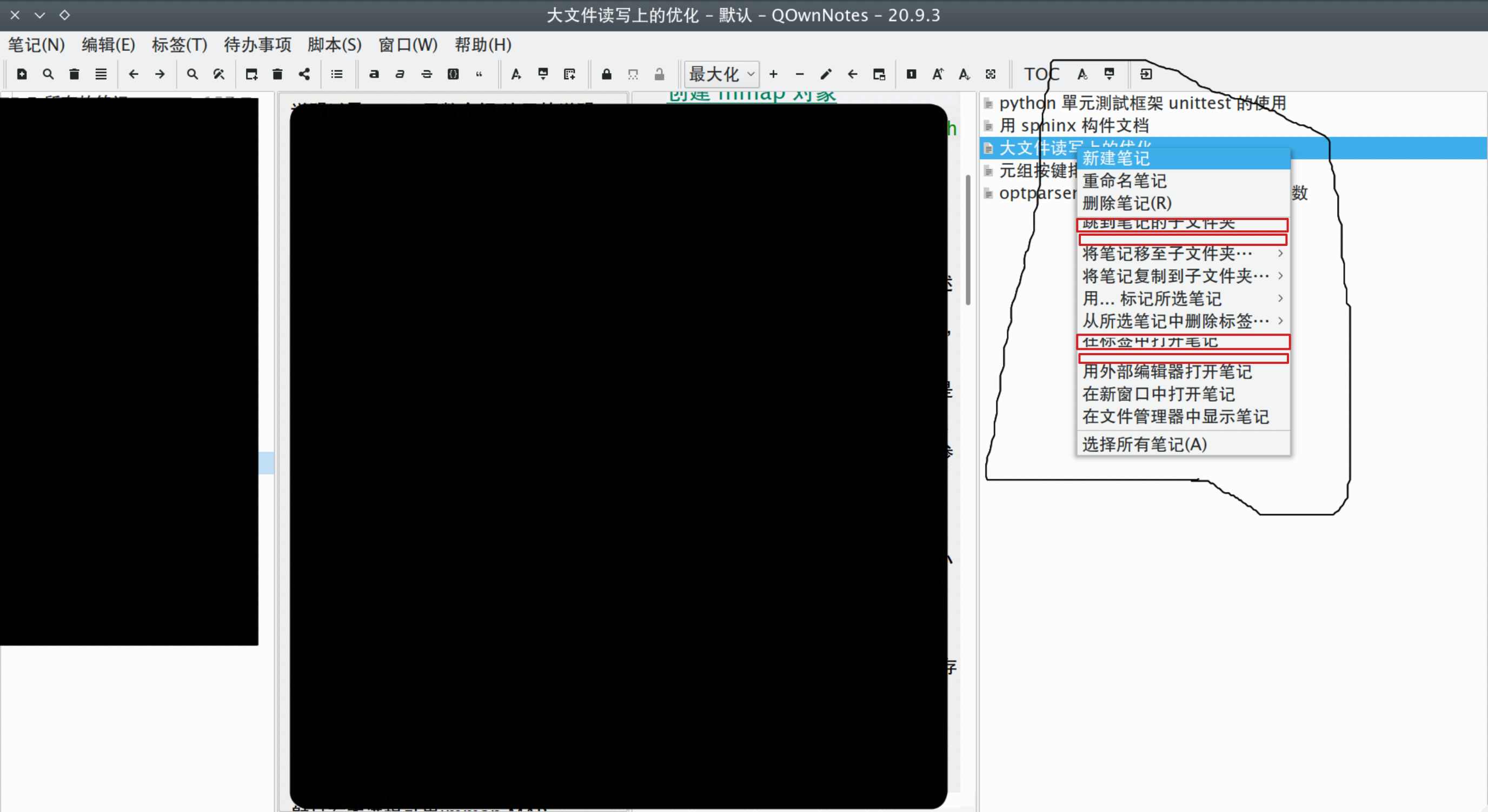
In the screenshot you posted, I also see the same offset.
iclementine
on 11 Sep 2020
Strange. That seems to be an issue with the default Qt styling. Do you also have that issue in dark mode? (QON's dark mode)
There is a script in the script repository that lets you modify the UI styling. Maybe you can find a way to get around this.
pbek
on 11 Sep 2020
Yes, you are right. I cannot reproduce it in dark mode.
Also I tried lower versions, 20.4.18, It does not have this issue even with default Qt styling.
iclementine
on 12 Sep 2020
Maybe it came with a newer Qt version.
pbek
on 12 Sep 2020
I am using Qt 5.9.7, openSUSE 15.1. Maybe it is related to the Qt style and QON's language package's version. Thank you.
iclementine
on 12 Sep 2020
There is no "language package", it just uses the usual way of how Qt apps are translated. Like I said, you could try tinker with the UI with above mentioned script.
pbek
on 12 Sep 2020
Thank you. Now I've enabled the custom-stylesheet script. I'am trying to figure out which name controls the context menu on the noteTreeWidget.
iclementine
on 12 Sep 2020
Could be a general thing of QMenu: https://doc.qt.io/qt-5/stylesheet-examples.html#customizing-qmenu
And if it looks ok in dark mode you could take a look at the styles from there: https://github.com/pbek/QOwnNotes/blob/develop/src/libraries/qdarkstyle/style.qss#L246
pbek
on 12 Sep 2020
I have found another case with "some menu items have some unexpected offsets".
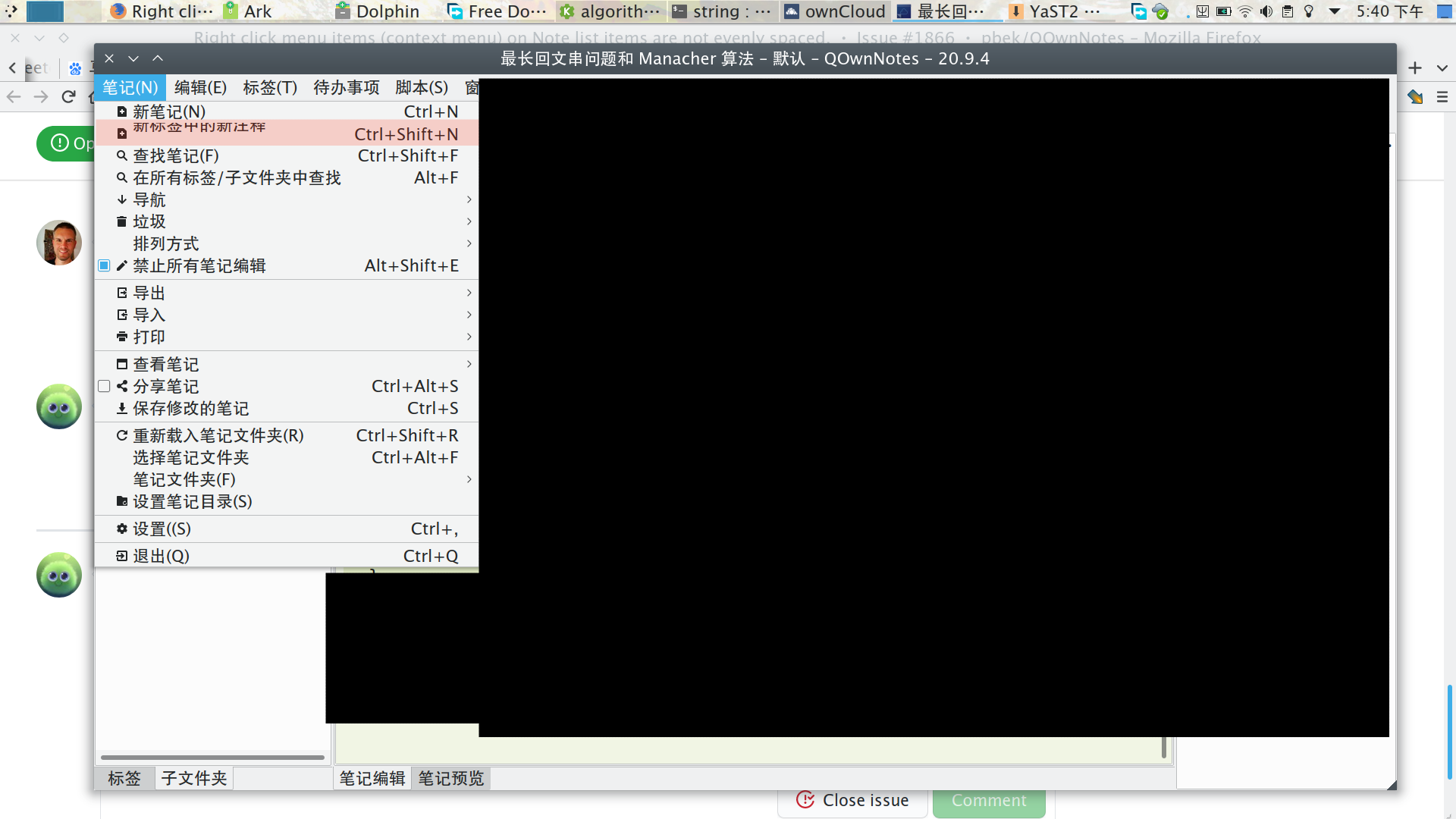
So I think it's probably an error in the translation(what I previously referred to as language package) of Chinese (simplified and traditonal). I think there is an unspected \n in these items that show some unexpected offsets. So I checked the translation of Chinese and I did find these errors. I compared "languages/QOwnNotes_en.ts" and "language/QOwnNotes_zh_CN.ts" and "language/QOwnNotes_zh_TW.ts"
New note in new tab
English

zh_CN

Jump to the note's subfolder
en

zh-CN

en

zh-CN

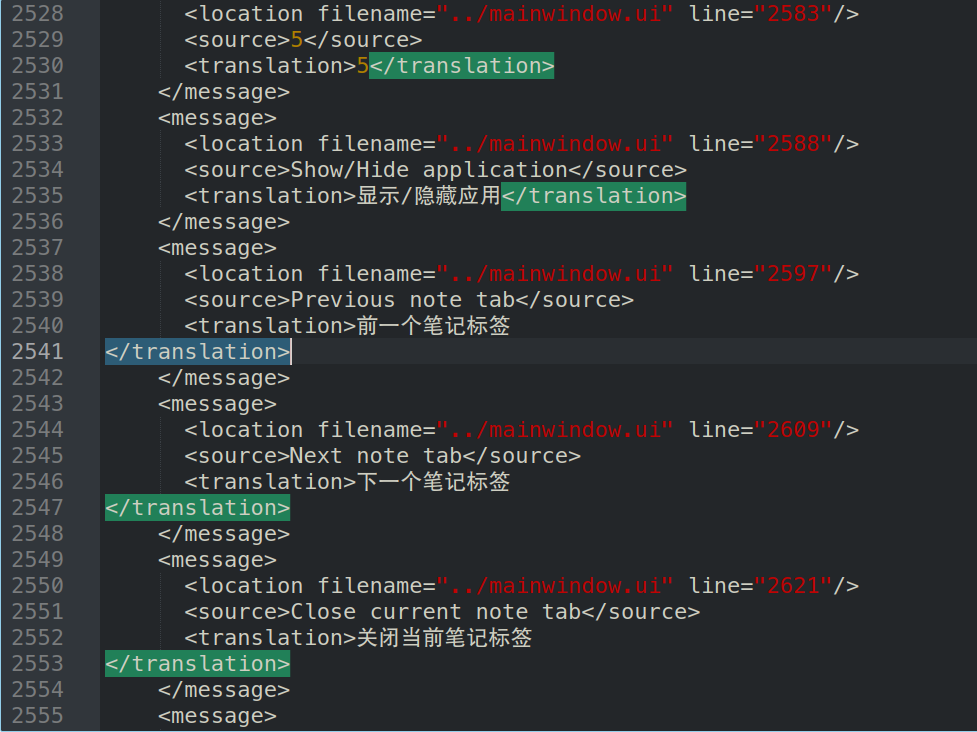
In these 3 examples, there is a \n before in Chinese translation. I think it is the cause of this. And also, there are more translations in Chinese with an extra \n, I think it is a problem. If it is comfired, I would like to make a pull request to fix this. Is it the ordinary way to contribute to the translations of QOwnnotes.
more examples of these unexpected space.
iclementine
on 12 Sep 2020
I have found another case with "some menu items have some unexpected offsets".
Then it really could be a QMenu issue (see above).
pbek
on 12 Sep 2020
I have found another case with "some menu items have some unexpected offsets".
Then it really could be a QMenu issue (see above).
Thank you, and I found something strange in the translation file. Does a \n in the menu item affects the menu?
iclementine
on 12 Sep 2020
That really could be the reason for it. You could fix those line-breaks for the two languages on https://crowdin.com/project/qownnotes and also open issues in comments for those strings. (Or you can tell me your username on https://crowdin.com/ and I make you proofreader so you can approve the strings yourself)
pbek
on 12 Sep 2020
Update:
I edited the Chinese translation file and rebuild qownnotes on obs. The problem is fixed. So I am sure that this is a problem with the translation.
iclementine
on 12 Sep 2020
Awesome! Thank you very much for confirming! Then please: https://github.com/pbek/QOwnNotes/issues/1866#issuecomment-691470572 😀
pbek
on 12 Sep 2020
That really could be the reason for it. You could fix those line-breaks for the two languages on https://crowdin.com/project/qownnotes and also open issues in comments for those strings. (Or you can tell me your username on https://crowdin.com/ and I make you proofreader so you can approve the strings yourself)
Thank you, I did not have a account on crowdin.com, but I would sign up for an account.
Also, I found the translation errors that I would like to fix.
iclementine
on 12 Sep 2020
Wonderful, you can use your GitHub account for auth.
pbek
on 12 Sep 2020
Thank you. I Also want to know what "double click to stick/unstick note form tab" means? I need to understand this to translate it.
I found double cliking on a tab would toggle a mini flag on the tab title. But I don't really what understand sticking/unsticking mean?
iclementine
on 12 Sep 2020
Making them sticky means that the tab will not be re-used by another note when you click on another note. Rather a new tab will be opened then.
pbek
on 12 Sep 2020
Thank you. I've signed up with my github account and edited some translations. Please make me a proof reader. I am an old user of QOwnNotes and would like to contribute to it.
iclementine
on 12 Sep 2020
Done
pbek
on 12 Sep 2020
Crowdin is generally not very strict or rather not strict enough regarding changes in style. These kinds of issues I kind of expected somehow. Thanks for sharing.
 PurplePlums
on 12 Sep 2020
PurplePlums
on 12 Sep 2020
I have checked and corrected some translation errors and formatting errors in Chinese Simplified translations. When would these changes to applied to a newer version of QOwnNotes?
(I have not corrected that for Chinese Traditional, because it takes some time to do so).
iclementine
on 12 Sep 2020
As far as I understand they will be visible at the next update, coming up shorty.
PurplePlums
on 12 Sep 2020
I'll integrate the new translations in the next release. Thank you!
pbek
on 12 Sep 2020
20.9.5
- a great amount of translations into Chinese Simplified were fixed so the menu items are
correctly shown again (for #1866, thank you @iclementine)
pbek
on 13 Sep 2020
There now is a new release, could you please test it and report if it works for you?
pbek
on 13 Sep 2020
There now is a new release, could you please test it and report if it works for you?
Yes, it works for me now. Thank you!
iclementine
on 13 Sep 2020
Great, thank you for testing and your work!
pbek
on 13 Sep 2020
Related issues
 RealDrJester
·
7Comments
RealDrJester
·
7Comments
 schiessle
·
5Comments
schiessle
·
5Comments
 dodancs
·
4Comments
pbek
·
7Comments
dodancs
·
4Comments
pbek
·
7Comments
 eimajenthat
·
3Comments
eimajenthat
·
3Comments