Qownnotes: Strange heading format behaviour
Version
20.5.12
Expected behaviour
Consistently format all headings
Actual behaviour
Some heading aren't formatted consistently when the last word is a single character. In this case, this character is displayed as «normal». It doesn't happen with every character, only some.
In my experience:
b, B, c, f, F, g, h, H, i, j, J, k, K, l, L, m, M, n, p, q, Q, r, s, t, T, v, V, w, W, x, X, z, ñ, Ñ ç, Ç, ž, Ž, ł, Ł, á, Á, é, É, í, Í, ú, Ú, ä, Ä, ë, Ë, ï, Ï, ö, Ö, ü, Ü, à, À, è, È, ì, Ì, ò, Ò, ù, Ù, æ, Æ.
Steps to reproduce
Type:
# 1234566 B
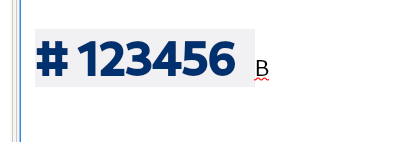
Sometimes it triggers, sometimes it doesn't. But if you keep experimenting it shows again.

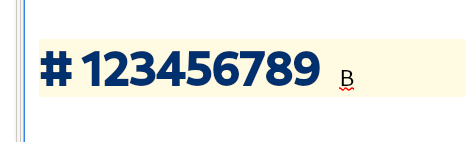
Somewhere around 11-12 character and on it produces the same output.

 ludenticus
All 10 comments
That's a funny one... Unfortunately I wasn't able to reproduce that.
@Waqar144, do you know anything about that?
 pbek
on 28 May 2020
pbek
on 28 May 2020
Yeah, quite funny. In order to reproduce it, the last character has to be one of the above posted, not a space.
Working on Arch/Gnome
ludenticus
on 28 May 2020
I tried all kind of ways to type exactly your examples. :grimacing:
pbek
on 28 May 2020
Alas! I've found the source of the issue: Check spelling... If I unselect it, it formats as it has to.
It is reported: [14:15:42] [warning] Missing trigrams for languages: QSet("de_LU", "fr_BE", "fr_LU", "fr_CH", "de_BE", "it_CH", "de_CH", "de_LI", "fr_CA")
ludenticus
on 28 May 2020
Even more strange. @Waqar144?
pbek
on 28 May 2020
Yes, I can reproduce it.
I will fix it soon.
 Waqar144
on 30 May 2020
Waqar144
on 30 May 2020
20.6.0
- fix markdown heading highlighting issue (for #1777, thank you @Waqar144)
pbek
on 31 May 2020
There now is a new release, could you please test it and report if it works for you?
pbek
on 31 May 2020
As far as I can tell, it's solved. Perfect!
:1st_place_medal:
ludenticus
on 2 Jun 2020
Great, thank you for testing!
pbek
on 2 Jun 2020
Related issues
 sunjam
·
4Comments
sunjam
·
4Comments
 radmen
·
6Comments
radmen
·
6Comments
 schiessle
·
7Comments
schiessle
·
7Comments
 tveyben
·
6Comments
tveyben
·
6Comments
 alexanderino
·
7Comments
alexanderino
·
7Comments
Most helpful comment
Yes, I can reproduce it.
I will fix it soon.