Qownnotes: All default and custom shortcuts seem to be disabled after update
Expected behaviour
Keep default and custom shortcuts on upgrade. Additionally a button to reset to default shortcuts could be helpful.
Actual behaviour
It seems that shortcuts have been annihilated. Often used defaults like Ctrl+, (Settings), Ctrl+Shift+A do not seem to work anymore.
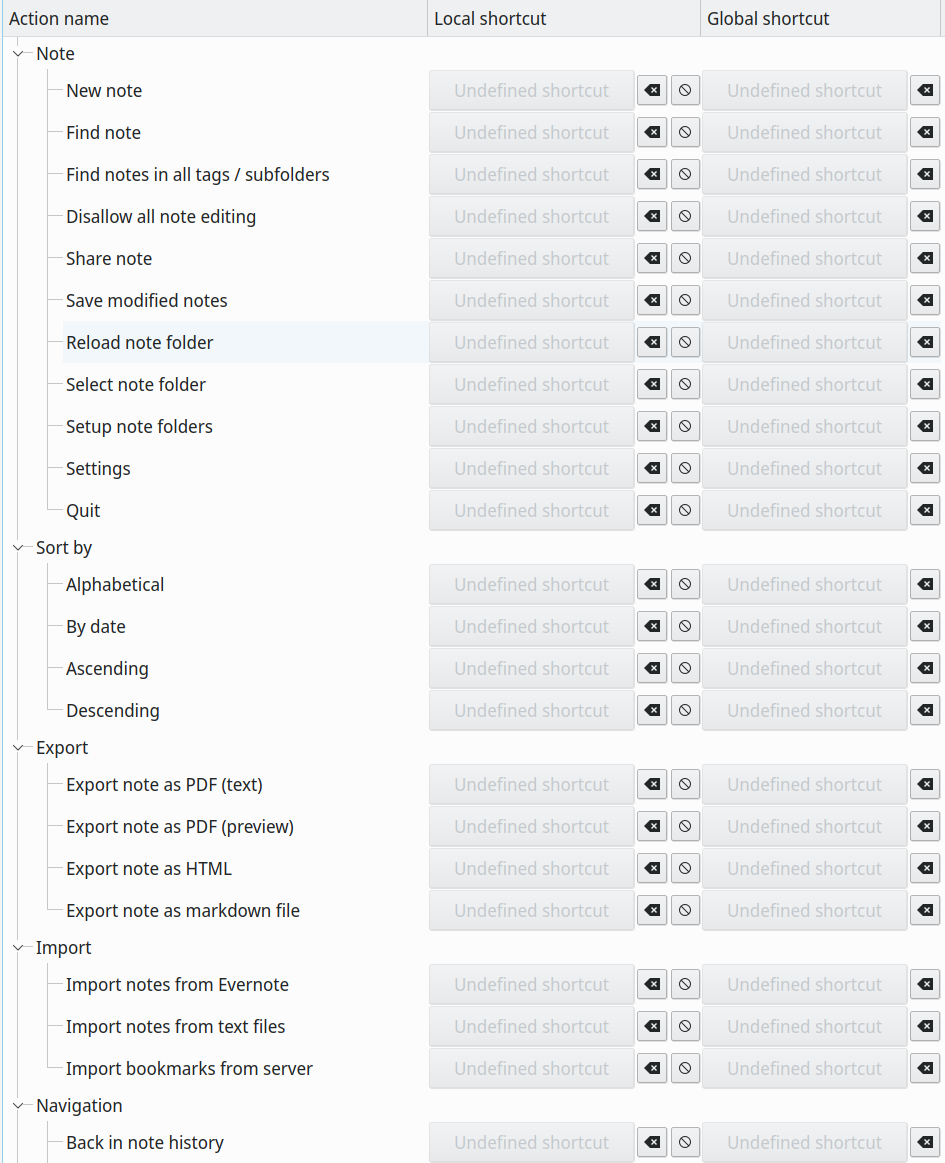
Steps to reproduce
It started after upgrading 20.3.7-1 -> 20.4.12-1.
Output from the debug section in the settings dialog
Expand
QOwnNotes Debug Information
General Info
Current Date: vr apr. 24 23:41:43 2020
Version: 20.4.14
Build date: Apr 24 2020
Build number: 703
Platform: linux
Operating System: Manjaro Linux
Build architecture: x86_64
Current architecture: x86_64
Release: AUR
Qt Version (build): 5.14.2
Qt Version (runtime): 5.14.2
Portable mode: no
Settings path / key: /home/<user>/.config/PBE/QOwnNotes.conf
Application database path: /home/<user>/.local/share/PBE/QOwnNotes/QOwnNotes.sqlite
Application arguments: /usr/bin/QOwnNotes
Qt Debug: 0
Locale (system): en_US
Locale (interface): empty
Primary screen resolution: 2560x1440
Icon theme: empty
Notes in current note folder: 1074
Calendar items: 5
Enabled scripts: 7
Note folders
currentNoteFolderId: 1
Note folder default
id: 1
isCurrent: yes
activeTagId: -1
remotePath: Notes
cloudConnectionId: 1
isShowSubfolders: yes
isUseGit: yes
Settings
AboutDialog/geometry (QByteArray): <binary data>
ActionDialog/geometry (QByteArray): <binary data>
ActiveNoteHistoryItem (NoteHistoryItem): <binary data>
AttachmentDialog/geometry (QByteArray): <binary data>
Debug/fakeOldVersionNumber (QString): false
Debug/fileLogging (QString): false
DistractionFreeMode/editorWidthCustom (QString): 150
DistractionFreeMode/editorWidthMode (QString): 5
DistractionFreeMode/isEnabled (QString): false
DistractionFreeMode/menuBarGeometry (QByteArray): <binary data>
DistractionFreeMode/menuBarHeight (QString): 0
DistractionFreeMode/menuBarVisible (QString): true
DistractionFreeMode/windowState (QByteArray): <binary data>
Editor/ColorSchemes (QStringList): EditorColorSchema-0f1d08d8-dd92-4e56-82ec-ec49db21daa7, EditorColorSchema-a5ae3693-e30e-4528-a2d0-9bb82956e93c
Editor/CurrentSchemaKey (QString): EditorColorSchema-6033d61b-cb96-46d5-a3a8-20d5172017eb
Editor/autoBracketClosing (QString): true
Editor/autoBracketRemoval (QString): true
Editor/centerCursor (bool): true
Editor/disableCursorBlinking (QString): false
Editor/editorWidthInDFMOnly (QString): false
Editor/highlightCurrentLine (QString): true
Editor/indentSize (QString): 4
Editor/useTabIndent (QString): true
Editor/vimMode (QString): false
EditorColorSchema-0f1d08d8-dd92-4e56-82ec-ec49db21daa7/BackgroundColorEnabled_-1 (QString): true
EditorColorSchema-0f1d08d8-dd92-4e56-82ec-ec49db21daa7/BackgroundColorEnabled_0 (QString): true
EditorColorSchema-0f1d08d8-dd92-4e56-82ec-ec49db21daa7/BackgroundColorEnabled_1 (QString): true
EditorColorSchema-0f1d08d8-dd92-4e56-82ec-ec49db21daa7/BackgroundColorEnabled_11 (QString): false
EditorColorSchema-0f1d08d8-dd92-4e56-82ec-ec49db21daa7/BackgroundColorEnabled_12 (QString): true
EditorColorSchema-0f1d08d8-dd92-4e56-82ec-ec49db21daa7/BackgroundColorEnabled_13 (QString): true
EditorColorSchema-0f1d08d8-dd92-4e56-82ec-ec49db21daa7/BackgroundColorEnabled_14 (QString): true
EditorColorSchema-0f1d08d8-dd92-4e56-82ec-ec49db21daa7/BackgroundColorEnabled_15 (QString): true
EditorColorSchema-0f1d08d8-dd92-4e56-82ec-ec49db21daa7/BackgroundColorEnabled_16 (QString): true
EditorColorSchema-0f1d08d8-dd92-4e56-82ec-ec49db21daa7/BackgroundColorEnabled_17 (QString): true
EditorColorSchema-0f1d08d8-dd92-4e56-82ec-ec49db21daa7/BackgroundColorEnabled_18 (QString): false
EditorColorSchema-0f1d08d8-dd92-4e56-82ec-ec49db21daa7/BackgroundColorEnabled_19 (QString): true
EditorColorSchema-0f1d08d8-dd92-4e56-82ec-ec49db21daa7/BackgroundColorEnabled_2 (QString): true
EditorColorSchema-0f1d08d8-dd92-4e56-82ec-ec49db21daa7/BackgroundColorEnabled_21 (QString): true
EditorColorSchema-0f1d08d8-dd92-4e56-82ec-ec49db21daa7/BackgroundColorEnabled_22 (QString): true
EditorColorSchema-0f1d08d8-dd92-4e56-82ec-ec49db21daa7/BackgroundColorEnabled_23 (QString): true
EditorColorSchema-0f1d08d8-dd92-4e56-82ec-ec49db21daa7/BackgroundColorEnabled_25 (QString): true
EditorColorSchema-0f1d08d8-dd92-4e56-82ec-ec49db21daa7/BackgroundColorEnabled_3 (QString): true
EditorColorSchema-0f1d08d8-dd92-4e56-82ec-ec49db21daa7/BackgroundColorEnabled_4 (QString): true
EditorColorSchema-0f1d08d8-dd92-4e56-82ec-ec49db21daa7/BackgroundColorEnabled_8 (QString): false
EditorColorSchema-0f1d08d8-dd92-4e56-82ec-ec49db21daa7/BackgroundColor_-1 (QColor): #ffffff
EditorColorSchema-0f1d08d8-dd92-4e56-82ec-ec49db21daa7/BackgroundColor_0 (QColor): #fff8ef
EditorColorSchema-0f1d08d8-dd92-4e56-82ec-ec49db21daa7/BackgroundColor_1 (QColor): #fff2e4
EditorColorSchema-0f1d08d8-dd92-4e56-82ec-ec49db21daa7/BackgroundColor_11 (QColor): #aaf7ff
EditorColorSchema-0f1d08d8-dd92-4e56-82ec-ec49db21daa7/BackgroundColor_12 (QColor): #f1f1f4
EditorColorSchema-0f1d08d8-dd92-4e56-82ec-ec49db21daa7/BackgroundColor_13 (QColor): #f1f1f4
EditorColorSchema-0f1d08d8-dd92-4e56-82ec-ec49db21daa7/BackgroundColor_14 (QColor): #f1f1f4
EditorColorSchema-0f1d08d8-dd92-4e56-82ec-ec49db21daa7/BackgroundColor_15 (QColor): #f1f1f4
EditorColorSchema-0f1d08d8-dd92-4e56-82ec-ec49db21daa7/BackgroundColor_16 (QColor): #f1f1f4
EditorColorSchema-0f1d08d8-dd92-4e56-82ec-ec49db21daa7/BackgroundColor_17 (QColor): #f1f1f4
EditorColorSchema-0f1d08d8-dd92-4e56-82ec-ec49db21daa7/BackgroundColor_18 (QColor): #f5f9d8
EditorColorSchema-0f1d08d8-dd92-4e56-82ec-ec49db21daa7/BackgroundColor_19 (QColor): #e2e7e2
EditorColorSchema-0f1d08d8-dd92-4e56-82ec-ec49db21daa7/BackgroundColor_2 (QColor): #fff2e4
EditorColorSchema-0f1d08d8-dd92-4e56-82ec-ec49db21daa7/BackgroundColor_21 (QColor): #ebebeb
EditorColorSchema-0f1d08d8-dd92-4e56-82ec-ec49db21daa7/BackgroundColor_22 (QColor): #f7f6ff
EditorColorSchema-0f1d08d8-dd92-4e56-82ec-ec49db21daa7/BackgroundColor_23 (QColor): #eaebea
EditorColorSchema-0f1d08d8-dd92-4e56-82ec-ec49db21daa7/BackgroundColor_25 (QColor): #fffae2
EditorColorSchema-0f1d08d8-dd92-4e56-82ec-ec49db21daa7/BackgroundColor_3 (QColor): #edffed
EditorColorSchema-0f1d08d8-dd92-4e56-82ec-ec49db21daa7/BackgroundColor_4 (QColor): #eaebea
EditorColorSchema-0f1d08d8-dd92-4e56-82ec-ec49db21daa7/BackgroundColor_8 (QColor): #dbf9e5
EditorColorSchema-0f1d08d8-dd92-4e56-82ec-ec49db21daa7/Bold_12 (QString): true
EditorColorSchema-0f1d08d8-dd92-4e56-82ec-ec49db21daa7/Bold_13 (QString): true
EditorColorSchema-0f1d08d8-dd92-4e56-82ec-ec49db21daa7/Bold_14 (QString): true
EditorColorSchema-0f1d08d8-dd92-4e56-82ec-ec49db21daa7/Bold_15 (QString): true
EditorColorSchema-0f1d08d8-dd92-4e56-82ec-ec49db21daa7/Bold_16 (QString): true
EditorColorSchema-0f1d08d8-dd92-4e56-82ec-ec49db21daa7/Bold_17 (QString): true
EditorColorSchema-0f1d08d8-dd92-4e56-82ec-ec49db21daa7/Bold_8 (QString): true
EditorColorSchema-0f1d08d8-dd92-4e56-82ec-ec49db21daa7/FontSizeAdaption_12 (QString): 200
EditorColorSchema-0f1d08d8-dd92-4e56-82ec-ec49db21daa7/FontSizeAdaption_13 (QString): 160
EditorColorSchema-0f1d08d8-dd92-4e56-82ec-ec49db21daa7/FontSizeAdaption_14 (QString): 130
EditorColorSchema-0f1d08d8-dd92-4e56-82ec-ec49db21daa7/FontSizeAdaption_15 (QString): 100
EditorColorSchema-0f1d08d8-dd92-4e56-82ec-ec49db21daa7/FontSizeAdaption_16 (QString): 90
EditorColorSchema-0f1d08d8-dd92-4e56-82ec-ec49db21daa7/FontSizeAdaption_17 (QString): 90
EditorColorSchema-0f1d08d8-dd92-4e56-82ec-ec49db21daa7/FontSizeAdaption_8 (QString): 100
EditorColorSchema-0f1d08d8-dd92-4e56-82ec-ec49db21daa7/ForegroundColorEnabled_-1 (QString): true
EditorColorSchema-0f1d08d8-dd92-4e56-82ec-ec49db21daa7/ForegroundColorEnabled_0 (QString): true
EditorColorSchema-0f1d08d8-dd92-4e56-82ec-ec49db21daa7/ForegroundColorEnabled_1 (QString): true
EditorColorSchema-0f1d08d8-dd92-4e56-82ec-ec49db21daa7/ForegroundColorEnabled_10 (QString): true
EditorColorSchema-0f1d08d8-dd92-4e56-82ec-ec49db21daa7/ForegroundColorEnabled_11 (QString): true
EditorColorSchema-0f1d08d8-dd92-4e56-82ec-ec49db21daa7/ForegroundColorEnabled_12 (QString): true
EditorColorSchema-0f1d08d8-dd92-4e56-82ec-ec49db21daa7/ForegroundColorEnabled_13 (QString): true
EditorColorSchema-0f1d08d8-dd92-4e56-82ec-ec49db21daa7/ForegroundColorEnabled_14 (QString): true
EditorColorSchema-0f1d08d8-dd92-4e56-82ec-ec49db21daa7/ForegroundColorEnabled_15 (QString): true
EditorColorSchema-0f1d08d8-dd92-4e56-82ec-ec49db21daa7/ForegroundColorEnabled_16 (QString): true
EditorColorSchema-0f1d08d8-dd92-4e56-82ec-ec49db21daa7/ForegroundColorEnabled_17 (QString): true
EditorColorSchema-0f1d08d8-dd92-4e56-82ec-ec49db21daa7/ForegroundColorEnabled_18 (QString): true
EditorColorSchema-0f1d08d8-dd92-4e56-82ec-ec49db21daa7/ForegroundColorEnabled_19 (QString): true
EditorColorSchema-0f1d08d8-dd92-4e56-82ec-ec49db21daa7/ForegroundColorEnabled_2 (QString): true
EditorColorSchema-0f1d08d8-dd92-4e56-82ec-ec49db21daa7/ForegroundColorEnabled_20 (QString): true
EditorColorSchema-0f1d08d8-dd92-4e56-82ec-ec49db21daa7/ForegroundColorEnabled_21 (QString): true
EditorColorSchema-0f1d08d8-dd92-4e56-82ec-ec49db21daa7/ForegroundColorEnabled_22 (QString): true
EditorColorSchema-0f1d08d8-dd92-4e56-82ec-ec49db21daa7/ForegroundColorEnabled_23 (QString): true
EditorColorSchema-0f1d08d8-dd92-4e56-82ec-ec49db21daa7/ForegroundColorEnabled_24 (QString): true
EditorColorSchema-0f1d08d8-dd92-4e56-82ec-ec49db21daa7/ForegroundColorEnabled_26 (QString): true
EditorColorSchema-0f1d08d8-dd92-4e56-82ec-ec49db21daa7/ForegroundColorEnabled_3 (QString): true
EditorColorSchema-0f1d08d8-dd92-4e56-82ec-ec49db21daa7/ForegroundColorEnabled_4 (QString): true
EditorColorSchema-0f1d08d8-dd92-4e56-82ec-ec49db21daa7/ForegroundColorEnabled_5 (QString): true
EditorColorSchema-0f1d08d8-dd92-4e56-82ec-ec49db21daa7/ForegroundColorEnabled_6 (QString): true
EditorColorSchema-0f1d08d8-dd92-4e56-82ec-ec49db21daa7/ForegroundColorEnabled_7 (QString): true
EditorColorSchema-0f1d08d8-dd92-4e56-82ec-ec49db21daa7/ForegroundColorEnabled_8 (QString): true
EditorColorSchema-0f1d08d8-dd92-4e56-82ec-ec49db21daa7/ForegroundColorEnabled_9 (QString): true
EditorColorSchema-0f1d08d8-dd92-4e56-82ec-ec49db21daa7/ForegroundColor_-1 (QColor): #000000
EditorColorSchema-0f1d08d8-dd92-4e56-82ec-ec49db21daa7/ForegroundColor_0 (QColor): #fc7e00
EditorColorSchema-0f1d08d8-dd92-4e56-82ec-ec49db21daa7/ForegroundColor_1 (QColor): #fc7e00
EditorColorSchema-0f1d08d8-dd92-4e56-82ec-ec49db21daa7/ForegroundColor_10 (QColor): #a3007b
EditorColorSchema-0f1d08d8-dd92-4e56-82ec-ec49db21daa7/ForegroundColor_11 (QColor): #ababab
EditorColorSchema-0f1d08d8-dd92-4e56-82ec-ec49db21daa7/ForegroundColor_12 (QColor): #00316e
EditorColorSchema-0f1d08d8-dd92-4e56-82ec-ec49db21daa7/ForegroundColor_13 (QColor): #00316e
EditorColorSchema-0f1d08d8-dd92-4e56-82ec-ec49db21daa7/ForegroundColor_14 (QColor): #00316e
EditorColorSchema-0f1d08d8-dd92-4e56-82ec-ec49db21daa7/ForegroundColor_15 (QColor): #00316e
EditorColorSchema-0f1d08d8-dd92-4e56-82ec-ec49db21daa7/ForegroundColor_16 (QColor): #00316e
EditorColorSchema-0f1d08d8-dd92-4e56-82ec-ec49db21daa7/ForegroundColor_17 (QColor): #00316e
EditorColorSchema-0f1d08d8-dd92-4e56-82ec-ec49db21daa7/ForegroundColor_18 (QColor): #aa0000
EditorColorSchema-0f1d08d8-dd92-4e56-82ec-ec49db21daa7/ForegroundColor_19 (QColor): #008000
EditorColorSchema-0f1d08d8-dd92-4e56-82ec-ec49db21daa7/ForegroundColor_2 (QColor): #fc7e00
EditorColorSchema-0f1d08d8-dd92-4e56-82ec-ec49db21daa7/ForegroundColor_20 (QColor): #3d3d3d
EditorColorSchema-0f1d08d8-dd92-4e56-82ec-ec49db21daa7/ForegroundColor_21 (QColor): #393939
EditorColorSchema-0f1d08d8-dd92-4e56-82ec-ec49db21daa7/ForegroundColor_22 (QColor): #4e18b9
EditorColorSchema-0f1d08d8-dd92-4e56-82ec-ec49db21daa7/ForegroundColor_23 (QColor): #008000
EditorColorSchema-0f1d08d8-dd92-4e56-82ec-ec49db21daa7/ForegroundColor_24 (QColor): #cccccc
EditorColorSchema-0f1d08d8-dd92-4e56-82ec-ec49db21daa7/ForegroundColor_26 (QColor): #ff5500
EditorColorSchema-0f1d08d8-dd92-4e56-82ec-ec49db21daa7/ForegroundColor_3 (QColor): #00bf00
EditorColorSchema-0f1d08d8-dd92-4e56-82ec-ec49db21daa7/ForegroundColor_4 (QColor): #008000
EditorColorSchema-0f1d08d8-dd92-4e56-82ec-ec49db21daa7/ForegroundColor_5 (QColor): #3d3d3d
EditorColorSchema-0f1d08d8-dd92-4e56-82ec-ec49db21daa7/ForegroundColor_6 (QColor): #3d3d3d
EditorColorSchema-0f1d08d8-dd92-4e56-82ec-ec49db21daa7/ForegroundColor_7 (QColor): #0057ae
EditorColorSchema-0f1d08d8-dd92-4e56-82ec-ec49db21daa7/ForegroundColor_8 (QColor): #00428a
EditorColorSchema-0f1d08d8-dd92-4e56-82ec-ec49db21daa7/ForegroundColor_9 (QColor): #a3007b
EditorColorSchema-0f1d08d8-dd92-4e56-82ec-ec49db21daa7/Italic_7 (QString): true
EditorColorSchema-0f1d08d8-dd92-4e56-82ec-ec49db21daa7/Name (QString): Light Sender
EditorColorSchema-0f1d08d8-dd92-4e56-82ec-ec49db21daa7/Underline_26 (QString): true
EditorColorSchema-a5ae3693-e30e-4528-a2d0-9bb82956e93c/BackgroundColorEnabled_-1 (QString): true
EditorColorSchema-a5ae3693-e30e-4528-a2d0-9bb82956e93c/BackgroundColorEnabled_0 (QString): true
EditorColorSchema-a5ae3693-e30e-4528-a2d0-9bb82956e93c/BackgroundColorEnabled_1 (QString): true
EditorColorSchema-a5ae3693-e30e-4528-a2d0-9bb82956e93c/BackgroundColorEnabled_12 (QString): false
EditorColorSchema-a5ae3693-e30e-4528-a2d0-9bb82956e93c/BackgroundColorEnabled_13 (QString): false
EditorColorSchema-a5ae3693-e30e-4528-a2d0-9bb82956e93c/BackgroundColorEnabled_14 (QString): false
EditorColorSchema-a5ae3693-e30e-4528-a2d0-9bb82956e93c/BackgroundColorEnabled_15 (QString): false
EditorColorSchema-a5ae3693-e30e-4528-a2d0-9bb82956e93c/BackgroundColorEnabled_16 (QString): false
EditorColorSchema-a5ae3693-e30e-4528-a2d0-9bb82956e93c/BackgroundColorEnabled_17 (QString): false
EditorColorSchema-a5ae3693-e30e-4528-a2d0-9bb82956e93c/BackgroundColorEnabled_18 (QString): false
EditorColorSchema-a5ae3693-e30e-4528-a2d0-9bb82956e93c/BackgroundColorEnabled_19 (QString): true
EditorColorSchema-a5ae3693-e30e-4528-a2d0-9bb82956e93c/BackgroundColorEnabled_2 (QString): true
EditorColorSchema-a5ae3693-e30e-4528-a2d0-9bb82956e93c/BackgroundColorEnabled_21 (QString): true
EditorColorSchema-a5ae3693-e30e-4528-a2d0-9bb82956e93c/BackgroundColorEnabled_22 (QString): true
EditorColorSchema-a5ae3693-e30e-4528-a2d0-9bb82956e93c/BackgroundColorEnabled_23 (QString): true
EditorColorSchema-a5ae3693-e30e-4528-a2d0-9bb82956e93c/BackgroundColorEnabled_25 (QString): true
EditorColorSchema-a5ae3693-e30e-4528-a2d0-9bb82956e93c/BackgroundColorEnabled_3 (QString): true
EditorColorSchema-a5ae3693-e30e-4528-a2d0-9bb82956e93c/BackgroundColorEnabled_4 (QString): true
EditorColorSchema-a5ae3693-e30e-4528-a2d0-9bb82956e93c/BackgroundColorEnabled_7 (QString): false
EditorColorSchema-a5ae3693-e30e-4528-a2d0-9bb82956e93c/BackgroundColorEnabled_8 (QString): false
EditorColorSchema-a5ae3693-e30e-4528-a2d0-9bb82956e93c/BackgroundColor_-1 (QColor): #201f1f
EditorColorSchema-a5ae3693-e30e-4528-a2d0-9bb82956e93c/BackgroundColor_0 (QColor): #333333
EditorColorSchema-a5ae3693-e30e-4528-a2d0-9bb82956e93c/BackgroundColor_1 (QColor): #333333
EditorColorSchema-a5ae3693-e30e-4528-a2d0-9bb82956e93c/BackgroundColor_12 (QColor): #ebebf0
EditorColorSchema-a5ae3693-e30e-4528-a2d0-9bb82956e93c/BackgroundColor_13 (QColor): #ebebf0
EditorColorSchema-a5ae3693-e30e-4528-a2d0-9bb82956e93c/BackgroundColor_14 (QColor): #ebebf0
EditorColorSchema-a5ae3693-e30e-4528-a2d0-9bb82956e93c/BackgroundColor_15 (QColor): #ebebf0
EditorColorSchema-a5ae3693-e30e-4528-a2d0-9bb82956e93c/BackgroundColor_16 (QColor): #ebebf0
EditorColorSchema-a5ae3693-e30e-4528-a2d0-9bb82956e93c/BackgroundColor_17 (QColor): #ebebf0
EditorColorSchema-a5ae3693-e30e-4528-a2d0-9bb82956e93c/BackgroundColor_18 (QColor): #f5f9d8
EditorColorSchema-a5ae3693-e30e-4528-a2d0-9bb82956e93c/BackgroundColor_19 (QColor): #333333
EditorColorSchema-a5ae3693-e30e-4528-a2d0-9bb82956e93c/BackgroundColor_2 (QColor): #333333
EditorColorSchema-a5ae3693-e30e-4528-a2d0-9bb82956e93c/BackgroundColor_21 (QColor): #444444
EditorColorSchema-a5ae3693-e30e-4528-a2d0-9bb82956e93c/BackgroundColor_22 (QColor): #3e3e44
EditorColorSchema-a5ae3693-e30e-4528-a2d0-9bb82956e93c/BackgroundColor_23 (QColor): #1a1a1a
EditorColorSchema-a5ae3693-e30e-4528-a2d0-9bb82956e93c/BackgroundColor_25 (QColor): #272421
EditorColorSchema-a5ae3693-e30e-4528-a2d0-9bb82956e93c/BackgroundColor_3 (QColor): #646356
EditorColorSchema-a5ae3693-e30e-4528-a2d0-9bb82956e93c/BackgroundColor_4 (QColor): #1a1a1a
EditorColorSchema-a5ae3693-e30e-4528-a2d0-9bb82956e93c/BackgroundColor_7 (QColor): #9eb6ff
EditorColorSchema-a5ae3693-e30e-4528-a2d0-9bb82956e93c/BackgroundColor_8 (QColor): #dbf9e5
EditorColorSchema-a5ae3693-e30e-4528-a2d0-9bb82956e93c/Bold_12 (QString): true
EditorColorSchema-a5ae3693-e30e-4528-a2d0-9bb82956e93c/Bold_13 (QString): true
EditorColorSchema-a5ae3693-e30e-4528-a2d0-9bb82956e93c/Bold_14 (QString): true
EditorColorSchema-a5ae3693-e30e-4528-a2d0-9bb82956e93c/Bold_15 (QString): true
EditorColorSchema-a5ae3693-e30e-4528-a2d0-9bb82956e93c/Bold_16 (QString): true
EditorColorSchema-a5ae3693-e30e-4528-a2d0-9bb82956e93c/Bold_17 (QString): true
EditorColorSchema-a5ae3693-e30e-4528-a2d0-9bb82956e93c/Bold_8 (QString): true
EditorColorSchema-a5ae3693-e30e-4528-a2d0-9bb82956e93c/FontSizeAdaption_12 (QString): 120
EditorColorSchema-a5ae3693-e30e-4528-a2d0-9bb82956e93c/FontSizeAdaption_13 (QString): 110
EditorColorSchema-a5ae3693-e30e-4528-a2d0-9bb82956e93c/ForegroundColorEnabled_-1 (QString): true
EditorColorSchema-a5ae3693-e30e-4528-a2d0-9bb82956e93c/ForegroundColorEnabled_0 (QString): true
EditorColorSchema-a5ae3693-e30e-4528-a2d0-9bb82956e93c/ForegroundColorEnabled_1 (QString): true
EditorColorSchema-a5ae3693-e30e-4528-a2d0-9bb82956e93c/ForegroundColorEnabled_10 (QString): true
EditorColorSchema-a5ae3693-e30e-4528-a2d0-9bb82956e93c/ForegroundColorEnabled_11 (QString): true
EditorColorSchema-a5ae3693-e30e-4528-a2d0-9bb82956e93c/ForegroundColorEnabled_12 (QString): true
EditorColorSchema-a5ae3693-e30e-4528-a2d0-9bb82956e93c/ForegroundColorEnabled_13 (QString): true
EditorColorSchema-a5ae3693-e30e-4528-a2d0-9bb82956e93c/ForegroundColorEnabled_14 (QString): true
EditorColorSchema-a5ae3693-e30e-4528-a2d0-9bb82956e93c/ForegroundColorEnabled_15 (QString): true
EditorColorSchema-a5ae3693-e30e-4528-a2d0-9bb82956e93c/ForegroundColorEnabled_16 (QString): true
EditorColorSchema-a5ae3693-e30e-4528-a2d0-9bb82956e93c/ForegroundColorEnabled_17 (QString): true
EditorColorSchema-a5ae3693-e30e-4528-a2d0-9bb82956e93c/ForegroundColorEnabled_18 (QString): true
EditorColorSchema-a5ae3693-e30e-4528-a2d0-9bb82956e93c/ForegroundColorEnabled_19 (QString): true
EditorColorSchema-a5ae3693-e30e-4528-a2d0-9bb82956e93c/ForegroundColorEnabled_2 (QString): true
EditorColorSchema-a5ae3693-e30e-4528-a2d0-9bb82956e93c/ForegroundColorEnabled_20 (QString): true
EditorColorSchema-a5ae3693-e30e-4528-a2d0-9bb82956e93c/ForegroundColorEnabled_21 (QString): true
EditorColorSchema-a5ae3693-e30e-4528-a2d0-9bb82956e93c/ForegroundColorEnabled_22 (QString): true
EditorColorSchema-a5ae3693-e30e-4528-a2d0-9bb82956e93c/ForegroundColorEnabled_23 (QString): true
EditorColorSchema-a5ae3693-e30e-4528-a2d0-9bb82956e93c/ForegroundColorEnabled_24 (QString): true
EditorColorSchema-a5ae3693-e30e-4528-a2d0-9bb82956e93c/ForegroundColorEnabled_26 (QString): true
EditorColorSchema-a5ae3693-e30e-4528-a2d0-9bb82956e93c/ForegroundColorEnabled_3 (QString): true
EditorColorSchema-a5ae3693-e30e-4528-a2d0-9bb82956e93c/ForegroundColorEnabled_4 (QString): true
EditorColorSchema-a5ae3693-e30e-4528-a2d0-9bb82956e93c/ForegroundColorEnabled_5 (QString): true
EditorColorSchema-a5ae3693-e30e-4528-a2d0-9bb82956e93c/ForegroundColorEnabled_6 (QString): true
EditorColorSchema-a5ae3693-e30e-4528-a2d0-9bb82956e93c/ForegroundColorEnabled_7 (QString): true
EditorColorSchema-a5ae3693-e30e-4528-a2d0-9bb82956e93c/ForegroundColorEnabled_8 (QString): true
EditorColorSchema-a5ae3693-e30e-4528-a2d0-9bb82956e93c/ForegroundColorEnabled_9 (QString): true
EditorColorSchema-a5ae3693-e30e-4528-a2d0-9bb82956e93c/ForegroundColor_-1 (QColor): #f9f39c
EditorColorSchema-a5ae3693-e30e-4528-a2d0-9bb82956e93c/ForegroundColor_0 (QColor): #fa680c
EditorColorSchema-a5ae3693-e30e-4528-a2d0-9bb82956e93c/ForegroundColor_1 (QColor): #fc7e00
EditorColorSchema-a5ae3693-e30e-4528-a2d0-9bb82956e93c/ForegroundColor_10 (QColor): #ffff00
EditorColorSchema-a5ae3693-e30e-4528-a2d0-9bb82956e93c/ForegroundColor_11 (QColor): #646464
EditorColorSchema-a5ae3693-e30e-4528-a2d0-9bb82956e93c/ForegroundColor_12 (QColor): #fdc109
EditorColorSchema-a5ae3693-e30e-4528-a2d0-9bb82956e93c/ForegroundColor_13 (QColor): #e3ae09
EditorColorSchema-a5ae3693-e30e-4528-a2d0-9bb82956e93c/ForegroundColor_14 (QColor): #c49509
EditorColorSchema-a5ae3693-e30e-4528-a2d0-9bb82956e93c/ForegroundColor_15 (QColor): #ad8609
EditorColorSchema-a5ae3693-e30e-4528-a2d0-9bb82956e93c/ForegroundColor_16 (QColor): #9d7b09
EditorColorSchema-a5ae3693-e30e-4528-a2d0-9bb82956e93c/ForegroundColor_17 (QColor): #8a6c09
EditorColorSchema-a5ae3693-e30e-4528-a2d0-9bb82956e93c/ForegroundColor_18 (QColor): #aa0000
EditorColorSchema-a5ae3693-e30e-4528-a2d0-9bb82956e93c/ForegroundColor_19 (QColor): #00aa00
EditorColorSchema-a5ae3693-e30e-4528-a2d0-9bb82956e93c/ForegroundColor_2 (QColor): #fc7e00
EditorColorSchema-a5ae3693-e30e-4528-a2d0-9bb82956e93c/ForegroundColor_20 (QColor): #e1e1e1
EditorColorSchema-a5ae3693-e30e-4528-a2d0-9bb82956e93c/ForegroundColor_21 (QColor): #fc970a
EditorColorSchema-a5ae3693-e30e-4528-a2d0-9bb82956e93c/ForegroundColor_22 (QColor): #d88109
EditorColorSchema-a5ae3693-e30e-4528-a2d0-9bb82956e93c/ForegroundColor_23 (QColor): #c6530b
EditorColorSchema-a5ae3693-e30e-4528-a2d0-9bb82956e93c/ForegroundColor_24 (QColor): #515151
EditorColorSchema-a5ae3693-e30e-4528-a2d0-9bb82956e93c/ForegroundColor_26 (QColor): #ff5500
EditorColorSchema-a5ae3693-e30e-4528-a2d0-9bb82956e93c/ForegroundColor_3 (QColor): #fdad09
EditorColorSchema-a5ae3693-e30e-4528-a2d0-9bb82956e93c/ForegroundColor_4 (QColor): #c6530b
EditorColorSchema-a5ae3693-e30e-4528-a2d0-9bb82956e93c/ForegroundColor_5 (QColor): #e1e1e1
EditorColorSchema-a5ae3693-e30e-4528-a2d0-9bb82956e93c/ForegroundColor_6 (QColor): #e1e1e1
EditorColorSchema-a5ae3693-e30e-4528-a2d0-9bb82956e93c/ForegroundColor_7 (QColor): #fdc109
EditorColorSchema-a5ae3693-e30e-4528-a2d0-9bb82956e93c/ForegroundColor_8 (QColor): #e3ae09
EditorColorSchema-a5ae3693-e30e-4528-a2d0-9bb82956e93c/ForegroundColor_9 (QColor): #ffff00
EditorColorSchema-a5ae3693-e30e-4528-a2d0-9bb82956e93c/Italic_7 (QString): true
EditorColorSchema-a5ae3693-e30e-4528-a2d0-9bb82956e93c/Name (QString): Flexx
EditorColorSchema-a5ae3693-e30e-4528-a2d0-9bb82956e93c/Underline_26 (QString): true
EvernoteImport/AttachmentImportCheckBoxChecked (QString): true
EvernoteImport/ImageImportCheckBoxChecked (QString): true
EvernoteImport/MetaDataUnCheckedList (QStringList): ,
EvernoteImportDialog/geometry (QByteArray): <binary data>
GlobalShortcuts/MainWindow-togglePanel-notePreviewDockWidget (QString): Ctrl+Shift+P
ImageDialog/disableCopying (QString): false
ImageDialog/geometry (QByteArray): <binary data>
IssueAssistantDialog/geometry (QByteArray): <binary data>
LastUpdateCheck (QDateTime): 2020-04-24T23:02:55.643
LinkDialog/geometry (QByteArray): <binary data>
LogWidget/criticalLog (QString): true
LogWidget/debugLog (QString): true
LogWidget/fatalLog (QString): true
LogWidget/infoLog (QString): true
LogWidget/scriptingLog (QString): true
LogWidget/statusLog (QString): true
LogWidget/warningLog (QString): true
MainWindow/geometry (QByteArray): <binary data>
MainWindow/mainToolBar.iconSize (QString): 22
MainWindow/menuBarGeometry (QByteArray): <binary data>
MainWindow/noteSubFolderTreeWidgetExpandState-1 (QStringList): FlowLabs, Projects, Mind KB, Health
MainWindow/noteTextEdit.code.font (QString): JetBrains Mono,9,-1,5,50,0,0,0,0,0,Regular
MainWindow/noteTextEdit.font (QString): Noto Sans,9,-1,5,50,0,0,0,0,0,Regular
MainWindow/noteTextView.code.font (QString): Noto Mono,10,-1,5,50,0,0,0,0,0,Regular
MainWindow/noteTextView.font (QString): Noto Sans Display,10,-1,5,50,0,0,0,0,0,Regular
MainWindow/noteTextView.ignoreCodeFontSize (QString): false
MainWindow/noteTextView.rtl (QString): false
MainWindow/noteTextView.underline (QString): true
MainWindow/noteTextView.useEditorStyles (QString): true
MainWindow/noteTextView.useInternalExportStyling (QString): true
MainWindow/showNotesFromAllNoteSubFolders (bool): false
NoteDialog/geometry (QByteArray): <binary data>
NoteDiffDialog/geometry (QByteArray): <binary data>
NoteFolder-1/allowDifferentNoteFileName (QString): false
NoteHistory-1 (QVariantList): <variant list with 200 item(s)>
NoteHistoryCurrentIndex-1 (int): 199
OrphanedAttachmentsDialog/geometry (QByteArray): <binary data>
OrphanedImagesDialog/geometry (QByteArray): <binary data>
PasswordDialog/geometry (QByteArray): <binary data>
PiwikClientId (QString): <hidden>
Printer/NotePrinting (QByteArray): <binary data>
ScriptRepositoryDialog/geometry (QByteArray): <binary data>
ScriptRepositoryDialog/mainSplitterState (QByteArray): <binary data>
SearchEngineId (QString): 0
SettingsDialog/geometry (QByteArray): <binary data>
SettingsDialog/mainSplitterState (QByteArray): <binary data>
ShareDialog/geometry (QByteArray): <binary data>
Shortcuts/MainWindow-actionActivate_context_menu (QString): empty
Shortcuts/MainWindow-actionAllow_note_editing (QString): empty
Shortcuts/MainWindow-actionAutocomplete (QString): empty
Shortcuts/MainWindow-actionCheck_for_updates (QString): empty
Shortcuts/MainWindow-actionCopy_headline (QString): empty
Shortcuts/MainWindow-actionDelete_line (QString): empty
Shortcuts/MainWindow-actionDelete_word (QString): empty
Shortcuts/MainWindow-actionEdit_encrypted_note (QString): empty
Shortcuts/MainWindow-actionFind_action (QString): empty
Shortcuts/MainWindow-actionFind_notes_in_all_subfolders (QString): empty
Shortcuts/MainWindow-actionFormat_text_bold (QString): empty
Shortcuts/MainWindow-actionFormat_text_italic (QString): empty
Shortcuts/MainWindow-actionInsert_Link_to_note (QString): empty
Shortcuts/MainWindow-actionInsert_attachment (QString): empty
Shortcuts/MainWindow-actionInsert_block_quote (QString): empty
Shortcuts/MainWindow-actionInsert_code_block (QString): empty
Shortcuts/MainWindow-actionInsert_current_time (QString): empty
Shortcuts/MainWindow-actionInsert_headline_from_note_filename (QString): empty
Shortcuts/MainWindow-actionInsert_image (QString): empty
Shortcuts/MainWindow-actionInsert_table (QString): empty
Shortcuts/MainWindow-actionJump_to_note_list_panel (QString): empty
Shortcuts/MainWindow-actionJump_to_note_subfolder_panel (QString): empty
Shortcuts/MainWindow-actionJump_to_note_text_edit (QString): empty
Shortcuts/MainWindow-actionJump_to_tags_panel (QString): empty
Shortcuts/MainWindow-actionNext_note (QString): empty
Shortcuts/MainWindow-actionOpen_List (QString): empty
Shortcuts/MainWindow-actionPaste_image (QString): empty
Shortcuts/MainWindow-actionPrevious_Note (QString): empty
Shortcuts/MainWindow-actionReload_scripting_engine (QString): empty
Shortcuts/MainWindow-actionReplace_in_current_note (QString): empty
Shortcuts/MainWindow-actionSave_modified_notes (QString): empty
Shortcuts/MainWindow-actionScript_repository (QString): empty
Shortcuts/MainWindow-actionSearch_text_on_the_web (QString): empty
Shortcuts/MainWindow-actionSelect_note_folder (QString): empty
Shortcuts/MainWindow-actionShare_note (QString): empty
Shortcuts/MainWindow-actionShow_menu_bar (QString): empty
Shortcuts/MainWindow-actionShow_note_in_file_manager (QString): empty
Shortcuts/MainWindow-actionSplit_note_at_cursor_position (QString): empty
Shortcuts/MainWindow-actionStrike_out_text (QString): empty
Shortcuts/MainWindow-actionSwitch_to_previous_workspace (QString): empty
Shortcuts/MainWindow-actionToggle_distraction_free_mode (QString): empty
Shortcuts/MainWindow-actionToggle_fullscreen (QString): empty
Shortcuts/MainWindow-actionToggle_text_case (QString): empty
Shortcuts/MainWindow-actionView_note_in_new_window (QString): empty
Shortcuts/MainWindow-action_Back_in_note_history (QString): empty
Shortcuts/MainWindow-action_Decrease_note_text_size (QString): empty
Shortcuts/MainWindow-action_DuplicateText (QString): empty
Shortcuts/MainWindow-action_Find_note (QString): empty
Shortcuts/MainWindow-action_Forward_in_note_history (QString): empty
Shortcuts/MainWindow-action_Increase_note_text_size (QString): empty
Shortcuts/MainWindow-action_New_note (QString): empty
Shortcuts/MainWindow-action_Open_note_in_external_editor (QString): empty
Shortcuts/MainWindow-action_Print_note_markdown (QString): empty
Shortcuts/MainWindow-action_Print_note_text (QString): empty
Shortcuts/MainWindow-action_Quit (QString): empty
Shortcuts/MainWindow-action_Reload_note_folder (QString): empty
Shortcuts/MainWindow-action_Remove_note (QString): empty
Shortcuts/MainWindow-action_Reset_note_text_size (QString): empty
Shortcuts/MainWindow-action_Settings (QString): empty
Shortcuts/MainWindow-action_new_tag (QString): empty
Shortcuts/MainWindow-customAction_addHighlights (QString): empty
Shortcuts/MainWindow-customAction_journalEntry (QString): empty
Shortcuts/MainWindow-customAction_journalEntryTomorrow (QString): empty
Shortcuts/MainWindow-customAction_list - (QString): empty
Shortcuts/MainWindow-customAction_list 123 (QString): empty
Shortcuts/MainWindow-customAction_list clear (QString): empty
Shortcuts/MainWindow-customAction_noteLinkToClipboard (QString): empty
Shortcuts/MainWindow-customAction_sortLinesAsc (QString): empty
Shortcuts/MainWindow-customAction_sortLinesDesc (QString): empty
Shortcuts/MainWindow-customAction_toggleCheckbox (QString): empty
Shortcuts/MainWindow-togglePanel-notePreviewDockWidget (QString): Ctrl+Shift+P
ShowSystemTray (QString): false
StartHidden (QString): false
TableDialog/geometry (QByteArray): <binary data>
TodoDialog/geometry (QByteArray): <binary data>
TodoDialog/mainSplitterState (QByteArray): <binary data>
TodoDialog/showCompletedItems (QString): 2
TodoDialog/todoListSelectorSelectedItem (QString): Personal
UpdateDialog/geometry (QByteArray): <binary data>
WelcomeDialog/geometry (QByteArray): <binary data>
acceptAllExternalModifications (QString): true
allowNoteEditing (bool): true
allowOnlyOneAppInstance (QString): false
appMetrics/disableAppHeartbeat (QString): false
appMetrics/disableTracking (QString): false
appMetrics/notificationShown (QString): true
automaticNoteFolderDatabaseClosing (QString): false
checkSpelling (QString): false
closeTodoListAfterSave (QString): false
cryptoKey (QString): <hidden>
currentNoteFolderId (QString): 1
currentWorkspace (QString): 267b2d48-17db-4bbb-b519-680ea301157d
cursorWidth (QString): 1
customNoteFileExtensionList: empty
darkMode (QString): false
darkModeColors (QString): false
darkModeIconTheme (QString): false
darkModeTrayIcon (QString): false
defaultNoteFileExtension (QString): md
disableAutomaticUpdateDialog (QString): true
disableSavedSearchesAutoCompletion (QString): true
dockWasInitializedOnce (QString): true
enableNoteTree (QString): false
enableSocketServer (QString): false
externalEditorPath (QString): empty
fullyHighlightedBlockquotes (QString): true
gitCommitInterval (QString): 30
gitExecutablePath (QString): empty
gitLogCommand (QString): empty
guiFirstRunInit (bool): true
ignoreAllExternalModifications (QString): false
ignoreAllExternalNoteFolderChanges (QString): false
ignoreNoteSubFolders (QString): ^\.
imageScaleDown (QString): false
imageScaleDownMaximumHeight (QString): 1024
imageScaleDownMaximumWidth (QString): 1024
insertTimeFormat (QString): empty
interfaceFontSize (QString): 11
interfaceLanguage (QString): empty
internalIconTheme (QString): false
itemHeight (QString): 24
legacyLinking (QString): false
localTrash/autoCleanupDays (QString): 30
localTrash/autoCleanupEnabled (QString): true
localTrash/supportEnabled (QString): true
markdownHighlightingEnabled (QString): true
navigationPanelHideSearch (QString): true
networking/ignoreSSLErrors (QString): true
networking/proxyType (QString): 2
newNoteAskHeadline (QString): true
noteEditIsCentralWidget (QString): true
noteListPreview (QString): false
noteSaveIntervalTime (QString): 10
noteSubfoldersPanelDisplayAsFullTree (QString): true
noteSubfoldersPanelHideSearch (QString): true
noteSubfoldersPanelOrder (QString): 0
noteSubfoldersPanelShowFullPath (QString): false
noteSubfoldersPanelShowNotesRecursively (QString): true
noteSubfoldersPanelShowRootFolderName (QString): true
noteSubfoldersPanelSort (QString): 0
notesPanelOrder (QString): 0
notesPanelSort (QString): 1
notifyAllExternalModifications (QString): false
overrideInterfaceFontSize (QString): false
ownCloud/supportEnabled (QString): true
ownCloud/todoCalendarBackend (QString): 3
ownCloud/todoCalendarCalDAVPassword (QString): <hidden>
ownCloud/todoCalendarCalDAVServerUrl (QString): empty
ownCloud/todoCalendarCalDAVUsername (QString): empty
ownCloud/todoCalendarCloudConnectionId (QString): 1
ownCloud/todoCalendarDisplayNameList (QStringList): Personal, wwork
ownCloud/todoCalendarEnabledList (QStringList): Personal, wwork
ownCloudInfo/appIsValid (bool): true
ownCloudInfo/connectionErrorMessage (QString): Unknown error
ownCloudInfo/notesPathExistsText (QString): yes
ownCloudInfo/serverVersion (QString): 18.0.3.0
previousWorkspace (QString): bc4123cc-e609-4f29-98af-a0d3f69adcb5
restoreCursorPosition (QString): true
restoreLastNoteAtStartup (QString): true
showMatches (QString): false
showMenuBar (bool): true
showStatusBar (bool): true
skipVersion (QString): 19.5.1
spellCheckLanguage (QString): auto
systemIconTheme (QString): true
tagWasAddedToNote (QString): true
taggingShowNotesRecursively (QString): false
tagsPanelHideSearch (QString): false
tagsPanelOrder (QString): 0
tagsPanelSort (QString): 0
todoCalendarSupport (QString): true
toolbar/1/items (QStringList): action_New_note, action_Find_note, action_Remove_note, action_Open_note_in_external_editor, actionShow_local_trash, actionAllow_note_editing, , action_Back_in_note_history, action_Forward_in_note_history, , action_Find_text_in_note, actionReplace_in_current_note, , actionShow_versions, actionShow_trash, actionShare_note, , actionOpen_List
toolbar/1/name (QString): mainToolBar
toolbar/1/title (QString): main toolbar
toolbar/2/items (QStringList): actionFormat_text_bold, actionFormat_text_italic, actionStrike_out_text, actionInsert_code_block, actionInsert_block_quote
toolbar/2/name (QString): formattingToolbar
toolbar/2/title (QString): formatting toolbar
toolbar/3/items (QStringList): actionInsert_Link_to_note, actionInsert_image, actionInsert_current_time
toolbar/3/name (QString): insertingToolbar
toolbar/3/title (QString): inserting toolbar
toolbar/4/items (QStringList): action_Encrypt_note, actionEdit_encrypted_note, actionDecrypt_note
toolbar/4/name (QString): encryptionToolbar
toolbar/4/title (QString): encryption toolbar
toolbar/5/items (QStringList): actionWorkspaceComboBox, actionStore_as_new_workspace, actionRemove_current_workspace, actionRename_current_workspace, actionSwitch_to_previous_workspace, actionUnlock_panels, , actionToggle_distraction_free_mode, action_Increase_note_text_size, action_Decrease_note_text_size, action_Reset_note_text_size
toolbar/5/name (QString): windowToolbar
toolbar/5/title (QString): window toolbar
toolbar/6/items (QString): action_Quit
toolbar/6/name (QString): quitToolbar
toolbar/6/title (QString): quit toolbar
toolbar/size (QString): 6
useNoteFolderButtons (QString): false
useUNIXNewline (QString): false
webSocketServerService/bookmarksNoteName (QString): Bookmarks
webSocketServerService/bookmarksTag (QString): bookmarks
webSocketServerService/port (QString): 22222
workspace-267b2d48-17db-4bbb-b519-680ea301157d/name (QString): just_right
workspace-267b2d48-17db-4bbb-b519-680ea301157d/noteSubFolderDockWidgetVisible (QString): true
workspace-267b2d48-17db-4bbb-b519-680ea301157d/windowState (QByteArray): <binary data>
workspace-61c23434-ec5d-43ab-99d8-f01f99da22c5/name (QString): minimal
workspace-61c23434-ec5d-43ab-99d8-f01f99da22c5/noteSubFolderDockWidgetVisible (QString): true
workspace-61c23434-ec5d-43ab-99d8-f01f99da22c5/windowState (QByteArray): <binary data>
workspace-bc4123cc-e609-4f29-98af-a0d3f69adcb5/name (QString): full
workspace-bc4123cc-e609-4f29-98af-a0d3f69adcb5/noteSubFolderDockWidgetVisible (QString): true
workspace-bc4123cc-e609-4f29-98af-a0d3f69adcb5/windowState (QByteArray): <binary data>
workspaces (QStringList): bc4123cc-e609-4f29-98af-a0d3f69adcb5, 61c23434-ec5d-43ab-99d8-f01f99da22c5, 267b2d48-17db-4bbb-b519-680ea301157d
Update
When running a fresh session QOwnNotes --session test, the default shortcuts are still present. The debug information does not contain any **Shortcuts/MainWindow- lines. The Shortcut window does look the same though:
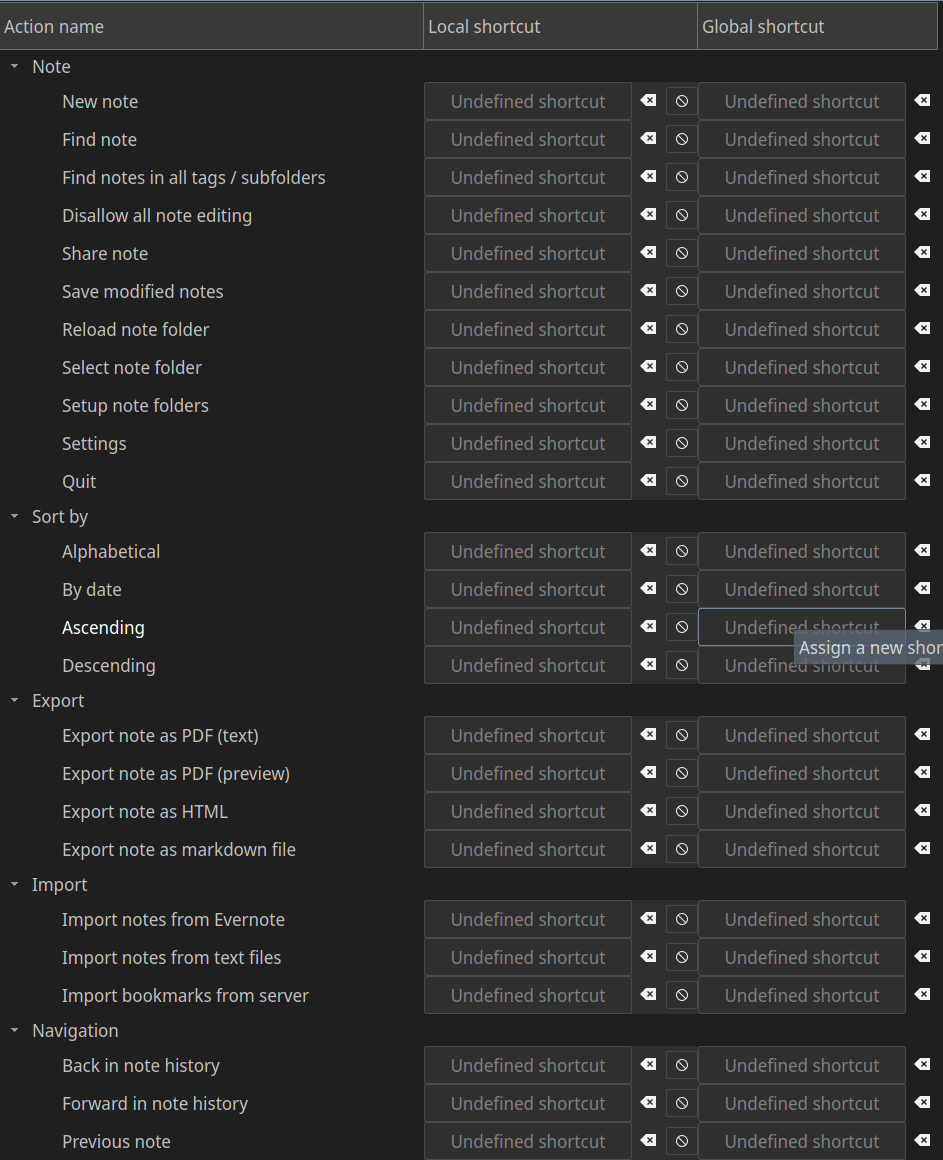
 sanderboom
All 41 comments
In Telegram I was talking about all those empty shortcut settings:
Shortcuts/MainWindow-actionActivate_context_menu (QString): empty
Shortcuts/MainWindow-actionAllow_note_editing (QString): empty
Shortcuts/MainWindow-actionAutocomplete (QString): empty
Shortcuts/MainWindow-actionCheck_for_updates (QString): empty
Shortcuts/MainWindow-actionCopy_headline (QString): empty
Shortcuts/MainWindow-actionDelete_line (QString): empty
Just remove them from /home/<user>/.config/PBE/QOwnNotes.conf. An empty setting now means "no shortcut". There are now two buttons for each shortcut. One to reset to default and one to clear it (for #1693).
I don't know where you get the empty settings. Did you maybe once compiled QOwnNotes yourself from the develop branch (not the master branch)?
 pbek
on 25 Apr 2020
pbek
on 25 Apr 2020
I don't know where you get the empty settings. Did you maybe once compiled QOwnNotes yourself from the develop branch (not the master branch)?
No, I didn't.
I tested a bit:
- quit QON
- remove the complete
[Shortcuts]from the.conffile. - start QON
- add 1 'Local' shortcut (
ctrl+shift+p) - quit QON
- see the following diff in the
.conffile (snippet):
428,500d427
< [Shortcuts]
< MainWindow-actionActivate_context_menu=
< MainWindow-actionAllow_note_editing=
< MainWindow-actionAutocomplete=
< MainWindow-actionCheck_for_updates=
< MainWindow-actionCopy_headline=
< MainWindow-actionDelete_line=
< MainWindow-actionDelete_word=
< MainWindow-actionEdit_encrypted_note=
< MainWindow-actionFind_action=
< MainWindow-actionFind_notes_in_all_subfolders=
< MainWindow-actionFormat_text_bold=
< MainWindow-actionFormat_text_italic=
< MainWindow-actionInsert_Link_to_note=
< MainWindow-actionInsert_attachment=
< MainWindow-actionInsert_block_quote=
< MainWindow-actionInsert_code_block=
< MainWindow-actionInsert_current_time=
< MainWindow-actionInsert_headline_from_note_filename=
< MainWindow-actionInsert_image=
< MainWindow-actionInsert_table=
< MainWindow-actionJump_to_note_list_panel=
< MainWindow-actionJump_to_note_subfolder_panel=
< MainWindow-actionJump_to_note_text_edit=
< MainWindow-actionJump_to_tags_panel=
< MainWindow-actionNext_note=
< MainWindow-actionOpen_List=
< MainWindow-actionPaste_image=
< MainWindow-actionPrevious_Note=
< MainWindow-actionReload_scripting_engine=
< MainWindow-actionReplace_in_current_note=
< MainWindow-actionSave_modified_notes=
< MainWindow-actionScript_repository=
< MainWindow-actionSearch_text_on_the_web=
< MainWindow-actionSelect_note_folder=
< MainWindow-actionShare_note=
< MainWindow-actionShow_menu_bar=
< MainWindow-actionShow_note_in_file_manager=
< MainWindow-actionSplit_note_at_cursor_position=
< MainWindow-actionStrike_out_text=
< MainWindow-actionSwitch_to_previous_workspace=
< MainWindow-actionToggle_distraction_free_mode=
< MainWindow-actionToggle_fullscreen=
< MainWindow-actionToggle_text_case=
< MainWindow-actionView_note_in_new_window=
< MainWindow-action_Back_in_note_history=
< MainWindow-action_Decrease_note_text_size=
< MainWindow-action_DuplicateText=
< MainWindow-action_Find_note=
< MainWindow-action_Forward_in_note_history=
< MainWindow-action_Increase_note_text_size=
< MainWindow-action_New_note=
< MainWindow-action_Open_note_in_external_editor=
< MainWindow-action_Print_note_markdown=
< MainWindow-action_Print_note_text=
< MainWindow-action_Quit=
< MainWindow-action_Reload_note_folder=
< MainWindow-action_Remove_note=
< MainWindow-action_Reset_note_text_size=
< MainWindow-action_Settings=
< MainWindow-action_new_tag=
< MainWindow-customAction_addHighlights=
< MainWindow-customAction_journalEntry=
< MainWindow-customAction_journalEntryTomorrow=
< MainWindow-customAction_list%20-=
< MainWindow-customAction_list%20123=
< MainWindow-customAction_list%20clear=
< MainWindow-customAction_noteLinkToClipboard=
< MainWindow-customAction_sortLinesAsc=
< MainWindow-customAction_sortLinesDesc=
< MainWindow-customAction_toggleCheckbox=
< MainWindow-togglePanel-notePreviewDockWidget=Ctrl+Shift+P
<
- start QON
- default shortcuts do not work anymore
Hope this helps.
sanderboom
on 25 Apr 2020
I did that now on Manjaro (AUR), that's what I got:
MainWindow-actionSet_ownCloud_Folder=Ctrl+Shift+P
MainWindow-action_Print_note_markdown=
MainWindow-customAction_externalNoteDiff=
MainWindow-customAction_scribble=
Did you your steps with a fresh session or your "old" session?
pbek
on 25 Apr 2020
Did you your steps with a fresh session or your "old" session?
I will use a completely new session. BTW to remove a session, is rm ~/.config/PBE/QOwnNotes-test.conf and rm ~/.cache/PBE/QOwnNotes-test -R sufficient?
sanderboom
on 25 Apr 2020
QOwnNotes --session shortcuts- Set up QON first time
- Close QON
cp QOwnNotes-shortcuts.conf QOwnNotes-shortcuts.conf_pre- Open QON
- Go to shortcut settings dialog, filter for 'preview'
- Set local shortcut to
ctrl+shift+p - Close QON
diff QOwnNotes-shortcuts.conf_pre QOwnNotes-shortcuts.conf:
2c2,5
< LastUpdateCheck=@DateTime(\0\0\0\x10\0\0\0\0\0\0%\x85U\x3\bT\x80\0)
---
> ActiveNoteHistoryItem=@Variant(\0\0\0\x7f\0\0\0\x10NoteHistoryItem\0\0\0\0\x30\0N\0o\0t\0\x65\0 \0\x32\0\x30\0\x32\0\x30\0-\0\x30\0\x34\0-\0\x32\0\x34\0T\0\x32\0\x33\0.\0\x34\0\x30\0.\0\x30\0\x34\0\0\0\0\0\0\x1\x4\0\0\0\0)
> LastUpdateCheck=@DateTime(\0\0\0\x10\0\0\0\0\0\0%\x85U\x3\t\xc8\xcc\0)
> NoteHistory-1=@Variant(\0\0\0\t\0\0\0\x1\0\0\0\x7f\0\0\0\x10NoteHistoryItem\0\0\0\0\x30\0N\0o\0t\0\x65\0 \0\x32\0\x30\0\x32\0\x30\0-\0\x30\0\x34\0-\0\x32\0\x34\0T\0\x32\0\x33\0.\0\x34\0\x30\0.\0\x30\0\x34\0\0\0\0\0\0\x1\x4\0\0\0\0)
> NoteHistoryCurrentIndex-1=0
3a7,10
> SearchEngineId=2
> ShowSystemTray=false
> StartHidden=false
> acceptAllExternalModifications=false
5a13
> automaticNoteFolderDatabaseClosing=false
6a15
> closeTodoListAfterSave=false
9a19,25
> cursorWidth=1
> customNoteFileExtensionList=@Invalid()
> darkMode=false
> darkModeColors=false
> darkModeIconTheme=false
> darkModeTrayIcon=false
> defaultNoteFileExtension=md
10a27
> disableSavedSearchesAutoCompletion=false
11a29,35
> enableNoteTree=false
> enableSocketServer=true
> externalEditorPath=
> fullyHighlightedBlockquotes=false
> gitCommitInterval=30
> gitExecutablePath=
> gitLogCommand=
12a37,42
> ignoreAllExternalModifications=false
> ignoreAllExternalNoteFolderChanges=false
> ignoreNoteSubFolders=^\\.
> imageScaleDown=false
> imageScaleDownMaximumHeight=1024
> imageScaleDownMaximumWidth=1024
13a44,47
> insertTimeFormat=
> interfaceFontSize=11
> interfaceLanguage=
> internalIconTheme=false
14a49
> legacyLinking=false
15a51,52
> navigationPanelHideSearch=false
> newNoteAskHeadline=false
16a54,64
> noteListPreview=false
> noteSaveIntervalTime=10
> noteSubfoldersPanelDisplayAsFullTree=true
> noteSubfoldersPanelHideSearch=false
> noteSubfoldersPanelOrder=0
> noteSubfoldersPanelShowFullPath=false
> noteSubfoldersPanelShowNotesRecursively=false
> noteSubfoldersPanelShowRootFolderName=true
> noteSubfoldersPanelSort=0
> notesPanelOrder=0
> notesPanelSort=1
17a66,70
> notifyAllExternalModifications=false
> overrideInterfaceFontSize=false
> restoreCursorPosition=true
> restoreLastNoteAtStartup=true
> showMatches=true
20a74,81
> systemIconTheme=false
> taggingShowNotesRecursively=false
> tagsPanelHideSearch=false
> tagsPanelOrder=0
> tagsPanelSort=0
> todoCalendarSupport=true
> useNoteFolderButtons=false
> useUNIXNewline=false
25a87,90
> [Debug]
> fakeOldVersionNumber=false
> fileLogging=false
>
27a93,100
> autoBracketClosing=true
> autoBracketRemoval=true
> disableCursorBlinking=false
> editorWidthInDFMOnly=true
> highlightCurrentLine=true
> indentSize=4
> useTabIndent=false
> vimMode=false
29a103
> geometry=@ByteArray(\x1\xd9\xd0\xcb\0\x3\0\0\0\0\0\x80\0\0\0<\0\0\t\x7f\0\0\x5+\0\0\0\x80\0\0\0\x63\0\0\t\x7f\0\0\x5+\0\0\0\0\0\0\0\0\n\0\0\0\0\x80\0\0\0\x63\0\0\t\x7f\0\0\x5+)
30a105
> menuBarGeometry=@ByteArray(\x1\xd9\xd0\xcb\0\x3\0\0\0\0\0\0\0\0\0\0\0\0\b\xff\xff\xff\xff\xff\0\0\0\0\0\0\0\0\xff\xff\xff\xff\xff\xff\xff\xff\xff\xff\xff\xff\0\0\0\0\n\0\0\0\0\0\0\0\0\0\0\0\b\xff\xff\xff\xff\xff)
34a110,114
> noteTextView.ignoreCodeFontSize=true
> noteTextView.rtl=false
> noteTextView.underline=true
> noteTextView.useEditorStyles=true
> noteTextView.useInternalExportStyling=true
37a118,181
> mainSplitterState=@ByteArray(\0\0\0\xff\0\0\0\x1\0\0\0\x2\0\0\x1\x5\0\0\x12\x39\x1\xff\xff\xff\xff\x1\0\0\0\x1\0)
>
> [Shortcuts]
> MainWindow-actionActivate_context_menu=
> MainWindow-actionAllow_note_editing=
> MainWindow-actionAutocomplete=
> MainWindow-actionCheck_for_updates=
> MainWindow-actionCopy_headline=
> MainWindow-actionDelete_line=
> MainWindow-actionDelete_word=
> MainWindow-actionEdit_encrypted_note=
> MainWindow-actionFind_action=
> MainWindow-actionFind_notes_in_all_subfolders=
> MainWindow-actionFormat_text_bold=
> MainWindow-actionFormat_text_italic=
> MainWindow-actionInsert_Link_to_note=
> MainWindow-actionInsert_attachment=
> MainWindow-actionInsert_block_quote=
> MainWindow-actionInsert_code_block=
> MainWindow-actionInsert_current_time=
> MainWindow-actionInsert_headline_from_note_filename=
> MainWindow-actionInsert_image=
> MainWindow-actionInsert_table=
> MainWindow-actionJump_to_note_list_panel=
> MainWindow-actionJump_to_note_subfolder_panel=
> MainWindow-actionJump_to_note_text_edit=
> MainWindow-actionJump_to_tags_panel=
> MainWindow-actionNext_note=
> MainWindow-actionOpen_List=
> MainWindow-actionPaste_image=
> MainWindow-actionPrevious_Note=
> MainWindow-actionReload_scripting_engine=
> MainWindow-actionReplace_in_current_note=
> MainWindow-actionSave_modified_notes=
> MainWindow-actionScript_repository=
> MainWindow-actionSearch_text_on_the_web=
> MainWindow-actionSelect_note_folder=
> MainWindow-actionShare_note=
> MainWindow-actionShow_menu_bar=
> MainWindow-actionShow_note_in_file_manager=
> MainWindow-actionSplit_note_at_cursor_position=
> MainWindow-actionStrike_out_text=
> MainWindow-actionSwitch_to_previous_workspace=
> MainWindow-actionToggle_distraction_free_mode=
> MainWindow-actionToggle_fullscreen=
> MainWindow-actionToggle_text_case=
> MainWindow-actionView_note_in_new_window=
> MainWindow-action_Back_in_note_history=
> MainWindow-action_Decrease_note_text_size=
> MainWindow-action_DuplicateText=
> MainWindow-action_Find_note=
> MainWindow-action_Forward_in_note_history=
> MainWindow-action_Increase_note_text_size=
> MainWindow-action_New_note=
> MainWindow-action_Open_note_in_external_editor=
> MainWindow-action_Print_note_markdown=
> MainWindow-action_Print_note_text=
> MainWindow-action_Quit=
> MainWindow-action_Reload_note_folder=
> MainWindow-action_Remove_note=
> MainWindow-action_Reset_note_text_size=
> MainWindow-action_Settings=
> MainWindow-action_new_tag=
> MainWindow-togglePanel-notePreviewDockWidget=Ctrl+Shift+P
42a187,188
> disableAppHeartbeat=false
> disableTracking=false
44a191,199
> [localTrash]
> autoCleanupDays=30
> autoCleanupEnabled=true
> supportEnabled=true
>
> [networking]
> ignoreSSLErrors=true
> proxyType=2
>
46a202,236
> todoCalendarBackend=3
> todoCalendarCalDAVPassword="AwJH+/s="
> todoCalendarCalDAVServerUrl=
> todoCalendarCalDAVUsername=
> todoCalendarCloudConnectionId=1
> todoCalendarDisplayNameList=@Invalid()
> todoCalendarEnabledList=@Invalid()
> todoCalendarEnabledUrlList=@Invalid()
> todoCalendarUrlList=@Invalid()
>
> [toolbar]
> 1\items=action_New_note, action_Find_note, action_Remove_note, action_Open_note_in_external_editor, actionShow_local_trash, actionAllow_note_editing, , action_Back_in_note_history, action_Forward_in_note_history, , action_Find_text_in_note, actionReplace_in_current_note, , actionShow_versions, actionShow_trash, actionShare_note, , actionOpen_List
> 1\name=mainToolBar
> 1\title=main toolbar
> 2\items=actionFormat_text_bold, actionFormat_text_italic, actionStrike_out_text, actionInsert_code_block, actionInsert_block_quote
> 2\name=formattingToolbar
> 2\title=formatting toolbar
> 3\items=actionInsert_Link_to_note, actionInsert_image, actionInsert_current_time
> 3\name=insertingToolbar
> 3\title=inserting toolbar
> 4\items=action_Encrypt_note, actionEdit_encrypted_note, actionDecrypt_note
> 4\name=encryptionToolbar
> 4\title=encryption toolbar
> 5\items=actionWorkspaceComboBox, actionStore_as_new_workspace, actionRemove_current_workspace, actionRename_current_workspace, actionSwitch_to_previous_workspace, actionUnlock_panels, , actionToggle_distraction_free_mode, action_Increase_note_text_size, action_Decrease_note_text_size, action_Reset_note_text_size
> 5\name=windowToolbar
> 5\title=window toolbar
> 6\items=action_Quit
> 6\name=quitToolbar
> 6\title=quit toolbar
> size=6
>
> [webSocketServerService]
> bookmarksNoteName=Bookmarks
> bookmarksTag=bookmarks
> port=22222
51c241
< windowState="@ByteArray(\0\0\0\xff\0\0\0\0\xfd\0\0\0\x2\0\0\0\0\0\0\x1G\0\0\x3\x9f\xfc\x2\0\0\0\x6\xfb\0\0\0.\0n\0o\0t\0\x65\0S\0u\0\x62\0\x46\0o\0l\0\x64\0\x65\0r\0\x44\0o\0\x63\0k\0W\0i\0\x64\0g\0\x65\0t\0\0\0\0\0\xff\xff\xff\xff\0\0\0u\x1\0\0\x2\xfb\0\0\0\"\0t\0\x61\0g\0g\0i\0n\0g\0\x44\0o\0\x63\0k\0W\0i\0\x64\0g\0\x65\0t\x1\0\0\0J\0\0\x1:\0\0\0u\x1\0\0\x2\xfb\0\0\0(\0n\0o\0t\0\x65\0S\0\x65\0\x61\0r\0\x63\0h\0\x44\0o\0\x63\0k\0W\0i\0\x64\0g\0\x65\0t\x1\0\0\x1\x85\0\0\0\"\0\0\0\"\0\0\0\"\xfb\0\0\0(\0n\0o\0t\0\x65\0\x46\0o\0l\0\x64\0\x65\0r\0\x44\0o\0\x63\0k\0W\0i\0\x64\0g\0\x65\0t\x1\0\0\x1\xa8\0\0\0'\0\0\0'\0\0\0'\xfb\0\0\0$\0n\0o\0t\0\x65\0L\0i\0s\0t\0\x44\0o\0\x63\0k\0W\0i\0\x64\0g\0\x65\0t\x1\0\0\x1\xd0\0\0\x1\f\0\0\0V\x1\0\0\x2\xfb\0\0\0\x30\0n\0o\0t\0\x65\0N\0\x61\0v\0i\0g\0\x61\0t\0i\0o\0n\0\x44\0o\0\x63\0k\0W\0i\0\x64\0g\0\x65\0t\x1\0\0\x2\xdd\0\0\x1\f\0\0\0V\x1\0\0\x2\0\0\0\x1\0\0\x4\x1f\0\0\x3\x9f\xfc\x2\0\0\0\x5\xfb\0\0\0\x1a\0l\0o\0g\0\x44\0o\0\x63\0k\0W\0i\0\x64\0g\0\x65\0t\0\0\0\0\0\xff\xff\xff\xff\0\0\0\r\x1\0\0\x2\xfb\0\0\0&\0s\0\x63\0r\0i\0p\0t\0i\0n\0g\0\x44\0o\0\x63\0k\0W\0i\0\x64\0g\0\x65\0t\0\0\0\0\0\xff\xff\xff\xff\0\0\0\r\x1\0\0\x2\xfb\0\0\0*\0n\0o\0t\0\x65\0P\0r\0\x65\0v\0i\0\x65\0w\0\x44\0o\0\x63\0k\0W\0i\0\x64\0g\0\x65\0t\x1\0\0\0J\0\0\0\xba\0\0\0\\\x1\0\0\x2\xfb\0\0\0$\0n\0o\0t\0\x65\0\x45\0\x64\0i\0t\0\x44\0o\0\x63\0k\0W\0i\0\x64\0g\0\x65\0t\x1\0\0\x1\x5\0\0\x2\xa4\0\0\x1\x96\x1\0\0\x2\xfb\0\0\0\"\0n\0o\0t\0\x65\0T\0\x61\0g\0\x44\0o\0\x63\0k\0W\0i\0\x64\0g\0\x65\0t\x1\0\0\x3\xaa\0\0\0?\0\0\0,\0\0'\x10\0\0\0\0\0\0\x3\x9f\0\0\0\x4\0\0\0\x4\0\0\0\b\0\0\0\b\xfc\0\0\0\x1\0\0\0\x2\0\0\0\a\0\0\0\x16\0m\0\x61\0i\0n\0T\0o\0o\0l\0\x42\0\x61\0r\x1\0\0\0\0\xff\xff\xff\xff\0\0\0\0\0\0\0\0\0\0\0\"\0\x66\0o\0r\0m\0\x61\0t\0t\0i\0n\0g\0T\0o\0o\0l\0\x62\0\x61\0r\x1\0\0\x2\n\xff\xff\xff\xff\0\0\0\0\0\0\0\0\0\0\0 \0i\0n\0s\0\x65\0r\0t\0i\0n\0g\0T\0o\0o\0l\0\x62\0\x61\0r\x1\0\0\x2\xc2\xff\xff\xff\xff\0\0\0\0\0\0\0\0\0\0\0\"\0\x65\0n\0\x63\0r\0y\0p\0t\0i\0o\0n\0T\0o\0o\0l\0\x62\0\x61\0r\x1\0\0\x3\x36\xff\xff\xff\xff\0\0\0\0\0\0\0\0\0\0\0\x1a\0w\0i\0n\0\x64\0o\0w\0T\0o\0o\0l\0\x62\0\x61\0r\x1\0\0\x3\xaa\xff\xff\xff\xff\0\0\0\0\0\0\0\0\0\0\0(\0\x63\0u\0s\0t\0o\0m\0\x41\0\x63\0t\0i\0o\0n\0s\0T\0o\0o\0l\0\x62\0\x61\0r\0\0\0\0\0\xff\xff\xff\xff\0\0\0\0\0\0\0\0\0\0\0\x16\0q\0u\0i\0t\0T\0o\0o\0l\0\x62\0\x61\0r\x1\0\0\x5\x37\xff\xff\xff\xff\0\0\0\0\0\0\0\0)"
---
> windowState="@ByteArray(\0\0\0\xff\0\0\0\0\xfd\0\0\0\x2\0\0\0\0\0\0\x1\xb2\0\0\x4z\xfc\x2\0\0\0\x6\xfb\0\0\0.\0n\0o\0t\0\x65\0S\0u\0\x62\0\x46\0o\0l\0\x64\0\x65\0r\0\x44\0o\0\x63\0k\0W\0i\0\x64\0g\0\x65\0t\x1\0\0\0,\0\0\0\xe4\0\0\0|\x1\0\0\x2\xfb\0\0\0\"\0t\0\x61\0g\0g\0i\0n\0g\0\x44\0o\0\x63\0k\0W\0i\0\x64\0g\0\x65\0t\x1\0\0\x1\x11\0\0\x1\x33\0\0\0|\x1\0\0\x2\xfb\0\0\0(\0n\0o\0t\0\x65\0S\0\x65\0\x61\0r\0\x63\0h\0\x44\0o\0\x63\0k\0W\0i\0\x64\0g\0\x65\0t\x1\0\0\x2\x45\0\0\0&\0\0\0&\0\0\0&\xfb\0\0\0(\0n\0o\0t\0\x65\0\x46\0o\0l\0\x64\0\x65\0r\0\x44\0o\0\x63\0k\0W\0i\0\x64\0g\0\x65\0t\x1\0\0\x2l\0\0\0+\0\0\0+\0\0\0+\xfb\0\0\0$\0n\0o\0t\0\x65\0L\0i\0s\0t\0\x44\0o\0\x63\0k\0W\0i\0\x64\0g\0\x65\0t\x1\0\0\x2\x98\0\0\x1\a\0\0\0Y\x1\0\0\x2\xfb\0\0\0\x30\0n\0o\0t\0\x65\0N\0\x61\0v\0i\0g\0\x61\0t\0i\0o\0n\0\x44\0o\0\x63\0k\0W\0i\0\x64\0g\0\x65\0t\x1\0\0\x3\xa0\0\0\x1\x6\0\0\0|\x1\0\0\x2\0\0\0\x1\0\0\aM\0\0\x4z\xfc\x2\0\0\0\x5\xfb\0\0\0\x1a\0l\0o\0g\0\x44\0o\0\x63\0k\0W\0i\0\x64\0g\0\x65\0t\0\0\0\0\0\xff\xff\xff\xff\0\0\0\x14\x1\0\0\x2\xfb\0\0\0&\0s\0\x63\0r\0i\0p\0t\0i\0n\0g\0\x44\0o\0\x63\0k\0W\0i\0\x64\0g\0\x65\0t\0\0\0\0\0\xff\xff\xff\xff\0\0\0\r\x1\0\0\x2\xfb\0\0\0*\0n\0o\0t\0\x65\0P\0r\0\x65\0v\0i\0\x65\0w\0\x44\0o\0\x63\0k\0W\0i\0\x64\0g\0\x65\0t\x1\0\0\0,\0\0\0\xec\0\0\0_\x1\0\0\x2\xfb\0\0\0$\0n\0o\0t\0\x65\0\x45\0\x64\0i\0t\0\x44\0o\0\x63\0k\0W\0i\0\x64\0g\0\x65\0t\x1\0\0\x1\x19\0\0\x3\\\0\0\x1\x96\x1\0\0\x2\xfb\0\0\0\"\0n\0o\0t\0\x65\0T\0\x61\0g\0\x44\0o\0\x63\0k\0W\0i\0\x64\0g\0\x65\0t\x1\0\0\x4v\0\0\0\x30\0\0\0\x30\x1\0\0\x2\0\0\0\0\0\0\x4z\0\0\0\x4\0\0\0\x4\0\0\0\b\0\0\0\b\xfc\0\0\0\x1\0\0\0\x2\0\0\0\a\0\0\0\x16\0m\0\x61\0i\0n\0T\0o\0o\0l\0\x42\0\x61\0r\x1\0\0\0\0\xff\xff\xff\xff\0\0\0\0\0\0\0\0\0\0\0\"\0\x66\0o\0r\0m\0\x61\0t\0t\0i\0n\0g\0T\0o\0o\0l\0\x62\0\x61\0r\x1\0\0\x2\n\xff\xff\xff\xff\0\0\0\0\0\0\0\0\0\0\0 \0i\0n\0s\0\x65\0r\0t\0i\0n\0g\0T\0o\0o\0l\0\x62\0\x61\0r\x1\0\0\x2\xc2\xff\xff\xff\xff\0\0\0\0\0\0\0\0\0\0\0\"\0\x65\0n\0\x63\0r\0y\0p\0t\0i\0o\0n\0T\0o\0o\0l\0\x62\0\x61\0r\x1\0\0\x3\x36\xff\xff\xff\xff\0\0\0\0\0\0\0\0\0\0\0\x1a\0w\0i\0n\0\x64\0o\0w\0T\0o\0o\0l\0\x62\0\x61\0r\x1\0\0\x3\xaa\xff\xff\xff\xff\0\0\0\0\0\0\0\0\0\0\0(\0\x63\0u\0s\0t\0o\0m\0\x41\0\x63\0t\0i\0o\0n\0s\0T\0o\0o\0l\0\x62\0\x61\0r\0\0\0\0\0\xff\xff\xff\xff\0\0\0\0\0\0\0\0\0\0\0\x16\0q\0u\0i\0t\0T\0o\0o\0l\0\x62\0\x61\0r\x1\0\0\x5p\xff\xff\xff\xff\0\0\0\0\0\0\0\0)"
- Open QON
- Shortcuts don't work anymore (except for
ctrl+shift+p!)
sanderboom
on 25 Apr 2020
I also tried again with a new session and didn't get empty shortcut settings.
In your step description you said you set a shortcut ctrl+shift+p, that shortcut is already taken. how did you get around that (you didn't say anything about it in your steps)
pbek
on 25 Apr 2020
everything is grayed out on my side too. this is really weird. I never use shortcuts, or change them. Ever.
QOwnNotes - version 20.4.15 - Snapcraft - build 704
 Waqar144
on 25 Apr 2020
Waqar144
on 25 Apr 2020
In your step description you said you set a shortcut
ctrl+shift+p, that shortcut is already taken. how did you get around that (you didn't say anything about it in your steps)
B/c I didn't have to do anything or any warning was show. I do remember that in earlier versions I had to set the other action to a never-to-be-used-shortcut before I could set ctrl+shift+p for Hide Preview. Are you saying you (still) get a warning? For the record: I'm on version: 20.4.14-1
sanderboom
on 25 Apr 2020
I also lost all keyboard shortcuts from a recent update. On version 20.4.15 - Snapcraft - build 704.
pbek's suggestion of deleting the empty lines from the config brought them all back though and adding new ones hasn't caused any issues.
I am not sure, but I think there was a new shortcut for show/hide menu bar in an update that conflicted with one I had (I think it used to be empty?). Just a thought
 mjdubbs
on 25 Apr 2020
mjdubbs
on 25 Apr 2020
I do remember that in earlier versions I had to set the other action to a never-to-be-used-shortcut before
I right, I remember
At least now you really can set "no shortcut" (that's an empty string in the settings then).
Are you saying you (still) get a warning?
only if the shortcut is really blocked, that was not the case for you
pbek's suggestion of deleting the empty lines from the config brought them all back though and adding new ones hasn't caused any issues.
I wonder where you got the empty settings... maybe there really was one release in the far past that caused empty settings...
pbek
on 25 Apr 2020
wonder where you got the empty settings... maybe there really was one release in the far past that caused empty settings...
I have had this snap install since Jan 2020 but the keyboard shortcuts stopped working maybe a week ago(Not exactly sure on that date or release because my usage has been different lately). I think I also changed the menu bar shortcut around that time too, which may have triggered something. If it helps, I only had a couple custom shortcuts but I got empty lines for all or almost all of them.
Anyway, its no issue for me anymore. Thanks for the great app :+1:
mjdubbs
on 25 Apr 2020
I have had this snap install since Jan 2020 but the keyboard shortcuts stopped working maybe a week ago
it came with 20.4.8:
- you can now also clear local shortcuts in the Shortcuts settings (for #1693)
Anyway, its no issue for me anymore. Thanks for the great app 👍
Thank you 😁
pbek
on 26 Apr 2020
@Waqar144, you also have this issue? do you also have empty settings?
pbek
on 26 Apr 2020
@pbek Is there an intermediate solution? I miss my shortcuts in daily use of QON :wink: If I set one custom shortcut, all others don't work anymore. Maybe to set all default shortcuts in the conf file explicitly? Or downgrade? Thanks.
sanderboom
on 27 Apr 2020
So far I only know of you that can reproduce your issue. Do you also have this issue with the snap, flatpak or apparmor version of QOwnNotes?
The best would be if you build QOwnNotes yourself and step through the code with the debugger in QtCreator to get a clue what is happening on your computer. :grimacing:
pbek
on 27 Apr 2020
@Waqar144, you also have this issue? do you also have empty settings?
yes
Waqar144
on 29 Apr 2020
So far I only know of you that can reproduce your issue. Do you also have this issue with the snap, flatpak or apparmor version of QOwnNotes?
The best would be if you build QOwnNotes yourself and step through the code with the debugger in QtCreator to get a clue what is happening on your computer. grimacing
Its happening on the snap. I will test with the custom build later
Waqar144
on 29 Apr 2020
@Waqar144 and can you set shortcuts after you cleaned the shortcut settings?
pbek
on 29 Apr 2020
I cannot reproduce this anymore. I also updated after a long time, so maybe something went wrong. On fresh builds everything is working as expected
Waqar144
on 2 May 2020
@sanderboom, do you still have this issue?
pbek
on 12 May 2020
@sanderboom, do you still have this issue?
Yes, unfortunately. |Just tried it again:
- remove all under
[Shortcuts]from.conffile - open QON
- see that all default shortcuts work (
ctrl+shift+a,ctrl+,, etc) - change one shortcut ('Delete line' ->
ctrl+d) - exit settings by
OK - see that changed shortcut works
- see that all default shortcuts do not work
- see that
.conffile under[Shortcuts]looks like:
[Shortcuts]
MainWindow-actionActivate_context_menu=
MainWindow-actionAllow_note_editing=
MainWindow-actionAutocomplete=
MainWindow-actionCheck_for_updates=
MainWindow-actionClose_current_note_tab=
MainWindow-actionCopy_headline=
MainWindow-actionDelete_line=Ctrl+D
MainWindow-actionDelete_word=
MainWindow-actionEdit_encrypted_note=
MainWindow-actionFind_action=
MainWindow-actionFind_notes_in_all_subfolders=
MainWindow-actionFormat_text_bold=
MainWindow-actionFormat_text_italic=
MainWindow-actionInsert_Link_to_note=
MainWindow-actionInsert_attachment=
MainWindow-actionInsert_block_quote=
MainWindow-actionInsert_code_block=
MainWindow-actionInsert_current_time=
MainWindow-actionInsert_headline_from_note_filename=
MainWindow-actionInsert_image=
MainWindow-actionInsert_table=
MainWindow-actionJump_to_note_list_panel=
MainWindow-actionJump_to_note_subfolder_panel=
MainWindow-actionJump_to_note_text_edit=
MainWindow-actionJump_to_tags_panel=
MainWindow-actionNew_note_in_new_tab=
...
Why can't I reproduce that. :disappointed:
pbek
on 12 May 2020
I will try again. lets see
Waqar144
on 12 May 2020
Some :ghost: is acting up...
Hitting OK also seems to freeze the application for some seconds, after that I see the 'Reloading notes...' dialog.
Update:
It also happens when just opening the settings window and closing it with pressing OK :flushed:
sanderboom
on 12 May 2020
- remove all under
[Shortcuts]from.conffile
This fixed the missing shortcuts after an update for me.
Fortunately they stay even after changing one.
 r00tr4v3n
on 22 May 2020
r00tr4v3n
on 22 May 2020
@sanderboom, Did you ever hide the menu bar?
I can now reproduce this issue on 20.6.0 snap fresh install
Steps to reproduce:
- Open QOwnNotes
- Hide menu bar (Ctrl+Shift+M)
- Open settings (Ctrl+,)
- Click OK
As soon as I click OK the .conf gets filled with the empty shortcuts. The only thing that stands out to me in the logs is initShortcuts - 'menuBarIsVisible': false
Perhaps related to #1267?
Here is the whole log:
[Jun 03 09:21:39] [debug]: Set proxy configuration to use NO proxy
[Jun 03 09:21:40] [debug]: initShortcuts  - 'menuBarIsVisible':  true
[Jun 03 09:21:40] [debug]: cloudConnection:  CloudConnection: <id>1 <name>"Default" <serverUrl>"" <username>"" <priority>1
[Jun 03 09:21:40] [debug]: initShortcuts  - 'menuBarIsVisible':  true
[Jun 03 09:21:40] [debug]: updatePanelMenu  - 'updatePanelMenu'
[Jun 03 09:21:40] [debug]: buildNotesIndex  - 'noteSubFolderId':  0
[Jun 03 09:21:40] [debug]: setupNoteFolderTables  - 'database version':  14
[Jun 03 09:21:40] [debug]: cloudConnection:  CloudConnection: <id>1 <name>"Default" <serverUrl>"" <username>"" <priority>1
[Jun 03 09:21:40] [debug]: loadNoteDirectoryList
[Jun 03 09:21:40] [debug]: reloadTagTree
[Jun 03 09:21:40] [debug]: reloadTagTree  - 'noteSubFolderIds':  QVector()
[Jun 03 09:21:40] [debug]: reloadNoteSubFolderTree
[Jun 03 09:21:40] [debug]: loadNoteDirectoryList
[Jun 03 09:21:40] [debug]: reloadTagTree
[Jun 03 09:21:40] [debug]: reloadTagTree  - 'noteSubFolderIds':  QVector(0)
[Jun 03 09:21:40] [debug]: reloadNoteSubFolderTree
[Jun 03 09:21:40] [debug]: reloadNoteSubFolderTree
[Jun 03 09:21:40] [debug]: reloadTagTree
[Jun 03 09:21:40] [debug]: reloadTagTree  - 'noteSubFolderIds':  QVector(0)
[Jun 03 09:21:40] [debug]: updatePanelMenu  - 'updatePanelMenu'
[Jun 03 09:21:40] [debug]: updatePanelMenu  - 'updatePanelMenu'
[Jun 03 09:21:40] [debug]: updatePanelMenu  - 'updatePanelMenu'
[Jun 03 09:21:40] [debug]: reloadTagTree
[Jun 03 09:21:40] [debug]: reloadTagTree  - 'noteSubFolderIds':  QVector()
[Jun 03 09:21:41] [info]: "QOwnNotes server listening on port 22222"
[Jun 03 09:21:41] [debug]: on_noteTreeWidget_currentItemChanged
[Jun 03 09:21:41] [debug]: setCurrentNote  - 'note':  Note: <id>1 <name>"Markdown Cheatsheet" <fileName>"Markdown Cheatsheet.md" <noteSubFolderId>0 <relativePath>"" <hasDirtyData>false  - 'updateNoteText':  true  - 'updateSelectedNote':  false
[Jun 03 09:21:41] [debug]:  added to history:  NoteHistoryItem: <noteName>"Markdown Cheatsheet" <noteSubFolderPathData>"" <cursorPosition>228 <relativeScrollBarPosition>0
[Jun 03 09:21:41] [debug]: updatePanelMenu  - 'updatePanelMenu'
[Jun 03 09:21:41] [debug]: updatePanelMenu  - 'updatePanelMenu'
[Jun 03 09:21:41] [debug]: updatePanelMenu  - 'updatePanelMenu'
[Jun 03 09:21:41] [debug]: updatePanelMenu  - 'updatePanelMenu'
[Jun 03 09:21:41] [debug]: updatePanelMenu  - 'updatePanelMenu'
[Jun 03 09:21:41] [debug]: updatePanelMenu  - 'updatePanelMenu'
[Jun 03 09:21:41] [debug]: updatePanelMenu  - 'updatePanelMenu'
[Jun 03 09:21:45] [debug]: initShortcuts  - 'menuBarIsVisible':  false
[Jun 03 09:21:53] [debug]: cloudConnection:  CloudConnection: <id>1 <name>"Default" <serverUrl>"" <username>"" <priority>1
Clicked OK here I think
[Jun 03 09:21:56] [debug]: Set proxy configuration to use NO proxy
[Jun 03 09:21:56] [debug]: initShortcuts  - 'menuBarIsVisible':  false
[Jun 03 09:21:56] [debug]: cloudConnection:  CloudConnection: <id>1 <name>"Default" <serverUrl>"" <username>"" <priority>1
[Jun 03 09:21:56] [debug]: buildNotesIndex  - 'noteSubFolderId':  0
[Jun 03 09:21:56] [debug]: setupNoteFolderTables  - 'database version':  14
[Jun 03 09:21:56] [debug]: cloudConnection:  CloudConnection: <id>1 <name>"Default" <serverUrl>"" <username>"" <priority>1
[Jun 03 09:21:56] [debug]: loadNoteDirectoryList
[Jun 03 09:21:56] [debug]: reloadTagTree
[Jun 03 09:21:56] [debug]: reloadTagTree  - 'noteSubFolderIds':  QVector()
[Jun 03 09:21:56] [debug]: reloadNoteSubFolderTree
[Jun 03 09:21:56] [debug]: reloadNoteSubFolderTree
[Jun 03 09:21:56] [debug]: reloadTagTree
[Jun 03 09:21:56] [debug]: reloadTagTree  - 'noteSubFolderIds':  QVector(0)
[Jun 03 09:21:56] [debug]: loadNoteDirectoryList
[Jun 03 09:21:56] [debug]: reloadTagTree
[Jun 03 09:21:56] [debug]: reloadTagTree  - 'noteSubFolderIds':  QVector(0)
[Jun 03 09:21:56] [debug]: reloadNoteSubFolderTree
[Jun 03 09:21:56] [debug]: reloadTagTree
[Jun 03 09:21:56] [debug]: reloadTagTree  - 'noteSubFolderIds':  QVector()
@sanderboom, Did you ever hide the menu bar?
No, I don't do this manually. But in KDE Plasma I use a top panel with the 'Window App Menu' widget. This in basically removes the menu bar from all applications and displays it in the widget. Maybe this clarifies (application is fullscreen):
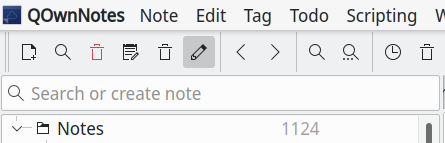
I'm not sure about how this widget works and I do have this permanently enabled.
sanderboom
on 3 Jun 2020
Disabled or invisible menubar, that's a hot trail! Thank you @mjdubbs and @sanderboom
pbek
on 3 Jun 2020
Confirmed. It's the old Qt "thing" that if you hide the menubar the shortcuts are not accessible. :confounded: And the next time you visit the settings dialog the "no-shortcuts" will be saved.
pbek
on 4 Jun 2020
Whoohah, breakthrough!
But what changed recently that this became a problem? I have had this widget for years.
sanderboom
on 4 Jun 2020
I think the "empty shortcut settings" must have existed before, but now you are able to really set shortcuts to "empty" and so that setting will be used. I'm still not entirely sure how to get around this Qt-issue.
pbek
on 4 Jun 2020
20.6.1
- fixed a problem with empty shortcuts if the menubar is disabled and settings
were stored in the Settings dialog
pbek
on 4 Jun 2020
There now is a new release, could you please test it and report if it works for you?
pbek
on 4 Jun 2020
Its working for me on snap on ubuntu gnome :tada:
I can try a few others later
mjdubbs
on 4 Jun 2020
Just tested windows and kubuntu and the 'Window AppMenu' widget and all is working :+1: :tada:
mjdubbs
on 5 Jun 2020
Great, thank you for testing!
pbek
on 5 Jun 2020
Works great, finally my shortcuts back, tx :smile: :tada:
sanderboom
on 6 Jun 2020
Great! :sweat_smile:
pbek
on 6 Jun 2020
No shortcut at all for me. I'm on Manjaro KDE using the latest version. I think I have to click "reset to default shortcut" under settings to register default shortcuts.
 sith-on-mars
on 25 Jun 2020
sith-on-mars
on 25 Jun 2020
You can also remove all the shortcut settings in the settings ini file (see Debug settings for path).
pbek
on 25 Jun 2020
Related issues
 radmen
·
6Comments
radmen
·
6Comments
 eimajenthat
·
3Comments
eimajenthat
·
3Comments
 johanson
·
5Comments
johanson
·
5Comments
 alexanderino
·
7Comments
sanderboom
·
5Comments
alexanderino
·
7Comments
sanderboom
·
5Comments