Qownnotes: Markdown code blocks are no longer formatted
Expected behaviour
In 20.1.2 and prior, Markdown code blocks (4 spaces indented) are properly formatted (font and colors are applied):

Actual behaviour
In 20.1.3 and 20.1.5, the same text is no longer formatted:

Steps to reproduce
Create a note with 4-space-indented text.
 smokris
All 21 comments
Confirmed. Thank you for reporting.
@Waqar144, another regression?
 pbek
on 8 Jan 2020
pbek
on 8 Jan 2020
20.1.6
- fixed four spaces code blocks (for #1558, thank you @Waqar144)
pbek
on 10 Jan 2020
Btw. it would be much better to use the code blocks with "ticks", then you can also profit from code block syntax highlighting.
pbek
on 10 Jan 2020
There now is a new release, could you please test it and report if it works for you?
pbek
on 10 Jan 2020
Yes, I confirmed that in 20.1.6, four-space code blocks are formatted again. Thanks, @pbek and @Waqar144!
Btw. it would be much better to use the code blocks with "ticks", then you can also profit from code block syntax highlighting
The syntax highlighting looks nice! I've started using it for some code blocks. (Though for very short snippets, like in my screenshot above, I prefer the more concise four-space syntax.)
smokris
on 10 Jan 2020
Great, thank you for testing!
pbek
on 11 Jan 2020
I just updated to 20.1.13, and four-space code blocks are broken again. 😇
smokris
on 21 Jan 2020
Can you share a screenshot?
 Waqar144
on 21 Jan 2020
Waqar144
on 21 Jan 2020
(It's exactly the same as the screenshots at the top of this issue.)
smokris
on 21 Jan 2020
Ah yes,
The Library got updated, QON didn't. I guess it will be working in the next release.
Waqar144
on 21 Jan 2020
Sounds good. Thanks.
smokris
on 21 Jan 2020
20.1.14
- fixed four spaces code blocks again (for #1558, thank you @Waqar144)
There now is a new release, could you please test it and report if it works for you?
pbek
on 22 Jan 2020
Thanks; that's an improvement — if I add a blank line between the ## heading and the four-space code block, the code block is properly formatted. But if the heading and the four-space code block are adjacent, the code block isn't formatted — could you fix that?
| No blank line; code block _isn't_ formatted | Has blank line; code block _is_ properly formatted |
| - | - |
|  |
| 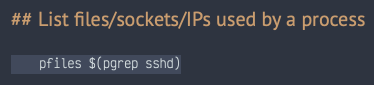 |
|
smokris
on 22 Jan 2020
Hi.
That was a recent change to become more CommonMark compliant. CommonMark requires a space between an indented code block and preceding paragraph: https://spec.commonmark.org/0.29/#indented-code-block
Waqar144
on 22 Jan 2020
Ah, thanks for the reference. Yes, for paragraphs, CommonMark requires a blank line, but if I understand correctly, CommonMark does not require a blank line after a header. On that page, example 85 says "indented code can occur immediately before and after other kinds of blocks" and demonstrates it by showing a heading followed by a four-space code block, without a blank line.
smokris
on 22 Jan 2020
Yes indeed. Now I am thinking what do they mean by 'other'. Probably everything other than <p> I think. I think I will just enable it for everything. That'd be simpler and faster.
Waqar144
on 23 Jan 2020
Now it allows indented code block after a heading (just like in the preview). For all other types of paragraphs, it will not work unless there is a blank line in between
Waqar144
on 23 Jan 2020
20.1.15
- fixed stacked code block highlighting and improved non-fenced code block highlighting (thank you @Waqar144)
pbek
on 23 Jan 2020
There now is a new release, could you please test it and report if it works for you?
pbek
on 23 Jan 2020
20.1.15 looks great. Thanks!
smokris
on 23 Jan 2020
Great, thank you for testing!
pbek
on 23 Jan 2020
Related issues
 eimajenthat
·
3Comments
eimajenthat
·
3Comments
 johanson
·
5Comments
johanson
·
5Comments
 anmsh
·
7Comments
anmsh
·
7Comments
 wiktor2200
·
5Comments
wiktor2200
·
5Comments
 schiessle
·
7Comments
schiessle
·
7Comments