Qownnotes: Syntax highlighting in the preview
Syntax highlighting in the note edit works great, we also want it in the preview. :laughing:
 pbek
pbek
All 48 comments
See #1525
pbek
on 30 Dec 2019
19.12.17
- there now also is syntax highlighting in the preview
(for #1526, thank you @Waqar144)
- most of the languages already work except YAML (doesn't work fully yet),
INI (doesn't work fully yet) and CSS
- most of the languages already work except YAML (doesn't work fully yet),
pbek
on 30 Dec 2019
We are feature complete now. 😁🎉😅
This one was my biggest gripe with QON.
 Waqar144
on 30 Dec 2019
Waqar144
on 30 Dec 2019
Great work, @Waqar144!
pbek
on 30 Dec 2019
There now is a new release, could you please test it and report if it works for you?
pbek
on 30 Dec 2019
There now is a new release, could you please test it and report if it works for you?
Yes🤣
Waqar144
on 30 Dec 2019
The update didn't work for me [1] :( . See below, the toolbar is missing icons, and the preview code-block is not fully highlighted.
Using QOwnNotes - version 19.12.17 - AppVeyor - build 5142
[1]

 siran
on 30 Dec 2019
siran
on 30 Dec 2019
Yes
amazing! :laughing:
The update didn't work for me [1] :( . See below, the toolbar is missing icons,
seems like you have enabled dark mode toolbar icons (they are "light")
and the preview code-block is not fully highlighted.
full width code blocks like in #1480 would be a different feature request (and will be hard to implement, right @Waqar144?)
pbek
on 30 Dec 2019
Well I guess Ill be reading from the editor.
But I'll keep watching future improvements!
siran
on 30 Dec 2019
Well I guess Ill be reading from the editor.
You can always turn off the background color of code blocks if you don't like it.
pbek
on 30 Dec 2019
I'm also considering not being such a nazi and learn to love the broken background in the Preview.
Would you fathom this feature to ever be implemented?
siran
on 30 Dec 2019
I'm also considering not being such a nazi and learn to love the broken background in the Preview.
Hahah :laughing: that's okay. That's how we improve ;)
Would you fathom this feature to ever be implemented?
Sure, once we have ironed out all the basic stuff.
@pbek H1 and other stuff is being highlighted end-to-end, this could be too right? Maybe with css?
Waqar144
on 31 Dec 2019
H1 and other stuff is being highlighted end-to-end, this could be too right? Maybe with css?
It's the way a QTextBrowser renders background-color, I didn't find a way around that yet. If someone likes to experiment with styles, there is the Custom preview styling script in the script repository.
pbek
on 31 Dec 2019
With that plugin I could fix the rendering in the preview and PDF [1].
All I did was to add pre {display:block; background-color:#edfced;}. I don't know if it will run into other issues. The color is hardcoded since I still don't know how to access the color via a variable from QOwnNotes style configuration.
There is an issue: in the PDF, the <span> get automatically a grey background.
I don't know how is the HTML generated, but if on QOwnNotes side, it could probably be improved. Checking the generated HTML each line of code is inside its own <pre>. Probably its better if ``be mapped to a
` tag enclosing all the code-block at once. This is just a thought.[1]
 siran
on 31 Dec 2019
siran
on 31 Dec 2019
It's a good step in the right direction, but has some side effects. In draws ab extra line at the end of each code block and pre is also used by inline code blocks.
pbek
on 1 Jan 2020
The extra line seems to be a 'white space` that gets rendered in the HTML for some reason. It is not on the markdown code, so I guess it gets added when rendered in the preview [1].
[1]
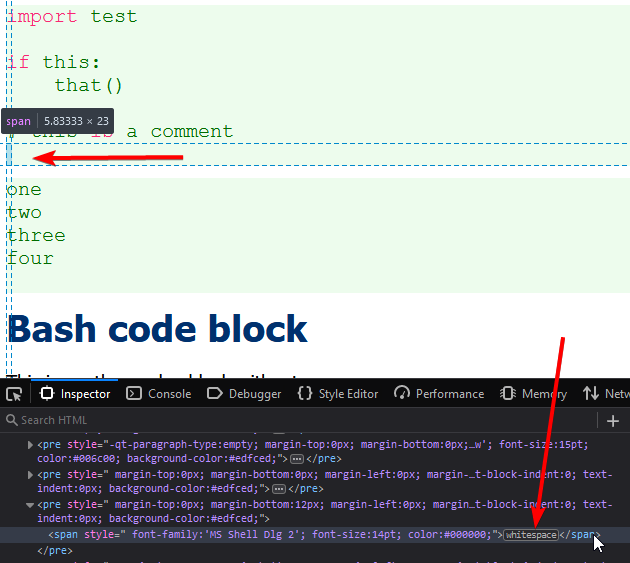
siran
on 1 Jan 2020
This is probably the QTextBrowser trying to do its own magic
Waqar144
on 1 Jan 2020
@pbek notice that the extra line (the whitespace) is there even if it not visible because of the broken background [1]
Is there any other side-effect of adding the pre {display:block; background-color:#edfced;} ?
Can the color for the <pre> be referenced from the value of the style configuration, something like a variable?
[1]
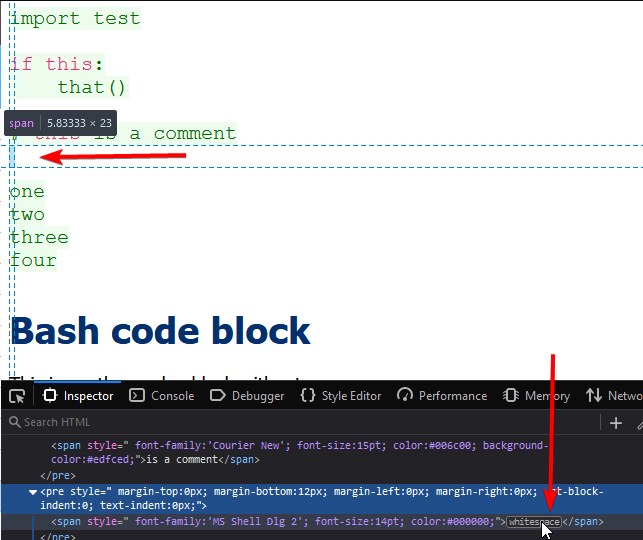
siran
on 1 Jan 2020
@siran, did you export the "raw html" from the preview for your test? I found out that this html is already transformed by the QTextBrowser and not the html we are feeding to it. :disappointed:
Is there any other side-effect of adding the pre {display:block; background-color:#edfced;} ?
probably for inline code-blocks
pbek
on 2 Jan 2020
I found out that this html is already transformed by the QTextBrowser and not the html we are feeding to it.
is there some easy way I could see the HTML QOwnNotes sends to QTextBrowser?
probably for inline code-blocks
I've tested inline blocks and they seem OK
siran
on 2 Jan 2020
is there some easy way I could see the HTML QOwnNotes sends to QTextBrowser?
currently only if you build QOwnNotes yourself and enable the dumping out of the html content
pbek
on 2 Jan 2020
currently only if you build QOwnNotes yourself
Unfortunately that is not currently in my ballpark.
However, I doubt that QOwnNotes is adding the extra space, I suspect it is QTextBrowser. I'd would love to see how is this HTML generated. Hopefully in the future I can dedicate some time to building from scratch and reading and play with the cpp source code.
I'm happy with/I don't care about the extra space in the code blocks. I'm also happy it's not caused by the display:block CSS that is added with the plugin
siran
on 2 Jan 2020
I'm happy with/I don't care about the extra space in the code blocks.
I don't like the extra space at all :smiley:
I'm also happy it's not caused by the display:block CSS that is added with the plugin
but the display: block is causing the space, doesn't it?
is there some easy way I could see the HTML QOwnNotes sends to QTextBrowser?
we can also store the html that is sent to the QTextBrowser a 2nd time in memory (although I don't like that a lot just for a debugging functionality)
@Waqar144, any thoughts / objections?
pbek
on 3 Jan 2020
is there some easy way I could see the HTML QOwnNotes sends to QTextBrowser?
I'll implement that for 20.1.2 :sweat_smile:
pbek
on 3 Jan 2020
is there some easy way I could see the HTML QOwnNotes sends to QTextBrowser?
we can also store the html that is sent to the
QTextBrowsera 2nd time in memory (although I don't like that a lot just for a debugging functionality)
@Waqar144, any thoughts / objections?
There is also the 'Export to HTML' option in the menu. There isn't a whole lot of difference between that and the one sent to the preview. That can be used for debugging, though there can't be done much with respect to fixing the QTextBrowser preview...
Currently the export to pdf looks nice to me without any script.
Export to PDF
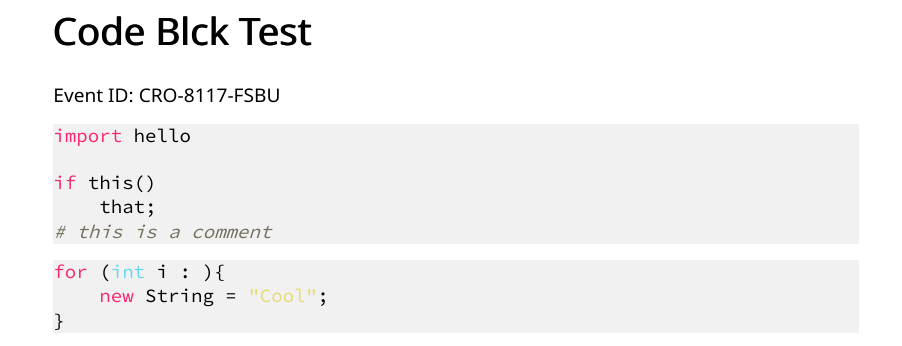
The preview doesn't look so good though:
Left: Editor, Right: Preview:
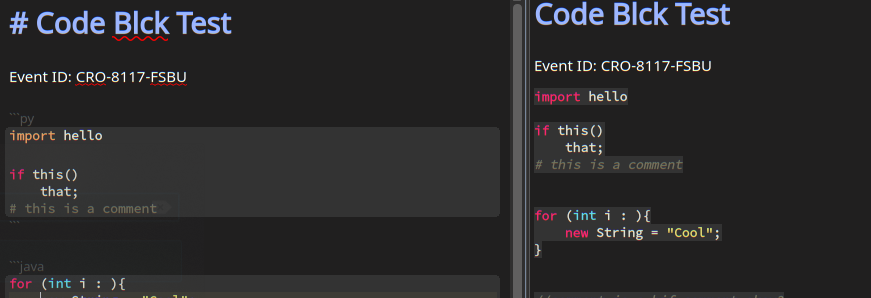
Waqar144
on 3 Jan 2020
I think i got the new line issue fixed.
@pbek
result.replace(QStringLiteral("\n</code>"), QStringLiteral("</code>"));
This is being done for export html. If you do the same for 'the preview html', there will be no extra lines.
Put the line above after the one at 2194.
However the export to pdf now looks really bad :/
Waqar144
on 3 Jan 2020
There is also the 'Export to HTML' option in the menu. There isn't a whole lot of difference between that and the one sent to the preview.
There are differences (huge ones for example when it comes to images, that will be base64 encoded inside the html in the html export)
However the export to pdf now looks really bad :/
Yeah, every "little" change can wreak havoc on some other place. :disappointed:
pbek
on 3 Jan 2020
There are differences (huge ones for example when it comes to images, that will be base64 encoded inside the html in the html export)
Yeah, but in this case the html is going to be not very different as there aren't any images involved, right?
However the export to pdf now looks really bad :/
Yeah, every "little" change can wreak havoc on some other place. disappointed
I just figured, its because the PDF export is always in light colors so that is why its looking bad. It would be good enought for light mode I think
Waqar144
on 3 Jan 2020
Yeah, but in this case the html is going to be not very different as there aren't any images involved, right?
You cannot debug with the html of the "html export", that was the whole reason for the context menu item in the preview. :grin:
I just figured, its because the PDF export is always in light colors so that is why its looking bad. It would be good enought for light mode I think
Are you talking about #1469?
pbek
on 3 Jan 2020
You cannot debug with the html of the "html export", that was the whole reason for the context menu item in the preview. grin
Yeah but you can't control much what the final html is in the 'preview'. QTextBrowser modifies it a lot.
I just figured, its because the PDF export is always in light colors so that is why its looking bad. It would be good enought for light mode I think
Are you talking about #1469?
Yeah I think.
The preview would be fine for light mode. For dark mode we can use a different color, so that the resulting pdf looks good.
Waqar144
on 3 Jan 2020
Yeah but you can't control much what the final html is in the 'preview'. QTextBrowser modifies it a lot.
yes, but we can control what we set with setHtml :grin: And that's what I want to output.
pbek
on 3 Jan 2020
Yeah but you can't control much what the final html is in the 'preview'. QTextBrowser modifies it a lot.
yes, but we can control what we set with
setHtmlgrin And that's what I want to output.
Haha okay.
Did you try this yet?
Waqar144
on 3 Jan 2020
Did you try this yet?
yes, now in your PR
However the export to pdf now looks really bad :/
bad in what way? and because of the removed newline?
pbek
on 3 Jan 2020
bad in what way? and because of the removed newline?
It doesn't look bad unless you do:
pre {display:block; background-color: #333333;}
I'm also happy it's not caused by the display:block CSS that is added with the plugin
but the display: block is causing the space, doesn't it?
is there some easy way I could see the HTML QOwnNotes sends to QTextBrowser?
I'll implement that for 20.1.2
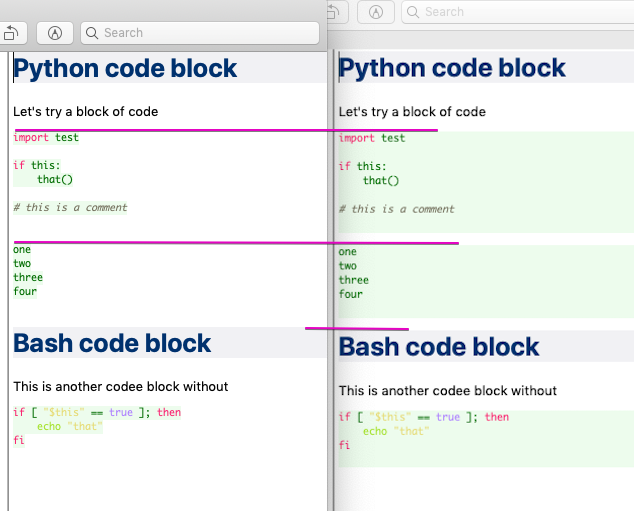
I think I have to wait to see the raw HTML to see if the display:block is causing the issue. As I posted earlier, the "raw html" from the preview shows the extra space with and without the display:block
In fact, here is an image comparing side-by-side the preview with and without the display:block [1]. As you can conclude by the purple straight lines that show alignment between the two images, both previews have the extra-line, although it is only visible when the background is colored by using the display:block.
[1]
siran
on 3 Jan 2020
20.1.2
- the
Export generated raw HTMLpreview context menu item now exports the html
generated to be viewed in the preview and not the already transformed html inside
theQTextBrowserwidget
There now is a new release, could you please test it and report if it works for you?
pbek
on 3 Jan 2020
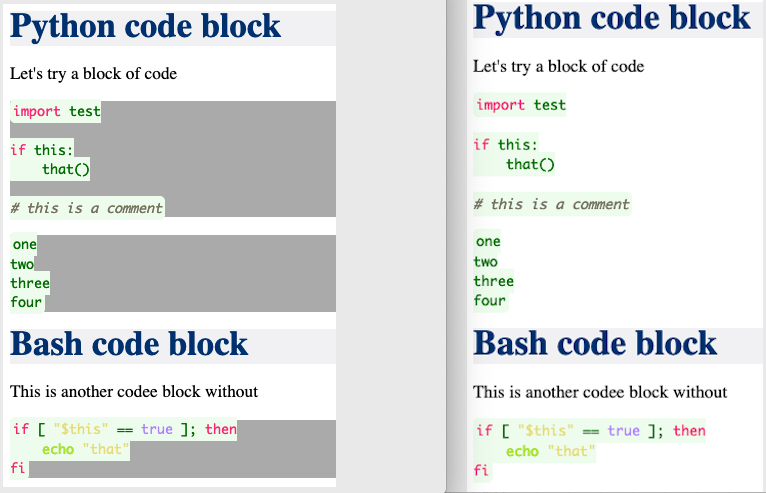
As you can see in the image [1], the extra line is not due to the pre {display:block}. In fact, the HTML code generated by QOwnNotes is super clean. I added a different background color for the pre to increase clarity in what it does to the HTML.
The extra line (with only whitepace) is added by QTextBrowser whether the pre {display:block} CSS is added or not (as I've showed in previous images). QTextBrowser adds many things to the HTML, and indeed makes it way more dirty than what QOwnNotes hands to it.
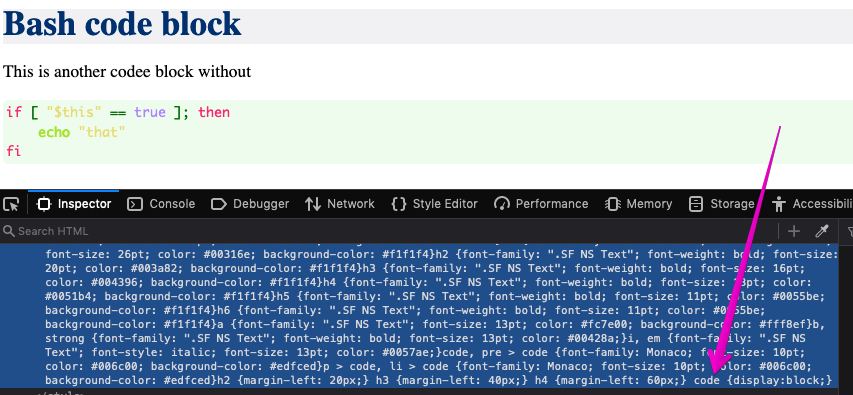
In my browser test, it also works by adding code {display:block} (instead of styling pre) [2] but not in the QTextBrowser
[1]
[2]
siran
on 3 Jan 2020
How is the PDF export looking like?
The extra line is gone now. I did a little something to take care of it
Waqar144
on 3 Jan 2020
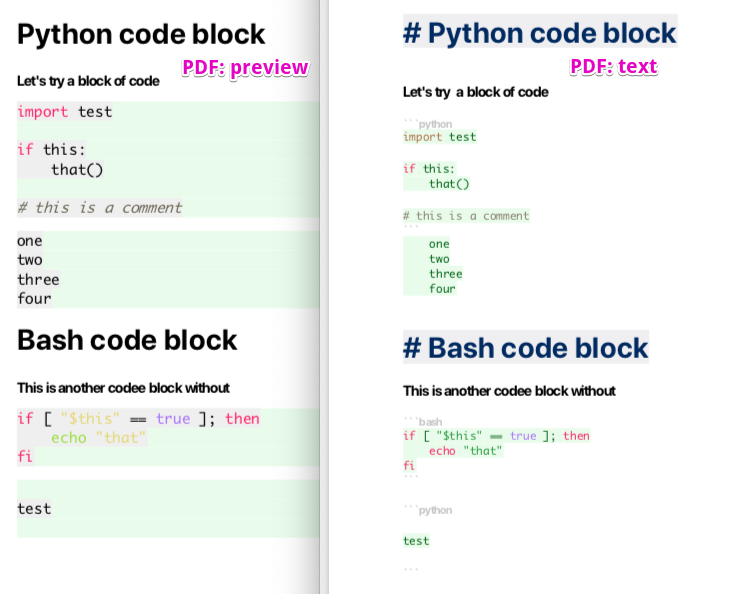
Please see image [1]
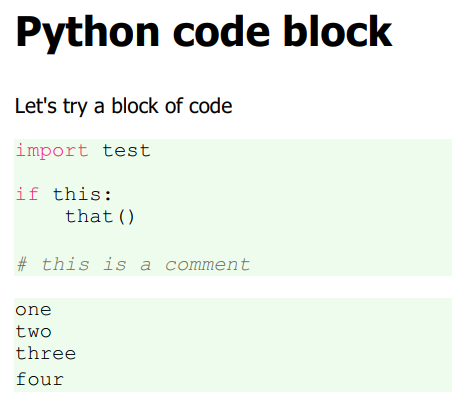
The export preview (left) has the full background, but the code looks grey and the pre background color green.
The export text (right) does not pick the display:block for the pre has the broken background and the code has the green color.
[1]
siran
on 3 Jan 2020
PDF preview can be fixed by adding the CSS code {background-color:#edfced;} [1]
However, PDF (text) does not seem to honor the CSS code {display:block; background-color:#edfced;} [2]
[1]
[2]
siran
on 4 Jan 2020
20.1.4
- code blocks now can have a full-width background color in the preview
There now is a new release, could you please test it and report if it works for you?
pbek
on 7 Jan 2020
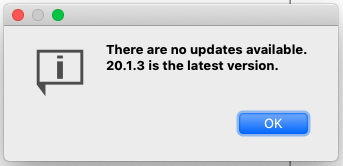
In MacOS I can't see that version
siran
on 7 Jan 2020
I was able to do some testing in the editor and in the PDF export.
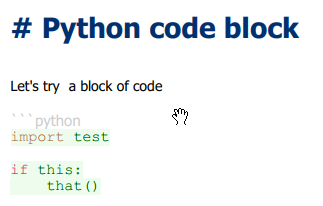
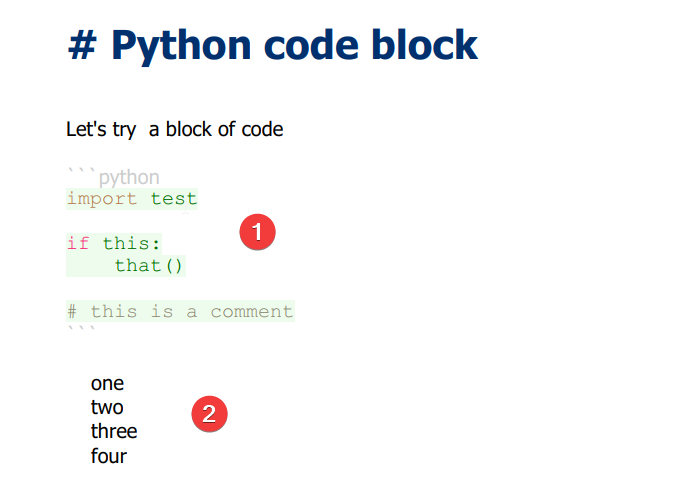
Regarding [1] in the image below: in the editor, the background of code blocks is not being fully colored. The CSS applied using the plugin is: (I added the !important in an attempt to force this CSS, but it doesn't work with or without)
pre {display:block !important; background-color:#edfced; width:100% !important;}
code {display:block !important; background-color:#edfced; width:100% !important;}
Regarding [2] in the image below: PDF text export also does not fully color the background for code blocks.
Lastly, as a new issue, the background of code blocks created by 4-spaces is not being colored in the editor nor in the export.
siran
on 9 Jan 2020
Lastly, as a new issue, the background of code blocks created by 4-spaces is not being colored in the editor nor in the export.
You mean this one: https://github.com/pbek/QOwnNotes/issues/1558 ?
pbek
on 9 Jan 2020
yes, #1558
My last post messed up: the image shows a PDF text export
[1] is regarding the PDF text export
[2] is regarding #1558 for PDF text export
The preview (not in the export, but in the app) seems working fine for 4-space codeblocks.
Regarding PDF preview export:
- code blocks with 3 backticks are highlighted fine
- code blocks with 4 spaces are not highligthed (similar to #1558 but in PDF preview export)
siran
on 9 Jan 2020
There will be no color highlighting for them because it is simply not possible as we don't have any information about the code.
The code block detection will be fixed shortly.
One thing i just discovered is that, Code Block with 4 space/tabs doesn't get escaped in the preview. So, in case you were writing html there, you will see nothing in the output. Thats kinda scary... and definitely a bug. @pbek can you confirm?
Waqar144
on 10 Jan 2020
One thing i just discovered is that, Code Block with 4 space/tabs doesn't get escaped in the preview. So, in case you were writing html there, you will see nothing in the output. Thats kinda scary... and definitely a bug. @pbek can you confirm?
yes, I can confirm that
pbek
on 10 Jan 2020
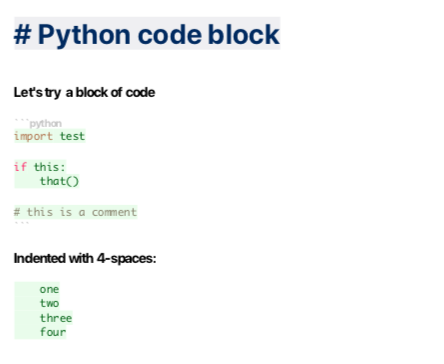
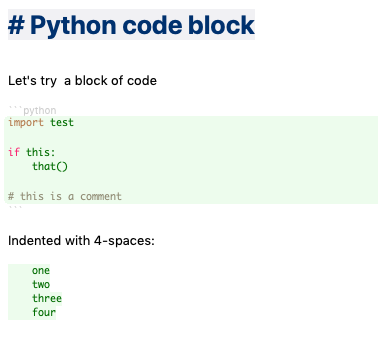
with QOwnNotes - version 20.1.6 - Travis CI - build 5197 and the CSS [1], the PDF preview export and the preview look OK.
However, the PDF text export [2] as well as the editor [3] don't fully color the background. They also behave differently as seen in the images.
Question: can the HTML from the editor and/or the PDF text export be seen as for the preview?
[1]
I can probably simplify this CSS, but its a working POC
pre {display:block !important; background-color:#edfced !important; width: 100% !important;}
code {display:block !important; background-color:#edfced !important; width: 100% !important;}
[2]
[3]
siran
on 10 Jan 2020
Related issues
 alexanderino
·
7Comments
alexanderino
·
7Comments
 anmsh
·
7Comments
anmsh
·
7Comments
 tveyben
·
6Comments
tveyben
·
6Comments
 schiessle
·
7Comments
schiessle
·
7Comments
 dodancs
·
4Comments
dodancs
·
4Comments