Qownnotes: Bug: Delay after opening a note
Video: https://youtu.be/SGVbFvq7vb4
 ivanpirog
All 35 comments
Sometimes, when I open a note, the QON doesn't respond about 3-6 seconds.
ivanpirog
on 14 Nov 2019
Hardware: Core i7 3.6 GHz, 32 Gb ram, SSD
ivanpirog
on 14 Nov 2019
Thank you for reporting, I can't reproduce that on any of my systems.
Can you please post the output from the debug settings (see issue template).
And is there any useful log output if you enable the log panel (see Window / Panels)? Please make sure you also enable debug logging.
@Waqar144, I can't see any spellchecking. Can that still be a thing?
 pbek
on 14 Nov 2019
pbek
on 14 Nov 2019
@ivanpirog and can you please upload an example note file that takes long to load.
pbek
on 14 Nov 2019
@ivanpirog
- did you build yourself or using pre-built binary?
- Can you tell us about the file size of the note which takes long to load?
- Can you confirm whether spell checking is enabled or disabled in Main menu- Edit -> Check spelling?
- Can you tell us which version of QON you are using?
@pbek
Spellchecker can be enabled but if there's no highlighting it means that it wasn't able to load dictionaries and hence the function returns early. I will try with Russian dictionary to confirm. The delay is too much for a debug version even.
 Waqar144
on 14 Nov 2019
Waqar144
on 14 Nov 2019
The delay is too much for a debug version even.
I've no delay for large notes in debug.
pbek
on 14 Nov 2019
The delay is too much for a debug version even.
I've no delay for large notes in debug.
I get a delay of about 1100ms with auto detect (using 2 dictionaries, German and English) with a note of about 160KB and almost 3000 blocks. It used to be 3000ms before for me.
With specific language, for eg en_US, it takes, 500ms. With German, 700 because dictionary size is bigger.
This is the startup performance.
Once the application has loaded the note and dictionary, switching notes is faster.
Waqar144
on 14 Nov 2019
Thank you for reporting, I can't reproduce that on any of my systems.
I have 2 different machines with different Win 10 version (64 & 32 bit). On the fast machine delay is slightly lower.
did you build yourself or using pre-built binary?
pre-build
Can you tell us about the file size of the note which takes long to load?
Size is matter. The larger the size of the note, the longer the delay.
Can you confirm whether spell checking is enabled or disabled in Main menu- Edit -> Check spelling?
Yes. When I disable spellchecking, notes opens super fast!
Can you tell us which version of QON you are using?
19.11.12.
When I open long note I have long debug log about "[warning] Unable to find any suggestion for 'blahblah'".
Example note:
ivanpirog
on 14 Nov 2019
It’s strange thing that spellchecking is not looking for words, but whole sentences.
ivanpirog
on 14 Nov 2019
BTW, I have no spellchecker installed for russian lang.
ivanpirog
on 14 Nov 2019
It’s strange thing that spellchecking is not looking for words, but whole sentences.
It's trying to guess the language so that's why these are sentences.
Can you check whether you have any dictionaries installed?
Dictionaries are visible in Edit->Languages
Waqar144
on 14 Nov 2019
BTW, I have no spellchecker installed for russian lang.
Even so, the guessing should work for some sentences and not fail for everything. I will look investigate this more.
Waqar144
on 14 Nov 2019
If you need more note examples, just go here and copy/paste a long article.
ivanpirog
on 14 Nov 2019
BTW, I have no spellchecker installed for russian lang.
Can you install a dictionary and then see if there is a delay?
Also,
In the main menu under Edit->Languages there is an option to choose a language or use auto detect. If you have installed a dictionary, can you try switching to your languages and then see if there is a performance issue.
Waqar144
on 14 Nov 2019
It’s strange thing that spellchecking is not looking for words, but whole sentences.
It's trying to guess the language so that's why these are sentences.
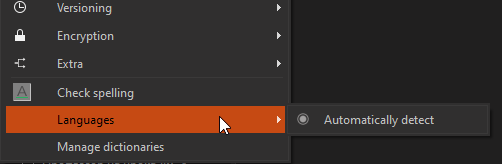
Can you check whether you have any dictionaries installed?
Dictionaries are visible in Edit->Languages
No languages installed:
ivanpirog
on 14 Nov 2019
If you need more note examples, just go here and copy/paste and long article.
Thank you for the link. I will be investigating this more.
Did you install a dictionary and try?
Waqar144
on 14 Nov 2019
Can you install a dictionary and then see if there is a delay?
I installed Russian lang and have no more delays!
Option: Automatic detect
ivanpirog
on 14 Nov 2019
It’s strange thing that spellchecking is not looking for words, but whole sentences.
It's trying to guess the language so that's why these are sentences.
Can you check whether you have any dictionaries installed?
Dictionaries are visible in Edit->LanguagesNo languages installed:
Ahh. So that's why.
The trigrams are failing so that's why it's taking so long.
Waqar144
on 14 Nov 2019
Can you install a dictionary and then see if there is a delay?
I installed Russian lang and have no more delays!
Option: Automatic detect
Great!
If you are using only one language, you should switch to a specific language instead of auto detect. It will be even more faster.
Waqar144
on 14 Nov 2019
According to my feelings, when automatically detecting a language, notes open a little slower than if I specify the language. But it’s difficult to determine by eye, I need to measure time. In any case, after installing the dictionary, notes open very quickly.
ivanpirog
on 14 Nov 2019
Ahh. So that's why.
The trigrams are failing so that's why it's taking so long.
So, the problem is detected. Congratulations! :)
ivanpirog
on 14 Nov 2019
According to my feelings, when automatically detecting a language, notes open a little slower than if I specify the language. But it’s difficult to determine by eye, I need to measure time. In any case, after installing the dictionary, notes open very quickly.
Yes, auto detection is slower because it tries to guess your language. If you don't have any dictionaries installed, it will fail completely but will still try to guess language for every sentence.
Auto detection is useful when you have two languages in the same note. It will detect both languages and provide spell checking for them. (You need dictionaries for both languages)
The problem was that spellchecker should be disabled in case no dictionaries found.
The spellchecker is new, so we are still ironing things out ;)
@ivanpirog
Thank you for reporting :+1:
Waqar144
on 14 Nov 2019
Auto detection is useful when you have two languages in the same note. It will detect both languages and provide spell checking for them. (You need dictionaries for both languages)
I have an idea. If just one dictionary installed, you should automatically set to that language. In this case the Auto detect option have no sense.
ivanpirog
on 14 Nov 2019
Auto detection is useful when you have two languages in the same note. It will detect both languages and provide spell checking for them. (You need dictionaries for both languages)
I have an idea. If just one dictionary installed, you should automatically set to that language. In this case the Auto detect option have no sense.
Good point.
What do you think @pbek?
Waqar144
on 14 Nov 2019
Great work! :grin:
pbek
on 14 Nov 2019
I have an idea. If just one dictionary installed, you should automatically set to that language. In this case the Auto detect option have no sense.
good idea
pbek
on 14 Nov 2019
19.11.14
- the spellchecker is now disabled if no dictionaries are available and language
auto-detection enabling is fixed for multiple languages
(for #1418, thank you @Waqar144) - spellchecker information was added to the Debug settings
pbek
on 16 Nov 2019
There now is a new release, could you please test it and report if it works for you?
pbek
on 17 Nov 2019
It seems that GitHub currently has troubles. I still get a unicorn on https://github.com/pbek/QOwnNotes/releases...
pbek
on 17 Nov 2019
It seems that GitHub currently has troubles. I still get a unicorn on https://github.com/pbek/QOwnNotes/releases...
Waiting for 19.11.14...
ivanpirog
on 18 Nov 2019
Yes, it seems that GitHub still has troubles. I still get a unicorn on https://github.com/pbek/QOwnNotes/releases... I got that confirmed by GitHub, but they don't know when it will be fixed.
pbek
on 18 Nov 2019
I've checked last version for MacOS.
In the previous version (19.11.13 for Mac) there were the same delays when opening notes. In the latest version, notes open instantly. Dictionaries not installed. Build for MacOS works fine!
ivanpirog
on 18 Nov 2019
You should get a new Windows version within one hour.
pbek
on 19 Nov 2019
Checked. Everything works well!
ivanpirog
on 20 Nov 2019
Great, thank you for testing!
pbek
on 20 Nov 2019
Related issues
 wiktor2200
·
5Comments
wiktor2200
·
5Comments
 tveyben
·
6Comments
tveyben
·
6Comments
 dodancs
·
4Comments
dodancs
·
4Comments
 sanderboom
·
5Comments
sanderboom
·
5Comments
 radmen
·
6Comments
radmen
·
6Comments
Most helpful comment
I've checked last version for MacOS.
In the previous version (19.11.13 for Mac) there were the same delays when opening notes. In the latest version, notes open instantly. Dictionaries not installed. Build for MacOS works fine!